Build a Purchase Requisition App with Power Automate: A Complete Guide
Streamline purchase requests into automated, compliant POs with Power Automate efficiency.
Executive Summary
Finance and procurement leaders face a constant balancing act: enabling business agility while maintaining strict financial controls. Manual requisition-to-purchase order (PO) processes often create bottlenecks, invite errors, and slow decision-making. Power Automate purchase order workflows allow organizations to digitize requisitions, streamline approvals, and integrate seamlessly into ERP systems.
In this blog, we’ll walk you through how to build a purchase requisition app using Power Automate, explore its benefits, and compare it to next-generation automation platforms like Hyperbots AI Co-pilots that extend beyond Microsoft Power Platform.
You’ll learn:
How Power Automate requisition workflows work
Core building blocks: connectors, Dataverse, and Teams approvals
Best practices to automate purchase orders with compliance and audit trails
How Hyperbots’ Procurement Copilot delivers transformational ROI compared to standard automation
Why Automating Purchase Requisition Matters
Before diving into Power Automate, it’s important to understand why automation is critical:
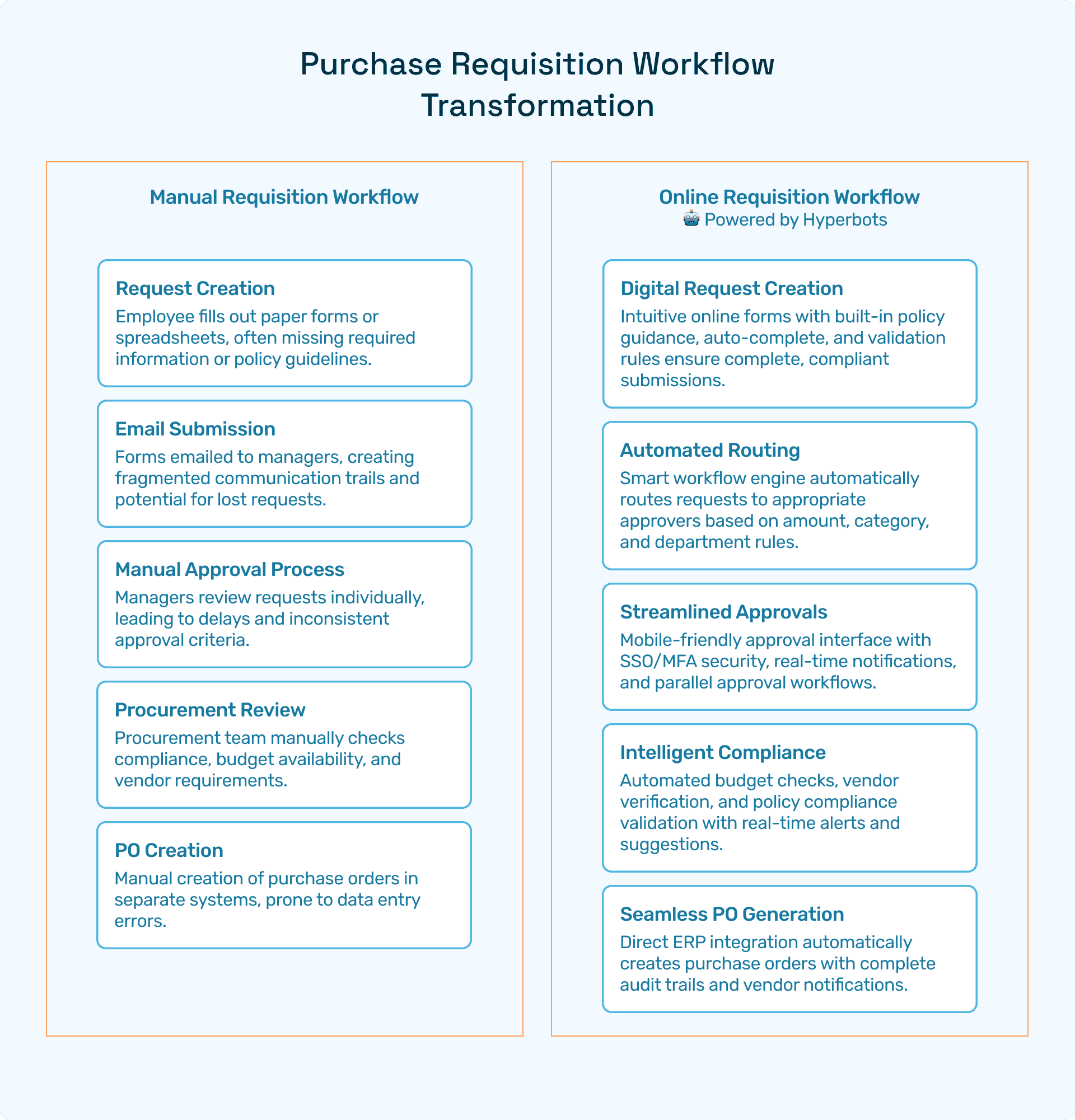
Delays and bottlenecks: Manual requisitions often require multiple email approvals, slowing cycle times.
Error-prone data entry: Incorrect cost centers, duplicate entries, or miskeyed vendor details increase rework.
Limited visibility: Finance teams struggle to track requisition status and spend across departments.
Compliance gaps: Without clear audit trails, organizations risk policy violations and poor spend governance.
A purchase requisition app built in Power Automate addresses these pain points by providing real-time tracking, automated routing, and ERP integration.
Building a Purchase Requisition App with Power Automate
Step 1: Define the Workflow
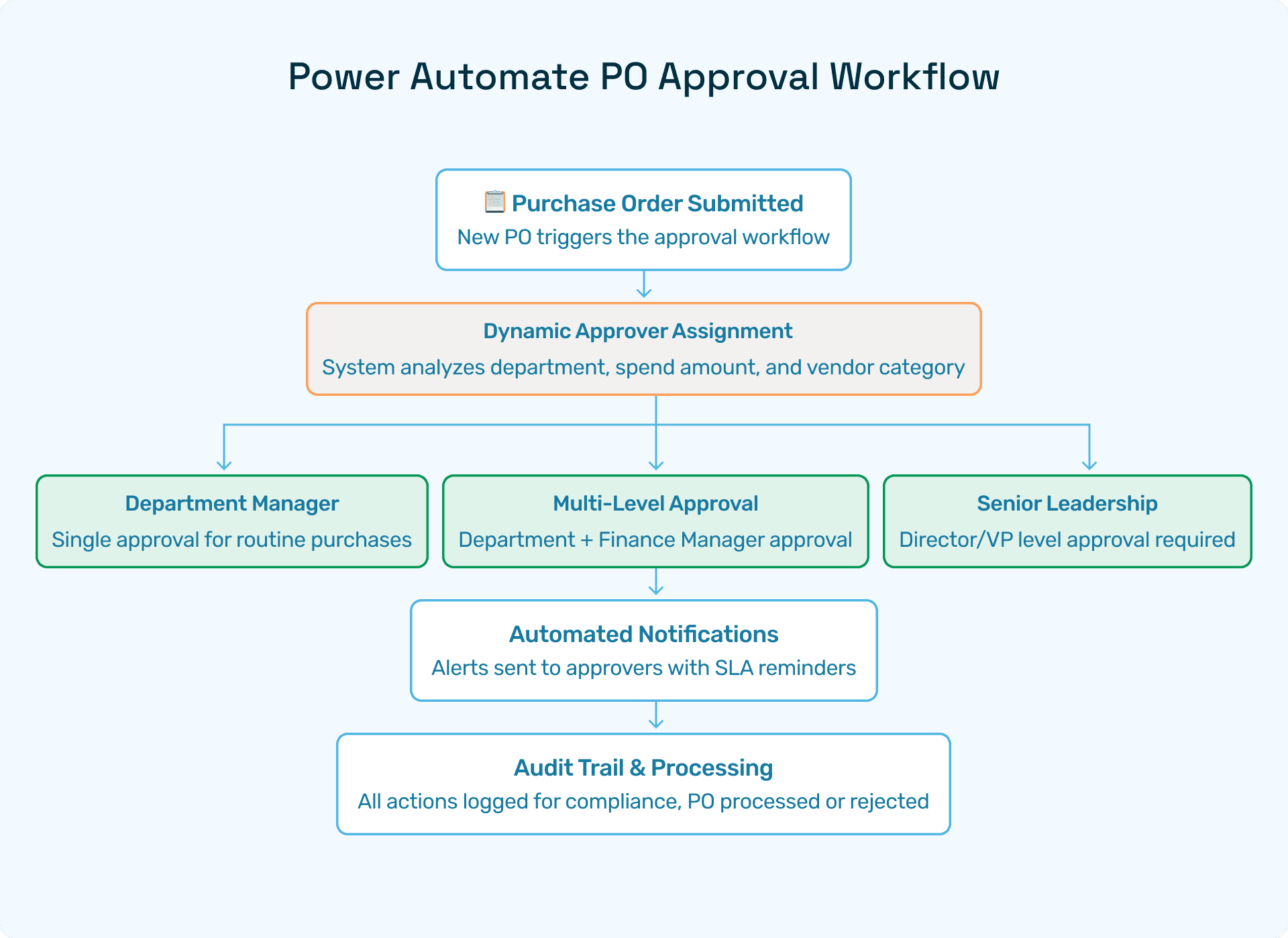
A typical requisition-to-PO workflow includes:
Employee submits a requisition form
Manager or department head reviews
Finance validates budget allocation
Procurement approves vendor compliance
PO is generated and sent to ERP
This structure becomes the foundation for your Power Automate purchase order workflow.
Step 2: Use Microsoft Dataverse as Your Data Backbone
Microsoft Dataverse provides the secure, scalable database to store requisition details, approvals, and PO status.
Tables can be customized for vendors, cost centers, and requisition templates
Role-based access ensures compliance with procurement policies
Step 3: Connect with Power Automate Connectors
Connectors are the building blocks that let Power Automate integrate with your enterprise ecosystem. For a purchase requisition app, critical connectors include:
Dynamics 365 / SAP / Oracle ERP: Sync requisition → PO → invoice data
Microsoft Teams: Enable instant approval notifications
Outlook: Automate email alerts and escalations
Step 4: Embed Approvals with Microsoft Teams
Using Teams approvals, requisition requests can be routed for one-click approvals inside chat or mobile.
Approvers receive contextual details (cost, vendor, justification)
SLA-based escalation ensures no request stalls in the pipeline
All decisions are logged for audit trails
Step 5: Automate Purchase Orders Creation
Once approvals are complete, Power Automate can trigger ERP or accounting systems to generate a PO automatically.
Templates standardize PO structure
Errors from manual entry are eliminated
Finance gains real-time visibility of committed spend
Best Practices to Automate Purchase Orders in Power Automate
To maximize the value of your requisition app:
Standardize requisition templates for consistent data entry
Set approval policies aligned with spend thresholds
Leverage Dataverse rules for compliance and budget checks
Monitor requisition status tracking with Power BI dashboards
Maintain a full audit trail for regulatory readiness
Beyond Power Automate: Hyperbots AI Co-pilots for Procurement
While Power Automate purchase order apps are a strong starting point, they remain rule-based and limited to Microsoft ecosystems. CFOs and procurement heads increasingly seek agentic AI solutions that go further.
Why Hyperbots is Different
Procurement Copilot: Shrinks cycle times from request to PO with AI-driven routing and ERP-synced approvals.
Invoice Processing Copilot: Extracts, validates, and reconciles invoices at scale.
Vendor Management Copilot: Automates onboarding, risk checks, and compliance.
Hyperbots AI Co-pilots differ from Power Automate in 3 ways:
Agentic AI vs. Rule-Based Automation - learns from past approvals and adapts to new policies.
Cross-Platform Compatibility - integrates with any ERP or finance system, not just Microsoft.
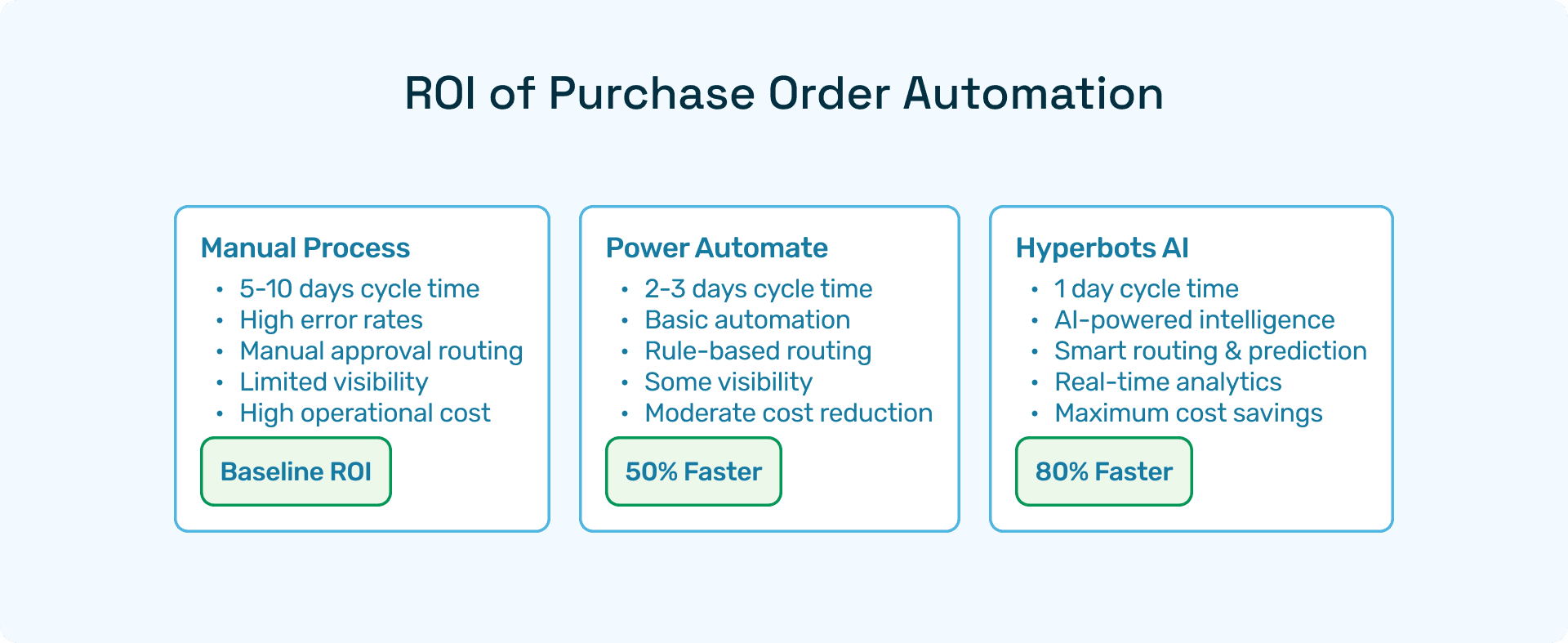
ROI at Scale - up to 80% cost reduction in procurement operations, with payback in months.
ROI of Purchase Order Automation with Hyperbots
Hyperbots clients report:
80% faster cycle times from requisition to PO
Fewer approval bottlenecks due to intelligent routing
Real-time spend visibility, enabling better forecasting
Lower operational costs through reduced manual effort
Putting It All Together - Hybrid Approach
Many enterprises adopt a hybrid strategy:
Use Power Automate for lightweight requisition apps inside Microsoft 365
Use Hyperbots AI Co-pilots for enterprise-grade procurement automation and compliance
This layered approach helps CFOs balance agility with governance.
FAQs
Q1: Can Power Automate replace ERP-native PO workflows?
Not entirely. Power Automate integrates with ERP systems but doesn’t replace them. It acts as a flexible workflow layer.
Q2: How does Hyperbots integrate with Power Automate?
Hyperbots offers APIs and connectors that extend Power Automate’s capabilities with AI-driven decision-making.
Q3: Is Dataverse necessary for requisition tracking?
Yes, if you want centralized, scalable data management. However, smaller orgs can use SharePoint lists.
Q4: How do Teams approvals compare to Hyperbots approvals?
Teams approvals are effective for simple routing. Hyperbots adds AI-led prioritization and escalation, reducing delays.