Invoice Number Tracking Online: The Complete Guide for AP and Finance Teams
How to track invoice numbers in real time, reduce delays, and improve visibility with modern invoice tracking systems
Invoice number tracking online allows businesses to monitor the status of invoices in real time, from submission and validation to approval and payment. Instead of relying on spreadsheets or email follow-ups, modern systems provide a clear view of where every invoice stands at any moment.
This guide explains how invoice tracking works, how to track an invoice number step by step, and what features define a reliable invoice tracking system. You’ll also see how AI-powered platforms like Hyperbots help finance teams reduce processing time, eliminate errors, and gain complete visibility across accounts payable workflows.
What Is Invoice Number Tracking Online?
Invoice number tracking online is the process of monitoring the real-time status of invoices using a digital system, from the moment a vendor submits a document through capture, validation, matching, approval, and payment.
Unlike manual methods that rely on spreadsheets or email threads, online invoice tracking assigns a unique invoice ID to every document and surfaces its current stage in an accessible dashboard. Finance teams, AP departments, and vendors can all query the system instantly to answer questions like "Where is invoice #INV-2041?" without sending a single follow-up email.
Key components of a complete invoice number tracking system include:
Invoice ID assignment at capture (automated or manual)
Status progression across defined workflow stages
Real-time visibility for both internal teams and external vendors
Audit-ready logs tied to every status change
When done well, invoice number tracking online reduces payment delays, eliminates duplicate payments, and gives finance leaders reliable data on liabilities in flight.
Why Invoice Visibility Became Mission-Critical
Late payments continue to strain business finances — with vendors increasingly rating payment transparency as their number one satisfaction driver. Knowing where every invoice ID sits within the process of capture, match, approval, and payment requires robust invoice number tracking online.
According to APQC's Open Standards Benchmarking data, hidden AP costs include manual processing inefficiency of $12 to $30 per invoice, missed early payment discounts worth 18 to 36% annualized returns, and duplicate payments affecting 0.1 to 0.5% of all transactions. For a business processing 5,000 invoices a month, that compounds fast.
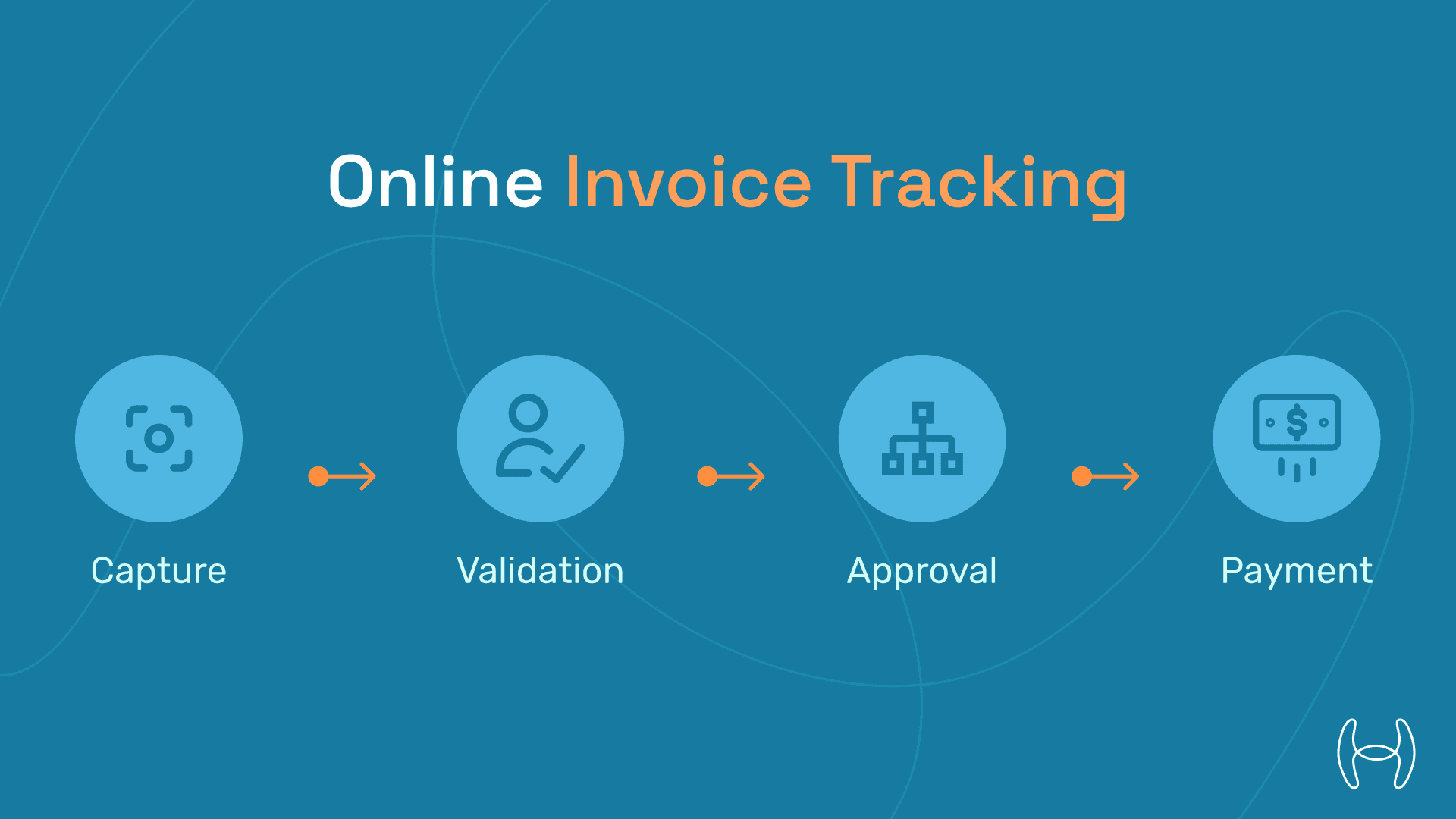
The Anatomy of Online Invoice Tracking
Stage | Stakeholder Pain | Hyperbots Fix |
Capture | "Did you get my invoice?" | Email scrape + vendor portal upload |
Validation | "Is my TIN correct?" | AI validation agent |
Approval | "Who's holding it?" | Slack/Teams approval bot |
Payment | "When will I be paid?" | Real-time track invoice number status bar |
With these components in place, invoice tracking shifts from inbox chaos to dashboard clarity.
How to Track an Invoice Number: Step-by-Step
Whether you are a vendor waiting on payment or a finance professional managing hundreds of open invoices, here is how to track an invoice number in a modern AP environment.
Step 1: Locate the Invoice ID Every invoice should carry a unique reference number assigned at submission. In automated systems, this is generated at capture. In manual workflows, it may be the vendor's own invoice number.
Step 2: Access Your Invoice Tracking Portal Log in to your AP platform or vendor self-service portal. In Hyperbots, vendors access a dedicated portal where the invoice tracking number is visible alongside current status.
Step 3: Query the Invoice Status Search by invoice ID, vendor name, PO number, or date range. The system will surface the current stage: Received, Validated, Matched, Approved, or Paid.
Step 4: Review Any Exceptions or Holds If the invoice is paused, the system will flag the reason (for example: PO mismatch, missing tax ID, pending approver). This replaces the "who's holding it?" email chain entirely.
Step 5: Set Up Notifications Most modern platforms allow status-change alerts via email or Slack. Once configured, the invoice tracking number updates automatically and both parties are notified without manual follow-up.
This five-step process replaces an average of 12 back-and-forth emails per invoice, based on Hyperbots' internal benchmarks.
Vendor Management Co-Pilot: Supplier Visibility and Invoice Tracking
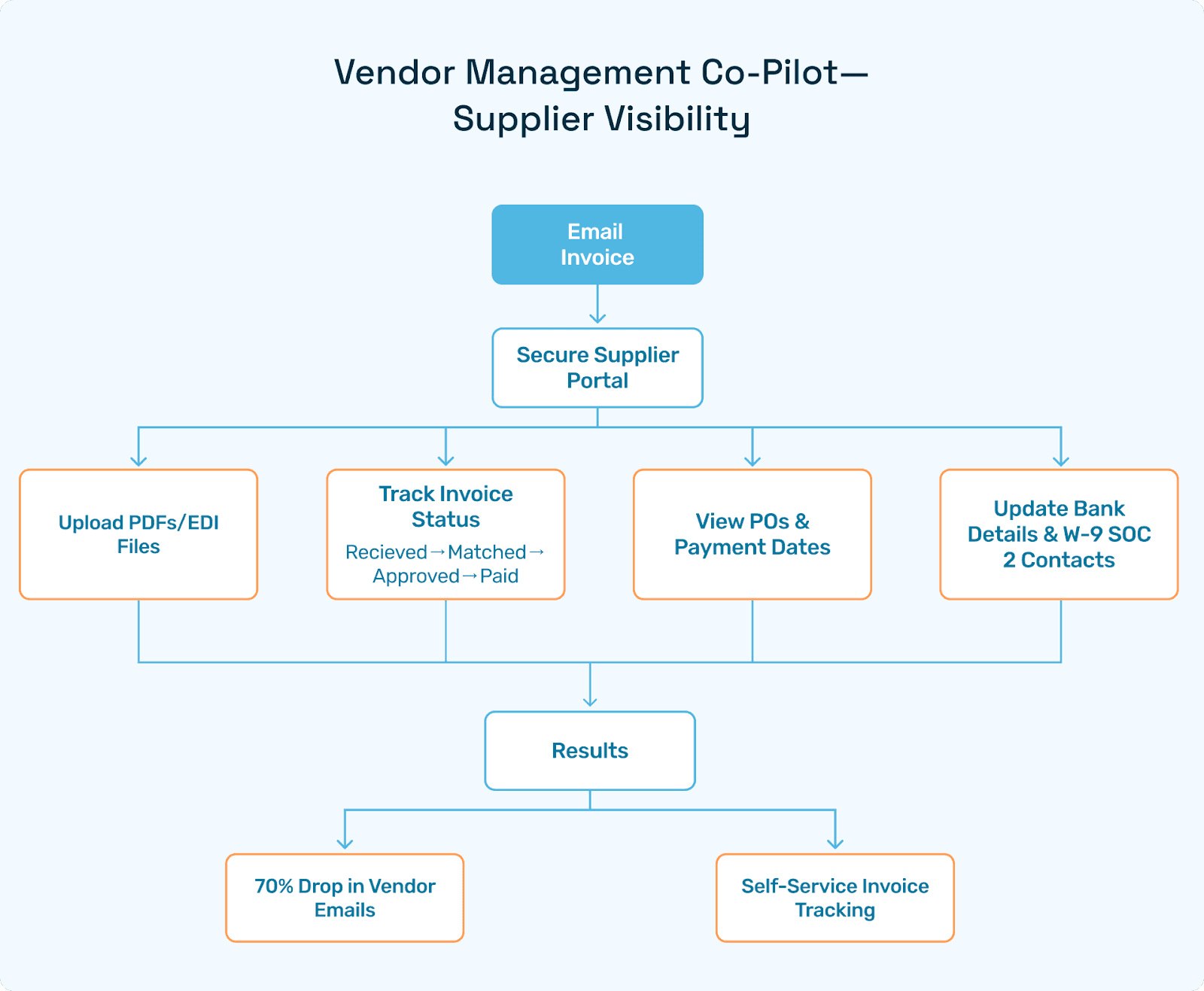
Hyperbots' Vendor Management Co-Pilot gives each supplier a secure portal where they can:
Upload PDFs or EDI files and instantly track invoice number status (Received, Matched, Approved, Paid).
View POs, shipment notices, and payment dates with no email follow-ups.
Update bank details and W-9 forms under SOC 2 controls.
Result: Vendor email volume drops by 70%, and invoice number tracking online becomes fully self-service.
Invoice Processing Co-Pilot: Internal Command Center
Finance and AP teams see every document in a kanban-style board:
Column | Meaning | Auto-Refresh |
Inbox | Captured invoices | 3s |
Validated | Passed AI checks | 5s |
Matched | PO/GRN aligned | 5s |
Approved | Waiting payment | 5s |
Paid | ACH cleared | Instantly |
Any user can drill into an ID, fulfilling the perennial query: "How can I track invoice number X?"
How AI Agents Power Invoice Number Tracking Online
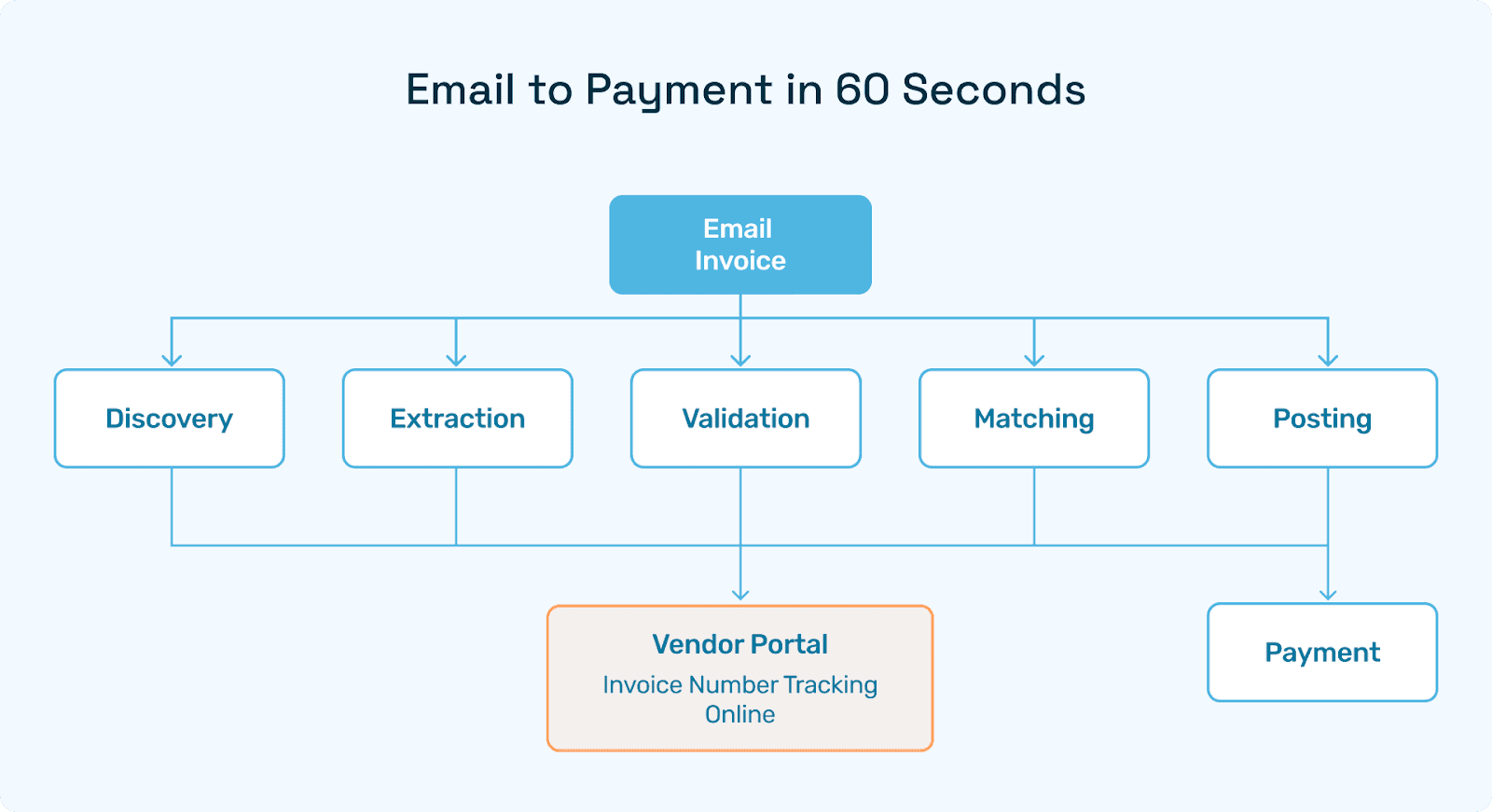
Agent | Function | Seconds |
Discovery | Parses emails and portals | 3 |
Extraction | VLM reads the header/lines | 10 |
Validation | Checks vendor, tax, and duplicates | 15 |
Matching | 2-way and 3-way PO/GRN | 20 |
Posting | Updates ERP and pay-rail | 10 |
Total: Less than 60 seconds per invoice. For context, Aberdeen Group benchmarks manual invoice processing at 14.6 days. That gap is where Hyperbots operates.
Manual vs Automated Invoice Tracking: A Side-by-Side Comparison
One of the most common questions finance teams ask before adopting a platform: "Is manual tracking good enough for our volume?" Here is an honest comparison.
Factor | Manual Tracking (Spreadsheets/Email) | Automated Tracking (Hyperbots) |
Status visibility | Updated manually, often delayed | Real-time, sub-5-second refresh |
Vendor communication | 12+ emails per 100 invoices | Zero vendor status emails |
Duplicate payment risk | Zero Duplicates | |
Average cycle time | 14.6 days | Minutes |
Audit readiness | Manual log reconciliation | Immutable, hash-stamped logs |
Scalability | Breaks above ~200 invoices/month | Handles thousands concurrently |
Cost to maintain | Near-zero marginal cost per invoice |
For teams processing fewer than 50 invoices a month, spreadsheets may be workable in the short term. Beyond that threshold, the errors and delays in manual invoice number tracking compound quickly.
Benchmarks: Email Ping-Pong vs. Dashboards
Metric | Email Chains | Hyperbots |
Vendor "Where's my invoice?" emails | 12 per 100 invoices | 0 per 100 |
Average cycle time (days) | 10.4 | 0.04 |
Duplicate pay risk | 0.03% |
Real-time invoice tracking demonstrably reduces costs and errors at scale.
Compliance and Audit: What Automated Invoice Tracking Provides
SOC 2 Type II: Immutable logs on every status change.
SOX 404: Segregation of duties recorded automatically.
e-Invoicing (EU/LatAm): PEPPOL and CFDI IDs stored for portal look-ups.
Auditors appreciate online invoice tracking precisely because every click is hash-stamped and traceable.
90-Day Implementation Roadmap for Invoice Tracking
Week | Milestone |
0–2 | Vendor master hygiene, bank details |
2–4 | Portal branding, SSO configuration |
4–6 | Sandbox 1,000 invoices; test status jumps |
6–8 | ERP pay-rail APIs; Slack bot live |
8–12 | Global rollout; legacy ticket inbox closed |
Final Thoughts: Start Tracking Invoice Numbers in Real Time Today
Spreadsheets and shared inboxes can't answer "Where's my invoice?" Modern finance operations demand instant, transparent invoice number tracking online for both vendors and staff. With AI agents handling capture, validation, matching, and posting in under 60 seconds, platforms like Hyperbots make the invoice tracking number a live, queryable asset rather than a mystery reference in someone's inbox.
The ROI is clear: fewer emails, faster cycles, lower duplicate payment risk, and audit-ready logs built in from day one.
Ready to See Invoice Number Tracking Online in Action?
Two ways to get started:
Book a Free 30-Minute Demo — Watch a live invoice travel from inbox to payment while every stakeholder tracks its number in real time.
Start Your Free Trial — Try Hyperbots with your own invoice data, no commitment required.