Accounts Payable Approval Process: 2026 Pillar Guide to Touch-Free AP
Most finance teams lose early-pay discounts not because they lack cash, but because their accounts payable approval process moves too slowly. This guide breaks down why AP approvals stall, how invoice approval procedures differ across approval structures, and what a sub-minute invoice workflow looks like in practice.
Why Invoice Approvals Slow Down Accounts Payable
For most AP teams, the invoice approval workflow is where speed goes to die.
The sequence looks simple enough on paper: receive an invoice, route it for sign-off, release payment. But in practice, a single invoice can bounce across multiple inboxes, wait in an ERP queue while an approver travels, or sit unanswered for days because nobody was sure who actually needed to sign off. By the time payment clears, the vendor has sent two follow-up emails and the early payment discount window has closed.
The core issue is that most accounts payable approval processes were designed around human availability, not business speed. Manual routing assumes approvers will see requests promptly, act on them immediately, and escalate exceptions without prompting. None of those assumptions hold up under real operating conditions.
Four things break down most often.
Email chains have no visibility. When invoice approvals run through email, there is no single source of truth. The AP team has no reliable way to see where an invoice is in the process, whether it has been seen, or when it will return. Chasing approvers becomes a recurring task rather than an exception.
Authority chains are often informal. Many organizations have undocumented approval authority where a manager approves most things, but nobody has formally defined thresholds, category rules, or escalation paths. Similar invoices get routed differently depending on who handles them, creating inconsistency and audit exposure.
Approver availability is unpredictable. Vacations, business travel, and calendar conflicts create bottlenecks that are entirely predictable yet rarely designed around. If the system cannot reassign or escalate automatically, invoices simply wait.
Handoffs between teams compound the delay. An invoice that needs sign-off from both the business unit manager and the finance team has a minimum cycle of four days if each step takes two, before accounting for weekends, clarification requests, or missing PO references.
Approval delays increase invoice cycle time, which directly affects working capital planning. Vendors who consistently wait too long for payment factor that risk into contract terms. And AP teams spend a disproportionate amount of time managing queues rather than analyzing spend or closing the books.
Accounts payable automation addresses these delays at the source, by replacing manual routing and email-based approvals with structured, automated workflows that follow defined rules and escalate automatically.
Manual vs Automated Invoice Approval Processes
The gap between manual and automated invoice approval is not incremental. It is structural.
Manual approval processes were built to serve organizations where invoice volume was low, vendor relationships were stable, and approvers were physically present. That world still exists in some places, but it describes fewer and fewer AP teams. As transaction volume grows and approval chains extend across time zones and departments, manual processes hit a ceiling.
Here is how the two approaches compare across the workflows that matter most:
Capability | Manual Approval | Automated Approval |
Invoice routing | Email or ERP queue, manual selection | Rule-based AI routing by amount, category, cost center |
Approver notification | Email, often missed or delayed | Slack bot, system push notification, configurable channels |
Escalation | Manual follow-up by AP team | Automatic escalation after SLA breach |
OOO handling | No built-in rerouting | Calendar-aware rerouting to designated backup |
Approval thresholds | Informal or spreadsheet-based | Codified in rule engine, applied consistently |
Audit trail | Patchy, relies on email archives | Complete, timestamped record of every action |
Cycle time (typical) | 3 to 5 days | Under 1 hour for routine invoices |
Exception handling | Manual review for every mismatch | AI flags exceptions; routine invoices clear automatically |
In a manual workflow, an AP clerk receives an invoice, determines who needs to approve it, and sends it via email or routes it through an ERP queue. If the approver does not respond within a few days, someone has to follow up manually. If the approver is out of office, the invoice waits. If the threshold matrix lives in a spreadsheet, there is always a risk of routing it to the wrong person.
Spreadsheet-based routing is particularly fragile. Thresholds change, people change roles, and the spreadsheet is rarely updated in real time. This leads to invoices being approved by people who no longer have authority over the relevant cost center, or being held up because the designated approver left the company three months ago.
Automation changes the foundation. In an automated workflow, routing logic is defined once and applied consistently. Invoices are categorized by vendor, amount, spend category, and cost center, then sent to the right approver with a direct notification. If the approver does not act within the SLA window, the system escalates automatically.
More importantly, the vast majority of routine invoices never need human approval at all. Invoices that match POs, fall within pre-approved thresholds, and contain no anomalies can be approved and queued for payment without any human involvement. Human review is reserved for the exceptions that actually need judgment.
Modern AI-driven workflows take this a step further. Rather than applying fixed rules mechanically, AI can assess context, check vendor history, flag unusual patterns, and route intelligently based on the full picture of the invoice rather than just a single dollar amount. Platforms like Hyperbots combine this kind of AI reasoning with direct Slack integration, so approvers can act on invoices without leaving the tools they already use. If you are thinking through how to marry approval governance with workflow design more broadly, this guide on connecting approvals and workflows covers the structural decisions well.
For teams evaluating where to start, optimizing the approval process for early payment discounts is often the highest-ROI entry point.
Why AP Approvals Still Hurt
The numbers are blunt: 58% of invoices hit at least one approval delay, and 42% of early-pay discounts expire before sign-off arrives. The average invoice gets touched 4.1 times before payment clears. That is not a cash problem. That is a process problem.
But the numbers only tell part of the story. Behind each delayed invoice is a real operational cost.
When approvals take days instead of hours, AP teams absorb the difference in follow-up effort. Clerks spend time chasing approvers, re-sending requests, and manually reconciling what has been approved versus what is still pending. That effort compounds across hundreds or thousands of invoices per month. For a team processing 5,000 invoices monthly, even a modest improvement in approval speed can free up multiple hours of staff time per day.
Approval bottlenecks also affect working capital planning in ways that are hard to see until they add up. When payment timing is unpredictable, treasury teams cannot forecast outflows accurately. When discounts expire before approval completes, the cost is often invisible because nobody tracks the discounts that were never captured. Ardent Partners research suggests that best-in-class AP teams capture early payment discounts at rates significantly above average, and approval cycle time is one of the primary differentiators.
The friction extends beyond the finance team. When vendors cannot predict when they will be paid, they build a buffer into their pricing. Vendor relationship quality tracks closely with payment reliability, and approval delays are one of the most common sources of payment variability.
Legacy email workflows make this worse rather than better. Email is not designed for structured approval workflows. There is no visibility into status, no automatic escalation, no audit trail without manual effort, and no way to enforce SLAs. Approvers treat invoice approval emails the same way they treat any other email: they get to it when they get to it. For a process that directly affects cash flow and vendor relationships, that is an inadequate foundation. Teams looking to fix this at a process level first will find the breakdown of how to master the accounts payable workflow a useful starting point before evaluating tooling.
ERPs offer queue-based approval workflows that are more structured than email, but most were not designed with approver experience in mind. Logging into an ERP to approve a single invoice creates enough friction that approvers often delay the action until they have several to clear at once that is rational for them, but creates batch-based delays that mirror the weekly payment runs of an earlier era.
Legacy OCR-based AP systems add another layer of problems. Template-driven extraction can parse structured invoices from known vendors, but it struggles with unstructured payment terms, non-standard layouts, and invoices that do not match the expected format. The result is higher exception rates, more manual review, and more chances for the approval process to stall.
Hyperbots addresses this with an Extraction Agent combining VLM, LayoutLM, and LLM MoE to feed structured data directly into an AI-powered AP approval workflow, cutting human lag at every stage.
Anatomy of an Accounts Payable Invoice Approval Process
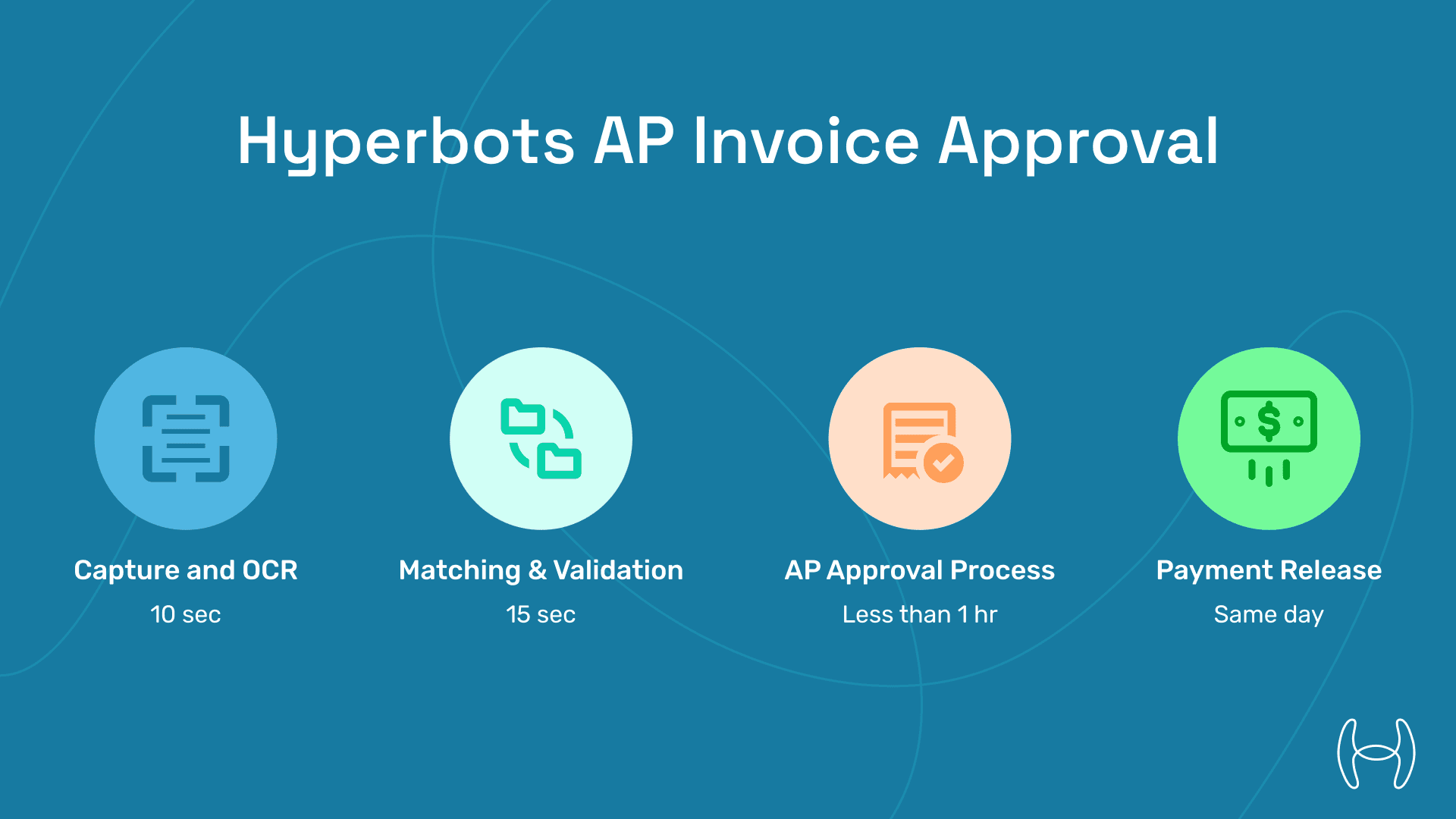
Stage | Legacy Time | Hyperbots Time | Keyword Hit |
Capture & OCR | 2 d | 10 s | invoice workflow |
Validation & Match | 2 d | 15 s | invoice approval procedures |
AP approval process (manager to finance) | 3–5 d | Less than 1 h (Slack bot) | ap approval process |
Payment release | Weekly batch | Same day | — |
Result: 80% of invoices skip the human touch; only exceptions move to approvers, which is ideal for accounts payable invoice approval process goals.
Each stage in this process has its own failure modes, and understanding where delays typically occur is the first step to eliminating them.
Starting with capture: this is where the process begins, and for many teams it is where the first delay occurs. Invoices arrive by email, vendor portal, EDI, or post. Manual teams log each one, key in header data, and file it. This step alone can take a day or more at high volumes. More importantly, manually keyed data introduces errors that create problems downstream such as wrong amounts, mismatched vendor names, or missing PO references that trigger exceptions during matching.
Automated capture changes this entirely. AI-driven extraction pulls structured data from any invoice format in seconds, regardless of layout or vendor. The Hyperbots Invoice Processing Co-Pilot handles unstructured invoices, multi-page documents, and non-standard payment terms that trip up template-based OCR systems.
After capture, validation runs against POs and goods receipts. In a manual process, this means a clerk cross-referencing documents in the ERP, checking line items, and flagging discrepancies. Exceptions are routed back to the vendor or business unit for clarification. A single exception on a complex invoice can add two to three days to the cycle.
Automated validation runs these checks in seconds. AI matches invoice line items against POs and receipts, applies configured tolerance rules, and routes genuine exceptions for review while clearing clean invoices automatically. The result is that only invoices with real discrepancies require human attention, and those are flagged with full context so reviewers can act quickly.
Approval routing is typically the longest stage in legacy workflows. The invoice needs to reach the right approver, who needs to review it, and who needs to respond before the process can continue. As described above, email and ERP-based routing introduce delays at every step.
Automated routing sends approval requests directly to the right person via Slack or email notification, with full invoice context attached. Approvers can act in one click without logging into any system. SLA timers ensure that approvals escalate automatically if not completed within the defined window. For invoices below approval thresholds from known vendors, AI can approve automatically with a complete audit record.
On payment authorization: legacy payment runs happen on fixed schedules which are weekly or bi-weekly batches regardless of when invoices were approved. Early payment discounts are frequently lost because the invoice cleared approval after the last batch but before the next one.
Automated payment authorization releases payments as soon as approval is complete, or schedules them to optimize for discount capture. Payment timing becomes a decision, not an accident. Detecting and preventing payment fraud and anomalies is also handled automatically at this stage, with AI flagging unusual patterns before disbursement.
Across all four stages, automation reduces cycle time not by doing the same things faster, but by eliminating the wait states that account for most of the delay.
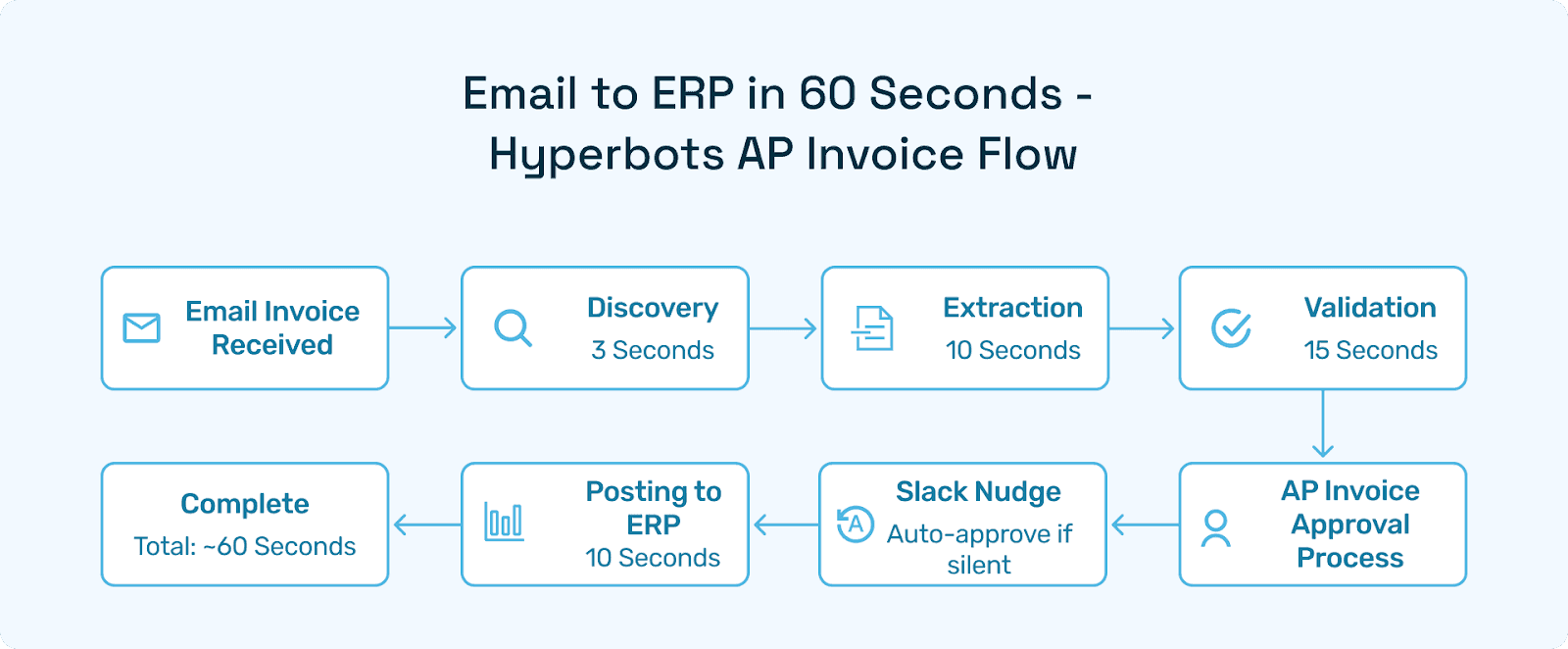
Flowchart: Email to ERP in 60 Seconds
Four Approval-Strategy Frameworks
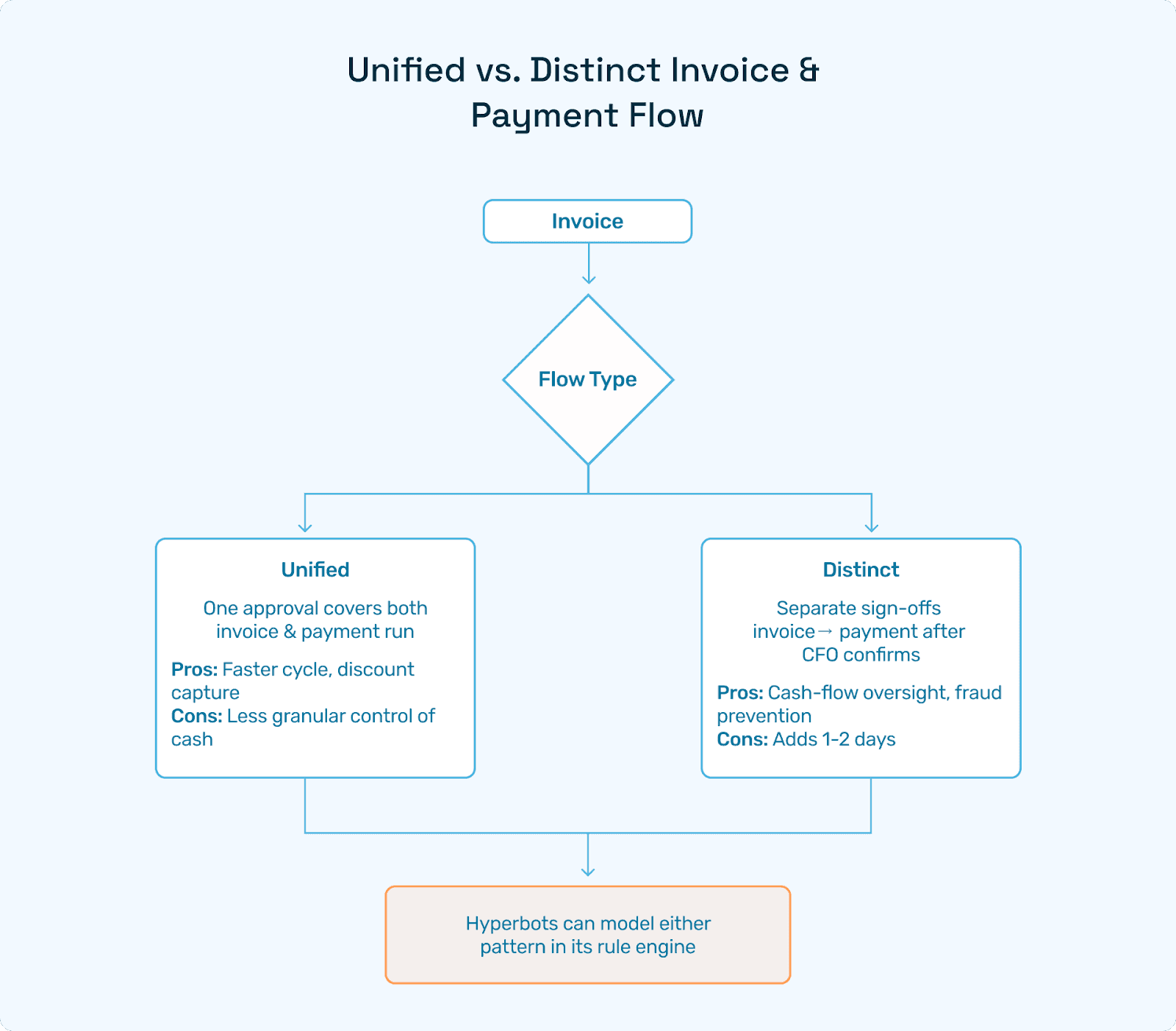
Unified vs. Distinct Invoice & Payment Flow
Unified: One approval covers both the invoice and the payment run.
Pros: Faster cycle, discount capture.
Cons: Less granular control of cash.
Distinct: Separate sign-offs; invoice approved first, then payment authorized after CFO confirms.
Pros: Cash-flow oversight, fraud prevention.
Cons: Adds 1–2 days.
Hyperbots can model either pattern in their rule engine.
Department-Based vs. Company-Wide Authority Metrics
Departmental: Marketing's $5k limit vs. Engineering's $20k.
Company-wide: Single matrix, e.g., under $10k to manager, $10–50k to director.
Slack Approval Bot reads cost-center tags then routes accordingly, automating invoice approval procedures with zero spreadsheet lookups. For teams designing authority matrices from scratch, the best practices for PR and PO approval workflows covers threshold design, delegation rules, and escalation paths in more depth.
Spend-Category vs. Amount-Based Routing
Category-based: IT hardware always needs CIO sign-off.
Amount-based: Anything over $25k triggers CFO.
Combine both for bulletproof AP invoice approval process governance.
Manual Escalations & AI Nudges
Hyperbots Approval Bot escalates if there is no action within 24 hours, re-checks calendar OOO flags, and can auto-approve under-$500 utility bills, accelerating the invoice workflow without audit risk.
Hyperbots Co-Pilots Powering the Process
Co-Pilot | Role in AP approval process | Differentiation |
Invoice Processing | 99.8% capture, line-item match | Handles unstructured terms |
Payment | AI timing, multi-rail | FedNow + ACH + SEPA |
Accrual | Auto-book/reverse at month-end | 80% less close pressure |
Vendor Management | Portal updates, KYC | Cuts "Where's my pay?" emails 70% |
Tax Verification | VAT/TIN checks | Instant compliance flags |
Industry Playbooks
Retail: 10,000-SKU bills auto-mapped; approval tiers by merchandise type.
Construction: AIA forms route to project managers; lien waivers auto-attach.
SaaS: Multi-currency invoices; FX thresholds trigger finance VP approval.
Healthcare: HIPAA-safe PHI redaction; CPT-code flagging before sign-off.
Compliance & Audit Controls
SOC 2 Type II hashes every click
SOX 404 logs the authority chain
VAT OSS digital links
1099 thresholds auto-alert
All of these ensure your accounts payable approval process is audit-ready. For teams evaluating dedicated AP approval software with these controls built in, the 2026 guide to AP approval software covers what to look for and how autonomous AP stacks up against traditional workflow tools.
KPI Benchmarks & ROI Simulator
Metric | Legacy | Hyperbots |
Approval lag | 3.8 d | Under 1 h |
Discounts captured | 22% | 100% |
Duplicate pay | 0.25% | 0.03% |
Annual cash lift (8k invoices) | — | $95k |
60-Day Implementation Roadmap
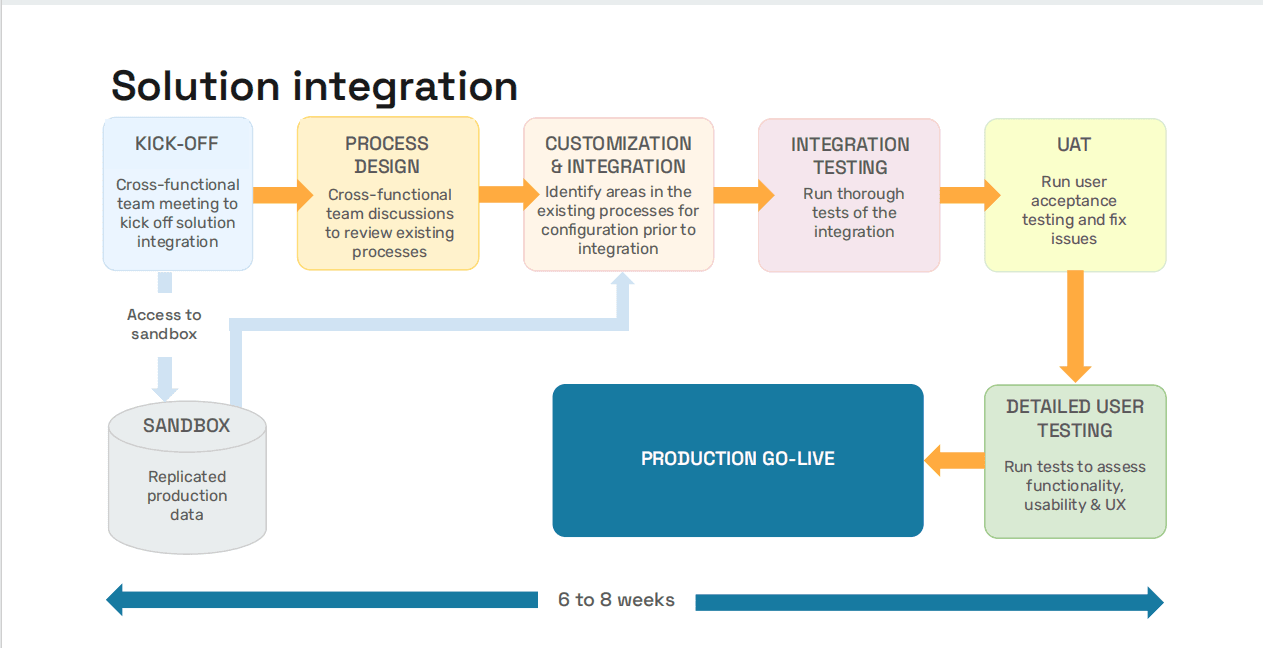
Finance teams that have gone through this process often note that the implementation timeline is shorter than expected. Hyperbots' pre-trained models mean there is no lengthy configuration phase where AI co-pilots can be live within days, not months, with accuracy from the first invoice.
See What a Faster AP Approval Process Looks Like
If your team is still managing approvals through email chains and ERP queues, the 90-day roadmap above is a realistic path to something significantly better, not just for faster approvals but full visibility into where every invoice stands, automatic escalation before deadlines are missed, and a complete audit trail without any manual documentation effort.
The ROI calculators on the Hyperbots site let you model the impact against your own invoice volume. Or if you would rather see the workflow in action, a 30-minute demo will walk through a live invoice moving from inbox to paid, with no manual clicks and a complete audit trail at every step.
Explore the ROI or Schedule a Demo to see what this looks like for your team.