Automating Purchase Orders in Excel and Email Workflows
Turn static Excel and email POs into smart, automated workflows that cut costs instantly
Executive Summary
Manual purchase order (PO) approvals and email-based workflows create costly delays for finance and procurement teams. Spreadsheets and inboxes weren’t designed for complex compliance rules, routing, or real-time ERP integration. Today, automation bridges this gap.
This blog explores how automated purchase order Excel workflows and email-based PO automation reduce operational bottlenecks, improve compliance, and deliver measurable ROI. It covers:
What automated purchase order Excel and email workflows mean
How CSV-to-PO conversion and email parsing streamline data entry
Common pitfalls of spreadsheet-driven procurement
The tangible benefits of automation, including cycle time reductions of upto 80%
Why Hyperbots’ Procurement Copilot and supporting AI Co-Pilots lead the industry
By adopting AI-powered automation, enterprises can shrink cycle times from weeks to hours, reduce operational costs by up to 80%, and achieve enterprise-grade compliance without overburdening finance teams.
Introduction: Why Excel and Email Still Dominate Purchase Orders
For decades, Excel sheets and email threads have been the default tools for finance teams managing purchase orders. Employees create purchase requests in spreadsheets, send them over email for approval, and manually track updates.
While familiar, this approach introduces several problems:
Data entry errors from copy-pasting between sheets and systems
Lost or delayed approvals due to overflowing inboxes
Compliance risks with no audit trail of routing decisions
Time drain on procurement and finance staff
According to Deloitte’s 2025 Global CPO Survey, digital leaders in procurement see significantly better performance across cost savings and supplier metrics compared to peers stuck in manual workflows.
This is where automated purchase order Excel and email automation step in , modernizing a familiar workflow with intelligent automation and ERP synchronization.
What is Automated Purchase Order Excel Workflow?
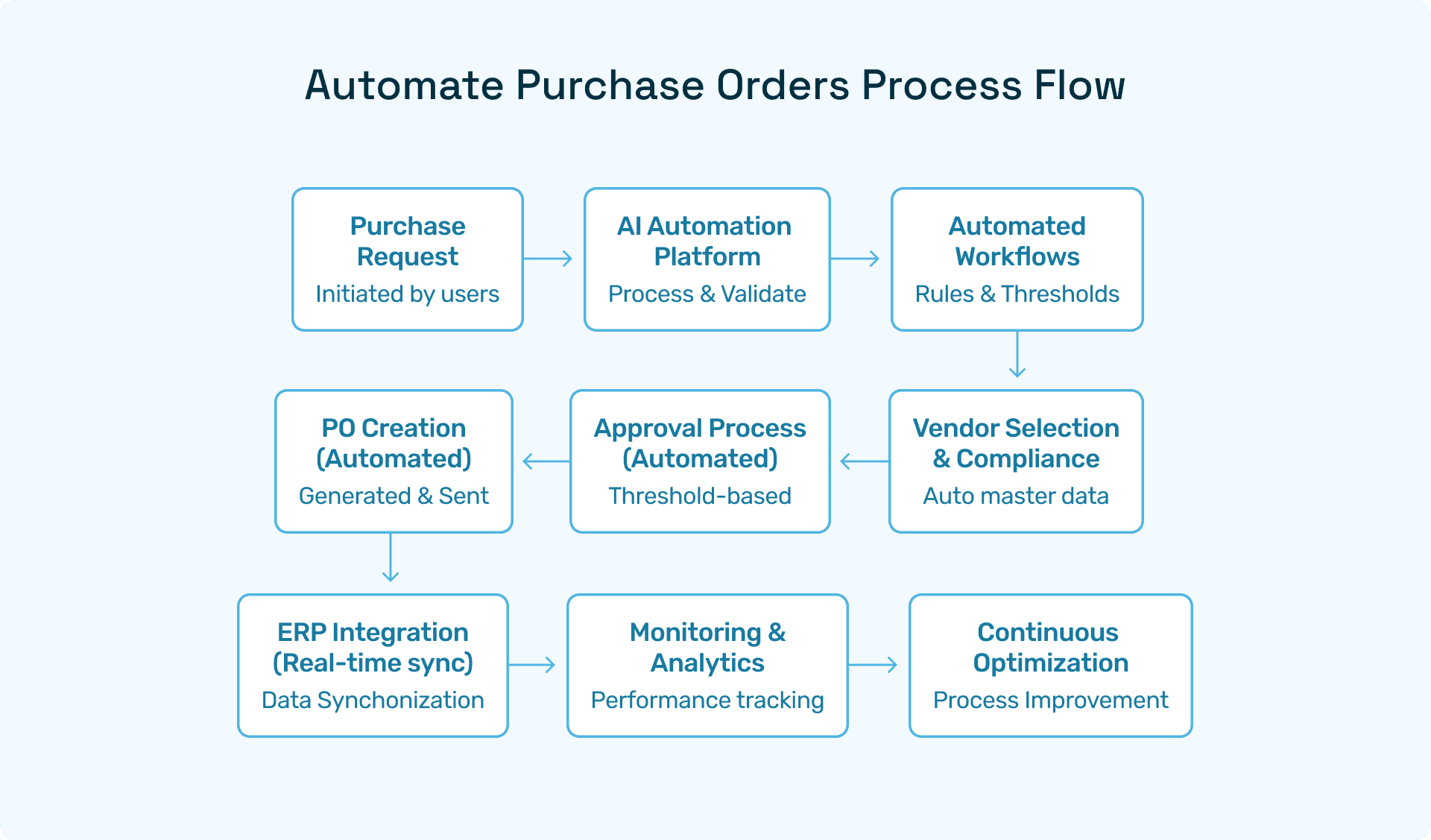
An automated purchase order Excel workflow refers to using automation software to:
Convert CSV or Excel files into structured POs
Validate entries against budgets, vendor catalogs, and policies
Route POs for approval automatically based on thresholds
Sync approved POs with ERP systems like SAP, Oracle, or NetSuite
Instead of spreadsheets being static files, automation transforms them into dynamic inputs that trigger approval workflows.
👉 For instance, an Excel-based CSV-to-PO automation lets procurement teams upload files, which the system instantly validates and converts into ERP-ready purchase orders — eliminating manual re-keying.
Automating Purchase Orders by Email
Automated purchase orders by email allow requests sent through email to be parsed, validated, and routed without manual handling.
This typically involves:
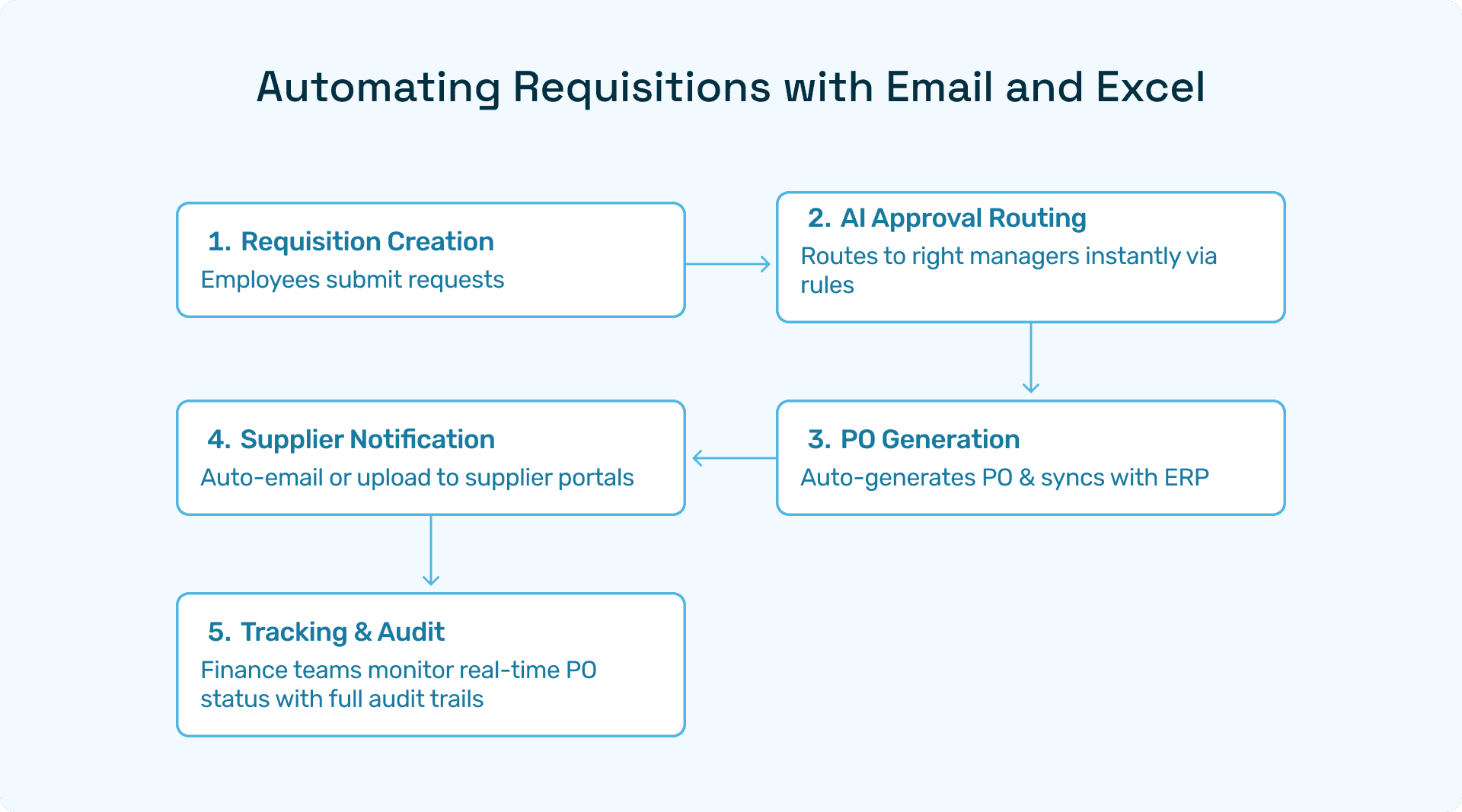
Email Parsing → Extracting PO details from structured/unstructured emails.
Validation → Matching against policies, budgets, and vendor data.
Approval Routing → Forwarding to approvers or auto-approving based on rules.
ERP Sync → Storing final approved POs in the ERP.
With automation, finance leaders can turn every incoming vendor or employee email into a tracked, compliant purchase request without lifting a finger.
Key Challenges of Manual Excel and Email Workflows
While Excel and email remain widely used, relying on them without automation creates hidden costs:
Approval bottlenecks: POs stuck in inboxes cause project delays.
Error-prone entries: Duplicate or missing data leads to compliance exceptions.
Audit difficulties: No single source of truth for approvals or changes.
Scaling issues: Mid-sized companies quickly outgrow spreadsheet/email processes.
Gartner reports that top supply chain ORGs are utilizing AI to optimize processes at 2X the rate of their low performing peers.
Benefits of Automating Purchase Orders in Excel and Email
Implementing automated purchase order Excel workflows and email parsing delivers:
Faster Cycle Times
Shrinks approval cycles from weeks to hours.
Auto-approves low-value purchases.
Cost Savings
Cuts procurement times by up to 80% through reduced manual effort.
Compliance & Risk Reduction
Automated validation against budgets and policies.
Digital audit trails for regulators.
ERP Integration
Instant syncing with SAP, Oracle, Microsoft Dynamics, or NetSuite.
Real-Time Visibility
Dashboards show spend patterns, vendor activity, and approval metrics.
CSV-to-PO Conversion and Email Parsing in Action
CSV-to-PO automation and email parsing are the backbone of modern PO workflows.
CSV-to-PO: Procurement uploads a CSV/Excel sheet. Automation validates data, maps fields, and generates ERP-synced POs.
Email Parsing: Requests sent via email are scanned, structured, and pushed into approval workflows instantly.
IBM emphasizes that three-way matching, cloud/mobile access, and automated validation are critical to preventing duplicate entries and errors in PO management. Hyperbots builds on this foundation with AI-driven Co-Pilots, which provide contextual intelligence far beyond rule-based parsing.
Why Hyperbots Leads in Purchase Order Automation
While many vendors offer automated purchase orders in Excel and email, Hyperbots sets itself apart with its AI-powered Co-Pilots.
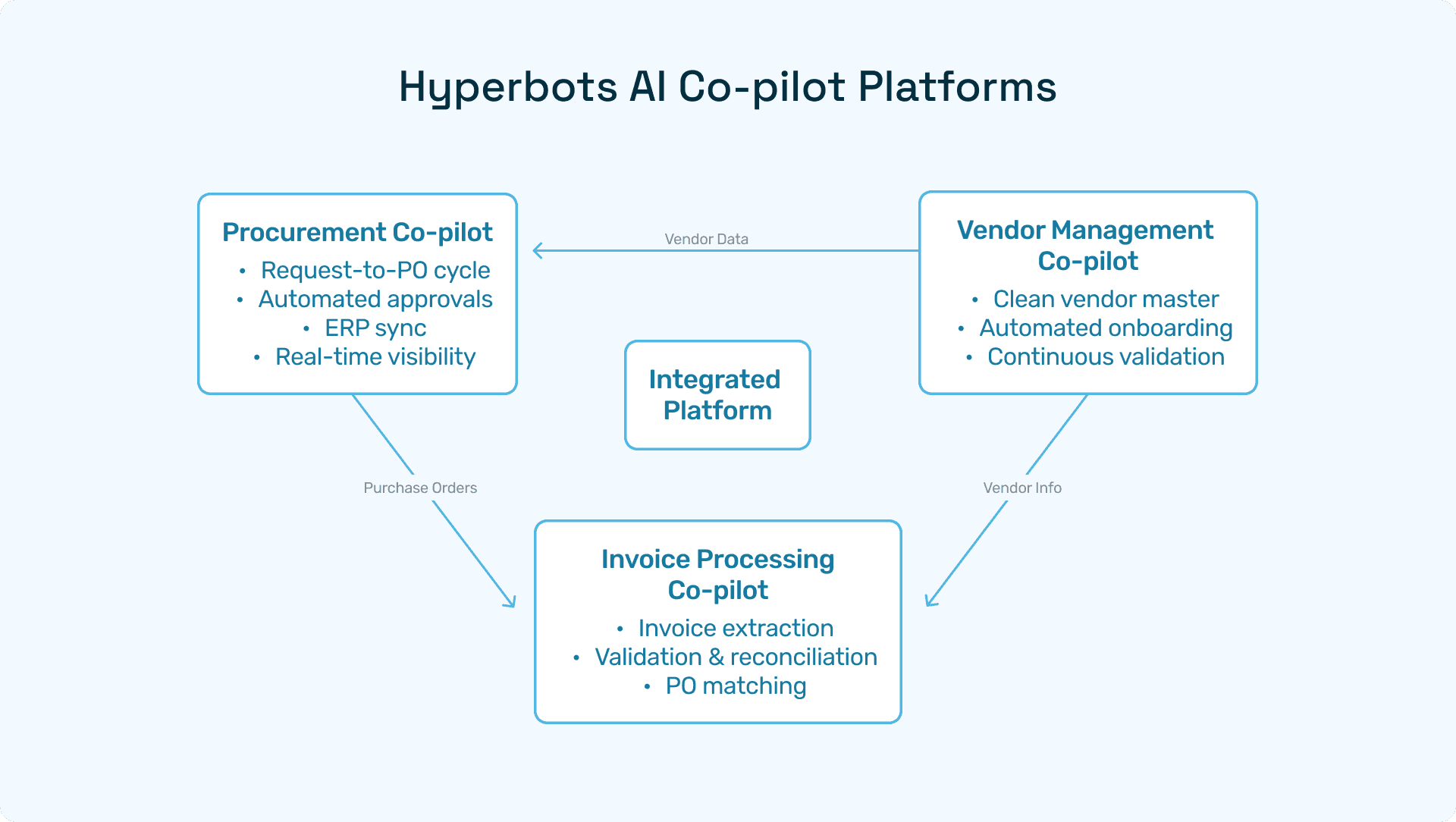
Hyperbots Procurement Copilot
Shrinks cycle times from request to PO.
Delivers instant ERP-synced approvals.
Auto-validates policies with AI.
Provides real-time spend dashboards.
Supporting Co-Pilots
Invoice Processing Copilot → Automates invoice validation and matching.
Vendor Management Copilot → Simplifies onboarding and compliance.
Accruals Copilot → Provides real-time expense visibility.
Payments Copilot → Ensures secure, policy-compliant disbursements.
Hyperbots Platform Capabilities
The Hyperbots Agentic AI Platform provides:
Unstructured data handling (PDFs, contracts, scanned invoices).
Deep ERP integration (SAP, NetSuite, Oracle, Microsoft Dynamics).
AI decision intelligence → anomaly detection, predictive analytics.
Human-in-the-loop controls for CFO oversight.
This ensures speed + compliance + control, a balance rule-based competitors cannot deliver.
ROI of Automating Purchase Orders in Excel and Email
Organizations adopting Hyperbots see ROI through:
Improved supplier relationships
Higher employee satisfaction
faster cycle times
better audit and compliance
Data-driven decision-making with real-time insights
FAQs
Q1. What is automated purchase order Excel workflow?
It’s the use of automation to validate, route, and sync POs created in Excel/CSV files.
Q2. How does email parsing automate POs?
Automation extracts details from emails, validates them, and routes them into approval workflows.
Q3. Which industries benefit most?
Manufacturing, logistics, and retail - where procurement volume is high and cycle times matter.
Q4. How does Hyperbots differ from others?
Unlike rule-based vendors, Hyperbots leverages AI Co-Pilots with deep ERP integration and real-time decision intelligence.
Moving Forward with Automated Purchase Orders in Excel and Email
Finance and procurement leaders can no longer afford to manage purchase orders manually through spreadsheets and inboxes.
Hyperbots’ Procurement Copilot and supporting Co-Pilots deliver the fastest cycle times, strongest compliance, and highest ROI in the market - turning static Excel and email processes into dynamic, AI-powered workflows.
👉 Schedule a Demo with Hyperbots to see how you can automate purchase orders end-to-end.