
Best Purchase Order System for Small Business: Features, Pricing, and Setup
Streamline procurement with the best purchase order system for small business—AI-powered, affordable, and easy to set up.
Executive Summary
Managing purchase orders manually works fine until it doesn't. Missed approvals, duplicate orders, vendors chasing the wrong contact, budget overruns that only show up at month-end is where these symptoms push small businesses to look for a proper system.
The right purchase order system eliminates that friction. It automates requisition creation, routes approvals to the right people, syncs with your accounting or ERP software, and gives finance teams a real-time view of what's been committed before it becomes a problem.
This guide covers what to look for, how pricing typically works, and what setup actually involves, so you can evaluate options and pick the one that fits where your business is today.
What Is a Purchase Order System?
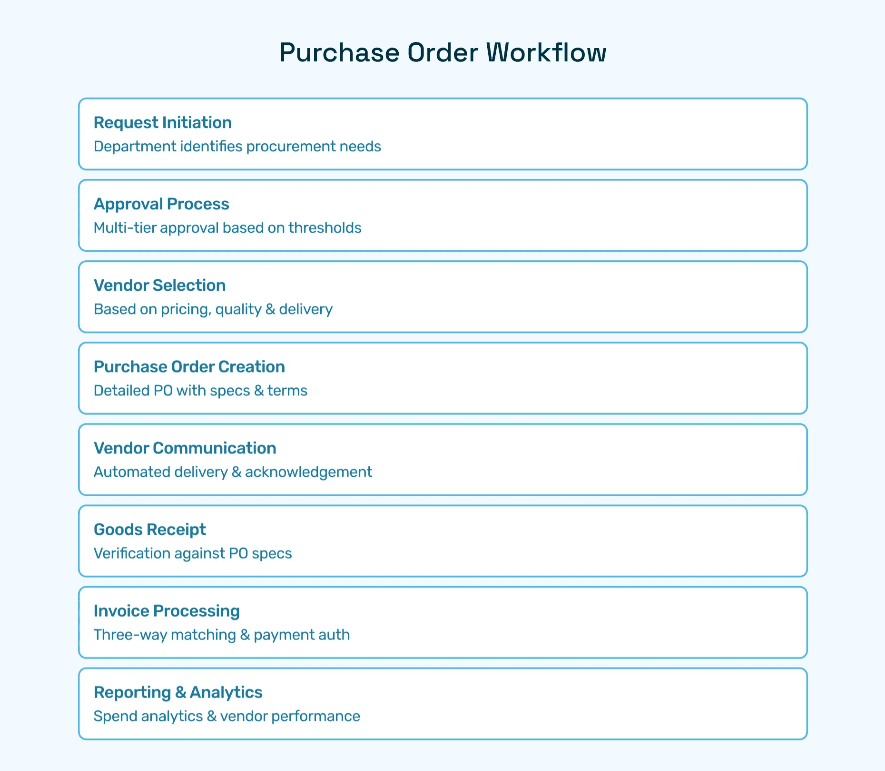
A purchase order system digitally manages the lifecycle of purchase orders, from purchase requisition and approvals through to order issuance, vendor communication, and payment reconciliation. Replacing outdated manual or spreadsheet-based methods, automated PO systems streamline workflows, enhance accuracy, enforce spend policies, and provide finance teams with the real-time visibility needed to control budgets and monitor supplier relationships effectively.
Why Automation Matters
Manual PO processing feels manageable until you look at what it actually costs. A requisition sits in someone's inbox over a weekend. A vendor gets paid late because the PO was never formally issued. A duplicate order goes through because two departments were buying from the same supplier independently. None of these feel like emergencies in the moment, but they compound fast.
Ardent Partners' 2025 research puts a number on it: typical accounts payable teams take 17.4 days to process a single invoice, while best-in-class operations do it in 3.1 days. That 14-day gap does not just slow things down. It means missed early payment discounts, vendors chasing overdue confirmations, and finance teams spending their week managing exceptions that a properly configured system would have caught before they became problems.
The scale of the issue is wider than most finance teams realize. Deloitte's 2025 Chief Procurement Officer Survey found that nearly half of procurement teams still rely on manual processes. The inefficiency is not a niche problem, it is the norm. Most businesses are losing time and money on PO processing not because better tools do not exist, but because they have not yet made the switch.
The upside of switching is well documented. McKinsey's October 2025 research on AI-driven procurement found that automation is on track to make procurement functions 25 to 40 percent more efficient, with spend managed per procurement FTE growing 50 percent over the past five years. That is not efficiency for its own sake. It is finance headcount doing higher-value work instead of chasing paper.
An automated purchase order system gets you there by:
Catching errors like misplaced requisitions or wrong vendor details before they reach a supplier
Enforcing spending limits and triggering multi-level approvals based on rules you define once
Accelerating PO generation and dispatch so vendors receive confirmed orders the same day
Creating complete audit trails for every transaction, automatically, without manual logging
For a small business, the math is straightforward. Every day a PO sits unprocessed is a day your supplier relationship is at risk, your budget visibility is incomplete, and your finance team is doing work a system should be handling for them.
Benefits for Small Business Finance Teams
Increased Accuracy and Fewer Errors: Automated validation and AI anomaly detection prevent common mistakes like duplicate requests or incorrect vendor data.
Faster Cycle Times: Real-time automated approvals eliminate bottlenecks and shrink the request-to-order timeframe.
Budget Control and Spend Visibility: Integrations with ERP systems ensure budget compliance and up-to-date financial reporting.
Vendor Management: Centralized, dynamic vendor profiles facilitate better communication and compliance.
Deloitte reports that nearly half of procurement teams still rely on manual processes prone to error and inefficiency, underscoring the need for systems that automate and centralize purchase order workflows. With these transformational features, an easy purchase order system becomes a critical finance tool for managing complexity as businesses grow.
Core Features of the Best Purchase Order System for Small Business
Automated Workflows and Intelligent Approvals
An effective purchase order system supports custom automated workflows that trigger approvals based on spend limits, departments, or vendor categories. Hyperbots’ Procurement Copilot employs AI to analyze requisitions, detect duplicates, and route approvals instantly, ensuring compliant, error-free orders.
Real-Time ERP Integration
Seamless connectivity with ERP platforms like SAP, Oracle, or NetSuite synchronizes budget data, ledger codes, and vendor details instantly. This integration is vital for real-time budget monitoring and accurate posting of purchase orders.
Vendor and Contract Catalog Management
Comprehensive vendor master management automates onboarding, monitors vendor compliance, and provides a centralized view of supplier performance. AI-powered catalog management links contract terms and pricing, enabling risk-controlled, streamlined purchase requisitions.
AI-Driven Validation and Anomaly Detection
Purchase orders are digitally cross-checked for anomalies such as out-of-budget spends or duplicate entries using advanced AI techniques. This intelligent validation safeguards against fraud and errors, enhancing overall procurement reliability.
Reporting and Analytics
Powerful dashboards deliver actionable insights into spend trends, supplier performance, approval bottlenecks, and budget variances. Finance leaders can leverage these reports to drive continuous process improvement and cost optimization.
Ease of Use and User Experience
A best-in-class purchase order system offers user-friendly interfaces with easy PO creation, configurable templates, and minimal training requirements. Platforms like Hyperbots provide intuitive no-code workflow configuration and vendor portals for enhanced transparency and collaboration.
How to Set Up an Easy Purchase Order System for Your Business
Setting up the best purchase order system for small business requires a strategic approach to align technology with procurement policies and business goals. Here is an expanded, practical guide based on industry best practices and Hyperbots’ proven implementation methodologies:
1. Assess Your Existing Procurement Processes
Begin with a detailed review of how purchase orders are currently created, approved, and processed. Identify pain points such as manual data entry, approval bottlenecks, duplicate orders, or missing vendor information. Understanding your existing process will highlight areas where automation can deliver maximum impact.
2. Define Clear Procurement Policies
Explicit procurement policies form the backbone of a well-functioning PO system. Define budgeting limits, multi-level approval hierarchies, vendor selection criteria, and compliance requirements. Embed these policies into your purchase order workflows to enforce control automatically.
3. Customize Purchase Order Forms and Templates
Avoid one-size-fits-all templates. Customize PO forms to capture the necessary fields such as item descriptions, quantities, unit prices, delivery terms, and vendor information critical to your business. Customized templates prevent incomplete or inaccurate orders.
4. Implement Multi-Level Approval Workflows
Establish departmental and spending thresholds that trigger multi-level approvals. The system should support dynamic routing to appropriate approvers depending on purchase type or amount. Incorporate exception handling for urgent purchases that need faster approvals but still maintain audit trails.
5. Integrate Your PO System with ERP and Accounting Platforms
Deep integration minimizes duplicate data entry and enables automatic budget checks. Real-time ERP syncing ensures that purchase orders do not exceed budget or commit funds inaccurately. It also facilitates faster invoice processing and better cash flow management.
6. Centralize and Continuously Clean Vendor Data
Accurate vendor master data is crucial to avoid delays and financial errors. Regularly update contact details, payment terms, tax info, and contract terms in a centralized vendor portal. Automate vendor onboarding and compliance verification to reduce fraud risks.
7. Provide Comprehensive Training and Communication
Transparent communication about new processes and systems eases resistance to change. Deliver role-specific training to purchasers, approvers, finance teams, and vendors to ensure everyone understands how to use the system efficiently and collaboratively.
8. Pilot the System and Monitor Early Adoption
Start with a controlled pilot project among select users or departments. Collect feedback, track usage patterns, and address any issues before organization-wide rollout. Monitor KPIs like PO cycle times, error rates, and budget compliance to measure initial improvements.
9. Continuously Optimize Based on Analytics
Leverage system analytics and reporting tools to identify bottlenecks, compliance issues, and opportunities for further automation and process refinement. Continuous feedback loops ensure your purchase order system evolves alongside changing business needs.
Hyperbots simplifies setup with low-code configuration, AI-guided validations, and comprehensive onboarding resources making it a simple purchase order system tailored for small-sized enterprises.
Best Practices for Purchase Order Process Optimization
Modern purchase order systems are not just transactional tools; they are strategic enablers when optimized effectively. Here are key best practices recommended by procurement experts and industry reports for maintaining a healthy and efficient PO system:
Centralize All Procurement Activities
Consolidate PO management on a single platform to enable visibility across departments and projects. Centralization simplifies tracking, eliminates duplicate orders, and reduces procurement fraud risks.
Standardize PO Formats and Processes
Using standardized, digital PO templates reduces errors and accelerates approvals. Every PO should contain complete, consistent information such as clear product descriptions, agreed prices, and delivery schedules.
Automate Key PO Workflow Steps
Automation of requisition creation, approval routing, vendor communication, and invoice matching reduces manual workload and speeds the procurement cycle. AI-driven automation further enhances accuracy and compliance.
Maintain Accurate and Up-to-Date Vendor Information
Regular validation and updates to vendor profiles prevent delays and errors caused by incorrect contact details or banking information. Automation of vendor onboarding also reduces compliance risk.
Establish Clear and Enforced Approval Workflows
Define multistage approval chains based on department, spend size, and purchasing category. Automate routing to ensure POs are promptly reviewed and authorized, reducing bottlenecks and unauthorized spend.
Track and Monitor Key Performance Indicators (KPIs)
Measure PO cycle times, approval durations, error rates, supplier defect rates, and budget variances. Use this data to identify process inefficiencies and continuously improve procurement operations.
Foster Supplier Collaboration and Quality Assurance
Maintain open communication channels with vendors via integrated portals. Conduct thorough inspections on receipts and use quality KPIs to ensure supplier reliability and prevent returns or disputes.
Leverage Advanced Technologies Like AI and Analytics
Use AI for anomaly detection, duplicate elimination, and smart spend forecasting to anticipate budget constraints. Analytics provide actionable insights improving strategic sourcing and budget management.
Implementing these practices creates a resilient, efficient purchase order system capable of supporting business growth whilst controlling costs and risks. Hyperbots’ comprehensive AI-driven platform supports all these aspects and more through its suite of intelligent Co-pilots and extensive integration capabilities
How Hyperbots Delivers Differentiated AI Automation
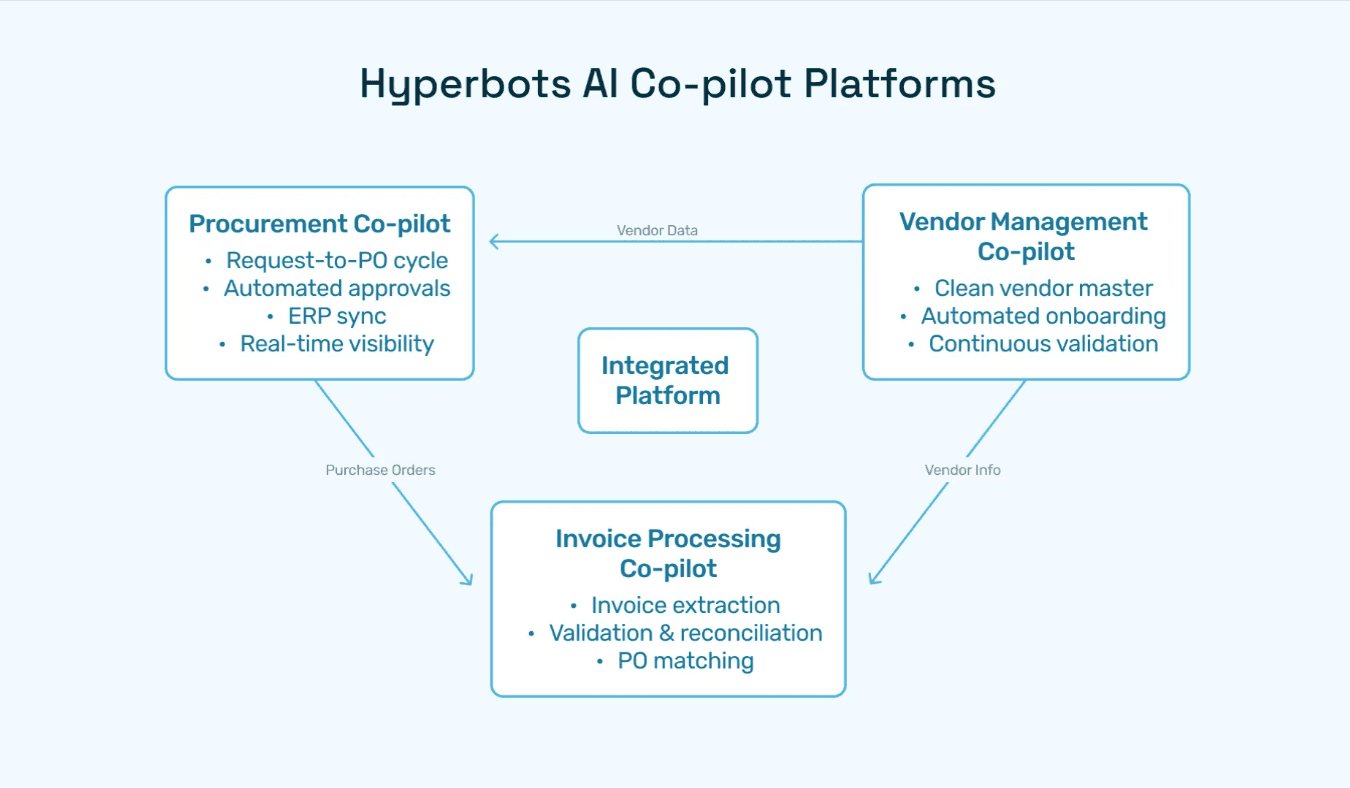
Hyperbots Procurement Copilot
Hyperbots’ primary AI agent automates creation, validation, and approval of purchase requisitions with precision. It automatically extracts PR fields from contracts or past data, performs duplication checks, enforces budget controls, and generates formatted purchase orders dispatched directly to vendors or systems.
Supporting AI Co-pilots
Invoice Processing Copilot: Streamlines invoice matching and reconciliation with POs and receipts, reducing manual corrections.
Vendor Management Copilot: Automates continuous validation, onboarding, and compliance monitoring of vendors to minimize fraud risk and administrative overhead.
Transformational Platform Capabilities Driving Business Impact
AI reasoning continually improves through learning from historical procure-to-pay processes.
Deep ERP integrations provide real-time budget visibility and ledger accuracy.
Flexible, no-code workflow engines enable dynamic approval routing tailored to business needs.
Rich audit trails empower efficient auditing and regulatory compliance.
Multi-entity support facilitates enterprise-wide synchronization.
Collectively, these capabilities enable finance and procurement teams to reduce manual workloads by over 80%, focus on strategy, and maintain exceptional compliance hyperbots.
Measured ROI Benefits of Hyperbots Purchase Order Automation
Up to 80% reduction in operational procurement costs, driven by AI automation and workflow efficiency.
Cycle time improvements of up to 70% from request to purchase order due to instant ERP-synced approvals and automatic dispatching.
Error reductions up to 90%, owing to AI-powered anomaly detection and validation removing manual data entry mistakes.
Improved compliance and audit readiness, reducing fraud risks and ensuring policy enforcement through comprehensive digital audit trails.
Enhanced spend visibility enabling smarter budget management and forecasting, thanks to real-time data integration and reporting dashboards.
According to The Hackett Group's 2025 research, top-performing procurement teams deliver 2.6x greater ROI than peers, while also executing 58% shorter requisition-to-purchase order cycle times.
Comparing Hyperbots Against Other PO Systems
Feature | Hyperbots | Typical Competitors |
AI-Powered Automation | End-to-end automation from requisition to PO to invoice | Partial automation, mostly workflow digitization |
ERP Integration | Robust, real-time syncing with SAP, Oracle, NetSuite | Limited or batch syncing |
Vendor and Catalog Management | Continuous AI vendor vetting and contract catalog linkage | Manual updates and basic catalog |
Approval Workflow | AI-enabled dynamic approvals with anomaly alerts | Static rule-based routing |
Reporting and Analytics | Real-time, customizable dashboards | Basic reporting, delayed updates |
Audit Trails and Compliance | Full traceability with contextual audit logs | Minimal audit features |
Why Small Businesses Can't Afford to Stick With Manual POs
Procurement complexity doesn't wait for a business to feel "ready" to automate. Approval delays stack up, vendor data goes stale, budgets get committed without visibility, and finance teams spend hours chasing paper trails that a proper system would eliminate in minutes.
The businesses that move fastest on automation aren't necessarily the largest rather they're the ones that recognized early that manual PO processes cost more in errors, delays, and lost supplier trust than any software subscription. The Hackett Group's 2025 research puts it plainly: top-performing procurement teams execute requisition-to-PO cycles 58% faster than their peers, and deliver 2.6x greater ROI from their procurement function overall.
A well-implemented purchase order system closes those gaps which gives finance teams real-time spend visibility, enforcing approval policies automatically, and freeing up time for work that actually requires human judgment.
Hyperbots is built specifically for this, an AI-driven platform that handles the full procure-to-pay cycle which integrates with ERPs like SAP and Oracle out of the box, and doesn't require a six-month implementation to see results.
FAQs
Q1: What features distinguish the best purchase order system for small business?
A: Advanced AI validation, ERP real-time integration, automated approval workflows, vendor and catalog management, and comprehensive reporting.
Q2: Is there a free purchase order system for small business?
A: Some providers offer free basic tiers, but advanced features like AI-powered automation and ERP syncing found in premium platforms like Hyperbots require paid plans.
Q3: How quickly can I implement a simple purchase order system?
A: With platforms like Hyperbots offering low-code setup and expert onboarding, many users go live within days, reducing disruption.
Q4: How does Hyperbots stand out from other purchase order software?
A: It offers reasoning-driven AI Co-pilots across the entire procure-to-pay lifecycle with continuous learning, audit readiness, and deep ERP integrations.
Q5: Can this system scale with my small business growth?
A: Yes, Hyperbots supports multi-entity operations and scalable workflows adaptable to evolving business demands.