SAP Business One Pricing: 2026 Buyer’s Guide
With Hyperbots, SAP Business One shifts from cost burden to outcome-driven financial performance engine.
Executive Summary
If you’ve been Googling “cost of SAP Business One,” you already know there isn’t a single sticker price. Like most ERPs, SAP Business One (B1) is sold via partners with pricing that depends on license type (Professional vs. Limited), deployment (cloud vs. perpetual), users, add-ons, and implementation scope. Directionally, many partners publish ranges for sap business one cloud cost (per-user per-month) and perpetual licenses (one-time per user, plus annual maintenance), but your final number will be quote-specific. SAP’s official pages clearly detail the scope and features of B1 for small and midsize companies; in practice, B1 covers accounting, purchasing, inventory, sales/CRM, production, and reporting—enough to be the SAP accounting software backbone for a whole business. SAP+1
This commercial guide translates price mechanics into a clean budget playbook. You’ll get:
The pricing building blocks (license types, deployment choices, users, modules, maintenance).
A B1 features refresher—so you don’t overbuy.
A comparison of SAP Business One vs. NetSuite, Microsoft Dynamics 365 Business Central, and QuickBooks—including pricing models you can actually validate from vendor pages and reputable partner guides. Microsoft+1QuickBooksCumula 3 Group
A DIY calculator and scenario budgets (SMB finance-first, light manufacturing, and growth).
A plan to compress TCO with Hyperbots—six Finance AI Co-pilots that sit on top of your ERP (including SAP B1) to automate Procure-to-Pay and close, reducing operating costs.
What SAP Business One Is (and Isn’t)
SAP Business One is SAP’s SMB ERP designed to be your system of record across accounting/finance, purchasing, inventory, sales/CRM, production, and reporting. It is broadly used by small and mid-market companies that want SAP governance and a partner ecosystem, without the complexity of S/4HANA. Official SAP materials emphasize “affordable ERP” with integrated modules rather than a patchwork of point tools. SAP+1
What B1 isn’t: a blank check for heavy customization. Its sweet spot is standardizing core operations with controlled extensions—add-ons from SAP partners, integrations (tax, banks, 3PL), and practical automations (see Hyperbots below).
Pricing Building Blocks
To decode SAP small business pricing, break your quote into four buckets:
Licenses
Professional vs. Limited users (e.g., Limited Logistics/CRM/Financials).
Cloud subscription (per user, per month) or perpetual (one-time per user) with annual maintenance (often ~20–25% via partners). Multiple reputable partner pages publish directional numbers for sap business one cloud cost and for perpetual licenses, but SAP itself does not post list prices; quotes vary by region and partner. ERP ResearchBusiness One ConsultancySynavos
Deployment
Cloud (partner-hosted / SAP-certified hyperscaler) vs. on-premise. Cloud bundles hosting and patching; on-prem adds infra + maintenance.
Modules / Add-ons
Manufacturing, service, WMS/barcoding, advanced analytics, localizations, e-invoicing, industry packs.
Services
Discovery, configuration, data migration, integrations, testing, training, cutover, hypercare. (We’ll quantify later.)
Important: Local markets (DACH, LATAM, EU) often publicize sap business one preis (DE) or sap business one preço (PT-BR) in euros/BRL for partner clouds and perpetual tiers. Example partner pages list cloud Professional at roughly double-digit €/user/month and perpetual Professional at low four-figure €/user with annual maintenance. Treat these as directional, not binding. Business One Consultancy
SAP Business One Pricing: Ranges & Scenarios
This section uses directional ranges from reputable 2025 partner guides to help you budget. Your final price depends on your user mix, modules, local discounts, and services.
Directional license signals (from partner sources):
Cloud subscription: partner ranges commonly cite ~$100–$219 per user/month depending on user type (Professional vs. Limited) and cloud bundle. ERP ResearchSynavos
Perpetual: partner posts often cite ~$1,800–$3,500 per user (Limited vs. Professional), plus ~20% annual maintenance. ERP Research
Europe (example): some EU partners publish €91/mo (Professional) and €47/mo (Limited) cloud signals, alongside perpetual €1,140–€2,700 per-user figures. Again, these are directional, not SAP list prices. Business One Consultancy
Three realistic scenarios
A) Finance-first SMB (single entity)
Who: Controller + AP + owner; 5–10 total users (mix of Limited + 1–3 Professional).
What you buy: Finance, purchasing, AR/invoicing, basic inventory, bank & tax connectors.
Budget signals: Cloud per-user pricing x user mix; minimal add-ons; services on the lower end (accelerator possible). ERP Research
B) Light Manufacturing / Distribution (two sites)
Who: Finance + buyers + warehouse + 1 planner; 10–25 total users (more Professional).
What you buy: Items/BOMs/routings, work orders (if needed), inventory/WMS, barcoding, 3PL/ship, e-invoicing.
Budget signals: Cloud per-user (more Professional seats); add-ons for WMS/labels; services in a mid band to account for data migration and integrations.
C) Multi-subsidiary growth
Who: Finance + operations across 2–3 entities, 20–50 users.
What you buy: Finance + inventory + manufacturing (if applicable) + analytics; intercompany flows; maybe localizations.
Budget signals: Larger subscription and services (multi-wave rollout). Expect meaningful testing time.
Rule of thumb: implementation services for mid-market ERPs like B1 vary with scope and data hygiene. Typical SMB/mid projects cluster from ~$25k–$150k+, with global/regulatory programs higher—patterns similar to NetSuite/Infor/Epicor in this tier. Use your partner quote to anchor. Cumula 3 Group
B1 Features Checklist (Buy What You’ll Use)
When you’re evaluating sap accounting software price, buy toward a day-in-the-life list so you don’t add modules you won’t use in year one. Official SAP material describes B1’s coverage across:
Finance & Accounting: GL/AP/AR, bank reconciliation, fixed assets, multi-currency, cost centers.
Purchasing & Inventory: POs, receipts, landed cost, item master, price lists, stock transfers, cycle counts.
Sales & CRM: quotes, orders, deliveries, invoicing, basic CRM, pipeline.
Production & MRP: items/BOMs/routings, work orders, MRP/DRP plans.
Reporting & Analytics: dashboards, built-in reporting, integration with analytics.
These are the backbone capabilities SAP highlights for small businesses choosing B1. SAP+1
Avoid overbuying by piloting 10–12 scripts (e.g., 3-way match with landed costs, partial receipts, outside processing service invoice, serialized inventory return). If a flow matters in daily life, keep it in scope.
SAP Business One vs. NetSuite vs. Business Central vs. QuickBooks
1) Microsoft Dynamics 365 Business Central
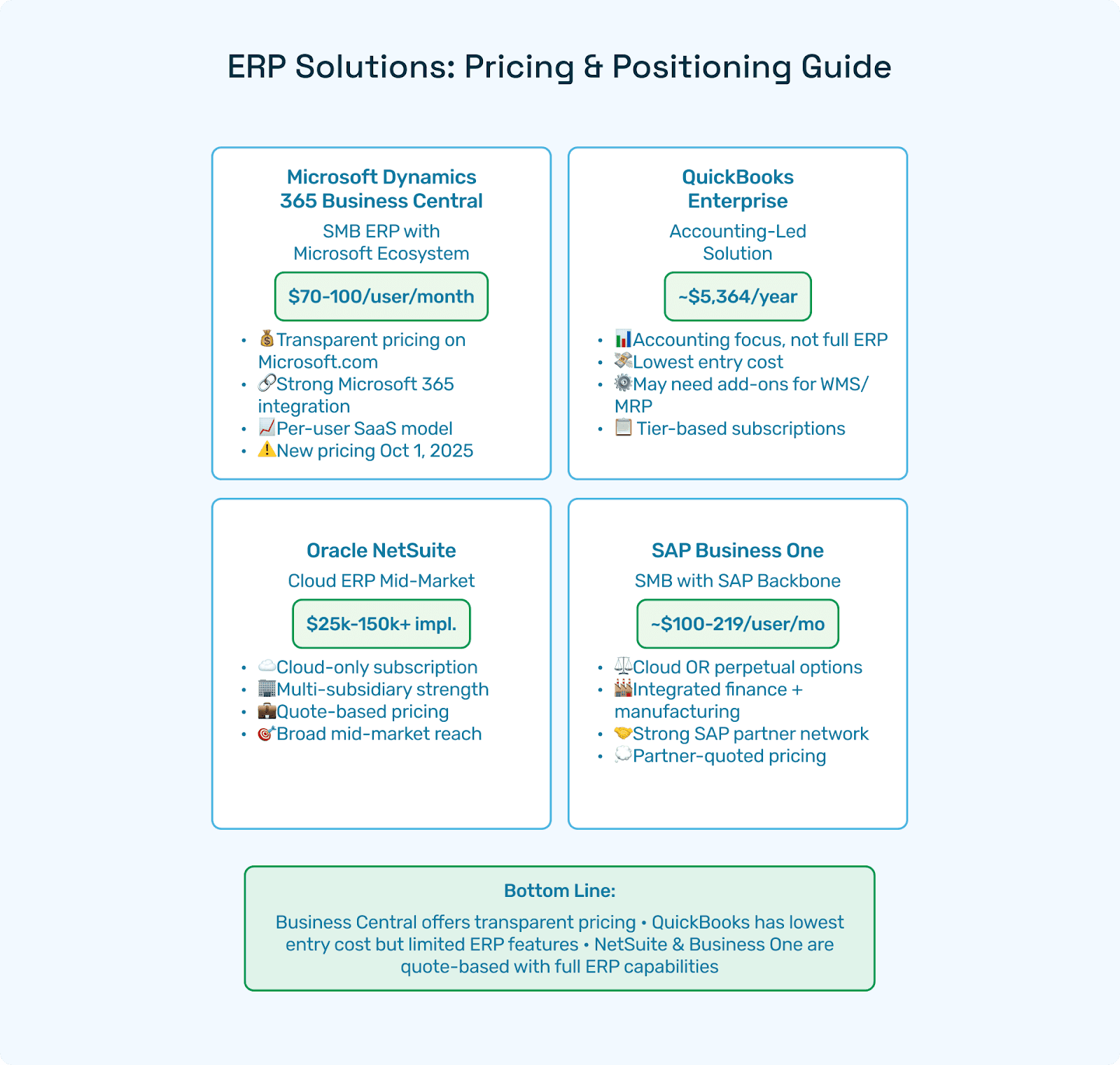
Model: Per-user SaaS; two tiers—Essentials ($70) and Premium ($100) per user/month, paid yearly; Team Members at a low per-user price for approvals/limited access. Microsoft has also announced new pricing effective Oct 1, 2025; current pricing holds until then. Microsoft+1Cargas |
Fit: SMB ERP with a big ecosystem; strong if you live in Microsoft 365 & Power Platform.
Compared to B1: Similar SMB footprint; Business Central pricing is transparent on Microsoft.com; B1 quotes vary by partner (cloud/perpetual).
2) QuickBooks (Desktop Enterprise)
Model: Subscriptions with annual price, paid monthly (tiers like Silver/Gold/Platinum/Diamond). The Intuit site shows current tier pricing and notes the annual subscription terms; sample Diamond page lists $5,364/yr (promos vary). QuickBooks+1
Fit: Accounting-led stack, not a full ERP. May require add-ons or manual processes for WMS/MRP/production.
Compared to B1: Lower entry software cost but higher process workarounds. Many teams move from QuickBooks to B1/Business Central/NetSuite when they outgrow accounting + spreadsheets.
3) Oracle NetSuite
Model: Edition + users + modules; pricing via Oracle/partners (calculators and 2025 guides exist for planning). Typical implementation ranges cited by partners are ~$25k–$150k+, depending on scope. Cumula 3 GroupTechfino
Fit: Cloud ERP with broad mid-market reach and multi-subsidiary strength.
Compared to B1: NetSuite pricing is subscription-only; B1 offers cloud and perpetual choices. NetSuite’s ecosystem is strong; B1 leverages SAP partners and localizations.
4) SAP Business One
Model: Cloud per-user/month or perpetual per-user plus annual maintenance; numerous partner posts publish directional figures (e.g., ~$100–$219/user/month cloud; ~$1,800–$3,500 per-user perpetual + maintenance). EU partners sometimes show €91/mo Professional. These are not official SAP list prices; treat them as budgeting signals. ERP ResearchBusiness One ConsultancySynavos
Fit: SMB firms needing integrated finance, inventory, and light manufacturing on an SAP backbone.
Bottom line for sap for small business price: Business Central’s transparent page pricing is helpful for early budgeting; B1 and NetSuite are quote-based, though partner ranges exist; QuickBooks Enterprise publishes plan pricing but isn’t a full ERP—compare TCO and capability coverage.
Cost Drivers: Users, Data, Add-Ons, Integrations
Your SAP Business One cost (or sap business 1 price) will track to these levers:
User mix: Professional vs. Limited (and how many).
Deployment: cloud vs. perpetual + maintenance; hosting vs. in-house.
Scope: manufacturing/MRP, WMS/barcoding, service, e-invoicing, analytics.
Data migration: customers, vendors, items/BOMs, open POs/SOs, on-hand lots/serials, GL balances.
Integrations: tax engines, banks, 3PL/ship, EDI, e-commerce, CPQ.
Change management: training and SOP readiness drive stabilization speed.
Localization/industry: regulated verticals and multi-entity add testing and documentation (cost).
DIY SAP Business One Pricing Calculator
Use this template to draft a budget before you talk to partners. Replace the variables with your expected counts.
A) Software (annual)
Base_Cloud_or_Perpetual + (Professional_Users × Rate) + (Limited_Users × Rate) + Σ(Module_i_Annual)
For cloud, use directional $100–$219/user/month for Professional (adjust for Limited).
For perpetual, use $1,800–$3,500/user and add ~20–25% annual maintenance as a planning mark. ERP ResearchSynavos
B) Services (one-time)
Discovery + Config + Data_Migration + Integrations + Testing + Training + Cutover + PMO
Use $25k–$150k+ as a directional mid-market range; regulated/global projects run higher. Cumula 3 Group
C) Ongoing
Support/AMS + Training + Admin + Enhancements (+ Hosting if private cloud)
Tip: sanity-check your B1 model against a NetSuite partner calculator and Business Central’s public pricing to ensure your erp pricing comparison narrative is internally consistent. MicrosoftCumula 3 Group
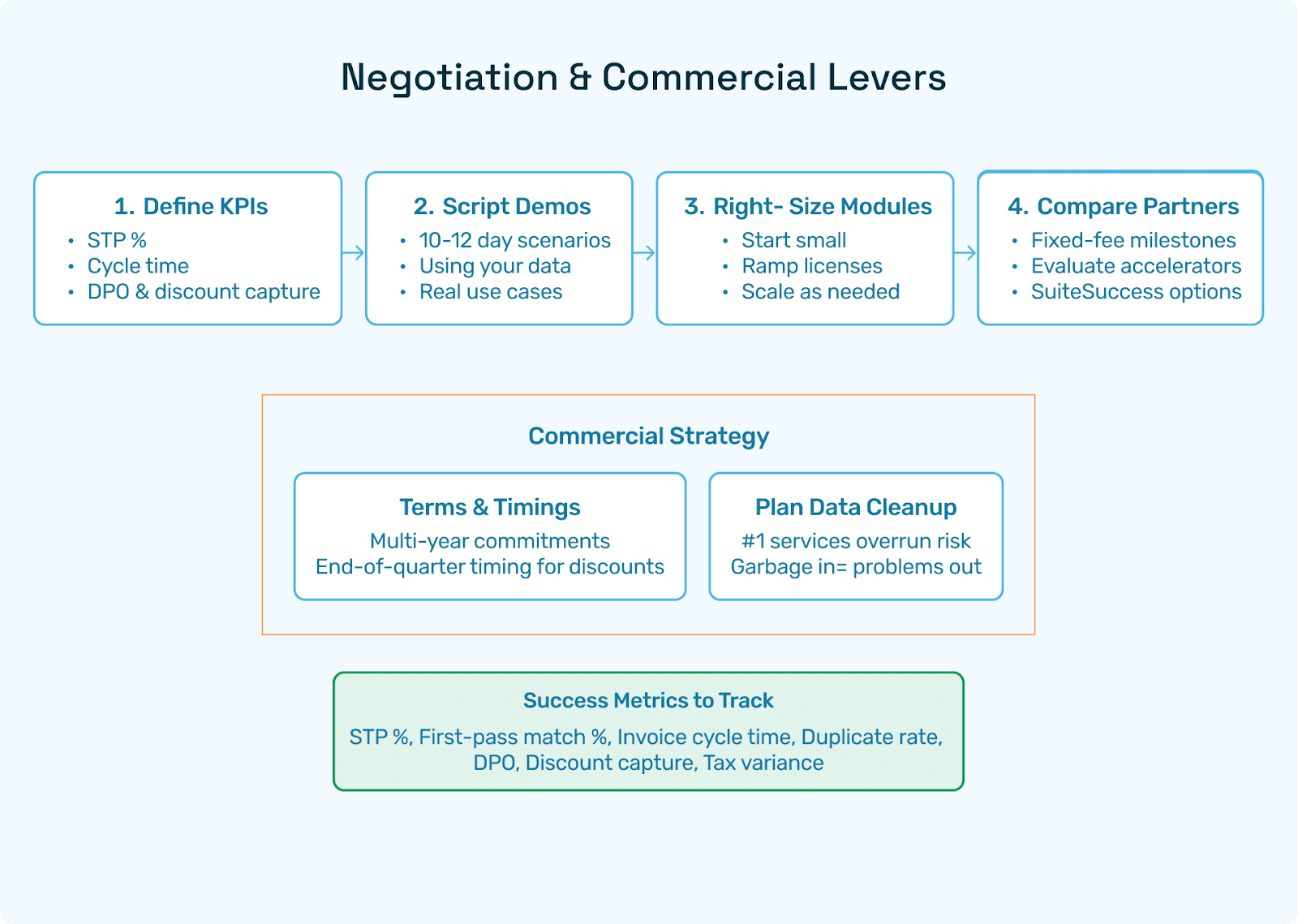
Negotiation & Buying Tips
Script real life: Make vendors run 10–12 “day-in-the-life” flows using your data (3-way match with landed cost, partial receipts, outside processing, serialized returns).
Phase modules: Start with Finance + P2P + light inventory; add WMS/MRP once the core is stable.
Right-size users: Upgrade Limited → Professional only where needed.
Compare two partners: Ask for fixed-fee milestones with clear deliverables and dates.
Budget for training: Role-based enablement cuts stabilization time (less rework = lower TCO).
Automate early (Hyperbots): Offload AP work, accruals, duplicates prevention, and tax verification to reduce run-rate and services overruns.
Where Hyperbots Fits on SAP B1
Hyperbots is a finance-grade AI layer that snaps onto SAP Business One, NetSuite, Business Central, and others. It automates the most labor-heavy steps in Procure-to-Pay and close—so your SAP small business pricing decision translates into actual outcomes, not extra headcount.
Six modular AI Co-pilots—start with one, scale as you go (underline links point to product pages):
Invoice Processing Co-pilot — https://www.hyperbots.com/products/invoice-processing
Procurement Co-pilot — https://www.hyperbots.com/products/procurement
Accruals Co-pilot — https://www.hyperbots.com/products/accruals
Payment Co-pilot — https://www.hyperbots.com/products/payments
Sales Tax Verification Co-pilot — https://www.hyperbots.com/products/sales-tax-verification
Vendor Management Co-pilot — https://www.hyperbots.com/products/vendor-management
How it helps SAP B1 teams
Invoice Processing: Read PDFs/emails/portals, extract headers and line-level details (items, qty, price, tax, freight); perform 2/3-way matching; post clean bills; surface duplicates.
Accruals: Suggest period-end accruals for unbilled services (freight, outside processing), in-transit receipts, and landed costs—auto-reversing with evidence.
Payments: Build proposals to capture discounts; validate vendor bank data; block duplicate/over-pays.
Sales Tax: Verify jurisdiction/rates per line; keep audit trails clean.
Vendor Management: Onboard vendors (KYC, W-9/W-8, insurance), enforce maker-checker on bank changes, and keep docs current.
This is how Hyperbots turns sap accounting software price into cost per outcome—less manual AP effort, faster close, stronger cash.
Hyperbots Platform Capabilities
Finance-trained AI (HyperLM + MoE): Vision + layout + LLM ensemble tuned for invoices, POs, GRNs/ASNs, and statements; excels at line-level reasoning and anomaly detection.
Deep connectors: Real-time read/write with major ERPs (incl. SAP B1); Gmail/Outlook ingestion; bank rails; tax engines; shipping/3PL; EDI; portals.
Policy & reasoning: GL coding suggestions; vendor-class tolerances; maker-checker on bank changes; approval nudges.
Security & SoD: Role-based access; redaction; immutable audit logs.
Scale & reliability: Microservices (Java, Postgres, React); multi-entity, multi-currency; high-volume doc throughput.
Outcome telemetry: STP %, first-pass match %, invoice cycle time, duplicate rate, DPO, discount capture, tax variance.
Hyperbots-Led ROI Improvements
Controller-approved, conservative first-wave outcomes (90–180 days):
Straight-Through Processing (STP): 60–90% of vendor bills post without human touch after stabilization.
Invoice Cycle Time: 30–60% faster from receipt to post; earlier discount capture.
Duplicate/Over-payment Prevention: near-elimination via cross-vendor/date/amount/line hashing + bank validation.
Working Capital (DPO): +3–10 days through optimized payment proposals.
Close Acceleration: 20–40% fewer manual accrual entries with fully linked evidence chains.
Many teams model ~80% operations cost reduction in AP workflows at scale when STP climbs and exception queues shrink (your mileage varies by data quality and policy discipline).
FAQs: SAP Business One Pricing
Q1. What’s the average cost of SAP Business One?
There’s no universal list price. B1 is sold via partners with cloud per-user or perpetual per-user + maintenance models. Multiple partner guides show ~$100–$219/user/month (cloud) or ~$1,800–$3,500/user (perpetual) as directional signals; your quote will vary. ERP ResearchSynavos
Q2. Is there official SAP pricing online?
SAP’s official pages explain features and fit but do not post B1 list prices. Use partner calculators/guides for planning; validate with a current quote. SAP+1
Q3. What’s the difference between sap business 1 price and sap business one preço/preis?
They’re the same idea in English/Portuguese/German. Local partner sites sometimes publish euro/BRL signals for cloud/perpetual—again, directional only. Business One Consultancy
Q4. How does B1 compare to Business Central on pricing?
Business Central posts transparent pricing—$70 (Essentials) / $100 (Premium) per user/month, plus Team Members. Microsoft announced price changes effective Oct 1, 2025; current pricing applies until then. B1 is quote-based with cloud or perpetual choices. Microsoft+1
Q5. How does B1 compare to QuickBooks?
QuickBooks Desktop Enterprise is subscription-based (annual, paid monthly) with clearly listed tiers on Intuit.com (e.g., Diamond). It’s accounting-led, not a full ERP; many companies migrate to B1/Business Central/NetSuite as processes mature. QuickBooks+1
Q6. What drives the cost of implementing ERP system on B1?
Data quality, manufacturing/WMS depth, integrations (tax, banks, 3PL/ship, EDI), and training. Mid-market B1 implementations often land in the ~$25k–$150k+ band; regulated/global programs run higher—similar to NetSuite implementations cited by partners. Cumula 3 Group
Q7. Can Hyperbots reduce my run-rate enough to matter?
Yes—by raising STP %, compressing cycle time, preventing duplicates, and linking audit evidence, Hyperbots often offsets a chunk of your annual ERP run-rate regardless of vendor.
Q8. We already own B1 perpetual licenses; is moving to cloud cheaper? Sometimes, sometimes not. Perpetual + maintenance can be cost-effective in place; cloud simplifies patching/hosting. Model both TCOs over 3–5 years.
Final Takeaway
There’s no universal sticker for SAP Business One pricing because the sap business one cloud cost or perpetual + maintenance math depends on your user mix, modules, data/integrations, and training plan. The fastest path to a credible budget is to:
Write 10–12 day-in-the-life scripts (the work you actually do).
Forecast users by role (Professional vs. Limited).
Draft two TCOs (cloud vs. perpetual).
Triangulate with public vendor pages (e.g., Business Central pricing) and directional B1 partner guides. MicrosoftERP Research
Then, layer Hyperbots on SAP B1 to turn ERP spend into outcomes: fewer manual touches, faster close, stronger cash, and audit-ready evidence—so your sap for small business price becomes a cost-per-outcome story your CFO and plant managers will actually love.