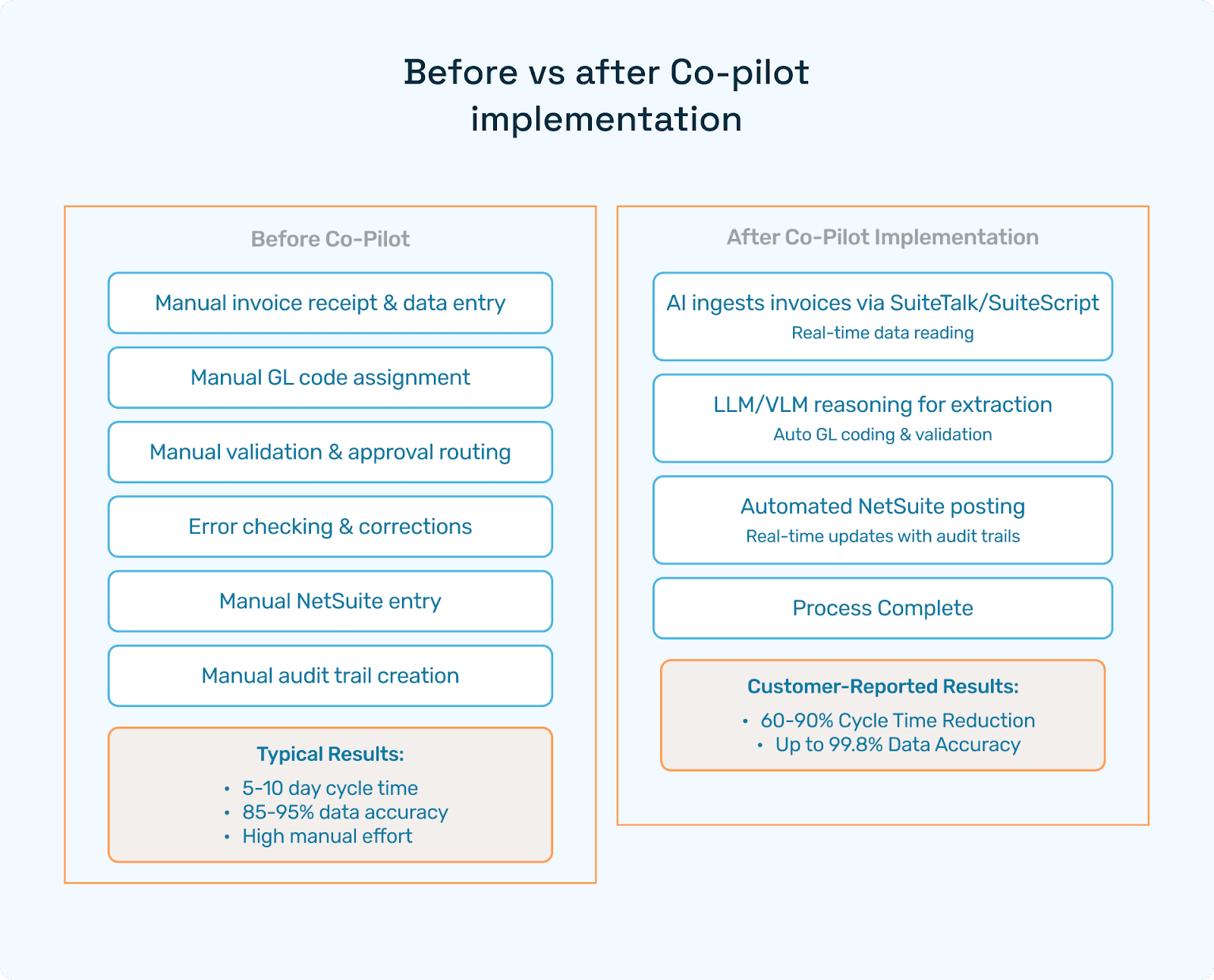
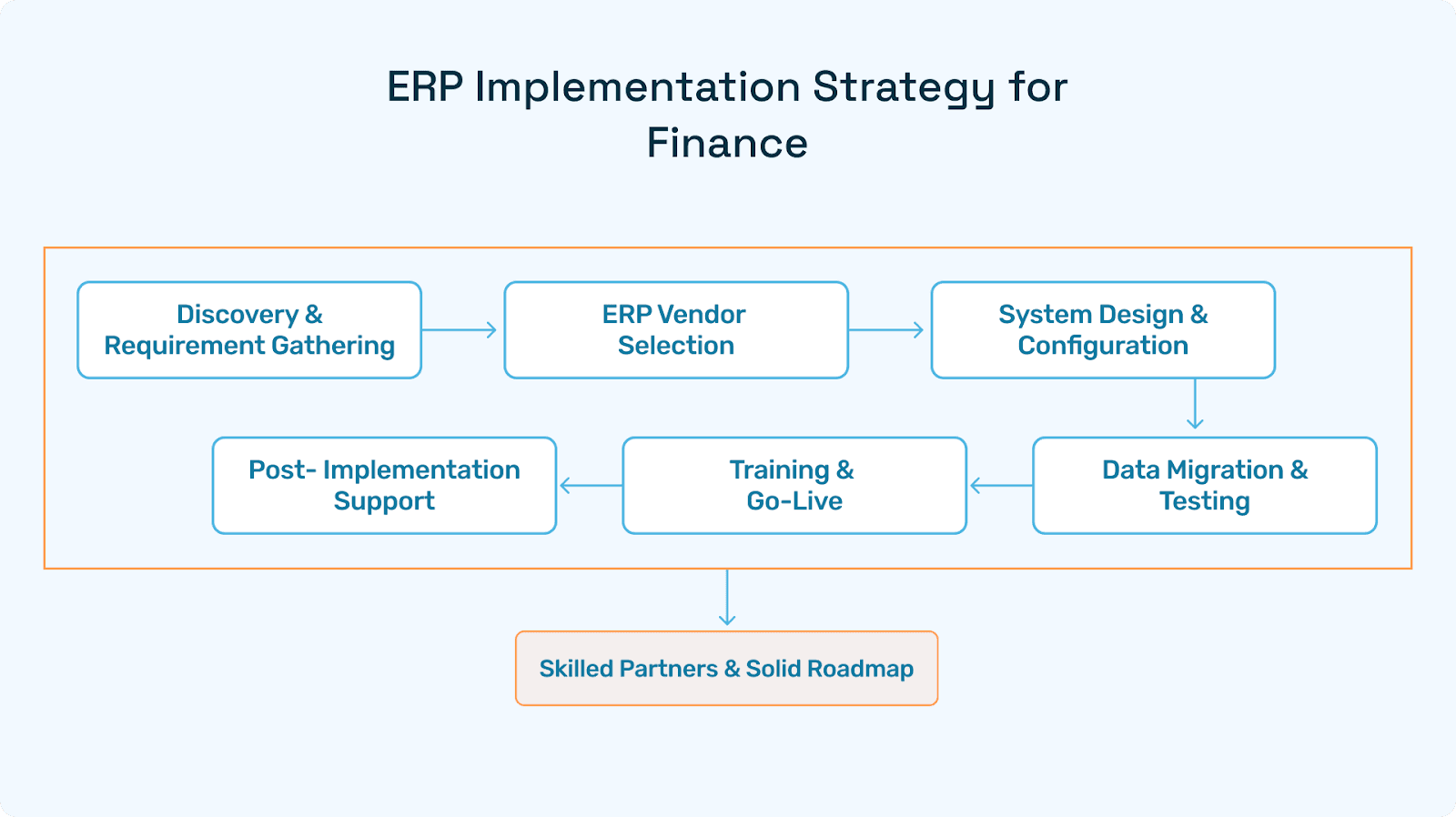
How Many Levels Does a Typical ERP System Include?
Understanding ERP Architecture, Modules, and AI Enhancements for Enterprise Efficiency
A typical ERP system includes five to six levels: infrastructure, platform and middleware, core application modules, user interface and role management, reporting and analytics, and in modern deployments with an AI and automation layer. Each level serves a distinct function, and together they determine how well an ERP system scales, integrates, and performs across an organization.
Whether you're evaluating an ERP for the first time or looking to optimize an existing deployment, understanding these levels is foundational to making the right architectural and vendor decisions.
What Is an ERP System?
An Enterprise Resource Planning (ERP) system is an integrated software platform that centralizes and automates core business processes like finance, procurement, inventory, HR, manufacturing, and more, on a single unified system.
Modern ERP platforms go well beyond data storage. They support real-time decision-making, cross-departmental visibility, compliance management, and increasingly, AI-driven automation across workflows.
Why ERP Architecture Is Built in Levels
ERP systems use a tiered architecture for good reason: each layer handles a specific class of functionality, which makes the overall system more modular, secure, and easier to scale.
The level-based structure enables:
Modularity: deploy only what you need, when you need it
Security: role-based access and data governance at each layer
Scalability: expand across geographies, entities, or business units
Integrability: connect to third-party platforms via well-defined API layers
Performance: isolate and optimize bottlenecks without disrupting the full system
Understanding this architecture also helps teams plan ERP implementations more effectively while knowing which layer a problem lives in dramatically reduces resolution time.
The 5 Core Levels of a Typical ERP System
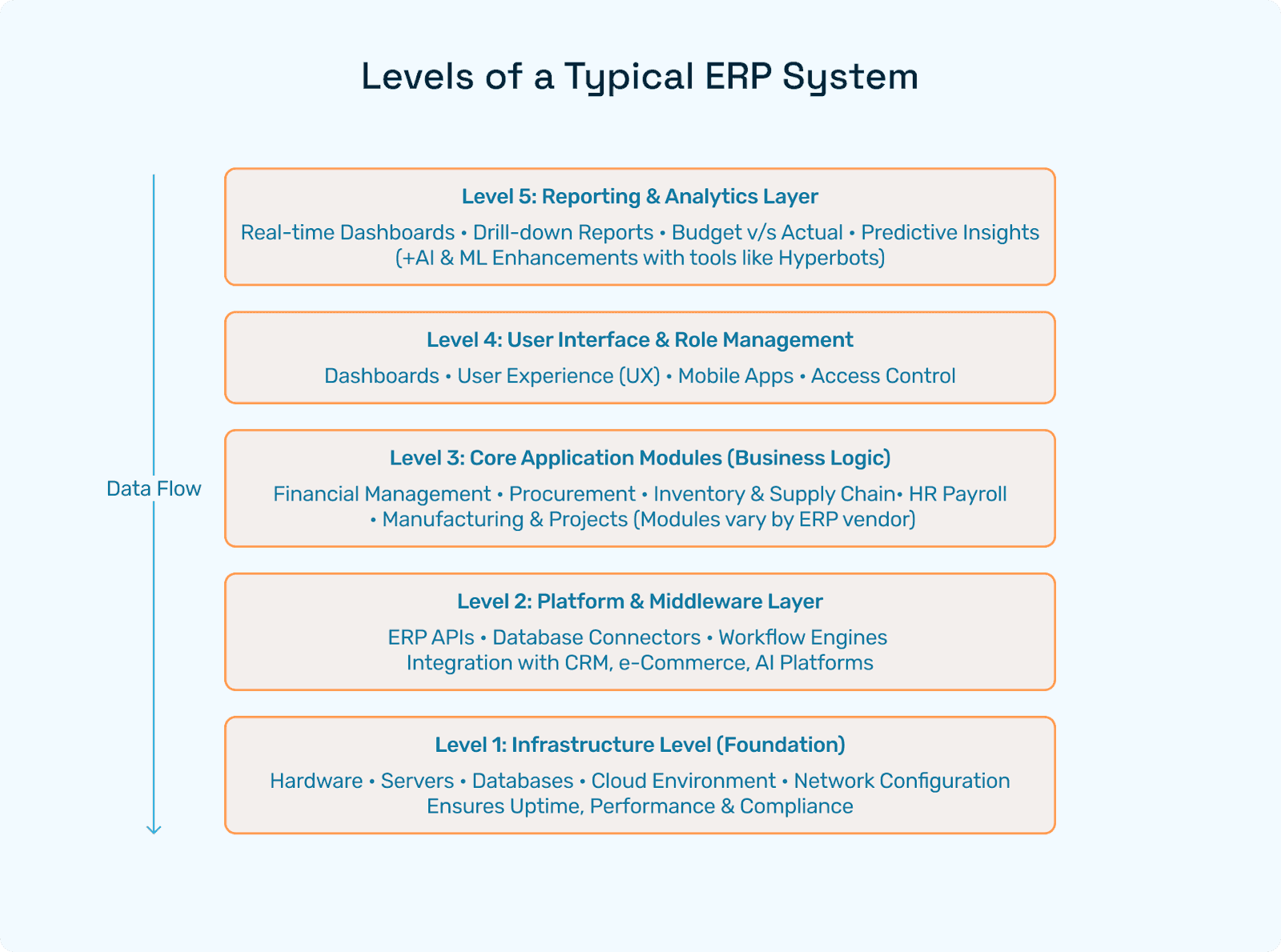
Level 1: Infrastructure
The infrastructure layer is the foundation of any ERP system. It includes:
Physical or cloud-hosted servers and databases
Network configurations and security protocols
Storage, backup, and disaster recovery systems
Compliance infrastructure (GDPR, SOC 2, ISO 27001, etc.)
Cloud ERP deployments - such as those hosted on AWS, Azure, or Google Cloud have made this layer largely invisible to end users, but its performance directly determines uptime, latency, and data reliability.
Level 2: Platform and Middleware
The middleware layer connects the ERP's core to the outside world. It includes:
ERP APIs for external integrations
Database connectors and ETL pipelines
Workflow engines that trigger automated actions
Integration layers for CRM, eCommerce, payroll, tax, and AI platforms
This is the layer where AI automation tools like Hyperbots integrate via API to extend ERP capabilities without requiring modifications to core application modules. That approach preserves system integrity while enabling intelligent process automation on top of existing infrastructure.
Level 3: Core Application Modules
This is the business logic heart of the ERP - where finance teams, procurement managers, HR professionals, and operations leads spend most of their time. Common modules include:
Module | Core Functionality |
Financial Management | General ledger, AP/AR, budgeting, forecasting |
Procurement | Purchase requests, PO management, vendor workflows |
Inventory & Supply Chain | Stock tracking, warehouse ops, supply chain visibility |
Human Capital Management | Payroll, benefits, performance management |
Project Management | Milestones, time tracking, project billing |
Sales & CRM | Quotes, orders, opportunity pipeline |
Manufacturing | Bill of materials, routing, production scheduling |
Compliance & Audit | Tax management, internal controls, audit trails |
The specific modules available vary by ERP vendor - NetSuite, SAP, Oracle, Microsoft Dynamics, and QuickBooks each offer different module configurations and depth.
Level 4: User Interface and Role Management
This layer governs how users interact with the system. It includes:
Role-based dashboards tailored to finance, operations, or executive views
Mobile applications for on-the-go access and approvals
Access control and permission management
Multilingual and multi-currency interfaces for global deployments
UX quality at this layer has a direct impact on ERP adoption rates. Poor interface design is one of the most commonly cited reasons ERP implementations underperform post-go-live.
Level 5: Reporting and Analytics
The analytics layer transforms raw ERP data into actionable intelligence. Capabilities typically include:
Real-time dashboards with drill-down functionality
Budget vs. actual reporting across cost centers and entities
Audit and compliance reports for internal and external review
KPI tracking for finance, operations, and supply chain
Embedded BI tools or integrations with platforms like Power BI or Tableau
This layer is where CFOs and finance leaders spend a significant portion of their time, and where the quality of underlying data at every other layer ultimately shows up.
The Sixth Level: AI and Automation (Increasingly Standard)
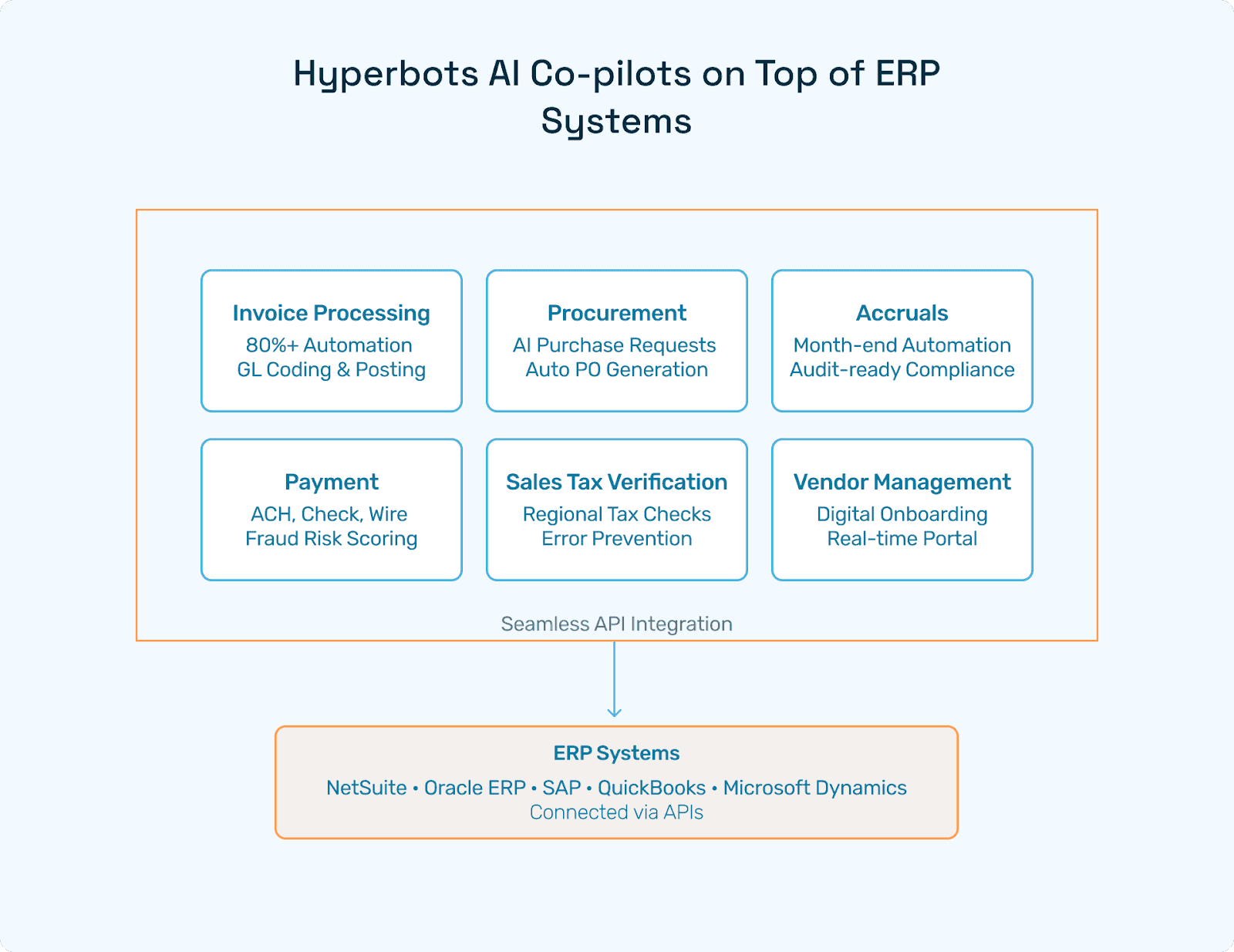
While not part of traditional ERP architecture, a sixth AI layer has become a practical standard for enterprise finance teams seeking to close faster, reduce manual errors, and scale without headcount.
Rather than replacing the existing five levels, the AI layer sits on top and connects via the middleware/API level to automate high-volume, rule-based, and judgment-intensive finance tasks.
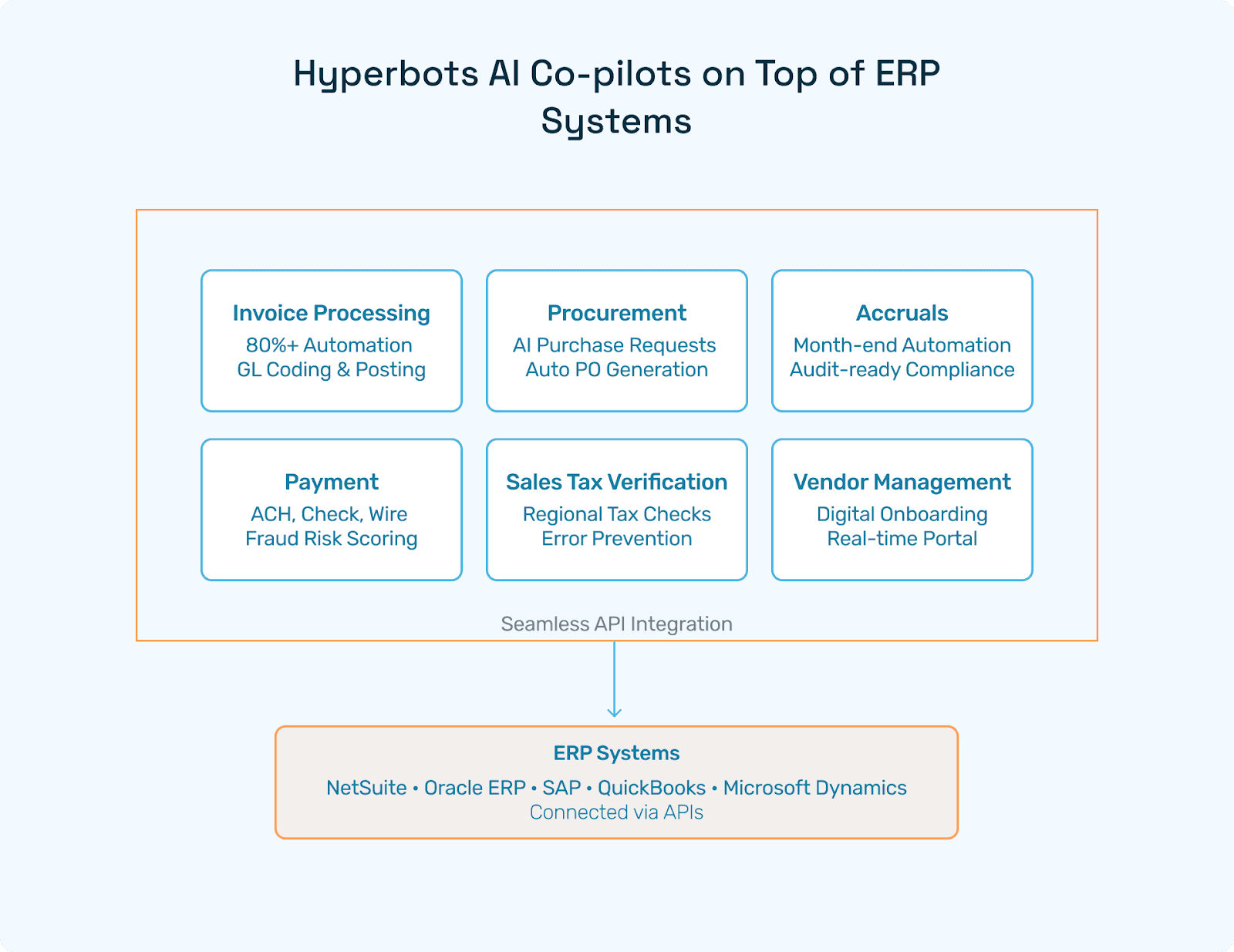
Hyperbots is purpose-built for this layer, offering a suite of AI co-pilots that operate across the full ERP stack:
Co-pilot | What It Automates |
Data extraction, GL coding, validation, and posting - 80%+ straight-through processing | |
AI-generated purchase requisitions, policy-based PO creation, auto-dispatch | |
Month-end automation, intelligent reversal logic, audit-ready outputs | |
ACH/check/wire workflows, due date tracking, fraud risk scoring | |
Regional and vendor-side tax validation, error prevention | |
Digital onboarding, duplicate detection, real-time vendor portal |
Hyperbots integrates with major ERP platforms including NetSuite, SAP, Oracle ERP, Microsoft Dynamics, and QuickBooks which makes it a vendor-agnostic enhancement layer rather than a replacement for any existing system.
ERP Level-by-Level Capability Summary
ERP Level | Primary Function | Example Capabilities |
Infrastructure | System foundation | Cloud hosting, backups, latency management |
Middleware / API | Integration and connectivity | Third-party connectors, AI agent hooks, ETL |
Application Modules | Business logic | Finance, HR, SCM, CRM, manufacturing |
UI & Role Management | User experience | Dashboards, mobile apps, access control |
Reporting & Analytics | Data intelligence | Embedded BI, KPI tracking, drill-down reports |
AI Layer | Intelligent automation | Invoice AI, procurement automation, accruals |
Key Features of Modern ERP Systems
Across all levels, leading ERP platforms share a common set of capabilities:
Centralized data repository with a single source of truth
Workflow automation across finance, procurement, and HR
Role-based access control with granular permissions
Audit trails and compliance reporting built in at the module level
Real-time financial visibility across entities and geographies
Scalable architecture that supports growth without re-platforming
AI/ML integration via native modules or third-party platforms
How ERP Levels Work Together: A Practical Example
Consider a three-way invoice match scenario in a mid-sized manufacturing company:
A vendor submits an invoice (captured at the UI layer)
The middleware layer routes it through the AP workflow engine
The procurement module checks it against the original PO
The inventory module confirms goods receipt
The analytics layer flags a quantity discrepancy in real time
The AI layer (via Hyperbots) automatically routes the exception for human review, logs the anomaly, and updates the accrual forecast
What once required manual intervention across three departments is resolved, or escalated intelligently within minutes.
Frequently Asked Questions
How many levels does a typical ERP system include?
A typical ERP system includes five core levels: infrastructure, platform and middleware, core application modules, user interface and role management, and reporting and analytics. Most modern deployments add a sixth level which is AI and automation, particularly for finance-heavy operations.
What are the most important modules in an ERP system?
Financial management, procurement, inventory and supply chain, and HR/payroll are the four most universally deployed ERP modules. Additional modules like project management, manufacturing, and CRM are common in mid-market and enterprise deployments.
How do AI tools integrate with ERP systems?
AI platforms like Hyperbots connect to ERP systems via the middleware/API layer. This means they extend ERP functionality by automating invoice processing, accruals, and vendor management that too without modifying core application modules or requiring a re-implementation.
What is the difference between ERP levels and ERP modules?
ERP levels refer to the architectural layers that make up the system (infrastructure, middleware, UI, etc.). ERP modules refer to the specific functional applications within Level 3 such as finance, HR, or procurement, that handle business processes.
Which ERP platforms support AI automation?
NetSuite, SAP, Oracle ERP, Microsoft Dynamics, and QuickBooks all support AI integration via their API/middleware layers. Platforms like Hyperbots are designed to work across all of them without requiring platform-specific customization.
Conclusion
Understanding how many levels a typical ERP system includes and what each level does which is essential for anyone planning an ERP implementation, integration, or optimization project. The five core levels (infrastructure, middleware, application modules, UI, and analytics) form the structural backbone of any modern ERP platform, while the AI layer has become the differentiator for finance teams looking to operate at scale.
For organizations running NetSuite, SAP, Oracle, QuickBooks, or Microsoft Dynamics, AI co-pilots like those offered by Hyperbots represent a practical, non-disruptive path to higher automation rates, faster close cycles, and measurably lower operational costs that too without replacing the ERP systems already in place.
Ready to see Hyperbots in action? Book a demo and watch invoice automation transform your ERP today.