Purchase Requisition Automation Demo: Scenarios, Metrics, and Checklist
A deep dive into how finance leaders can evaluate purchase requisition automation demos - from intake to PO creation - and measure ROI with Hyperbots’ AI Co-pilots.
Executive Summary
Finance leaders are under pressure to reduce cycle times, improve compliance, and cut procurement costs. Yet, manual requisition-to-purchase-order workflows slow decision-making, create errors, and frustrate employees.
This blog explores how a purchase requisition automation demo equips CFOs, Controllers, and Procurement Leaders to evaluate automation platforms effectively. We’ll cover:
What to expect in a demo of purchase requisition software
Key automation scenarios from intake to purchase order processing automation
Success criteria and ROI metrics (e.g., time-to-approve, error rates, adoption)
A practical checklist for comparing vendors
How Hyperbots AI Co-pilots deliver transformational value with 80% time reduction
By the end, you’ll see why the right automation demo isn’t just about software features - it’s about validating real-world impact on procurement efficiency, compliance, and ROI.
Introduction: Why Purchase Requisition Automation Matters
Requisitioning is the first - and often most overlooked - step in procurement. Employees submit requests, managers approve them, and procurement teams convert them into purchase orders. On paper, this sounds simple. In practice, it’s full of friction:
Requests buried in email threads
Spreadsheets without audit trails
Long approval chains delaying projects
Frequent mismatches between budgets and vendor terms
According to Deloitte’s Global CPO Survey, digital procurement leaders achieve 2x higher savings and stronger supplier metrics than manual-first peers. That’s why enterprises now seek purchase requisition software that automates intake, validation, approvals, and integration with ERP systems.
A purchase requisition automation demo allows finance teams to test how these capabilities work in real business scenarios.
What is a Purchase Requisition Automation Demo?
A purchase requisition automation demo is a guided walkthrough of software designed to showcase:
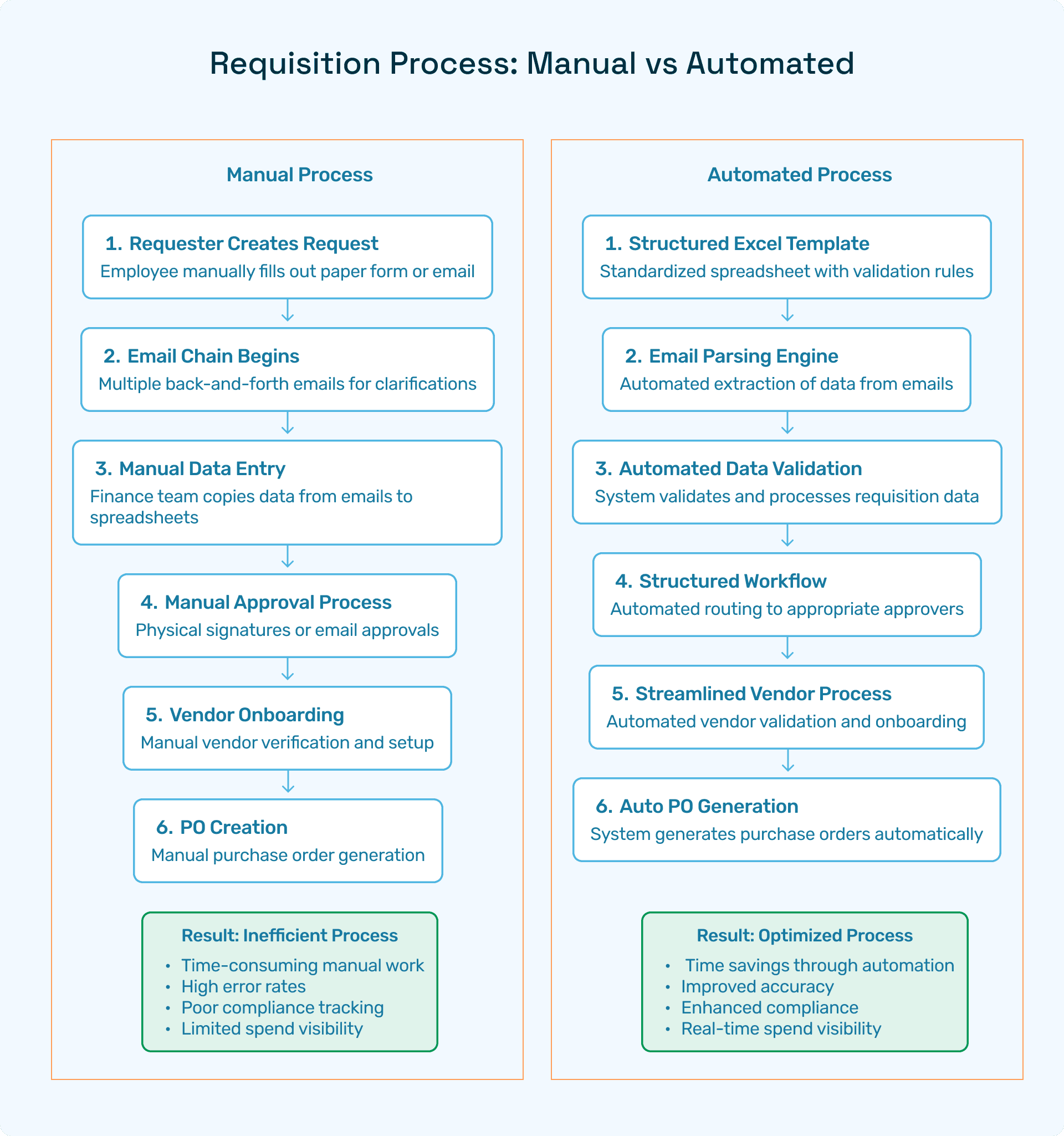
Intake orchestration → capturing requests from spreadsheets, forms, or emails
Validation checks → ensuring requests meet budget, policy, and vendor rules
Approval routing → auto-escalating based on thresholds and policies
PO creation & processing automation → converting approved requisitions into purchase orders
ERP synchronization → pushing data to SAP, Oracle, NetSuite, or Dynamics
In contrast to generic product overviews, a focused demo highlights your company’s scenarios, measuring time-to-approve, error reduction, and user adoption.
Key Scenarios to Expect in a Demo
1. Intake and Validation
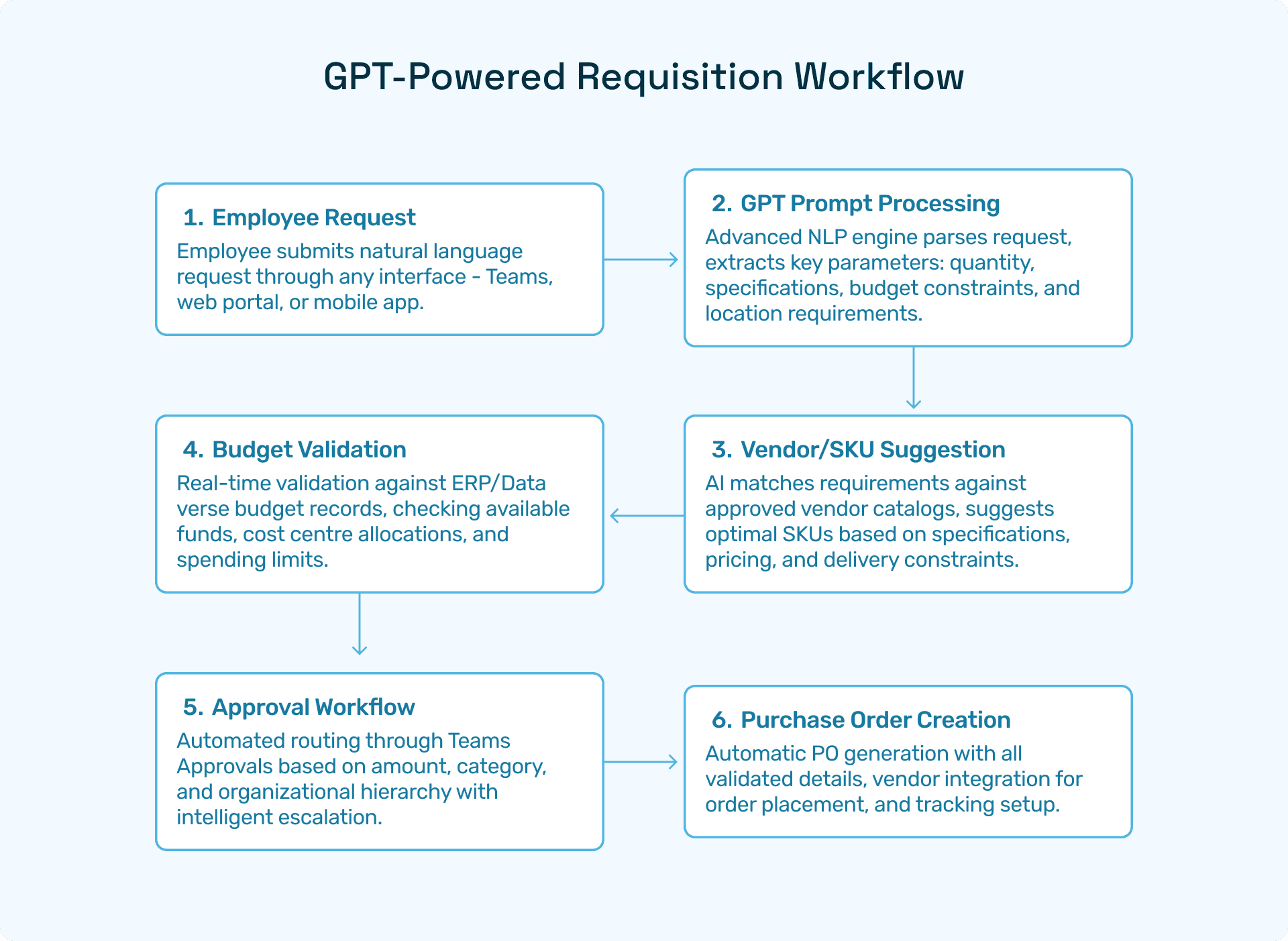
Parsing requisitions from Excel, email, or a web form
Budget validation against cost centers in real time
Vendor/SKU suggestions for accuracy
2. Automated Approvals
Rules-based routing for different approval hierarchies
SLA-based escalation if managers delay responses
Teams/Slack notifications for instant approvals
3. PO Creation & ERP Integration
Approved requisitions instantly converted into purchase orders
Automatic syncing with ERP systems like SAP, Oracle, NetSuite, and Microsoft Dynamics
Three-way matching setup for compliance
4. Analytics & Reporting
Real-time dashboards tracking time-to-approve
Audit trail visibility for every decision
Spend analytics for procurement optimization
Success Metrics: Measuring the ROI of Automation
CFOs and Controllers want hard data, not just features. In any demo, ensure metrics are mapped against ROI.
Core Metrics
Time-to-Approve: Shrink approval cycles from weeks to hours
Error Rate: Track reduction in duplicate/incorrect requisitions
Adoption Rate: Employees submitting requisitions through the automated platform
Compliance Rate: Requisitions aligned with policies/budgets
ROI Benchmarks
Faster cycle times
Reduced audit exceptions and regulatory risks
👉 External Reference: Gartner reports that top-performing procurement organizations leverage AI automation 2x more often than low performers.
Checklist for Evaluating Purchase Requisition Automation
When attending a demo, use this checklist to guide questions:
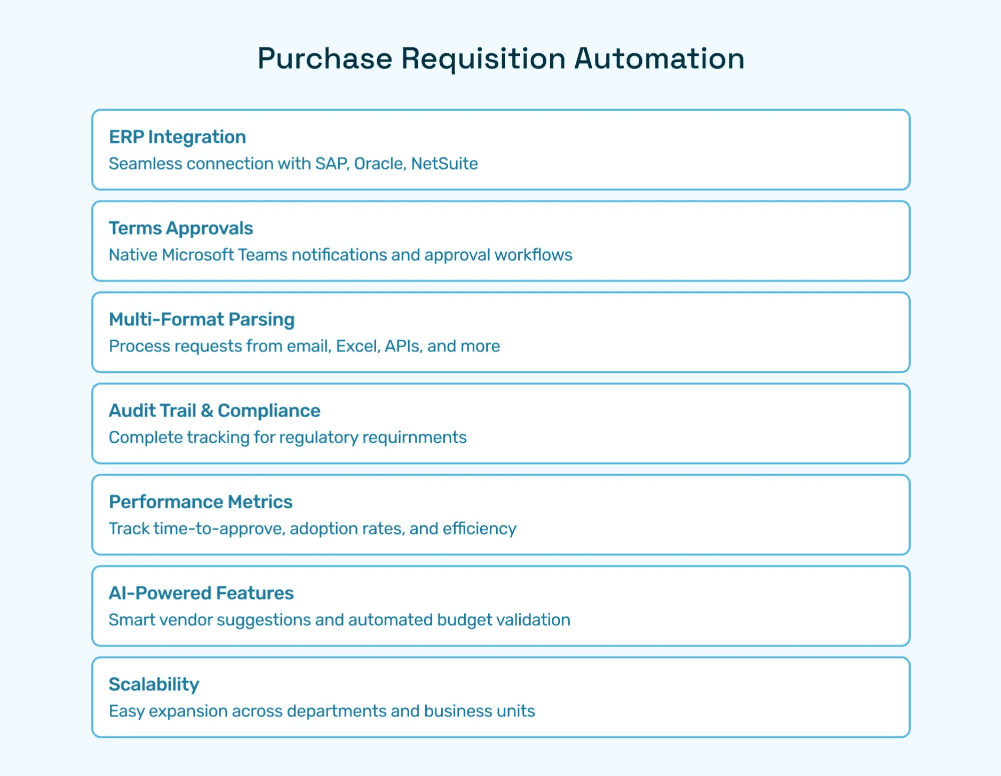
✅ Does the software integrate with our ERP (SAP, Oracle, NetSuite)?
✅ Are Teams approvals and notifications supported?
✅ Can it parse requests from email, Excel, and APIs?
✅ Does it support audit trails for compliance?
✅ Are metrics like time-to-approve and adoption tracked?
✅ Is AI included for vendor suggestions and budget validation?
✅ How easy is it to scale across departments?
Why Hyperbots Sets the Benchmark
While many vendors offer purchase requisition software, Hyperbots differentiates with AI-powered Co-pilots.
Procurement Copilot
Shrinks cycle times from request to PO
Auto-validates policies with AI reasoning
Provides real-time dashboards for spend visibility
Supporting Co-pilots
Invoice Processing Copilot → automates invoice matching & validation
Vendor Management Copilot → ensures compliant onboarding
Accruals Copilot → delivers real-time expense visibility
Payments Copilot → secures disbursements with policy compliance
Platform Capabilities
Agentic AI for unstructured data (emails, PDFs, contracts)
Deep ERP integrations with SAP, Oracle, Microsoft Dynamics
Adaptive reasoning → anomaly detection and predictive analytics
Human-in-the-loop workflows for CFO oversight
Hyperbots’ ROI Impact
Faster requisition-to-PO cycles
Policy compliance
Stronger vendor trust through on-time orders
Improved employee experience with simpler workflows
Data-driven procurement strategy
Adoption Plan: Moving from Demo to Rollout
Run a Targeted Demo
Focus on 2–3 high-volume processes (e.g., IT requisitions, office supplies).Define Success Criteria
Use metrics such as time-to-approve, error rates, and adoption as benchmarks.Pilot Deployment
Launch automation in one department, then scale to others.Full Rollout with Governance
Define access rules, audit protocols, and change management training.
👉 Deloitte recommends using phased adoption roadmaps to balance budgets with transformation pace.
FAQs
Q1. What is a purchase requisition automation demo?
A: It’s a guided walkthrough of software showcasing how requisitions move from intake to PO creation with automation.
Q2. Which metrics matter most in a demo?
A: Time-to-approve, error rates, adoption, and compliance levels.
Q3. How does Hyperbots differ from competitors?
A: Hyperbots uses AI Co-pilots with adaptive reasoning, ERP integration, and real-time spend dashboards—features most rule-based systems lack.
Q4. What ROI can finance leaders expect?
A: Most organizations see ROI in 6–9 months, with immediate cycle time and cost reductions.
Q5. Do Hyperbots support Teams approvals?
A: Yes, requisitions can be routed through Microsoft Teams for instant approvals.