Ramp Implementation vs Hyperbots: Time-to-Value and Accuracy Benchmarked
Implementation speed matters, but accuracy shapes long-term ROI. Here’s how Ramp and Hyperbots stack up when it comes to setup, performance, and delivering real automation value quickly.
If enterprise software had personality types, most AP tools would fall into the category of “tries really hard but needs supervision.” You know the type: systems that promise automation, but the moment you hand them a slightly wrinkled invoice, they panic and send it straight back to you like a boomerang of disappointment. Ramp fits neatly into that world by being organized, structured, and great at tidying workflows, but not exactly built to wrestle with messy, real-world AP complexity. Hyperbots, on the other hand, skips the motivational speeches and focuses on what actually matters: accuracy, context, and reducing the hours humans spend fixing what software should’ve caught.
That contrast matters, because when AP teams adopt new software, the real question isn’t “How fast can we turn it on?” but “How soon will it actually reduce work?” And that’s where implementation speed, accuracy, and long-term automation gains start to diverge sharply between Ramp and Hyperbots. From setup timelines to how each system handles messy, real-world invoices, the differences become clear very quickly, long before anyone celebrates a successful “go-live.”
Ramp implementation: speed is the brand promise
Ramp has built much of its narrative around reducing friction: sign up quickly, control spend with cards and policies, and add Bill Pay for AP. Ramp’s site and support docs repeatedly emphasize short time-to-value sometimes “days” for core features and provide guides for exporting audit trails and preparing for compliance reviews. They contrast modern AP tools with legacy deployments and note that modern AP solutions like Ramp Bill Pay typically deploy in under 2 weeks, while legacy systems take much longer.
What that means in practice:
Fast onboarding for spend controls and cards. Ramp’s card and expense flows are built for rapid adoption. You can often issue cards and enforce policies in days.
Bill Pay can be turned on quickly for basic use. Ramp markets Bill Pay as a modern AP tool that integrates with approvals and payments enough for many teams to replace manual bill pay workflows quickly.
Auditability is baked in. Ramp provides an Audit Log and exportable audit history so you can hand auditors a structured record of approvals, receipts, and edits. That lowers compliance friction in audits.
All of this is real value. Faster time-to-deploy means earlier wins less email chasing, fewer missing receipts which is why Ramp gets high marks from finance teams that want immediate control over spend. But there’s a catch: speed doesn’t always equal accuracy.
Ramp Sets Up Fast, Then Hands You a To-Do List
Missing or Limited Integrations Stall Deployment
Many teams discovered mid-implementation that Ramp simply doesn’t integrate with their accounting systems. Actual user complaints include:
“Ramp is not integrated with our particular accounting software so… our accounting department is still having to manually enter all expenses.”
Even when Ramp does integrate with ERPs like QuickBooks Online, limitations appear:
“It is only a one-way sync (Ramp → QBO)… a two-way sync would reduce errors and improve automation.”
Translation: You may get Ramp “live” quickly, but AP automation progress halts if the system can’t speak to your ERP. And manual re-entry ≠ automation.
Multi-entity Weaknesses Slow Scale
For companies managing multiple subsidiaries:
“Multi-entity functions are limited for QBO users.”
Meaning: Implementation for one entity might look smooth, but replicating AP workflows across multiple business units becomes a patchwork of manual fixes.
Rule Management Creates Admin Overhead
Another surprising bottleneck during implementation:
“Rules are easy to set, but it would be better if we could export all the rules.”
“Want to bulk update locations? Good luck. You have to update each transaction one by one.”
Bulk edits and exports are foundational to efficient AP configuration. Without them, teams spend implementation (and ongoing maintenance) doing repetitive admin tasks.
Limited Reporting = Limited Usability
Even after deploying Ramp, several teams run into the same wall:
“I wish there were additional reporting features and the ability to export reports to Excel.”
This has a direct impact on AP deployment time, because finance teams must either:
Rebuild reporting outside Ramp, or
Continue relying heavily on their ERP, reducing Ramp’s role in AP automation.
5. Errors Are Hard to Diagnose
One review put it bluntly:
“It is hard to resolve issues as the error message might not describe what caused the issue.”
When errors are unclear, implementation slows and support cycles increase.
6. Automation Adoption Gets Blocked by Missing Intelligence
This is the one that impacts AP deployment the most:
“Recurring transactions from the same vendor every month? Ramp still won’t auto-apply the right location. We’ve set it manually 100 months in a row.”
This isn’t just a quirk. It’s a structural limitation. Ramp relies heavily on rule-based automation. Rules require configuration. Rules don’t scale well. And rules fail on messy data.
If the system can’t learn patterns, it keeps asking humans to babysit it.
Hyperbots: What “Accuracy-First” Implementation Actually Looks Like
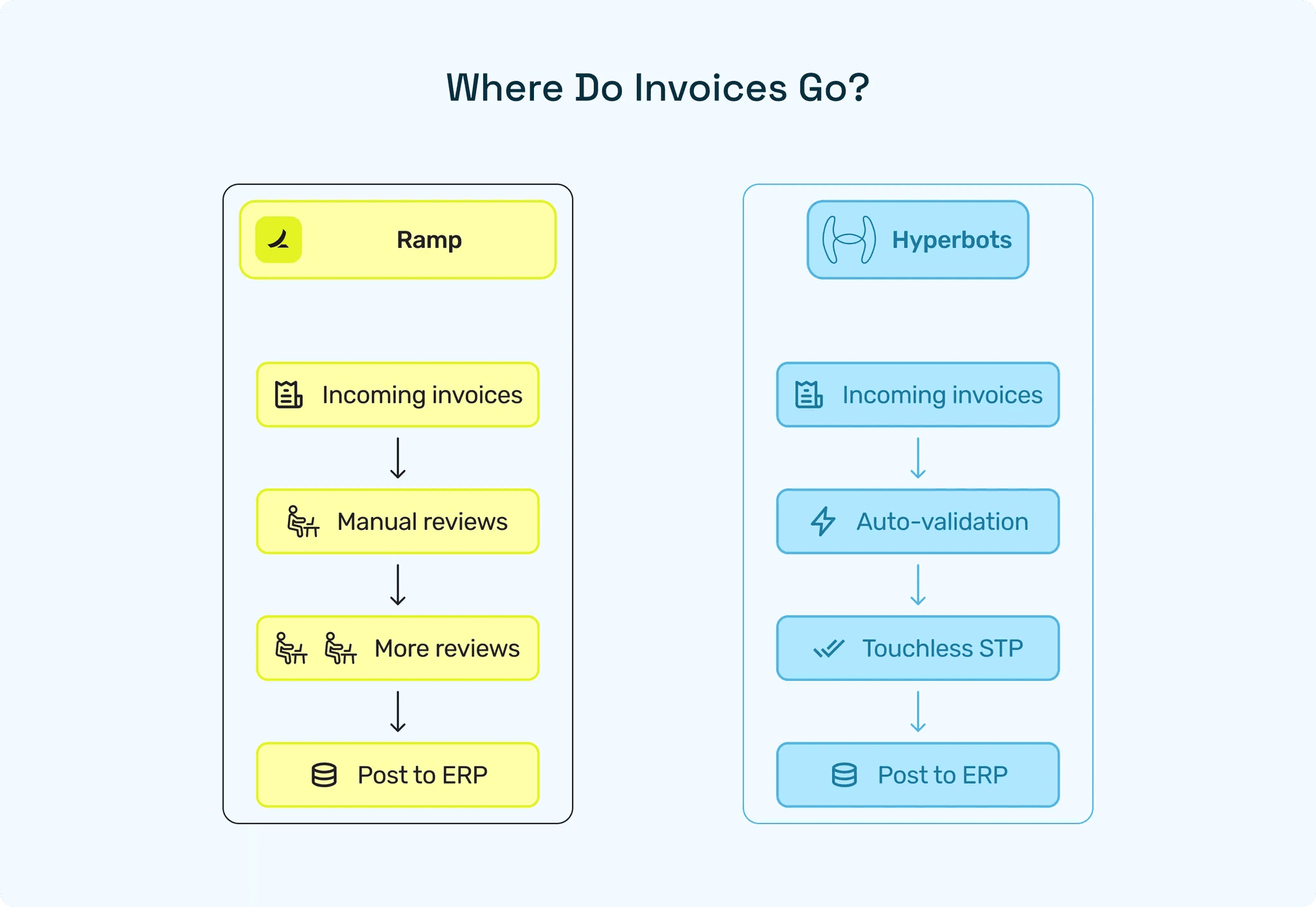
Hyperbots flips the entire implementation logic upside down. Instead of rushing to a surface-level go-live and hoping accuracy catches up later (which is where many Ramp deployments start to wobble), Hyperbots optimizes for correctness, context, and automation that sustains itself without endless human babysitting.
Here’s what that looks like in practice:
1. Integrations That Actually Work (and Actually Sync Both Ways)
Ramp struggles with missing ERP integrations and one-way syncs, leading teams to manually re-enter expenses or shuffle CSVs like it’s 2009.
Hyperbots’ approach is the opposite:
Deep, bi-directional ERP connectors (NetSuite, SAP, Dynamics, Sage, QBO, and more)
Real-time sync, not delayed pushes
No dependence on manual exports/imports
Plug-and-play deployment, not a six-month scavenger hunt
If Ramp still has teams manually keying data because the integration doesn’t exist, doesn’t sync, or doesn’t capture context… Hyperbots just eliminates the entire scenario.
2. Seamless Multi-Entity Logic That Doesn’t Break at Scale
Users repeatedly noted Ramp’s multi-entity limitations, especially QBO teams juggling subsidiaries.
Hyperbots treats multi-entity as a first-class citizen:
Automatic entity detection from invoices
Entity-level rules, roles, workflows, and audit separation
Shared vendor understanding across entities
Accurate cross-entity posting without duplication
Where Ramp users get stuck recreating logic for each entity, Hyperbots centralizes the intelligence so AP teams scale without multiplying their headaches.
3. No More Rule Overload: Hyperbots Learns Instead of Asking You to Configure Everything
Ramp users described painfully manual tasks:
No bulk updates
No rule exports
Updating locations one transaction at a time
Limited automation for recurring patterns
Hyperbots avoids this entire category of pain:
AI learns patterns automatically from coding, vendors, locations, terms, entity routing
Bulk editing everywhere
Enterprise-grade configuration panels
Self-healing logic when upstream data changes
Instead of hundreds of brittle rules, Hyperbots uses confidence scoring, relational signals, and semantic understanding. It learns what humans do and applies it across all future transactions, something Ramp’s rules simply can’t replicate.
4. Accurate Extraction = Fewer Errors, Clearer Troubleshooting
Ramp users often complain:
“Error messages don’t explain what went wrong.”
That happens because errors originate from upstream misreads - rules firing incorrectly, mismatches caused by incomplete data, or context that OCR simply didn’t understand.
Hyperbots prevents these problems at the source:
99.8% extraction accuracy
Field-level and line-level confidence scoring
Vendor- and PO-aware extraction
Semantic table reconstruction for messy invoices
When data is correct on day one, you don’t waste time hunting obscure errors in the logs. And when something is uncertain, Hyperbots highlights the exact field, value, and confidence score, no mystery detective work required.
5. Reporting That Works Where It Matters (Not an Afterthought)
Ramp users consistently ask for:
“More reporting features and exports to Excel.”
Hyperbots delivers:
Out-of-the-box analytics on exceptions, cycle time, vendor performance, STP, audit trails
Export anything, anytime
Drilldowns directly linked to the exact extracted fields
No dependence on ERP reporting to fill gaps
Because visibility isn’t a “nice to have” - it’s what makes finance teams trust automation.
6. Hyperbots Automates Recurring Patterns Ramp Can’t Recognize
Ramp users said:
“Recurring monthly transactions? Ramp still won’t auto-apply the right location. We’ve set it manually for 100 months.”
This is a classic example of what happens when a rule-based system hits real-world complexity.
Hyperbots eliminates manual repetition by design:
Pattern recognition across vendors, spend categories, and historical behavior
Autocomplete entity, GL, department, and location fields based on learned patterns
Zero “teach it every month” maintenance
Self-learning from every correction AP makes
Ramp asks humans to repeat the same classification month after month.
Hyperbots learns it once and then never asks again.
The Accuracy-First Payoff
Because Hyperbots front-loads intelligence rather than configuration, the results compound:
Higher STP (80+%) because fewer invoices ever become exceptions
Lower TCO because teams aren’t buried in rule management and multi-system patchwork
Faster, more meaningful ROI, not just a quick go-live that leads to slow, inconsistent automation
It’s the difference between software that goes live quickly…
and software that keeps working long after the implementation team leaves the building.
Where Ramp gets tripped up by integrations, rigidity, and rules that don’t adapt, Hyperbots becomes more accurate, more autonomous, and more useful the longer you use it.
If Ramp is the system you constantly have to correct, Hyperbots is the system that learns so you don’t have to.
Category | Ramp | Hyperbots |
Primary Strength | Fast implementation, quick controls | Fast Implementation, High accuracy, deep automation |
Deployment Time | Days to ~2 weeks for core features | Few days to ~2 weeks (integration + model validation) |
ERP Integration | Limited or one-way sync in many cases | Deep, bi-directional, real-time syncs |
Multi-Entity Support | Limited, especially for QBO setups | Native, automatic, scalable multi-entity logic |
Automation Approach | Rule-based (manual setup & maintenance) | Learning-based (patterns, context, relational signals) |
Recurring Invoice Handling | Often requires repeated manual corrections | Learns once, self-applies going forward |
Extraction Accuracy | Dependent on invoice quality | 99.8% accuracy, line-level semantic extraction |
STP Outcomes | Moderate; requires tight vendor discipline | High (80%+), grows over time |
Reporting | Basic; limited exports | Full analytics, Excel exports, audit-ready drilldowns |
Ideal For | Fast control + simple AP needs | High-volume, complex, multi-entity AP teams |
Benchmarks: Time-to-Value (AP deployment time) vs Accuracy
Let’s define two metrics we care about:
Deployment time: How long until the tool is functionally useful (cards issued, Bill Pay working, ERP syncs in place).
Sustained automation ROI: How much manual work is eliminated after 30–90 days (measured by STP, reduction in manual hours, and error rates).
Ramp
Deployment time: marketed as days to 4 weeks for many modern setups; Ramp materials claim rapid onboarding and quick go-live for core features.
Sustained automation ROI: depends heavily on invoice quality and how much of AP you route through Bill Pay vs. manual processes. Expect moderate STP unless you augment with specialist extraction or tighten vendor input standards. (Customer reviews and third-party teardowns describe Ramp as strong for spend management and basic AP.)
Hyperbots
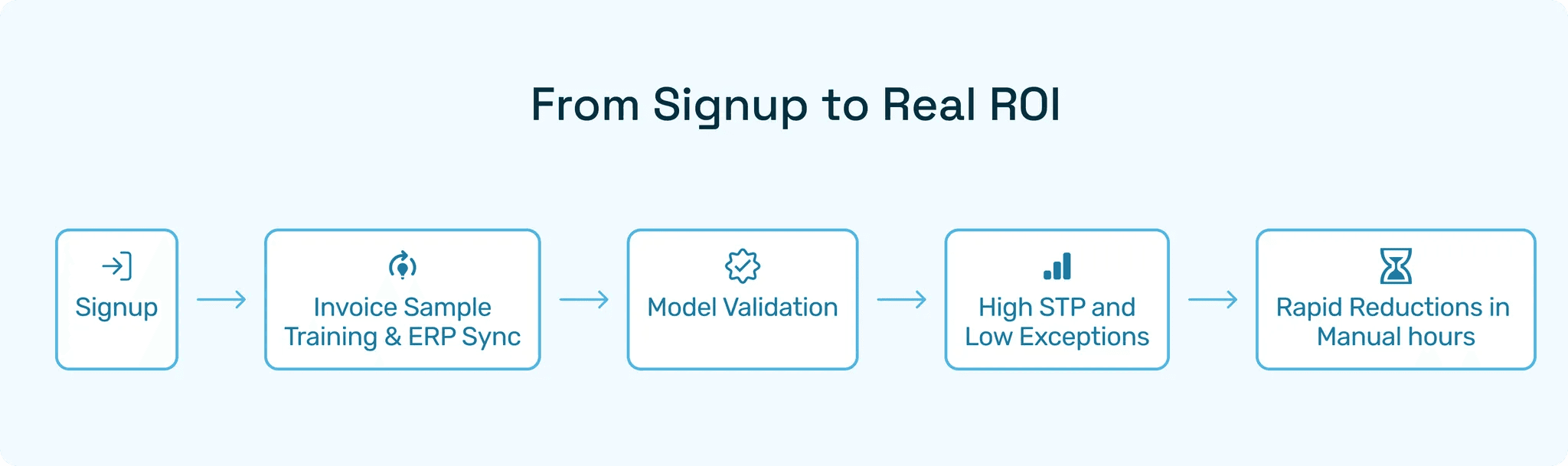
Deployment time: connectors and prebuilt ERP syncs aim to get you live within a few days to 4 weeks (A week is a typical target when integrations are straightforward like with major ERPs such as Netsuite, SAP, Quickbooks, Dynamics 365). Implementation focuses on mapping and validating extraction models against your invoices.
Sustained automation ROI: because extraction is engineered to be highly accurate and matching is context-aware, STP and exception reduction are typically much higher so the ROI becomes visible rapidly and scales with volume.
The real economics: automation adoption ROI
Two numbers matter to CFOs: time saved and errors avoided.
With Ramp’s speed, you realize time saved quickly means fewer late approvals, improved card controls, and faster payments if you move bills through Bill Pay.
With Hyperbots’ accuracy, you realize both time saved and errors avoided are fewer duplicate payments, fewer misposted GL entries, and shorter month-end closes. That’s automation adoption ROI that compounds: each avoided exception saves not only the fix time but the downstream reconciliation work.
If your goal is to minimize human involvement long term, accuracy beats speed. If your goal is to get control quickly and you have low invoice complexity, Ramp’s quick wins can be extremely valuable.
When Ramp is the smart play
You need unified spend controls, corporate cards, and Bill Pay fast.
Your invoice quality is good (e-invoices, supplier portal adoption) and exceptions are already low.
When Hyperbots is the smart play
You operate high-volume AP with messy inputs (scans, line-item complexity, multi-entity).
Exceptions are eating headcount and delaying closes.
Your priority is durable automation adoption ROI and long-term reduction in manual review.
The Verdict: Speed Gets You Live But Accuracy Keeps You Alive
If you want to stop the leaks that silently drain headcount and margin, Hyperbots is the deep solution that pays dividends over time. One only gets you to go live fast; the other makes you go live fast AND your AP functionally silent in the best possible way.
Frequently Asked Questions (FAQs)
1. What is AP deployment time for Hyperbots?
Around a few days to 4 weeks. Hyperbots targets quick, connector-based deployments (often a few weeks), but invests more up front in extraction validation to maximize first-pass accuracy.
2. Which yields higher automation adoption ROI: Ramp or Hyperbots?
If your main metric is time-to-control, Ramp delivers quick wins. If your KPI is long-term reduction in exceptions and manual work (true automation adoption ROI), Hyperbots’ accuracy-first approach typically outperforms.
3. Can I use Ramp and Hyperbots together?Yes. Many finance teams use unified spend tools (Ramp) for cards and policy enforcement while plugging in specialist extraction/AI platforms (like Hyperbots) for high-accuracy invoice processing and matching.