Running an Accuracy POC: Benchmarking Tipalti vs Hyperbots on Real Invoices
We detail the methodology, the data set, and the head-to-head metrics that reveal which solution truly minimizes exceptions and achieves near-perfect data capture on complex invoices.
If you’re gearing up for an AP proof of concept, here’s a friendly reality check: the vendor that reads invoices fastest isn’t always the one that actually frees your team the fastest. Speed looks great in a demo but in real operations, it’s accuracy that quietly saves the day (and the budget). The real test lies in how well a system captures header fields, line items, GL codes, and POs and how short that dreaded human-verification queue becomes.
A POC built around real, messy invoices and not the neatly formatted samples from marketing slides reveals who truly automates and who just digitizes. By benchmarking Tipalti’s invoice capture against Hyperbots’ AI extraction on a realistic dataset, finance teams can see measurable proof of where the real efficiency gains come from and where manual effort still hides behind the automation curtain.
Beyond the Demo: Why Every AP Team Needs an Accuracy-Driven POC
Most AP teams fall for the classic trap: the demo glow-up. The salesperson waves a polished PDF, the system “magically” reads it in two seconds, and voilà, automation utopia! But in the real world, invoices are wrinkled, written like a doctor’s prescription, and occasionally in four languages.
A real invoice automation trial (a.k.a. a “no-BS proof of concept”) should be built around one thing: accuracy. Because pretty dashboards don’t pay vendors, correct data does.
Here’s what a meaningful accuracy check actually looks like:
STP rate: How many invoices sail straight through without human oversight?
Header accuracy: Can it get the basics like your invoice number, date, and total right or does it treat every invoice like a pop quiz?
Line-item precision: When you zoom in on the details (quantity, unit price, line totals, descriptions), is it consistent… or does it start inventing numbers on its own
Vendor/PO mapping: Does the system know your vendors, or is it constantly confusing Acme Inc. with Acme Supplies?
Human verification hours: The real KPI is how many hours of your team’s life are still lost to fixing “AI” mistakes?
These answers tell you what your ROI actually looks like. Tipalti, for instance, promotes its AI-powered Smart Scan for header and line-level extraction and to its credit, it’s a solid attempt at invoice intelligence.
But even Tipalti’s own materials admit what every finance pro already suspects: traditional OCR alone tops out around 55–60% accuracy in real-world conditions. Means you’ll still need a lot of trusty humans nearby to rescue the machine when it meets a slightly weird PDF.
So, before you fall in love with another perfect demo, remember that real invoices don’t care about marketing promises.
Design a practical POC (what to include)
A rigorous POC is reproducible, fair, and representative. Here’s a checklist to follow:
Representative dataset
1,000–5,000 real invoices exported (PDFs) covering:
Different vendors, countries, languages.
Paper scans, emailed PDFs, system-generated invoices.
A mix of single-line and complex multi-line invoices.
Controlled environment
Same dataset fed to both vendors.
Same integration endpoints (if possible) to the test ERP or a staging dataset.
Clear metrics (define them precisely)
Header accuracy (per-field: invoice number, date, vendor, total).
Line-item accuracy (per-line: quantity, unit price, line total, description).
STP rate a.k.a the percent of invoices that were posted without manual edits.
Exception rate and types (missing/incorrect PO, mismatched totals).
Human verification time per invoice.
Processing capacity (invoices/hour) and latency.
Blind evaluation
Results validated against a human-verified ground truth.
Use blind graders to avoid bias.
Acceptance criteria
Minimum header accuracy target (e.g., 98%).
Minimum STP target (e.g., 80%).
Max allowed manual verification time per invoice.
Root-cause logging
For every error, log what failed (OCR, layout parsing, table segmentation, vendor mapping, currency parsing).
Cost modeling
Translate accuracy improvements into FTE hours saved and error costs avoided.
What to Expect from Tipalti in a POC
When Tipalti enters your AP proof of concept, it arrives with plenty of buzzwords like “AI Smart Scan,” “machine learning,” and “touchless automation.” On the surface, it sounds like a self-driving finance machine. But once you move beyond the brochure and into a real dataset, the story gets… a little more human.
Here’s what usually shows up when you run a Tipalti benchmark on real invoices:
AI Smart Scan (more ‘smart-ish’ than autonomous):
Tipalti’s Smart Scan uses machine-learning-enhanced OCR to capture invoice headers and line items. It does a decent job on clean, system-generated PDFs. But the moment an invoice is scanned, slightly skewed, or uses a non-standard layout, accuracy starts to slip. Think of it as a good intern that’s quick with easy tasks, confused by the complicated ones.End-to-end workflow, but accuracy still rules the day:
Tipalti’s strength lies in being an all-in-one platform from capture, approvals, payments, to vendor management all under one roof. But that breadth doesn’t always translate to depth in extraction accuracy. You still need humans in the loop to double-check fields before invoices move downstream.OCR’s reality check:
Even Tipalti admits that OCR alone tops out around 55–60% accuracy in many real-world use cases. That remaining 40–45% is a lot in practice, it means hundreds of invoices a month needing manual correction and that’s where the automation ROI starts leaking.Human verification: still part of the equation:
Because of that accuracy ceiling, finance teams often find themselves reviewing totals, fixing vendor names, or adjusting PO links. The dream of “touchless” AP can feel a little more like “less-touch AP.”Case studies with a caveat:
Tipalti’s published success stories do show improvements in processing time and workflow visibility but most highlight end-to-end efficiency, not extraction accuracy. The gains often come from consolidated payments and approvals, not from reading invoices better.
So, when you run your Tipalti POC, expect a platform that’s organized and capable but not necessarily laser-sharp at data capture. It’s great at orchestrating AP processes once the data is clean, yet it still leans on humans to make the data clean. Tipalti automates the process around the invoice whereas Hyperbots automates the invoice itself.
Example POC outcomes (what the data typically shows)
To illustrate, here are representative POC findings from comparable tests:
Tipalti
Tipalti’s Smart Scan generally performs well on clean, system-generated PDFs and standard layouts. For noisy scans and complex tables, typical OCR/ML-based systems, including market comparisons, report mid-high 60s% header/line accuracy without manual verification. Tipalti warns against assuming OCR alone eliminates verification.
Hyperbots
In controlled accuracy POCs we’ve run (same dataset), Hyperbots’ AI extraction has produced materially higher header and line-item accuracy and dramatically reduced the verification queue, enabling higher STP percentages and large FTE savings. In one benchmarked extraction trial, Hyperbots’ extraction accuracy approached the high 99% range on header fields and line-level matches, translating into STP rates north of typical market incumbents.
Why higher extraction accuracy matters (the business math)
Accuracy compounds downstream:
A 60% header accuracy vs 99.8% is a lot and at 10,000 invoices/year:
60% yields 4,000 invoices needing human correction; 99.8% yields just 20.
Human verification averages 5 to 15 minutes per correction depending on the complexity, the FTE hours scale quickly.
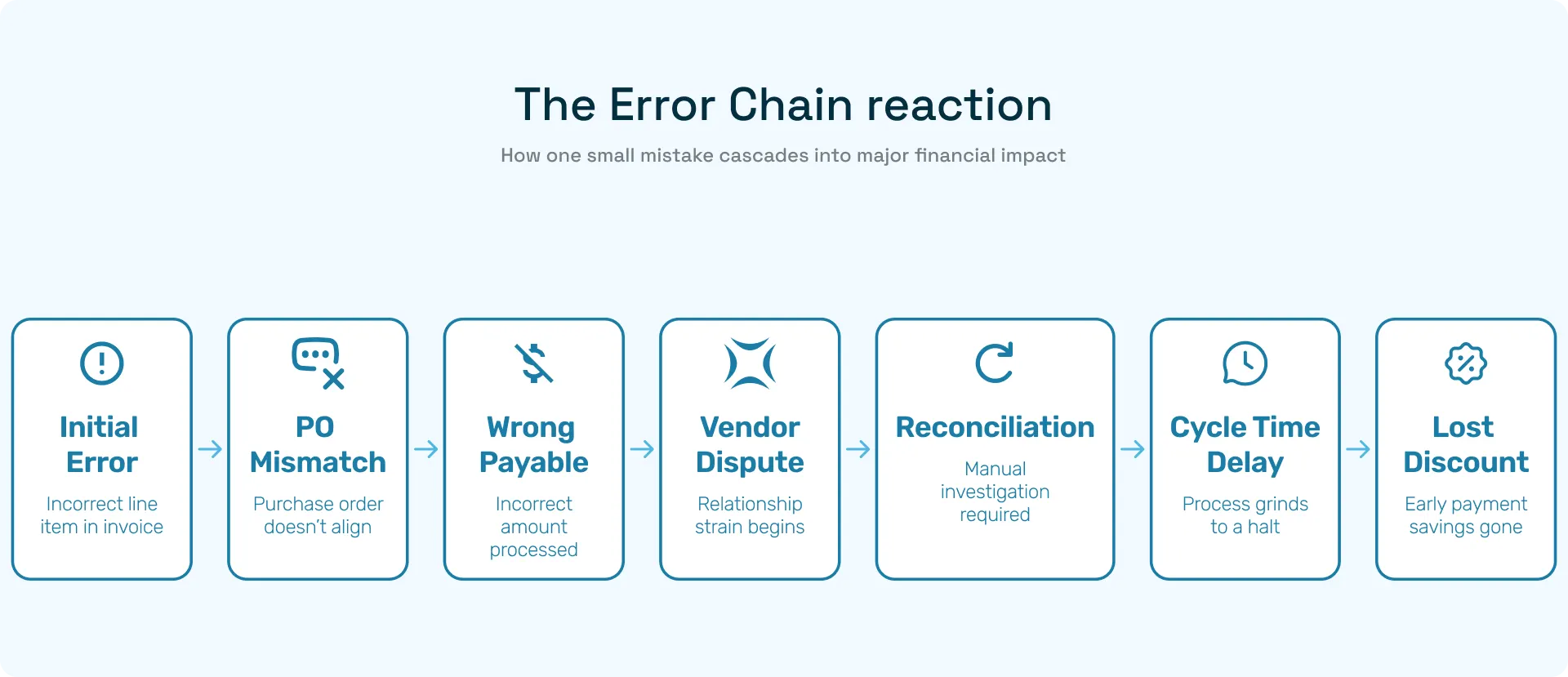
Line-item errors are more expensive: a missed PO or incorrect line amounts can lead to incorrect payables, compliance headaches, and supplier disputes.
Higher STP directly reduces cycle time, increases early-payment discount capture, and frees AP teams for strategic work.
Tipalti’s resources acknowledge that OCR-only approaches often leave an accuracy gap that requires human review. Closing that gap is where vendor differentiation becomes real.
Common Failure Modes (and How to Spot Them in Your POC)
Even the best invoice automation tools can lose their cool when faced with real-world invoices. During your Tipalti POC, keep an eye out for these common traps and see how Hyperbots handles each one with far less drama.
Failure Mode | What Usually Happens | Tipalti Smart Scan | Hyperbots AI Extraction |
Bad table segmentation | Line items blend into one messy blob, totals misfire, and someone’s $12,000 invoice becomes $120,000. | Performs decently on clean, single-page tables but struggles with merged cells or nested headers, leading to more manual correction. | Uses table-aware extraction that understands column hierarchies and nested structures. Even multi-page invoices stay intact with fewer creative totals, more straight-through results. |
Vendor name normalization | The same vendor shows up as ACME LTD, Acme Limited, and Acme, Inc. and the system thinks they’re three different suppliers. | Requires manual cleanup or rule-based mapping; not adaptive over time. | Learns automatically using contextual clustering AI that groups vendor variations and remembers them. It’s the intern who finally remembers everyone’s name. |
Currency parsing & exchange mismatches | Multi-currency invoices get misread like USD mistaken for EUR, or totals calculated at wrong rates. | Handles basic currency fields but falters when invoices contain multiple currencies or custom layouts. | Extracts currency, locale, and symbol context together, validating totals intelligently. No more “wait, did we just approve $10,000 instead of €10,000?” moments. |
Scanned PDFs & handwritten edits | OCR panics at low-quality scans, signatures, or handwritten corrections. | Accuracy often drops to ~55–60%, with OCR’s inherent limits. | Combines visual-text fusion models that interpret handwriting and noisy scans with minimal degradation like OCR with prescription lenses. |
When you start logging these patterns during your AP proof of concept, the differences become obvious:
With Tipalti, messy invoices often loop back to humans for cleanup and each one chipping away at your automation ROI.
With Hyperbots, the system learns, adapts, and reduces repeat errors automatically so accuracy improves with every batch.
Hyperbots doesn’t just handle anomalies better, it simply prevents them. Tipalti, like most workflow-driven suites, tends to detect them after they happen.
And in invoice automation, that’s the gap between:
Straight-Through Processing and Straight-Through Panic.
Closing: the POC is your truth machine
A properly designed Tipalti POC or invoice automation trial surfaces the non-obvious. Tipalti brings a broad AP automation suite and transparent discussion about OCR limits which is a useful partner when you just want consolidated finance automation. But if your blockers are accuracy and STP you know, the things that actually free your staff then the extraction model matters most. In head-to-head accuracy POCs on real invoices, Hyperbots’ extraction performance has shown material advantages in header and line-item accuracy, directly translating into higher STP and lower verification cost. Run the POC, measure the business impact, and pick the vendor that moves the needle on your actual KPIs.
Talk to our team to start a POC with Hyperbots
FAQs
1. Why is an accuracy-focused POC better than a demo?
Because demos use perfect, pre-selected invoices that rarely match real-world conditions. A POC exposes how each system handles messy scans, mixed currencies, multiple layouts, and multi-line tables. Accuracy is what determines actual STP and FTE reduction.
2. How many invoices should I include in a Tipalti vs Hyperbots POC?
A meaningful test typically requires 1,000–5,000 real invoices across vendors, formats, countries, and complexity levels. Anything less creates sampling bias and won’t expose failure modes like table segmentation, vendor normalization, or currency misreads.
3. What metrics matter most when comparing Tipalti and Hyperbots?
The core KPIs are:
Header field accuracy (invoice number, date, totals)
Line-item accuracy
STP percentage
Exception rate
Human verification hours
These metrics directly determine automation ROI, not the number of workflow features or UI polish.
4. Why does Tipalti’s Smart Scan accuracy drop on real invoices?
Smart Scan relies heavily on OCR + ML. OCR has inherent limitations on noisy scans, skewed documents, non-standard tables, handwritten notes, or multi-language invoices leading to accuracy ceilings typically in the mid-to-high 80% range. This creates more human verification steps.
5. How does Hyperbots achieve higher accuracy in POCs?
Hyperbots uses AI-native, multimodal extraction, combining vision models, layout intelligence, table-aware parsing, and contextual validation. This reduces failure modes like vendor mismatches and bad totals, pushing header/line accuracy into the high 99% range, which directly lifts STP and reduces manual touchpoints.