Tipalti OCR vs Hyperbots AI Extraction: Why 99.8% Invoice Accuracy Changes Everything
Discover why Hyperbots' 99.8% AI extraction outperforms Tipalti's standard OCR. Explore accuracy, exception rates, and the real-world impact on AP automation performance.
Accounts payable (AP) teams live and die by data accuracy. One wrong digit in an invoice total, and suddenly someone’s explaining to the CFO why a vendor got paid twice or not at all. A single misread line item can snowball into late payments, supplier friction, and hours of manual rework that feel like financial whack-a-mole.
That’s why the market for invoice data capture software has exploded because no one dreams of spending their Tuesday afternoons correcting OCR errors. Among the many contenders, Tipalti has made a name for itself as a powerful AP and payments platform that relies on OCR-based invoice capture. Meanwhile, Hyperbots has raised the bar with its AI invoice extraction engine, boasting an industry-leading 99.8% accuracy benchmark.
When the choice comes down to “good enough” versus “practically perfect,” it’s clear who’s taking home the accuracy crown and who’s still chasing down missing decimals.
Understanding OCR: The Backbone of Invoice Digitization
Optical Character Recognition (OCR) is the unsung hero that kick-starts the invoice digitization process.
It converts text from scanned documents, PDFs, or images into machine-readable data essentially teaching computers to “read.”
In invoice processing, OCR takes what would otherwise be static, unsearchable files and transforms them into structured data ready for validation, coding, and approval.
Without it, every invoice would need to be manually typed into an accounting system, a nightmare for any AP team.
While OCR lays the foundation, its accuracy depends on the quality of scans and the consistency of invoice formats, which is why newer AI invoice extraction models, like those used by Hyperbots, go a step further with interpreting, validating, and learning from context to achieve near-perfect precision.
How Tipalti’s OCR Works: The Good, the Smart, and the ‘Wait, Is That a 5 or an S?
Tipalti’s invoice capture process stacks a few key layers together with each one doing its part to make invoice data usable (though not always flawless):
OCR preprocessing and recognition: This is where Tipalti’s system starts by turning PDFs and scanned invoices into machine-readable text, basically the digital equivalent of deciphering messy handwriting. It’s a necessary first step, but let’s be honest: OCR can sometimes mistake a 5 for an S, so it’s not exactly fluent in “invoice.”
AI Smart Scan / machine learning: Once OCR’s done its best, Tipalti’s AI steps in to make sense of the chaos by mapping headers, line items, and tables into the right fields. It’s designed to adapt to different layouts and formats, essentially giving the system a bit of “invoice intuition.” Still, it occasionally needs a nudge when suppliers get too creative with their templates.
Validation and managed services: Finally, Tipalti adds its safety net in the form of validation rules, PO-matching, and sometimes even a human-in-the-loop review. It’s like having a backup editor who checks that the AI didn’t just invent a tax field out of nowhere. This combination keeps things moving, though it’s also a reminder that automation sometimes needs a human reality check.
Ultimately, Tipalti is a full AP system that embeds OCR and AI extraction as part of a larger workflow (invoice intake, matching, approvals, and global payments).
Why OCR Alone Won’t Save Your Invoices (or Your Sanity)
When buyers compare invoice data capture software, they often mix up OCR with accurate extraction, kind of like assuming that being able to read every word of a novel means you actually understood the plot. OCR does a great job of turning pixels into characters, but it doesn’t grasp context, table structures, or those mysteriously labeled “subtotal-ish” fields that suppliers love to invent.
Real-world invoices don’t make things any easier:
Multiple languages, non-standard fonts, logos, and the occasional handwritten note that looks like a doctor’s prescription.
Line-item tables with merged cells, split descriptions, or column orders that defy logic.
Poor scan quality with skewed images, low DPI, or PDFs so compressed they could fit in a tweet.
A thousand supplier templates, each convinced it’s the standard.
Even Tipalti acknowledges that traditional OCR can struggle with this chaos and positions AI-driven capture as the next logical step forward. And they’re right, OCR is just the starting line, not the finish.
The real winners are the vendors who can teach their systems not just to read invoices, but to understand them by using smart model training, document understanding, schema mapping, confidence scoring, and exception-handling workflows that separate “OCR that reads” from “AI that actually gets it.”
How Hyperbots approaches AI extraction (what makes it different)
Hyperbots’ offering centers on an extraction-first architecture which is built less like a bolt-on OCR feature and more like a data perfectionist that refuses to let a single digit slip by. The pieces that drive its 99.8% accuracy benchmark are:
Multi-stage document understanding: Not just text conversion, but full-on semantic decoding. The engine identifies entities (invoice number, dates, tax, totals), groups line-item rows even across broken or creative table designs, and normalizes currencies and date formats basically, it reads invoices the way accountants wish every intern could.
Large, invoice-specific training corpus: Models trained on millions of invoices and supplier templates across industries, languages, and “unique” design choices. The result? Hyperbots doesn’t blink when faced with an oddly formatted invoice from that one supplier who still uses Comic Sans.
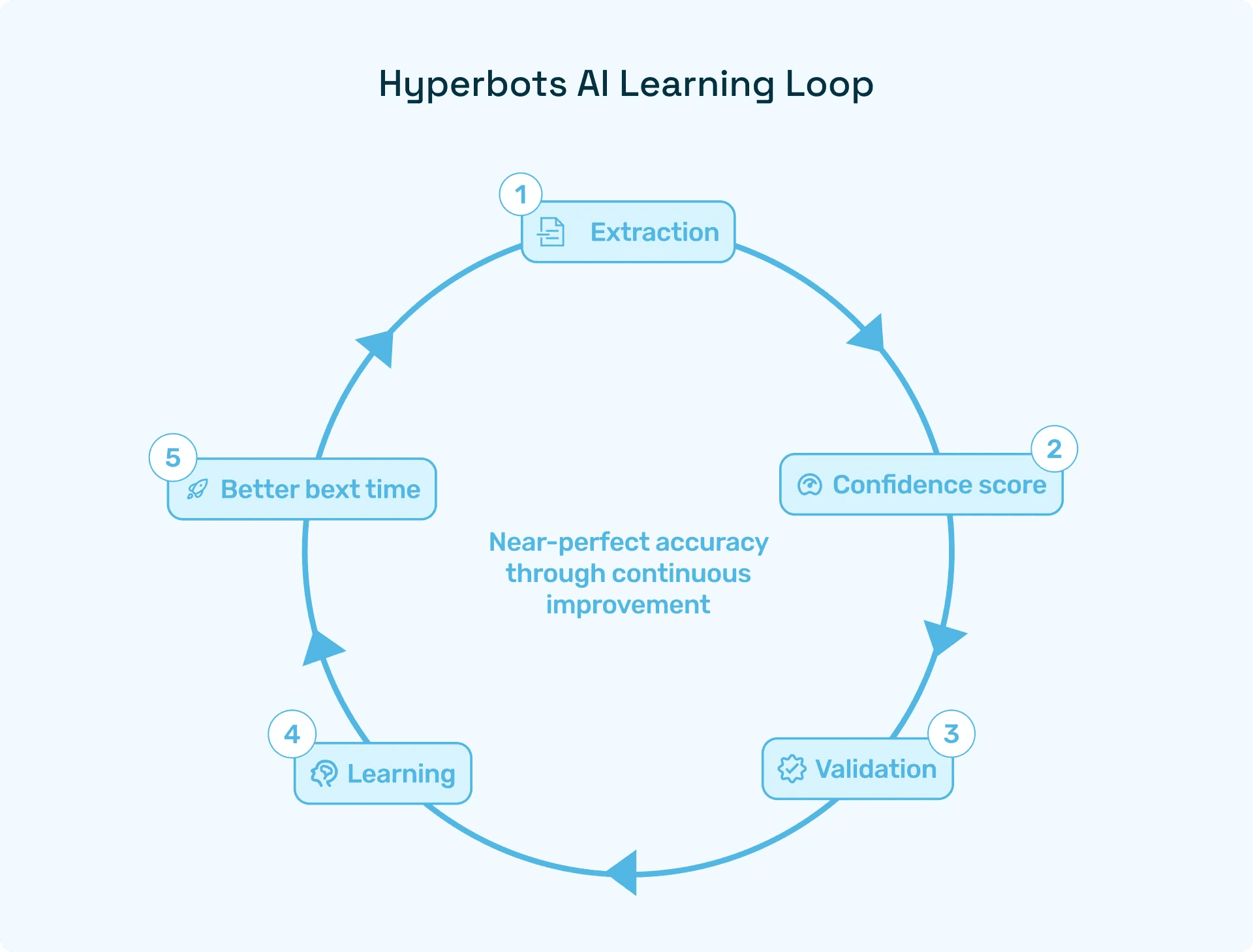
Active learning + continuous retraining: Every correction makes it smarter. Over time, it adapts per customer and per supplier so recurring vendors get parsed more accurately without a single configuration tweak.
High-granularity confidence scoring: Each extracted field comes with a confidence score. Low-confidence data isn’t just flagged, it’s intelligently routed for review or auto-validation, keeping human involvement strategic instead of repetitive.
Tight ERP/PO integration for contextual validation: Prices, quantities, and POs aren’t just references, they’re sanity checks. Hyperbots uses contextual data to catch mismatches before they snowball into AP headaches.
Put simply, Hyperbots treats invoice extraction like a learning experience, not a side feature. The result is a system that operates with near-human precision with 99.8% extraction accuracy. So it’s just faster, friendlier, and less likely to call in sick on a Monday. For AP teams, that means dramatically fewer exceptions and more invoices cruising straight through processing instead of getting stuck in the manual review purgatory.
Head-to-head: Tipalti OCR vs Hyperbots AI extraction (by capability)
Category | Tipalti OCR | Hyperbots AI Extraction |
Header & Line-Level Extraction | AI Smart Scan extracts headers and line items effectively across many templates, but accuracy can vary depending on model maturity and often requires human review. | Extraction-first design achieves 99.8% line-level accuracy, maintaining fidelity even on complex invoices with irregular tables or many line items. |
Handling Diverse Formats & Low-Quality Scans | Strong preprocessing and AI tolerance; Tipalti recommends e-invoicing or supplier portal uploads to improve intake quality. | Advanced preprocessing and augmented model training handle skewed, partial, or low-DPI scans with minimal accuracy drop. |
Human-in-the-Loop & Exception Handling | Leverages managed services and human validation to correct OCR errors; ideal for teams preferring a hybrid automation model. | Designed to minimize exceptions, high-accuracy extraction reduces manual reviews, and the system learns continuously from user corrections. |
How Better Invoice Scanning Translates to Real Business Impact
High invoice scanning accuracy is about keeping your AP team sane, your suppliers happy, and your CFO far away from unnecessary “why did we pay this twice?” conversations. Here’s what real accuracy delivers:
Higher Straight-Through Processing (STP) rates: Every percentage point of accuracy means fewer invoices landing in the “please fix me” pile. For high-volume AP teams, that translates to full-time equivalent (FTE) savings worth thousands or even millions each year. Basically, fewer manual clicks, fewer sighs, and more time for strategic work.
Faster close cycles: When invoices are extracted correctly the first time, they flow through matching and coding without detours. That means faster month-end closes and fewer late-night reconciliation marathons. Tipalti highlights ROI gains from combining OCR, AI, and workflow automation though the accuracy ceiling still caps how far you can scale that efficiency.
Lower error rates and fewer duplicate/overpayments: Accurate extraction keeps payment errors, duplicate entries, and vendor mix-ups at bay. Tipalti emphasizes matching and fraud safeguards, but accuracy remains the front-line defense, the better the extraction and the fewer the surprises on your next audit.
At the end of the day, if your goal is to minimize exceptions and maximize STP, accuracy isn’t just a metric, it’s the lever that moves everything else. And that’s exactly the lever Hyperbots has cranked up to 99.8% because in AP, “close enough” usually isn’t.
The Bottom Line: When Accuracy Is Everything, Hyperbots Delivers
In AP, precision isn’t optional, it’s the difference between smooth operations and endless exception chaos. That’s exactly where Hyperbots’ 99.8% AI extraction accuracy changes the game. By getting invoice data right the first time, it slashes manual reviews, accelerates close cycles, and drives Straight-Through Processing to new highs.
While other platforms may process invoices, Hyperbots perfects them. If your goal is fewer exceptions, faster throughput, and data your CFO can actually trust, the choice is clear: go with the system that gets it right every single time.
FAQs
Q: What makes Hyperbots different from Tipalti’s OCR?
A: Tipalti’s OCR + AI Smart Scan focuses on getting invoices into the system; Hyperbots focuses on getting them right. Its extraction-first AI reads, understands, and validates data with 99.8% accuracy, meaning far fewer exceptions and manual reviews.
Q: Does Hyperbots integrate with existing AP or ERP systems?
A: Absolutely. Hyperbots enhances your stack by plugging seamlessly into your existing ERP or AP workflow, acting as a best-in-class capture engine that delivers cleaner data and faster processing.
Q: How is Hyperbots’ 99.8% accuracy benchmark verified?
A: That benchmark reflects internal performance testing across diverse, real-world invoice sets. Customers can easily validate it with a proof of concept and most see immediate drops in exception volume and boosts in Straight-Through Processing rates.
Q: Why does accuracy matter more than full-suite automation?
A: Because every AP workflow, no matter how automated, depends on clean data. If extraction is flawed, everything downstream slows or breaks. Hyperbots fixes the root of the problem ensuring your automation runs at full throttle.
Q: Can Hyperbots handle messy, low-quality, or multi-language invoices?
A: Yes, it’s built for that. Hyperbots’ AI is trained on millions of diverse invoice formats, languages, and layouts. Even low-DPI scans or creatively designed templates don’t faze it.