Best Software for an Engineering Company (2025 Guide)
Hyperbots transform engineering ERP, cleaner finance, faster closes, and more time for solving critical problems.
Executive Summary
Engineering organizations, whether design consultancies, product-development teams, EPC (engineering, procurement, construction) firms, or ETO (engineer-to-order) manufacturers—live on complex projects, deep collaboration, and unforgiving budgets. The “best software for engineering company” isn’t a single tool: it’s a deliberately assembled stack anchored by engineering ERP software (sometimes referred to as erp system engineering or, in Spanish-language markets, erp ingenierias), surrounded by PLM/PDM, PSA, BIM/field tools, QMS, and data services, and then accelerated by AI that automates the repetitive finance work that soaks up time and creates risk.
This end-to-end guide gives leaders and PMOs a practical framework to evaluate, select, and implement the right stack. You’ll see the major types of manufacturing/engineering software and services that matter, what to deploy at each maturity stage, how to integrate with CAD/PLM/BIM and project-delivery systems, and a realistic blueprint for rollout with controls, data readiness, and KPIs. Throughout, we embed target phrases, engineering ERP software, ERP software for engineering companies, ERP ingenierias, ERP system engineering—naturally for SEO without resorting to keyword stuffing.
Finally, we show how Hyperbots’ six finance-grade AI Co-pilots (Invoice Processing, Procurement, Accruals, Payment, Sales Tax Verification, Vendor Management) sit on top of your ERP, PSA, and billing systems to raise straight-through processing (STP), accelerate month-end close, and protect cash. With Hyperbots, your people spend more time engineering and less time wrangling invoices, accruals, and vendor paperwork.
Who This Guide Is For
Design & engineering consultancies (civil, structural, MEP, geotech, environmental, product development)
EPC and project-based firms delivering feasibility, design, procurement, and construction oversight
ETO manufacturers & R&D orgs blending engineering, prototyping, and low-volume build
CFOs, controllers, and PMOs who need traceable project accounting, clean closes, and contract compliance
Ops & IT leaders designing an integrated stack from ERP software for engineering companies, out to CAD, PLM, QMS, billing, and field tools
What “Best Software” Means for Engineering
When people ask for the best software for an engineering company, they often get a brand list. “Best” is context, not a logo:
Delivery model & scope: T&M, fixed-fee, milestones, retainers, design-build, EPC, ETO.
Complexity: Multi-entity, multi-currency, JV or consortium accounting, grants, and R&D credits.
Regulatory & compliance: ISO 9001, ISO 13485 (med devices), FAA/FDA, DoD/ITAR, public works procurement, environmental permits, wage rates.
Data maturity: Version discipline for drawings/BOMs, resource calendars, vendor, and sub-contractor governance.
Time-to-value: Outcomes in months, not years—start minimal, iterate.
Change velocity: RFIs, submittals, ECNs/ECOs, change orders; your stack must absorb change without re-implementation.
In practice, your core is engineering ERP software or a strong PSA+ERP combo, tied to PLM/CAD and field/BIM, with a finance AI layer. The winning formula is fit × execution × controls.
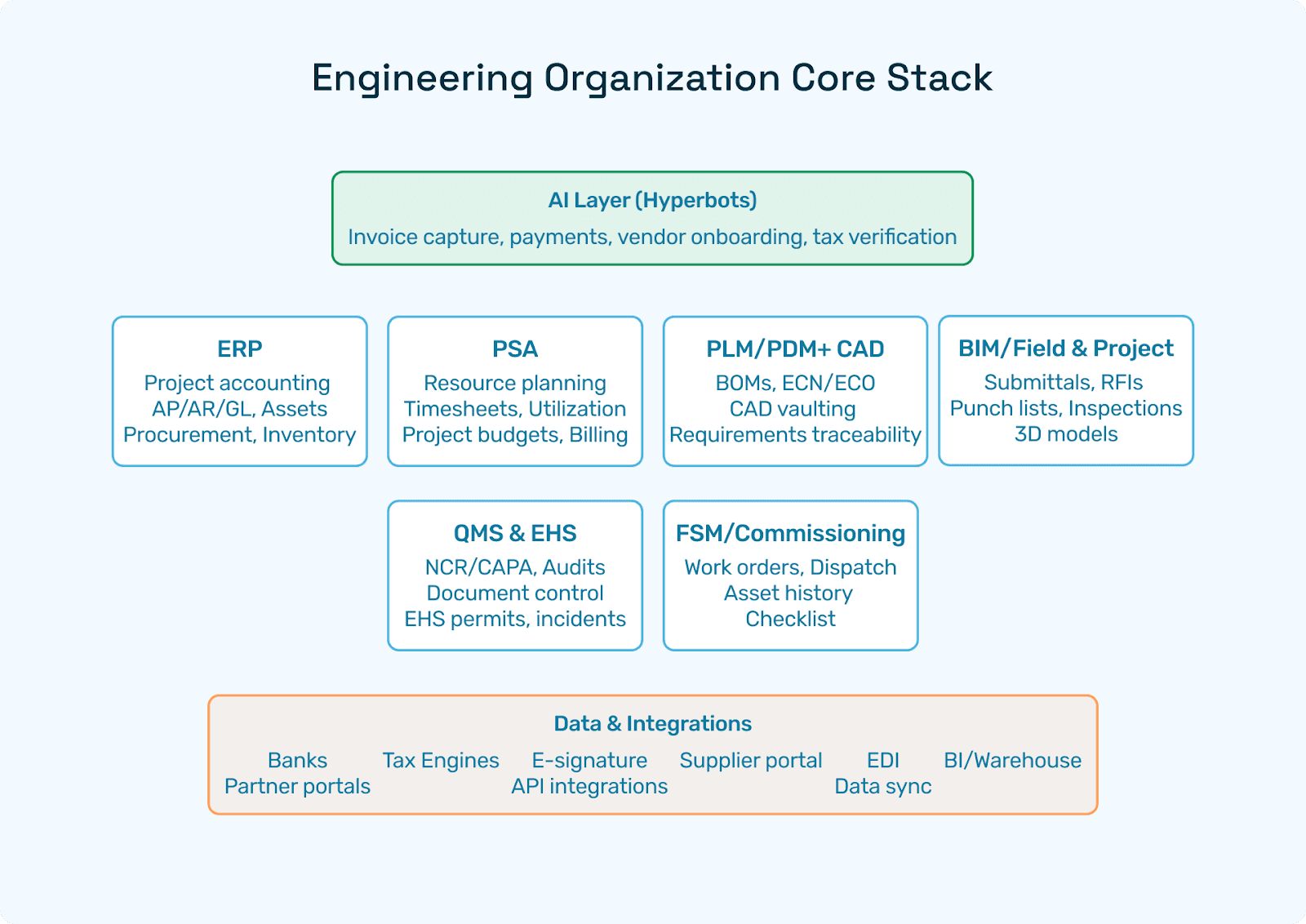
Core Stack Overview (Landscape)
Here’s the pragmatic landscape for engineering organizations. You won’t deploy everything Day 1, add as value demands:
1) ERP / “ERP System Engineering”
Project accounting (WBS, cost codes), AP/AR/GL, fixed assets, multi-entity/currency, procurement, inventory (for ETO), tax.
This is what many mean by ERP software for engineering companies or engineering ERP software.
2) PSA (Professional Services Automation)
Resource planning, timesheets/expenses, utilization, project budgets/ETC, billing (T&M/fixed/milestones).
Overlaps with ERP; sometimes natively part of your ERP, sometimes a separate best-of-breed tool.
3) PLM/PDM + CAD
Versioned BOMs/EBOM/MBOM, ECN/ECO workflows, CAD vaulting, requirements traceability.
Hand off to ERP for costed BOMs, work orders (ETO), and item masters.
4) BIM/Field & Project Tools (AEC/EPC)
Submittals, RFIs, punch lists, inspections, field photos, 3D models.
Integrates with ERP/PSA for commitments, change orders, and billing.
5) QMS & EHS
NCR/CAPA, audits, document control, training records; EHS permits, incidents, corrective actions.
6) FSM/Commissioning (as relevant)
Work orders, dispatch, asset history, checklists, common for product companies with field teams.
7) Data & Integrations
Banks, tax engines, e-signature, supplier/partner portals, EDI (for some ETO), BI/warehouse.
8) AI Layer (Hyperbots)
Automates finance operations on top of the stack—invoice capture/matching, accruals, payments, vendor onboarding, and tax verification.
Engineering ERP Software: Capabilities That Matter
Whether you call it engineering ERP software, ERP software for engineering companies, or ERP system engineering, the finance/ops backbone should cover:
A) Project Accounting & Cost Controls
WBS & cost codes: Phase/task, discipline, location, funding source.
Budgeting & change: Baseline, revisions, committed/spent/ETC, change orders linked to contracts.
Revenue models: T&M (rates by role, premium time), fixed-fee, milestones, cost-plus, retainers.
WIP & revenue recognition: % complete, milestones, IFRS/ASC compliance, unbilled AR aging.
Multi-entity/JV: Intercompany billing, eliminations, consolidated reporting.
B) Procurement & Commitments
Requisitions/POs for subs/vendors/materials; three-way match; approvals by thresholds/roles.
Commitment tracking: POs, subcontracts, and change orders roll into committed vs. budget.
Landed costs (for ETO/product orgs): freight/duty/tariffs into inventory or projects.
C) Time, Expense, & Billing
Timesheets with approvals, leave, cost rate multipliers, expense policies, and per-diem rules.
Billing: fee schedules, T&M with markups, milestone/percentage draws, retainage/holdbacks, progress invoices, consolidated billing.
D) Inventory & ETO (as needed)
For firms building prototypes or low-volume systems: items, BOMs, routings, work orders, serial/lot tracking, outside processing (lab tests, coating, machining), and project-item links.
E) Controls & Compliance
SoD/Maker-Checker: Vendor banking changes, journal approvals, posting controls.
Tax: Correct jurisdiction/rates; exemption certificates; use tax for materials.
Audit trails: Evidence for every posting (PO, receipt/submittal, invoice, approval).
If your core ERP falls short in resource planning or billing nuance, pair it with PSA—just keep the data contracts tight.
ERP System Engineering: Map Process to Ledger
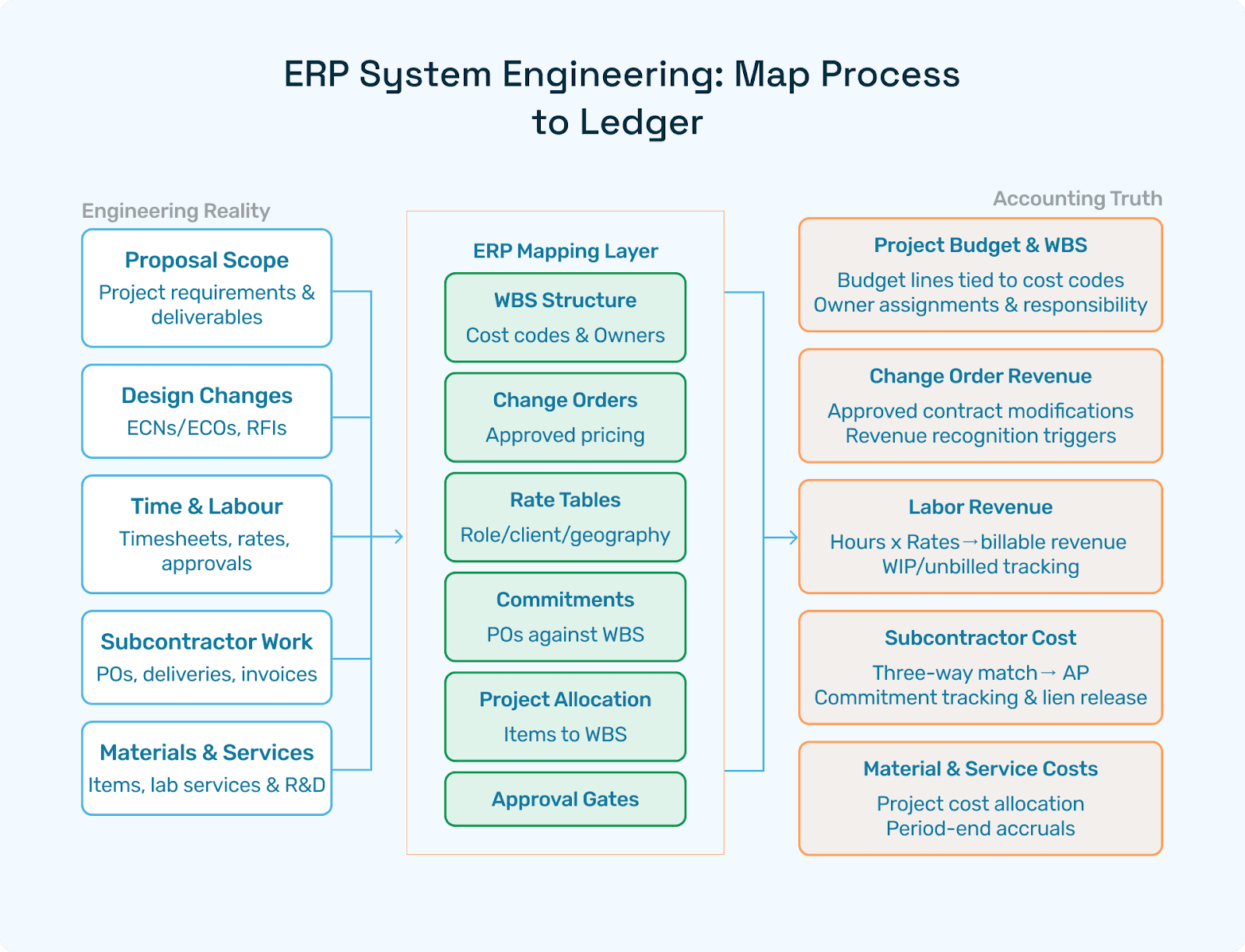
“ERP system engineering” is the discipline of mapping engineering reality to accounting truth. A few patterns to get right:
From Scope to Budget to WBS: translate proposal scopes into WBS with cost codes; tie each to budgets and the owner (engineering manager/PM).
Design Change to Contract Change: ECNs/ECOs and RFIs often drive cost/schedule changes, surface them as potential change orders, and are priced and approved before spend.
Timesheets to Revenue: rate tables (role, client, geography), premiums (night/weekend), and caps; map time to tasks and funding lines; ensure approvals before billing.
Subcontractor Spend to Commitments: POs/subcontracts against WBS; partial/milestone receipts; three-way match; lien releases when applicable.
Materials & Lab Services: for ETO/R&D, link items and outside processing to projects; accrue unbilled services at period end.
Evidence Chains: Every invoice or revenue event should be traceable back to WBS, contract, change, and approval.
When these flows are explicit, close is sane, and forecasting isn’t guesswork.
“ERP para Ingenierías” (ERP Ingenierias): Regional Notes
If you’re scouting ERP Ingenierias for Spanish-speaking markets:
Localized billing & tax: Factura electrónica, CFDI/DIAN/AFIP equivalents; multi-currency and inflation adjustments where applicable.
Public works: Tender procedures, guarantees/bonds, retention, and progress certificates.
Payroll nuances: Union rates, statutory benefits, regional per diems.
Document control: Spanish templates and bilingual records for audits and multinational JVs.
Your engineering ERP software should support these local realities without heavy customization.
PSA vs ERP: When You Need Both
For pure design consultancies, PSA often shines: utilization, staffing, time/expense, and project billing. For EPC/ETO or firms with physical goods, ERP is non-negotiable: procurement, commitments, inventory, and manufacturing/assembly. Many engineering companies run PSA+ERP:
PSA in front: Staffing, timesheets, budgets/etc, billing drafts.
ERP in back: AP/AR/GL, procurement, tax, revenue recognition, fixed assets.
Sync contracts/WBS/budgets both ways; keep a single “chart of truth” for cost codes.
If you do both, invest early in data contracts (IDs, statuses, approval semantics) or you’ll double-enter forever.
PLM/PDM & CAD: Design-to-Delivery Flow
For product and ETO orgs, PLM/PDM and CAD are the lifeblood:
Versioned EBOM→MBOM: Release engineering BOM to manufacturing BOM with alternates; synchronize to ERP items.
ECN/ECO discipline: Approvals and effective dates; auditability for regulated sectors.
CAD vault & metadata: Properties (material, finish, mass) flow to ERP item attributes.
Prototypes & NPI: Pre-production builds tracked at the project; capitalize R&D where appropriate.
Tie PLM → ERP so that costed BOMs and revisions are never “best-guess” at the plant or in the ledger.
Quality (QMS), Field/BIM, and EHS
QMS: Inspection plans, NCR/CAPA, document control, training/competency; for med/aero, full traceability to validation packs.
Field/BIM (AEC/EPC): RFIs, submittals, inspections, punch lists, progress photos, model coordination; integrate change orders to ERP.
EHS: Permits, incident tracking, corrective actions—especially for on-site work
Commissioning/FSM: Checklists and asset history for handover; warranty tracking to service.
These systems feed your ERP/PSA for cost, schedule, and billing events, and your BI for risk.
Data Readiness & Migration for Engineering
Most projects fail at the data step, not the demo. Focus on:
Masters: Projects/WBS, cost codes, rate tables, vendors and subs (banking/KYC), items (if ETO), customers/contracts, tax regimes, locations.
Transactions: Open POs/subcontracts/change orders, unbilled time/expenses, unvouchered receipts, WIP balances, open AR/AP.
Design data: EBOM/MBOM snapshots, drawing revision lists, ECN/ECO queue.
Policies: Timesheet approvals, expense rules, commitment tolerances, and tax treatments.
Trial loads & reconciliations: Control totals and three-way checks with Operations and Finance.
Hyperbots (see below) can improve readiness by validating vendor docs and banking, extracting invoice/ASN data, and surfacing exceptions before cutover.
Integrations That Actually Matter
Keep to a modular architecture with reliable contracts between systems:
AP inbox/email → ERP: Capture & validate invoices, do 2-/3-way match, post clean vendor bills.
Banks & payments: Proposal files, bank validation, auto-recon.
Tax engine: Jurisdiction/rates, exemption certificates, audit evidence.
PSA ↔ ERP: Projects, WBS, budgets, timesheets/expenses, draft→final invoices.
PLM/CAD ↔ ERP: Items and BOMs with revisions; ECN/ECO effectivity.
BIM/Field ↔ ERP: Commitments and change orders; progress certificates.
Portals: Supplier onboarding, submittals, ASNs, and invoice status.
Document/e-signature: Contracts, change orders, approvals.
Build lightweight, testable interfaces. Reliability beats “Swiss-army” connectors every time.
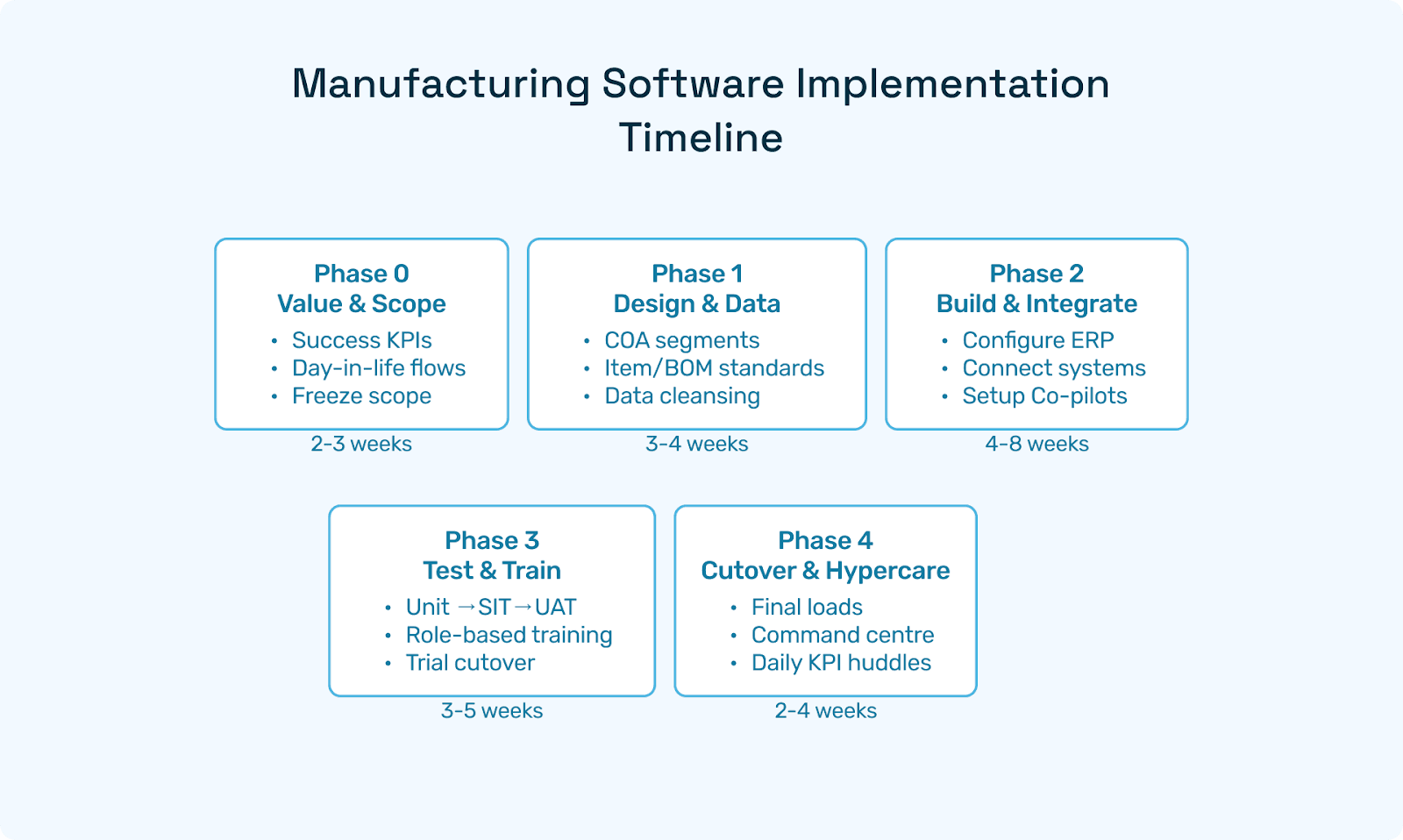
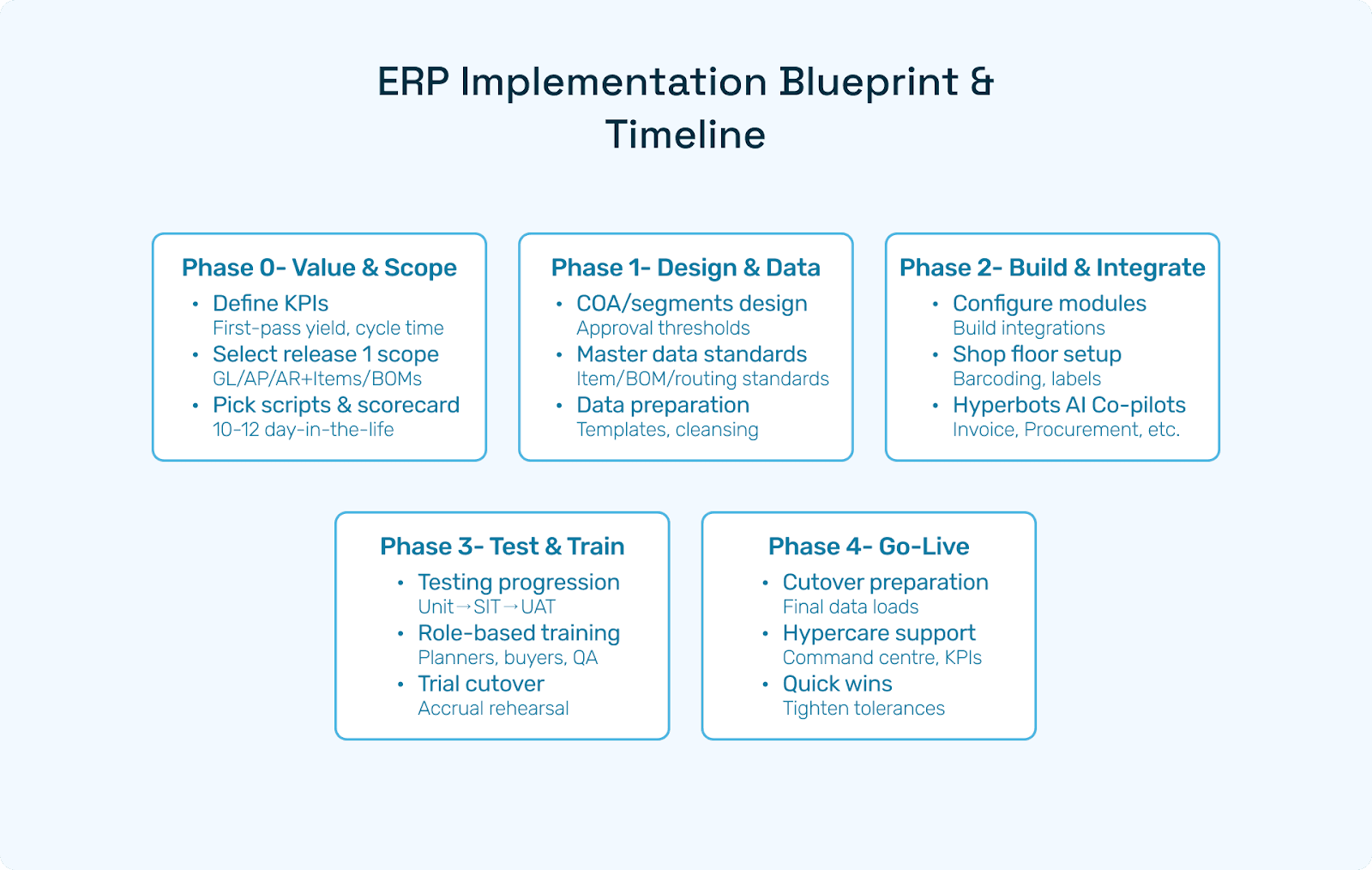
Implementation Blueprint & Timeline
A pragmatic path for ERP software for engineering companies:
Phase 0 — Value & Scope (2–3 weeks)
KPIs: utilization, margin by project, WIP aging, DSO, first-pass match %, STP %, invoice cycle time.
Day-in-the-life scripts (10–12) using your data: T&M + fixed fee + milestone; subcontract with change order; ECN-driven scope change; unbilled accruals.
Release-1 scope: project accounting + AP/AR/GL + procurement + timesheets/expense + simple billing.
Phase 1 — Design & Data (3–4 weeks)
COA segments (entity, practice, project, cost code), approval thresholds, tolerance rules, roles/SoD.
Standards: WBS/cost codes, vendor master (KYC/bank), item/BOM (if ETO), rate tables.
Data templates and cleansing; define integration contracts (PSA, PLM/CAD, BIM/Field).
Phase 2 — Build & Integrate (4–8 weeks)
Configure ERP/PSA; connect AP inbox, banks, tax, PLM/CAD (if applicable).
Stand up portals for vendors/subs; barcode/scanning for receipts (if material-intensive).
Configure Hyperbots Co-pilots across invoice, procurement, accruals, payment, tax, and vendor.
Phase 3 — Test & Train (3–5 weeks)
Unit → SIT → UAT against scripts; include ECN/change orders, partially approved timesheets, and disputed invoices.
Role-based training: PMs, engineers, buyers, AP, approvers, controllers.
Trial cutover: Load masters, open commitments, unbilled time/expense, WIP; reconcile.
Phase 4 — Cutover & Hypercare (2–4 weeks)
Freeze windows; final loads; validate bank/tax/print endpoints.
Command center; daily KPI standups; defect burn-down; quick wins (tighten tolerances, adjust approvals, fix vendor data).
Typical timeline: 12–24 weeks for a single-entity consultancy/EPC with moderate integrations; extend if heavy PLM/BIM is in scope.
TCO & Commercial Models
Plan a 3-year TCO that includes:
Subscriptions: ERP/PSA/PLM/BIM/QMS; user counts, module tiers, environments (prod/sandboxes).
Services: Design, config, data migration, integrations, training, cutover support.
Devices: Scanners, labelers, field tablets.
Change management: SOPs, internal champions, office hours.
Support: Vendor support vs. partner retainer.
AI layer (Hyperbots): Often self-funded via discount capture, duplicate prevention, and faster cycles.
Contingency: 10–20% services buffer for surprises.
Negotiate: Volume discounts, caps on rate escalators, and clear upgrade windows.
KPIs & Dashboards for Engineering Leaders
Balance project delivery, finance, and risk:
Delivery/Operations
Utilization (by role/practice), schedule adherence, change-order response time, and rework rate.
Financial
Margin by project/client, WIP aging, DSO, AR at risk, revenue leakage (unbilled time/expense).
AP: first-pass match %, STP %, invoice cycle time, duplicate rate, DPO, discount capture.
Portfolio/Risk
Subcontractor exposure, committed vs. budget variance, tax variance, and audit findings are closed.
ETO/Product
ECN cycle time, prototype cost variance, PPV, usage variance, standard vs. actual, warranty returns.
With Hyperbots in the loop, many of these metrics populate with audit-ready evidence automatically.
Risk Register & How to Avoid Pitfalls
1) Over-customization
Symptom: Irresistible urge to rebuild your legacy forms in the new ERP.
Fix: Configure first; keep core clean; push edge cases to extensions/portals.
2) Dirty masters
Symptom: Duplicate vendors, missing rate tables, inconsistent cost codes.
Fix: Cleanse and standardize before cutover; enforce policies and validations.
3) Weak approvals & SoD
Symptom: Late “fixes” to vendor banking or rushed journal postings.
Fix: Maker-checker on bank changes; policy-driven approvals; audit logs.
4) Ignoring landed costs & accruals (EPC/ETO)
Symptom: Freight/duty in OPEX; month-end surprises.
Fix: Landed-cost rules; accruals for unbilled subs and outside processing.
5) No UAT scripts
Symptom: Demo magic, go-live chaos.
Fix: 10–12 real scripts with pass/fail criteria tied to KPIs.
6) Over-ambitious Release 1
Symptom: Blown timelines; exhausted teams.
Fix: Start with project accounting + AP/AR/GL + time/expense + basic billing; layer PLM/BIM later.
7) No champions/change plan
Symptom: People revert to spreadsheets.
Fix: Role-based training, office hours, celebrate wins (e.g., STP% %, DSO cuts).
How Hyperbots AI Co-pilots Multiply ERP ROI
Hyperbots is a finance-first AI layer that sits on top of your ERP/PSA, purpose-built for engineering work. It transforms repetitive, error-prone steps into policy-aware automations, ideal whether you run a consultancy, EPC, or ETO shop. The six Co-pilots:
1) Invoice Processing Co-pilot —
Ingests vendor/subcontractor invoices from email/AP inbox; extracts headers/lines (items, labor categories, tax, freight).
Performs 2-/3-way matches against POs, subcontracts, service receipts, or milestones; flags mismatches, duplicates, or unsupported charges.
Posts clean vendor bills to ERP/PSA; routes true exceptions to approvers with evidence attached.
2) Procurement Co-pilot —
Auto-creates PRs from WBS budget changes, ECN impacts, or min/max breaches (ETO); recommends suppliers and price breaks.
Drives policy-based approvals; writes POs/subcontracts to ERP; tracks ASN/delivery adherence for field materials or lab services.
3) Accruals Co-pilot —Suggests period-end accruals for unbilled subs, in-transit receipts, outside processing, and project travel; creates reversal entries with links to backing documents.
4) Payment Co-pilot — Optimizes payment proposals by terms, cash position, retainage rules; validates bank details; blocks duplicates/overpayments; tracks lien releases where applicable.
5) Sales Tax Verification Co-pilot — Validates jurisdiction and rates on complex services/materials; handles exemptions and self-assessed use tax; preserves audit evidence.
6) Vendor Management Co-pilot — Onboards subs/vendors via a guided portal (KYC, W-9/W-8, insurance, certifications); verifies bank changes; scores performance/risk; guards master-data integrity.
Why it matters for engineering teams
Less back-and-forth for PMs and AP: invoices arrive matched or explained.
Faster close with clean accruals and auditable evidence.
Better cash: improved DPO/discount capture; fewer leakage points (duplicates, mis-coded freight/tax).
Happier auditors: policy-aware decisions captured inline.
Hyperbots Platform Capabilities for Engineering
Beyond Co-pilots, the platform complements engineering ERP software in durable ways:
Finance-trained AI (HyperLM + MoE): Vision + layout + LLM ensemble tuned for invoices, POs, submittals/ASNs, statements; strong at line-level reasoning and anomaly detection.
Connectors: Real-time read/write to major ERPs/PSAs; Gmail/Outlook ingestion; bank rails; tax engines; shipping; 3PL; PLM/CAD; BIM/Field; supplier/customer portals.
Policies & SoD: GL coding suggestions; tolerance rules by vendor class; maker-checker for bank changes; audit logs.
Scale & Reliability: Microservices (Java, Postgres, React); high-volume document throughput; multi-entity and multi-currency.
Outcome-first: Designed with CFOs/controllers to deliver measurable improvements: STP %, invoice cycle time, DSO, DPO, discount capture, and duplicate/tax variance reduction.
Pairing Hyperbots with your ERP system engineering turns a system of record into a system of results, without ripping and replacing core platforms.
FAQs
Q1. What’s the difference between ERP, PSA, and PLM for engineering?
A: ERP = finance + procurement + inventory (ETO) + project accounting; PSA = staffing, time/expense, utilization, and billing workflows; PLM/PDM = design control, BOMs, and change management. Most engineering orgs use ERP+PSA, and product/ETO orgs add PLM/CAD.
Q2. Is “engineering ERP software” the same as generic ERP?
A: Not exactly. You need project/WBS depth, timesheet→billing nuance, revenue recognition, commitments/change orders, and (for ETO) item/BOM/work-order capabilities and outside processing.
Q3. We operate in Spanish-speaking markets—does “ERP Ingenierias” change requirements?
A: You’ll want electronic invoicing, local tax regimes, public-works retention, and bilingual templates. Choose platforms with localized packs and partners.
Q4. Can we start with PSA and add ERP later?
A: Yes, common for design consultancies. Just define data contracts early (projects, WBS, rates, billing semantics) to avoid painful rework at ERP adoption.
Q5. Where does AI (Hyperbots) fit?
A: On top of ERP/PSA as a finance co-pilot, automating capture/matching, accruals, payments, tax verification, and vendor onboarding. It reduces manual touches and speeds up closing.
Q6. How long does implementation take?
A: Single-entity consultancy/EPC with moderate integrations: 12–24 weeks. Add time for heavy PLM/CAD/BIM integrations or multi-entity rollouts.
Q7. What KPIs prove success?
A: Utilization and margin by project, WIP aging, DSO, first-pass match %, STP %, invoice cycle time, duplicate rate, DPO, discount capture, tax variance.
Q8. We’re ETO. Do we still need PSA?
A: If you manage heavy staffing and time/expense, PSA helps. If staffing is simple and ERP has adequate time/expense and billing, you may keep it in ERP—test with real scripts.
Final Takeaway
The best software for an engineering company is the one that fits your delivery model, enforces clean financial controls, integrates predictably with design and field tools, and proves value fast. Anchor on capable engineering ERP software (your ERP system engineering core), complement it with PSA/PLM/BIM/QMS as needed, and overlay Hyperbots’ AI Co-pilots to remove the manual friction in finance. Your engineers will spend more time solving real problems, and your finance team will finally have a close they can trust.