Business Management Software for Small Business—Complete 2025 Guide
Empower small businesses with cloud management software and AI automation to streamline finance, CRM, and operations.
Executive Summary
Small businesses now require the same digital muscle as enterprises, without enterprise budgets. A modern business management platform unites accounting, CRM, inventory, HR, and analytics in one cloud hub. This 6,000-word guide explains why integrated business management software beats siloed apps, compares leading business management software companies, and shows how Hyperbots AI Co-pilots transform finance on NetSuite, QuickBooks, and Microsoft Dynamics. You’ll learn must-have features, pricing models, ROI benchmarks, FAQs, and actionable steps to pick the right small business software suite for your growth journey.
1. Introduction: Why Small Businesses Need Integrated Software
Running separate tools for accounting, CRM, and inventory creates data silos, duplicate entries, and decision delays. A unified business management tool delivers real-time insights, automated workflows, and scalability, critical in today’s fast-moving markets.
2. Core Modules of a Business Management System Software
Module | Purpose | Cloud Essentials |
Accounting (GL, AP/AR) | Financial backbone | Multi-currency, bank feeds |
CRM | Sales pipeline & customer history | Email & e-commerce sync |
Inventory & Supply Chain | Stock, reorder, vendors | Barcode/serial tracking |
HR & Payroll | Time, benefits, compliance | Employee self-service |
Analytics | Dashboards & BI | Drill-down, export APIs |
These modules transform standalone software programs for business into a cohesive business organization software suite.
3. Cloud vs. Desktop: Evolution of Company Management Software
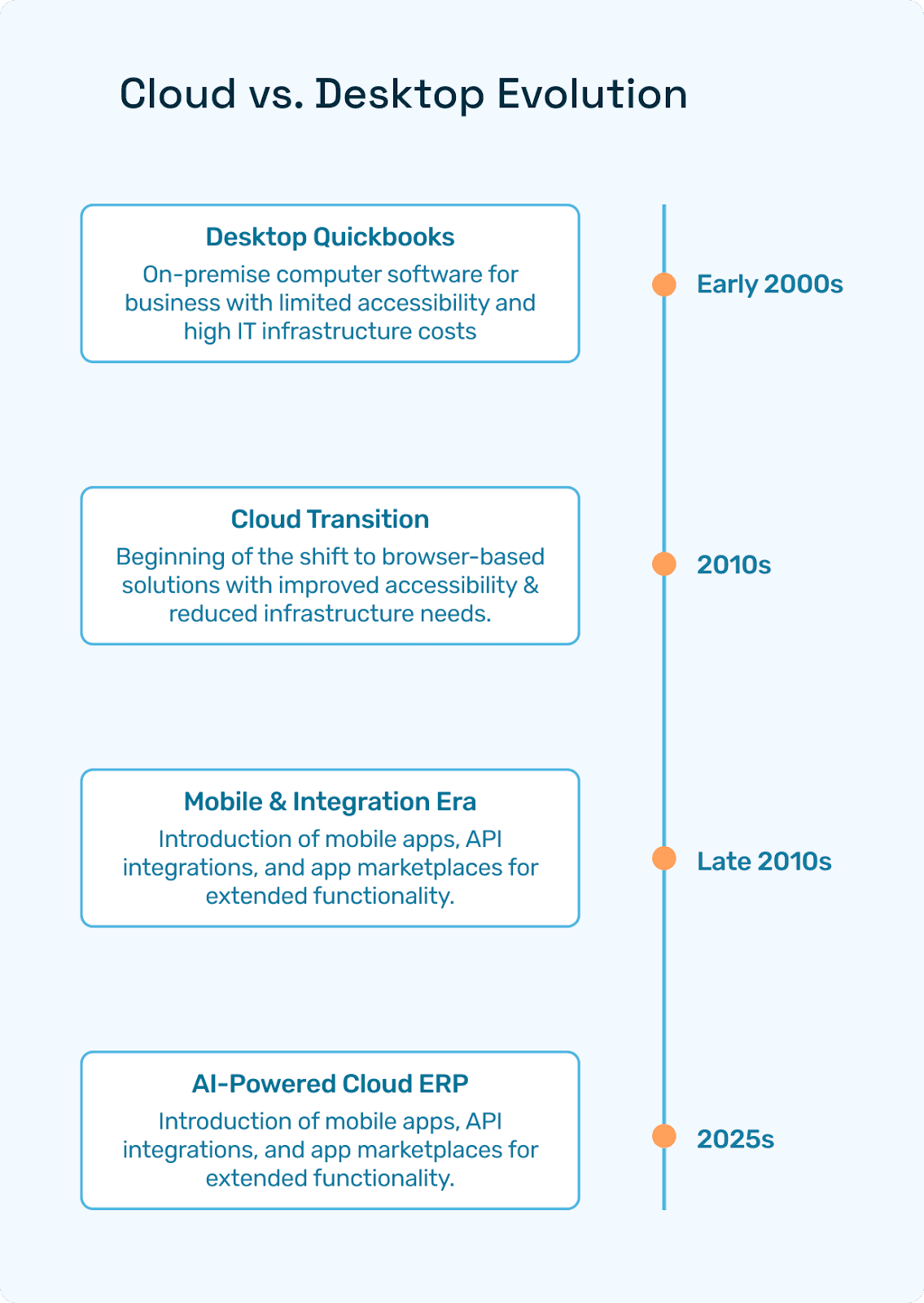
Early 2000s: on-prem computer software for business; limited access and costly IT.
2025: browser-based online business management software with subscription pricing, app stores, and AI plug-ins like Hyperbots.
4. Must-Have Features for Small Business Software Suites
Unified chart of accounts
Role-based dashboards
API ecosystem for add-ons (e.g., Hyperbots)
Mobile access
Built-in compliance & audit trail
5. Top Business Management Software Companies (Quick Glance)
Vendor | Ideal Size | Strengths | Caveats |
NetSuite | 20-500+ emp | All-in-one ERP | Setup effort |
QuickBooks Online Advanced | 5-100 emp | Ease, ecosystem | Limited multi-entity |
Microsoft Dynamics 365 Business Central | 10-300 emp | Microsoft stack | Customization cost |
Zoho One | <50 emp | All apps bundle | Deep Finance Limited |
Odoo | Any | Open-source modules | DIY complexity |
6. Deep Dive into Leading Small-Business Platforms
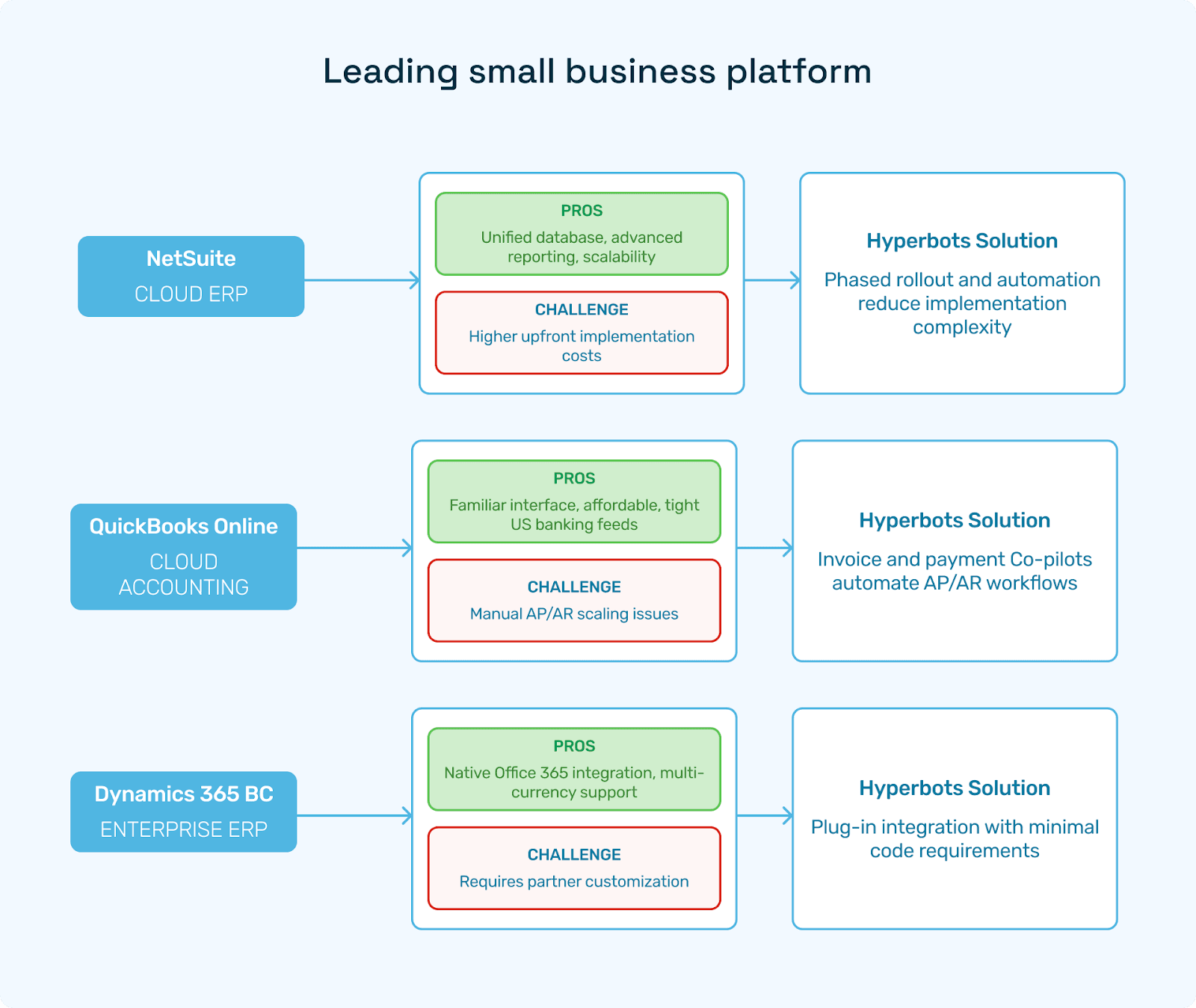
NetSuite (Cloud ERP)
Pros: Unified database, advanced reporting, scalability.
Cons: Higher upfront implementation—solved via phased rollout and Hyperbots automation.
QuickBooks Online Advanced
Pros: Familiar, affordable, tight US banking feeds.
Cons: Manual AP/AR scaling issues—fixed by Hyperbots Invoice & Payment Co-pilots.
Microsoft Dynamics 365 Business Central
Pros: Native Office 365 integration, multi-currency.
Cons: Requires partner customization—Hyperbots plugs in with minimal code.
7. The Role of Hyperbots AI Co-Pilots in Small-Business ERPs
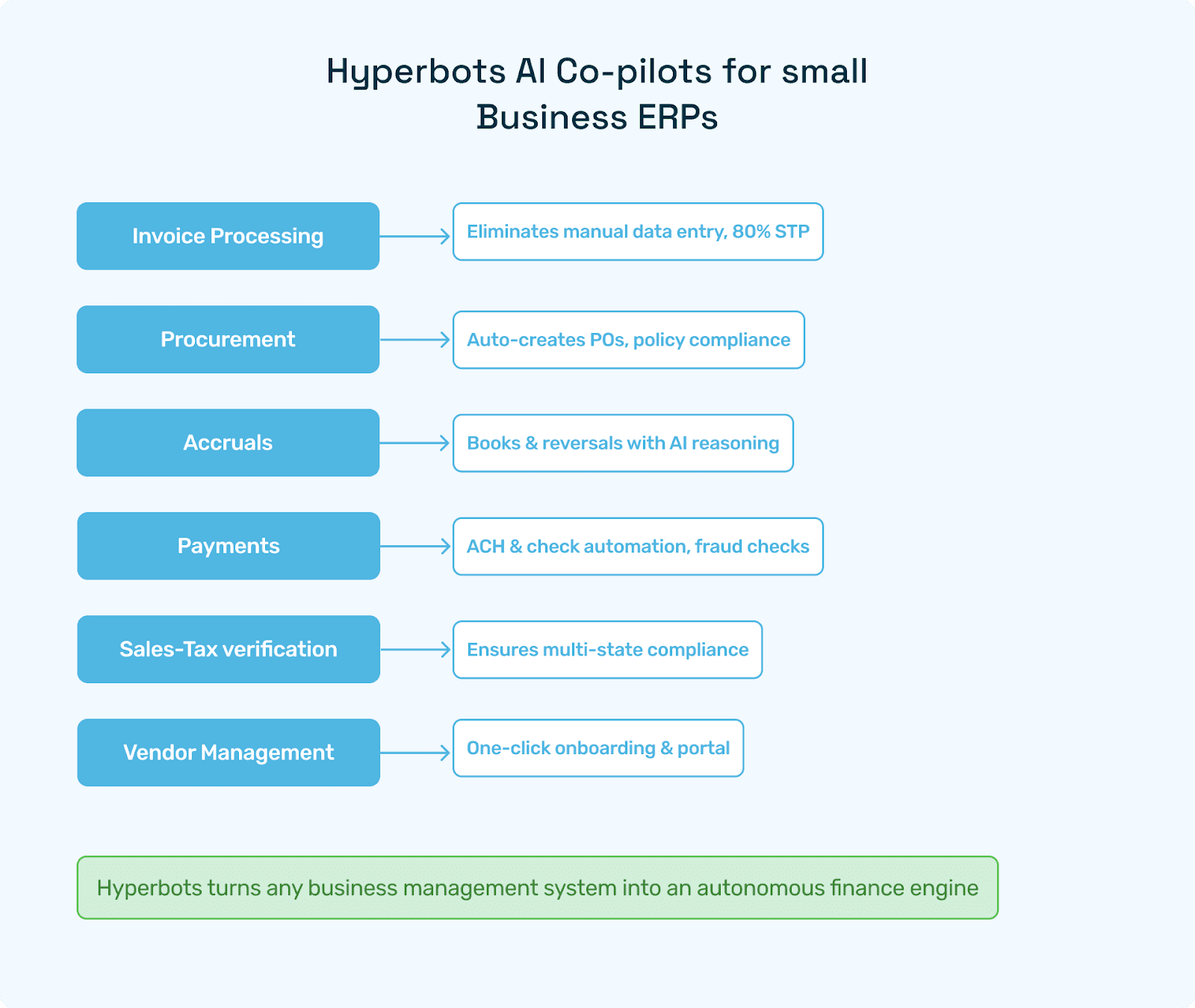
Co-pilot | SMB Pain Point Solved |
Eliminates manual data entry, 80 % STP | |
Auto-creates POs, policy compliance | |
Books & reversals with AI reasoning | |
ACH & check automation, fraud checks | |
Ensures multi-state compliance | |
One-click onboarding & portal |
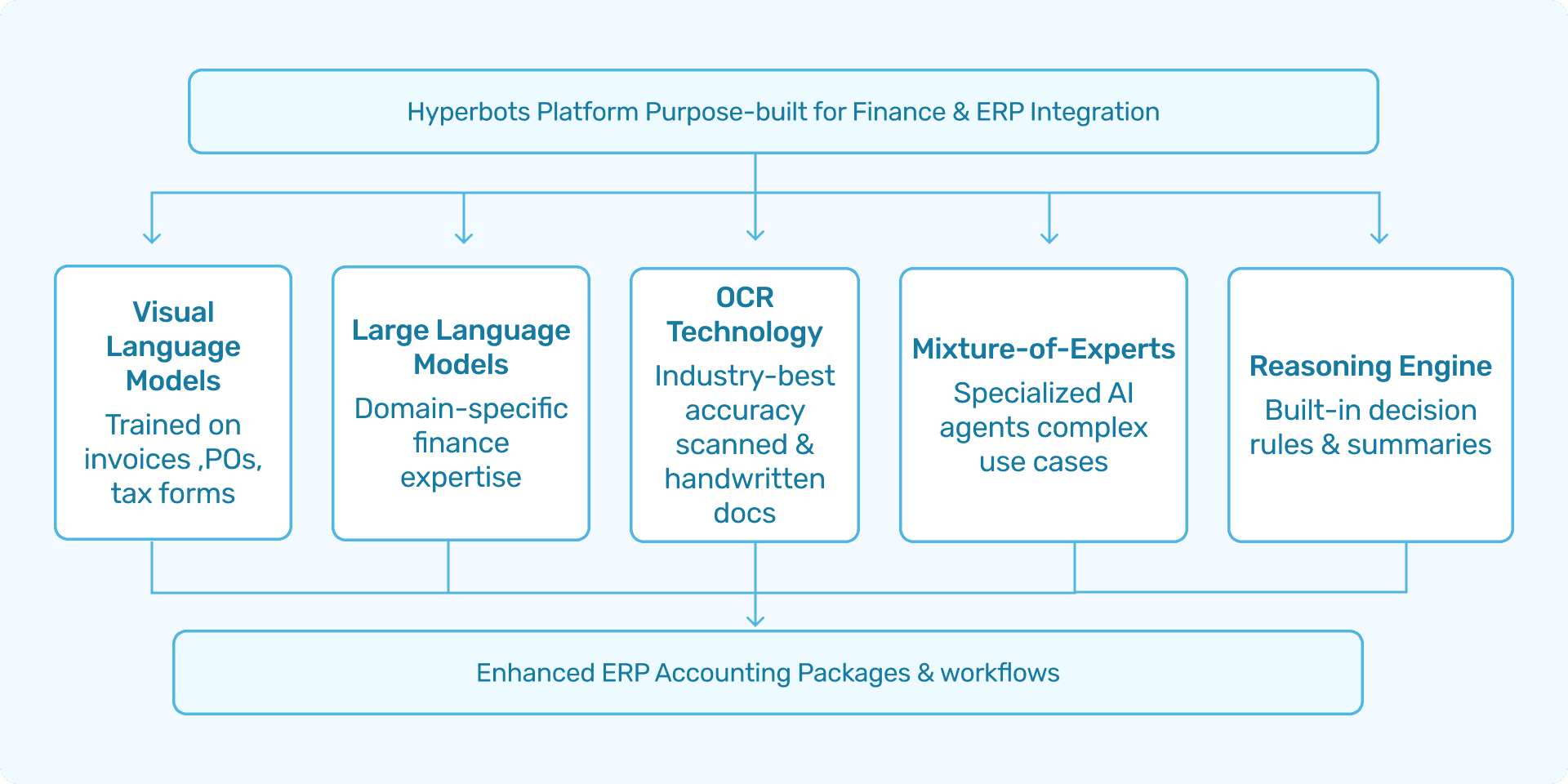
Hyperbots turns any online business management system into an autonomous finance engine.
8. Hyperbots Platform Capabilities for SMB Finance
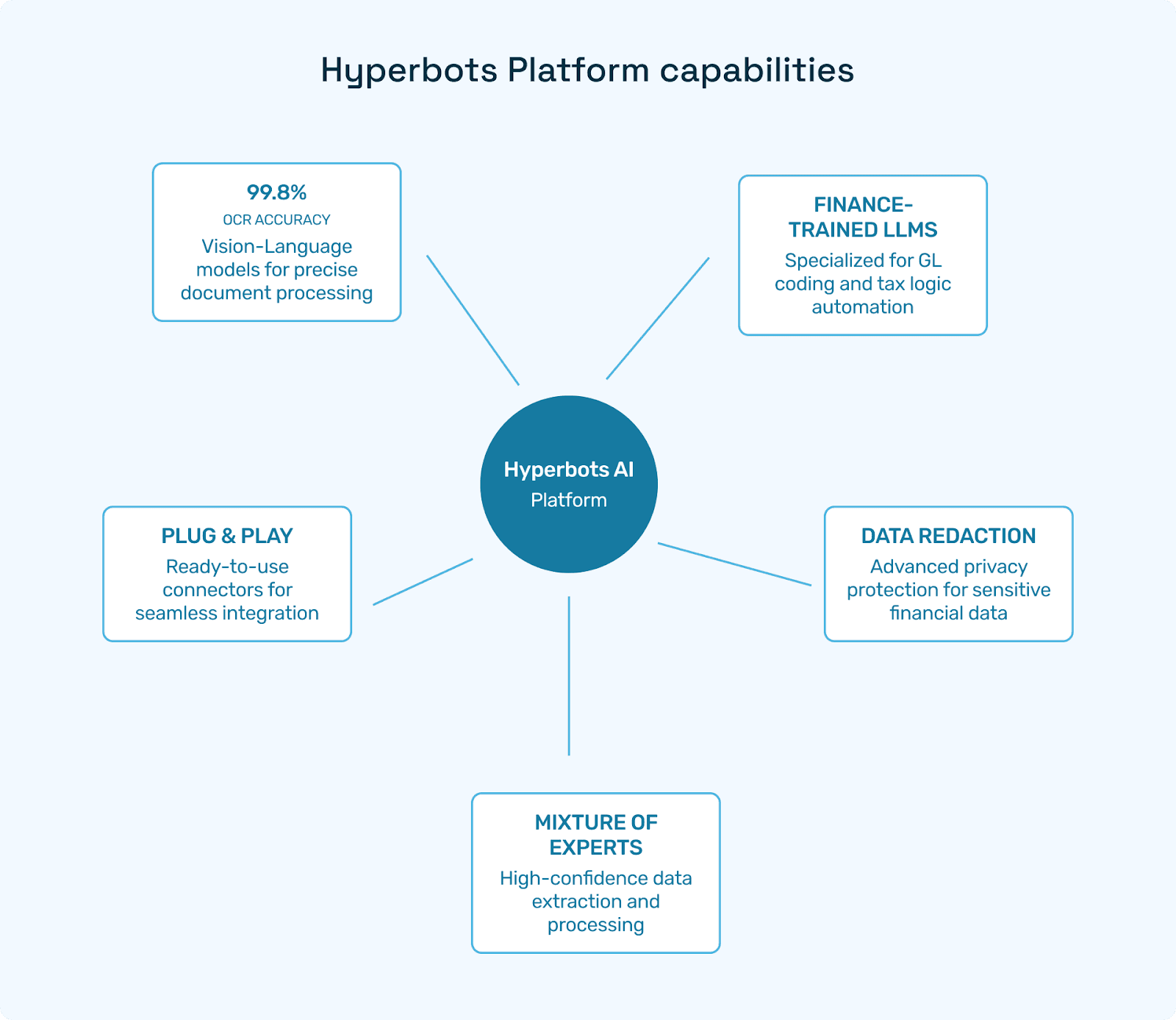
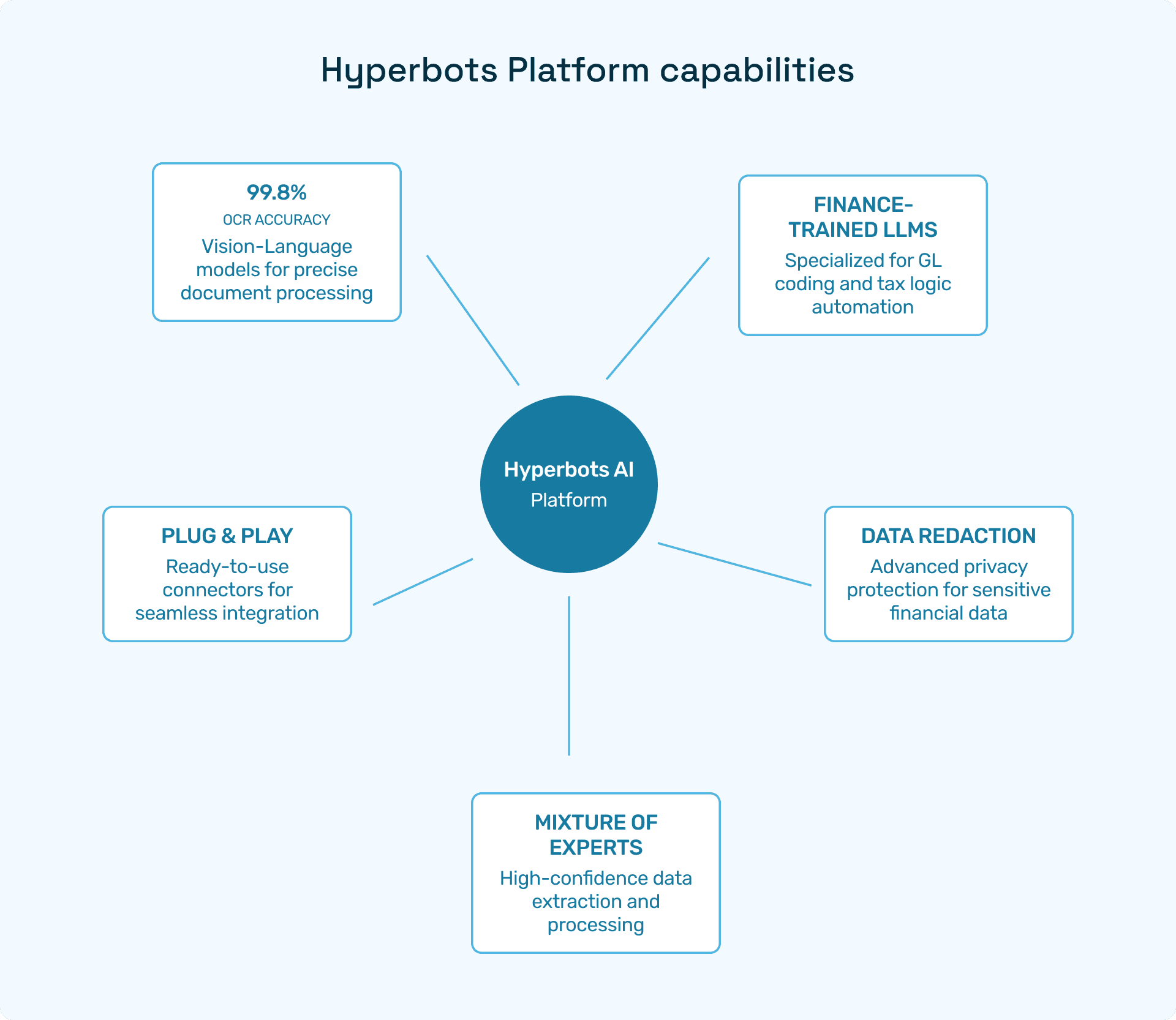
99.8 % OCR accuracy via Vision-Language Models
Finance-trained LLMs for GL coding and tax logic
Redaction for data privacy
Mixture-of-Experts for high-confidence extraction
Plug-and-play connectors for NetSuite, QuickBooks, and Dynamics
9. Implementation Best Practices
Map current vs. future workflows.
Start with the finance core, add CRM/Inventory later.
Deploy Hyperbots early to avoid re-keying historical data.
Train power users; leverage vendor communities.
10. Industry-Specific Considerations
Industry | Special Need | Hyperbots Edge |
eCommerce | Multi-channel tax | Sales Tax Co-pilot |
Manufacturing | 3-way match | Invoice & Procurement Co-pilots |
Services | ASC 606 rev-rec | Accruals Co-pilot |
Non-profit | Fund accounting | NetSuite + Hyperbots |
11. Pricing, ROI & TCO Benchmarks
Cloud suite license: $99–$999 / mo.
Hyperbots Co-pilots: usage-based; typical ROI 4–8× within 12 months.
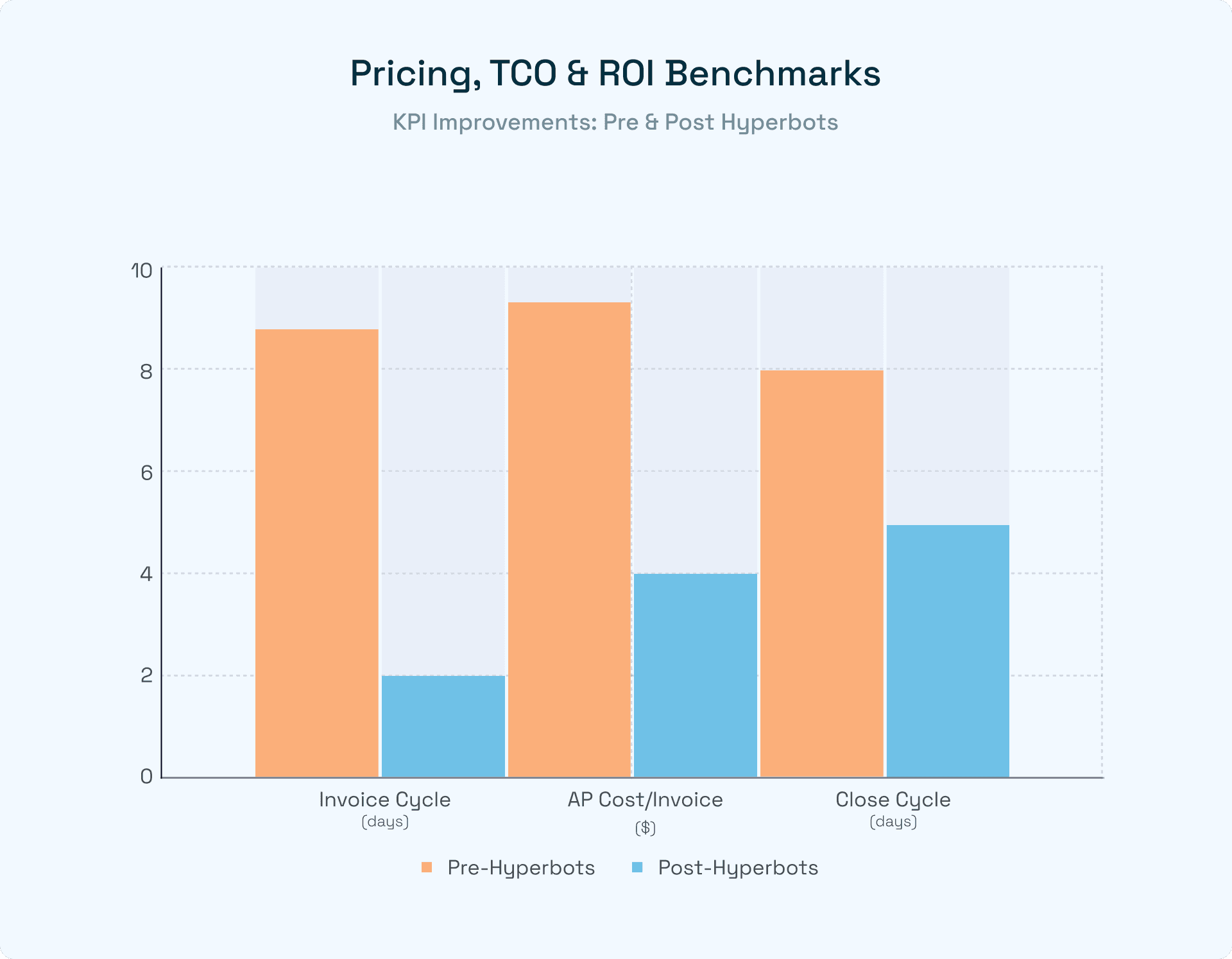
KPI improvements: 70 % faster invoice cycle, 40 % faster close, 60 % AP cost reduction.
12. FAQs
Q1. What is business management software for small businesses?
A cloud suite combining accounting, CRM, inventory, HR, and analytics.
Q2. Can I start with accounting only and add modules later?
Yes—most suites offer modular rollouts. Hyperbots integrates regardless of the module set.
Q3. Do Hyperbots replace my ERP?
No, it augments it—reading and writing via secure APIs.
Q4. How long to deploy Hyperbots?
Most SMBs go live in 2–4 weeks with minimal IT effort.
13. Conclusion
A modern business management platform is mission-critical for growth-minded SMEs. Cloud suites like NetSuite, QuickBooks, and Dynamics BC deliver unified finance, CRM, and inventory. Layering Hyperbots AI Co-pilots on top multiplies those gains—turning manual chores into autonomous workflows and letting small teams punch far above their weight. Ready to modernize your business management software for a small business? Book a Hyperbots demo and see AI-powered finance in action.