ERP Implementation Guide: Project Plan & Timeline
Accelerate ERP timelines with Hyperbots, optimize STP, hit KPIs, and unlock measurable finance automation outcomes.
Executive Summary
Enterprise Resource Planning (ERP) remains the backbone for integrating finance, procurement, inventory, sales, projects, and HR. Yet ERP deployment is notoriously high-stakes: missed data migrations, untrained users, or poorly sequenced tasks can derail go-live and ROI. This end-to-end ERP implementation guide gives you a pragmatic, CFO-friendly playbook you can lift into your SOWs and ERP system implementation plan.
You’ll get: a clear ERP implementation life cycle, a detailed ERP implementation project plan, a realistic ERP implementation timeline, a step-by-step ERP implementation procedure, actionable ERP implementation tips, and proven ERP project management implementation patterns. You’ll also see exactly how Hyperbots AI Co-pilots sit on top of any ERP to deliver 80%+ straight-through processing (STP) across Procure-to-Pay and beyond, reducing per-invoice costs, cycle times, and cash leakage from errors, duplicate payments, and missed discounts.
What Is ERP Implementation?
ERP implementation is the structured process of configuring, integrating, migrating, testing, and adopting an enterprise system that unifies core business functions. You’ll often see it discussed interchangeably with ERP deployment; in practice, deployment is a milestone within the broader ERP implementation life cycle.
A comprehensive ERP implementation guide typically covers:
A phase-by-phase ERP system implementation plan
A realistic ERP implementation timeline
A governance-backed ERP implementation project plan
Practical ERP implementation tips to minimize cost and risk
An ERP project management implementation approach that keeps scope, budget, and quality under control
ERP Implementation Life Cycle (End-to-End)
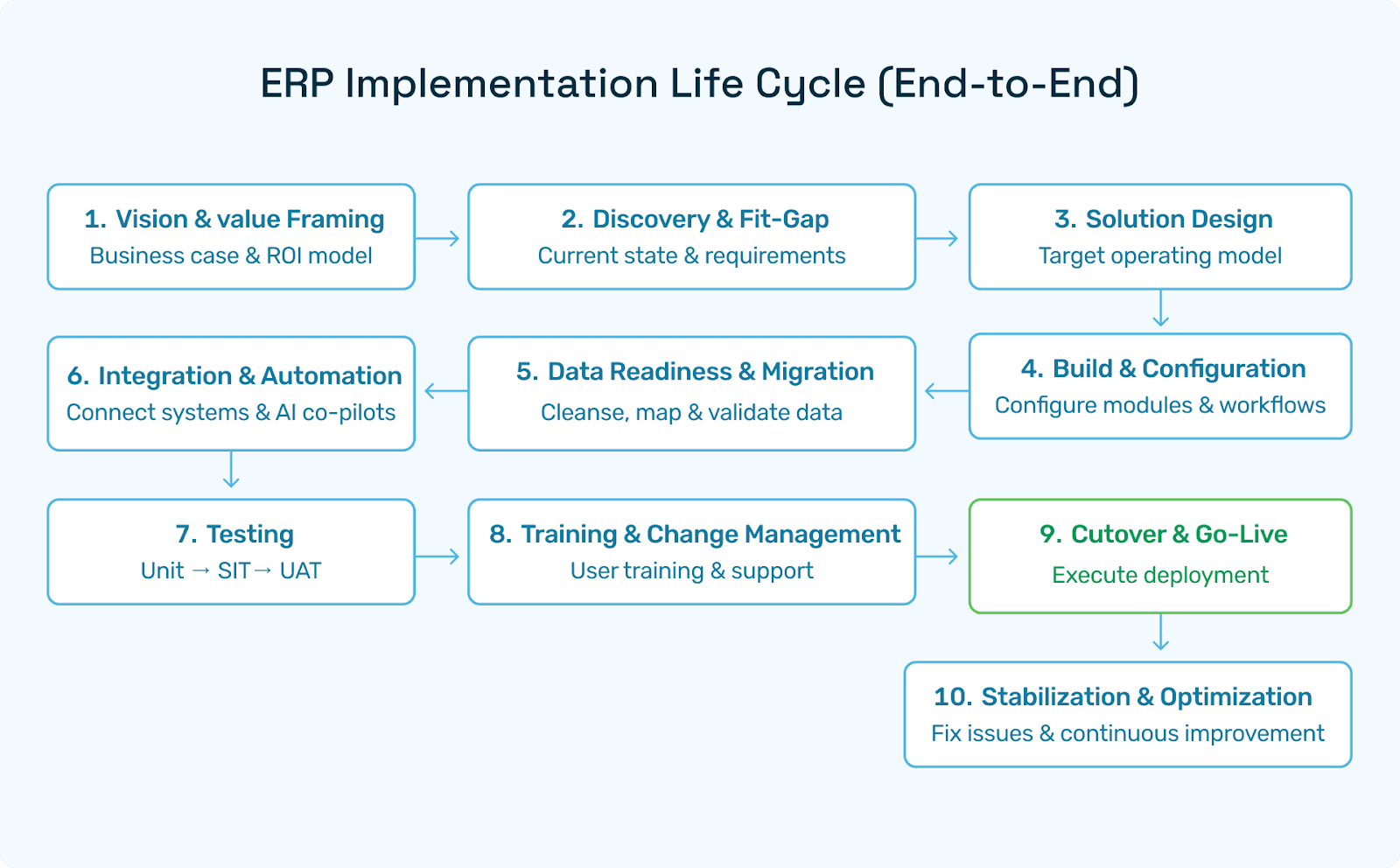
The ERP implementation life cycle contains ten dependable phases. Each phase aligns with specific deliverables, owners, and acceptance criteria that together reduce risk and accelerate time-to-value.
Vision & Value Framing
Goal: Quantify business case and agree on outcomes (e.g., DPO optimization, first-pass match rate, close acceleration).
Key outputs: Executive vision, ROI model, success KPIs.
Discovery & Fit-Gap
Goal: Understand current processes, data, controls, and compliance needs.
Outputs: Fit-gap matrix, prioritized backlog, risk register.
Solution Design
Goal: Design target operating model (TOM), chart of accounts (COA) structures, roles, and integrations.
Outputs: Architecture diagrams, configuration specs, integration contracts.
Build & Configuration
Goal: Configure ERP modules, extensions, workflows, roles/permissions.
Outputs: Config workbook, extension code, testable builds.
Data Readiness & Migration
Goal: Cleanse, map, stage, and validate masters & historicals.
Outputs: Data migration plan, trial loads, reconciliation reports.
Integration & Automation
Goal: Hook up banks, tax engines, e-commerce, EDI, and AI co-pilots.
Outputs: Integration test evidence, security sign-off.
Testing (Unit → UAT)
Goal: Prove it works: unit, SIT, performance, security, UAT, regression.
Outputs: Test scripts/evidence, defect logs, and go-live readiness score.
Training & Change Management
Goal: Equip users with role-based training, SOPs, and support.
Outputs: Curriculum, job aids, hypercare plan.
Cutover & Go-Live
Goal: Execute the ERP deployment runbook, minimize downtime.
Outputs: Cutover checklist, go/no-go decision, command center.
Stabilization & Optimization
Goal: Fix defects, optimize workflows, and roll out advanced AI automations.
Outputs: Post-go-live KPI dashboard, backlog for continuous improvement.
ERP System Implementation Plan (Template)
Use this structured ERP system implementation plan as your baseline; customize by scope (modules, entities), industry, and compliance needs.
1) Scope & Value
Modules in scope (e.g., GL, AP, AR, PO, Inventory, Projects, Tax).
Value hypotheses (cash leakage reduction, close acceleration, fraud/anomaly detection).
Target KPIs (first-pass match %, DPO, invoice cycle time, % STP).
2) Governance
Steering Committee (quarterly), PMO (monthly), workstream leads (weekly).
RACI for Finance, IT, Procurement, Operations, and Hyperbots.
Risk/issue/change control boards.
3) Project Controls
WBS, schedule baseline, milestones, RAID log, and budget tracking.
Quality gates per phase; go/no-go criteria for each gate.
4) Data Strategy
COA rationalization, vendor/customer master deduplication.
Migration waves (Masters → opening balances → historical transactions).
Validation and sign-off criteria per wave.
5) Integration Fabric
ERP ↔ Bank, tax engine, EDI, payroll, commerce, data warehouse.
Hyperbots connectors for email ingestion, invoice capture, approvals, payments, vendor onboarding, and sales-tax verification.
6) Security & Controls
SoD matrix, role design, maker-checker, audit trails.
Redaction and PII handling (finance-specific).
7) Testing Strategy
Unit, SIT, UAT, performance, regression, security.
Entry/exit criteria; defect SLAs.
8) Change & Training
Role-based curricula, learning paths for AP clerks, buyers, approvers, and controllers.
Communications plan; floor support during hypercare.
9) Cutover
Freeze windows, trial cutovers, back-out plan, command center, war room shifts.
Day-0/Day-1/Week-1 checklists.
10) Optimization
Post-go-live triage, AI-assisted process tuning, roadmap for Phase-2/3 automations.
Use this plan as the backbone of your ERP implementation project plan and ERP implementation procedure.
ERP Implementation Project Plan (WBS & RACI)
A crisp project plan translates strategy into accountable tasks. Below is a high-signal WBS you can paste into your PM tool.
Work Breakdown Structure (WBS)
Program mobilization & governance
Business discovery & fit-gap
Solution design (COA, masters, workflows, controls)
Build/config (GL, AP, AR, PO, Inventory, Projects)
Hyperbots AI Co-pilots configuration (Invoice, Procurement, Accruals, Payment, Sales-Tax, Vendor Management)
Integrations (banks, tax engine, email ingestion, EDI, payroll, CRM/e-commerce)
Data readiness & migration (masters, balances, histories)
Testing (unit, SIT, UAT, performance, security, regression)
Training & change (role-based)
Cutover & go-live
Stabilization & optimization
Sample RACI Snippet
CFO (A/R): Value targets, policy & controls sign-off
Controller (R): GL/COA, close process
AP Lead (R): Invoice automation, approvals, payments
Procurement Lead (R): POs, vendor onboarding, catalogs
IT/Integration Lead (R): Interfaces, SSO, security
PMO (A): Schedule, RAID, budget, reporting
Hyperbots Architect (R): Co-pilot config, data contracts, accuracy SLAs
Steering Committee (A): Go/no-go, change scope
This structure enables robust ERP project management implementation with clear accountability.
ERP Project Management Implementation Models
Pick a delivery model that suits ERP scope, risk appetite, and business deadlines.
1) Hybrid Agile (most common)
Agile sprints for configuration & co-pilot tuning; gated milestones for compliance/data.
Pros: Frequent feedback, faster value, manageable risk.
Use when: You have a firm go-live date but evolving requirements.
2) Waterfall (compliance-heavy)
Big upfront design, sequential phases.
Pros: Predictability; easier audit trail.
Use when: Highly regulated environments or strict SoD/validation.
3) Agile Incremental (multi-entity rollouts)
Roll out by entity/site; stabilize, then expand.
Pros: Shorter hypercare windows; lessons learned carry forward.
Whatever model you choose, ensure the ERP implementation guide maps to the model and that your ERP implementation procedure includes phase gates and executive checkpoints.
ERP Implementation Timeline (Realistic Durations)
Your ERP implementation timeline varies by scope and complexity. Typical mid-market patterns:
Core Finance (GL/AP/AR/Bank): 12–18 weeks
Procurement & Inventory: 18–28 weeks
Projects/Manufacturing/Tax/EDI/Commerce: 26–40+ weeks
Multi-entity, multi-currency: add 4–12 weeks for data and intercompany
Time drivers: Data quality, integration complexity, number of users/entities, and how aggressively you adopt AI automation (Hyperbots can materially shrink cycle time by increasing data quality and reducing manual rework).
ERP Implementation Procedure (Step-by-Step)
Use the following procedure as your operational checklist:
Confirm scope, KPIs, and value baseline (e.g., current invoice cycle time, match rate, % duplicate payments).
Mobilize governance (SteerCo/PMO) and publish reporting calendars.
Run discovery & fit-gap workshops; prioritize gaps by risk and ROI.
Freeze critical design decisions (COA, approvals, SoD, master data governance).
Stand up non-prod environments; seed with anonymized sample data.
Configure ERP (modules, roles, workflows).
Configure Hyperbots co-pilots to accelerate AP, Procurement, Accruals, Payments, Sales-Tax, and Vendor Management.
Build integrations (AP inbox ingestion, bank, tax engine, EDI, CRM, commerce).
Prepare data (cleansing, mapping, deduping, enrichment).
Execute trial migrations; reconcile and remediate.
Test (unit → SIT → UAT → performance → security → regression).
Train users (role-based curricula, sandbox practice).
Run cutover rehearsals; finalize the ERP deployment runbook.
Go-live with command center; monitor KPIs hourly/daily.
Stabilize & optimize (defect triage, quick-win automations).
Transition to BAU with a continuous improvement backlog.
This procedure nests neatly inside your ERP implementation project plan and anchors the ERP system implementation plan.
Data Migration & Master Data Readiness
Data is the #1 risk in any ERP implementation life cycle.
Readiness tasks
COA rationalization: remove redundant GL codes.
Vendor/customer master deduplication; fill missing tax IDs, addresses, and payment terms.
Item master normalization; UoM standards; price/list/cost coherence.
Migration waves
Masters (vendors/customers/items/COA)
Opening balances
Open transactions (POs, invoices, GRNs, credit notes)
Histories if required for analytics/compliance
Controls
Trial loads with record counts & control totals.
Reconciliations signed by Finance.
Maker-checker on transformation scripts; audit evidence retained.
Hyperbots markedly improve data readiness by extracting, validating, and augmenting invoice and vendor data before it enters ERP, boosting ERP deployment quality and reducing rework.
Testing, Training & Change Management
Testing
Define test cycles mapped to real business scenarios (e.g., 2-way/3-way matches, partial receipts, returns, tax variance).
Automate repeatable tests where feasible; keep a regression pack for releases.
Training
Role-based paths (AP clerk, buyer, approver, controller, plant manager).
Bite-sized videos + sandbox exercises; track completion.
Change Management
Communicate the “why,” not just the “what.”
Identify champions per function; run office hours during hypercare.
Pro tip: Include ERP implementation tips inside your training portal so users quickly align with best practices (e.g., how to create clean POs, how to code expenses accurately).
Cutover & Post Go-Live Stabilization
Cutover
Freeze windows for transactions; coordinate last-check imports.
Final data loads; user provisioning; printer/bank/tax endpoints verified.
War-room roster with business + IT + Hyperbots.
Stabilization
Daily defect triage; SLA by severity.
KPI watch: invoice cycle time, first-pass match %, exception backlog, duplicate payment rate, DPO trend.
Quick-hit improvements: tweak approval thresholds, tighten vendor onboarding validations, enable AI recommendations you deferred pre go-live.
KPIs, Controls & Continuous Optimization
Track these KPI/control families to ensure durable value:
Throughput & accuracy: First-pass match %, % STP, defect density.
Financial outcomes: DPO, early-payment discount capture, write-offs avoided.
Risk & compliance: SoD violations, tax variance, and audit findings closed.
Cycle time: Days from invoice receipt → approval → payment; PO cycle time; vendor onboarding time.
Hyperbots strengthens every KPI by acting as a finance-specific AI layer over your ERP, catching anomalies pre-posting, and guiding users with context-aware recommendations.
How Hyperbots AI Co-pilots Complement Any ERP
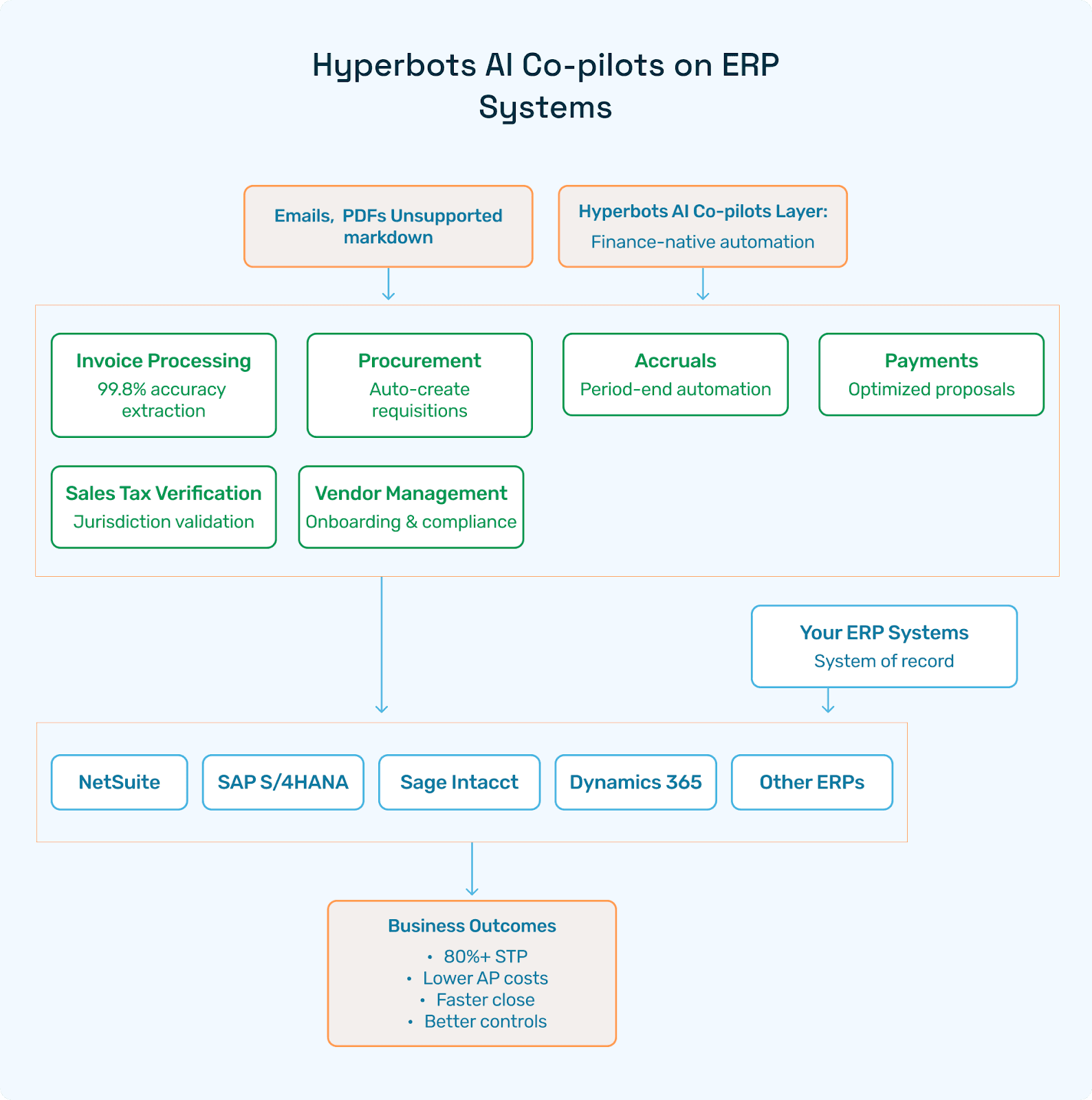
Hyperbots runs as an AI layer on top of leading ERPs (NetSuite, SAP S/4HANA, Sage Intacct, Microsoft Dynamics 365 Business Central, Deltek Costpoint, Epicor, QuickBooks, and more). These AI Co-pilots are designed with CFOs for 80%+ STP and measurable cash-outflow savings.
The 6 Hyperbots AI Co-pilots
Invoice Processing Co-pilot
Multi-model extraction (VLM + layout + LLM, MoE) from emails/PDFs;
Line-level reasoning; 3-way/2-way matching; fraud/duplicate detection;
Policy-aware approvals; GL coding recommendations; sales tax verification hooks.
Procurement Co-pilot
Auto-create purchase requisitions; guided buying; catalog intelligence;
Approval routing, vendor scorecards, and contract compliance nudges.
Accruals Co-pilot
Period-end accrual suggestions; reversals; variance analysis;
Learns seasonality and vendor behavior to tighten forecasts.
Payment Co-pilot
Payment proposal optimization (terms, cash position, discounts);
Duplicate/overpayment prevention; vendor banking validations.
Sales Tax Verification Co-pilot
Jurisdiction mapping; nexus considerations; invoice-level tax checks;
Flags anomalies before posting; supports audits with evidence.
Vendor Management Co-pilot
Onboarding/KYC; compliance docs; portal interactions;
Ongoing risk monitoring; performance insights.
Why it matters for your ERP implementation guide
Cleaner data in → Cleaner ERP out. Co-pilots validate and enrich master/transaction data before posting.
Shorter ERP implementation timeline via faster testing and fewer defects.
Lower TCO by minimizing manual touches and avoiding costly rework after go-live.
Higher control maturity with built-in finance policies, SoD awareness, and audit trails.
Manufacturing Spotlight: Why Hyperbots Win in Manufacturing
Factory & vendor sprawl: The Vendor Management Co-pilot accelerates onboarding and keeps docs current, reducing delays.
High invoice volume & line complexity: The Invoice Processing Co-pilot maintains best-in-class capture accuracy even on multi-page, multi-line invoices; improves first-pass matches; flags chargebacks and freight/tariff anomalies.
Distributed receiving (stores & DCs): Co-pilots reconcile POs/GRNs with invoices; surface mismatches (short-ships, substitutions, price/term variance).
Seasonal peaks: Accruals and Payment co-pilots smooth quarter-ends, protect cash, and prioritize discounts.
Tax complexity (multi-state): Sales Tax Verification reduces penalties and audit exposure.
Outcome: Massive productivity gains and measurable cost savings on top of any ERP, exactly the kind of advantage manufacturing CFOs need.
Hyperbots Platform Capabilities (Agentic AI)
Hyperbots’ agentic platform is purpose-built for Finance & Accounting:
HyperLM + MoE: Finance-trained language models with a Mixture-of-Experts approach (VLM + layout + LLM) for high-accuracy document understanding.
Connectors: Real-time read/write to major ERPs; email inbox ingestion (Gmail/Outlook); bank, tax, and payment rails; EDI; commerce; data warehouses.
Reasoning & Validation: Policy-aware approvals, GL coding suggestions, anomaly detection, duplicate payment prevention.
Security & Compliance: Role-based access, SoD alignment, redaction, audit logs.
Scalability: Microservices architecture (Java backend, Postgres, React front-end), multi-instance ERP support, robust retry logic, and observability.
Outcome First: Built with CFO input to achieve 80%+ STP and 10%+ cash-outflow savings in mid-market environments.
This platform complements ERP across industries such as retail, manufacturing, healthcare, construction, and SaaS, by reducing manual work and strengthening financial controls.
FAQs: ERP Deployment & Hyperbots
Q1. What’s the difference between ERP implementation and ERP deployment?
A: Implementation is the full journey (Design → Build → Test → Train → Cutover → Stabilize). Deployment is the go-live event within that broader ERP implementation life cycle.
Q2. How long does a typical ERP implementation timeline take?
A: 12–40+ weeks depending on scope, entities, integrations, and data quality. Hyperbots shortens time by improving data readiness and automating heavy AP/procurement work.
Q3. Do I need Hyperbots if my ERP already has workflows?
A: ERPs route tasks but don’t reason over messy documents at scale. Hyperbots’ finance-specific AI (VLM + LLM MoE) extracts, validates, detects anomalies, and recommends actions—raising accuracy and % STP.
Q4. Is there a standard ERP implementation procedure?
A: Yes, scope/KPIs, governance, fit-gap, design, build, data, integrations, testing, training, cutover, stabilization. This article gives you a reusable ERP implementation guide.
Q5. How does Hyperbots integrate with different ERPs?
A: Via certified connectors/APIs for real-time read/write; secure email ingestion; and modular co-pilot services. The result is consistent automation on top of any ERP.
Q6. What about security and compliance?
A: Role-based access, SoD alignment, redaction, audit logs, and evidence capture for each posting/decision. Hyperbots strengthens auditability vs. manual workflows.
Q7. Can Hyperbots help with sales tax accuracy?
A: Yes. The Sales Tax Verification Co-pilot checks jurisdictions, calculates expected tax, and flags discrepancies before posting.
Q8. Does Hyperbots support multi-currency and multi-entity?
A: Yes. Co-pilots respect entity-level policies, currencies, and approval thresholds; Accruals/Payment logic adapts to local rules.
Q9. How do I measure success?
A: Track first-pass match %, % STP, duplicate rate, invoice cycle time, DPO, discount capture, tax variance, and audit findings closed.
Call to Action
Ready to compress your ERP implementation timeline and raise the percentage of STP?
Schedule a working session with Hyperbots to tailor your ERP implementation project plan and map co-pilot outcomes to your 90-day KPIs.
Book a demo: Hyperbots Demo
Get the template pack: ERP Implementation Kit
Bonus: Rapid-Fire ERP Implementation Tips
To close, here are practical ERP implementation tips you can act on immediately:
Write KPIs before scope; design to the numbers.
Freeze COA changes early; reduce post-go-live churn.
Stand up a clean email ingestion channel for AP documents on day one.
Pilot co-pilots (Invoice & Vendor Management) in UAT to cut exception volume before go-live.
Use trial cutovers as training—assign owners per checklist line.
Pre-agree defect SLAs for hypercare; publish a visible burn-down.
Over-invest in vendor master quality; it pays dividends across PO/AP/tax
Maintain a permanent regression pack; run it before every release.
Keep approvals policy-driven (thresholds, SoD) and let AI do the nudging.
Celebrate value milestones (STP%, discount capture) to reinforce adoption.