NetSuite Implementation: A Complete, Practitioner-Level Guide for Strategy, Delivery, and Scale
Build a strong NetSuite foundation, then accelerate finance efficiency with Hyperbots automation and streamlined operations.
Executive Summary
A successful NetSuite implementation is less about turning features on and more about designing a stable data model, clean processes, and a roadmap for continuous improvement.
Use a blended team - business owners, solution architects, NetSuite developers, and a trusted NetSuite agency to deliver value quickly while avoiding over-customization.
Treat NetSuite migration as a controlled transformation: cleanse master data, enrich transactions, and validate with reconciliations; avoid lifting and shifting spreadsheet chaos.
Lean on intelligent automation after go-live. Hyperbots AI co-pilots add straight-through processing to Procure-to-Pay and Order-to-Cash, delivering faster close, cleaner audits, and lower AP cost per invoice.
Continuous NetSuite development and managed enhancements, sometimes called “NetSuite optimization”, turn your ERP from a system of record into a system of results.
What “Great” NetSuite Implementation Looks Like
A great NetSuite implementation is the convergence of four things:
a) Clean model, not just modules
Map how money, inventory, and obligations move through your organization. Your Chart of Accounts, item master (including attributes), locations, vendors, customers, tax codes, and approval chains are the rails. If they’re wobbly, everything on top wobbles.
b) Business-first configurations
Default to native NetSuite capabilities (workflows, SuiteApprovals, SuiteAnalytics, SuiteTax, Advanced Financials, Item/Inventory features). Add custom NetSuite development only after proving a gap can’t be closed by configuration or a vetted SuiteApp.
c) Frictionless user experience
Role-based centers, saved searches, dashboards, KPIs, and guided forms reduce training burden. Build one “golden path” for each persona (AP specialist, buyer, accountant, sales ops, warehouse manager).
d) Run-ready operations
Release management, test plans, knowledge base, and a cadence for post-go-live enhancements (your NetSuite development backlog) so the system evolves with the business.
Roles, RACI, and Operating Model
Executive Sponsor (CFO/COO) — Clarifies outcomes, unblocks decisions.
Business Process Owners — Own Procure-to-Pay, Order-to-Cash, Record-to-Report; sign off on “Definition of Done”.
Solution Architect / Lead Consultant — Designs data model, orchestration, and integrations.
NetSuite Developers — Implement scripts (SuiteScript 2.x), workflows, integrations, and Suitelets with standards.
Data Lead — Oversees NetSuite migration mapping, cleansing, and reconciliation plans.
QA/UAT Lead — Acceptance criteria, test suites, automation.
Change/Training Lead — Curricula, role guides, floor support.
Security & Compliance — Least-privilege roles, SOD controls, audit trails.
Hyperbots Architect — Plans finance automation overlay.
Keep RACI crisp, who is Accountable vs. Responsible, or ambiguity becomes your largest risk.
Scoping the Journey: Fit-Gap and Value Cases
Start with a clear hypothesis: “Where will NetSuite change our financial outcomes?”
Priority Value Cases
AP cycle time & cost per invoice: Can we achieve straight-through processing?
Landed cost & accruals: Reduce variance and manual reversals.
Revenue & billing accuracy: Subscription, project, or multi-element revenue rules.
Inventory accuracy: Eliminate stockouts and aged stock via disciplined receiving and counts.
Fit-gap
Walk through end-to-end scenarios: Purchase → Receive → Invoice → Pay → Close; Quote → Order → Fulfill → Bill → Collect → Close.
Classify each step: Fit by Configuration, Fit with SuiteApp, or Gap (requires NetSuite development).
Rank each gap by value impact and complexity to prioritize the backlog.
Data Strategy & NetSuite Migration
Golden rule: Don’t dump bad data into a new system.
Data domains
Master Data: Chart of Accounts, Vendors, Customers, Items, Locations, Tax Codes.
Open Transactions: POs, SOs, GRN/GRNI, Invoices, Credits, Payments on account.
Historical Summaries: Trial balance by month, inventory on hand by location, customer/vendor balances.
Migration steps
Profile & cleanse in a staging area. De-duplicate vendors/customers; normalize addresses; validate tax IDs; rationalize units of measure.
Enrich with missing attributes that will power reporting (e.g., item attributes for retail, project tags for services).
Map & transform to NetSuite CSV templates or integration jobs; define a repeatable mock-load script.
Reconcile mock loads: trial balance (legacy vs. NetSuite), inventory quantities & valuation, aging reports.
Freeze & cutover close to go-live; final deltas; document residuals and how they’ll be cleared.
Success Criteria
Trial balance matches within immaterial variance.
Inventory counts match by location and item.
Open payables/receivables reconcile line-by-line to legacy.
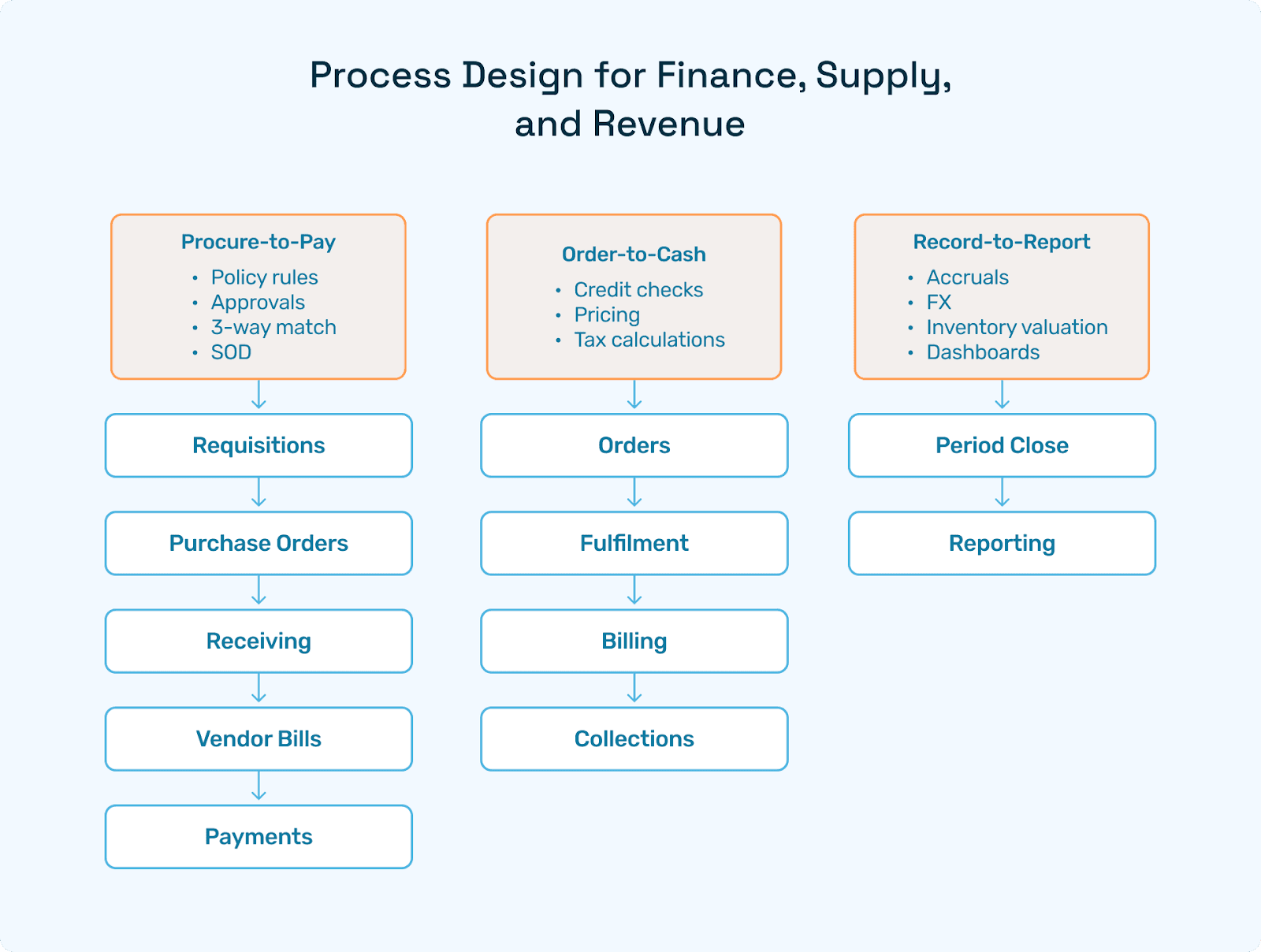
Process Design for Finance, Supply, and Revenue
Procure-to-Pay (P2P)
Requisitions → POs: Policy rules for amounts, categories, and locations; auto-routing with approvals.
Receiving: Enforce item receipts before billing; mobile receiving and put-away if warehouse-heavy.
Vendor Bills: 2-way/3-way match; landed cost allocation (freight, duty, insurance).
Payments: Approval matrices, check/ACH/wire, positive pay, and segregation of duties.
Order-to-Cash (O2C)
Orders: Credit checks, pricing tiers, discount approvals.
Fulfillment: Pick/pack/ship, partials, backorders; ASN/EDI if needed.
Billing: Milestone/subscription/project; tax calculation with SuiteTax/connector.
Collections: Dunning workflows, cash application, disputes, and write-offs.
Record-to-Report (R2R)
Period close checklist: Inventory valuation, accruals/reversals, FX remeasurement, intercompany eliminations.
Reporting: Role dashboards, financial statements, and SuiteAnalytics workbooks per persona.
Customization the Right Way: Scripts, Workflows & “Custom NetSuite Development”
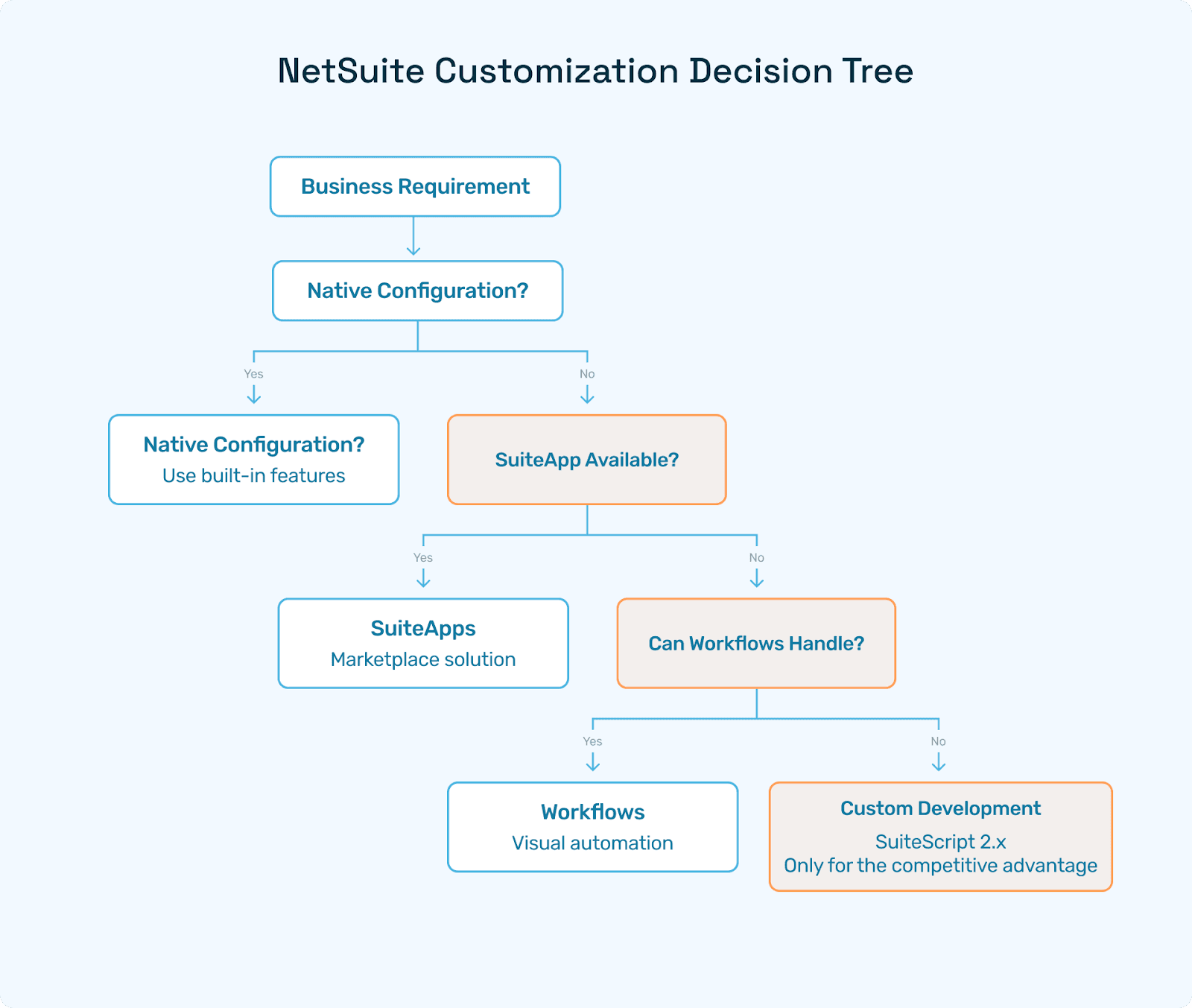
Customization hierarchy
Native configuration
SuiteApps
Workflows
SuiteScript 2.x.
Place heavier NetSuite development only where you derive a competitive advantage or genuine compliance needs.
Dev standards
Version-controlled scripts (Git) with naming conventions and code reviews.
Unit tests for critical functions; integration tests for end-to-end flows.
Releasable packages (bundles) with rollback plans; maintain a Release Notes log.
Avoid implicit dependencies on hard-coded internal IDs; use script parameters and metadata.
Examples where custom makes sense
Complex promotion calculation, special GL posting logic, carrier rate shopping, or advanced allocation models
Tailored vendor/customer portals when packaged alternatives fall short.
Testing & Cutover: From Sandbox to Production
Test strategy
Unit & Integration: Scripts, workflows, and SuiteApps.
System: End-to-end business scenarios, negative tests, and boundary conditions.
UAT: Business owns acceptance; run through training scripts.
Performance: High-volume day simulations (invoice spikes, order peaks).
Security: Roles/permissions, segregation of duties (SOD), audit logs.
Cutover checklist
Freeze masters, close legacy subledgers, and extract deltas.
Execute final loads; run reconciliations; sign off with CFO/Controller.
Communications plan: who does what on Day 1; where to get help; known issues list.
Hypercare & Continuous Enhancement (NetSuite Optimization)
Go-live is the starting line, not the finish line. Establish a NetSuite development runway:
Hypercare (2–4 weeks): Triage room, daily issue burndown, and prioritized fixes.
Quarterly optimization: New dashboards, saved searches, and minor workflow tweaks.
Semiannual reviews: Deeper refactors, module enablement, integration rationalization.
NetSuite optimization focus: Automations for approvals, accruals, and reconciliations; performance tuning of saved searches/workbooks.
Include the long-tail SEO variant Netsuite optimization once in your site taxonomy to capture misspelt queries (do not use it in UI copy).
How Hyperbots AI Co-pilots Multiply NetSuite ROI
Once core processes are stable, layer Hyperbots to strip manual effort from finance operations. These finance-native agents are trained on millions of documents and accounting samples and run on top of NetSuite via secure, read/write APIs.
Invoice Processing Co-pilot
Handles complex, multi-page, multi-line invoices using a Mixture-of-Experts approach (VLMs + layout models + LLMs).
Extracts fields with up to 99.8% accuracy in our benchmarks, applies business rules, matches to POs/receipts, assigns GL/department/class, and posts, delivering 80–90% straight-through processing (STP).
Procurement Co-pilot
Generates requisitions from demand signals, enforces policy thresholds, accelerates approvals, and auto-creates POs in NetSuite.Accruals Co-pilot
Books freight/duty/GRNI accruals nightly and auto-reverses next period, cutting month-end close by days and tightening landed-cost accuracy.Payments Co-pilot
Orchestrates ACH/check/wire while optimizing timing for early-pay discounts vs. cash-flow. Includes fraud checks and delegated approvals; writes back payment status.Sales Tax Verification Co-pilot
Validates jurisdiction and rate at the line level pre-posting, reducing audit exposure.Vendor Management Co-pilot
One-click vendor onboarding (e.g., W-9 verification), duplicate detection, and portal access so vendors can track POs, invoices, and payments.
Why this matters: AP cost per invoice drops, invoice cycle time shrinks from weeks to days, accrual variance narrows, and audit narratives are “explainable by design” thanks to agent reasoning logs.
Hyperbots Platform Capabilities for NetSuite
Redaction — PII/bank details anonymized before model access; zero leakage policy.
OCR + Vision-Language Models (VLMs) — Layout-aware extraction for tables and free-form paragraphs (terms, penalties, discounts, surcharges) common in vendor documents.
Finance-aware LLMs — Interpret remittances, complex payment instructions, and line-level justifications; make the postings explainable.
Mixture of Experts (MoE) — Specialized models for invoice types (freight, duty, credit memos) automatically selected per document.
Reasoning & Auditability — Human-readable rationale attached to every posting in NetSuite.
Connectors — Robust, secure read/write integration to vendors, POs, bills, payments, journals, and tax objects.
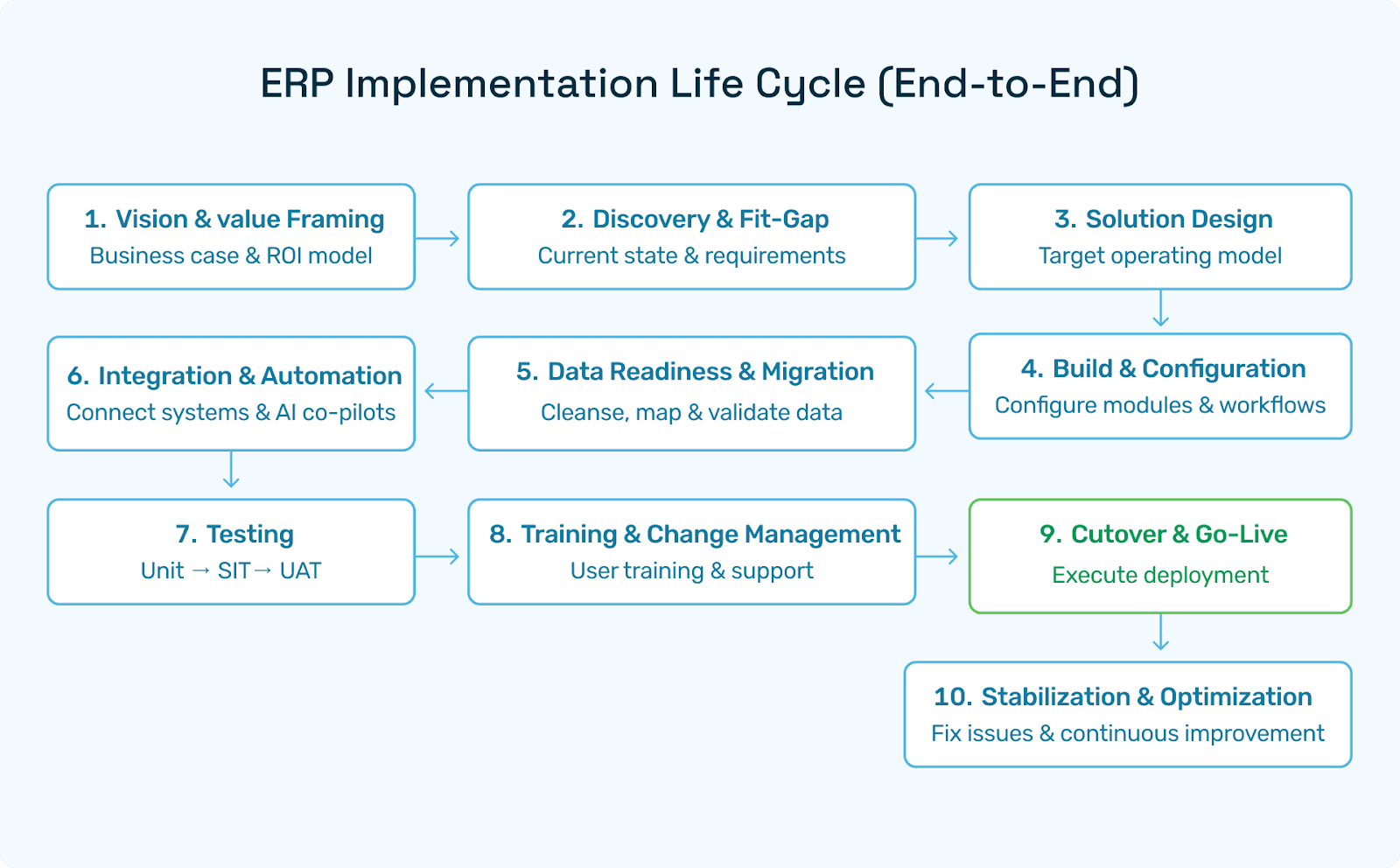
Implementation Roadmap & Timeline
Phase 0 (Week 0–1) — Mobilize
Charter, KPIs, RACI; environment plan; security & redaction policy.
Value case baselines: AP cost/invoice, invoice cycle time, and close days.
Phase 1 (Weeks 1–3) — Design & Data
Data model sign-off (CoA, items, vendors, customers, tax).
Fit-gap matrix and backlog; mock migrations begin.
Phase 2 (Weeks 3–8) — Build
Config + light NetSuite development; SuiteApps; workflows; saved searches/dashboards.
Integration stubs (bank, tax, eComm, WMS/OMS).
Prepare Hyperbots connectors (read-only) and sample document ingestion.
Phase 3 (Weeks 8–10) — Test & Train
System + UAT; performance & security; training by role.
Hyperbots in shadow mode for invoices/accruals/tax; variance report.
Phase 4 (Weeks 10–12) — Cutover & Go-Live
Final migrations & reconciliations; Day-1 support.
Hyperbots controlled write-back pilot for selected vendors.
Phase 5 (Weeks 12+) — Hypercare & Scale
Extend Hyperbots to 100% invoice volume, payment execution, and vendor portal.
Quarterly NetSuite optimization sprints.
Selecting a NetSuite Agency & Working with NetSuite Developers
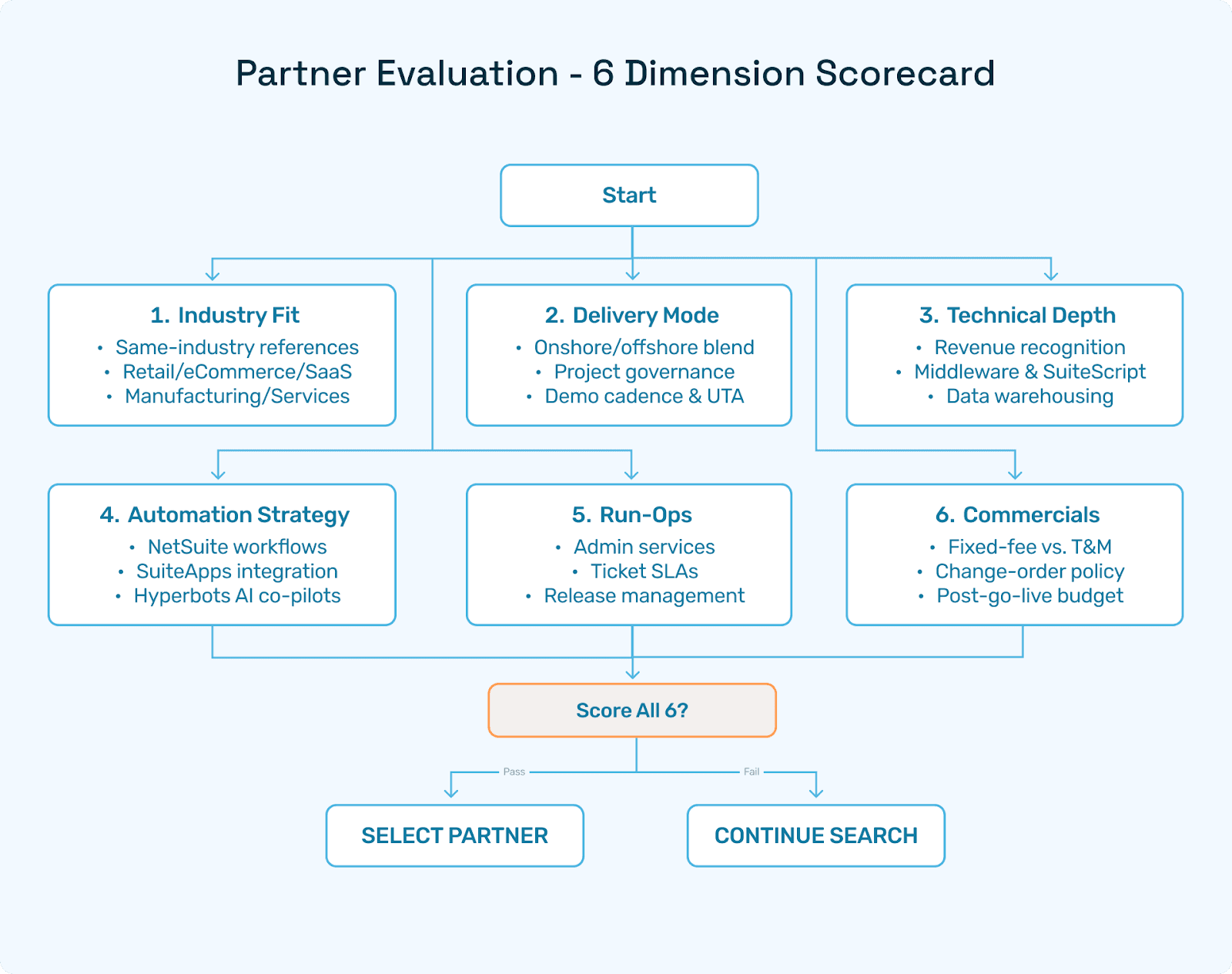
When evaluating a NetSuite agency, compare on six dimensions:
Industry fit — Retail, DTC/eCommerce, SaaS, manufacturing, services; demand 2–3 references in your micro-vertical.
Delivery model — Onshore/offshore blend, sprint cadence, demo frequency, and UAT approach.
Technical depth — Revenue recognition, intercompany, landed cost, inventory, tax; NetSuite developers who write clean SuiteScript and know when not to.
Automation mindset — Proof they can layer Hyperbots and NetSuite workflows to minimize manual effort.
Run-ops — Admin services, release management, observability, SLAs.
Commercial clarity — SOW scope matrix (in/out), change-order policy, and optimization budget.
Engagement hygiene
Force early prototypes: Chart of Accounts (COA) mapping, approval flows, 3-way match, and bank reconciliation demos within the first sprints.
Ask developers to submit code via PRs with linting and tests; retain access to repositories.
Security, Compliance & Auditability
Least privilege roles; avoid “god mode” users; rotate credentials.
SOD controls: No single role can create vendor + update bank + release payments.
Audit evidence: Saved searches/report packs; change logs; Hyperbots reasoning logs attached to key postings.
Data retention & privacy: Align with legal/industry standards; tokenize where possible.
KPI Benchmarks & ROI Model
NetSuite alone - post go-live baselines
AP cost/invoice: $4–$6 (from $8–$12 legacy).
Invoice cycle time: 5–7 days (from 10–14).
Close time: 6–7 days (from 8–10).
Accrual variance: ~0.8–1.2%.
NetSuite + Hyperbots - 90-day targets
AP cost/invoice: $1.5–$2.5
Invoice cycle time: 1–3 days
Close time: 3–5 days
Accrual variance: ≤0.5%
STP (straight-through invoices): 80–90% of in-scope volume
ROI
Savings accrue from labor, fewer late fees and penalties, better cash timing (early-pay discounts), and reduced audit adjustments—payback often within 9–12 months.
Design & Documentation: What to Hand to the Business
Role playbooks — One page per persona: inputs, key screens, KPIs, and exception paths.
Close checklist — Period-end tasks and owners; links to saved searches.
Run-book — Release cadence, how to request enhancements, and how to escalate issues.
Audit pack — Standardized exports (GL, subledgers, bank rec, tax summaries), plus Hyperbots reasoning logs.
FAQs
Q1. Do I need a NetSuite agency, or can my team implement directly?
A: If you have experienced NetSuite developers and a strong architect, a self-implementation can work for smaller scopes. Most mid-market and enterprise projects benefit from a seasoned NetSuite agency for design patterns, integration guardrails, and change management.
Q2. What is the right balance between configuration and custom NetSuite development?
A: Aim for 70–85% via configuration/SuiteApps and 15–30% via targeted NetSuite development. If scripts exceed 30–40% of effort, reassess the design or consider a productized SuiteApp.
Q3. How should I approach NetSuite migration without disrupting the business?
A: Run at least two mock migrations with full reconciliations (trial balance, inventory, aging). Use a staging area to cleanse and enrich masters. Cut over close to period end, and maintain a clear plan for residual transactions.
Q4. We went live, now users want enhancements. How do we prioritize?
A: Adopt quarterly “mini-roadmaps”: quick wins (workflows/dashboards), compliance fixes, and a few strategic features. Track each ask’s business value and effort. Fold in Hyperbots automations where repetitive finance work persists.
Q5. What exactly is NetSuite optimization?
A: It’s the ongoing improvement cycle, tuning saved searches and SuiteAnalytics, rationalizing customizations, tightening approvals, and adding automations.
Q6. How does Hyperbots integrate with NetSuite?
A: Through secure APIs with read/write scopes. Agents ingest docs (email/portal/SFTP), perform extraction and reasoning, and post back to NetSuite with audit-ready logs. You can begin in shadow mode, then enable controlled write-back.
Conclusion & Next Steps
A durable NetSuite implementation turns finance and operations into a single, reliable machine. Start with the data model and process discipline; keep customizations targeted; test like a skeptic; and plan for continuous improvement. When you’re stable on core flows, switch on Hyperbots to automate the last mile of finance, AP, accruals, tax, payments, and vendor onboarding, so your team spends time on analysis, not admin.
Want to see what autonomous finance on top of NetSuite looks like?
Explore Our Product Pages for:
Invoice Processing ·
Procurement ·
Accruals ·
Payments ·
Sales Tax Verification ·
Vendor Management.