Excel/SharePoint Purchase Order Systems: Templates, Pros, Cons
Discover Excel purchase order system templates, SharePoint options, and their pros and cons for smarter procurement.
Executive Summary
In today’s fast-paced business environment, companies often rely on tools like the purchase order system Excel templates and SharePoint online purchase order systems to manage procurement efficiently. Excel provides flexibility and accessibility especially for small to mid-sized businesses, while SharePoint enhances collaboration and automation for expanding teams. This blog explores the advantages, drawbacks, and best practices related to Excel purchase order tracking systems, including free templates and how to create these systems in Excel. Additionally, it highlights SharePoint’s collaborative power as a cloud platform and introduces Hyperbots’ AI-powered procurement Co-pilots, which redefine purchase order automation with significant efficiency and compliance gains. This guide is tailored for CFOs, procurement heads, and finance professionals who want to optimize their purchase order processes and technology investments.
What Is a Purchase Order System in Excel and SharePoint?
A purchase order system is software or templates that automate and manage purchase order creation, approval, tracking, and reporting throughout the procurement lifecycle.
The purchase order system Excel involves utilizing Excel templates for manual or semi-automated PO management. It offers great customization and familiarity but lacks native workflow automation and real-time multi-user collaboration.
The SharePoint purchase order system, particularly SharePoint Online, provides a cloud-based environment optimized for collaborative workflows, with multi-level approvals, integration with Microsoft 365 and ERP systems, and real-time reporting.
Excel Purchase Order System: Templates and Advantages
Excel remains a widely used procurement tool thanks to these advantages:
Popular Excel Purchase Order Templates
Multiple free, professionally designed templates enable businesses to start managing purchase orders quickly:
Standard Purchase Order Template: Includes fields for PO numbers, vendor and buyer details, ordered items, quantities, unit prices, taxes, and total costs.
Contract-Linked PO Template: Supports contract references and compliance notes for specialized procurement.
Planned Purchase Order Template: Ideal for scheduled follow-on purchases with delivery forecasting.
Purchase Order Tracker: Aggregates and monitors PO statuses and payment milestones dashboard-style.
Advantages of Excel-Based Systems
Familiar to many finance and procurement staff, reducing training overhead.
Low to no additional software costs due to common Office licenses.
Highly customizable using Excel features like formulas, dropdowns, and conditional formatting.
Offline capabilities useful where internet access is limited.
Best suited for straightforward procurement with lower transaction volumes.
Deloitte’s reports verify that many small and mid-sized companies still rely on spreadsheet-based procurement due to budget constraints but recognize scalability and automation limitations.
Overcoming Common Pitfalls in Excel Purchase Order Systems
While Excel templates offer affordability and flexibility, users must be vigilant about several pitfalls. Businesses relying heavily on spreadsheets often encounter risks such as data inconsistency, version control issues, and slow retrieval during audits. For example, storing purchase orders in multiple local files can lead to lost or outdated information, making it difficult to ensure audit readiness and compliance.
Manual entry remains a significant source of errors in Excel-based systems, impacting the accuracy of purchase orders and, ultimately, procurement decisions. Discrepancies created by human error can delay order processing, cause payment mismatches, and distort financial reporting. Without automated validation or workflow enforcement, errors can remain undetected until late in the procurement cycle.
To mitigate these challenges, businesses should complement Excel templates with structured policies, such as standardizing data entry, enforcing unique PO numbers, and regularly training staff. Supplementing Excel with cloud storage solutions like OneDrive or SharePoint can improve version management and enable semi-collaborative tracking.
SharePoint Purchase Order Systems: Enhancing Control and Transparency
SharePoint Online addresses many Excel limitations by introducing centralized, cloud-based purchase order workflows. Through SharePoint lists and automated Power Automate flows, organizations enforce multi-level approvals based on company policies, ensuring compliance and accountability.
Key benefits include:
Advanced Workflow Automation: SharePoint enables conditional approvals, escalation paths, and automated notifications, reducing manual follow-ups and approval delays.
Seamless Collaboration: Integration with Microsoft Teams and Outlook facilitates communication among procurement, finance, and supplier management teams. Users access real-time PO statuses on dashboards powered by Power BI, enhancing transparency.
Document Management and Audit Trails: Versioning controls and metadata tagging improve record-keeping quality. This facilitates audits and supports regulatory compliance.
Despite these strengths, SharePoint implementation requires technical expertise and management commitment. Licensing fees scale with users and functionality, and complex procurement requirements may demand additional customization or third-party tools, increasing costs and deployment time. Proper user onboarding is essential to maximize tool adoption and minimize operational disruptions.
How to Create a Purchase Order System in Excel
Steps for building an efficient purchase order system in Excel:
Begin with a free or company-branded purchase order template covering all necessary fields.
Control inputs with dropdown menus or data validation to reduce entry errors.
Use formulas to automate calculations of line totals, taxes, discounts, and the overall amount.
Build an aggregated tracker sheet or dashboard reflecting all open and closed POs with status indicators.
Protect important cells to prevent inadvertent modifications.
Share via OneDrive or SharePoint for controlled multi-user collaboration and version management.
An Excel-based purchase order tracking system created this way can serve small to midsize organizations efficiently.
Best Practices for Excel Purchase Order Systems
Implementing Excel-based PO management requires clear policies for consistency and quality:
Standardize templates to avoid inconsistent data entry.
Use unique PO numbering schemes to prevent duplication.
Schedule regular backups to protect data integrity.
Log approvals manually or via email since Excel lacks automated workflows.
Employ rigorous data validation to reduce errors.
Provide user training and regularly update templates for continuous improvement.
Adhering to these best practices enhances the reliability and auditability of Excel PO systems.
Limitations of Excel Purchase Order Systems
Excel's constraints for procurement include:
No true multi-user real-time collaboration, risking data conflicts.
Manual data entry without automation leads to errors and duplication.
Absence of built-in workflow automation or compliance enforcement.
Limited audit trails complicate regulatory adherence.
Difficult integration with ERP and accounting systems limits financial control.
Poor scalability with growing procurement complexity.
Thus, many organizations seek more automated cloud or AI-driven platforms as procurement matures.
SharePoint Purchase Order System: Features and Benefits
Businesses looking to scale enjoy SharePoint Online for purchase order management due to:
Centralized purchase request submission and comprehensive tracking.
Configurable, multi-level approval workflows tailored by department and spend thresholds.
Automated notifications and reminders to appropriate approvers.
Integration with Microsoft Teams, Power BI, Outlook, and ERP for seamless collaboration and reporting.
Document versioning maintaining a complete audit trail.
Mobile-friendly interface supporting anytime, anywhere approvals.
SharePoint is optimal for mid-sized businesses transitioning from Excel needing better collaboration.
Drawbacks of SharePoint Systems
Requires setup expertise and IT support or third-party consultants.
Ongoing licensing fees may accumulate as user numbers grow.
End users require appreciable training on SharePoint functionality.
Complex procurement rules may require additional software or custom development.
Despite drawbacks, it balances ease of adoption with enhanced workflow automation.
Selecting the Right System for Your Organization
Choosing between Excel, SharePoint, and AI-driven Hyperbots depends on organizational size, complexity, budget, and growth trajectory:
Aspect | Excel PO System | SharePoint PO System | Hyperbots AI Automation |
Scalability | Low; suited for small teams and volume | Moderate; supports mid-sized, growing firms | High; enterprise-grade, handles complexity |
Collaboration | Limited; offline, version control challenges | Strong; cloud-based, real-time collaboration | Excellent; AI-driven workflows and integration |
Automation | Minimal; manual entry and approvals | Good; automated workflows, notifications | Advanced; end-to-end AI automation |
Cost | Low; requires only Office license | Moderate; requires Microsoft 365 licensing | Higher; subscription/licensing costs |
Integration | Limited; difficult with ERPs | Good; integrates with Microsoft ecosystem | Superior; deep ERP and financial system integration |
Compliance & Controls | Weak audit trail, manual enforcement | Strong audit trail and policy controls | Real-time compliance with AI validation |
User Expertise | Basic Excel skills | Requires SharePoint/Power Automate skills | Minimal user effort post-implementation |
Best Practices for Purchase Order Management in 2025
Regardless of platform, adopting these high-impact practices enhances procurement efficiency:
Define and enforce clear procurement policies within workflows.
Automate approvals for low-risk purchases to speed cycle times.
Centralize vendor data and audit regularly for accuracy.
Monitor purchase order statuses to prevent delays.
Periodically audit purchase orders to reduce policy violations and rogue spending.
Analyze procurement data to optimize supplier engagement and forecasting.
Leveraging data and automation fosters greater compliance, cost control, and efficiency.
Setting Up a SharePoint Purchase Order System: Step-by-Step Guide
Detailed steps to deploy a SharePoint purchase order system include:
Define business procurement requirements, approval levels, and spend policies.
Create a SharePoint list for purchase requests specifying fields like item description, quantity, cost, requester, and status.
Customize forms with Infowise Ultimate Forms or Power Apps to enable easier data entry and validation.
Configure multi-layer approval workflows using SharePoint Designer or Power Automate with e-mail notifications for approvers and escalation rules.
Set up vendor and product catalog lists for data consistency.
Assign role-based permissions controlling creation, approval, and view access to protect procurement data.
Provide training and documentation to end-users to improve user adoption.
Use Power BI to build dashboards for real-time spend insight and bottleneck identification.
This approach allows scalable, compliant procurement workflows integrated into existing Microsoft environments.
Moving Beyond Excel and SharePoint: Hyperbots AI Automation
Hyperbots AI-powered procurement Co-pilots enable comprehensive purchase order automation:
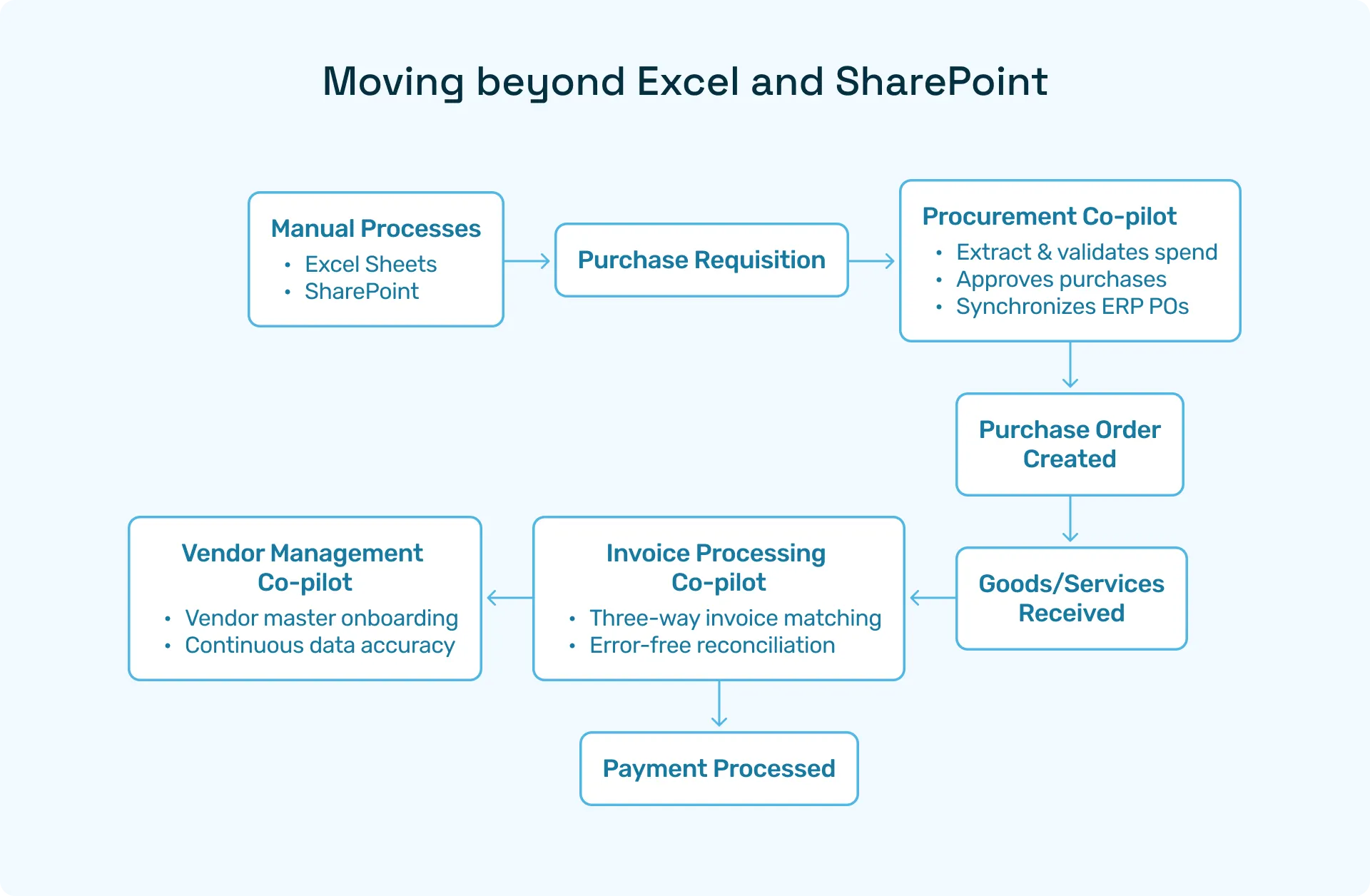
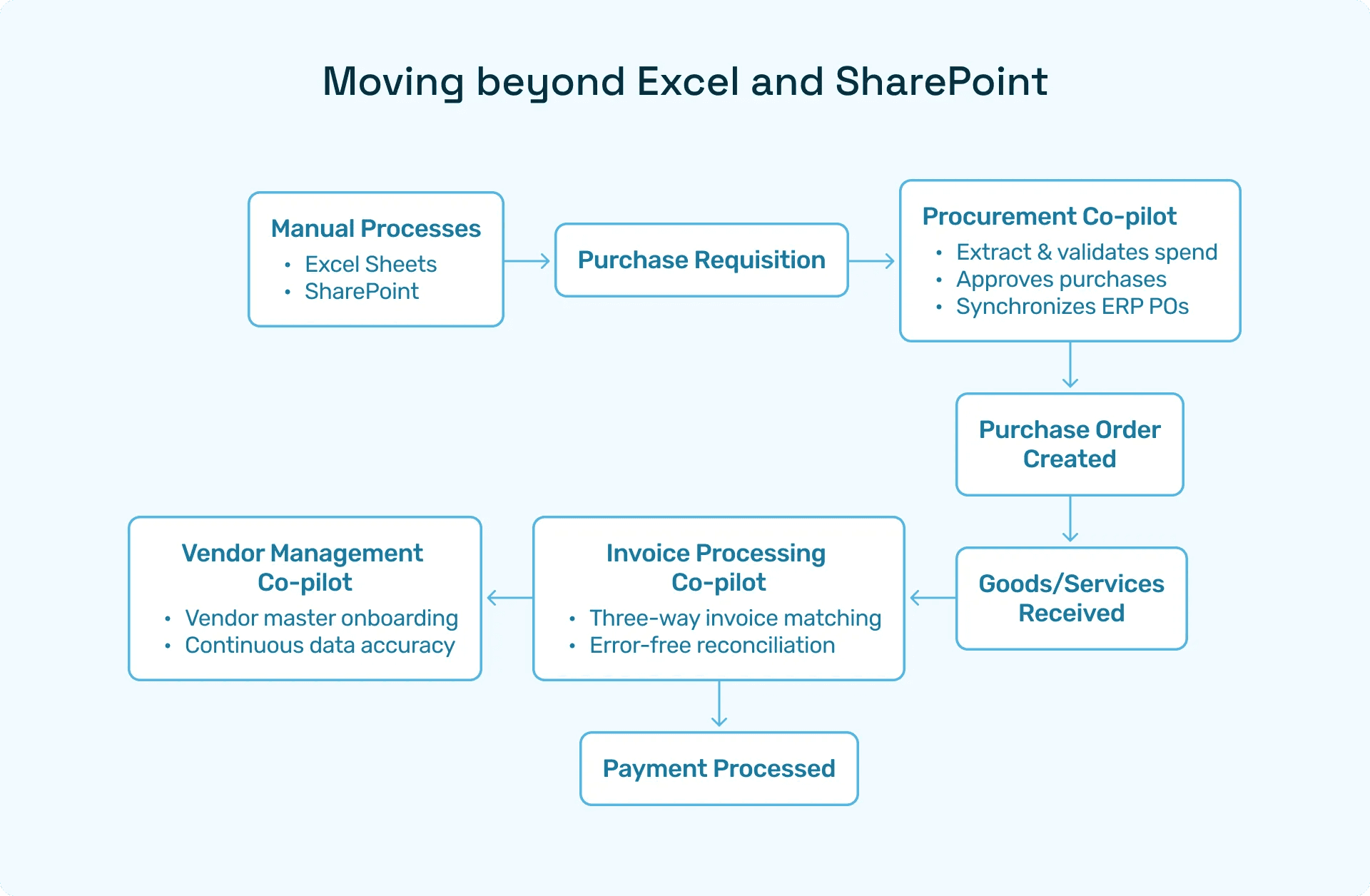
Procurement Copilot: AI extracts requisition data, validates content, enforces policy, and triggers ERP-synced approvals rapidly.
Invoice Processing Copilot: Matches invoices with purchase orders and goods receipts, automating accounts payable.
Vendor Management Copilot: Keeps vendor records accurate and compliant with continuous validation.
These AI Co-pilots reduce manual workload by 80%, speed PO cycles by 70%, and nearly eliminate errors, surpassing Excel or SharePoint capabilities.
AI-enhanced purchase order automation flowchart illustrating Hyperbots Co-pilots in action.
Hyperbots AI Procurement Co-Pilots: The Next Frontier
Moving beyond traditional systems, Hyperbots leverages artificial intelligence to automate the full spectrum of purchase order processes. Its suite of AI Co-Pilots offers transformative efficiency gains through:
Procurement Copilot: Extracts and validates purchase requisition data automatically, enforces compliance policies, and accelerates ERP-synced approvals.
Invoice Processing Copilot: Performs automated three-way matching between POs, goods receipts, and invoices to streamline accounts payable.
Vendor Management Copilot: Continuously verifies vendor data for accuracy and regulatory adherence.
The AI-powered system ensures purchase orders move through approval workflows without bottlenecks, freeing CFOs and procurement teams to focus on strategic activities.
ROI You Can See and Feel with Hyperbots
When finance leaders evaluate purchase order automation, the first question is simple: what’s the ROI? With Hyperbots, the answer is both measurable and transformative. The platform delivers savings you can quantify in hard dollars, along with intangible benefits that reshape how procurement and finance teams work.
Implementing Hyperbots' Procurement copilot deliver significant ROI and transforms procurement operations by providing:
Over 80% reduction in PO creation & dispatch time
5 minute PR creation time
At least a 10% reduction in cash outflows
Accurate and timely automatic communication with vendors
100% automation of forms and other information verification
Granular and customized workflow for each process
Improved vendor relationships due to predictable approval timelines.
Hyperbots’ integrated platform ensures that these benefits scale across departments, projects, and business units, turning procurement into a high-value function rather than a bottleneck.
Enterprises integrating Hyperbots with leading ERP platforms like Microsoft Dynamics, SAP, and Oracle experience a seamless digital procure-to-pay transformation, gaining a robust competitive advantage.
Frequently Asked Questions (FAQs)
Q1: What is a purchase order system Excel?
A: A spreadsheet-based purchasing tool, customizable and suitable for low-complexity procurement.
Q2: Where can I find a free purchase order tracking system Excel download?
A: Trusted free downloads are available at ProcureDesk and Smartsheet offering ready-to-use templates.
Q3: How does SharePoint online purchase order system work?
A: It digitizes purchase requests, automates multi-level approvals, and integrates seamlessly within Microsoft 365.
Q4: What are Excel limitations for purchase order management?
A: Collaboration challenges, manual errors, lack of approval workflows, and poor integration with financial systems.
Q5: How does Hyperbots improve efficiency beyond Excel and SharePoint?
A: AI Co-pilots automate every purchase order and invoice process step, integrating deeply with ERPs for compliance and efficiency.