How to Evaluate a Cloud ERP System: The Buyer's Checklist for 2026
A practical framework to help finance and technology leaders compare features, security, scalability, integrations, and total cost when selecting the right cloud ERP platform.
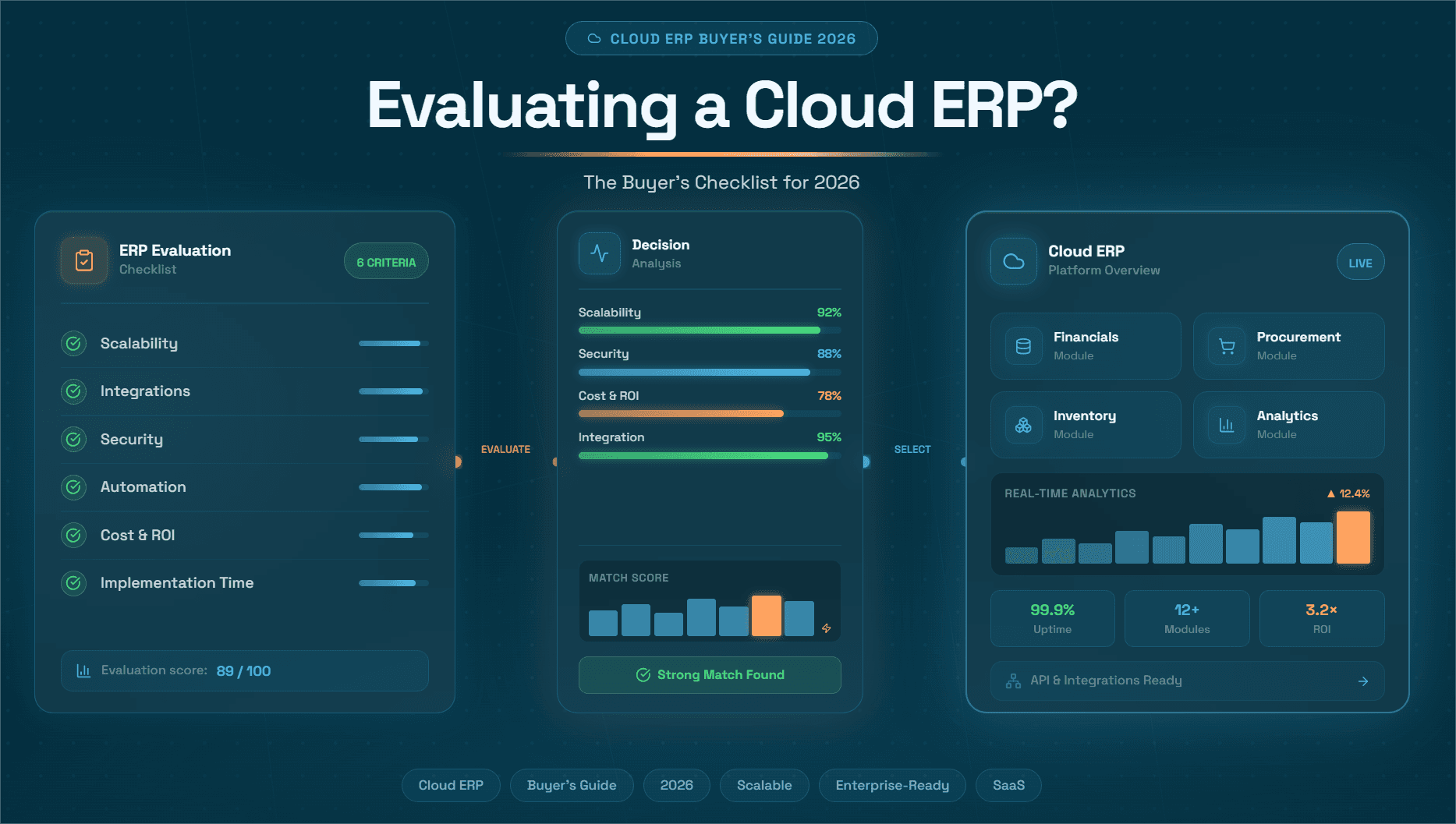
Choosing an enterprise resource planning (ERP) system in 2026 is one of the most consequential decisions a CFO, VP of Finance, or operations leader will make this decade. The cloud ERP market is now crowded with legacy vendors retrofitting old architectures, SaaS-native upstarts, and a new generation of AI-augmented platforms that are fundamentally redefining what ERP can do.
The stakes are high. A poorly chosen ERP creates data silos, stalls digital transformation, and leaves millions of dollars of process efficiency on the table. A well-chosen one, especially one layered with purpose-built AI co-pilots, can cut operational costs by up to 80%, accelerate month-end close, and free your finance team to focus on strategic work instead of manual reconciliations.
This guide gives you a thorough, practitioner-tested checklist for evaluating cloud ERP systems in 2026. We cover architecture, integrations, AI capabilities, total cost of ownership, vendor stability, and critically, how to evaluate the AI automation layer that sits on top of your ERP to unlock the real ROI. We also show you exactly where Hyperbots AI Co-pilots fit into this picture, and why they represent the most differentiated finance automation capability available today.
Why Cloud ERP Evaluation Is Different in 2026
The ERP evaluation frameworks of 2018 or even 2022 are largely obsolete. Three tectonic shifts have changed the game:
1. AI is no longer a feature, it is the architecture. In 2026, any ERP vendor worth evaluating has an AI story. But there is a massive difference between AI features bolted onto a legacy platform and a purpose-built AI layer with autonomous agents capable of taking end-to-end action inside financial workflows. Buyers need to interrogate this distinction rigorously.
2. The ERP is no longer the system of intelligence, it is the system of record. Modern enterprises increasingly run their finance intelligence in a layer above the ERP: AI co-pilots that read ERP data, make decisions, execute transactions, and write results back. This architecture decouples process automation from the ERP vendor's release cycle and allows companies to adopt best-of-breed automation without ripping and replacing core systems.
3. The procure-to-pay and order-to-cash process stacks are converging. In 2026, CFOs are no longer evaluating AP automation separately from procurement separately from collections. They want integrated, AI-driven process coverage across the entire financial operations stack, from purchase requisition to supplier payment, and from customer invoice to cash application.
The Complete Cloud ERP Evaluation Checklist for 2026
Use the following checklist across all vendor evaluations. Score each criterion on a 1–5 scale and weight categories by strategic priority for your organization.
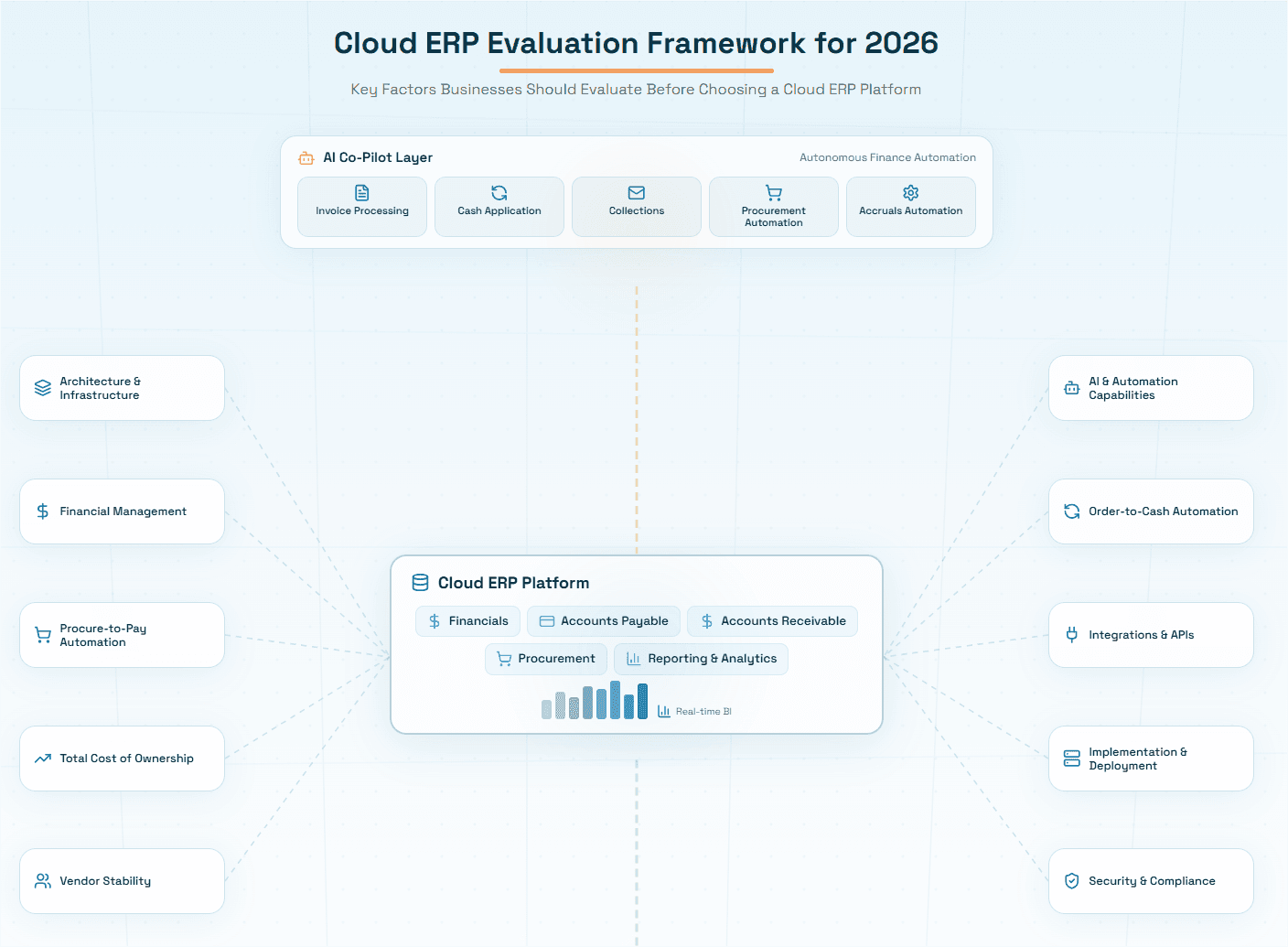

Category 1: Core Architecture & Infrastructure
Checklist items:
Is the platform genuinely cloud-native (built on cloud from inception), or is it a hosted on-premise system?
Does it run on a recognized hyperscaler (AWS, Azure, GCP) or a proprietary data center?
What is the uptime SLA? Is 99.9% or 99.99% guaranteed contractually?
Is the architecture multi-tenant SaaS, single-tenant, or hybrid? Understand what you are getting.
Does the vendor support zero-downtime deployments and automatic updates?
What is the disaster recovery RTO (recovery time objective) and RPO (recovery point objective)?
Is data encrypted at rest and in transit? What encryption standards (AES-256, TLS 1.3)?
Is the system SOC 2 Type II certified? ISO 27001? GDPR-compliant?
What good looks like: A cloud-native ERP runs on a hyperscaler, has 99.9%+ contractual uptime, automatic quarterly updates without downtime, and holds current SOC 2 Type II and ISO 27001 certifications.
Category 2: Financial Management Capabilities
This is the core of any ERP evaluation for finance teams. Probe deeply here.
Checklist items:
General Ledger: Multi-entity, multi-currency, multi-book support. Does it handle IFRS and US GAAP simultaneously?
Accounts Payable: Automated invoice capture and matching? PO, non-PO, and 3-way match supported?
Accounts Receivable: Automated dunning, cash application, and deduction management?
Fixed Assets: Automated depreciation across multiple schedules?
Consolidation: Can it consolidate across 50+ legal entities with intercompany eliminations?
Revenue Recognition: ASC 606 / IFRS 15 compliant out of the box?
Close Management: Does it have a close calendar, task management, and reconciliation workflow?
Reporting: Configurable management accounts, board packs, and drill-through to transaction level?
A word of caution: Many ERP vendors claim full AP and AR automation but actually deliver only basic data capture. The real automation such as exception handling, matching logic, approval routing, and ERP write-back, often requires a specialized AI co-pilot layer. This is a critical distinction we return to later.
Category 3: Procure-to-Pay (P2P) Process Coverage
The procure-to-pay process is one of the highest-volume, highest-error-rate workflows in any finance function. Evaluate the following:
Requisition to PO: Is procurement fully digitized? Self-service catalogs? Spend controls?
Supplier Onboarding: Automated supplier portal, tax form collection (W-9, W-8), and bank detail verification?
Invoice Capture: OCR capture or EDI integration? What is the straight-through processing rate?
3-Way Matching: Automated PO, goods receipt, and invoice matching? What happens on exceptions?
Approval Workflows: Configurable by amount, entity, cost center, and category?
Accruals: Automated accrual calculation for uninvoiced purchase orders at period end?
Payment Runs: Automated payment scheduling, discount capture, and payment file generation?
Sales Tax / VAT: Automated tax determination on AP invoices? Integration with tax engines (Avalara, Vertex)?
This is precisely where Hyperbots AI Co-pilots deliver transformational value. Hyperbots offers purpose-built co-pilots for every node of the P2P process including Invoice Processing, Procurement, Accruals, Payments, and Sales Tax Verification that integrate directly with your ERP to automate the steps most ERP systems leave as manual.
Category 4: Order-to-Cash (O2C) Process Coverage
Order Management: Integration with CRM (Salesforce, HubSpot)? Automated order entry and validation?
Invoicing: Automated invoice generation, delivery (email, EDI, portal), and status tracking?
Credit Management: Automated credit limit checks and holds?
Collections: Automated dunning sequences, dispute tracking, and customer communication?
Cash Application: Automated remittance matching, deduction identification, and unapplied cash resolution?
Deductions Management: Automated deduction coding and dispute workflow?
Revenue Recognition: Automated contract modification handling and SSP (standalone selling price) updates?
For O2C, Hyperbots Collections Co-pilot and Cash Application Co-pilot provide AI-driven automation that most ERP systems simply cannot match natively particularly in high-volume B2B environments where remittance data is messy and deductions are frequent.
Category 5: AI and Automation Capabilities
This is the most differentiating category in 2026. Do not accept marketing language — demand demos, benchmarks, and references.
What is the AI architecture? Rules-based automation, ML models, or large language model (LLM)-powered agents?
Can the AI take action autonomously, or does it only surface recommendations for humans to act on?
What is the human-in-the-loop design? Where does AI hand off to humans, and how?
How is the AI trained? On your data alone, or on aggregate industry data? Is training continuous?
What is the out-of-the-box accuracy rate for document extraction, matching, and coding?
Can the AI handle exceptions, or does every exception go to a human queue?
Is there an audit trail for every AI decision? Can it explain its reasoning?
What is the AI's performance on your specific document types and supplier formats?
Category 6: Integration and Interoperability
ERP connectors: Pre-built connectors to SAP, Oracle, NetSuite, Microsoft Dynamics, Workday, Sage?
API architecture: RESTful APIs with OpenAPI/Swagger documentation? Webhooks? GraphQL?
iPaaS compatibility: Works with MuleSoft, Boomi, Workato, or native middleware?
EDI support: 810, 820, 850, 856 transaction sets? Trading partner management?
Banking integrations: Direct bank feeds? SWIFT/ACH/SEPA payment file formats?
Tax engine integrations: Avalara AvaTax, Vertex O Series, Thomson Reuters ONESOURCE?
Data warehouse: Can it push data to Snowflake, BigQuery, or Databricks for analytics?
Category 7: Implementation, Deployment, and Change Management
A bad implementation can wreck even the best ERP. This category is underweighted by most buyers.
What is the standard implementation timeline? Get it in writing.
What is the implementation methodology — waterfall, agile, or phased rollout?
Who implements? The vendor's own team, a systems integrator, or a partner network?
What does data migration look like? Historical data conversion scope and responsibility?
What is the training program? Role-based training, recorded videos, sandbox environment?
What does go-live support look like? Hypercare period? Dedicated support team?
What is the typical go-live rate on time and on budget? Ask for references.
Category 8: Total Cost of Ownership (TCO)
Do not evaluate ERP on license cost alone. TCO over five years is the right frame.
License/subscription cost: Per user, per module, or flat fee? What is included vs. add-on?
Implementation cost: Professional services, data migration, training, change management?
Integration cost: Custom connector development, middleware licensing?
Customization cost: What does it cost to configure workflows, reports, and approval rules?
Ongoing support cost: Tier 1/2/3 support included or priced separately?
Upgrade cost: Are major version upgrades included, or are they additional professional services?
Hidden costs: Storage overages, additional API calls, extra user seats, data export fees?
Benchmark: Industry analysts typically find that implementation and ongoing support costs run 2–4x the annual license fee for complex ERP deployments. Factor this into your business case.
Category 9: Vendor Stability and Strategic Direction
Financials: Is the vendor publicly traded or backed by credible institutional investors?
Customer retention: What is the annual gross revenue retention rate?
R&D investment: What percentage of revenue goes to product development?
AI roadmap: Is there a specific, credible AI product roadmap, not just a vision statement?
Partner ecosystem: Does the vendor have a robust SI and ISV partner ecosystem?
Customer community: Active user groups, annual conferences, community forums?
Category 10: Security, Compliance, and Data Governance
Certifications: SOC 2 Type II, ISO 27001, ISO 27701, FedRAMP (if public sector)?
Data residency: Can you choose the geography where your data is stored?
Data access controls: Role-based access, field-level security, segregation of duties?
Audit logging: Complete, tamper-proof audit trail for all transactions and user actions?
GDPR / CCPA: Right to erasure, data portability, consent management?
Penetration testing: Does the vendor conduct annual third-party pen tests? Can you see results under NDA?
The AI Co-Pilot Layer: Why Your ERP Evaluation Is Incomplete Without It
Here is the insight most ERP buyer guides do not tell you: the ERP is increasingly just the database. The intelligence, the automation, and the ROI now live in the AI layer above it.
Think of it this way. Your ERP stores invoices, purchase orders, payments, and journal entries. But it does not autonomously read a PDF invoice, understand what it is, match it to the correct PO, flag a price discrepancy, route it to the right approver, post it when approved, and schedule it for payment at the optimal time to capture an early payment discount, all without human intervention.
That is what an AI co-pilot does. And the best ones, like those from Hyperbots, do it at a level of accuracy and autonomy that is genuinely transformational.
Hyperbots AI Co-Pilots: The Most Comprehensive Finance Automation Suite
Hyperbots has built the most comprehensive suite of AI co-pilots purpose-designed for finance and accounting automation. Unlike point solutions that automate one step, or ERP vendors that bolt AI onto legacy infrastructure, Hyperbots delivers end-to-end intelligent automation across the two most critical financial process stacks: Procure-to-Pay and Order-to-Cash.
Procure-to-Pay AI Co-Pilots
Invoice processing copilot delivers true straight-through processing, from the moment an invoice arrives in an inbox to the moment it is posted in your ERP, with zero human intervention required.
The numbers speak for themselves: 80% of invoices are processed without any human touch, and cycle time drops from an industry average of 11 days to under one minute. That is not a pilot result, that is production performance.
The Co-pilot is pre-trained on 35 million invoice fields and achieves 99.8% field extraction accuracy using vision-language models, expert systems, and LLMs with chain-of-thought reasoning.
It handles every channel and format, PDF, EDI, email, portal, and performs configurable 2-way and 3-way matching across 140+ invoice fields, with clear explanations for any mismatch it finds. Every action is logged in a tamper-proof audit trail, so your team is always audit-ready.
The Hyperbots Procurement Co-pilot automates the entire PR-to-PO lifecycle, end to end, with AI that validates, detects anomalies, and enforces policy at every step.
It detects duplicate purchase requisitions by analyzing fields and cross-checking historical records before they become a problem.
It auto-fills complex ERP procurement forms in as little as 5 minutes, converts approved PRs into POs using your company templates, and dispatches them to vendors automatically, no human intervention needed.
A self-learning GL recommender that gets smarter over time handles accurate GL coding right at the point of PR creation. And because it works hand-in-glove with the Invoice Processing Co-pilot, the entire PO lifecycle closes automatically when the matching invoice arrives.
Collecting W-9s, verifying identity, chasing missing documents, setting up the vendor master in the ERP, it is a process that routinely takes nine days, and in complex organizations can stretch beyond 30. The Hyperbots Vendor Management Co-pilot compresses all of that to under a day.
This co-pilot collects supplier data and documents, verifies them, follows up on missing items, and creates a clean ERP record automatically so approvals happen on time and processes don't get restarted due to incomplete submissions.
Beyond onboarding, the Co-pilot instantly verifies vendor W-9s, gives suppliers a self-service portal for live PO, invoice, and payment status visibility, and highlights redundant or high-cost vendors thus helping finance and procurement teams rationalize the supplier base, consolidate spend, enable bulk discounts, and reduce administrative overhead.
It is pre-trained on vendor records including W-9s, ensuring high accuracy and adaptability to any identity verification need from day one so no model training or lengthy setup required.
And because it is AI-first by design, not an ERP with AI bolted on later, tasks like identity and sanctions checks that used to require manual intervention or external tools are now fully automated, with a learning loop that improves with every approval, rejection, and expiry update.
Month-end accruals are one of those tasks that every controller dreads. Having to manually hunt through open POs, receipt notes, and recurring expenses, all under pressure to close the books on time. The Hyperbots Accruals Co-pilot eliminates this entirely.
It automatically identifies what needs to be accrued such as GRNI (Goods Received Not Invoiced), SRNI (Services Received Not Invoiced), and recurring no-PO expenses like SaaS subscriptions, rent, and insurance and then calculates the amounts, books the journal entries, and reverses them automatically when the actual invoice arrives.
Its machine learning engine continuously learns from past accrual bookings and recurring expense patterns, so forecasts get progressively more accurate over time. At cut-off, it queries the Invoice Processing Co-pilot in real time for a live list of received-but-unposted invoices, keeping the accrual list current right through to final close.
The Hyperbots Payment Co-pilot analyzes payment terms, discount opportunities, penalties, and cost of capital to determine the optimal time and method for every payment thus capturing early payment discounts where they exist while preserving cash flow targets.
Approvals are automatically routed for same-day releases, supporting ACH, checks, and wire transfers with a full audit trail at every step. Before any payment goes out, the Co-pilot validates vendor bank details for accuracy and authenticity, and flags unusual activity or potential fraud in real time.
On the back end, it automates invoice-to-bank transaction reconciliation using AI-driven matching and real-time ERP updates by being pre-trained on bank statements and checks so it delivers high accuracy from day one, with no lengthy setup required.
Sales tax on AP invoices is one of the highest-risk, most universally manual tasks in finance. A single error, whether an underpayment or an overpayment, can mean penalties, audit exposure, or quietly leaking margin. The Hyperbots Sales Tax Verification Co-pilot closes that gap on every single invoice, automatically.
It operates at both invoice and line-item level: extracting line items, verifying shipping and vendor addresses for tax applicability, categorizing items against jurisdiction-specific rules, and cross-referencing a continuously updated tax database covering all 50 U.S. states.
Every tax classification carries a confidence score as the high-confidence items are processed automatically, while the lower-confidence items are flagged for human review, creating a continuous feedback loop that improves accuracy over time.
The built-in audit trail delivers timestamped documentation for every decision, so your team walks into any audit fully prepared. Because it is natively integrated with the Invoice Processing Co-pilot, all of this happens automatically within the same workflow, not as a separate, disconnected process.
Order-to-Cash AI Co-Pilots
The Hyperbots Collections Co-pilot enables 70% of collections to happen automatically, without any human chasing. That translates into a 40% reduction in DSO, a 70% reduction in cost to collect, and up to 80% improvement in collections team productivity which is all driven by AI agents that work around the clock, not just during business hours.
The Co-pilot dynamically reprioritizes the collector workload in real time based on payment behavior, invoice risk, dispute likelihood, and customer value so your team's attention always goes to the accounts that matter most.
It forecasts expected cash inflows by customer, week, and month using behavioral patterns rather than static aging buckets, giving finance leaders genuine visibility into cash flow.
When disputes arise, it detects the signals before the due date such as price mismatches, quantity discrepancies, PO mismatches and routes them to the right owner immediately.
Promises to pay are tracked, and when commitments are broken, the Co-pilot escalates automatically. Every outcome, every email sent, every dispute logged, every PTP recorded is posted back to the ERP without a human lifting a finger.
Unapplied cash is one of the quietest destroyers of working capital in any AR function. When payments come in without clean remittance data like partial payments, short-pays, deductions, missing references, they sit unmatched, distorting your books and consuming analyst time. The Hyperbots Cash Application Co-pilot resolves this at scale.
It achieves 80%+ straight-through processing on cash application, compared to less than 50% with other automation tools and near-zero in fully manual environments. Unapplied cash is reduced to less than 10%, and reconciliation costs fall by up to 80% which is driven by AI agents pre-trained to 99.8% accuracy on real-world bank statements and remittance documents.
The matching engine uses multiple signals such as invoice numbers, PO references, payment amounts, dates, customer behavior, and historical patterns simultaneously so it handles messy, incomplete remittance data that would defeat simpler rule-based tools.
Valid credits, promotional deductions, chargebacks, and pricing differences are identified and either applied or routed for resolution automatically. And throughout, the Co-pilot tracks its own performance: STP rate, unapplied cash percentage, average days to apply, reconciliation cost, and accuracy thus giving finance leaders a live picture of exactly how the AR function is performing.
Hyperbots Platform Capabilities: Transformational Impact
Beyond individual co-pilots, the Hyperbots platform delivers several cross-cutting capabilities that create compounding value:
Unified Finance Data Model All Hyperbots co-pilots share a unified data model, meaning data from invoice processing informs accruals, payment optimization, and cash flow forecasting which creates intelligence that siloed point solutions cannot produce.
ERP-Agnostic Integration Hyperbots integrates with SAP, Oracle ERP Cloud, NetSuite, Microsoft Dynamics 365, Workday, Sage Intacct, and others via pre-built connectors and open APIs. You do not need to change your ERP to benefit from Hyperbots.
Configurable Human-in-the-Loop Every co-pilot has configurable confidence thresholds. Above the threshold, actions are autonomous. Below it, the co-pilot surfaces the item for human review with full context and an AI recommendation. This gives finance leaders control without sacrificing automation rates.
Explainable AI Every decision made by a Hyperbots co-pilot is traceable to its inputs and logic. Auditors, controllers, and regulators can inspect the full decision trail which is absolutely critical for SOX compliance and external audit readiness.
Real-Time Analytics and Dashboards The Hyperbots platform surfaces real-time KPIs across all automated processes: invoice cycle time, straight-through processing rate, payment on-time percentage, DSO, cash application hit rate, and more, giving CFOs actionable visibility they have never had before.
Continuous Learning Hyperbots co-pilots learn from every transaction processed. Approval patterns, exception handling decisions, and matching rules continuously refine the models, meaning the system gets smarter the longer you use it, without manual retraining.
ROI Impact: What Hyperbots Delivers in P2P and O2C
Procure-to-Pay ROI
Tangible improvements:
80% straight-through processing (STP) of invoices, with AI autonomously discovering, extracting, validating, matching, GL-coding, and posting to the ERP, freeimg up your staff bandwidth by 80%.
Invoice processing time cut from an industry average of 11 days to less than one minute, thanks to STP achieved through AI agents.
99.8% data accuracy from day one due to models pre-trained on millions of invoices, with no need to label historical data or spend weeks on model training before going live.
Implementation in 3–4 weeks compared to traditional projects that take 12–24 weeks which means ROI realization is in weeks not quarters.
Month-end close compressed from days to hours, with accrual variance to actuals consistently under 5%, as the Accruals Co-pilot queries ERP data and books journal entries automatically so no manual spreadsheet chasing required.
100% accuracy for deployed agents as the platform achieves 99.8% accuracy in converting unstructured data to structured fields, while providing contextual validation and augmentations, thus ensuring 100% accuracy in production.
Duplicate payment elimination as the Invoice Processing Co-pilot cross-checks all invoice fields and PO data against historical entries to detect and prevent duplicate payments automatically.
Sales tax compliance on every invoice as the Sales Tax Verification Co-pilot locks in compliance on every invoice, shutting down tax underpayment penalties before they start, with a built-in time-stamped audit trail and near-zero human error rate. It catches both overpayments and underpayments, protecting margins from both directions.
Intangible improvements:
Finance teams shift from manual data entry and exception chasing to strategic analysis as the staff is empowered by the Co-pilot with pinpointed reasons to take quick decisions on the business exceptions that do require human judgment.
Supplier relationships improve through faster, more accurate payments and real-time visibility via the vendor portal.
Every action taken, whether it's taken by AI or human, is captured in a comprehensive audit trail with timestamps, data points, and actions performed, ensuring full transparency for compliance, audits, and internal reviews.
Month-end close stress is significantly reduced: the Accruals Co-pilot detects open POs or receipts without a bill and books temporary accruals automatically, then reverses them when the bill arrives which removes a large, time-consuming burden from controllers and accounting teams.
Scalability without headcount: the platform's unlimited access licensing model means no seat limits or delays, allowing AP operations to scale without per-user cost constraints.
Order-to-Cash ROI
Tangible improvements:
Collections productivity improved by up to 80%, with real-time automated dynamic prioritization and AI-driven follow-ups reducing DSO through continuous, autonomous action across the entire collections lifecycle.
40% reduction in DSO and 70% reduction in cost to collect, as measured by the Hyperbots Collections Co-pilot's key outcome metrics tracked in production deployments.
80%+ straight-through processing (STP) for cash application, with the Cash Application Co-pilot automating remittance and bank statement extraction, intelligent payment matching, exception handling, GL coding, and ERP posting end-to-end.
Unapplied cash reduced to less than 10%, and reconciliation costs lowered by up to 80%, using document reconciliation AI agents pre-trained for 99.8% accuracy.
Hyperbots achieves 60%–90% STP on cash application in production, compared to less than 50% with other automation tools and near-zero in manual environments.
Built-in KPI tracking across DSO, Average Days Delinquent (ADD), Collections Effectiveness Index (CEI), dispute cycle time, promise-to-pay success rate, forecast accuracy, and productivity gains thus giving finance leaders real-time visibility into every O2C outcome metric.
Early dispute detection as the Collections Co-pilot identifies dispute signals before the due date (price, quantity, tax, PO mismatch) and routes them to the right owner automatically, accelerating resolution and protecting cash flow.
Intangible improvements:
Customer experience improves materially, a self-service customer portal allows customers to view invoices, make payments, raise disputes, submit promises-to-pay, and track resolution status, reducing back-and-forth and improving satisfaction.
Credit risk visibility improves through AI-surfaced payment behavior signals, with the co-pilot continuously reprioritizing collection actions based on payment behavior, invoice risk, dispute likelihood, customer value, and aging impact on DSO.
Revenue assurance strengthens as fewer invoices fall through the cracks, the co-pilot autonomously orchestrates the entire collections lifecycle including promise-to-pay management with automated reminders and breach escalation.
Collections team morale improves as AI agents automatically execute personalized email and portal follow-ups, reminders, escalations, and nudges without manual intervention, freeing collectors for high-value relationship management.
Cash flow forecasting accuracy improves through AI that predicts expected inflows by customer, week, and month using behavioral and historical patterns, not static aging buckets.
How to Structure Your Cloud ERP Evaluation Process
Beyond the checklist, here is a practical process for running a rigorous ERP evaluation:
Phase 1 — Internal Discovery (Weeks 1–3) Document current state processes across P2P and O2C. Quantify pain points: invoice cycle times, error rates, close cycle duration, DSO, cash application hit rate. Build your business case baseline. Define must-have vs. nice-to-have requirements.
Phase 2 — Market Scan (Weeks 3–5) Use the checklist above to create a long list of 8–12 vendors. Eliminate vendors that fail hard requirements (missing certifications, no relevant integrations, pricing out of range). Create a short list of 3–5 vendors.
Phase 3 — RFP and Demo (Weeks 5–10) Issue a structured RFP based on your requirements. Run scripted demos — give each vendor the same scenarios to execute so you can compare apples to apples. Include your messiest invoice formats, your most complex matching scenarios, and your highest-exception workflows.
Phase 4 — Proof of Concept (Weeks 10–16) For your top 1–2 vendors, run a paid proof of concept on a subset of live data. Measure actual straight-through processing rates, exception rates, and user experience.
Phase 5 — Reference Checks and Negotiation (Weeks 16–20) Call 5+ references, not vendor-provided references only. Ask specifically about implementation experience, ongoing support quality, and whether the AI performance matched the demo. Negotiate contract terms including SLAs, price escalation caps, and data portability.
Red Flags to Watch in Cloud ERP Vendor Evaluations
Vague AI claims with no benchmarks. If a vendor cannot tell you their straight-through processing rate on AP invoices, they do not have one worth sharing.
Reluctance to do a proof of concept on your data. Any confident AI vendor will run a PoC. Resistance is a signal.
Implementation timelines that keep extending. Get references specifically about on-time go-lives.
"Roadmap" features in the demo. If a capability is not generally available, it should not be in your evaluation.
No explainability for AI decisions. If you cannot audit why the AI did something, you have a compliance problem.
Lock-in clauses on data export. Your data should be portable. Full stop.
Support quality that degrades post-sales. The sales team is always excellent. Check post-sales support references.
Cloud ERP vs. On-Premise ERP: The 2026 Verdict
For the vast majority of mid-market and enterprise organizations evaluating ERP in 2026, the answer is unambiguously cloud. The table below summarizes why:
Criterion | Cloud ERP | On-Premise ERP |
|---|---|---|
Pricing model | Subscription (OpEx) | Large upfront CapEx |
Deployment time | 3-9 months | 12–18 months |
Updates | Automatic, continuous | Manual, expensive |
Scalability | Instant elasticity | Hardware procurement required |
Security management | Vendor-managed | Internal IT burden |
AI capabilities | Continuous innovation | Dependent on upgrade cycles |
Access | Anywhere, any device | On-site or VPN |
Total 5-year cost | Lower for most organizations | Higher when factoring in IT, maintenance, upgrades |
The only remaining legitimate use cases for on-premise ERP are highly regulated industries with specific data sovereignty requirements that cannot be met by any cloud provider, a rapidly shrinking category.
Your ERP Is the Foundation. Hyperbots Is What Makes It Work.
Choosing the right cloud ERP is a critical decision but it is not the finish line. It is the starting point.
Your ERP is your system of record. It stores your invoices, purchase orders, payments, journal entries, and financial history. It is the foundation everything else is built on, and it deserves the rigorous, checklist-driven evaluation this guide walks you through. Get that decision right.
But here is what most ERP buyer guides will not tell you: the ERP alone will not transform your finance function. Every major cloud ERP can store your transactions. What actually drives your cost per invoice below $1, your DSO below 30 days, and your close cycle below 5 days is the intelligent automation layer that sits on top of your ERP, it's the layer that acts on those transactions autonomously, accurately, and continuously.
That layer is Hyperbots.
Hyperbots AI Co-pilots integrate directly with whichever cloud ERP you choose, SAP, Oracle, NetSuite, Dynamics 365, Workday, or others, and unlock the ROI your ERP investment was always supposed to deliver. Invoice processing in under a minute. 40% DSO reduction. 80% reduction in cost to collect. Month-end close compressed from days to hours. All in production, within weeks of deployment, without replacing or disrupting your ERP.
So use this checklist to evaluate your ERP options with full rigor. Lock in the right system of record for your organization. And then take the next step that most of your competitors haven't yet: layer in purpose-built AI co-pilots across your Procure-to-Pay and Order-to-Cash processes, and turn your ERP from a passive database into an active, intelligent finance engine.
Frequently Asked Questions (FAQs)
Q1: How long does a typical cloud ERP evaluation take?
A thorough evaluation for a mid-market company typically takes 4–6 months from internal discovery through contract signing. Enterprise evaluations with complex requirements can take 9–12 months. Do not rush this process, the cost of a wrong decision dwarfs the cost of a careful evaluation.
Q2: What is the biggest mistake buyers make in ERP evaluations?
Underweighting the AI and automation layer. Most buyers spend 80% of their evaluation time on ERP features and only 20% on automation capabilities. In 2026, the automation layer is where the ROI lives. Flip the weighting.
Q3: Do we need to replace our ERP to use Hyperbots AI Co-pilots?
No. This is one of the most important things to understand about Hyperbots. The co-pilots are ERP-agnostic and integrate with your existing ERP via pre-built connectors and APIs. You can deploy Hyperbots on top of SAP, Oracle, NetSuite, Dynamics 365, or virtually any other major ERP without disrupting your system of record.
Q4: How quickly can Hyperbots co-pilots be deployed?
Most Hyperbots co-pilot deployments go live within 3-4 weeks not months. Because the co-pilots integrate via API rather than replacing the ERP, the implementation complexity is dramatically lower than a full ERP replacement. Many customers see measurable ROI within the first 60 days.
Q5: What accuracy rates does Hyperbots achieve for invoice processing?
Hyperbots achieves 80%+ straight-through processing rates for invoice capture, extraction, and matching in production environments. This compares to industry averages of 40–60% for rules-based systems.
Q6: How does Hyperbots handle compliance and audit requirements?
Every action taken by a Hyperbots co-pilot is logged with full context: what data was used, what decision was made, what confidence level was assigned, and what action was taken. This audit trail is tamper-proof and available for SOX audits, external financial audits, and regulatory reviews.
Q7: Is cloud ERP secure enough for financial data?
Yes and in most cases, significantly more secure than on-premise alternatives. Leading cloud ERP vendors and AI co-pilot providers like Hyperbots invest more in security than the vast majority of enterprise IT departments can match. Look for SOC 2 Type II, ISO 27001, encryption at rest and in transit, and role-based access controls as baseline requirements.
Q8: What is the difference between an AI co-pilot and an AI chatbot?
An AI chatbot answers questions. An AI co-pilot takes actions. Hyperbots co-pilots do not just tell you that an invoice is likely a duplicate, they flag it, prevent the payment, notify the appropriate team member, and log the exception for audit. The distinction between advisory AI and agentic AI is the difference between a suggestion and a result.