Microsoft Dynamics (GP/D365) Purchase Order Processing: A Complete Guide
From Manual Bottlenecks to AI-Powered Efficiency: How to Transform Your Procurement Operations with Microsoft Dynamics GP, D365, and Next-Generation Automation
Executive Summary
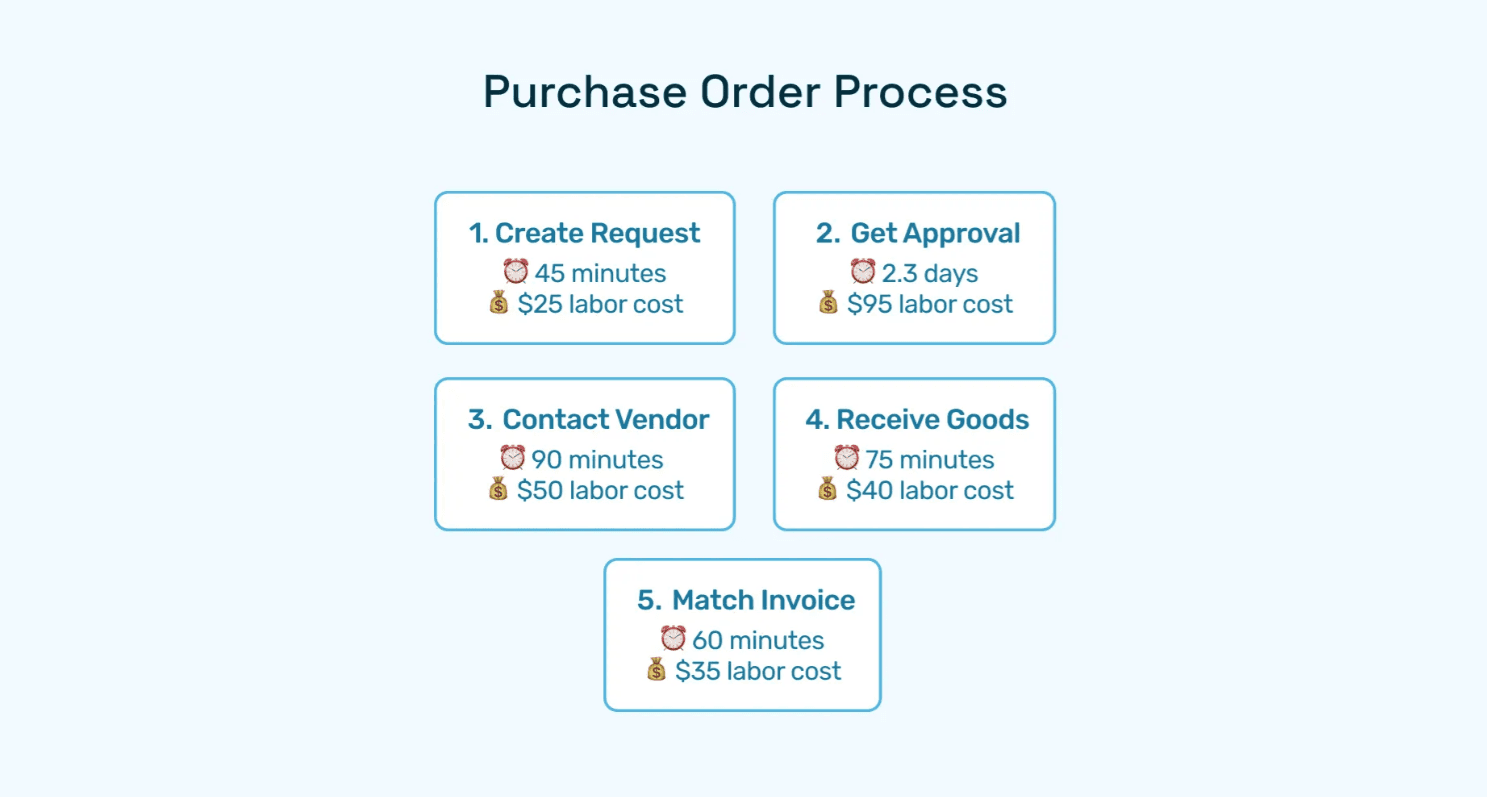
Purchase orders (POs) form the backbone of structured procurement. From construction to retail to enterprise finance, the ability to standardize purchase requests, approvals, and vendor transactions drives compliance, cost control, and efficiency. Industry benchmarks indicate that the average cost to process a purchase order ranges from $60 to $500 per PO, depending on complexity, industry, and degree of automation (APQC, Deloitte).
Within ERP ecosystems, Microsoft Dynamics offers two major platforms that dominate in the mid-market and enterprise space: Dynamics GP and Dynamics 365 Finance & Operations (D365 F&O). Dynamics GP has historically been favored by SMBs, while Dynamics 365 F&O is the go-to for enterprises managing global, multi-entity procurement.
Key challenges finance leaders face today include manual approval bottlenecks, lack of spend visibility, and compliance risk—making automation no longer optional but essential. This guide explores how Microsoft Dynamics 365 purchase order processing works compared to Dynamics GP purchase order processing, along with detailed insights into the purchase order year-end process in D365.
More importantly, it reveals how AI-powered procurement automation platforms like Hyperbots enhance these ERP-native capabilities — slashing operational costs by up to 80%, shortening approval cycles from days to hours, and delivering real-time financial visibility.
Key takeaways include:
End-to-end workflows for purchase order processing in Dynamics GP and Dynamics 365
Benchmark challenges around manual PO handling and year-end close
How Hyperbots' Procurement Co-pilot and supporting AI agents deliver transformational ROI
Practical implementation strategies to integrate AI-powered automation into Microsoft Dynamics environments
Why Microsoft Dynamics for Purchase Order Processing?
Microsoft Dynamics uniquely integrates with Power BI, Office 365, and Azure AI—making it not just a financial backbone but also a procurement intelligence hub. The platform's flexibility allows organizations to scale from basic purchase order workflows to sophisticated global procurement operations.
Feature | Dynamics GP | Dynamics 365 F&O |
Scalability | Best for SMBs | Enterprise-ready, global scale |
Mobile Access | Limited | Robust, mobile-first |
Reporting | Batch-based | Real-time via Power BI |
Integrations | Basic ERP-centric | API-first, Azure ecosystem |
Multi-Currency | Limited | Native global support |
Compliance | Manual tracking | Automated audit trails |
The choice between GP and D365 F&O often depends on organizational size, complexity requirements, and growth trajectory. Companies with multiple entities, international operations, or complex approval hierarchies typically find D365 F&O's advanced capabilities essential for operational efficiency.
Understanding Microsoft Dynamics Purchase Order Processing
Dynamics GP Purchase Order Processing
Dynamics GP (Great Plains) has been a trusted ERP for decades, particularly in industries like manufacturing, wholesale distribution, and mid-sized service organizations.
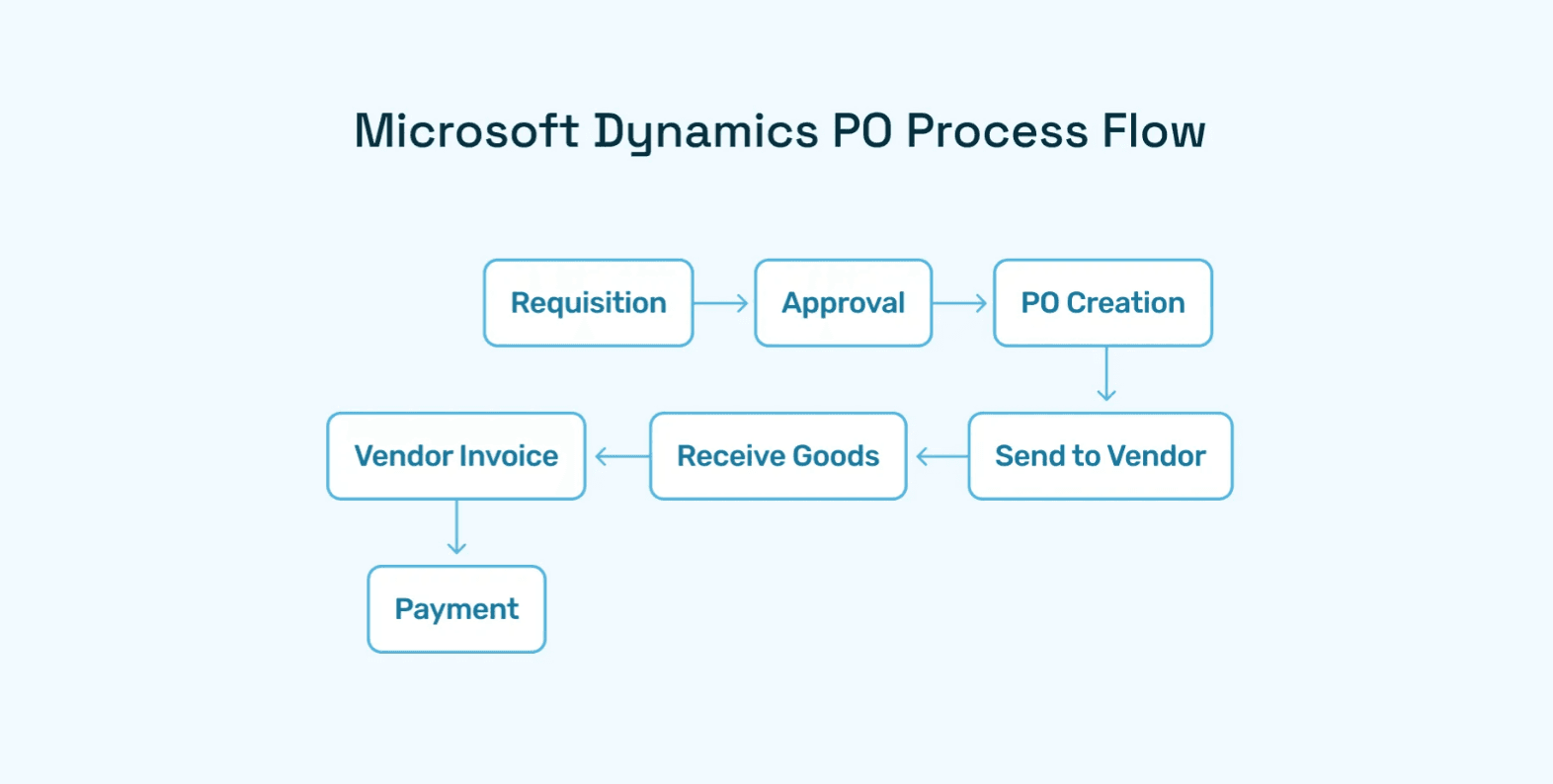
The typical workflow steps in Dynamics GP include: requisition → approval → purchase order creation → goods receipt → invoice posting.
Its purchase order processing module includes:
Purchase Request Entry – Users initiate requisitions, which can later be converted to purchase orders through a standardized approval process.
Approval Workflows – Rules can be defined based on amounts, departments, or roles, though these remain relatively rigid compared to modern alternatives.
Purchase Order Creation – Detailed POs include vendor information, quantities, pricing, delivery schedules, and tax details, with basic customization options.
Receiving Transactions – Users record goods receipts against issued purchase orders, creating the foundation for accurate financial reporting.
Three-Way Matching – PO, receipt, and vendor invoice reconciliation ensures payment accuracy and prevents duplicate payments.
Reporting – PO status, commitments, vendor performance, and spend data are available but limited in visualization capabilities.
One of the biggest pain points is the year-end PO close in GP, which often requires heavy manual reconciliation and batch postings. Finance teams frequently struggle with carrying forward open commitments and ensuring accurate accrual reporting.
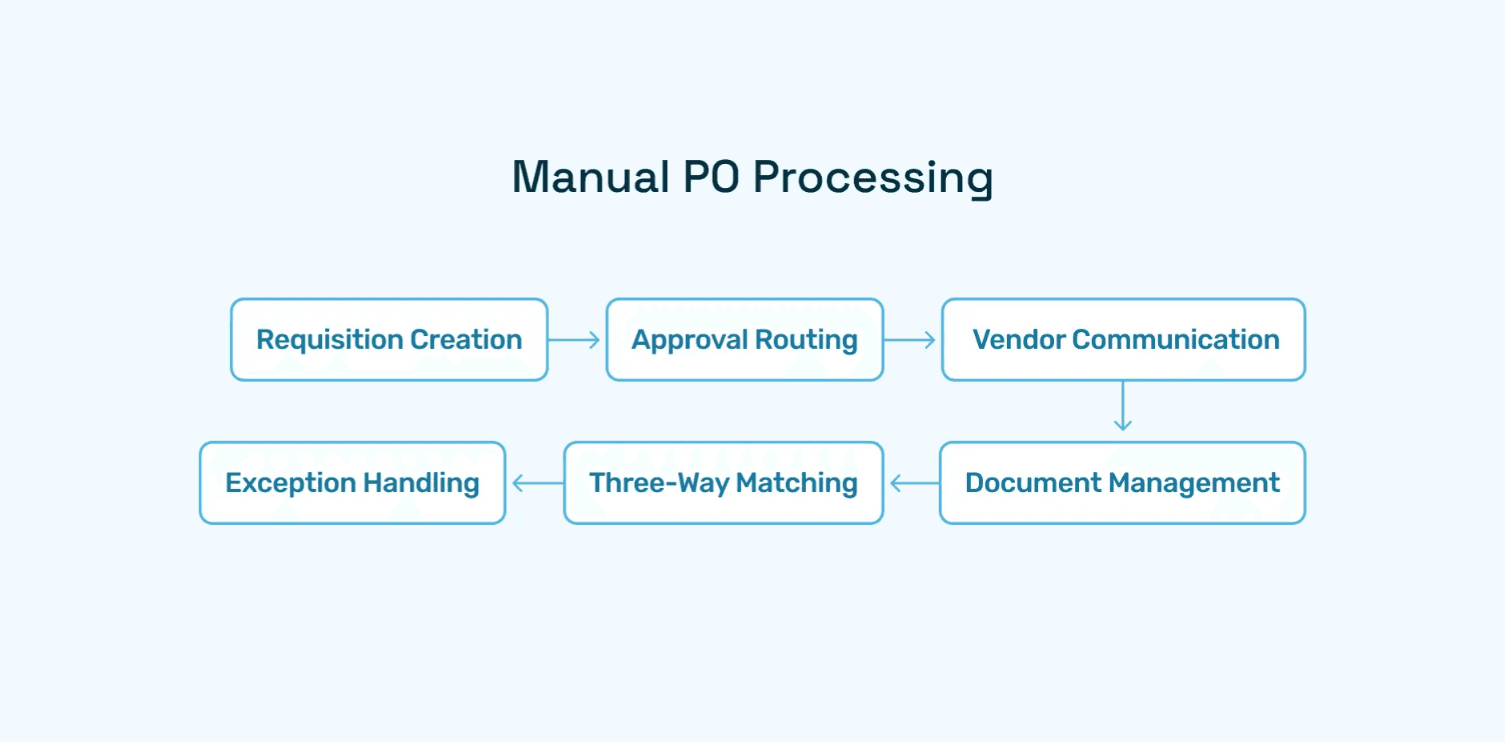
Limitations: While functional, Dynamics GP's PO workflows rely heavily on manual intervention and offer limited automation. For example, exception handling, vendor onboarding, and recurring POs must be managed manually or via costly customizations.
Microsoft Dynamics 365 Purchase Order Processing
Dynamics 365 Finance & Operations (D365 F&O) brings cloud-native, AI-enhanced functionality with far greater flexibility. It's designed for enterprises needing global compliance, multi-entity support, and advanced financial reporting.
The D365 PO lifecycle typically follows these stages: Draft → Approval → Confirmation → Goods Receipt → Invoice Match → Payment.
Key features of Microsoft Dynamics 365 purchase order processing include:
Requisition Management:
Role-based requests with configurable approval hierarchies
Budget controls to prevent overspending with real-time validation
Integration with expense management and project accounting modules
Purchase Order Lifecycle:
Creation, confirmation, and change management of POs with full audit trails
Multi-currency and tax-compliance support for international operations
Workflow automation for approvals with conditional logic and escalation rules
Vendor Collaboration Portal:
Vendors can confirm orders, provide shipping updates, and submit invoices directly
Real-time communication reduces manual follow-up and improves delivery accuracy
Self-service capabilities for order status inquiries and payment tracking
Three-Way and Four-Way Matching:
Ensures invoice accuracy against purchase orders and receipts
Supports advanced scenarios like subcontracting or consignment inventory
Automated exception handling with configurable tolerance levels
Analytics and Insights:
Embedded Power BI dashboards provide spend analytics, budget utilization, and vendor KPIs
Real-time reporting enables proactive decision-making
Customizable performance metrics and benchmarking capabilities
Mobile and Cloud Advantage:
Approvals, monitoring, and vendor interactions can be managed on the go
Offline capabilities ensure business continuity
Integration with Microsoft Teams and Outlook for seamless workflows
A global manufacturing firm uses D365 F&O to manage 10,000+ annual POs across 12 subsidiaries, with automatic consolidation into a single ledger, demonstrating the platform's enterprise scalability.
Purchase Order Year-End Process in D365
A recurring challenge for finance leaders is the purchase order year-end process in D365. This process ensures unfulfilled commitments roll forward into the new fiscal year while maintaining audit integrity.
The expanded year-end process includes:
Closing Encumbrances: Canceling or carrying forward un-invoiced purchase orders with proper documentation and approval workflows.
Carry Forward Open Purchase Orders: Systematically transferring open commitments into the new fiscal year with appropriate budget allocations.
Close Commitments Against Budgets: Ensuring accurate reporting of committed vs. actual spend for financial statement preparation.
Accrual Adjustments: Recognizing liabilities for goods received but not invoiced, with automated accrual booking capabilities.
Budget Transfers: Ensuring unspent commitments reflect in the new year's budgets with proper authorization and tracking.
Audit Reports: Providing finance teams and auditors with clear documentation of commitments, including detailed transaction histories and supporting documentation.
Challenges:
Manual reconciliations slow down year-end close, often extending the process by weeks
Errors in accruals can distort financial reporting and impact audit outcomes
Budget carry-forwards often require complex customizations and manual interventions
This is where AI-powered co-pilots can dramatically simplify the process by automating accruals, reconciling POs with invoices, and generating automated compliance-ready reports.
Integration and Automation Challenges
Common Dynamics PO integration challenges include API rate limits, customization overhead, and reliance on middleware such as KingswaySoft or Dell Boomi. Organizations often underestimate the complexity of connecting Dynamics with existing procurement systems, vendor portals, and third-party applications.
A retail chain integrated Dynamics 365 POs with its Shopify e-commerce system to sync supplier orders directly with ERP, reducing manual data entry but requiring significant middleware customization and ongoing maintenance.
Common Challenges in Dynamics PO Systems
Manual Bottlenecks:
Data entry for requisitions and purchase orders consumes significant staff time
Multi-level approvals causing delays, especially for urgent purchases
Vendor communication handled via emails rather than integrated portals
Exception handling requires manual investigation and resolution
Compliance and Audit Gaps:
Lack of standardized exception handling creates audit risks
Limited visibility into pending commitments affects cash flow planning
Difficulty enforcing budgetary controls across departments and projects
Incomplete audit trails for purchase order modifications and approvals
Scalability Issues:
Dynamics GP struggles with multi-entity, multi-currency requirements
Even in D365, without automation, enterprises face delays in cycle times
Performance degradation with high-volume transaction processing
Limited customization options without significant development investment
How Hyperbots AI Co-pilots Transform Dynamics PO Processing
Procurement Co-pilot: Core Transformation
Hyperbots' Procurement Co-pilot integrates directly into Microsoft Dynamics 365 purchase order processing workflows, addressing the core limitations of traditional ERP systems.
Key Capabilities:
Request-to-PO in Hours, Not Days: AI routes requisitions instantly through optimized approval chains, eliminating bottlenecks and reducing processing time.
ERP-Synced Approvals: Real-time synchronization ensures Dynamics stays the single source of truth while enabling advanced AI-driven decision-making.
Cycle Time Reduction: Faster PO creation and approvals through intelligent automation and exception handling.
Spend Visibility: Finance teams get dashboards highlighting commitments, budgets, and vendor risks with predictive analytics capabilities.
Compliance Automation: System auto-validates against procurement policies, ensuring consistent adherence to organizational guidelines and regulatory requirements.
AI Co-pilots vs Native Dynamics Comparison
Capability | Native Dynamics 365 | Hyperbots AI Co-Pilots |
Approval Workflows | Rule-based | AI-predictive & self-optimizing |
Invoice Matching | Manual/semi-auto | Automated 3-way with exception handling |
Vendor Analytics | Basic | Predictive, real-time insights |
Cycle Time | Days | Hours |
Exception Handling | Manual investigation | AI-driven resolution recommendations |
Year-End Close | Weeks | Days with automation |
Implementation Considerations
Best Practices:
Adopt a phased rollout (e.g., start with indirect spend categories) to minimize disruption and allow for iterative improvements.
Invest in change management to onboard non-finance stakeholders, ensuring user adoption and maximizing ROI.
Leverage Dynamics' built-in Power Automate for quick wins and basic automation before implementing advanced AI capabilities.
Establish clear data governance policies to ensure data quality and consistency across integrated systems.
Pitfalls to Avoid:
Underestimating data migration complexity can lead to project delays and cost overruns. Proper planning and data cleansing are essential.
Skipping vendor onboarding training results in low adoption and continued manual processes that undermine automation benefits.
Inadequate testing of integration points can cause system failures and data synchronization issues.
For Dynamics GP Users
Assess current pain points (manual approvals, lack of automation)
Leverage Hyperbots integration for requisition automation
Plan for eventual migration to Dynamics 365 with Hyperbots as the automation layer
Implement basic workflow improvements while planning the upgrade path
For Dynamics 365 Users
Start with Procurement Co-pilot for requisition-to-PO automation
Extend automation with Invoice and Vendor Management Co-pilots
Configure AI-driven reporting dashboards for spend analytics
Use Payment Co-pilot to fully automate procure-to-pay processes
Implement advanced analytics and predictive capabilities
Future Outlook: AI + Dynamics
Gartner predicts that by 2027, over 60% of finance teams will deploy AI in procurement workflows. Microsoft is embedding Copilot AI across Dynamics 365, enabling natural-language PO creation and approvals directly in Teams and Outlook.
Key trends shaping the future:
Predictive Procurement: Forecasting vendor needs before requisitions are raised, using historical data and market intelligence to optimize purchasing decisions.
Sustainability Integration: ESG pressures are reshaping procurement: expect D365 to add more supplier diversity and sustainability reporting features in upcoming releases, tracking carbon footprint and social impact metrics.
Autonomous Procure-to-Pay: AI-driven agents completing transactions with minimal human oversight, from vendor selection to payment processing.
Mobile-First Operations: Mobile-first PO approvals are now a must-have in hybrid work environments, with voice-activated and gesture-based interfaces emerging.
Blockchain Integration: Supply chain transparency and vendor verification through distributed ledger technology.
Microsoft Dynamics, combined with AI-powered Hyperbots, positions organizations at the forefront of this transformation, enabling continuous adaptation to evolving business requirements.
Transform Your Dynamics Purchase Order Operations
Traditional ERP workflows, even with advanced platforms like Microsoft Dynamics GP and D365, cannot fully eliminate manual effort and compliance risks. Hyperbots' AI Co-pilots extend Microsoft Dynamics 365 purchase order processing into a next-generation automation engine that slashes costs, accelerates cycle times, and improves vendor relationships.
The combination of Microsoft's robust ERP foundation with Hyperbots' intelligent automation creates a comprehensive solution that addresses both current operational challenges and future scalability requirements.
Ready to modernize your procurement? Explore Hyperbots Procurement Co-pilot or schedule a demo to see how automation can reshape your Dynamics environment.
Frequently Asked Questions
Q1: What is Microsoft Dynamics 365 purchase order processing?
A: It's the end-to-end workflow for requisition creation, purchase order generation, approvals, vendor collaboration, receipts, and invoice matching — all within Dynamics 365 Finance & Operations. The system provides comprehensive tracking, automated workflows, and integrated reporting capabilities.
Q2: How does Dynamics GP purchase order processing differ from D365?
A: Dynamics GP offers basic PO features but relies heavily on manual workflows and lacks native cloud automation. D365 adds vendor portals, Power BI analytics, multi-entity global compliance, and advanced mobile capabilities designed for modern enterprises.
Q3: What is the purchase order year-end process in D365?
A: It's the closing of outstanding POs, accruals for received-but-not-invoiced items, and budget carry-forwards. The process typically takes 2–3 weeks manually, but automated workflows can cut this to days. Hyperbots automates much of this with accrual booking and compliance-ready reporting.
Q4: How long does the purchase order year-end process in D365 take?
A: Typically 2–3 weeks manually, but automated workflows can cut this to days. With AI automation, organizations can reduce year-end close time by up to 80%.
Q5: What's the difference between D365 Business Central and Finance & Operations for POs?
A: Business Central is designed for SMBs with simpler PO needs, while F&O is enterprise-focused with advanced compliance and multi-entity features. F&O provides more sophisticated workflow capabilities and global scalability.
Q6: How do Hyperbots Co-pilots integrate with Dynamics?
A: Hyperbots connects via APIs to Dynamics GP and D365, synchronizing approvals, POs, invoices, and payments in real time. The integration maintains Dynamics as the system of record while adding intelligent automation layers.
Q7: Can Dynamics PO processing integrate with Salesforce or Coupa?
A: Yes, but often requires middleware or API customizations. Common integration platforms include Microsoft Power Automate, Logic Apps, and third-party solutions like Dell Boomi or MuleSoft.