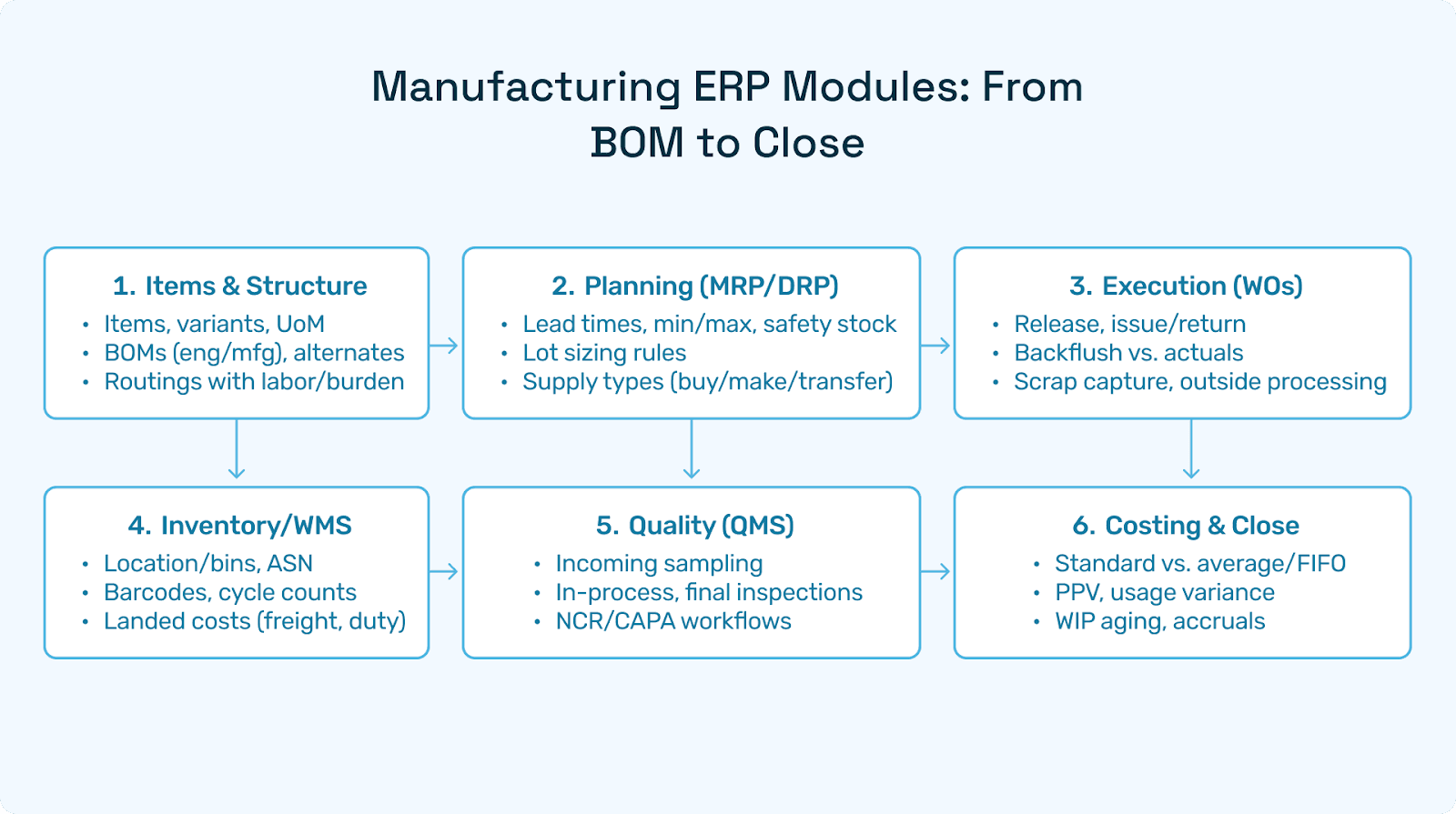
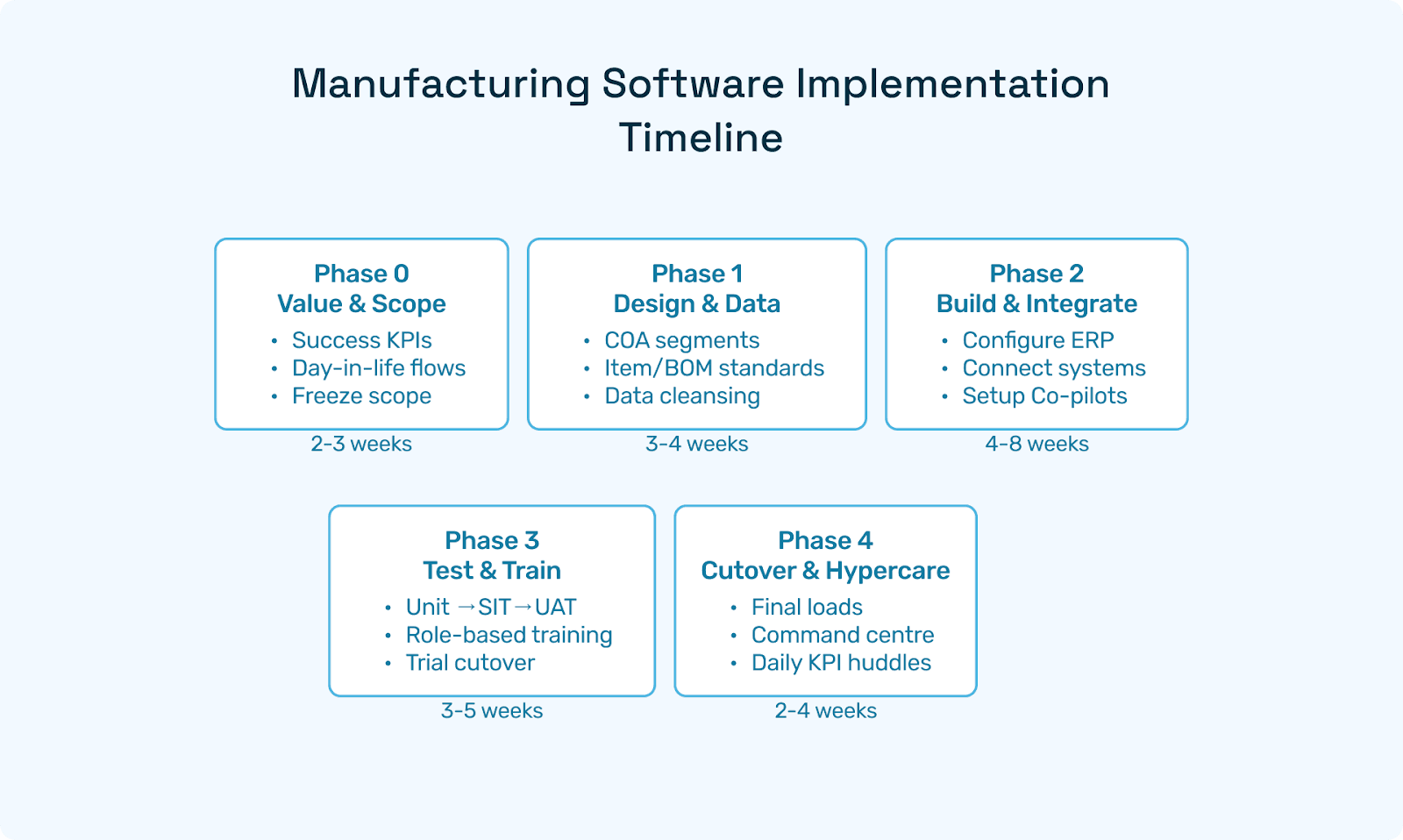
Netsuite
NetSuite Training Guide: Role-Based Programs, Free Resources & Learning Plan
From NetSuite basics to advanced workflows, this guide shows how to train teams faster using real scenarios, measurable KPIs, and practical learning paths.
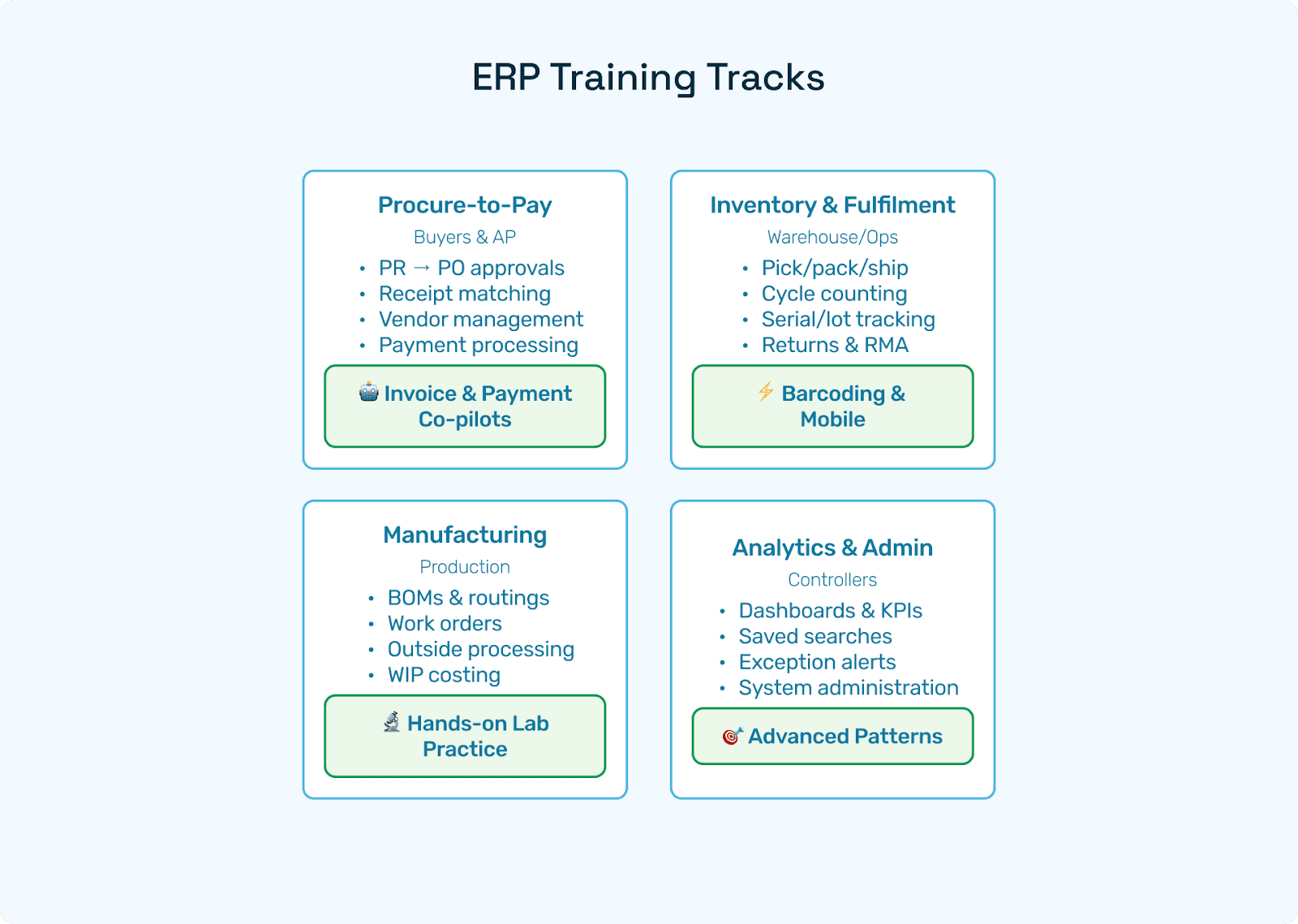
The Complete NetSuite Training Guide: Role-Based Programs That Actually Stick
Finance teams using NetSuite rarely struggle with the same thing. Some hit a wall at 3-way match tolerances. Others lose weeks to accrual logic that was never explained during go-live. What's consistent isn't the problem but the pattern: users know the clicks but can't explain the control behind them, and that's where audits get uncomfortable.
Most teams search for a NetSuite tutorial or a beginners course and hope it sticks. What actually moves the needle is a role-based, KPI-driven program that blends NetSuite basics, sandbox practice, and short day-in-the-life scenarios, then reinforces everything with automation where work truly happens: Procure-to-Pay, month-end close, and cash application.
This guide lays out a 30-60-90-day training blueprint, a curriculum for Finance, Procurement, Warehouse, and Operations, a library outline for NetSuite training videos, and a practical path to free NetSuite training resources (what's realistic and how to prepare even when certification vouchers are limited). It also covers how to layer in automation that shortens time to proficiency without replacing the training program itself.
By the end, you'll have a program you can hand to HR, Finance leadership, and plant managers to onboard users faster than "watch a course and hope."
Who This Guide Is For
New NetSuite customers launching or re-launching training
Controllers and CFOs who need a hands-on NetSuite accounting tutorial backed by real data and repeatable labs
Operations leaders who need role-based content for buyers, planners, warehouse, and production teams
Power users and admins building an internal NetSuite learning center
Smaller teams seeking free NetSuite training options to get started before expanding into paid or partner-led programs
Training Design Principles That Make Learning Stick
Role before module. Teach the work, not the menu tree. "AP clerk posts a 3-way match invoice with freight and discounts" beats "Here's the Bills page."
Scenario-first. Each lesson ends with a mini-lab mirroring your business: your vendor list, items, routings, and tax codes.
Progress by KPIs. Tie learning to outcomes: first-pass match %, invoice cycle time, inventory accuracy, order fill rate, close time.
Short video chunks. Users retain brief NetSuite training videos and micro-labs better than marathon webinars. Five minutes is the target.
Close the loop with automation. Layer automation tools to shrink exceptions so learners practice reviewing decisions rather than keying data.
Publish the "why." Every step should include the control rationale (audit, SoD, risk), not just the clicks. Users who understand why a control exists are far less likely to route around it under pressure.
Measure proficiency. Pre- and post-quizzes, sandbox challenges, and live observation. Completion rates alone tell you nothing.
30-60-90 Day NetSuite Training Plan
Day 0: Setup
Give everyone sandbox access, a role, and seed data: vendors, items, tax codes, and a bank account. Publish a one-page map of your core processes (P2P, O2C, R2R) and where each role fits. The map matters more than it sounds and a lot of early confusion comes from users not knowing where their work ends and someone else's begins.
Days 1-30: NetSuite Basics and Foundations
Navigation, global search, saved searches, dashboards
Master data standards: vendor approvals, item coding, UoM, terms, tax
Core flows: PR → PO → Receipt → Bill → Payment; Quote → SO → Pick/Pack/Ship → Invoice; close checklist
Two micro-labs per role (15-25 minutes each)
Days 31-60: Workflows, Controls, and Analytics
Approvals, tolerances, exception routing
Bank feeds, credit memo handling, returns and RMAs
Saved searches, KPI scorecards, scheduled reports
Introduce automation on P2P
This is typically where the first real friction shows up. Sandbox confidence and live data diverge — especially on GR/IR clearing and tolerance settings that were copied from defaults and never revisited.
Days 61-90: Advanced Topics and Stabilization
Landed cost allocation, drop-ship, outside processing
Multi-subsidiary and intercompany (if applicable)
Close acceleration: accruals, reconciliations, variance analysis
Final proficiency checks; roll into steady-state cadence
Finance Track: NetSuite Accounting Tutorial (Hands-On)
Unit 1: Foundations
Chart of accounts, segments, classes, departments
Vendor setup (KYC details, terms, tax, bank), customer master (credit limit, terms)
AP/AR lifecycle overview
Unit 2: Procure-to-Pay Mechanics
Create POs with price breaks and item/vendor cross-refs
Partial receipts and GRNs with lot/serial tracking (if applicable)
Vendor bill entry, 2/3-way match, freight and duty as landed cost
Discounts and payment proposals, ACH file export
One thing worth flagging here: 3-way match tolerance settings are where a lot of teams quietly accumulate risk. The NetSuite default gets copied at go-live and never reviewed. Build a lab exercise specifically around what happens when tolerances are set too wide — it makes the control feel real rather than theoretical.
Unit 3: Month-End Close
Unvouchered receipts, GR/IR clearing, accruals for services and in-transit freight
Bank rec, FX revaluation, intercompany eliminations (if using OneWorld)
Audit trail and evidence linkage
Unit 4: Analytics and Controls
Saved searches for duplicate detection, price variance, and unmatched receipts
KPI dashboards: first-pass match %, invoice cycle time, DPO, discount capture
SoD: maker-checker on vendor bank changes and payments
Pair each unit with a 20-minute lab and a 5-question quiz. For true beginners, compress Unit 1 and two labs into a single day.
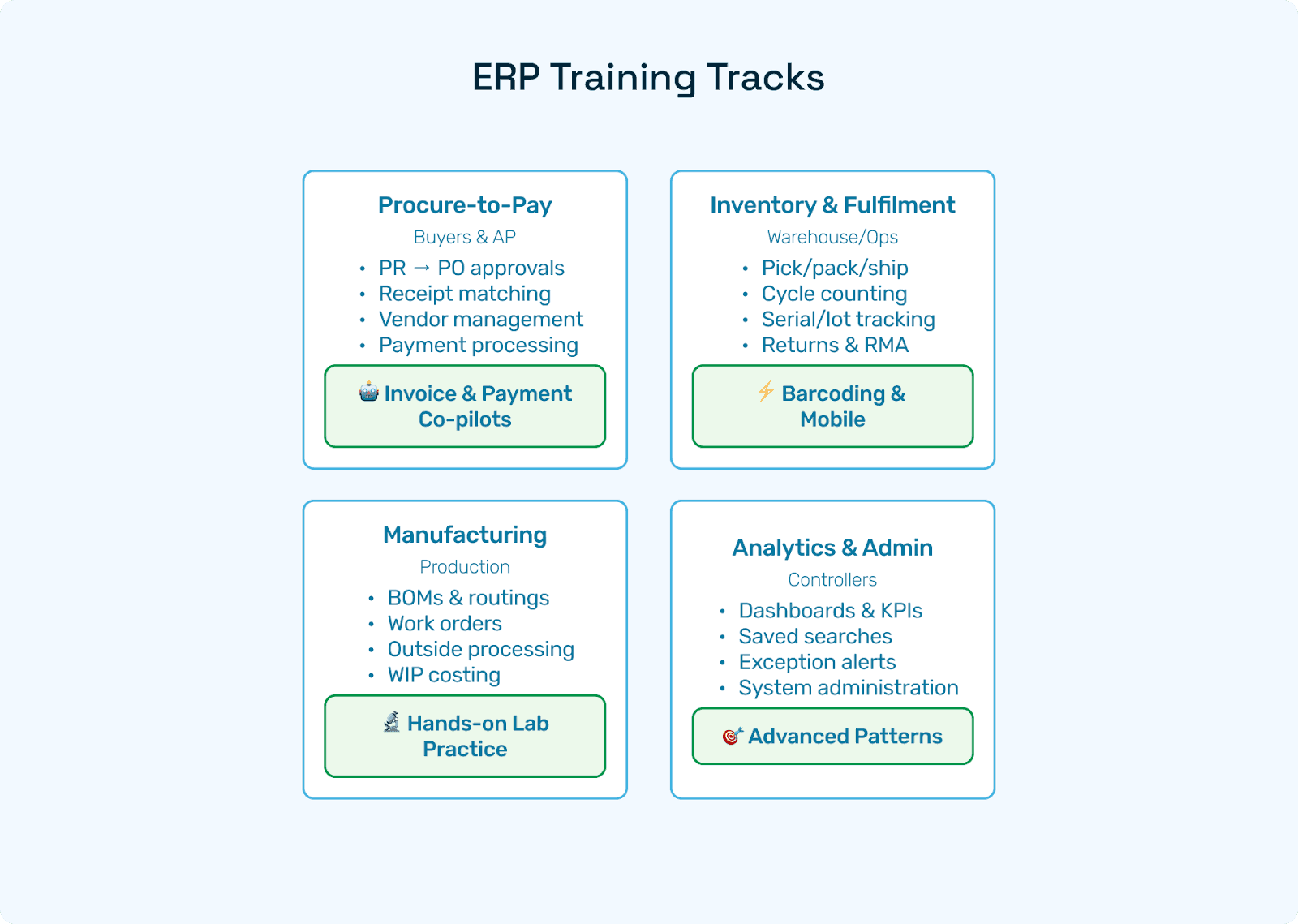
Procure-to-Pay Track: Buyers and AP
Buyer labs:
Convert MRP/min-max signals to PR → PO with approvals
ASN compliance, receipt scheduling, vendor performance scorecard
Price breaks, blanket POs, change orders
AP labs:
Service PO and service entry sheet for outside processing
PO and receipt mismatch handling; routing true exceptions
Debit memos, credits, short payments, and payment runs
Inventory and Fulfillment Track: Warehouse and Ops
Location and bin structure, cycle counting, adjustments with reason codes
Pick, pack, ship; labels; returns and RMA loop
Serial and lot capture, FEFO (if required), inventory aging
Landed cost and cost roll-ups for true inventory value
Quick wins to prioritize:
Barcoding basics and mobile picking
Saved search: items with zero on-hand but open orders
Dashboard: pick accuracy, order line fill rate, dock-to-stock time
Manufacturing and Operations Track
BOMs and routings, work order release, backflush vs. actual issue
Outside processing: ship WIP, receive WIP, service invoice match
WIP valuation and month-end WIP close
Simple S&OP loop: demand plan → MRP/DRP → PO/WO suggestions
Practice lab:
Create a two-level BOM, run MRP, release a work order, issue and complete, inspect, cost close. Add a subcontract step, post the service bill, verify the accrual reversal next month.
Analytics and Admin Track: Controllers and Power Users
Building role-based dashboards with KPIs and alert tiles
Saved search design patterns: hashing for duplicate detection, exception buckets for AP, negative margin alerts
Scheduled reports and distribution lists
Sandbox control: refresh cadence, UAT scripts, release notes, change approvals
Free NetSuite Training: What's Actually Available
"Free NetSuite training" gets searched a lot, but the word "free" covers a range of things. Here's what's realistic:
Voucher programs and scholarships. Certification vouchers occasionally come through NetSuite partners, user groups, or events. They're not predictable, but worth tracking if you're active in the community.
Employer-sponsored training. You don't pay out of pocket; the company covers exam and prep costs. This is the most common route for finance and ops teams at mid-market companies.
Free prep, paid exam. Plenty of no-cost study guides, intro course playlists, and practice questions exist. The certification exam itself typically carries a fee, but the preparation doesn't have to.
Community resources. NetSuite's own webinars, community forums, and user group recordings are genuinely useful for covering NetSuite basics before moving into more structured content.
Practical approach:
Start an internal study group using the syllabus in this guide
Use community webinars and intro playlists as your warm-up layer
Run a mock exam after 30 days and use sandbox labs to close gaps
If vouchers become available, register within the eligibility window
For the exam fee itself, most employers will sponsor it once you've demonstrated progress
Even without a free voucher, combining open prep material with employer sponsorship gets most people there.
Consulting-led research shows free resources are useful but incomplete without structured programs
Building an Internal NetSuite Learning Center
A well-organized internal portal removes the "where do I go?" friction that slows down onboarding.
Role-based pages. AP, Buyer, Warehouse, Planner, Controller, Exec. Each page holds micro-videos, SOPs, labs, and the KPIs that role owns.
Content types to include:
NetSuite training videos (2-8 minutes each), annotated screenshots, downloadable lab PDFs, and answer keys
Tutorial playlists per role
A NetSuite basics crash course pinned for day-one onboarding
Governance. Each module needs an owner and a review cadence tied to NetSuite release cycles. Track course completions and quiz scores. Surface a "what changed this quarter?" panel on the homepage so returning users can catch up without hunting.
Blended learning. Mix free community content for introductory topics with proprietary labs and SOPs that reflect your actual workflows. Weekly office hours for stumpers and show-and-tell wins will do more for retention than any course alone.
NetSuite Training Videos: A Ready-Made Syllabus
Use this outline to script your own training videos. Each should cover one task with one clear outcome, running 3-8 minutes.
Series 1: NetSuite Basics
Login, roles, and global search
Home dashboard, KPI portlets, reminders
Saved searches 101: build, filter, share
Records and relationships (vendor, bills, payments)
Attachments and audit trail
Series 2: AP Essentials
Create a vendor with maker-checker bank approval
PO with price breaks and approvals
Receive with ASN; partial receipts
Vendor bill and 3-way match; freight as landed cost
Payment proposal, discounts, ACH export
Series 3: Inventory and Fulfillment
Item master setup, UoM, item/vendor cross-refs
Cycle count and variance posting
Pick, pack, ship, and label reprint
RMAs and credit memos
Inventory aging and slow-mover report
Series 4: Close and Controls
Accruals for services and freight
Unvouchered receipts and GR/IR
Bank reconciliation
FX revaluation
Close checklist dashboard
Series 5: Manufacturing
BOM and routing
Work order release
Backflush vs. issue/return
Outside processing
WIP close
One-Week NetSuite Basics Crash Course
For users who need to get functional fast. One video (under 6 minutes), one lab (under 25 minutes), one 5-question quiz per day.
Day 1: Navigation and search; build your first saved search
Day 2: Vendor, item, and customer creation; attach documents
Day 3: P2P loop (PO → Receipt → Bill → Payment) including a mismatch case
Day 4: O2C loop (Quote → SO → Ship → Invoice); simple return and RMA
Day 5: Month-end prep: accruals, unvouchered receipts, and bank rec basics
Practice Labs and Checklists
Lab: AP 3-Way Match with Landed Cost
Create a PO with two price breaks, receive partial, allocate freight and duty, post the bill, match the variance, apply a discount, and export the ACH file.
Checklist: PO created → receipt complete → landed cost allocated → bill matched → payment scheduled → evidence linked
Lab: Service PO for Outside Processing
Add a routing step "Heat Treat (Subcon)", ship WIP, receive WIP, post the service bill, confirm accrual reversal next period.
Checklist: WO updated → shipment posted → WIP receipt → service bill linked → accrual entry auto-reversed
Lab: Duplicate Detection
Import two similar invoices, run a saved search with an amount/date/vendor hash, mark the duplicate, block payment.
Checklist: Hash search → suspect flagged → bank validation → duplicate blocked
Lab: Inventory Accuracy
Pick, pack, ship; run cycle count variance; post adjustment with reason code; verify dashboard tile.
Checklist: Order shipped → variance posted → accuracy tile updated
How Hyperbots Shortens the NetSuite Learning Curve
Training gets easier when users spend less time keying and more time reviewing. Hyperbots delivers six modular AI Co-pilots that sit on top of NetSuite:
Across Hyperbots deployments on NetSuite, straight-through processing on invoices reaches around 80% after stabilisation, with document extraction accuracy at 99.8%. Those numbers matter less as a benchmark and more as a training outcome: when 80% of invoices post without touch, the AP team's job shifts from data entry to exception review, and that's a faster, more durable skill to build.
The deeper training benefit is auditability. Every Hyperbots decision comes with a reason code, a tolerance reference, and an evidence link. New analysts aren't just told what the policy is - they see it applied, flagged, and documented on every transaction they review. That's a different kind of learning than a sandbox lab can replicate.
For AP teams specifically, payment validation blocks duplicate payments and flags vendor bank changes for maker-checker review. New analysts learn safe operations from day one rather than discovering the risks when something goes wrong.
Hyperbots doesn't replace training. It focuses it. Users learn to steward policy and outcomes rather than memorise screens.
FAQs
Is there a single NetSuite tutorial that covers everything?
No single course fits all roles. Start with a NetSuite basics intro, then move to role-based playlists (AP, Buyer, Warehouse, Controller) and practice labs. Trying to cover everything at once is usually what makes training not stick.
What free NetSuite training resources can I trust?
Intro webinars, community forum videos, and vendor blogs are a reasonable starting point. Pair them with your sandbox labs to make sure what you're learning applies to your actual configuration — generic content often skips the setup decisions that matter most.
How does free certification in NetSuite work?
Vouchers come through partners and user groups occasionally. Even without one, free prep materials combined with employer sponsorship for the exam fee is the most common path. The preparation is largely free; the exam itself is where the cost sits.
How long until a beginner is productive?
With the one-week crash course and 30-day labs, most users can handle routine tasks independently. Confident independence on edge cases typically comes around day 60-90, and that timeline compresses significantly when automation handles the high-volume, low-exception work.
How do I keep training current as NetSuite updates?
Run quarterly release notes sessions, update your labs when workflows change, and keep a change log in your learning center. The "what changed this quarter?" panel approach works well for this without requiring a full content overhaul each cycle.
Can automation tools like Hyperbots replace user training?
No, but they change what training needs to cover. When straight-through processing handles the routine volume, training time shifts from "how to key an invoice" toward "how to review an exception, understand the variance, and make a defensible decision." That's a better use of everyone's time.
Putting It Together
Effective NetSuite training isn't about finding one perfect course. It's a role-based, scenario-first program that turns NetSuite basics into repeatable, auditable outcomes — and then makes those outcomes faster with the right tooling.
Build your internal NetSuite learning center, ship early wins with labs and short training videos, and layer in automation to shift training focus from data entry toward analysis and control. The goal isn't users who've completed a course. It's users who can explain why a control exists, catch an exception when it surfaces, and close the month without a fire drill.