Ramp Integration vs Hyperbots: ERP Connectivity and Accuracy Compared
Why ERP accuracy and reliability matter more than feature lists
When you're choosing AP automation software, everyone talks about features and user interfaces. But here's what actually matters once you've signed the contract: does your new system play nicely with your ERP? Can it move data accurately, quickly, and without making your finance team want to pull their hair out?
Ramp integrations and Hyperbots both promise to connect with your existing financial infrastructure, but they approach the problem completely differently. One treats integration as a checkbox feature. The other built its entire platform around making ERP connectivity bulletproof. Let's figure out which approach actually works when you're trying to close the books on deadline.
Why ERP Integration Actually Matters (More Than You Think)
Before we dive into comparisons, let's be real about why this stuff matters. Your ERP system is where your financial truth lives. It's your general ledger, your chart of accounts, your vendor master data, your audit trail. Everything that goes into AP automation needs to end up in your ERP accurately, or you're just creating a fancy data entry system that still requires tons of manual reconciliation.
Poor ERP integration creates a nightmare scenario: your AP system says one thing, your ERP says another, and somebody has to manually figure out what actually happened. According to industry research, real-time integration minimizes data staleness and ensures accuracy, laying the foundation for confident decision-making, while batch integration accumulates data over periods (often hours or days) before transferring it to the target system.
The stakes here are high. Inaccurate data integration can lead to incorrect financial reporting, compliance violations, delayed payments, strained vendor relationships, and finance teams spending hours hunting down discrepancies instead of doing actual strategic work.
How Ramp Approaches ERP Integration
Ramp markets itself as having seamless integrations with major accounting platforms like QuickBooks, NetSuite, Sage, and others. On paper, it looks comprehensive. In practice, users tell a different story.
The Connection Process
Setting up Ramp with your ERP involves standard authentication flows and configuration steps. For NetSuite specifically, Ramp provides detailed setup instructions that require enabling SuiteCloud features, installing their SuiteApp, creating authentication tokens, and configuring role permissions.
The setup itself isn't terrible if you have someone technical on your team. But multiple users on G2 mention challenges with integration setup, with 50+ mentions of approval issues and difficulties managing necessary integrations, including one user noting that any manager change in their HRIS system has to be manually changed in Ramp since they lack that specific integration.
The Sync Depth Problem
Here's where things get interesting (and by interesting, I mean potentially frustrating). Ramp's ERP integrations work with daily batch updates, lacking the bidirectional, real-time integration finance teams often require for accurate decision-making.
What does that mean in practice? Your transaction data doesn't flow into your ERP immediately. Instead, it accumulates throughout the day and syncs in scheduled batches. For some businesses, that's fine. For others who need up-to-the-minute visibility into cash flow, spending, or budget tracking, it's a significant limitation.
One user captured this perfectly in their review, noting that when a payment is made outside of Ramp, it doesn't integrate to the ERP accounting system, creating double work for their team.
When Things Go Wrong
Ramp's own support documentation reveals just how many things can break during ERP synchronization. Their NetSuite troubleshooting guide lists dozens of potential sync errors, including:
Invalid account reference errors
Subsidiary mismatch problems
Missing department or location values
Closed period posting issues
Vendor bill attachment requirements
Purchase order matching failures
Custom field validation errors
Each of these errors requires manual investigation and resolution. The system will flag the problem, but it's up to your team to figure out what happened and fix it. For companies processing hundreds or thousands of invoices monthly, these exceptions add up quickly.
Real user feedback confirms this. People find the reporting interfaces difficult to manage and navigate, which becomes a real problem when trying to track down sync issues or understand why certain transactions got flagged.
The Reality of Batch Processing
Batch integration has legitimate uses. Banks process transactions in batches overnight. Utility companies generate billing statements monthly. Email marketing platforms send campaigns in scheduled bursts. These are all appropriate uses of batch processing because immediate data availability isn't critical.
But is accounts payable one of those use cases? When your CFO asks for current spending data, when vendors inquire about payment status, when you're trying to stay within budget in real time, batch integration creates lag between what's happening and what your ERP knows about.
According to integration experts, batch processing efficiently handles large volumes of data and minimizes resource contention, but it comes at the cost of data latency. For organizations needing immediate insights and responsive operations, that delay matters.
How Hyperbots Built Integration Differently
Hyperbots took a fundamentally different approach. Instead of treating ERP integration as a necessary feature to check off, they designed their entire platform architecture around the idea that integration needs to be real-time, bidirectional, comprehensive, and resilient.
Real-Time, Bidirectional Data Flow
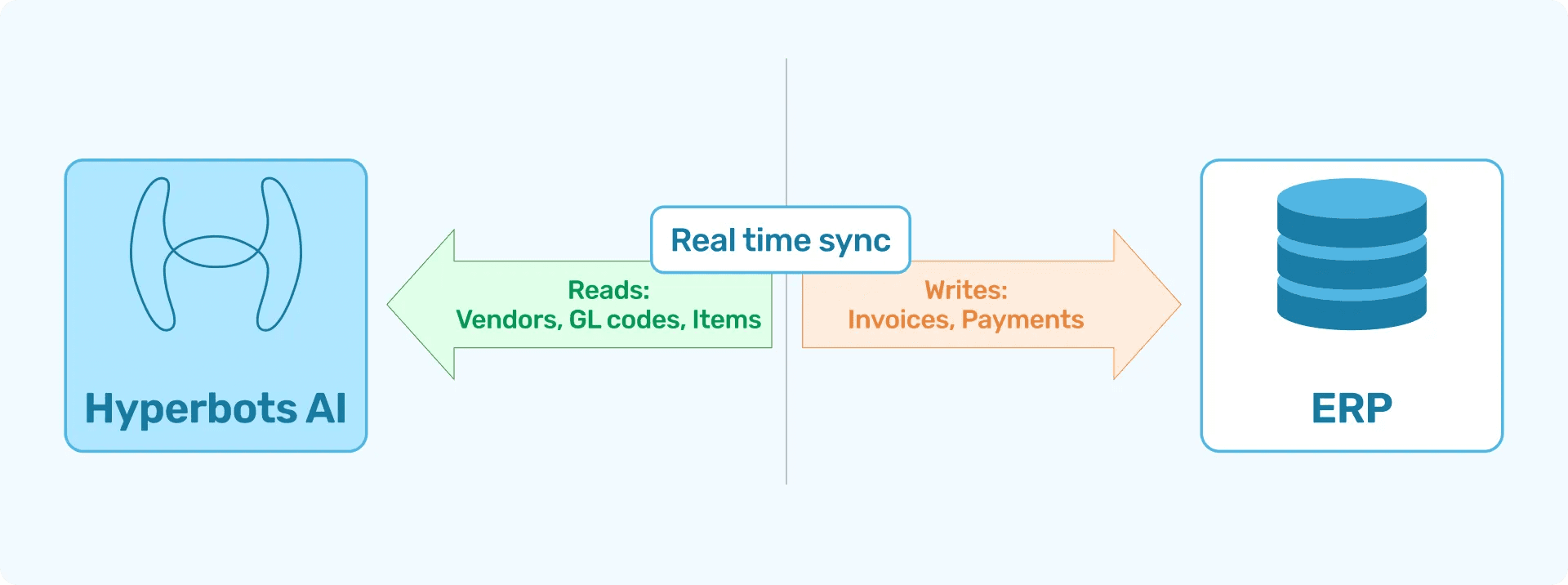
Hyperbots Co-pilots deliver real-time, bidirectional ERP data integration, instantly syncing expenses, vendors, items, and Chart of Accounts details to keep every finance workflow seamless, accurate, and audit-ready.
What does bidirectional mean? It means data doesn't just flow from Ramp to your ERP. It flows both ways, constantly. When you update a vendor record in NetSuite, that change appears in Hyperbots immediately. When you modify GL codes, those updates sync instantly. Your AP system and your ERP stay perfectly aligned without manual intervention.
The Hyperbots Co-pilots offer flexible synchronization options, allowing data to be synced in real-time, hourly, daily, or weekly depending on organizational requirements. Notice that real-time is the default option, not an afterthought.
Exhaustive Integration Coverage
Here's something most AP systems don't do: Hyperbots Co-pilots deliver exhaustive ERP integration, providing full read-and-write access to expenses, Chart of Accounts, vendor master, item master, assets, and liabilities to power end-to-end AI-driven automation.
This matters more than you might think. Many integration tools only handle the obvious stuff like invoices and payments. But what about when you need to automatically create a new vendor? What about when GL codes change? What about when you're dealing with multi-entity structures with different subsidiaries?
Hyperbots natively integrates with both on-premise ERP and cloud ERP platforms, enabling secure, high-speed data exchange and consistent finance automation across any deployment model. That means whether you're running NetSuite in the cloud, SAP on-premise, or some hybrid setup, the integration approach remains consistent.
The Verification Layer That Changes Everything
This is where Hyperbots really separates itself from competitors. The Co-pilots ensure data integrity by verifying ERP postings with read-back checks, employing optimal retries for failures, and providing exception reporting for user resolution.
Let's unpack what that means. After Hyperbots posts a transaction to your ERP, it doesn't just assume everything worked. It actually reads the data back from the ERP to confirm the transaction landed correctly, with all the right values in all the right fields. If something didn't match, it catches the error immediately and either retries automatically or alerts someone to investigate.
This verification approach is fundamental to achieving high accuracy. You're not just hoping the data made it to your ERP correctly. You know it did because the system verified it.
Handling ERP Customizations
Most companies don't run vanilla ERP instances. They have custom fields, custom workflows, industry-specific modifications, unique approval hierarchies. Generic integration tools struggle with this.
Hyperbots co-pilots adapt seamlessly to company-specific ERP customizations, enabling read and write access to custom fields through a configuration-driven integration framework. This flexibility means you're not forced to change your ERP setup to accommodate the AP automation tool. The tool adapts to you.
Speed and Processing Time: The Hidden Cost of Batch Integration
Let's talk about speed, because this affects your close timeline, your vendor payment schedules, and your team's ability to respond to financial questions quickly.
Ramp's Batch Timing
Ramp supports near-real-time ERP syncing for many workflows, but in practice the experience isn’t always consistent. Some transactions flow through immediately, while others can be delayed or fail to post as expected due to integration edge cases, configuration limits, or data mismatches that require manual follow-up.
For certain teams, that inconsistency is manageable. For others, it creates uncertainty. When you need to confirm available budget before approving another purchase, or answer a vendor asking about payment status, finance teams often end up checking multiple systems to understand what actually happened. The issue isn’t just speed. It’s the lack of predictability and visibility when syncing doesn’t behave the way you expect.
According to data integration research, batch processing involves accumulating data over periods before transferring it to target systems, which means decisions are being made on slightly stale information.
Hyperbots' Real-Time Advantage
Hyperbots reduce invoice processing time from an industry average of 11 days to less than one minute due to straight-through processing achieved through AI. That's not just about invoice reading. That's end-to-end processing including ERP posting.
With real-time integration, approved transactions appear in your ERP within seconds, not hours. Your financial data is always current. Your reporting is always accurate. Your team can make decisions based on actual current state rather than yesterday's snapshot.
Real-time data integration minimizes data staleness and ensures accuracy, enabling confident decision-making and immediate responsiveness to financial situations.
Multi-Entity and Complex Environments
If you're running a single-entity business with straightforward accounting needs, both platforms can probably handle your requirements adequately. But what if your reality is more complex?
Ramp's Multi-Entity Support
Ramp does support NetSuite subsidiaries and multi-entity configurations. Their integration can handle multi-currency transactions and generate statement payments for different entities. However, the setup is complex and requires careful configuration of subsidiary mappings, account mappings, and department assignments.
Based on RSM Technology's implementation guide, troubleshooting multi-entity setups involves checking subsidiary associations, verifying account configurations for each entity, and ensuring proper role permissions across entities. When issues arise, they typically require technical investigation and manual fixes.
Hyperbots' Unified Multi-Entity Approach
Hyperbots Co-pilots seamlessly integrate with multiple ERP systems and instances across various entities, providing a unified task view through Agentic AI and simplifying operations in complex, multi-ERP environments.
Read that again. Not just multiple entities within one ERP. Multiple entirely different ERP systems. This matters if you've grown through acquisition and haven't yet consolidated onto a single ERP platform. Or if different business units use different systems for legitimate operational reasons.
The Co-pilots adapt seamlessly to company-specific ERP customizations, enabling read and write access to custom fields through a configuration-driven integration framework across all these different systems while maintaining data consistency and accuracy.
The Deployment Timeline Reality Check
Integration complexity directly affects how long it takes to get your AP automation system actually running.
Ramp's Implementation Experience
Based on third-party implementation guides and Ramp's own documentation, setting up NetSuite integration requires administrator access on both platforms, enabling multiple SuiteCloud features, installing custom SuiteApps, configuring authentication tokens, mapping accounts and subsidiaries, and testing sync functionality.
For companies with complex ERP configurations, this can take weeks and often requires consulting help. RSM Technology, which frequently implements Ramp integrations, provides detailed step-by-step guides because the process isn't straightforward.
One significant issue: if you're currently integrated with QuickBooks and want to switch to NetSuite, you must completely disconnect from QuickBooks first. You can't run parallel integrations during transition periods, which creates cutover risk.
Hyperbots' Deployment Approach
For ERPs with pre-built connectors, integration can be completed in two to four weeks. Hyperbots delivers pre-built ERP integration connectors for NetSuite, SAP S/4HANA, Sage 300, Sage Intacct, Microsoft Dynamics 365 Business Central, Deltek Costpoint, Epicor, QuickBooks and many more, ready for fast code-free deployment.
The Co-pilots are ready-to-deploy, no-code solutions with pre-trained AI agents and native ERP connectors, enabling rapid, customized setup without third-party integrations or development overhead.
Notice the difference: Ramp requires technical setup, configuration, and often external consultants. Hyperbots designed the deployment process to be streamlined and not require specialized integration expertise.
When Things Break: Support and Troubleshooting
No integration runs perfectly forever. Systems change, requirements evolve, unexpected edge cases emerge. How platforms handle these situations tells you a lot about their integration maturity.
Ramp's Support Model
Ramp provides extensive documentation on sync errors and troubleshooting steps. Their support site lists dozens of specific error scenarios with resolution procedures. That documentation is helpful, but its existence proves how often things go wrong.
User reviews mention that support is mostly done by communicating with bots and is very frustrating. When you're dealing with integration issues that affect your close timeline or vendor payments, bot-based support isn't ideal.
The troubleshooting process typically involves checking NetSuite configurations, verifying account mappings, confirming role permissions, investigating field-level validation rules, and manually correcting data before re-attempting sync. This puts the burden on your team to diagnose and resolve integration problems.
Hyperbots' Proactive Approach
Instead of waiting for integrations to fail and then troubleshooting, Hyperbots built verification and resilience into the core architecture. The system verifies ERP postings with read-back checks, employs optimal retries for failures, and provides exception reporting for user resolution.
That optimal retry logic is important. If a sync fails because of a temporary network issue or ERP system busy state, Hyperbots automatically retries with appropriate backoff timing. You don't need to manually reprocess failed transactions.
When human intervention is genuinely needed, the Co-pilots generate contextual and configurable notifications across all processes, providing real-time updates and actionable insights to ensure transparency and efficient user intervention.
The Data Integrity Challenge
Here's something that doesn't get discussed enough: how do you know your integration is actually working correctly on an ongoing basis?
The Silent Failure Problem
With batch-based integrations, failures can accumulate silently. A transaction fails to sync during the overnight batch, but nobody notices until days later when reconciliation reveals the discrepancy. By then, tracking down what happened and why is significantly harder.
Ramp's approach relies on post-sync verification by your team. You need to manually check that transaction counts match between systems, that amounts reconcile correctly, and that all expected transactions made it to the ERP.
Hyperbots' Continuous Verification
The read-back verification that Hyperbots employs means the system actively confirms data integrity continuously. It's not just pushing data and hoping for the best. It's verifying that what landed in the ERP matches what was intended, immediately flagging any discrepancies.
This gives finance teams confidence that their data is accurate without requiring constant manual verification. The system proves its own accuracy rather than assuming it.
Cost Implications of Integration Complexity
Integration problems cost money in ways that aren't always obvious.
Hidden Costs of Poor Integration
When your AP automation system doesn't integrate well with your ERP, you pay in several ways:
Extended close times: Finance teams spend extra days each month reconciling differences between systems instead of closing on schedule.
Manual intervention overhead: Every sync error or integration failure requires someone to investigate, diagnose, and manually correct. At scale, that's significant ongoing labor cost.
Consultant dependency: Complex integration issues often require bringing in expensive consultants because the internal team can't resolve them.
Data quality issues: Poor integration leads to duplicate vendors, incorrect GL coding, mismatched transactions, all of which create downstream problems that require expensive cleanup.
Delayed payments: When transactions don't sync properly, payment processing gets delayed, potentially incurring late fees or damaging vendor relationships.
What CFOs and Controllers Should Actually Ask
When evaluating these platforms, skip the marketing materials. Here are the questions that reveal the truth about integration quality:
Can you show me a real-time demo of data flowing from your system to my ERP and back? If they can't demonstrate bidirectional, real-time sync, that tells you everything you need to know about their integration capabilities.
What happens when a sync fails? Understanding their error handling, retry logic, and notification approach reveals whether you'll be constantly managing integration issues or whether the system handles them intelligently.
How do you verify that data landed correctly in the ERP? If the answer is "you should periodically reconcile," that means they're not verifying. If they talk about read-back checks and automated verification, that's a more mature approach.
Show me your integration with our specific ERP configuration. Generic demos don't reveal how the system handles your custom fields, unique workflows, or industry-specific requirements.
What's your typical implementation timeline for companies with our level of complexity? Vague answers like "it depends" aren't helpful. You need concrete timelines based on similar deployments.
How do you handle ERP updates and changes? ERPs change over time. You need to know whether integration maintenance is your problem or theirs.
The Verdict: Integration Philosophy Matters
Here's the honest assessment: Ramp built a corporate card and expense management platform that added AP automation and ERP integration later. Those integrations work adequately for basic scenarios but show their limitations when dealing with complexity, real-time requirements, or high accuracy demands.
Hyperbots built an AI-first finance automation platform where deep, bidirectional, verified ERP integration was a core design requirement from day one. That architectural difference shows up in accuracy rates, processing speeds, error handling, and the overall robustness of the integration.
For companies with straightforward integration needs, single-entity structures, tolerance for daily batch syncing, and teams willing to manually manage integration exceptions, Ramp can work. The integration exists, it functions, it moves data.
For companies that need real-time visibility, handle complex multi-entity structures, require verified accuracy for compliance or audit purposes, or simply want their AP automation and ERP to work together seamlessly without constant babysitting, Hyperbots represents a fundamentally more mature approach.
The difference comes down to this: do you want integration that works well enough most of the time, or do you want integration that's engineered to be bulletproof? Do you want your team managing integration issues, or do you want the system managing itself?
In finance, accuracy isn't negotiable. Speed creates competitive advantage. And integration problems that seem small during demos become big headaches during month-end close. Choose the platform whose integration architecture matches the reality of your operations, not the simplified scenario in the sales presentation.
Because when you're trying to close the books at 2 AM on deadline, whether your AP system and ERP are actually in sync stops being a technical detail and becomes the only thing that matters.