Ramp vs. Hyperbots: Who Delivers the Best Audit Trail?
Audit trails aren’t optional, they’re financial truth serum. Here’s how Ramp and Hyperbots stack up when transparency, traceability, and compliance accuracy matter most in modern AP automation.
When it comes to AP automation, “audit trail” isn’t just a checkbox on the compliance form, it’s the backbone of trust, transparency, and financial governance. For finance leaders who care about AP compliance audit, a robust audit trail means not only knowing what happened, but why, when, and who triggered it. It’s the difference between “we think someone messed with the invoice” and “here’s exactly who touched it, when, and what changed beyond a shadow of a doubt.”
And this is where Hyperbots and Ramp start to diverge. Both promise clarity, both promise oversight, but the depth of explanation and the level of traceability each platform offers can feel worlds apart once you look beyond the UI.
What Does “Audit Trail” Really Mean in AP?
An audit trail is a chronological record of actions taken across invoice processing, payments, approvals, and exceptions. In an AP compliance audit, auditors will dig into these trails to validate:
Who approved or edited a record
Exactly when a change happened
Whether it was a person or automation (AI, in this case)
What the before-and-after values were
Comments or reasoning behind manual adjustments
A weak or opaque audit trail makes an auditor sigh. A strong one makes them smile.
How Ramp Approaches Audit Trail
Ramp, through its Bill Pay module, does include an audit logging mechanism. According to support docs, every user action like changes to vendor details or bank account information is logged with timestamps. Some key elements of Ramp’s audit trail:
Centralized Audit Log: In its “Audit Log,” Ramp consolidates all key actions by users (admins, owners, etc.) so you can track activity in one place.
SOX Compliance: The Ramp log supports SOX compliance by helping administrators ensure proper controls and role-based access.
Event Filters: You can filter events by type (e.g., “actor,” “affected user”), making it easier to investigate specific changes.
Audit During Payments, Approvals, and Changes: Ramp’s AP automation handles invoice ingestion, OCR, and approval routing and actions like approval decisions and payment executions are also logged. To quote an official blog: “Every action taken within Ramp Bill Pay whether it’s an approval, edit, or payment is logged with a timestamp and user identifier.”
Strengths
Straightforward, user-based audit logs.
Good SOX compliance visibility.
Easy to filter and track user edits and approvals.
Limitations
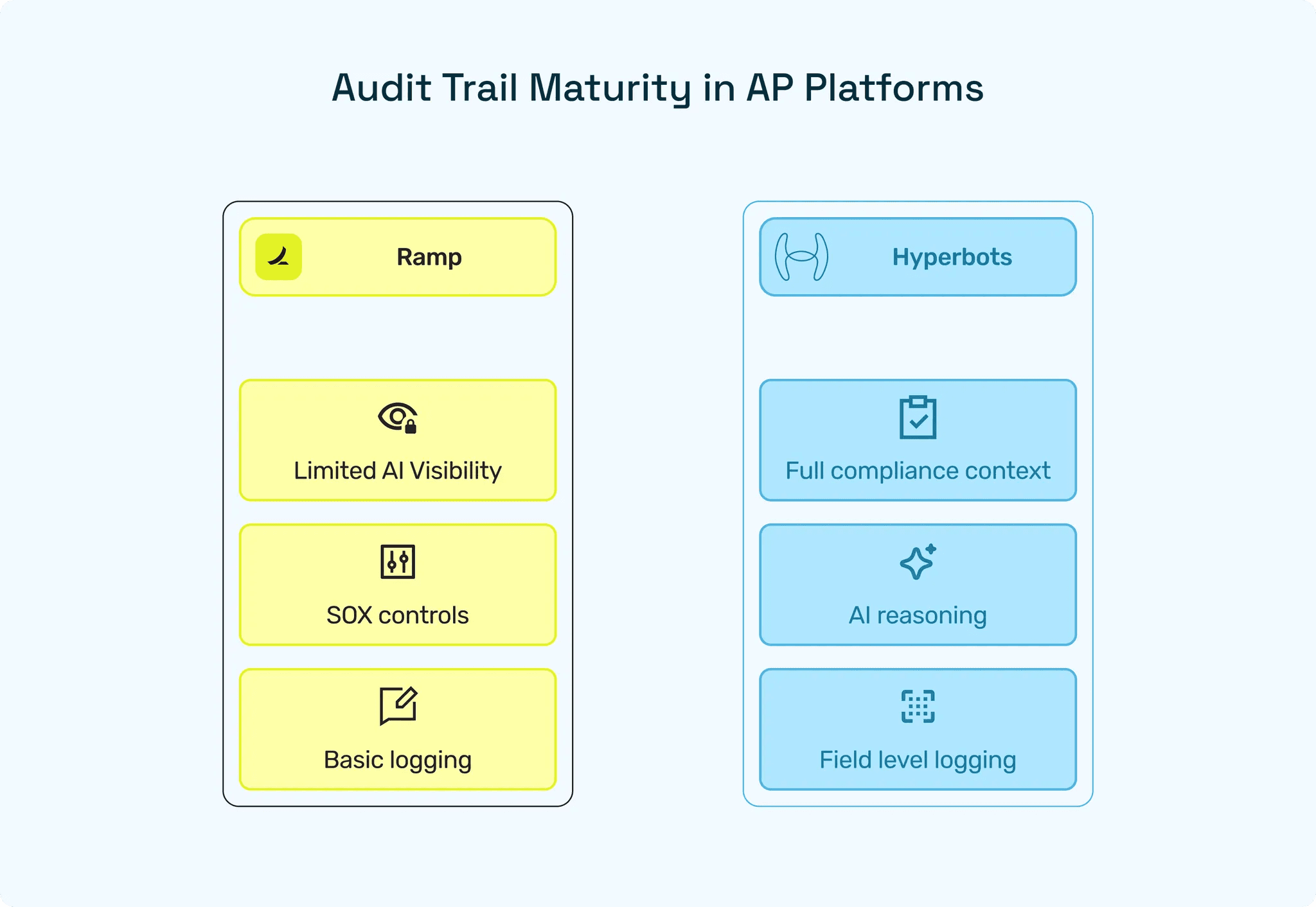
While Ramp identifies who did what, it doesn’t clearly distinguish why an AI agent made a decision (if those agents are in use).
The audit log is relatively “flat”: it doesn’t seem to provide very rich context around each field-level change (for example, differences in data validation, reasoning, or AI-human toggles).
Less granularity on line-item level or AI vs human reconciliation decisions compared to AI-native platforms.
In short: Ramp’s audit trail is solid for standard workflow governance, but may not satisfy deeper compliance teams who demand AI explainability finance-style especially when agent-driven actions come into play.
How Hyperbots Approaches Audit Trail
Hyperbots is built from the ground up for finance workflows, with Agentic AI in its DNA. That means audit trail isn’t an afterthought, it’s baked into every AI decision and human action.
Here’s how Hyperbots does audit trail differently (and better):
Comprehensive Action Logging
Hyperbots logs upto 140+ fields per invoice (line amounts, dates, PO numbers, GL codes, payment terms, and more).Timestamps & Context
Every action whether by AI or by a human is timestamped. Hyperbots captures who did it, when, what was changed, and why.Distinguishing AI vs Human
Crucially, Hyperbots’ audit trail differentiates between actions performed by its AI and those done by people. This is key for explainability and compliance.Rich Metadata
Each logged action includes associated data points: comments, approver names, matching discrepancies, time taken for decisions, and more.UI Audit Cards
Rather than a bland list, Hyperbots displays audit logs as intuitive “cards” in its Co-pilot UI, making it easy for finance or auditors to review and understand what happened, when.Payments Audit Trail
In its Payments Co-pilot, Hyperbots tracks every step payment creation, approval, remittance, reconciliation with full traceability.Self-Learning & Explainability
Because Hyperbots’ AI models self-learn and reason, its audit trail captures why the AI made a decision. This contributes to AI explainability in finance and gives compliance teams the context they need to trust the system.ACH & Payment File Traceability
Even ACH payment file generation is fully logged with details on who generated the file, who approved it, and when it was downloaded or uploaded.
Strengths
Gold-standard traceability: both AI and human actions are captured with context.
Explainability for finance: audits can show not just that something happened, but why.
UI built for compliance: actionable, readable audit cards make review easier.
Continuous learning: as AI learns, so does the trail, giving more detail over time.
Hyperbots vs Ramp: Side-by-Side Comparison
Criteria | Ramp Audit Trail | Hyperbots Audit Trail |
Tracks who did the action? | Yes, user-based logging | Yes, clearly separates AI vs human |
Timestamps for each action | Yes | Yes, with detailed contextual metadata |
Field-level change visibility | Limited (mainly user edits, vendor data, approvals) | Deep. Logs changes across 140+ financial fields |
Reason/explanation for changes | Basic; no clear AI reasoning | Full reasoning layer. Includes AI chain-of-thought + human comments |
AI transparency | Minimal; AI decisions not explained in depth | High. Explains why the AI made each decision |
UI design for audit review | Standard log-style list | Intuitive Audit Cards in Co-pilot UI |
Payment/ACH audit trail | Available but limited detail | Full traceability. Creation, approval, reconciliation, ACH file actions |
Metadata captured | User, timestamp, object changed | User/AI, before-after values, reasoning, comments, time spent, discrepancy notes |
Compliance readiness | SOX-supported; good for standard controls | Strong compliance + AI explainability ideal for regulated finance |
Best suited for | Teams needing basic workflow logging | Teams needing deep traceability, AI oversight & audit-grade transparency |
Why “Ramp Audit Trail” Might Fall Short for Some Teams
Limited AI visibility: If you’re evaluating AI auditability, Ramp’s audit log may feel shallow. It captures user actions well, but doesn’t always explain AI-driven decisions.
Less contextual reasoning: When humans or AI correct an invoice or exception, Ramp typically logs that something changed but not why, in a way that's easily searchable.
Compliance beyond user changes: For stringent compliance teams (e.g., external audits, SOX, internal controls), deeper field-level insights and reasoning trails matter a lot and that’s where AI-native platforms shine.
Why Hyperbots’ Audit Trail Is a Standout
Audit-Ready by Design
Hyperbots built its Co-pilot specifically for finance. That means every action by AI or human is recorded with business context, not just as a click in a workflow. That’s powerful for compliance, internal controls, and external auditors.
AI Explainability + Finance
Hyperbots doesn’t just do things, it reasons through them. And that reasoning is part of the trail. If your compliance officer or internal auditor asks, “Why did the AI re-code that invoice line?” Hyperbots can show the chain of thought.
Robust AP Compliance Audit Support
Because every decision and adjustment is timestamped, logged, and tied to a user or model, Hyperbots makes it easy for auditors to backtrack how GL codes were assigned, how matches happened, and how exceptions were resolved. This is crucial for AP compliance audits.
Adaptive & Transparent
Hyperbots’ audit trails evolve. As businesses change their workflows, as the AI learns, the audit trail adjusts, capturing both new rules and past logic. That means long-term compliance visibility without requiring a full reimplementation.
UI That Humans Actually Use
Audit cards are intuitive and interactive — not just a dump of lines in a spreadsheet. Finance teams, controllers, and auditors can visually navigate logs, filter by event types, and investigate anomalies much faster.
Real-World Impact: Audit Trail That Matters
Imagine this scenario: your CFO or auditor needs to validate your AP process at month-end. With Hyperbots:
They open the Co-pilot audit trail UI
They filter to a particular invoice
They trace every action: AI extraction, validation, matching, GL assignment, and posting
They see who intervened (if anyone), and when
If something changed, they can view old values, new values, and even notes or AI reasoning behind the change
For Ramp, the experience is more like sifting through a log file: “Yes, someone changed the vendor address on 5/12, but I don’t immediately know why or what validation was run.” That might be fine for some teams but not for others who require deep traceability.
Audit Trail + AI Explainability in Finance: Why It Matters Now
In 2026, finance teams are increasingly being asked not just to automate, but to explain their automation. Regulators, auditors, and compliance teams care not only about what happened, but how the AI thought about it. That’s the domain of AI explainability in finance, and Hyperbots was built for exactly this.
Meanwhile, a “traditional” audit trail (like what Ramp offers) may be sufficient for basic workflows but as companies scale, deal with regulatory risk, or adopt more AI-driven models, richer traceability becomes non-negotiable.
When Ramp’s Audit Trail is Good Enough
To be fair, Ramp’s audit log does cover a lot of ground:
You get a consolidated log of user actions
You can filter and investigate key changes
Ramp supports SOX-style controls through its audit log
Basic compliance teams might be satisfied with traditional logging
If your use case is relatively straightforward, your AP volumes are moderate, your audit requirements are standard, and you don’t heavily rely on AI agents. Ramp’s audit trail may meet your needs just fine.
When Hyperbots’ Audit Trail Truly Shines
Hyperbots is a better fit when:
You’re adopting AI-native AP automation and need transparency into what the AI is doing.
You face stringent compliance demands, and auditors expect traceability at a field and reasoning level.
You operate in a regulated environment where AP accuracy, role-based accountability, and data lineage are critical.
Your team wants to scale fast without losing control and wants a system that logs everything meaningfully, not just superficially.
Explainability matters, meaning, someone (auditor, finance leader, compliance officer) will ask “why did the system do this?”
The Verdict: Best Audit Trail for AP?
Ramp: Good user-action logging. Good for teams that prioritize standard workflow logging over AI reasoning.
Hyperbots: Transparent, explainable, AI-native audit trail. Designed for teams that want both automation and audit clarity.
If your organization cares deeply about AP compliance audit, explainable AI, and long-term traceability, Hyperbots will likely serve you better. For more traditional AP teams with lighter audit demands, Ramp’s audit log may suffice but it won’t give you the same depth of insight or reasoning trail.
Ready to see Hyperbots’ audit trail in action?
Book a demo today and experience finance automation that actually explains itself.
Frequently Asked Questions (FAQ)
What exactly is a “Ramp audit trail”?
It’s Ramp’s built-in audit log, accessible to administrators, that records user actions like edits, approvals, and vendor changes, with timestamps, actor information, and change history.Does Hyperbots record both AI and human actions in its audit trail?
Yes, Hyperbots logs every action, whether done by its AI agents or by a human. Each log entry includes who acted, what was changed, when, and why.How does Hyperbots’ audit trail help with AP compliance audits?
Its rich, transparent logging including reasoning, field-level changes, and timestamps, provides clear evidence for auditors and compliance teams, helping satisfy regulatory and internal control requirements.Can Hyperbots track payment actions (e.g., ACH) in the audit trail?
Absolutely. The Payments Co-pilot logs every step in the payment process: creation, approval, remittance, reconciliation, and more with full detail and traceability.Is Hyperbots’ audit trail customizable for different business needs?
Yes, its Agentic AI platform allows configurable audit trails, letting you add or tailor audit logging based on your workflows, policies, or compliance requirements.