AI in Finance
SAP Business One Cloud: Everything You Need to Know Before Making the Move
A complete guide to understanding cloud deployment, migration considerations, costs, and benefits of SAP Business One Cloud for growing businesses.
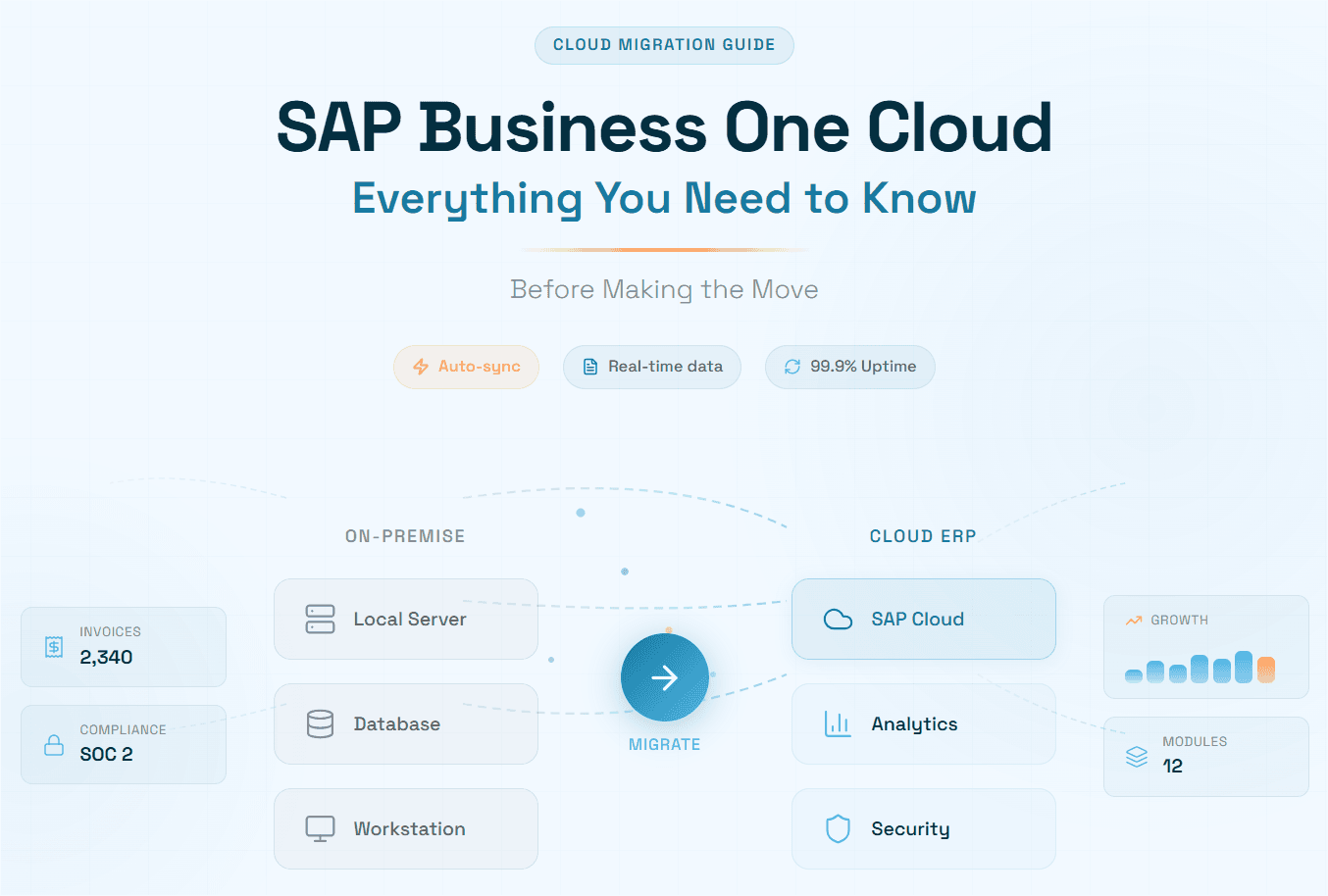
SAP Business One (SAP B1) is the world’s most purchased ERP for small and mid-sized enterprises, deployed in more than 90,000 companies across 150 countries. The shift from on-premise installations to SAP Business One cloud hosting has fundamentally changed how SMEs access, scale, and extract value from their ERP investment thereby, eliminating upfront hardware costs, enabling anywhere access, and dramatically reducing IT overhead.
This guide walks finance leaders, IT directors, and business owners through every dimension of the SAP B1 cloud journey: deployment models, migration roadmap, total cost of ownership, security considerations, and the emerging AI layer redefining what cloud ERP can achieve.
Whether you are evaluating your first move to SAP B1 cloud, looking to optimize an existing deployment, or seeking to layer intelligent automation on top of your SAP Business One hosting environment, this article is your definitive reference for 2026.
What Is SAP Business One Cloud
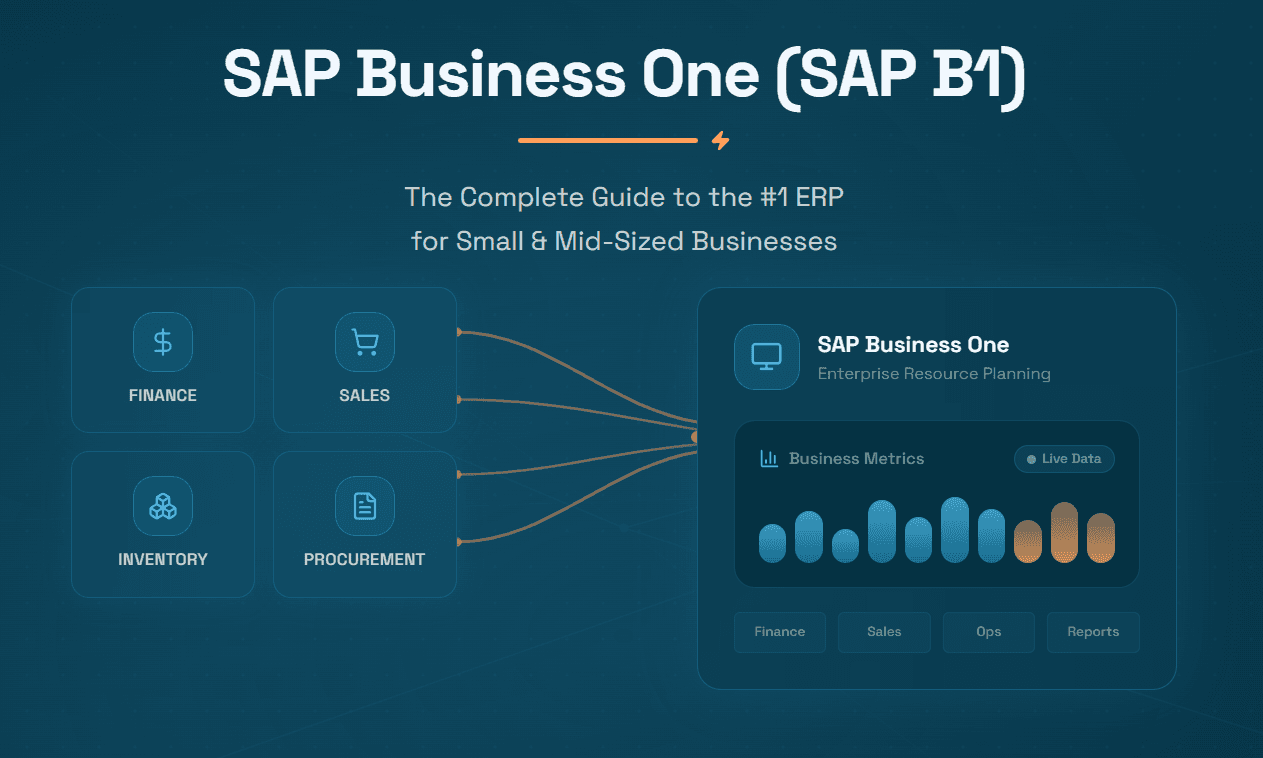
SAP Business One is SAP’s flagship ERP platform engineered for growing companies with 10 to 250 employees. Originally conceived as an on-premise solution, it has evolved into a fully cloud-capable system that enterprises can host on hyperscaler infrastructure, primarily Amazon Web Services (AWS) and Microsoft Azure, managed either by SAP-certified hosting partners or by in-house IT teams.
When people refer to SAP B1 cloud, they typically mean one of two arrangements: the software license is purchased and hosted on a cloud server managed by a partner (IaaS), or it is subscribed to on an On-Demand model where SAP or a Value-Added Reseller (VAR) provides the entire stack as a monthly service. In both cases, users access SAP Business One through a web browser or SAP’s dedicated client which removes the need for on-site servers, firewalls, or dedicated data centers.
In 2025, with more than 70% of businesses expected to operate on cloud ERP solutions, the migration imperative has never been more urgent. SAP has confirmed a long-term product roadmap for Business One spanning at least ten years, and the partner ecosystem has matured to provide enterprise-grade SAP Business One hosting at price points that were unimaginable a decade ago.
"With more than 90,000 customers worldwide, SAP’s ongoing investment in SAP Business One continues to pay off—ensuring it remains the ideal ERP solution for SME strategic growth well into the future."
SAP B1 Cloud Deployment Models Explained
The term SAP Business One cloud hosting encompasses several distinct deployment architectures. Understanding which model fits your organization is the single most important decision in the cloud journey. Here are the four primary options:
Public / Multi-Tenant Cloud
In a multi-tenant arrangement, multiple customer organizations share the same cloud infrastructure, with logical data separation ensuring privacy. This is the most cost-effective entry point for SAP B1 cloud: typically priced on a per-user, per-month basis, it eliminates nearly all infrastructure management overhead. Best suited to startups and smaller SMEs with relatively standard workflows and moderate compliance requirements.
Private / Single-Tenant Cloud
Single-tenant deployments provide dedicated cloud infrastructure exclusively for one organization. The hosting partner manages the environment while the customer retains full control over updates, add-ons, and configuration. This model is the most popular choice among mid-market companies in manufacturing and distribution that run bespoke SAP Business One customizations or require strict data residency controls.
Hybrid Cloud
Hybrid deployments combine on-premise SAP B1 infrastructure with cloud services. This is commonly used by companies in the middle of a phased migration or those operating in jurisdictions with specific data sovereignty requirements. Core transactional modules may remain on-site while reporting, analytics, and AI-driven automation layers run in the cloud.
SAP B1 on SAP HANA (Cloud-Hosted)
Hosting SAP Business One on the SAP HANA in-memory database, running in the cloud, unlocks real-time reporting, pervasive analytics, and built-in dashboards at speeds impossible on traditional SQL Server architectures. For companies processing high transaction volumes or running complex multi-entity financials, SAP B1 on HANA in the cloud is rapidly becoming the de facto standard.
Key Benefits of SAP Business One Cloud Hosting
Dramatic Cost Reduction
The economics of SAP Business One cloud hosting flip the traditional IT model. Instead of capital expenditure on servers, firewalls, UPS systems, and physical data center space, companies pay a predictable monthly operating cost sized to their current user count and resource consumption. Overheads drop significantly once the need for on-premise hardware, maintenance staff, and power-hungry server rooms is eliminated.
Global Accessibility & Remote Work Readiness
Cloud-hosted SAP B1 allows every employee, from a warehouse manager in one country to a CFO in another, to access the same live data through a web browser or the SAP B1 client. This is critical for businesses expanding into new markets or managing distributed, remote-first workforces.
Automatic Updates & Reduced IT Burden
With SAP Business One hosting managed by a certified partner, your IT team is freed from patching cycles, upgrade projects, and infrastructure emergencies. The hosting partner handles server maintenance, security updates, and SAP version upgrades, often during agreed maintenance windows with zero business disruption.
Scalability on Demand
Running SAP B1 cloud on hyperscaler infrastructure (AWS, Azure) enables elastic scalability. As your business grows, your hosting environment can scale CPU, RAM, and storage in hours rather than months. There is no longer a need to overprovision expensive hardware for future growth scenarios.
Enterprise-Grade Security & Disaster Recovery
Modern SAP Business One cloud hosting on AWS includes end-to-end SSL/TLS encryption, two-factor authentication, IAM role management, and AWS Shield for DDoS protection. Partners additionally offer Disaster Recovery as a Service (DRaaS), ensuring systems are restored within defined Recovery Time Objectives with data loss measured in minutes rather than days.
Sustainability & ESG Compliance
Multiple studies by 451 Research found that moving on-premise workloads to AWS can reduce workload carbon footprints by nearly 80%, rising to 96% once AWS operates on 100% renewable energy. For companies with ESG commitments, migrating to cloud-hosted SAP B1 directly contributes to measurable Scope 2 emission reductions.
Migrating to SAP Business One Cloud: Step-by-Step
Migrating from an on-premise SAP B1 installation to a cloud-hosted environment typically takes 8 to 16 weeks depending on data complexity, number of legal entities, and customization depth. Here is the proven eight-step roadmap:
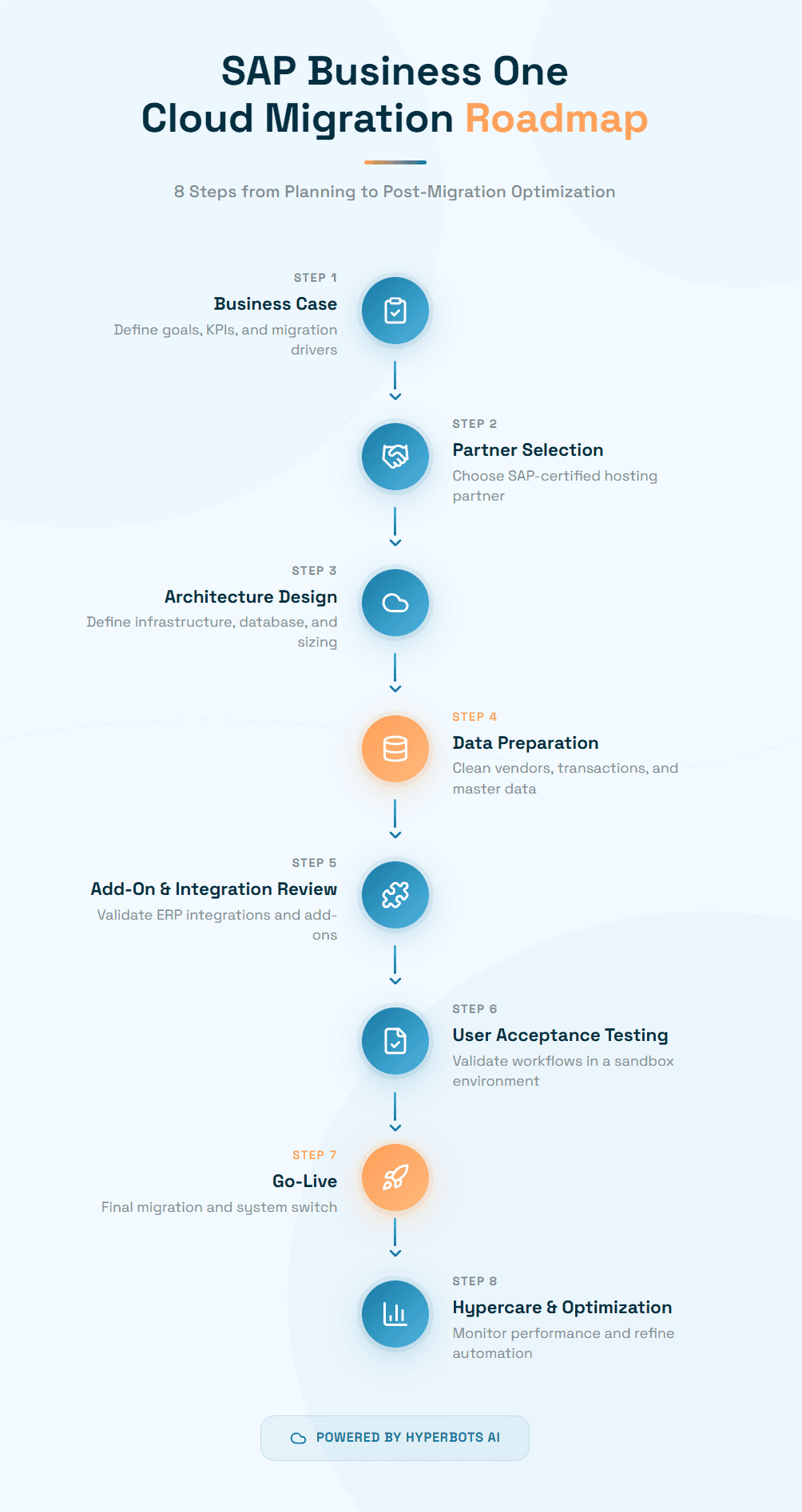
Step 1: Business Case & Requirements Definition
Document the migration’s strategic drivers and define KPIs that will measure success such as reduction in IT overhead, improvement in system uptime, or acceleration of month-end close. This business case will also inform which cloud deployment model best fits your needs.
Step 2: Hosting Partner Selection
Look for partners with SAP Gold or Platinum certification, demonstrated experience on hyperscaler platforms, published SLAs with 99.9%+ uptime guarantees, and certified support teams. Evaluate disaster recovery capabilities, ISO 27001 and SOC 2 certifications, and track records of successful migrations for businesses similar to yours.
Step 3: Environment Architecture & Sizing
Work with your hosting partner to define server size (CPU, RAM), storage allocation, network configuration, database choice (HANA or SQL Server), and backup frequency. Over-provisioning slightly at this stage is far less costly than performance bottlenecks post-migration.
Step 4: Data Cleansing & Preparation
Deduplicate vendor master records, clean up Chart of Accounts, archive obsolete transactions, and validate open purchase orders and invoices before migration day. The cleaner your data going in, the faster AI automation tools, like Hyperbots Co-pilots, will reach peak accuracy after go-live.
Step 5: Add-On & Integration Review
Audit all third-party add-ons currently running on your SAP B1 instance. Confirm cloud compatibility with each ISV. This is also the ideal moment to introduce native AI connectors, such as those provided by Hyperbots, which require no middleware and can be configured via a no-code UI.
Step 6: Parallel Run & User Acceptance Testing (UAT)
Run the cloud environment in parallel with the on-premise system for 2–4 weeks. Have key users test all critical workflows such as purchasing, AP invoice processing, inventory movements, financial closing. With Hyperbots, customers have reported 99.8% accuracy in invoice matching from the very first day of sandbox testing.
Step 7: Cut-Over & Go-Live
Plan the cut-over for a low-activity period (weekend or month-end). Execute the final data migration, switch connection strings, confirm integrations are live, and verify that all automated workflows, including Hyperbots AI Co-pilots for invoice processing, accruals, and payments, are firing correctly.
Step 8: Hypercare & Continuous Optimization
The first 90 days post-go-live are the hypercare period. Monitor performance, track user adoption, and tune AI model configurations. With Hyperbots, this phase includes model refinement against company-specific invoice formats and GL coding patterns, typically driving STP rates toward the 80%+ steady-state benchmark within 6 to 8 weeks.
Security, Compliance & Data Sovereignty
All data in transit is encrypted via SSL/TLS. Data at rest on AWS or Azure is encrypted using AES-256. Role-based access control (RBAC) in SAP B1, combined with IAM policies at the infrastructure level, ensures users see only the data their role permits.
Compliance Certifications
Leading SAP B1 cloud hosting partners hold ISO 27001, SOC 1 Type 2, and SOC 2 Type 2 certifications. The AI automation layer provided by Hyperbots also complies with ISO 27001, SOC 1 Type 2, and SOC 2 Type 2 that ensures the entire technology stack from ERP to AI meets enterprise security standards.
Data Residency & GDPR
Businesses operating in the EU, UK, or countries with data localization requirements can specify that their SAP B1 cloud instance runs in AWS or Azure regions located within their jurisdiction thus ensuring GDPR compliance without sacrificing scalability benefits.
Disaster Recovery & Business Continuity
A well-designed SAP Business One hosting arrangement includes automated daily backups, point-in-time recovery, and formal DRaaS with defined RTO and RPO commitments. Enterprise-class partners target RTO of 4 hours and RPO of 1 hour which is a standard that most on-premise SME deployments cannot match.
SAP B1 Cloud Pricing & Total Cost of Ownership
SAP Business One is not sold directly by SAP, it is sold exclusively through certified Value Added Resellers (VARs). Pricing is therefore not published on SAP's website. There are two fundamental models to choose from, and the right one depends on your capital position, growth plans, and IT capability.
The Two Licensing Models
| Cloud Subscription | Perpetual (On-Premise) |
What you pay | Monthly fee per named user, billed annually | One-time upfront fee per user + annual maintenance |
Who owns the software | SAP / partner retains ownership | You own the license permanently |
Hosting | Partner-managed cloud (AWS or Azure) | Your own servers, or cloud-hosted by partner |
Updates | ✔ Automatic, included | ⚡ Manual; update projects required |
Upfront cost | ✔ Low (first month only) | ⚡ High; full license cost day one |
Best for | Growing SMEs wanting predictable monthly OpEx | Established businesses with capital & IT resources |
User License Types
Both licensing models (cloud and perpetual) come in three user tiers. Choosing the right mix is the single biggest lever you have for controlling your SAP B1 cost.
Professional User - Full Access
The Professional license gives unrestricted access to every SAP B1 module: financial management, sales, purchasing, inventory, production, project management, fixed assets, and reporting. This is for power users such as your controllers, operations managers, senior finance staff, the ones who need to work across the whole system.Limited User - Role-Specific Access
The Limited license grants access to one functional area only: Finance, Logistics, or CRM. It is designed for staff who have a single operational focus, for example, a warehouse operative who only needs to receive goods, or a salesperson who only needs the CRM module. Limited licenses cost significantly less than Professional, making them ideal for controlling costs in larger deployments.Starter Package - Entry-Level (Up to 5 Users)
The Starter Package is SAP's entry-level bundle for companies with fewer than five users just starting their ERP journey. It covers the essentials such as accounting, sales orders, purchasing, and item management and can be upgraded to full Professional licenses at any time as the business grows. It is the lowest-cost way to get onto SAP B1.
Cloud Subscription Pricing (Per User / Month)
The cloud subscription model bundles software access, hosting, automatic updates, and standard support into one monthly fee. No server investment is required. Minimum commitment is typically 5 users for 1 year. The tables below show USD figures published by SEIDOR US and Michell Consulting Group, and EUR figures published by Business One Consultancy (Source: SAP SE, Oct 2025).
License Tier | Multi-Tenant (USD/user/mo) | Single-Tenant (USD/user/mo) | EU Cloud (EUR/user/mo) | Access Level |
Professional | $108–$110 | $219 | €91 | Full access to all modules |
Limited | $112 | $158 | €47 | One functional area (Finance, Logistics, or CRM) |
Starter Package | $110–$149 | $149 | From €38 | Up to 5 users. Accounting, sales orders, purchasing, item management |
Sources: SEIDOR US (michellgroup.com cites Professional subscription at $108/mo; SEIDOR Multi-Tenant $110/mo, Single-Tenant $219/mo, Limited Multi-Tenant $112/mo, Single-Tenant $158/mo, Starter $110–$149/mo). EU rates from Business One Consultancy (Source: SAP SE, October 2025). ERP Research cites a broader cloud range of $95–$250/user/month across all partner tiers and geographies.
⚠️ Important: SAP does not publish official list prices on its public website. All figures above come from published SAP-certified partner pages. Your actual quote will depend on your VAR, geography, user mix, and negotiated bundle. Always get proposals from at least two or three certified SAP B1 partners.
Perpetual (On-Premise) License Pricing
A perpetual license is a one-time purchase per named user. You permanently own that version of the software. Annual maintenance fees (covering updates, patches, and SAP Support Portal access) are charged separately, typically at 18–20% of the original license cost per year. Perpetual licenses can be run on your own servers or hosted in the cloud by a partner (eliminating hardware costs while retaining license ownership).
License Tier | One-Time Fee (USD/user) | Annual Maintenance | EU Perpetual (EUR/user) | Who It’s For |
Professional | $3,200–$5,500 | 18–20% p.a. (~$576–$1,100/user/yr) | €2,700 | Full module access; best for complex, long-term deployments |
Limited | $1,666–$3,500 | 20% p.a. (~$333–$700/user/yr) | €1,400 | Role-specific access for Finance, Logistics, or CRM |
Starter Package | ~$1,140–$1,350/user (max 5 users) | 18–20% p.a.; upgradeable to full | €1,140 | Small businesses (≤5 users); entry-level ERP starting point |
Sources: Michell Consulting Group ($3,213 Professional perpetual, 20% maintenance; $1,666 Limited); ERP Research ($3,500–$5,500 Professional perpetual, 18–20% maintenance); Synavos ($1,350–$3,500 range); EU figures from Business One Consultancy (Source: SAP SE, Oct 2025).
Implementation Costs
Implementation is typically the largest single cost in an SAP B1 project and is billed separately by your SAP partner. It covers project management, system configuration, data migration, integrations, user training, and go-live support. Costs vary widely based on your scope:
Deployment Scope | Estimated Cost (USD) | Typically Includes |
Small / Basic (3–5 users) | $8,000 – $25,000 | Core modules, minimal customization, basic data migration, standard training |
Mid-Range (10–20 users) | $25,000 – $75,000 | Custom workflows, integrations (CRM, eCommerce, WMS), training, PM fees |
Complex (50+ users, multi-site) | $75,000 – $150,000+ | Full customization, multiple system integrations, phased rollout, advanced UAT |
Consulting day rate | $150 – $250 / hour | Partner-set; varies by geography and SAP certification tier |
Data migration | $2,500 – $10,000 | Depends on data volume, quality, and mapping complexity |
User training | $1,000 – $5,000+ | $100–$150/hr for module-specific sessions; change management workshops extra |
Project management | $5,000 – $15,000 | Based on project duration and number of workstreams |
Sources: ERP Research ($15,000–$150,000+ implementation; $150–$250/hr consulting); Synavos ($15,000–$50,000+ consulting, $2,500–$10,000 data migration, $1,000–$5,000 training); SEIDOR ($25,000–$100,000 typical implementation); Emerging Alliance ($8,000–$50,000+ depending on complexity).
Tip: Comparing quotes from multiple SAP B1 partners often yields savings of 10–20% versus the first quote received (ERP Research). Always provide partners with the same detailed scope document so quotes are truly comparable.
Hidden & Ongoing Costs to Budget For
Beyond license and implementation fees, several costs are commonly underestimated and can add 10–30% to your total cost if not budgeted upfront:
Cost Item | Estimated Range (USD) | Notes |
Annual maintenance (perpetual) | 18–20% of license/yr | Covers patches, updates, SAP Support Portal access. Mandatory to stay supported. |
Third-party add-ons / ISV | $2,000 – $20,000+ per add-on | Industry-specific add-ons (WMS, MRP, payroll, EDI) priced separately by ISV |
System integrations | $3,000 – $15,000 per integration | Connecting to CRM, HR, eCommerce, 3PL, or banking platforms (Synavos, Emerging Alliance) |
Premium support plans | Varies by partner | Faster SLA response and dedicated contacts available above standard support tier |
SAP HANA database (if chosen) | 15–25% premium over SQL Server | Often bundled by hosting partners for cloud; required for in-memory analytics |
Version upgrade (perpetual) | $5,000 – $20,000 per major upgrade | Cloud subscriptions include upgrades automatically; perpetual licenses require paid upgrade projects |
Change management workshops | $1,000 – $5,000+ | Helping employees adapt to new workflows; sometimes bundled in implementation fee |
Internal staff time (IT, finance) | Often not costed | Configuration review, UAT, data cleaning, go-live support all consume internal resource hours |
Sources: Synavos (integrations $3,000–$15,000; training $1,000–$5,000); Emerging Alliance (hidden costs add 10–30% to total); ERP Research (premium support, upgrade projects).
Three-Year TCO: Cloud vs. On-Premise
The most important pricing exercise is the multi-year Total Cost of Ownership (TCO) comparison. The table below models a representative 15-user mid-market SME, a mix of 8 Professional and 7 Limited users, deploying SAP B1 over three years. All figures use mid-range estimates from published partner sources.
Cost Component | Cloud Subscription (3 Years) | Perpetual On-Premise (3 Years) |
Software licensing | 8 Prof. × $110 × 36 = $31,680 7 Lim. × $112 × 36 = $28,224 Total: ~$59,900 | 8 Prof. × $3,213 = $25,704 7 Lim. × $1,666 = $11,662 Total: ~$37,366 (one-time) |
Annual maintenance (perpetual) | Included in subscription | 20% × $37,366 × 3 yrs = ~$22,420 |
Server & infrastructure | Included in cloud hosting | $8,000–$15,000 upfront + $2,000–$4,000/yr ongoing = ~$14,000–$27,000 |
IT staff / managed services | Minimal (partner-managed) | ~$15,000–$40,000 over 3 years (part-time IT resource) |
Implementation (one-time) | $25,000–$75,000 | $25,000–$75,000 (similar scope) |
Version upgrade projects | Included (automatic updates) | 1 major upgrade over 3 yrs = $5,000–$15,000 |
Integrations & add-ons | $5,000–$20,000 (one-time) | $5,000–$20,000 (one-time, same) |
Estimated 3-Year TCO | ~$119,000 – $234,000 | ~$129,000 – $257,000+ |
This is a directional model built from published partner mid-range estimates. Your actual TCO will vary based on partner rates, geography, module scope, and customization depth. Build a line-item model with your shortlisted partners before committing.
Key insight: The perpetual license appears cheaper in Year 1 if you have capital. But when infrastructure, IT maintenance, and upgrade project costs are included, the cloud model typically delivers lower 3- to 5-year TCO for companies with fewer than ~80 users. Above that threshold, perpetual economics can be more favorable especially if your deployment is already stable and customized.
Key Questions to Ask Before Getting a Quote
What is my user mix? Map each person to Professional, Limited, or Starter. Over-licensing is the most common way to overspend on SAP B1.
Cloud or perpetual? If you have capital and plan to stay on the same system for 7+ years with minimal changes, perpetual may be cost-effective. If you value scalability and lower upfront cost, cloud wins.
Multi-tenant or single-tenant? Single-tenant gives you dedicated infrastructure and more customization freedom; multi-tenant is cheaper but shared.
SQL Server or HANA? HANA unlocks real-time analytics but carries a 15–25% premium. Assess whether you will genuinely use HANA’s pervasive analytics before paying the premium.
Which add-ons do I actually need at go-live? Start lean. Add modules and ISV add-ons after go-live once you’ve validated core workflows.
How many partners am I getting quotes from? ERP Research confirms that comparing multiple SAP B1 VAR quotes typically delivers 10–20% savings versus the first quote received.
Am I budgeting for hidden costs? Add 10–30% to your base license + implementation estimate to cover integrations, training, data migration, and ongoing maintenance.
Have I modeled the AI automation layer? Include the cost of Hyperbots in your TCO model alongside its documented savings. For most companies it is a strong positive ROI within Year
What Does SAP B1 Cost? — Three Buyer Scenarios
To make the numbers concrete, here are three representative buyer profiles with estimated first-year costs.
| Scenario A: Startup | Scenario B: Growing SME | Scenario C: Mid-Market |
Company profile | 5 users, single site, basic accounting + sales | 15 users, two sites, finance + purchasing + WMS | 40 users, multi-entity, full ERP + integrations |
License model | Cloud — Starter Package | Cloud — 8 Professional + 7 Limited | Cloud — 20 Professional + 20 Limited |
Monthly license cost | 5 × $110 = $550/mo | (8 × $110) + (7 × $112) = $1,664/mo | (20 × $110) + (20 × $112) = $4,440/mo |
Annual license cost | ~$6,600/yr | ~$19,968/yr | ~$53,280/yr |
Implementation | $8,000–$20,000 | $25,000–$75,000 | $75,000–$130,000 |
Integrations & add-ons | Minimal (~$2,000) | 1–2 integrations (~$8,000–$15,000) | 3–4 integrations (~$20,000–$40,000) |
Est. Year 1 Total | ~$16,600 – $28,600 | ~$53,000 – $109,970 | ~$148,280 – $223,280 |
How Hyperbots Change the TCO Equation
The license and implementation costs above represent the cost of the ERP system. But for finance teams, the true operating cost of running SAP B1 includes the people cost of manual processes layered on top: AP clerks processing invoices, accountants running accruals, finance managers chasing approvals. Layering Hyperbots AI Co-pilots on top of SAP B1 automates those workflows directly and the labour savings consistently outpace the cost of the subscription.
Bottom line: The combined SAP B1 cloud + Hyperbots stack delivers lower total operating cost than SAP B1 alone with manual AP workflows. See the Hyperbots ROI breakdown →
Hyperbots AI Co-pilots for SAP Business One
Moving your ERP to the cloud is the foundation but it is only the beginning. The companies extracting the most value from their SAP B1 cloud deployments in 2026 are those layering Hyperbots AI Co-pilots on top of their hosted ERP to automate the labor-intensive financial workflows that still consume 60–70% of finance team capacity even after cloud adoption.
Hyperbots is the world’s only Agentic AI platform built exclusively for Finance and Accounting automation, pre-trained on over 35 million invoice fields, with native ERP connectors that integrate directly into SAP Business One with no middleware, no custom API contracts, and no third-party system integrators required. The result: go-lives in 3–4 weeks, 99.8% extraction accuracy from day one, and up to 80% straight-through processing (STP) of invoices.
The Complete Suite of Hyperbots AI Co-pilots
Co-pilot | What It Automates | Key Metric |
Full invoice lifecycle: discovery, extraction, 2/3/4 and no-way matching, GL coding, ERP posting | 80% STP | |
PR creation from contracts/SOWs, PR-to-PO conversion, vendor dispatch | 5 Minutes with Hyperbots | |
Accrual identification, booking, and reversal including GRNI, SRNI, and non-PO accruals | 20–40% fewer manual entries | |
Payment proposals, early-pay discount capture, vendor bank validation, duplicate blocking | 10% reduction in cash outflow | |
Line-item tax validation using origin, destination, item descriptions, and tax dictionaries | Audit-ready trails | |
KYC onboarding, W-9 collection, bank change maker-checker controls | 60–70% fewer vendor queries |
The Hyperbots SAP B1 Connector
The Hyperbots SAP Business One Connector provides seamless real-time, bidirectional integration for financial and operational data including invoices, purchase orders, vendor details, and GL entries. Built specifically for SMEs, the connector ensures secure synchronization and improved financial visibility without requiring any middleware, custom API contracts, or third-party system integrators. Customers consistently go live within 3-4 weeks, compared to 4–6 month timelines quoted by competitors.
Tangible Financial ROI
Metric | Before Hyperbots | With Hyperbots |
AP Operational Cost | Baseline / 100% | 80% reduction at scale |
Invoice Processing Time | ~11 days (industry average) | Under 1 minute |
Invoice Processing Cost | $12-$20 per Invoice | $2-$4 per invoice (80 - 85% reduction in cost) |
Extraction Accuracy | 85–95% (industry average) | 99.8% from day one |
Implementation Time | 12–24 weeks | 3–4 weeks |
Days Payable Outstanding | 45-50 Days | 30-35 days |
Month-End Manual Accruals | 8-20 hours per close | 5-12 hours per close (20-40% reduction) |
Hybrid Deployments allow organizations to run parts of their SAP B1 environment on-premise while extending into the cloud for specific functions or subsidiaries. This is less common but relevant for businesses that have significant on-premise investments they're not yet ready to retire.
The Bottom Line: Cloud + AI Is the New Standard for SME Finance
SAP Business One Cloud gives growing businesses the ERP foundation they need without the infrastructure headaches of on-premise deployment. Combined with the right SAP Business One hosting partner, it delivers enterprise-grade reliability, security, and accessibility at a cost structure that makes sense for SMEs.
But the organizations that will pull furthest ahead are those that don't stop at ERP modernization. By integrating Hyperbots' Agentic AI with their SAP B1 Cloud environment, finance teams can automate the high-volume, error-prone workflows that no ERP alone can eliminate and start seeing measurable returns from day one.
Ready to see what's possible? Book a personalized demo to discover how finance teams optimize SAP B1 workflows with finance-trained AI.
Frequently Asked Questions (FAQs)
Q1. What is the difference between SAP Business One cloud and on-premise?
With on-premise, you own and manage servers inside your own facility. With SAP B1 cloud, a certified hosting partner runs those servers on AWS or Azure and you access the system through a browser from anywhere. Cloud eliminates hardware investment, converts costs to a predictable monthly fee, and hands infrastructure maintenance to the partner. On-premise only makes sense for businesses with deep, static customizations or strict data residency requirements that cloud cannot accommodate.
Q2. What cloud deployment models are available for SAP Business One?
There are four options: Multi-tenant (public cloud), lowest cost, shared infrastructure, limited customization; Single-tenant (private cloud), dedicated infrastructure, full customization freedom, higher cost; Hybrid, some modules on-premise, others in the cloud, ideal for phased migrations and SAP B1 on HANA (cloud-hosted) which has in-memory database unlocking real-time analytics, best for high transaction volumes and complex multi-entity financials.
Q3. How long does it take to migrate from on-premise SAP B1 to cloud?
A typical migration takes 8 to 16 weeks from kickoff to go-live, depending on data complexity, number of legal entities, and depth of customizations. Data cleansing which involves deduplicating vendors, validating open transactions, is the biggest risk factor and directly determines go-live smoothness. If you are adding Hyperbots AI Co-pilots alongside the migration, the combined project is still typically achievable within 6 to 12 weeks, since Hyperbots' pre-built SAP B1 connector requires no middleware.
Q4. Is SAP Business One cloud secure enough for financial data?
Yes. Enterprise-grade SAP B1 cloud hosting on AWS or Azure includes AES-256 encryption at rest, SSL/TLS in transit, two-factor authentication, role-based access control, and DDoS protection. Leading hosting partners hold ISO 27001, SOC 1 Type 2, and SOC 2 Type 2 certifications. Data residency can be restricted to specific geographic regions for GDPR compliance, and Disaster Recovery as a Service (DRaaS) typically delivers an RTO of 4 hours and RPO of 1 hour, standards most on-premise SME setups cannot meet.
Q5. How much does SAP Business One cloud hosting cost?
SAP does not publish prices publicly, all pricing is set by certified VARs. Published partner data for 2025 shows cloud subscriptions at approximately $108–$110/user/month (Professional) and $112/user/month (Limited) for multi-tenant, rising to $219 and $158 respectively for single-tenant. Implementation ranges from $8,000–$25,000 for small deployments to $75,000–$150,000+ for complex multi-site projects. Always budget an additional 10–30% for integrations, add-ons, training, and data migration.
Q6. Is cloud cheaper than a perpetual license over the long term?
For most SMEs with fewer than ~80 users, cloud delivers lower 3-to-5 year TCO once you factor in hardware, infrastructure maintenance, IT staffing, and upgrade project costs that perpetual on-premise requires. A representative 15-user deployment costs roughly $119K–$234K over 3 years on cloud versus $129K–$257K+ on perpetual. Perpetual can be more economical for large, stable deployments planned to run unchanged for 7+ years with significant in-house IT capability.