SAP Business One Pricing Explained: Licensing, Cloud Costs & Hidden Fees in 2026
Understand 2026 SAP Business One pricing, including licenses, cloud costs, implementation fees, and hidden expenses.
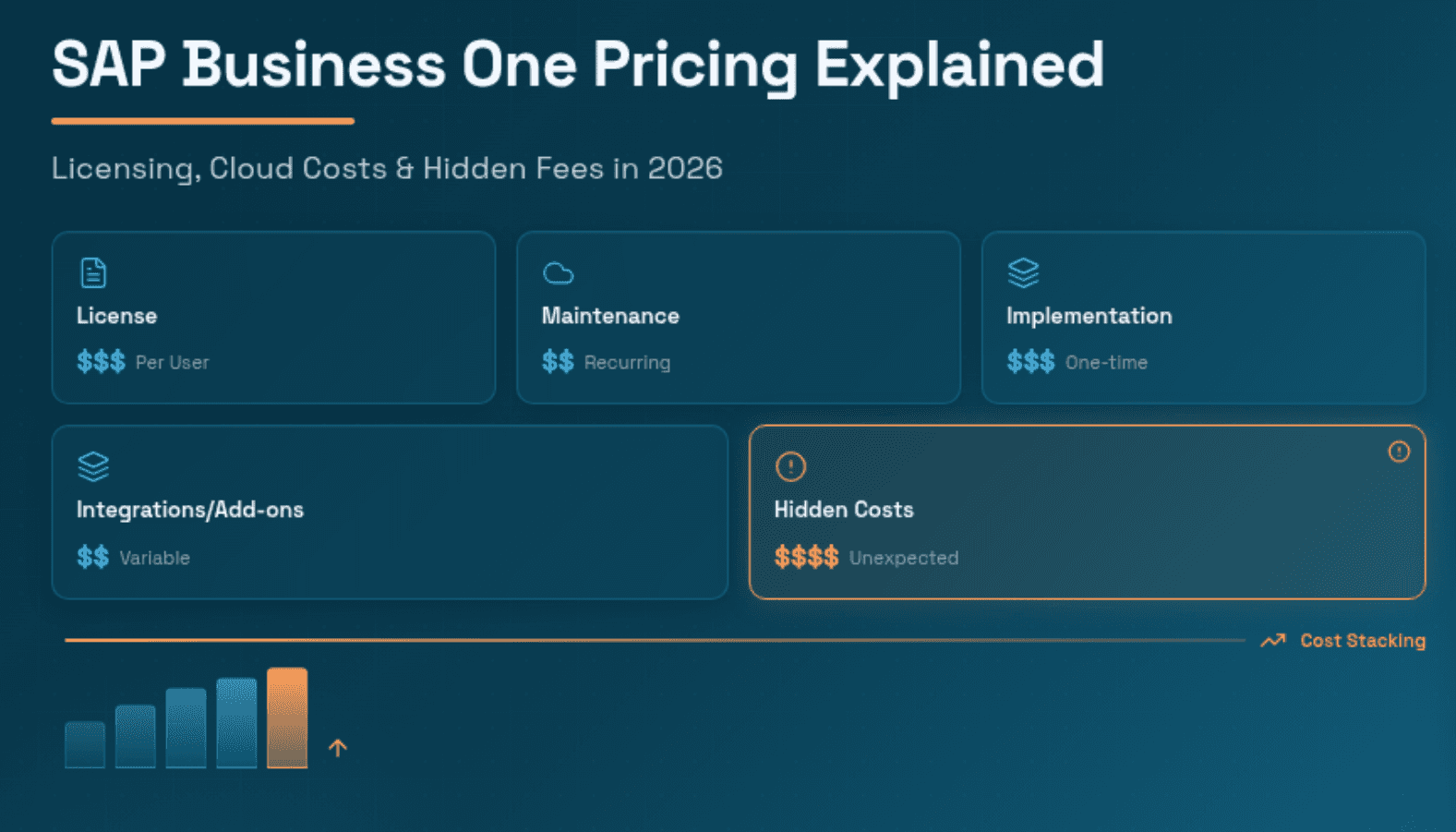
The SAP Business One pricing model is multi-layered and influenced by several factors such as licensing type, choice of deployment model (cloud vs on-premise), number of users, implementation services, required customizations, and ongoing support functions. There is no single answer to SAP Business One cost, but knowing the dependencies can help calculate your cost better.
Industry analyses show that companies with smaller, less complex SAP Business One implementations can begin under $10,000-$20,000, while larger deployments can exceed $50,000 to upto $100,000 depending on complex factors such as customizations, consulting fees, and data migration. An easy cloud deployment with an ERP provider can start from $110 per user per month, making SAP B1 pricing accessible for growing SMEs.
Additionally, ERP costs are only part of the financial picture. Finance teams also face ongoing operational costs for manual processes such as invoice processing, managing procurement, vendor onboarding, chasing collections, and reconciling payments. These time-consuming tasks erode the ROI of your ERP investment.
Modern AI automation platforms like Hyperbots integrate with SAP Business One and significantly reduce finance operations costs by automating procure-to-pay (P2P) and order-to-cash (O2C) workflows. Organizations using Hyperbots alongside SAP B1 report at least 80% reduction in finance operations costs, 99.8% invoice processing accuracy and faster month-end close cycles.
What is SAP Business One?
SAP Business One (also known as SAP B1) is an ERP solution system designed primarily for small and mid-sized enterprises (SMEs). Unlike the full SAP S/4 HANA suite aimed at large corporations, SAP B1 is purpose-built to be affordable, implementable, and scalable for businesses typically employing between 10 and 250 people.
At its core, SAP B1 integrates critical business processes such as finance, procurement, supply chain, and sales into a single unified platform. This eliminates fragmented data, reduces manual data entry across disconnected systems, and gives business leaders a real-time operational picture.
Companies using SAP Business One typically belong to industries like:
Manufacturing - Production planning and scheduling, Bill of Materials (BOM) management, shop floor control and work orders
Retail & E-commerce - Inventory management, POS integration, sales order automation
Wholesale Distribution - Purchase orders, warehouse management, logistics
Professional Services - Project management, billing, resource planning and allocation
Logistics & Transportation - Route optimization, carrier and freight management, shipment tracking, delivery scheduling
Financial Services - Reporting, compliance management, multi-currency accounting, Accounts Payable & Receivables management
SAP B1 helps organizations manage financial reporting, supply chain management, procurement processes, and operational workflows from a centralized system.
However, the SAP business one software price is often misunderstood because the ERP is sold through partners and involves several cost layers.
SAP Business One Pricing Overview (2026)
The SAP Business One software price is not published as a simple list price. Instead, the total cost of ownership (TCO) is built from multiple layers, each of which can vary significantly depending on your business requirements.
Core Cost Components of SAP Business One Pricing
Cost Component | What It Covers | Typical Range |
Software Licensing | User license fees (subscription) | Starter User License - $1,350 per user (one-time license - cloud/on-premise) Professional User License - |
Implementation Services | Configuration, data migration, training, and go-live | Small business - $10,000-$25,000+ |
Customizations & Add-ons | Industry-specific modules, third-party integrations | $15,000 – $50,000+ (differs according to industry needs & workflow complexity) |
Annual Maintenance & Support | Updates, patches, helpdesk | 18–22% of license cost/year |
Ongoing Support (After implementation) | Maintenance, updates, troubleshooting, & guaranteed response times through an SLA | $3,000 to $15,000 cost/ year |
Because of these variables, there is no single standard SAP Business One price, and the final ERP investment is usually determined by the implementation partner.
companies with similar user counts can receive dramatically different SAP B1 cost proposals depending on the partner, region, and level of customization required. This is why independent research, multiple partner quotes, and a clear scope definition are critical before budgeting.
SAP Business One License Cost: A Detailed Breakdown
SAP Business One license cost is the most frequently asked-about component of SAP B1 pricing. Licenses are sold per named user (not concurrent users), which means each individual who accesses the system requires a dedicated license.
SAP offers three primary license types:
Professional License
The Professional license is the most comprehensive and provides full access to all SAP B1 modules, including:
Financial accounting and management reporting
Inventory and warehouse management
Sales order management
Customer Relationship Management (CRM)
Admin tools for workflow & approval setup, integrations & add-ons etc.
Typical SAP B1 professional license cost:
About $3,200-$3600 per user in the perpetual(one-time payment) licensing model which is mostly on-premise, and $100-$150 per user for a cloud version.
This license is recommended for power users such as finance managers, operations heads, and system administrators.
Limited License
Limited licenses provide role-based access for departments such as finance, logistics, or sales, in order to obtain specific features instead of paying for full access.
SAP offers Limited licenses for:
Finance Limited - Accounts payable/receivable, general ledger
Logistics Limited - Inventory, warehouse, shipping
Sales Limited - Customer management, opportunities, service calls
Typical SAP B1 Limited License Cost:
Approximately $1500-1,650 per user for one-time payment, and $50–$90/month per user for cloud. Limited licenses comprise almost 30–60% of a full user license.
This is ideal for departmental staff who need module-specific access without requiring the full ERP scope.
Starter Package
The SAP Business One Starter Package is tailored for very small businesses, typically those with five or fewer users. It provides access to basic ERP functions but caps the number of named users and has some limitations on features.
Typical SAP Business One Starter Package Cost:
Around $1,350 per user for one-time on-premise payment, and $45 per month/user for cloud.
This is the most affordable entry point for businesses adopting ERP for the first time.
SAP License Cost Per User - Summary
License Type | Access Level | Cost Per User (Perpetual/One-Time Payment) | Cost Per User/Month (Cloud) | Best For |
Professional | Full ERP access | $3,200-$3600 | $100-$150 | Finance managers, operations heads, system administrators |
Limited (Finance) | Finance module only | $1500-1,650 | $50–$90 | AP/AR Managers, GL Keepers |
Limited (Logistics) | Logistics module only | $1500-1,650 | $50–$90 | Warehouse, logistics, operations heads |
Limited (Sales/CRM) | CRM module only | $1500-1,650 | $50–$90 | Sales reps, service agents |
Starter Package | Core/basic ERP, max 5 users | ~$1,350 | $45 | Micro-businesses, startups |
SAP licensing is sold through authorized partners, so final SAP license cost per user may vary by 10–20% depending on your partner, region, and negotiated deal terms. Always request itemized quotes from at least two SAP partners before committing.
SAP Business One Cloud Pricing vs. On-Premise
SAP B1 is available as both an on-premise deployment and a cloud-based subscription. One of the most important decisions in SAP B1 deployment is choosing between the cloud (subscription) and the on-premise (perpetual license) models. Each has distinct financial implications.
SAP Business One Cloud Pricing
In the cloud deployment model, businesses pay a recurring monthly subscription per user, making it a pay-as-you-go type model. The cloud provider manages infrastructure, hosting, updates, and platform maintenance.
This eliminates a one-time capital expenditure and helps to bear and manage monthly cash flows better.
License Type | Estimated Monthly Cost/User | Annual Cost (10 Users) |
Professional License (Cloud) | ~$100-150/month | ~$12,000-18,000/year |
Limited License (Cloud) | ~$50-90/user/month | ~$6000-10,800/year |
Starter Package (Cloud) | ~$45/user/month | ~$5,400/year (max 5 users) |
Cloud pricing can escalate based on licensing type, storage requirements, number of integrations, customizations, and database options selected. Businesses should model their cloud costs over a 3–5 year horizon to compare against on-premise TCO.
SAP Business One On-Premise Pricing
With on-premise deployment, businesses pay a one-time perpetual license fee plus annual maintenance (typically 18–22% of the license cost). The company is responsible for its own infrastructure, such as servers, databases, networking, and security.
While on-premises has higher upfront costs, many mid-sized companies prefer it for data security and control reasons, especially in industries like financial services and healthcare.
SAP Business One Implementation Cost
The SAP Business One implementation cost is often the single largest component of the total project budget, frequently exceeding the software licensing cost itself. Unlike off-the-shelf software, ERP implementations are complex, multi-phase projects requiring specialized expertise.
What Drives Implementation Costs
Number of users and modules being implemented
Complexity of existing business processes
Volume and quality of legacy data requiring migration
Number of third-party system integrations (e-commerce, payroll, CRM, banking)
Degree of customization
Training requirements across user groups
Geographic distribution of the business (multi-site, multi-currency, multi-language)
SAP Business One Implementation Cost Ranges
Implementation Tier | Business Profile | Estimated Cost Range |
Basic / Entry Level | 1–5 users, minimal customization, partner hosting, minor implementation | $2,500-$5,000 |
Small Business | 6–20 users, moderate customization, simple business processes | $10,000-$20,000 |
Mid-Sized Business | 21–50 users, complex business processes, major customization requirements, complex workflows, multiple integrations | $50,000 – $100,000 |
Large Enterprises | 50+ users, multi-location, extensive customization | $100,000+ |
Implementation costs include:
Data extraction
Customization
System configuration
User Acceptance Testing (UAT)
Data Migration & Training
Go-live support
Post-launch care
Companies often underestimate the time and cost of data migration and training, which can each represent 20–30% of total implementation cost.
The implementation timeline usually ranges from several weeks to months, realistically speaking, between 90-150 days, but it can change depending on project complexity.
Hidden Costs of SAP Business One You Must Know
Many companies receive an initial SAP Business One cost estimate and budget accordingly, only to discover that the final total cost of ownership (TCO) is substantially higher. The following hidden or under-appreciated costs are critical to consider in your SAP Business One pricing evaluation.
Customizations & Development
SAP B1 covers most standard business processes, but almost every business has unique workflows. Custom development such as building Industry-specific functionality, custom approval workflows or specialized reporting can add from $5,000 to $50,000+ into project costs, depending on complexity.
Third-Party Add-ons & Modules
Many businesses require specialized capabilities beyond the standard SAP B1 module set:
Advanced reporting tools (Tableau, Microsoft Power BI)
Modules like manufacturing, quality, multi-currency etc.
Warehouse management system (WMS)
E-commerce platform connectors (Shopify, WooCommerce, Magento)
These add-ons typically carry their own licensing fees and implementation costs.
Integration Costs
Modern businesses rely on multiple software platforms simultaneously. SAP Business One can be integrated with external systems:
Banking platforms
Payment gateways
CRM tools
HR software
e-commerce
The integrations require other connectors, API development, and ongoing maintenance. These integration projects can range from $3000 for simple connectors to $15,000 per integration for complex, bidirectional integrations.
Annual Maintenance and Support
Perpetual license customers pay annual maintenance fees (typically 18–22% of initial license cost) for access to updates, patches, and SAP support.
For a professional license type at $3200/user, for 20 user deployment, this represents roughly $11,520-$14,080 in annual maintenance fees alone.
Upgrade Costs
SAP B1 periodically releases new versions with enhanced features, security improvements and better performance. While maintenance involves the right to use new versions, implementation work is required to upgrade, including data analysis, testing, and customization updates.
This cost can be part of the maintenance fee or can be collected separately. Cloud version includes upgrades automatically with no extra charges required, whereas on-premise setups require upgrades to be planned, tested, and manually applied.
Training and Change Management
ERP adoption is as much a people challenge as a technology one. Comprehensive training programs, change management initiatives, and ongoing user support programs can cost up to $1000-$5,000 for training sessions.
These additional costs can significantly increase the total cost of ownership (TCO). But this investment is critical for achieving the business benefits of the ERP, as people and systems keep changing.
Real-World Examples: How Much Does SAP Business One Cost?
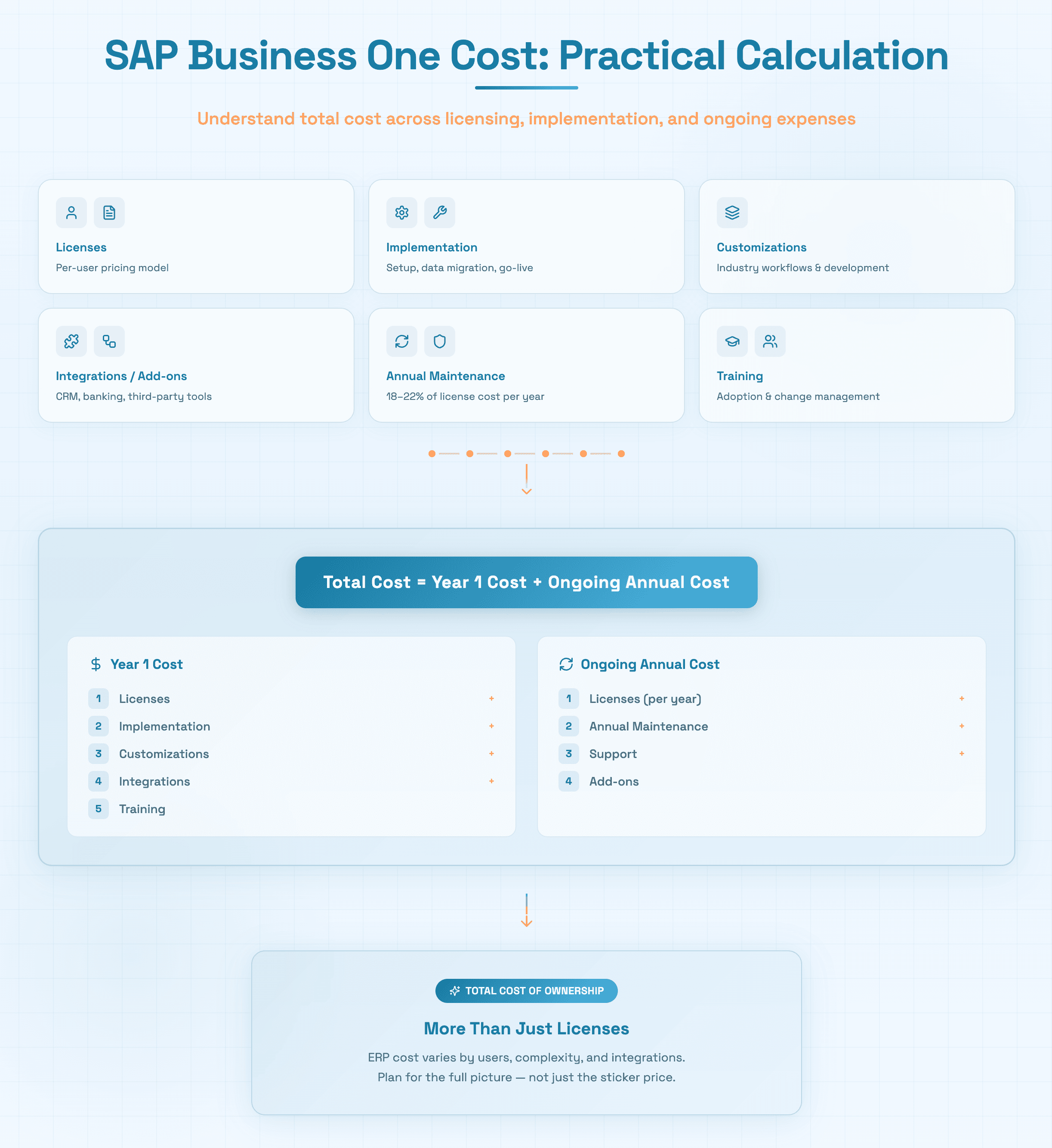
To make SAP B1 pricing concrete, here are illustrative total cost scenarios for different business profiles:
Small Business (5 Users, Cloud Subscription)
Starter Package licenses: 5 users x $45/user/month = $225/month ($2700/year)
Implementation: $3,750 with basic setup & minimal customization (average of $2,500-$5,000)
Annual Maintenance: No cost, as 5 users would take cloud deployment because of less IT infrastructure
Training: $3,000
Year 1 Total: $9,450
Ongoing Annual Cost: ~$2700/year
Mid-Market Company (25 Users, On-Premise)
Professional licenses (10 users): 10 x $3200 = $32,000
Limited licenses (15 users): 15 x $1500 = $22,500
Hence, Total License Cost: $32,000 + $22,500 = $54,500
Implementation: $66,700 ($50,000-$1,00,000 for 21-50 users)
Customizations: $5,000+
3 Integrations: 3 x $3000 = $9,000
Annual Maintenance (18%) = $9,810
Training: $3,000 ($1,000 - $5,000)
Year 1 Total: $1,48,010+
Ongoing Annual Cost: $64,310/year (Licenses+Maintenance)
Larger Business (60 Users, Multi-Site)
Professional Licenses (25 users): 25 x $3,200 = $80,000
Limited licenses (35 users): 35 x $1500 = $52,500
Hence, total license cost: $80,000 + $52,500 = $132,500
Implementation: $100,000+
Customizations & add-ons: $50,000+
15 Integrations: 10x$3,000 = $30,000 (10 simple), 5x$15,000 = $75,000 (5 complex)
Total = $105,000Annual Maintenance (18%): $23,850
Training (3 sessions) : 3 x $5000 = $15,000
Year 1 Total: $426,350+
Ongoing Annual Cost: $156,350
Enhancing SAP Business One with Hyperbots AI Co-Pilots
SAP Business One is an exceptional ERP for managing financial records, operational data, and business processes. However, it is fundamentally a system of record, not a system of action. The Hyperbots AI Co-pilot platform bridges this gap by adding a powerful layer of intelligent automation directly on top of SAP Business One, transforming it from a passive data repository into an active, AI-driven finance operations engine.
The Finance Automation Gap in SAP B1
Even with SAP B1 fully deployed, finance teams continue to manually handle:
Onboarding and validating new vendors
Reviewing and matching supplier invoices against POs
Verifying sales tax obligations across multiple jurisdictions
Processing payment runs and optimizing payment timing for cash flow
Manually coding GL accounts for transactions
Following up on overdue Accounts Receivable and customer collections
Performing month-end accruals calculations
Each of these tasks is repetitive, rule-based, and error-prone when done manually, requiring a heavy amount of human effort. This makes them perfect candidates for AI automation.
Hyperbots P2P Co-Pilots for SAP B1
Hyperbots offers a comprehensive suite of Procure-to-Pay AI Co-pilots for AP automation that automate the entire purchase-to-payment cycle:
The Invoice Processing Co-pilot automates the entire invoice lifecycle, and processes invoices end-to-end, from discovery and extraction to validation, matching, GL coding, and GL posting, with minimal human intervention.
It achieves 80% straight-through processing (STP) and reduces invoice processing time from an industry average of 11 days to <1 minute.The Payment Co-pilot optimizes payment timing to capture early payment discounts and avoid late payment penalties, while automating payment processing across multiple methods including ACH, checks, and wire transfers.
It reduces cash outflow by up to 10% by analyzing payment terms, discounts, penalties, and cost of capital, and automates reconciliation of invoices against bank statements.The Procurement Co-pilot provides AI-assisted purchase requisition creation and approval workflows to automated PO generation, vendor dispatch, and PO closure.
It reduces PR creation time to <5 minutes and cuts PO creation and dispatch time by 80%, while enforcing policy compliance and integrating seamlessly with any ERP.
The Vendor Management Co-pilot Streamlines vendor onboarding by automating W-9 verification and identity checks, eliminating duplicate vendor records, and giving suppliers real-time visibility into PO, invoice, and payment status through a self-service portal.
It also drives spend optimization through vendor rationalization by consolidating suppliers and enabling bulk discounts.The Accruals Co-pilot automates accrual identification, booking, and reversals to deliver timely, compliant month-end closing.
It discovers accruals across goods received, services rendered and recurring expenses, reducing manual accrual effort by 80% and keeping the variance between accrued and actual costs to under 5%.The Sales Tax Verification Co-pilot automatically verifies sales tax on every invoice at the line-item level, classifying each item into the correct tax category based on origin and destination ZIP codes, and cross-checking amounts against live rates.
It also flags discrepancies between calculated and billed tax to prevent both overpayments and underpayments.
Hyperbots O2C Co-Pilots for SAP B1
On the Order-to-Cash side, Hyperbots provides:
The Collections Co-Pilot orchestrates the entire collections lifecycle, with dynamic prioritization, dunning, follow-ups (email and phone), early dispute detection and routing and promise-to-pay management.
It helps in 70% reduction in Cost to Collect, bringing DSO down by upto 40%. It also improves cash-flow forecasting through behavior-based payment prediction.The Cash Application Co-Pilot automates remittance and bank statement extraction, performs intelligent payment matching, GL coding, and ERP posting.
It automatically detects short-payments, overpayments, and deductions and routes exceptions for resolution. It reduces unapplied cash to below 10%, cutting reconciliation costs by up to 80%.
Hyperbots Platform Capabilities & Transformational Impact on SAP Business One
The Hyperbots platform is purpose-built for deep ERP integration, with native connectors designed specifically for connecting Hyperbots to ERP systems, without needing custom development.
These connectors also enable real-time bidirectional data synchronization with SAP Business One, which ensures that all updates flow seamlessly between Hyperbots and SAP B1, so the ERP can remain as the single source of truth, eliminating the risk of shadow systems
Deep ERP Integration Architecture
Real-time read/write integration with SAP Business One, with both on-premise and cloud deployments
Flexible sync frequencies with hourly, daily, or weekly syncs
Offers multi-ERP integration support to connect Hyperbots across SAP versions like SAP B1, SAP S/4 HANA, SAP ECC, and other ERP systems like NetSuite, QuickBooks, and Microsoft Business Central simultaneously
Automated error handling and exception reporting with full audit trails
AI Capabilities That Go Beyond RPA
Unlike traditional Robotic Process Automation (RPA) tools that follow rigid rules, Hyperbots Co-pilots use large language models and machine learning to:
Understand context, not just rules: With a multi-modal MOE model combining LLMs, vision-language models (VLMs), reasoning, redaction, and math interpretation, Hyperbots Co-Pilots can handle complex, unstructured financial documents with 99.8% accuracy.
Self-learn and improve over time: Self-learning AI continuously adapts and improves according to company-specific workflows, business rules, and exceptions with the help of reinforcement learning.
Deploy with finance-specific pre-training: Hyperbots platform is pre-trained on millions of financial documents, enabling high accuracy, fast deployment, and adaptability to accounting content from day one.
Operate 24x7 autonomously: The Co-Pilots run finance workflows around the clock, alerting humans only when exception handling is genuinely needed.
Ready-to-deploy for any company or industry: The Co-Pilots are no-code ready-to-deploy solutions, helping a faster customization of workflows for organization-specific requirements, without any third-party support.
Keep humans meaningfully in control: Enables human-in-the-loop collaboration through exception handling, approval workflows, and contextual insights.
Security, Compliance, and Control
Full audit trails for every AI and human action
Role-based approval controls to match responsibilities, and Single Sign-On (SSO) for multiple ERPs
Data encrypted in transit and at rest with compliance standards like ISO 27001 and SOC certifications
AI provides clear reasoning for every decision and exception to help make quick decisions
Co-pilots offer other functional elements like notifications, security, analytics, user portals, permissions, and observability
Hyperbots ROI Improvements in SAP Business One
Organizations that deploy Hyperbots AI Co-pilots alongside SAP Business One report measurable, quantifiable improvements across both financial and operational metrics.
Tangible ROI Improvements
Finance Operations Cost: AI autonomously handles 80% of repetitive finance workload, reducing total operations cost to just 20% of the original baseline spend for any company.
Invoice Processing Rate (STP): Straight-through processing leaps from an industry average of ~30% to 80%+, with the vast majority of invoices requiring almost zero human intervention.
Invoice Processing Time: Invoice processing time plummets from an industry average of ~14.6 days to under 1 minute, a near-total elimination of processing delays.
Invoice Field Extraction Accuracy: AI extraction accuracy improves to 99.8% from a typical 85–90% accuracy (pre-trained on 35 million invoice fields), effectively eliminating errors and rework.
PR Creation & Dispatch Time: The full PR to PO dispatch cycle compresses from 5–15 days down to just 1–3 days with the Hyperbots platform.
PR Creation Time: Complex ERP purchase requisition forms that previously took 1–5 days are now auto-filled and completed in under 5 minutes.
Cash Outflow Savings: AI analyzes payment terms, early payment discount options, and penalties to optimize every payment run, delivering up to 10% savings on total cash outflow.
Days Sales Outstanding (DSO): DSO reduced by up to 40% through AI-driven collections prioritization, autonomous follow-ups, and customer behavior-based dunning that targets the right invoices at the right time.
Cost to Collect: Manual collections typically cost 1.5–3% of total receivables. Hyperbots platform can cut this by up to 70% through autonomous AI agents handling dunning, disputes, promise-to-pay management, and ERP updates.
Vendor Onboarding Time: AI-assisted W-9 verification and automated vendor information capture reduce vendor onboarding from a typical 4–12 weeks down to just days.
Reconciliation Cost: Cash application reconciliation costs can be cut by up to 80%, with the help of posting adjustments, closing invoices, and writing outcomes back to ERP
Unapplied Cash: Unapplied cash balances are reduced to below 10% of total receipts through a dedicated AI matching engine supporting payments from multiple sources while continuosuly learning customer payment behaviors.
Intangible ROI Benefits
Finance Team Empowerment: Staff freed from repetitive manual tasks can focus on exceptions, analysis, and higher-value strategic finance decisions.
Cash Flow Predictability: AI-driven collections forecasting and payment timing optimization give CFOs real-time visibility and confidence in cash flow planning.
Fraud & Duplicate Prevention: AI-driven duplicate detection and vendor identity verification significantly reduce fraud risks and duplicate payments.
Compliance Confidence: Automated sales tax verification, policy-driven workflows, and GL coding accuracy reduce compliance risk across jurisdictions and reporting periods.
Vendor & Supplier Satisfaction: Real-time visibility into invoice, PO, and payment status via a vendor portal builds transparency, trust, and stronger supplier partnerships.
Audit Readiness: Time-stamped audit trails for every AI and human action ensure finance teams are always audit-ready without last-minute audit-prep scrambles.
Scalability Without Headcount: Unlimited user access with no per-seat licensing means finance teams can scale transaction volumes and users without proportional cost increases.
Conclusion
SAP Business One remains one of the most capable and cost-effective ERP platforms for small and mid-sized enterprises in 2026. Understanding the full SAP Business One price, from per-user license costs and cloud subscription fees to implementation services and hidden operational costs, is essential for accurate budgeting and maximizing your ERP investment.
But the real opportunity lies beyond the ERP itself. Companies that combine SAP Business One with Hyperbots AI Co-pilots unlock a new level of finance operations performance, automating the manual workflows that SAP B1 records but cannot execute, and achieving up to 80% reduction in finance operations costs.
Whether you are just beginning your SAP Business One evaluation or looking to maximize the value of your existing deployment, Hyperbots provides the most comprehensive, AI-native automation platform to turn your ERP investment into a true competitive advantage. Explore Hyperbots product capabilities to learn how leading SMEs can transform their finance operations, request a demo to discuss with our finance experts today or start a free trial directly.
Frequently Asked Questions
Q1. How much does SAP Business One cost?
A: SAP Business One cost depends on the licensing type, deployment model, number of users, and implementation complexity. Entry-level projects for small businesses can begin under $10,000, while mid-market and large enterprise deployments with full implementation services typically range from $50,000 to $100,000+. Perpetual licenses range from $1,350 to $3,200 per user.
Q2. What is SAP Business One license cost per user?
A: SAP license cost per user varies by license type: Professional licenses cost approximately $3,200/user, Limited licenses approximately $1,650/user, and the Starter Package approximately $1,350/user (for up to 5 users).
Q3. What is SAP Business One cloud pricing?
A: SAP Business One cloud pricing typically starts around $45 per user per month for the Starter/Limited tier, rising to approximately $100 per user per month for Professional licenses. Annual cloud costs for a 10-user deployment range from $5,400 to $18,000 before customization and integration fees.
Q4. What is the SAP Business One implementation cost?
A: Implementation costs vary from approximately $10,000–$20,000 for basic deployments to $50,000–$100,000+ for complex, multi-site rollouts. The main drivers are user count, customization requirements, data migration, and post-launch support xcomplexity.
Q5. What are the hidden costs of SAP Business One?
A: Beyond licensing and implementation, hidden SAP Business One costs include customization and custom development, third-party add-ons and modules, system integration expenses, annual maintenance fees (18–22% of license cost), upgrade costs, user training, and change management.
Q6. Why is SAP Business One pricing different for every company?
A: Pricing varies because ERP systems require different customizations, configurations, modules, user counts, data migration, and integrations for each organization.
Q7. How does Hyperbots reduce SAP Business One's total cost of ownership?
A: Hyperbots AI Co-pilots reduce finance operations costs by up to 80% by automating invoice processing, procurement, payments, accruals, vendor management, collections, and cash application, directly within SAP Business One. This means companies can grow transaction volumes without proportional headcount increases, achieving a dramatically better ROI on their SAP B1 investment.