SAP Implementation Phases Explained: A Project Manager's Guide to Going Live on Time
A step-by-step breakdown of the key phases involved in implementing SAP ERP systems, helping project managers plan effectively, manage risk, and deliver successful deployments on schedule.
Of all the large-scale enterprise technology programmes a project manager can be handed, a global SAP system implementation is among the most demanding. The stakes are enormous, the variables are complex, and the track record across the industry is sobering: 75% of ERP implementation projects get derailed, according to Gartner, with scope ambiguity as the single biggest contributor. According to Panorama Consulting's longitudinal survey data, nearly half of all ERP implementation projects experience cost overruns with scope expansion, underestimated staffing, and technical issues cited as the top contributing factors, and unnecessary customization compounding costs at every stage.
These are not abstract statistics. They describe real organizations such as manufacturers, retailers, distributors, financial services firms that invested years and tens of millions of dollars in SAP, only to find themselves with a system that went live late, over budget, underperforming, or not at all. One of the most famous cases is Hershey's 1999 SAP fiasco, where a hasty implementation timeline led to a launch that could not process $100 million worth of orders during Halloween, their busiest season, resulting in a 19% profit decrease and a 12% drop in sales.
The difference between projects that succeed and those that fail is rarely the quality of the SAP software itself. SAP software is rigorously tested and successfully powers the operations of the world's largest corporations. The root cause of implementation failure is rarely a technical flaw in the software. SAP implementation is fundamentally a business transformation project disguised as an IT upgrade.
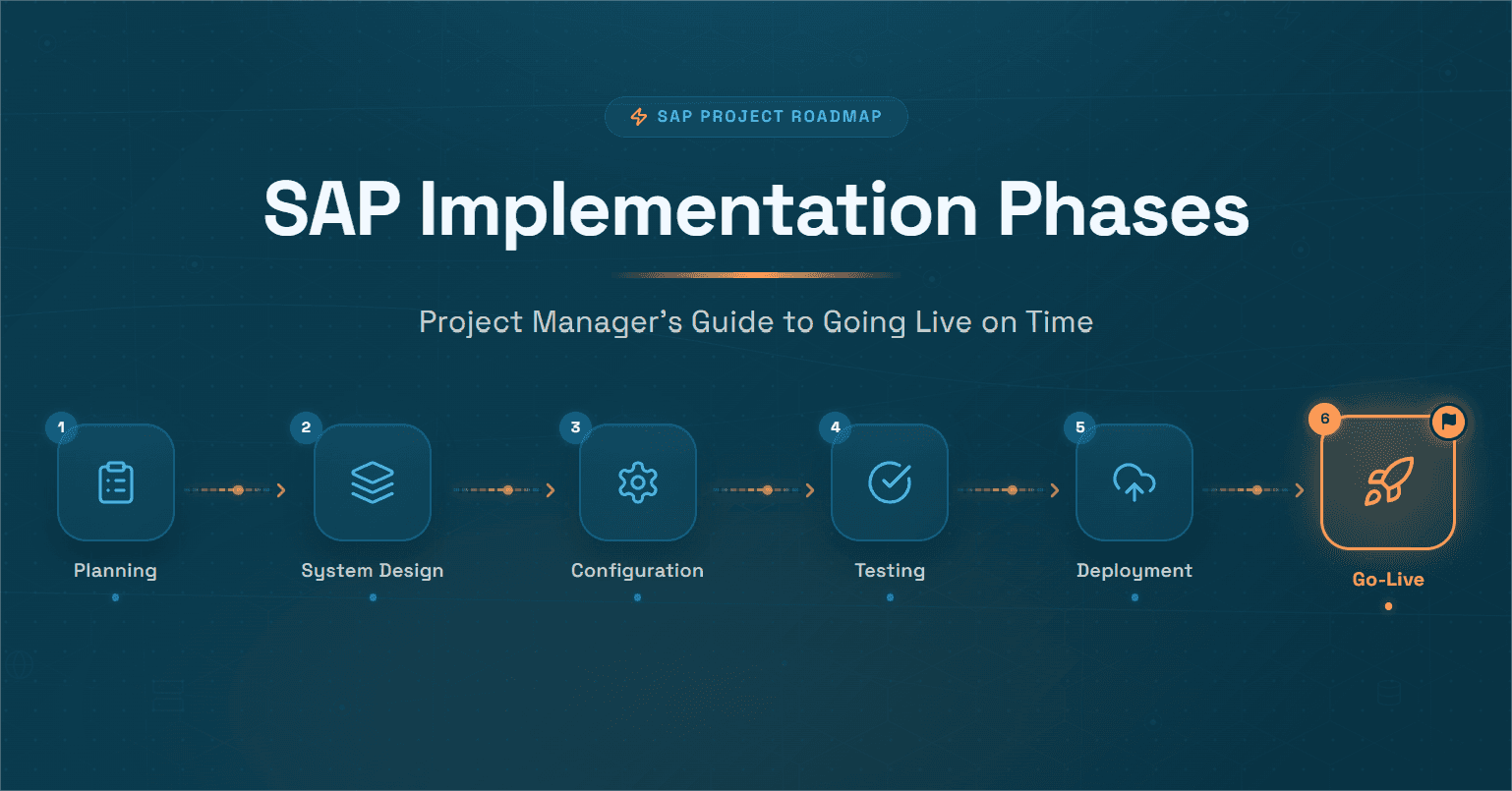
What separates success from failure is methodology, discipline, and preparation across every phase in SAP implementation. This guide walks through all six phases of the SAP Activate methodology in actionable detail, explains the critical risk points at each stage, and shows how deploying Hyperbots AI Co-pilots during and after implementation transforms the ROI your SAP investment was always supposed to deliver.
What Is the SAP Activate Methodology?
Before diving into individual phases, it is worth understanding the framework that governs modern SAP system implementation.
SAP Activate Methodology is a project management framework that provides the technical flexibility and functional agility needed to help project teams outline detailed project goals and phases and allow project managers to deliver projects more accurately and efficiently. It is used not only to plan and execute complex SAP solutions, but also to improve the quality and success of SAP-related projects.
SAP Activate is SAP's proven implementation framework that combines SAP Best Practices, guided configuration tools, and a modern agile project methodology. The SAP Activate Roadmap is a project management and delivery framework that outlines the entire SAP S/4HANA implementation journey from discovery to going live and beyond. It provides detailed instructions, best practices, accelerators, and templates for every stage. The roadmap acts like a GPS for your SAP projec, giving you direction, timelines, and proven strategies to reach your digital transformation goals.
SAP Activate is a methodology utilized in S/4HANA that helps users innovate continually in the cloud and anywhere at any time by starting quickly, building intelligently, and operating simply.
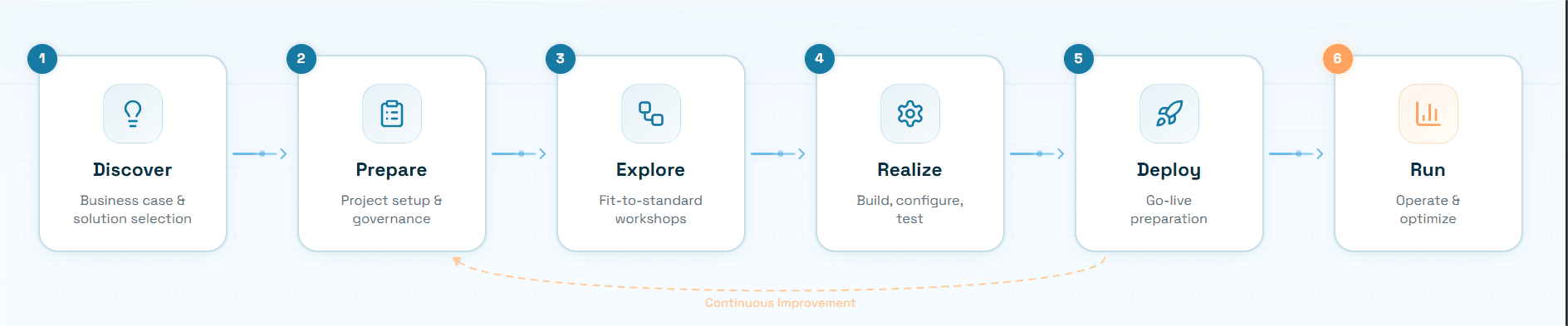
The SAP Activate methodology includes six phases: Discover, Prepare, Explore, Realize, Deploy, and Run. Each phase has defined deliverables, quality gates, and accelerators. Understanding what each phase requires, and where projects typically go wrong within it, is the core of effective SAP implementation project management.
Phase 1 — Discover: Defining the Case for SAP
Typical duration: 2–4 weeks
The Discover phase is the sales phase where a customer makes a purchase decision. A Digital Discovery Assessment is used in this phase to help the customer identify the SAP cloud deployment that best fits their needs.
In practice, for the project manager, this phase is about more than procurement. It is about establishing the business foundation on which the entire SAP implementation stages will be built.
Key activities in this phase:
The initial phase involves assessing business needs, defining goals, and evaluating SAP's fit. It includes workshops to identify gaps and opportunities. Key activities include conducting fit-gap analysis, creating a project roadmap, and selecting a deployment model on-premise, cloud, or hybrid.
During the Discover phase, SAP users can also access the SAP Roadmap Viewer to find which roadmap aligns best with their needs and the built-in capabilities of their chosen solution.
What good looks like: A completed business case with quantified ROI targets. Executive sponsorship secured and documented. Deployment model selected with clear rationale. A high-level project charter approved.
Common failure point: Many projects fail due to poor scope definition and unrealistic timelines, with insufficient upfront planning being a leading cause of failure according to Gartner. The Discover phase is where unrealistic timelines are born often because the organization is eager to begin and underestimates complexity. The project manager's job here is to push back on artificial urgency and ensure the business case reflects real-world scope.
PM tip: Involve finance, procurement, and operations leaders in Discover workshops, not just IT. The future users of the SAP system need to validate the scope before a single configuration decision is made.
Phase 2 — Prepare: Building the Foundation for Delivery
Typical duration: 4–6 weeks
The Prepare phase is where the implementation project begins with planning, preparation, and access to the systems required for implementation tasks.
This is where the organizational machinery of a global ERP implementation gets assembled. For project managers, this is one of the most intensive phases because every weakness in your project structure gets compounded by every subsequent phase.
In the Prepare phase, project managers define the scope of work, project governance, prepare the sandbox and starter systems, start the project, identify and define the resources, define the roles and responsibilities for the project team, and detail the management plans for running the project.
Key activities in this phase:
Formal project kick-off with all workstream leads
Governance structure: steering committee, project management office, escalation paths
Project plan: milestone dates, resource allocation by phase, dependency mapping
System landscape setup: development, quality, and production environments provisioned
Integration planning: identifying all third-party systems that will connect to SAP
Data migration strategy: scoping which data will be migrated, from which legacy systems, and in what form
Change management plan: stakeholder communication strategy, training approach, adoption metrics
Companies that make substantial investments in project preparation typically experience a 25% increase in success rates for their SAP implementations, according to a Panaya study. That is a remarkable return on time invested in planning.
Common failure point: Integration planning is almost always under-resourced in Prepare. Nearly half of C-suite executives say more than 30% of their IT projects are over budget and late, with integration being the top reason. Budget integration separately, not as a line item but as its own workstream with its own timeline and testing phase.
PM tip: Create a dedicated integration workstream with its own project manager, budget line, and delivery schedule. Treating integrations as a footnote to the main implementation is one of the most reliable predictors of go-live delay.
Phase 3 — Explore: Designing the Future-State Business Processes
Typical duration: 6–10 weeks
In the Explore phase, project teams run fit-to-standard workshops using the SAP Best Practice content and demonstrate standard processes using the sandbox or starter systems. The objective is to identify the fit of the Best Practices-based solution to the business, capture delta configuration requirements, and identify gaps and configuration values.
This is the phase where theory meets reality. For finance-focused implementations particularly those touching procure-to-pay and order-to-cash, the Explore phase is where some of the most consequential decisions of the entire project are made.
Key activities in this phase:
Fit-to-standard workshops for each process area: AP, AR, GL, procurement, treasury, fixed assets
Documentation of configuration requirements and custom development gaps (the "delta list")
Finalization of organizational structure: company codes, chart of accounts, controlling areas
Data migration mapping: field-by-field mapping from legacy systems to SAP data objects
Integration specifications: API requirements, data flow diagrams, middleware decisions
Security and authorization design: role matrix, segregation of duties framework
Reporting requirements: management accounts structure, regulatory reporting needs
The fit-to-standard discipline is critical here. Every custom object, report, or transaction becomes a liability during an upgrade. What was a one-time development cost becomes a perpetual tax on innovation and security, creating technical debt accumulation that makes the system unstable and dependent on a few specialists.
Common failure point: Business stakeholders demanding that SAP be configured to replicate their current (often broken) processes, rather than adopting the superior SAP best-practice process. The phrase "but that's how we do it today" in an Explore workshop is a warning signal every project manager should treat with caution.
PM tip: For every delta requirement (deviation from SAP standard), require the business stakeholder to quantify the business value of the deviation and the cost of maintaining it through upgrades. Most discretionary customizations dissolve under this scrutiny.
Phase 4 — Realize: Building, Configuring, and Testing the System
Typical duration: 12–24 weeks (the longest and most resource-intensive phase)
The Realize phase is the heart of the SAP implementation steps. This is where the SAP system is actually configured, developed, integrated, and tested against the requirements defined in Explore.
During the Realize phase, the project team adopts an agile approach to iteratively and incrementally build the functionality from the backlog. This build follows the prioritization given by the product owner, the business users, who continue to be involved with the project team during the sprints. During the build, the team adds the configuration and development on top of the Best Practices content. The Realize phase covers all the build and test activities required to prepare a release of functionality into production, including a full integration test and user acceptance test.
Key activities in this phase:
Configuration and Development
System configuration across all modules: FI/CO, MM, SD, PP, HR, depending on scope
Custom development (ABAP/BTP) for approved delta requirements
Interface development: connecting SAP to all third-party systems defined in Explore
Forms and output management: invoice layouts, PO formats, payment advice templates
Data migration technical development: extraction, transformation, and load (ETL) programs
Testing Workstreams
Unit testing: individual configuration objects tested in isolation
String testing: end-to-end process scenarios tested across modules
Integration testing: SAP tested against all interfacing systems simultaneously
User acceptance testing (UAT): business users validate that SAP meets their requirements
Performance/load testing: SAP tested under anticipated transaction volumes
Data Migration Rehearsals
Mock migration runs: full data loads into the quality system, results validated
Data quality remediation: fixing issues discovered during mock migrations
Typically three mock migrations are run before the production cutover
Common failure point: Testing is the most consistently under-resourced and under-scheduled activity in the Realize phase. Any complex ERP implementation project will require comprehensive testing and configuring before launch. If the implementation team fails to account for all the main variables present in the ERP project, the chances of delays increase significantly.
SAP Activate uses Quality Gates (QGs) to review and validate progress at critical stages of the project lifecycle. These gates act as checkpoints that ensure the right work is done at the right time with the right outcomes. The Quality Gate process is a formal review method that helps project teams transition smoothly between phases, checking that deliverables have been accepted, actions completed, and risks addressed.
PM tip: Protect your test cycles. When Realize timelines slip, and they often do, the first casualty is test time. Never compress testing to recover schedule. A go-live without adequate testing is a crisis deferred, not avoided.
Phase 5 — Deploy: Going Live on SAP
Typical duration: 4–6 weeks (cutover period 1–2 weeks)
The Deploy phase is the culmination of everything. The deployment phase includes the implementation of the new SAP solution in the production environment and the transition. After the final changes have been made and all individual requirements have been met, the implemented SAP system is put into operation.
For project managers, this phase requires the most precise orchestration of the entire engagement. A deployment plan that is even slightly wrong can result in a chaotic go-live that damages business operations for months.
Key activities in this phase:
Final Preparation
Final preparation focuses on data migration, system testing, and end-user training. Thorough preparation here is key to a successful launch.
Final mock migration run in the production-equivalent environment
Go/no-go decision meeting with all workstream leads and steering committee
Cutover plan finalized: minute-by-minute task list for the cutover weekend
Hypercare support model confirmed: who is on call, for how long, at what escalation level
End-User Training
Role-based training delivery: each user trained on the SAP transactions relevant to their role
Thorough training for end-users decreases time-to-proficiency by an average of 30%, according to SAPinsider research.
Quick reference guides and job aids distributed
Super-user network activated: internal champions who can support peers post-go-live
Production Cutover
Legacy system freeze: no new transactions after the cutover start date
Final data extraction from legacy systems
Production data load: all master data and open items loaded to SAP
System validation: automated and manual checks confirming data integrity
Business sign-off on production data quality
Go-live: SAP opens for business
Hypercare Period (first 30–60 days)
Dedicated support team on-site or on-call
Daily triage calls: issues identified, prioritized, and resolved
Performance monitoring: system response times, batch job completion
Organizations that prioritize post-go-live support experience a 20% quicker uptake among end-users, according to ERP Focus research.
Common failure point: The go-live date becomes a political commitment rather than a readiness milestone. Hershey sped up their implementation timeline from 48 months to 30 months to avoid perceived Y2K chaos. The launch coincided with Halloween and could not process $100 million worth of orders during their busiest season. Every project manager should have the authority, and the courage, to recommend a go-live delay when readiness criteria are not met.
PM tip: Define objective go/no-go criteria before the Deploy phase begins. Criteria should include: percentage of UAT defects resolved, data migration quality thresholds, training completion rates, and interface test success rates. When the go/no-go meeting arrives, the decision should be data-driven, not political.
Phase 6 — Run: Stabilizing and Optimizing Post Go-Live
Typical duration: Ongoing - first 90 days are critical
The post-go-live phase or Run phase concerns ongoing operations and the implementation of improvements. In this phase, the organization is responsible for continuously optimising and maintaining the implemented SAP system, as well as organising updates and upgrades. Planning and implementation of software updates through release management is a critical consideration.
Going live is the starting line. The Run phase determines whether your SAP investment delivers its promised business value or becomes an expensive, underutilized system that finance teams work around with spreadsheets.
Key activities in this phase:
The Run phase involves keeping up with the latest SAP upgrades and innovations and shifting the focus to risk management and continuous system improvement. Key integrations with SAP Solution Manager and SAP Cloud ALM are made during this phase to help automate, centralize, maintain, and improve system management practices and manage both SAP and non-SAP applications more efficiently.
Stabilization: resolving the inevitable post-go-live issues as real transaction volumes hit the system
Performance tuning: optimizing batch jobs, report runtimes, and system response
Process optimization: using the first 90 days of live data to identify inefficiencies in configured processes
Release management: planning and executing SAP enhancement packs and cloud updates
Continuous improvement roadmap: building the business case for Phase 2 scope items
The critical question every PM should ask in Run: Is the business actually using SAP as designed, or have workarounds crept in? Shadow spreadsheets, manual rekeying, and off-system processes are the clearest signals that the implementation has not delivered its full value.
This is exactly where Hyperbots AI Co-pilots become the most powerful lever for realizing the full ROI of your SAP investment which we cover in detail in the next section.
The SAP Implementation Phase Most Organizations Get Wrong: Automation Planning
Here is the gap that most SAP implementation guides do not address: the automation layer.
Every organization that implements SAP has a vision of how the system will work in production. Invoices will flow in automatically. Purchase orders will be matched and posted without human intervention. Month-end close will be faster. Collections will be more systematic.
But SAP on its own, even with its native automation capabilities, rarely delivers on this vision without a dedicated AI co-pilot layer. The finance team still keys invoices, still chases accrual emails at month end, still manually works through the AR aging report. The system is live, but the transformation has not happened.
The smart approach is to plan the automation layer during the SAP implementation phases themselves, specifically during Explore and Realize, so that Hyperbots AI Co-pilots are configured and tested in parallel with the core SAP build. When SAP goes live, the AI automation layer goes live with it. Day one operations are automated from the start.
Hyperbots' reported outcomes include 80% of invoices processed end-to-end without human intervention, 99.8% data accuracy, and implementation timelines of three to five weeks.
Hyperbots AI Co-Pilots: Finance Automation Built for SAP S/4HANA
Hyperbots has built the most comprehensive suite of AI co-pilots purpose-designed for finance and accounting automation on SAP. Every co-pilot integrates directly with SAP through native connectors, requires no ABAP development, and deploys in three to five weeks, making it ideal to layer into a global ERP implementation without adding risk or timeline.
Procure-to-Pay Co-Pilots
Invoice Processing Co-pilot The world's only AI-driven solution delivering true straight-through processing of invoices from email to GL, with zero human intervention. Invoice processing co-pilot achieves an 80% STP rate, reducing cycle time from an industry average of 11 days to under one minute. Pre-trained on 35 million invoice fields with 99.8% extraction accuracy. Performs no-way, 2-way, 3-way and 4-way matching across 140+ fields and posts directly to SAP FI-AP.
Vendor Management Co-pilot Automates the full SAP vendor onboarding process: document collection, W-9 verification, Business Partner duplicate checks, and clean ERP record creation. Reduces vendor onboarding time by 8x and cuts vendor data error rates from 6% to under 1%.
Procurement Co-pilot Automates the full PR-to-PO lifecycle in SAP. Auto-fills complex SAP procurement forms in as little as five minutes, converts approved PRs into POs using company templates, and dispatches them to vendors automatically. A self-learning GL recommender improves coding accuracy over time.
Accruals Co-pilot The Co-pilot queries SAP, NetSuite, or whichever ERP you run, to compile invoice, PO, and service entry data and books the accrual journal automatically. Close can take hours and not days, with variance to actual consistently under five percent. Accruals co-pilot covers GRNI, SRNI, and recurring no-PO expenses and is the only solution in the market delivering fully automated, near-zero-touch accruals.
Payment Co-pilot Manages the full SAP payment run end to end: scheduling, approval routing, bank file generation, and reconciliation. Validates vendor bank details before every payment, detects fraud signals in real time, and optimizes payment timing to capture early payment discounts.
Sales Tax Verification Co-pilot Validates sales tax on every AP invoice in SAP at invoice and line-item level. Covers all U.S. states, continuously updates its tax database, and produces a timestamped audit trail for every decision, natively integrated within the Invoice Processing workflow.
Order-to-Cash Co-Pilots
Collections Co-pilot autonomously orchestrates the entire collections lifecycle with dynamic prioritization, dunning, follow-ups, dispute detection, promise-to-pay management, and ERP updates. Delivers a 40% reduction in DSO, 70% reduction in cost to collect, and 80% productivity improvement. Writes all outcomes directly back to SAP FI-AR.
Cash Application Co-pilot automates the end-to-end cash application lifecycle with 80%+ straight-through processing. Reduces unapplied cash to less than 10% and lowers reconciliation costs by up to 80%. Matches payments using multiple signals and posts SAP AR clearing documents automatically.
How Hyperbots Differentiates from Other SAP Finance Automation Tools
The SAP ecosystem has no shortage of tools claiming to automate finance. Here is how Hyperbots stands apart from the three main categories a project manager will encounter:
Dimension | SAP Native (VIM / OpenText) | RPA Tools | iPaaS Middleware | Hyperbots AI Co-pilots |
|---|---|---|---|---|
Requires ABAP development | Yes | No, but fragile | Sometimes | Never |
Real-time bidirectional SAP integration | Partial | No; batch only | Configurable | Always, by design |
Handles SAP custom fields | Limited | No | Manual mapping | AI auto-discovers |
Upgrade safe through SAP releases | Partial | Breaks frequently | Depends | Yes; no code changes |
AI decision-making architecture | Rules-based | None | None | Agentic LLM-powered |
Invoice STP rate | 40–60% | 20–40% | N/A | 80%+ |
Deployment timeline | 12–24 weeks | 8–16 weeks | 4–12 weeks | 3–4 weeks |
Continuous self-learning | No | No | No | Yes |
Audit trail for SOX | Basic | Minimal | None | Immutable, full-context |
Multi-entity SAP support | Yes | Limited | Yes | Native |
Hyperbots is positioning itself as a specialized automation layer on top of SAP S/4HANA, targeting finance teams seeking efficiency gains and straight-through processing. The emphasis on AI-driven discovery of custom fields and learning from historical patterns indicates a focus on complex, higher-value implementations.
The most important distinction is this: other tools move data. Hyperbots moves data, makes intelligent decisions on it, and writes verified results back to SAP autonomously, at 99.8% accuracy, 24/7, without any code changes to your SAP environment.
Hyperbots Platform Capabilities: Transformational Impact on SAP Environments
Beyond individual co-pilots, the Hyperbots platform delivers foundational capabilities that multiply impact in SAP landscapes:
No-Code Customization for Any SAP Configuration The Hyperbots Agentic AI platform enables rapid implementation of customer-specific customizations through business process managers, rules engines, and AutoML capabilities with no-code configurability for both core and business process-specific functionalities. This means your unique SAP configuration of custom fields, non-standard GL structures, multi-entity approval hierarchies is handled without custom code.
SOX-Ready Immutable Audit Trail Every policy override and posting is timestamped and hash-chained in Hyperbots. Auditors can pull the entire quarter's accrual lifecycle in under ten minutes. This applies across all co-pilots, a single, coherent audit trail spanning the entire financial operations stack.
Multi-ERP, Single Automation Layer One rule can drive SAP, NetSuite, and Sage instances simultaneously. Hyperbots standardizes data before AI processes it so that US GAAP and IFRS plants follow the same approval workflow. Germany can keep a strict GDPR-based policy; the US permits PO-based accruals. Both configurations live side by side.
Enterprise-Grade Security The Hyperbots Agentic AI platform ensures robust data security through redaction, encryption, customer-specific permissions, and compliance with ISO 27001, SOC 1 Type 2, and SOC 2 Type 2 standards. The platform integrates with Okta, Microsoft Entra ID, Google Workspace, and OneLogin for seamless SSO.
24/7 Continuous Operation Hyperbots Co-pilots run 24/7, automating invoice workflows, monitoring tasks, and alerting humans only when needed. This ensures uninterrupted operations, faster turnaround, and continuous productivity across finance and procurement teams. In global SAP environments spanning multiple time zones, this means zero overnight backlogs.
Self-Learning That Improves With Every Transaction Hyperbots Co-pilots use self-learning AI to adapt to company-specific workflows, improve accuracy over time, and continuously align with changing business rules, exceptions, and process variations, driving smarter automation with every interaction. Unlike rules-based tools that plateau at around 50% accuracy, Hyperbots gets better the longer you use it.
ROI: What Hyperbots Delivers on Your SAP Investment
Procure-to-Pay ROI
Tangible:
80% of AP invoices processed without human touch — the majority of SAP FI-AP postings happen autonomously
Invoice cycle time from 11 days to under one minute — from the moment an invoice arrives to the moment it is posted in SAP
99.8% GL coding accuracy on SAP postings — eliminating reclassification journals and audit queries
Vendor onboarding 8x faster — from nine days to under one day, vendor data errors down to under 1%
Month-end close from days to hours — accruals booked and reversed automatically, variance to actual under 5%
Near-zero sales tax errors — every invoice validated at line-item level before SAP posting
Deployment in 3–5 weeks versus 12–24 weeks for traditional SAP finance automation tools
Intangible:
IT and SAP basis teams freed from integration maintenance, no custom code through upgrades
Finance teams shift from SAP transaction processing to strategic analysis
Full SOX-compliant audit trail across all SAP postings thus reducing audit preparation dramatically
Supplier relationships improve through faster, more accurate payments
Order-to-Cash ROI
Tangible:
40% reduction in DSO — driven by AI reading live SAP AR data and acting on it around the clock
70% reduction in cost to collect — 70% of collections activity automated without human chasing
80%+ STP on cash application — SAP AR clearing documents posted automatically, unapplied cash under 10%
80% reduction in reconciliation costs — bank-to-SAP matching at 99.8% accuracy
Collections team productivity up 80% — AI handles SAP AR follow-up, humans focus on high-value accounts
Intangible:
Real-time cash flow forecasting using live SAP AR data, not static aging reports
Customer satisfaction improves with fewer incorrect dunning notices, faster dispute resolution
Revenue assurance strengthened as AI catches every open SAP AR item that would have fallen through the cracks
SAP Implementation Project Manager's Master Checklist
Use this checklist across all six SAP implementation stages to stay on track:
Discover
Business case with quantified ROI targets signed off by CFO
Executive sponsor identified and actively engaged
Deployment model selected: cloud, on-premise, or hybrid
High-level scope defined and documented
Prepare
Project governance structure established: steering committee, PMO, workstream leads
Detailed project plan with milestones, dependencies, and resource allocations
Integration inventory complete — every third-party system documented
Data migration strategy approved
Change management and training plan in place
System landscape provisioned: dev, QA, production
Explore
Fit-to-standard workshops complete for all modules in scope
Delta requirements (customizations) documented with business justification and TCO estimate
Organizational structure finalized: company codes, COA, controlling areas
Data migration mapping complete: field-by-field legacy to SAP
Integration specifications signed off by all interfacing system owners
Realize
Agile sprint plan in place with product owner sign-off on prioritization
Quality gates defined and scheduled between all major test cycles
At least three data migration mock runs planned
UAT plan approved by business owners — sufficient time protected
Performance test scenario library built and scheduled
Deploy
Go/no-go criteria defined objectively before the phase begins
Minute-by-minute cutover plan approved by all workstream leads
Hypercare support model documented: on-call rota, escalation paths, triage process
End-user training completion rates tracked and reported weekly
Rollback plan documented and tested
Run
Post-go-live KPI dashboard live: system performance, process KPIs, user adoption metrics
Release management process documented for future SAP updates
AI co-pilot performance metrics tracked: STP rates, exception rates, DSO impact
Continuous improvement backlog established and prioritized
Phase 2 scope items in planning
Conclusion: The SAP Go-Live Is Where the Journey Starts, Not Ends
A successful SAP go-live is a milestone worth celebrating. It means six phases of rigorous work like discovery, planning, design, configuration, testing, and deployment have been executed well enough to move your organization onto the world's most powerful ERP platform.
But the transformational ROI that justified the investment does not arrive automatically at go-live. It arrives when the system is fully operational, fully adopted, and most critically, fully automated at the process level.
Every SAP implementation stages framework tells you how to get the system live. What the best-performing finance organizations add is a purpose-built AI automation layer which is deployed in parallel with the SAP build, live on day one, and continuously improving from that moment forward. That layer is Hyperbots.
SAP holds your financial truth. Hyperbots acts on it autonomously, accurately, and continuously thus turning your ERP from a system of record into a system of intelligent, automated finance operations.
Use the checklist in this guide to manage your SAP implementation phases with discipline. And make sure your automation strategy is part of the plan from the start — not an afterthought six months after go-live.
Frequently Asked Questions (FAQs)
Q1: How long does a full SAP S/4HANA implementation take end to end?
For a mid-market organization with moderate complexity, a full SAP system implementation typically takes 9–15 months from the start of the Discover phase to go-live. For large enterprise or global ERP implementations covering multiple countries and business units, 18–24 months is common. The Realize phase is the longest, typically accounting for 40–50% of total project duration. Cloud implementations tend to be faster than on-premise due to SAP's pre-configured best practices content.
Q2: What is the difference between SAP Activate and the older ASAP methodology?
SAP Activate is an agile framework that combines best practices from ASAP and Agile, emphasizing discovery, preparation, realization, deployment, and run phases. It was introduced in 2014 and has been continuously refined. Unlike ASAP, which was a waterfall methodology with fixed phases and heavy documentation, SAP Activate uses agile sprints in the Realize phase, allowing for iterative delivery and faster identification of issues. For modern SAP S/4HANA implementations, particularly cloud deployments, SAP Activate is the current standard.
Q3: What are the most common reasons SAP implementations fail?
The data is consistent across multiple studies: inadequate planning and scoping, lack of user adoption, and ineffective project teams are the three most common causes. Scope ambiguity is the single biggest contributor to budget overruns, and integration is the top technical cause of cost overruns. The underlying pattern is that organizations treat SAP implementation as an IT project rather than a business transformation thus resulting in insufficient business ownership, inadequate change management, and poor data quality.
Q4: What does a global ERP implementation require differently from a single-country deployment?
Global ERP implementations add several layers of complexity: multiple legal entities with different chart-of-accounts requirements, multi-currency and multi-language support, country-specific tax and regulatory compliance (VAT, withholding tax, statutory reporting), data privacy laws (GDPR in Europe, various state laws in the US), and time zone management for cutover and hypercare planning. Template-based deployment where a global design is established first, then localized is the standard approach for managing this complexity across phases in SAP implementation.
Q5: How do we decide between SAP S/4HANA Cloud Public Edition and Private Edition?
SAP S/4HANA Cloud Public Edition follows the SAP Activate for SAP S/4HANA Cloud Public Edition methodology, while Private Edition follows the SAP Activate Methodology for RISE with SAP S/4HANA Cloud Private Edition. Public Edition is a true multi-tenant SaaS offering with less customization flexibility but faster implementation, automatic updates, and lower IT overhead which is suitable for organizations willing to adopt SAP standard processes. Private Edition allows greater customization and is closer to traditional on-premise SAP in flexibility which is suitable for organizations with complex or unique requirements. Most large enterprises choose Private Edition.
Q6: When should we plan for Hyperbots AI Co-pilot deployment relative to SAP go-live?
The ideal approach is to plan Hyperbots deployment in parallel with the SAP Realize phase, so both go live simultaneously. This means finance teams begin operating on day one with full AI automation, not on manual SAP processes that are then automated months later. Hyperbots Invoice Processing and Vendor Co-pilots typically go live in four weeks, with Payment Co-pilot added in week six. No system integrators are required, Hyperbots handles the integration directly. Because Hyperbots requires no ABAP development and no changes to the SAP system, it adds minimal risk to the SAP implementation timeline.
Q7: How does Hyperbots handle SAP upgrades without breaking the integration?
Hyperbots requires no code changes during SAP upgrades or ECC migrations. Because the integration is built on standard, documented SAP APIs and BAPIs rather than custom code or undocumented internal tables, it remains stable through SAP releases. This is a meaningful operational advantage for IT teams managing complex SAP landscapes.
Q8: What metrics should we track in the Run phase to measure SAP implementation success?
The most meaningful operational metrics fall into two categories. For the SAP system itself: system uptime and performance, transaction processing volumes, open item aging (AP and AR), period close cycle time, and user adoption rates by module. For the Hyperbots automation layer: invoice STP rate, GL coding accuracy, vendor onboarding cycle time, DSO trend, cash application hit rate, and collections productivity. The combination of these two metric sets gives a complete picture of whether your SAP investment is delivering its promised operational and financial value.