Stop Wasting Time - Let Hyperbot’s AI Co-Pilots Run Your Microsoft Business Central
Transform Business Central with Hyperbot AI Co-Pilots, streamlining finance, forecasting, and reporting accuracy effortlessly.
Jace:
Cool. Well, thanks for joining me today, Brian. Quick introduction to myself, my name is Jace. I’m an Account Executive here at Hyperbot. I’ve been here a couple of months, and I’ve spent most of my career in the Software-as-a-Service (SaaS) space, focused on automating the financial and accounting aspects of businesses.
With me today, we also have Brian Kallish, who brings over three decades of experience in corporate finance, financial planning, accounting, and treasury. He has worked with leading organizations, including JPMorgan Chase, previously served as an Executive Director at AFP, and now advises global finance teams on best practices, technology adoption, and finance transformation strategy. So, thank you for joining us here today, Brian. We appreciate your time.
Brian:
Pleasure to be here.
Jace:
Awesome. We’ll kick things off here. The focus of today’s conversation is really about Hyperbot’s AI Co-Pilots on Microsoft Dynamics 365 Business Central. First question for you, Brian, what makes Hyperbot’s AI Co-Pilots a natural fit for Business Central today?
Brian:
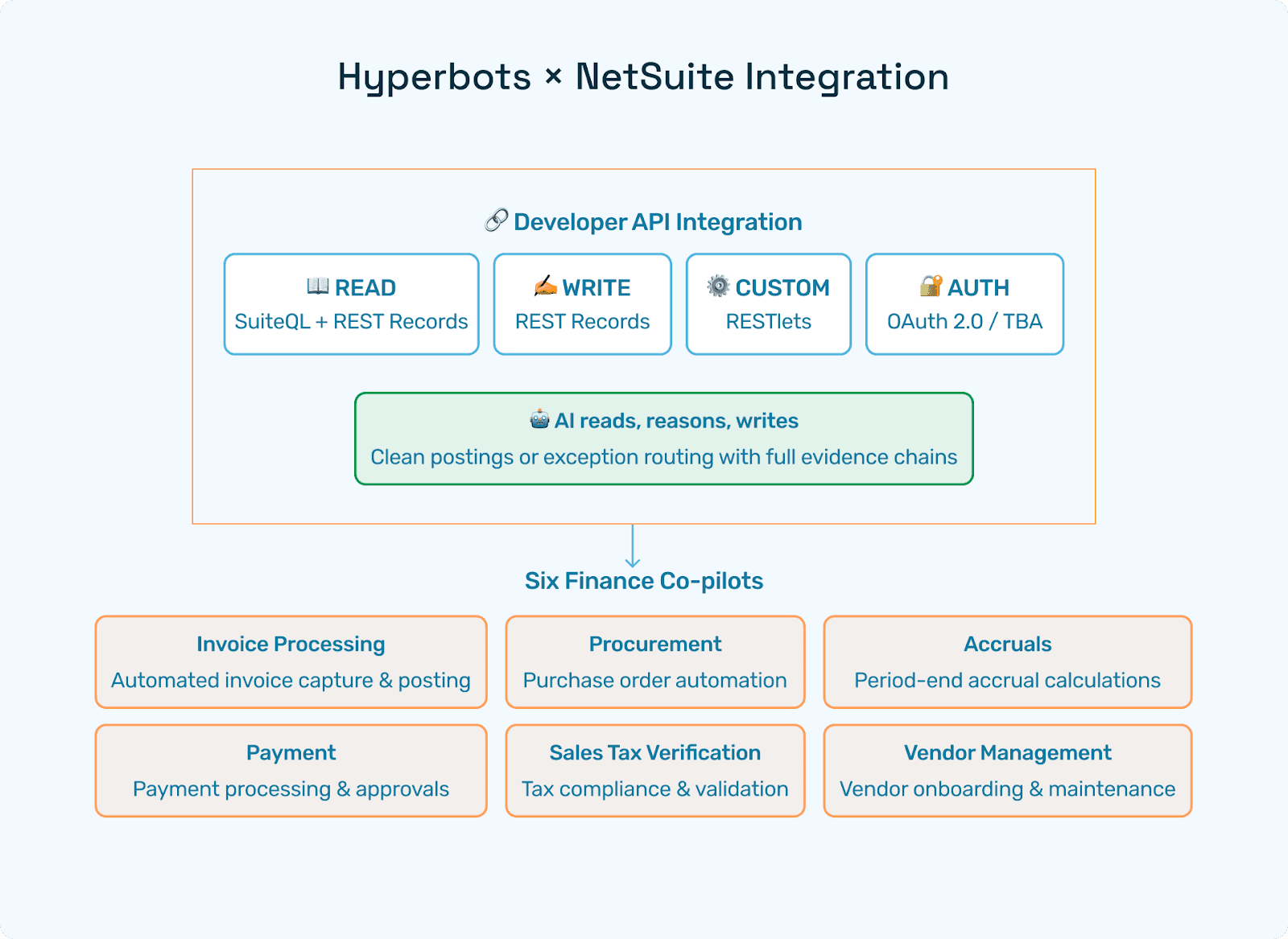
Sure. What’s interesting is that Hyperbot ships a ready-made connector for Dynamics 365 Business Central, both SaaS and on-prem. So, you’re starting from a great point since it’s already built out. It uses BCO data, version 4, and APIs plus AL extension events to expose virtually every finance object, whether it’s the Chart of Accounts (COA), dimensions, vendors, items, POs, receipts, invoices, payments, or even custom-made table fields.
What’s great is that deployment is pure configuration. Business Central remains your single source of truth, while the Co-Pilots run the automation behind the scenes.
Jace:
Awesome. And how long does it typically take to get a Co-Pilot live on Business Central from what you’ve seen?
Brian:
Great question. I get asked that a lot. Really, we’re talking end-to-end, from sandbox mapping and UAT replay to production cutover. It usually takes about 2 to 4 weeks. We need API credentials and a sandbox company, and about 90 minutes to map fields. Adding extra custom tables might take a few additional days, but since the connector core is already built, the timeline is short.
Jace:
So it’s not the huge lift you’d typically see with an ERP project where you’re ripping out a tool and replacing the whole thing, which can take 6 to 8 months. That’s awesome.
Brian:
Exactly. Some of those projects can even take years; sometimes, companies hope to finish in 3 years. Hyperbot’s approach is on a completely different time frame.
Jace:
Right, so just a couple of days to a couple of weeks tops, depending on what exactly is being rolled out.
Brian:
Absolutely.
Jace:
And how often does Hyperbot sync data with Business Central, and what cadence would you recommend from your experience?
Brian:
If we break it down by type, metadata probably makes sense to sync weekly. Master data like vendor items and dimensions should sync daily. For transactions such as POs, receipts, and invoices, hourly makes sense for logistics, but posting and accruals should really always be in real time.
Also, cadence is configurable. It’s a UI setting, so you can throttle if API call budgets are tight. It’s a nice, dynamic environment.
Jace:
Yeah, customizable at the end of the day. So, depending on what cadence fits best for that process, you can adjust. How does each Co-Pilot automate a typical Business Central task?
Brian:
Great question. It’s fun because I get asked this all over the world. In fact, I’m heading off to Southeast Asia soon (Malaysia, Singapore, Indonesia, Brunei), and people there are asking the same thing.
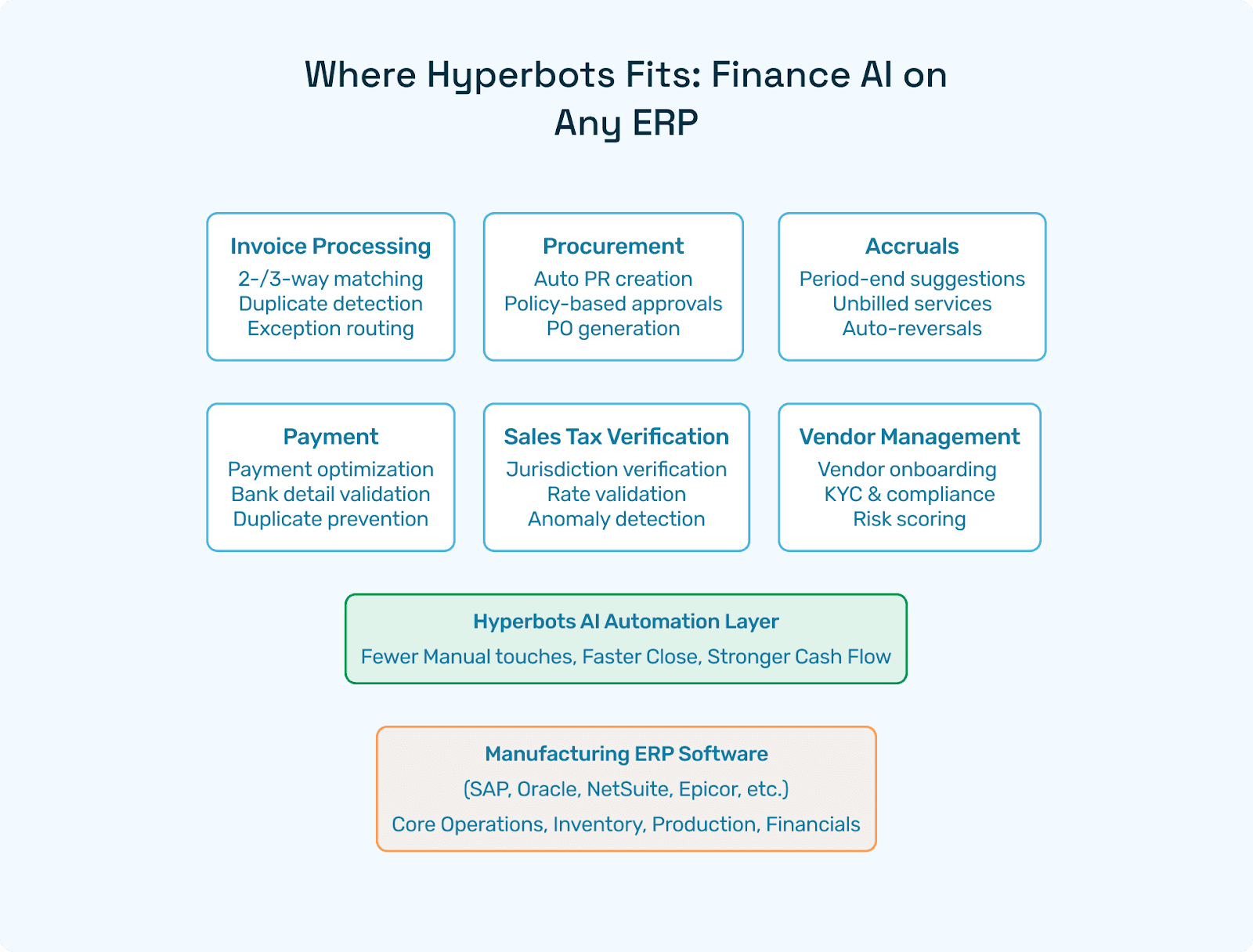
In invoice processing, for example, OCR plus three-way match. You’ve got your PO, the receipt, and the invoice. The Co-Pilot does auto-dimension coding and posts the AP voucher. About 80% of this can be straight-through processed (STP). That’s important, AI won’t do 100%, but it should do the heavy lifting, leaving the 20% to humans. It’s like the Pareto rule—80% handled by AI, 20% requiring human focus. That creates efficiency and effectiveness.
For accruals, it reads open POs and receipts, books month-end accruals, creates JEs, and auto-reverses when invoices land. For PR and PO, it builds requisitions from contracts, checks budgets, routes approvals in Teams, and creates the BC PO header and lines.
For vendor management, it validates W-9s and EINs, routes onboarding workflows, updates vendor cards, and EFT data. For payments, it analyzes discounts and cost of capital, things that normally take too long or involve too much unstructured data to be done manually.
Then, in sales tax verification, it validates origin and destination, item tax groups, does rate lookups, and writes clean tax lines. These are processes that are usually very manual, and AI makes them efficient.
Jace:
Yeah, 100%. And you mentioned the 80% STP being a big focus. How does Hyperbot handle the exceptions or write failures back to Business Central for the other 20% that need attention?
Brian:
Good question. Nothing silently fails. Every write is followed by an immediate readback via OData. If BC returns an error, such as a closed period or dimension mismatch, the connector retries three times. If it still fails, it parks the record in an integration exceptions queue with the raw BC error and sends a Teams alert.
Jace:
So it notifies you exactly what the issue is and what needs to be done to fix it. That’s awesome. And what safeguards exist for security, data integrity, and customization?
Brian:
I had my IT team help me with this one. It uses TLS 1.3 with AES-256 encryption, SOC 2 Type 2, and ISO 27001 compliance. There’s also AAD OAuth and scopes, so tokens match your preferred permission set.
For customization, we can rewrite any table extension or custom dimension code. There are multi-company dashboards where one pane tracks every BC company and environment, and multi-currency support using BC’s currency tables and posting dates to ensure correct forex.
Jace:
Got it. And what happens if we upgrade Business Central or migrate to another ERP?
Brian:
Hyperbot connections are versioned and auto-compatible with each major BC wave. During upgrades or migrations, we enable dual-write mode, posting to both ledgers until cutover. That means zero downtime and zero data loss.
Jace:
Awesome. And how can you guarantee each write transaction into Business Central is successful?
Brian:
The connector posts and then instantly re-reads the record, comparing every field, amount, dimension, currency, and posting date. Only after a perfect match does a green posted check mark appear. Any mismatch triggers retries and alerts.
Jace:
So it notifies you right away. And how does Hyperbot handle Business Central-specific nuances and customizations?
Brian:
BC’s flexibility, AL table extensions, custom dimensions, and posting groups are exposed through the connector’s metadata scan. Optional columns become first-class mapping targets. The Co-Pilots read them for context and write back new values. Subledger batches flow through standard journals, respecting posting group logic, so the GL remains fully compliant.
Jace:
That’s critical to ensure compliance. How is Hyperbot’s agentic AI on Business Central different from other AI add-ons, including Microsoft’s native AI features?
Brian:
Great question. There’s a lot of “agent washing” out there, companies calling something agentic AI when it’s really not. With Hyperbot, it’s truly agentic AI.
Most products stop at OCR or predictive dashboards. Hyperbot adds an agentic workflow. The AI acts, it creates POs, posts to GL, reverses accruals, requests credit memos, reconciles payments, and validates tax. And all of this happens under one roof.
From my perspective, it’s like combining the benefits of RPA from a few years ago with a “thinking box” that can address much more. Hyperbot’s finance-trained models deliver 99.8% field extraction and decision accuracy. That translates to 80% productivity gains end-to-end, versus maybe 30% lifts with OCR or RPA products.
Plus, you get immediate audit trail access across AP, accruals, procurement, vendor onboarding, payments, and tax. To me, this feels like living through an industrial revolution in real time. This is what’s transformed my career; we now have technology that can automate what should be automated.
Jace:
That makes sense. And it seems like a common theme today, consolidating systems instead of having dozens of logins for dozens of dashboards. Hyperbot aligns with that vision, serving not just as a part-of-the-process automator, but as your go-to finance and accounting tool for automation across the board.
Thank you so much, Brian, for your time today and for answering all these questions. We truly appreciate it and look forward to chatting again soon.
Brian:
Great. Be well, take care.