Best Purchase Order System for Mid-Sized Businesses
Streamline purchasing with the best purchase order system for small business—featuring AI automation, simple setup, and affordable pricing for faster, smarter procurement.
Executive Summary
In an increasingly complex business environment, mid-sized companies demand a purchase order system designed to optimize procurement efficiency, reduce costs, and maintain compliance. The best purchase order system for small business is one that combines AI-driven automation, real-time ERP integration, customizable workflows, and robust vendor management to slash operational costs by as much as 80%. Hyperbots leads this transformation with its AI-powered Procurement Copilot and supporting Co-pilots, reducing purchase cycle times from request to order while providing actionable spend visibility. This comprehensive guide explores the critical features, pricing models, and setup considerations for selecting the best purchase order system that delivers measurable ROI and empowers finance and procurement teams.
As businesses scale, manual purchase order processes become increasingly untenable—leading to errors, delays, budget overruns, and audit risks. Investing in an automated—and easy—purchase order system is no longer optional but a strategic imperative. This guide anchors key considerations for mid-sized enterprises and highlights how AI co-pilots create competitive advantages while reducing the operational burden on finance teams.
What Is a Purchase Order System?
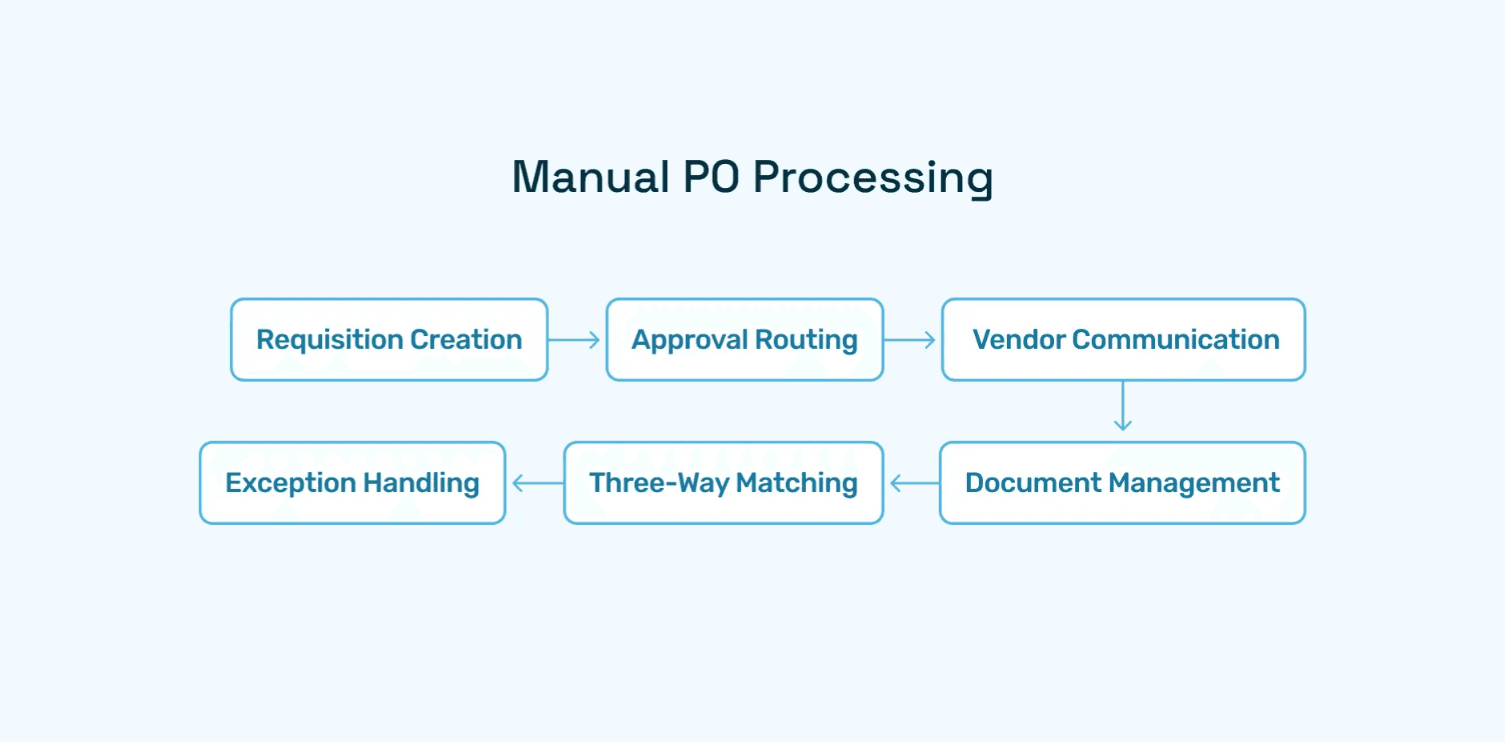
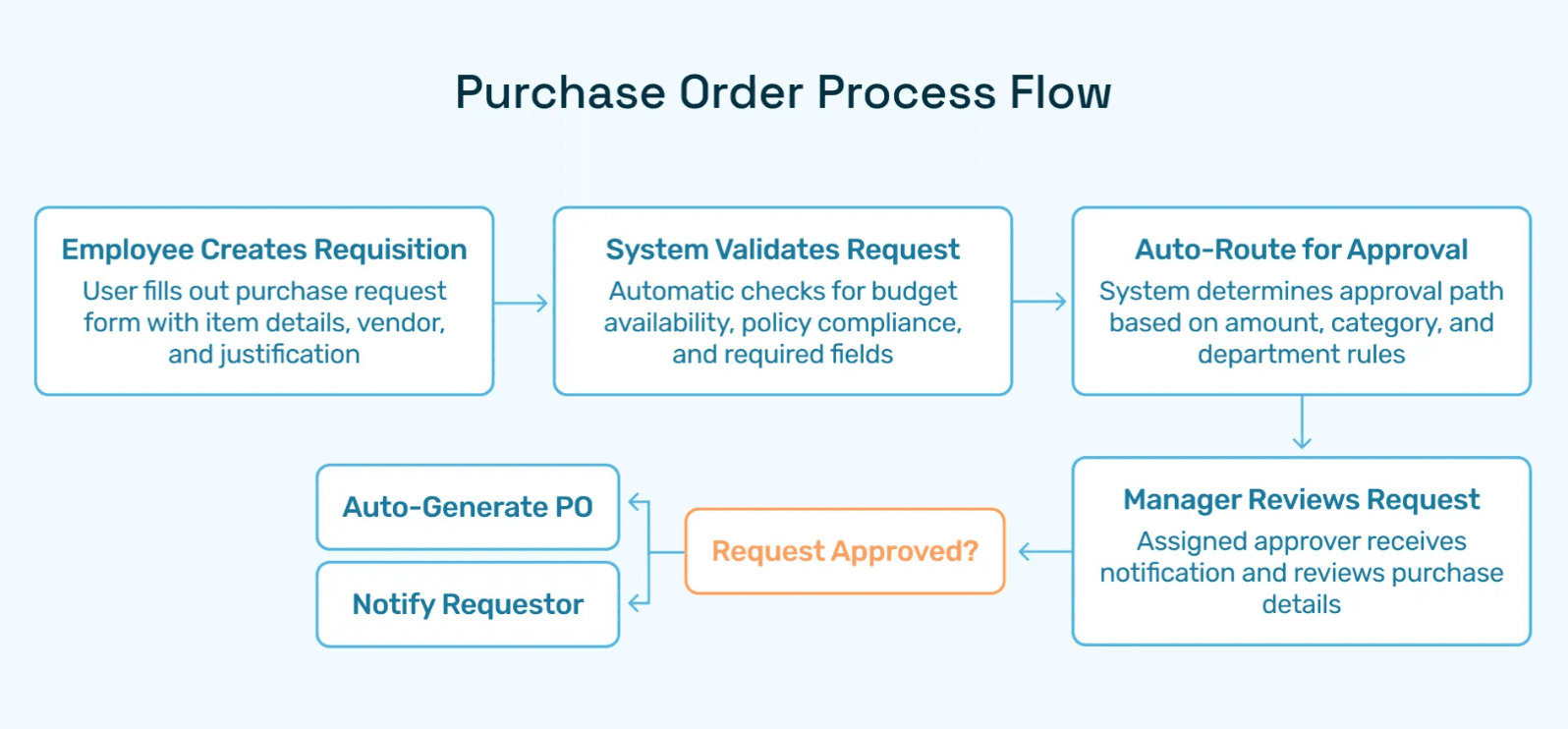
A purchase order system digitally manages the lifecycle of purchase orders—from purchase requisition and approvals through to order issuance, vendor communication, and payment reconciliation. Replacing outdated manual or spreadsheet-based methods, automated PO systems streamline workflows, enhance accuracy, enforce spend policies, and provide finance teams with the real-time visibility needed to control budgets and monitor supplier relationships effectively.
Why Automation Matters
Organizations relying on manual PO processing face risks such as duplicate orders, late approvals, missing data, and lack of visibility into financial commitments. This results in slower procurement cycles and costly compliance failures.
An automated purchase order system:
Reduces human errors like misplaced requisitions or wrong vendor details
Enforces spending limits and multi-level approvals
Accelerates purchase order generation and dispatch
Provides audit trails for regulatory compliance and internal governance
Benefits for Small Business Finance Teams
Increased Accuracy and Fewer Errors: Automated validation and AI anomaly detection prevent common mistakes like duplicate requests or incorrect vendor data.
Faster Cycle Times: Real-time automated approvals eliminate bottlenecks and shrink the request-to-order timeframe.
Budget Control and Spend Visibility: Integrations with ERP systems ensure budget compliance and up-to-date financial reporting.
Vendor Management: Centralized, dynamic vendor profiles facilitate better communication and compliance.
Deloitte reports that nearly half of procurement teams still rely on manual processes prone to error and inefficiency, underscoring the need for systems that automate and centralize purchase order workflows. With these transformational features, an easy purchase order system becomes a critical finance tool for managing complexity as businesses grow.
Core Features of the Best Purchase Order System for Small Business
Automated Workflows and Intelligent Approvals
An effective purchase order system supports custom automated workflows that trigger approvals based on spend limits, departments, or vendor categories. Hyperbots’ Procurement Copilot employs AI to analyze requisitions, detect duplicates, and route approvals instantly, ensuring compliant, error-free orders.
Real-Time ERP Integration
Seamless connectivity with ERP platforms like SAP, Oracle, or NetSuite synchronizes budget data, ledger codes, and vendor details instantly. This integration is vital for real-time budget monitoring and accurate posting of purchase orders.
Vendor and Contract Catalog Management
Comprehensive vendor master management automates onboarding, monitors vendor compliance, and provides a centralized view of supplier performance. AI-powered catalog management links contract terms and pricing, enabling risk-controlled, streamlined purchase requisitions.
AI-Driven Validation and Anomaly Detection
Purchase orders are digitally cross-checked for anomalies such as out-of-budget spends or duplicate entries using advanced AI techniques. This intelligent validation safeguards against fraud and errors, enhancing overall procurement reliability.
Reporting and Analytics
Powerful dashboards deliver actionable insights into spend trends, supplier performance, approval bottlenecks, and budget variances. Finance leaders can leverage these reports to drive continuous process improvement and cost optimization.
Ease of Use and User Experience
A best-in-class purchase order system offers user-friendly interfaces with easy PO creation, configurable templates, and minimal training requirements. Platforms like Hyperbots provide intuitive no-code workflow configuration and vendor portals for enhanced transparency and collaboration.
How to Set Up an Easy Purchase Order System for Your Business
Setting up the best purchase order system for small business requires a strategic approach to align technology with procurement policies and business goals. Here is an expanded, practical guide based on industry best practices and Hyperbots’ proven implementation methodologies:
1. Assess Your Existing Procurement Processes
Begin with a detailed review of how purchase orders are currently created, approved, and processed. Identify pain points such as manual data entry, approval bottlenecks, duplicate orders, or missing vendor information. Understanding your existing process will highlight areas where automation can deliver maximum impact.
2. Define Clear Procurement Policies
Explicit procurement policies form the backbone of a well-functioning PO system. Define budgeting limits, multi-level approval hierarchies, vendor selection criteria, and compliance requirements. Embed these policies into your purchase order workflows to enforce control automatically.
3. Customize Purchase Order Forms and Templates
Avoid one-size-fits-all templates. Customize PO forms to capture the necessary fields such as item descriptions, quantities, unit prices, delivery terms, and vendor information critical to your business. Customized templates prevent incomplete or inaccurate orders.
4. Implement Multi-Level Approval Workflows
Establish departmental and spending thresholds that trigger multi-level approvals. The system should support dynamic routing to appropriate approvers depending on purchase type or amount. Incorporate exception handling for urgent purchases that need faster approvals but still maintain audit trails.
5. Integrate Your PO System with ERP and Accounting Platforms
Deep integration minimizes duplicate data entry and enables automatic budget checks. Real-time ERP syncing ensures that purchase orders do not exceed budget or commit funds inaccurately. It also facilitates faster invoice processing and better cash flow management.
6. Centralize and Continuously Clean Vendor Data
Accurate vendor master data is crucial to avoid delays and financial errors. Regularly update contact details, payment terms, tax info, and contract terms in a centralized vendor portal. Automate vendor onboarding and compliance verification to reduce fraud risks.
7. Provide Comprehensive Training and Communication
Transparent communication about new processes and systems eases resistance to change. Deliver role-specific training to purchasers, approvers, finance teams, and vendors to ensure everyone understands how to use the system efficiently and collaboratively.
8. Pilot the System and Monitor Early Adoption
Start with a controlled pilot project among select users or departments. Collect feedback, track usage patterns, and address any issues before organization-wide rollout. Monitor KPIs like PO cycle times, error rates, and budget compliance to measure initial improvements.
9. Continuously Optimize Based on Analytics
Leverage system analytics and reporting tools to identify bottlenecks, compliance issues, and opportunities for further automation and process refinement. Continuous feedback loops ensure your purchase order system evolves alongside changing business needs.
Hyperbots simplifies setup with low-code configuration, AI-guided validations, and comprehensive onboarding resources making it a simple purchase order system tailored for mid-sized enterprises.
How to Choose the Best Purchase Order System for Small Business
Selecting the right purchase order system goes beyond automation. For small and mid-sized businesses, the decision should be guided by both current needs and future growth plans. Here are key factors to consider:
1. Features That Truly Matter
Ease of Use: An intuitive interface is essential since finance and operations staff may not have deep technical expertise.
Customization: Ability to tailor workflows, approval hierarchies, and templates to align with your company’s policies.
Integration Capability: A strong PO system should sync seamlessly with accounting or ERP tools like QuickBooks, Xero, NetSuite, or SAP.
Mobile Access: Many small businesses operate on-the-go; mobile compatibility ensures approvals and monitoring can happen anytime.
Scalability: The system should adapt as the business grows, supporting higher transaction volumes and additional entities.
2. Pricing Models to Evaluate
Per-User Licensing: Best for smaller teams where only a handful of employees need access.
Transaction-Based Pricing: Ideal for businesses with fluctuating procurement activity, as you only pay for what you use.
Subscription (SaaS) Tiers: Offers predictable monthly or annual fees with different feature levels—common for most cloud-based PO systems.
Free or Basic Plans: Some providers offer limited free versions, which can be useful for very small businesses, though they often lack advanced automation and compliance tools.
3. Setup Considerations
Implementation Time: Cloud-based PO systems can be deployed in days or weeks, compared to months for on-premises solutions.
Training & Support: Ensure the vendor offers onboarding resources and customer support tailored for smaller organizations.
Data Migration: Assess how easily your existing vendor, invoice, and budget data can be imported into the new system.
Security & Compliance: Even small businesses must safeguard sensitive financial and vendor data—look for systems with built-in compliance and audit trails.
Common Mistakes to Avoid
Even with a clear understanding of features and pricing, many small and mid-sized businesses make avoidable mistakes when selecting and implementing a purchase order system. Avoiding these pitfalls ensures a smoother adoption process and stronger ROI.
1. Choosing Based Solely on Price Without Considering Long-Term Scalability
While cost is an important factor, selecting the cheapest option often backfires. A system that looks affordable today may lack the features your business will need as it scales—such as multi-entity support, ERP integration, or advanced analytics. The result is costly migrations later or running parallel systems that increase inefficiencies. Instead, balance upfront affordability with future-proof capabilities.
2. Over-Customizing Too Early
Many teams try to replicate their existing manual processes exactly within the new system, adding excessive custom workflows or forms right from the start. This increases implementation time, complexity, and costs, while delaying the realization of benefits. Best practice is to start simple—adopt the system’s standard workflows first, then introduce phased customizations once the team is comfortable and measurable ROI is achieved.
3. Neglecting Staff Training and Change Management
Even the most intuitive PO system requires clear onboarding. A common mistake is assuming employees will “figure it out” without structured training. Without proper training, adoption rates drop, users revert to manual processes, and ROI declines. Invest in role-based training, clear documentation, and ongoing support to build confidence among employees, vendors, and approvers.
4. Ignoring Integration with Existing Systems
Small businesses sometimes choose a PO system in isolation, without considering how it connects with their ERP, accounting, or inventory platforms. Lack of integration leads to duplicate data entry, mismatched budgets, and poor visibility across finance functions. Always evaluate whether the system offers pre-built integrations or APIs for smooth data flow.
5. Overlooking Vendor Support and Reliability
A purchase order system is only as strong as the vendor behind it. Choosing a platform with poor customer support or unreliable uptime can cause frustration and workflow disruptions. Look beyond the feature sheet—assess vendor reputation, support response times, and security standards before committing.
By carefully navigating these common mistakes, small businesses can ensure their purchase order system is not just a short-term solution, but a foundation for sustainable growth, financial control, and procurement efficiency.
How Hyperbots Delivers Differentiated AI Automation
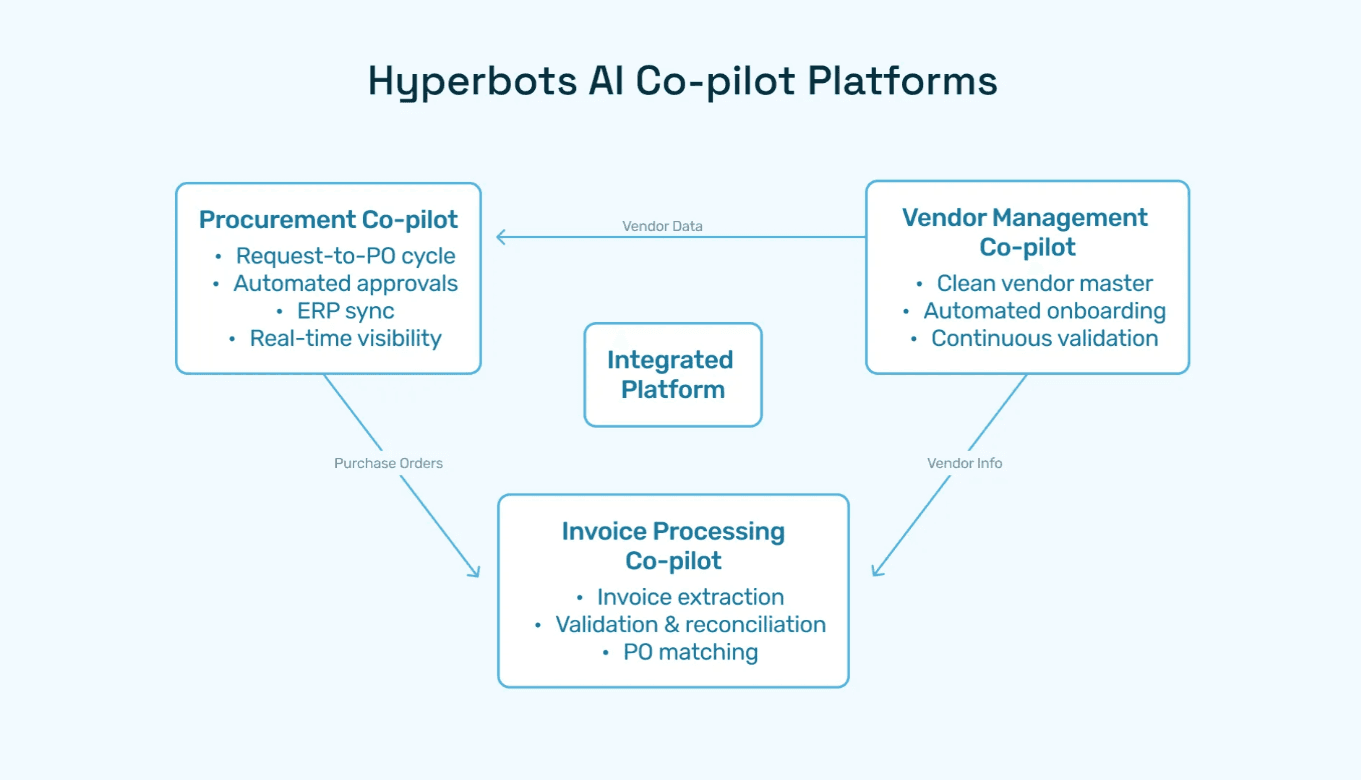
Hyperbots Procurement Copilot
Hyperbots’ primary AI agent automates creation, validation, and approval of purchase requisitions with precision. It automatically extracts PR fields from contracts or past data, performs duplication checks, enforces budget controls, and generates formatted purchase orders dispatched directly to vendors or systems.
Supporting AI Co-pilots
Invoice Processing Copilot: Streamlines invoice matching and reconciliation with POs and receipts, reducing manual corrections.
Vendor Management Copilot: Automates continuous validation, onboarding, and compliance monitoring of vendors to minimize fraud risk and administrative overhead.
Transformational Platform Capabilities Driving Business Impact
AI reasoning continually improves through learning from historical procure-to-pay processes.
Deep ERP integrations provide real-time budget visibility and ledger accuracy.
Flexible, no-code workflow engines enable dynamic approval routing tailored to business needs.
Rich audit trails empower efficient auditing and regulatory compliance.
Multi-entity support facilitates enterprise-wide synchronization.
Collectively, these capabilities enable finance and procurement teams to reduce manual workloads by over 80%, focus on strategy, and maintain exceptional compliance hyperbots.
Measured ROI Benefits of Hyperbots Purchase Order Automation
When finance leaders evaluate purchase order automation, the first question is simple: what’s the ROI? With Hyperbots, the answer is both measurable and transformative. The platform delivers savings you can quantify in hard dollars, along with intangible benefits that reshape how procurement and finance teams work.
Implementing Hyperbots' Procurement copilot deliver significant ROI and transforms procurement operations by providing:
Over 80% reduction in PO creation & dispatch time
5 minute PR creation time
At least a 10% reduction in cash outflows
Accurate and timely automatic communication with vendors
100% automation of forms and other information verification
Granular and customized workflow for each process
Improved vendor relationships due to predictable approval timelines.
Industry analysts concur that AI-driven procurement automation delivers among the highest ROI of any finance technology investment. According to Gartner, such platforms enable faster, smarter sourcing, contract management, and supplier collaboration essential for mid-sized business growth.
Comparing Hyperbots Against Other PO Systems
Feature | Hyperbots | Typical Competitors |
AI-Powered Automation | End-to-end automation from requisition to PO to invoice | Partial automation, mostly workflow digitization |
ERP Integration | Robust, real-time syncing with SAP, Oracle, NetSuite | Limited or batch syncing |
Vendor and Catalog Management | Continuous AI vendor vetting and contract catalog linkage | Manual updates and basic catalog |
Approval Workflow | AI-enabled dynamic approvals with anomaly alerts | Static rule-based routing |
Reporting and Analytics | Real-time, customizable dashboards | Basic reporting, delayed updates |
Audit Trails and Compliance | Full traceability with contextual audit logs | Minimal audit features |
Why Your Business Needs the Best Purchase Order System
Scaling businesses face growing complexities in spend compliance, vendor management, and operational efficiency. A modern, easy purchase order system:
Speeds sourcing and approvals, reducing cycle times and increasing procurement agility.
Real-time budget tracking for better cost control.
Improves visibility into spend, budget adherence, and financial forecasting.
Enhances compliance with policies and audit requirements through AI enforcement.
Reduces manual errors, fraud risks, and operational costs.
Frees finance and procurement teams to focus on strategic initiatives.
Hyperbots’ AI-driven platform uniquely addresses these challenges with measurable business impact, validated by real-world use cases and industry-leading ROI reports.
Frequently Asked Questions (FAQs)
Q1: What features distinguish the best purchase order system for small business?
A: Advanced AI validation, ERP real-time integration, automated approval workflows, vendor and catalog management, and comprehensive reporting.
Q2: Is there a free purchase order system for small business?
A: Some providers offer free basic tiers, but advanced features like AI-powered automation and ERP syncing found in premium platforms like Hyperbots require paid plans.
Q3: How quickly can I implement a simple purchase order system?
A: With platforms like Hyperbots offering low-code setup and expert onboarding, many users go live within days, reducing disruption.
Q4: How does Hyperbots stand out from other purchase order software?
A: It offers reasoning-driven AI Co-pilots across the entire procure-to-pay lifecycle with continuous learning, audit readiness, and deep ERP integrations.
Q5: Can this system scale with my mid-sized business growth?
A: Yes, Hyperbots supports multi-entity operations and scalable workflows adaptable to evolving business demands.