Cloud ERP Implementation: A Complete Guide for Enterprises and Mid-Market Firms
Transform finance with cloud ERP and AI by streamlining operations, cutting errors, and driving business growth.
Introduction
Many small and mid-sized businesses still rely on Excel and email workflows for purchase orders, but these approaches often create silos and errors as transaction volumes grow. As more organizations adopt digital-first strategies, the shift toward cloud-based ERP has accelerated. Whether you're upgrading from legacy systems or rolling out a new cloud ERP solution, the cloud ERP implementation process can be transformative if done right.
In this comprehensive guide, we’ll explore everything from the cloud ERP meaning to the detailed ERP implementation steps, to how Hyperbots AI co-pilots enhance every phase of your ERP journey.
What Is Cloud ERP?
Cloud ERP (Enterprise Resource Planning) is software hosted on a vendor's cloud platform and accessed via the internet. Unlike traditional on-premise ERP, which requires local infrastructure, cloud-based ERP systems offer flexibility, scalability, and lower upfront costs.
It’s a type of cloud computing for Enterprise Resource Planning (ERP), often provided as ERP cloud services, accessible from anywhere, anytime.
Why Cloud ERP Over On-Premise ERP?
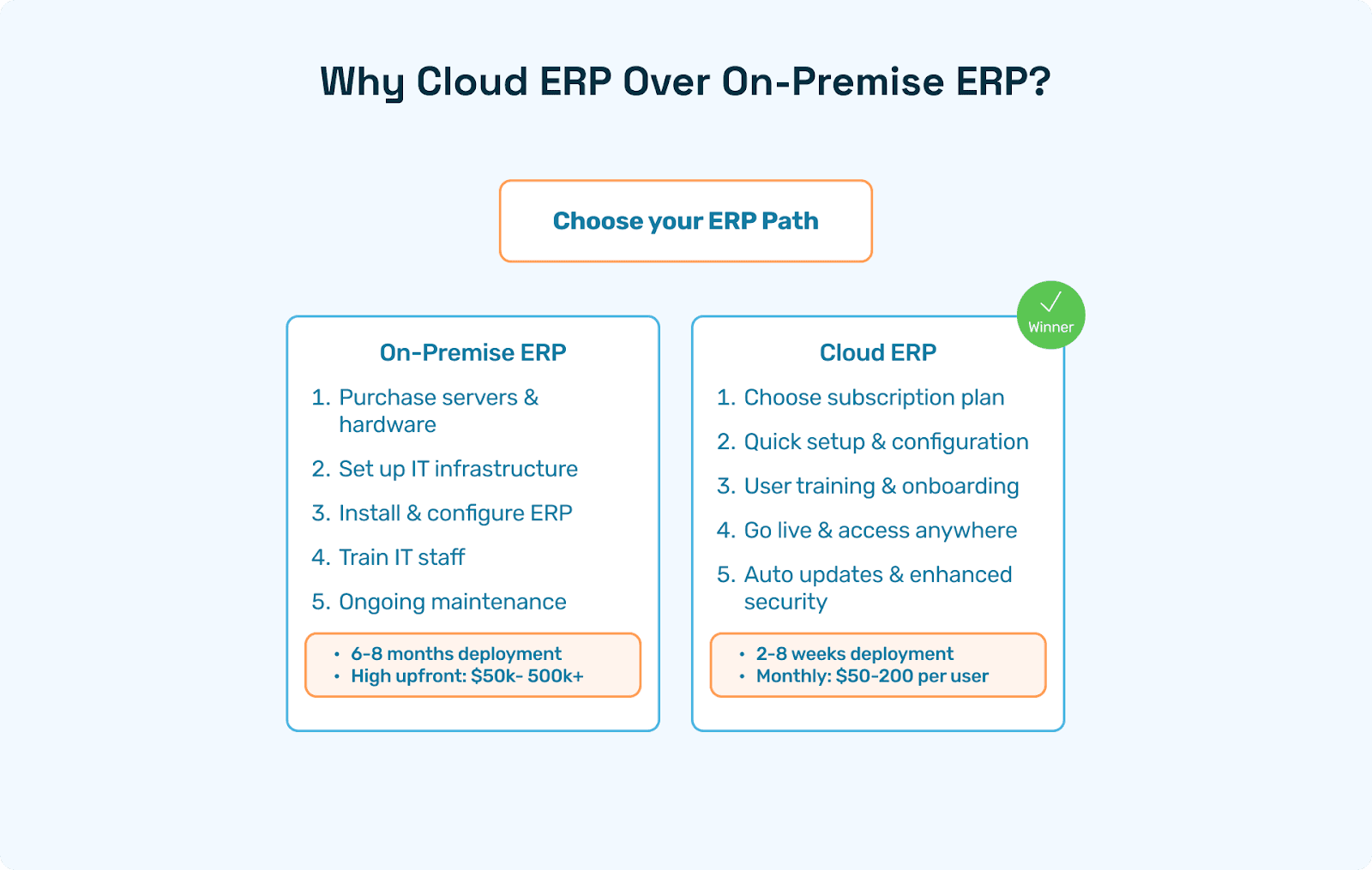
In the debate of ERP on premise vs cloud, cloud ERP wins for many modern businesses due to:
No upfront hardware costs
Seamless updates and support
Accessibility from any location
Faster deployment cycles
Enhanced data security and backups
This shift makes cloud-based Enterprise Resource Planning (ERP) ideal for fast-scaling firms.
Benefits of Cloud ERP
The advantages of cloud ERP go beyond cost savings. Here’s why businesses are turning to cloud-based ERP solutions:
1. Scalability
Easily add users, modules, or features as you grow with no physical constraints.
2. Lower IT Burden
With cloud computing ERP software, vendors manage updates, security, and infrastructure.
3. Real-Time Insights
Data across business units is updated in real-time for faster decision-making.
4. Remote Accessibility
Teams can access cloud enterprise software anytime, anywhere.
5. Security and Compliance
Top providers offer bank-level encryption, GDPR compliance, and more.
Cloud ERP Implementation Explained
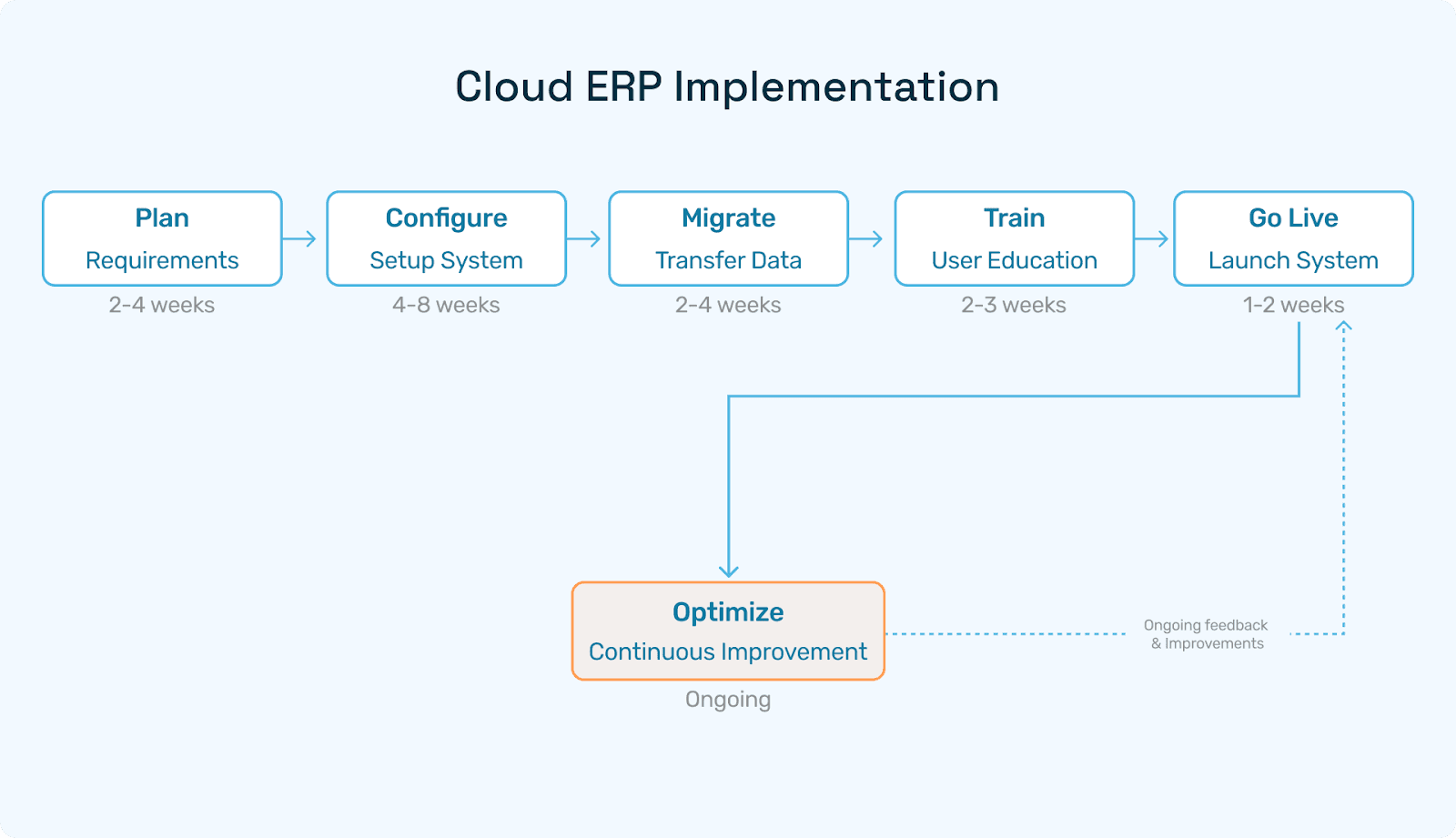
Implementing cloud-based ERP involves configuring the software to match your workflows, migrating data, training users, and going live.
It’s different from on-premise ERP implementation in that it’s faster, more agile, and less reliant on internal IT resources.
ERP Implementation Steps & Methodology
Every successful Enterprise Resource Planning (ERP) implementation follows a logical sequence:
Step 1: Planning & Discovery
Define goals
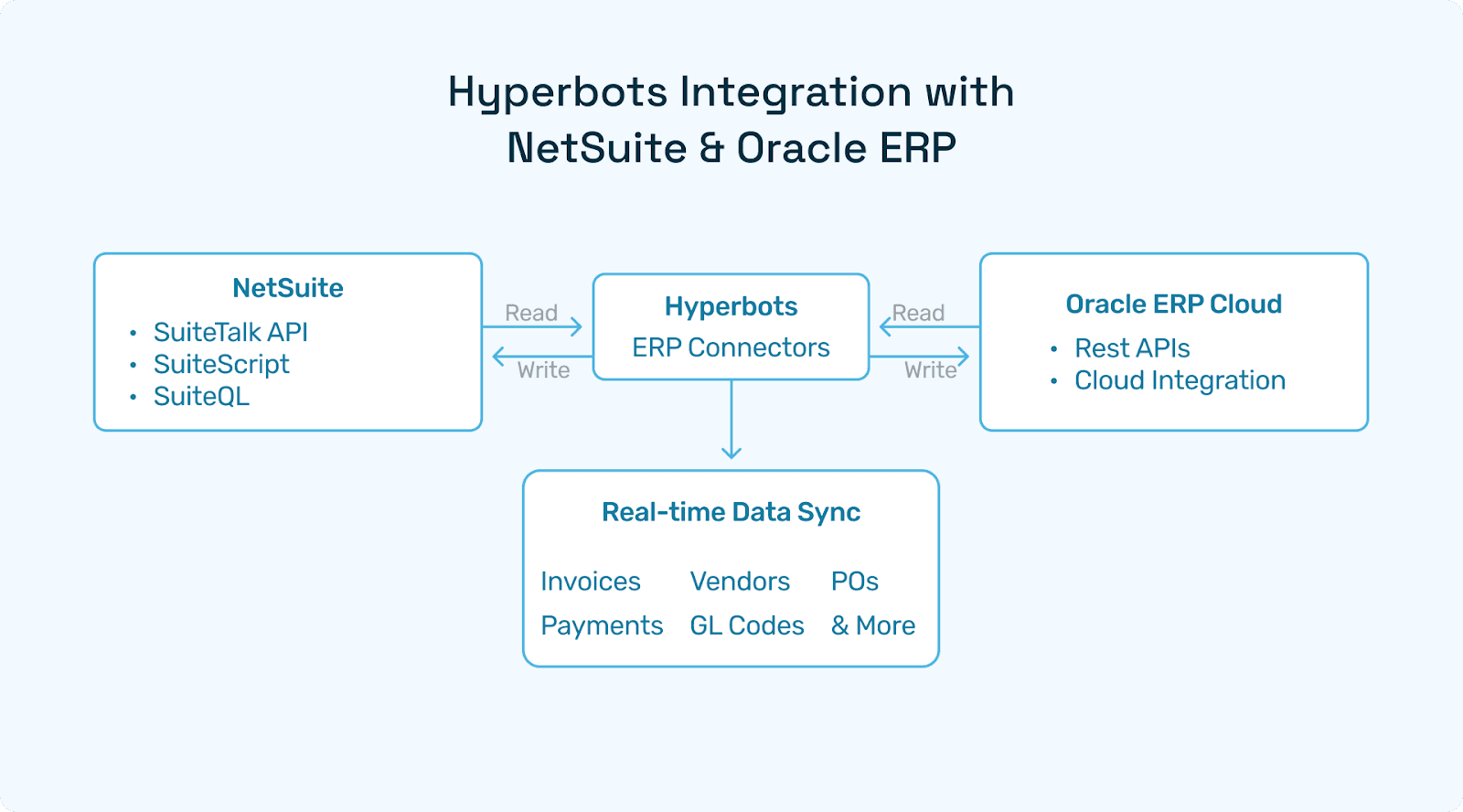
Choose ERP vendor (NetSuite, Oracle Cloud ERP, etc.)
Assemble the project team
Step 2: Process Mapping
Identify existing workflows
Determine what needs to change or be automated
Step 3: Customization & Configuration
Tailor the ERP system to business needs
Add integrations (e.g., CRM, HRMS)
Step 4: Data Migration
Clean, validate, and import historical data
Step 5: User Training
Hands-on workshops and tutorials
Admin and end-user training
Step 6: Go-Live & Support
Launch system
Monitor usage and fix issues
Cloud ERP Implementation Phases
Let’s break down ERP implementation phases:
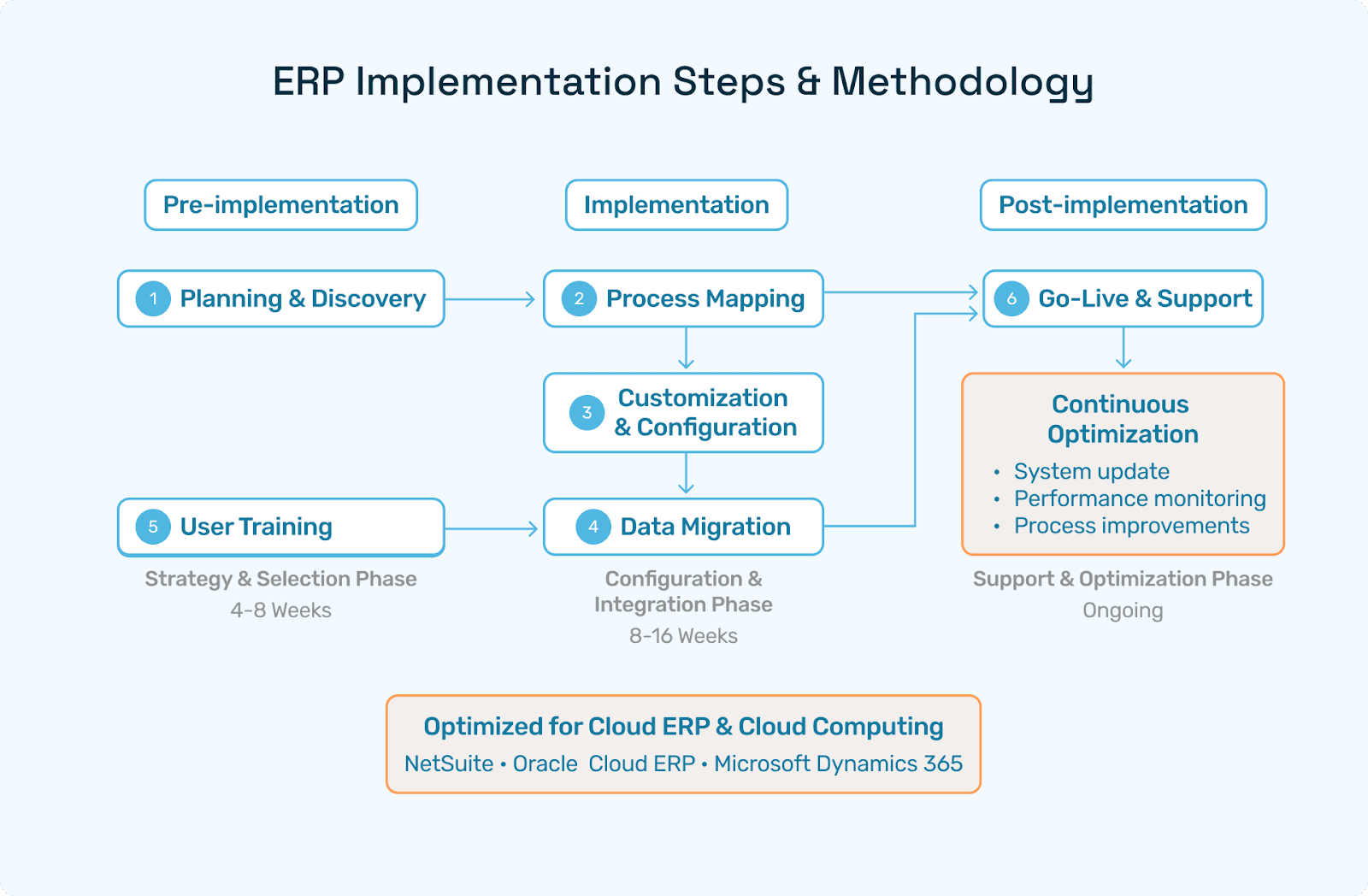
Pre-implementation (Strategy and selection)
Implementation (Configuration, integration, migration)
Post-implementation (Support, updates, optimization)
This applies to both cloud ERP and cloud computing in ERP systems.
ERP Implementation Plan Checklist
Phase | Task | Owner | Status |
Planning | Define KPIs | CIO | ✅ |
Setup | Choose modules | CTO | ✅ |
Data | Migrate data | IT Lead | ⬜ |
Training | Train users | HR | ⬜ |
Go-Live | Final testing | PM | ⬜ |
Common Pitfalls and How to Avoid Them
Pitfall: Skipping training
Fix: Mandate comprehensive onboardingPitfall: Poor data quality
Fix: Clean data before importPitfall: Over-customization
Fix: Use standard features where possible
How Hyperbots Co-Pilots Transform Finance Operations
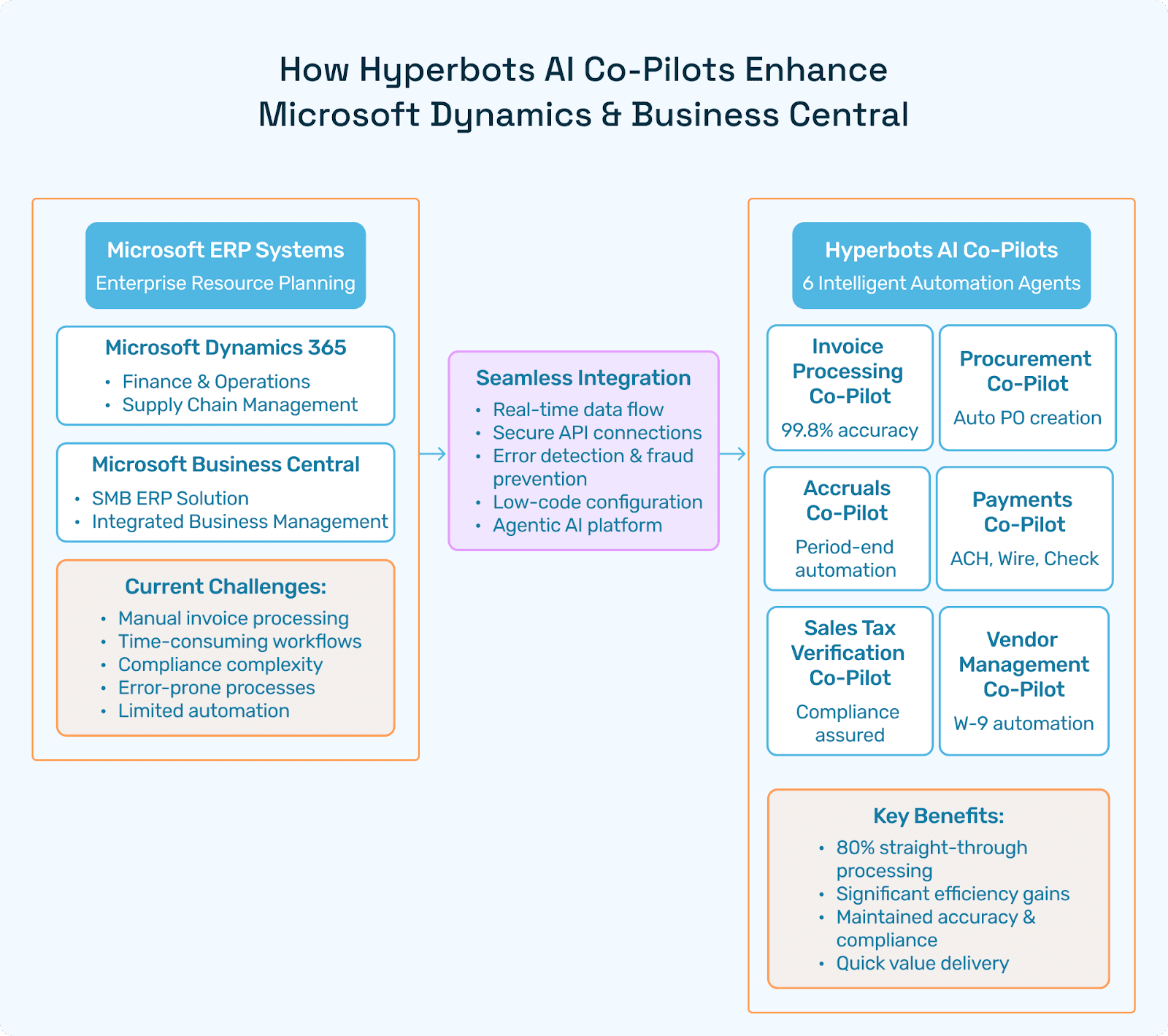
Hyperbots brings AI-powered ERP implementation success across NetSuite, Oracle, QuickBooks, and more.
1. Automated Data Extraction with Invoice Co-Pilot
Extracts 99.8% accurate fields from PDFs, scans, and emails using VLMs, LLMs, and MoE models.
➡️ Hyperbots Invoice Processing Co-pilot
2. Smart Procurement Automation
Procurement Co-pilot generates AI-led requisitions, automates PO dispatch, and enforces policy compliance.
➡️ Hyperbots Procurement Co-pilot
3. Timely Accruals and Closures
Reduces manual work in the month-end closing with intelligent automation.
➡️ Hyperbots Accruals Co-pilot
4. Secure, Compliant Payments
Supports ACH, wire, and check payments with timing recommendations and approval layers.
➡️ Hyperbots Payments Co-pilot
5. Sales Tax Accuracy
Sales Tax Verification Co-pilot validates local, state, and federal taxes on invoices.
➡️ Hyperbots Sales Tax Verification Co-pilot
6. Vendor Management Simplified
AI-powered onboarding, identity validation, vendor portal, and rationalization.
➡️ Hyperbots Vendor Management Co-pilot
Cloud ERP Implementation Case Study
Company: Mid-size US manufacturing firm
ERP: NetSuite
Challenge: Manual invoice handling, delayed POs, non-compliant tax processing
Solution: Hyperbots’ full suite of Co-pilots deployed in 3 weeks
Results:
80% invoice STP
60% faster PO cycles
99.5% tax validation accuracy
$320K annual cost saving
Recommended Tools & Technologies
Category | Tools |
ERP | NetSuite, Oracle Cloud, SAP |
AI Integration | Hyperbots |
Project Management | Asana, Jira |
Data Migration | Fivetran, Hevo |
Analytics | Tableau, Power BI |
FAQs on ERP Cloud Computing
Q1: What is ERP system implementation?
ERP implementation involves deploying enterprise software that manages business functions across departments.
Q2: What does cloud ERP mean?
Cloud ERP is hosted on a vendor’s cloud and accessed over the internet.
Q3: What are the benefits of cloud ERP?
Lower IT costs, better scalability, and faster deployment.
Conclusion
Cloud ERP implementation is not just a tech upgrade; it’s a strategic transformation. With the right approach, tools, and AI partners like Hyperbots, businesses can streamline finance operations, reduce errors, and accelerate growth.
Whether you’re exploring ERP cloud computing or scaling your operations with cloud ERP solutions, let Hyperbots Co-pilots lead the way to smarter automation.