ERP Procurement Automation Integrations: Security, Compliance, and Risk Management Guide
Key security and compliance risks in ERP procurement integrations and how to prevent data exposure, validation errors, and audit failures
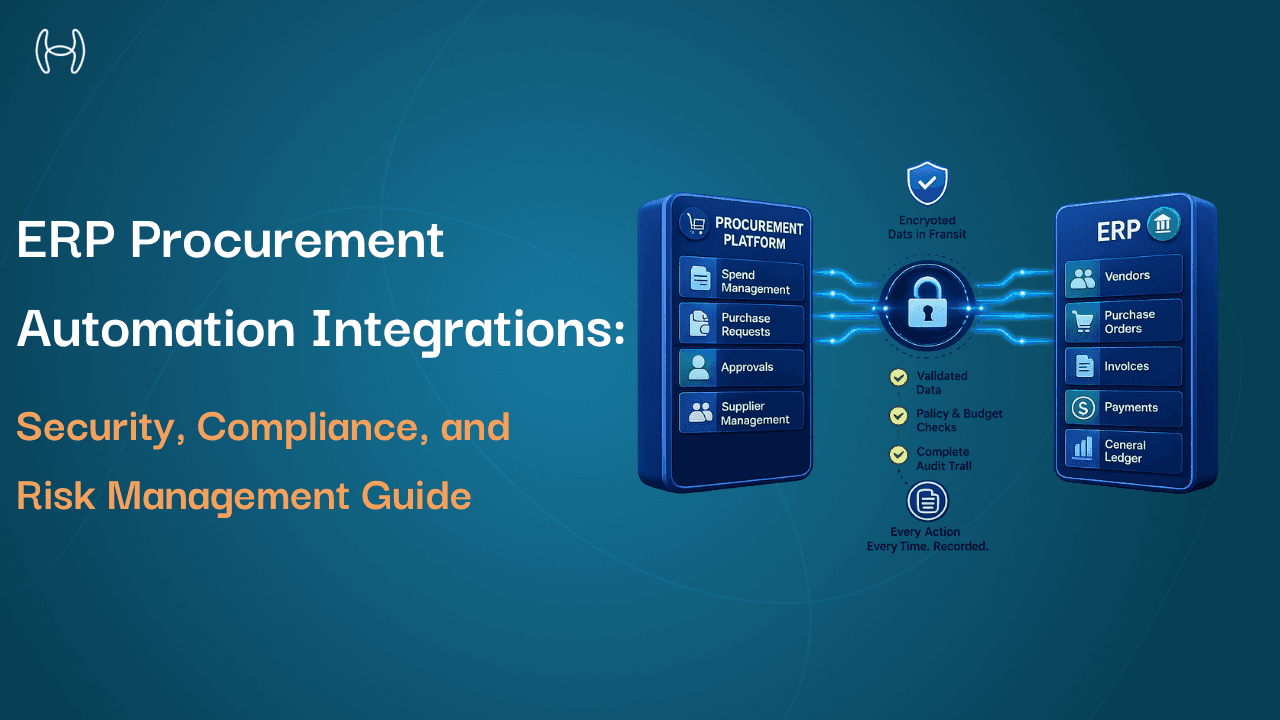
When a procurement automation tool connects to your ERP, it gains access to some of the most sensitive data in your business: vendor banking details, approved supplier lists, budget authorizations, payment instructions, and purchase commitments. Most finance teams evaluate that connection in terms of functionality. Does it sync correctly? Does it post invoices? Does it match purchase orders?
Fewer ask the question that matters just as much: is it secure, and does it leave a trail that holds up under scrutiny?
This blog is for finance leaders, CFOs, controllers, and anyone evaluating or managing procurement automation. It covers the specific security and compliance risks that arise at the ERP–procurement integration point, what causes them, and what well-built controls do to prevent them.
Why the Integration Point Is Where Risk Concentrates
A procurement automation tool on its own is a contained system. An ERP on its own is a contained system. When they are connected, a new area of risk is created at the point of connection. That risk is the product of specific technical decisions: how access is granted, how data is transmitted, what happens when a transaction fails, and whether every automated action is recorded in a way that can be reviewed and explained later.
The guide on integrating purchase order automation with ERP systems covers the full architecture of how procurement automation connects to ERP platforms. This blog focuses on what can go wrong at that connection from a security and compliance perspective, and what the right design does to eliminate those risks.
The Four Risks That Matter Most
1. Overprivileged Connector Access
When a procurement automation platform connects to an ERP, it is granted access credentials. Those credentials define what data the platform can read, write, or modify. In a well-designed integration, those credentials follow the principle of least privilege: the platform has access to exactly what it needs and nothing beyond.
In practice, many integrations are built with broad access because it is faster to configure. A connector granted wider access than its function requires can read data it should never see and write to fields it should never touch. Unnecessary read access to payroll or payment records creates a data exposure. Write access to the vendor master beyond what invoice processing requires creates a pathway for fraudulent vendor creation.
The right approach maps the access required for each function specifically. Invoice processing gets vendor master fields and GL data. Procurement gets PO creation and budget check access. Accruals get goods receipt data. Each function gets what it needs. Nothing beyond that is granted.
2. Unencrypted Data in Transit
Data moving between a procurement automation platform and an ERP travels across a network. For organisations using cloud ERP deployments, that data travels across the public internet. Vendor banking details, payment terms, purchase commitments, and approval authorisations are exactly the types of data that financial fraud depends on. If that data is not encrypted in transit, it is a vulnerability.
Encryption in transit is not an advanced feature. It is a baseline requirement for any compliant ERP–procurement integration. A platform that cannot confirm that all data transmitted between its system and the ERP is encrypted in transit and at rest is not a platform that belongs in a regulated finance environment.
3. Validation Failures That Let Bad Data Into the ERP
The ERP is the system of record. Its data quality determines the accuracy of every financial report, every compliance filing, and every audit. When a procurement automation platform writes data to the ERP without adequate validation, it introduces errors that are difficult and expensive to correct.
The most common validation failures are:
Duplicate vendor records. A procurement tool that creates vendor records without checking for duplicates accumulates multiple records for the same supplier over time. Duplicate records are one of the most common causes of duplicate payments and data that auditors flag immediately.
Invalid GL codes. Assigning GL codes without validating them against the current chart of accounts in the ERP results in postings to codes that do not exist or have been deactivated. These errors require manual correction and leave financial statements unreliable until resolved.
Policy violations passed through. If the integration does not check purchase requests against approval policies, budget limits, and vendor approval status before writing to the ERP, it passes violations into the system of record. A purchase that exceeds a budget threshold should be blocked before the commitment is created, not after.
Incomplete records. ERP transactions often have mandatory fields required for downstream processing and compliance. An integration that writes incomplete records creates transactions that cannot be processed correctly.
4. Incomplete Audit Trails
An audit trail is a chronological record of every action taken: what was done, when, by whom, and to what data. In a procurement automation context, the trail must cover actions taken by the system as well as by people. If the platform approves an invoice automatically, that decision needs to be recorded with the same rigour as a human approval: what logic was applied, what data was used, and what the outcome was.
Regulatory frameworks including Sarbanes-Oxley Section 302 and 404 require documented controls over financial reporting. Any automated procurement system that creates or approves financial commitments falls within scope. An audit trail that covers human actions but leaves automated decisions unrecorded is incomplete and will generate findings in any serious audit.
The specific gaps that create the most problems are no record of why an automated decision was made, an audit trail that covers the automation tool but is not confirmed in the ERP's own records, and logs that can be modified after the fact. An audit trail that can be edited is not an audit trail. It is a document.
What a Secure, Compliant Integration Looks Like
The flowchart below shows how a well-built integration handles a transaction from arrival to ERP posting, with security and compliance controls at every step.
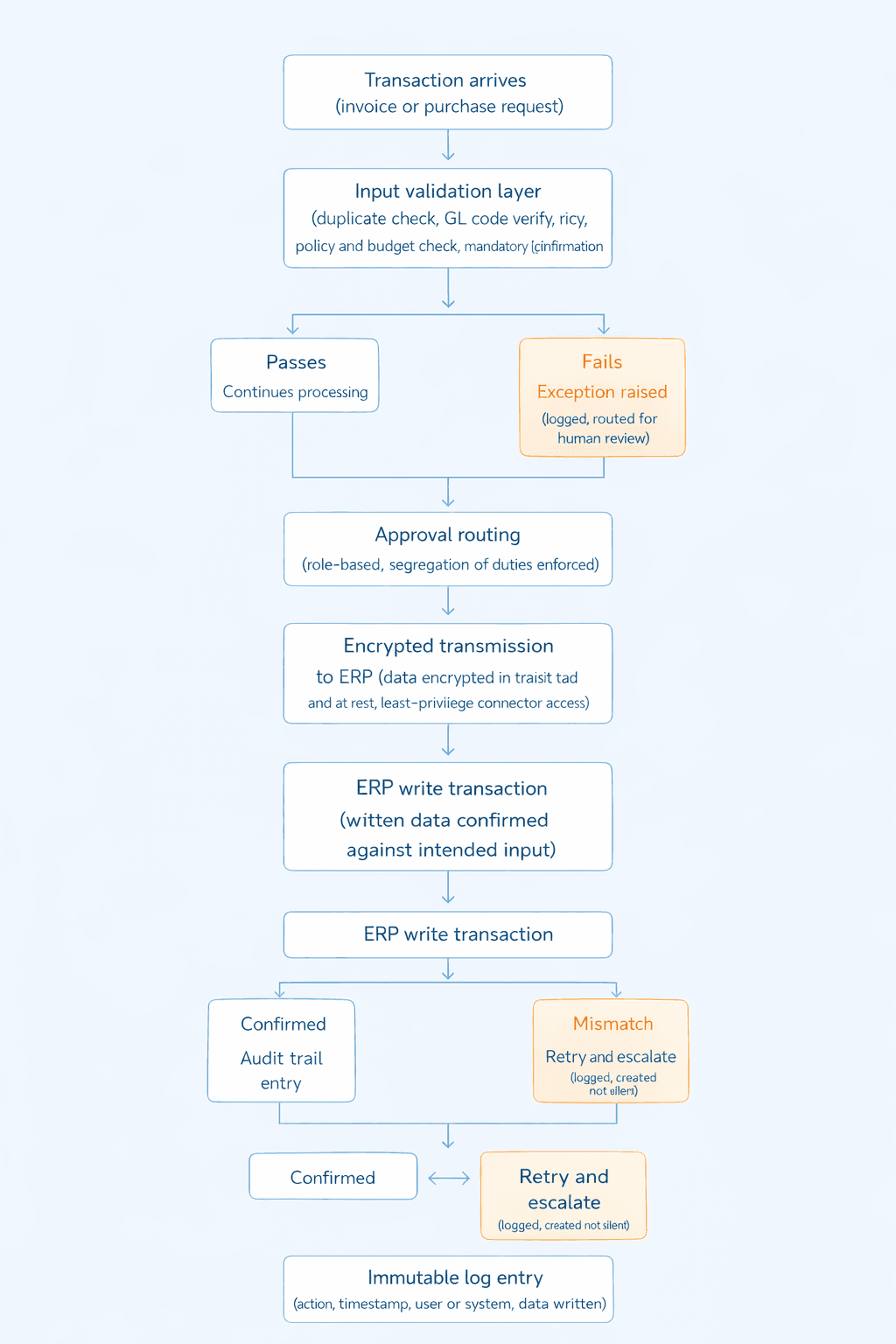
Every step confirms the transaction or creates a logged, reviewable record of why it did not proceed. There are no silent failures and no unattributed actions.
Compliance Frameworks That Apply
Framework | What It Requires |
Sarbanes-Oxley (SOX) | Documented, auditable controls over any system creating or approving financial commitments |
Internal audit standards | Evidence that financial controls are operating effectively; integration gaps generate findings |
Data protection (GDPR and equivalents) | Encrypted transmission and storage of vendor, employee, and financial data; access controls |
ISO 27001 | Information security management controls across data handling and access |
SOC certifications | Independent verification that security and operational controls have been tested over time |
How Hyperbots Addresses These Risks
The security and compliance architecture of Hyperbots' ERP integrations is built around the specific risks above. Each has a specific control.
Least-privilege connector access. Hyperbots connectors are scoped to the data objects each co-pilot function requires. Invoice processing reads and writes the vendor master fields, GL codes, and posting data it needs. Procurement reads budget data and writes PO records. No function is granted access beyond what its specific workflow requires.
Encrypted data transmission and storage. All data in transit between Hyperbots and the ERP is encrypted. Data at rest is also encrypted. Role-based access controls govern who can access what within the platform. Hyperbots adheres to ISO 27001 and SOC certification standards. This applies across public cloud, private cloud, and on-premise ERP deployments.
Validation before every write. The validation and duplicate detection capability checks every transaction against the ERP's live data before writing. Vendor records are checked for duplicates against the current vendor master. GL codes are validated against the current chart of accounts. Purchase requests are checked against current approval policies and budget balances. Mandatory fields are confirmed complete. Transactions that fail validation are not written to the ERP; they are raised as exceptions and routed for human review.
Complete, immutable audit trails. Every action taken by the Hyperbots platform is recorded: the action, the data involved, the timestamp, and whether it was taken by a human or the system. Automated decisions include the logic applied and the data referenced, so every decision can be explained to an auditor. Audit entries are tamper-evident. The trail covers both the automation platform and the ERP through read-back verification, which confirms that what the platform recorded as written matches what the ERP received.
Error handling with no silent failures. When a write to the ERP fails, the system detects the failure, retries automatically, and escalates to an exception report if the retry does not resolve it. Every failure is logged as an event. Finance teams and auditors can see every transaction that succeeded, every one that failed, and how each failure was resolved.
For a broader view of how these controls support auditability across the finance function, the analysis of how AI automation improves CFO auditability covers the relationship between automation and audit readiness. For how automated procurement enforces compliance through embedded controls, the guide on how automated POs ensure regulatory compliance covers policy controls, approval gates, and audit trail requirements in detail. And for how AI catches financial fraud at the vendor and invoice level, the analysis of fraud and anomaly detection in finance explains what AI detects that manual review misses.
Questions to Ask Before Connecting Any Automation Platform to Your ERP
What access does the connector require, and why? The platform should specify exactly which data objects it needs read and write access to for each function. Broad or administrative access requests need justification.
How is data secured in transit and at rest? Confirm encryption applies to both, and that role-based access controls are in place within the platform itself.
What validation runs before every ERP write? Ask specifically about duplicate detection, GL code validation, policy and budget checking, and mandatory field completion, all against live ERP data.
What does the audit trail cover? It must cover automated decisions and human ones, with enough detail to explain each decision to an auditor. Confirm logs are tamper-evident and retained appropriately.
What happens when a write fails? Every failure needs to be detected, retried, escalated if unresolved, and logged as a distinct event.
What certifications does the platform hold? ISO 27001 and SOC certifications are the relevant standards. Ask for current documentation.
The Bottom Line
An ERP–procurement integration is not just a functional connection. It is a security and compliance decision. The automation platform connected to your ERP has access to your most sensitive financial data and creates the records that auditors examine. Overprivileged access, unencrypted transmission, validation gaps, and incomplete audit trails are not edge cases. They are the predictable consequences of integration built for convenience rather than compliance.
The controls that matter are least-privilege access, encrypted transmission and storage, validation before every ERP write, complete and tamper-evident audit trails, and error handling with no silent failures. Hyperbots builds all of these into its integration architecture by design. Request a demo.
FAQs
What are the main security risks in ERP–procurement automation integrations? Overprivileged connector access, unencrypted data transmission, validation failures that allow bad data into the ERP, and incomplete audit trails that cannot support regulatory or internal audit requirements.
What is least-privilege access in an ERP integration context? The connector is granted access only to the specific ERP data objects needed for each function. Invoice processing gets the fields it needs. Procurement gets what procurement requires. Nothing beyond that is granted.
Why do audit trails need to cover automated decisions? Regulatory frameworks including SOX require documented controls over any system creating or approving financial commitments. If automation makes a decision, that decision must be recorded with the same rigour as a human one. An audit trail covering only human actions is incomplete.
What is read-back verification? After writing a transaction to the ERP, the system reads back the written data and compares it to the intended input. A mismatch triggers a retry rather than assuming the write succeeded. Without this, write failures can pass silently.