What Is the ERP Integration Layer and Why Your Finance Automation Depends on It
What the ERP integration layer does, why it matters, and how real-time bidirectional sync improves accuracy and automation outcomes
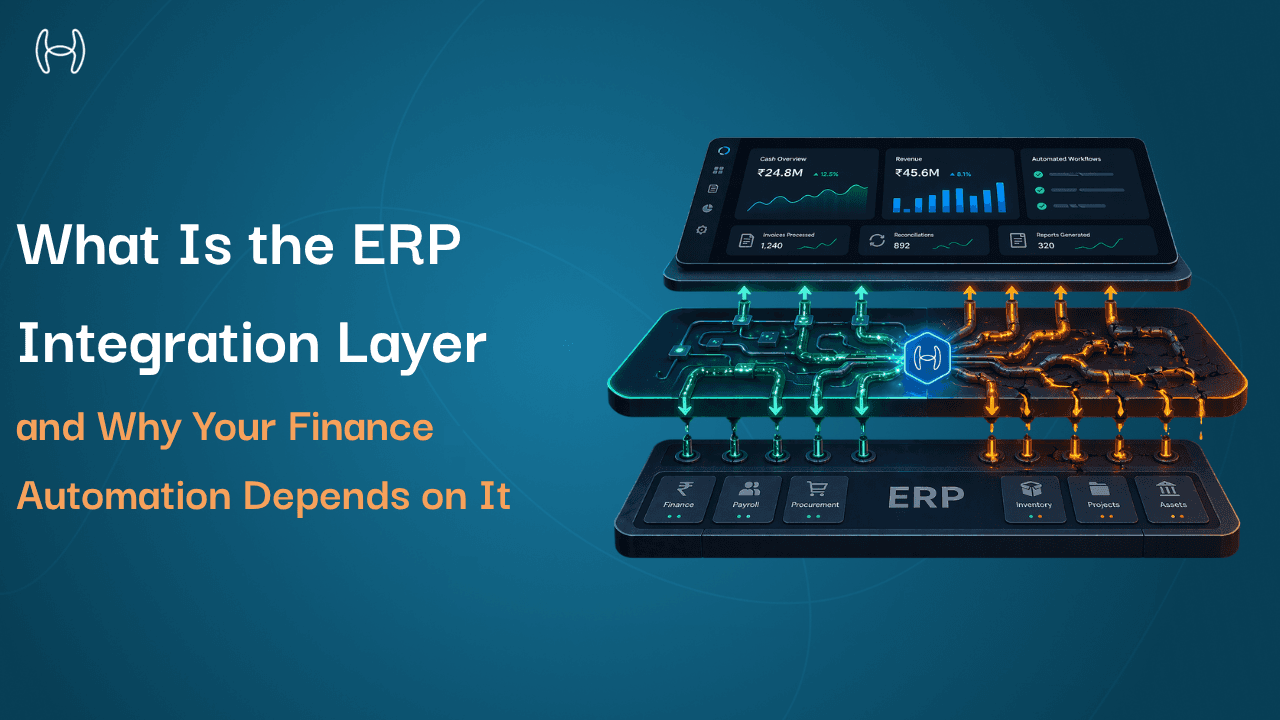
If you have ever deployed a finance automation tool and found that it was pulling data from yesterday rather than right now, or that vendor records in your automation platform did not match what was in your ERP, or that invoices processed by the tool were not posting back to the ledger correctly, the problem was almost certainly not the automation tool itself. It was the integration layer connecting it to your ERP.
The integration layer is one of the least explained parts of ERP architecture, and one of the most consequential. Finance leaders evaluating automation platforms rarely ask about it specifically, because it is not visible in a product demo. But it determines whether the automation tool you buy actually works the way it is supposed to, or whether it delivers polished-looking outputs built on stale, incomplete, or one-directional data.
This blog explains what the ERP integration layer is, what it does, what breaks when it is poorly built, and what a well-built integration layer enables for finance automation. It is written for finance leaders, operations managers, CFOs, and anyone evaluating or implementing an AP or procurement automation tool on top of an existing ERP.
What an ERP Is and Where the Integration Layer Fits
An ERP, or Enterprise Resource Planning system, is the central software that manages a company's core operations: finance, procurement, inventory, HR, and reporting. Every transaction the business makes flows through it. It is the system of record.
Most modern ERP systems are built in layers. A typical ERP includes an infrastructure layer at the base, a platform and middleware layer above that, then the core application modules where day-to-day work happens, followed by the user interface, and finally the reporting and analytics layer at the top. Some modern deployments add a sixth layer for AI and automation above all of these.
The integration layer sits within Level 2, the platform and middleware level. It is the part of the architecture that connects the ERP's core to everything outside it: third-party automation tools, procurement platforms, AP systems, tax engines, banking connectors, and any other software that needs to read from or write to the ERP.
If you want to understand the full architecture of how these layers relate to each other, the guide to how many levels a typical ERP system includes covers each level in detail, including what the middleware and integration layer does within the broader architecture and how AI connects at Level 6.
What the Integration Layer Actually Does
The integration layer is not a single piece of software. It is a set of technical components that work together to move data between the ERP and the tools connected to it. Understanding what those components are helps explain why integration quality varies so much across automation platforms.
APIs (Application Programming Interfaces) are the defined channels through which external systems can request and send data to the ERP. When an automation tool wants to read a vendor record from the ERP or post a processed invoice back to the ledger, it does so through an API call. The quality and depth of the API determines what data is accessible, how quickly, and in what format.
Database connectors are direct links into the ERP's underlying data structures. Some ERPs expose rich APIs that cover most data objects. Others have limited APIs for certain data types, and connectors go directly to the database layer to access what the API cannot reach. Building a reliable database connector requires deep knowledge of the specific ERP's data model.
ETL pipelines (Extract, Transform, Load) move data in batches. The system extracts data from the ERP at intervals, transforms it into a format the receiving system understands, and loads it into that system. Batch-based ETL is common in older integrations and has a fundamental limitation: the data is always slightly out of date.
Workflow engines sit within the integration layer and trigger automated actions when certain conditions are met. An invoice arrives, the workflow engine triggers a validation check against the ERP's PO data, routes the result to the correct approver, and initiates the posting sequence. Without a workflow engine in the integration layer, each of these steps requires a manual handoff or a separate configured automation.
Real-time bidirectional sync is the capability that separates genuinely useful integrations from ones that look good in a demo. Bidirectional means data flows in both directions: the automation tool reads from the ERP and writes back to it. Real-time means that reading and writing happen as events occur, not on a schedule. An invoice processing automation tool that reads vendor master data from the ERP in real time will always apply the correct GL code, the correct payment terms, and the correct entity mapping because it is working with current data. One that pulls vendor data in a nightly batch will sometimes work with records that changed since the last sync.
What the Integration Layer Looks Like in Practice
Here is how data flows between a finance automation platform and an ERP through a well-built integration layer:
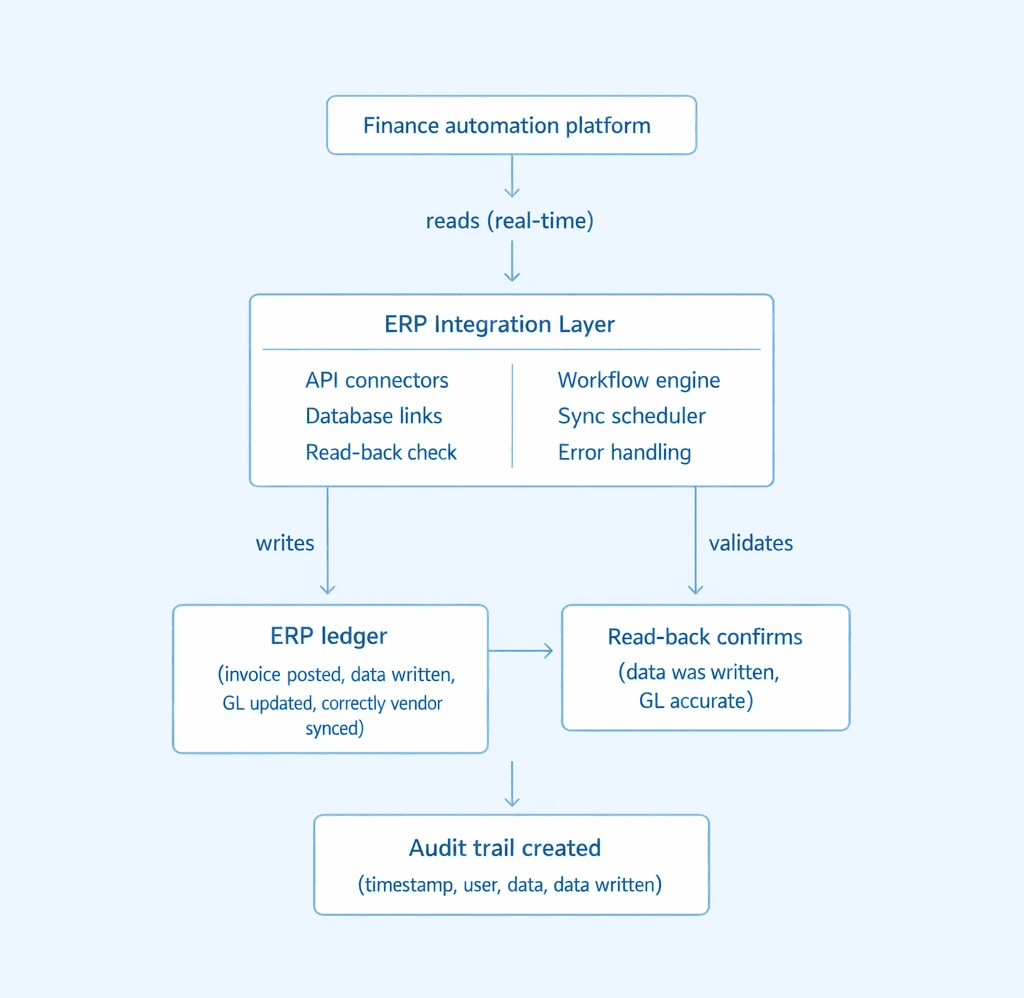
Every write to the ERP is confirmed by reading back the written data and comparing it to the intended input. If there is a discrepancy, the integration layer retries or raises an alert. This read-back verification is what makes the audit trail reliable, and it is not present in all integration architectures.
Batch Sync vs Real-Time Integration: What the Difference Means for Finance
The distinction between batch and real-time integration is not a technical detail. It has direct consequences for the accuracy of every finance process that depends on ERP data.
Capability | Batch Sync Integration | Real-Time Bidirectional Integration |
Data freshness | Hours to one day old | Current at point of processing |
Invoice GL coding | Based on yesterday's chart of accounts | Based on live chart of accounts |
Vendor master accuracy | May reflect outdated payment terms or bank details | Always reflects current vendor record |
Budget availability checks | Against a snapshot that may be stale | Against live ERP budget balances |
Write-back to ERP | Manual export or scheduled batch | Automatic, immediate, with read-back verification |
Error detection | Discovered at reconciliation | Detected and retried at point of failure |
Audit trail | Reconstructed manually | Created automatically per transaction |
Multi-entity support | Separate exports per entity, manually combined | Unified view with entity-specific connectors |
What Breaks When the Integration Layer Is Poorly Built
Most finance automation failures that get blamed on the automation tool are actually integration layer failures. Here are the most common ones.
Stale data produces wrong outputs. An automation platform that reads vendor master data from the ERP once a day will sometimes apply payment terms that changed yesterday, GL codes that were updated last week, or entity mappings that no longer exist. The automation processes the invoice perfectly according to its own rules, but the rules it is applying are out of date. The result looks like an automation error. It is an integration failure.
One-way sync leaves the ERP behind. Some automation tools read from the ERP but write results to their own database rather than posting directly back to the ledger. The finance team then has to manually transfer or approve exports back into the ERP. This defeats a large part of the purpose of automation and creates a second reconciliation problem: keeping the automation tool's database aligned with the ERP.
Missing data objects create gaps. Not all ERPs expose all of their data through standard APIs. If an automation platform's connector only covers the data objects the ERP's standard API exposes, it will be missing fields that exist in the ERP's database but are not surfaced through the API. Custom GL codes, company-specific expense categories, and entity-level configurations often fall into this gap. The automation platform processes transactions without access to these fields and either ignores them or applies defaults that are wrong for the specific company.
No error handling means silent failures. When a write transaction to the ERP fails, the integration layer needs to detect the failure, retry, and escalate if the retry fails. Integration layers without robust error handling let failures pass silently. The invoice appears to have been processed. The AP team assumes it is posted. The ERP never received it. This surfaces at reconciliation time, when the discrepancy has to be investigated and resolved manually.
Batch sync cannot support real-time workflows. Finance processes that depend on current data, including three-way matching, real-time accrual calculation, and live budget checking, cannot function correctly on batch-synced data. A procurement tool that checks budget availability against ERP data that is twelve hours old will approve purchases against budgets that may have already been consumed.
What a Well-Built Integration Layer Enables
When the integration layer is built correctly, finance automation does what it is supposed to do. The difference is significant across every process it touches.
Invoice processing posts directly to the ERP. Invoices are captured, validated, matched against live PO and goods receipt data from the ERP, coded to the correct GL account using current chart of accounts data, approved through the correct workflow, and posted to the ledger, all without anyone exporting files or re-entering data. For a full picture of how PO automation connects to ERP integration, the guide on integrating purchase order automation with ERP systems covers the architecture and data flows in detail.
Procurement runs on live budget and policy data. A purchase requisition approved by the automation platform is approved against the actual current state of the budget in the ERP, not a snapshot from yesterday's export. The approved PO is dispatched and recorded in the ERP immediately. No manual transfer, no lag.
Accruals are calculated from live goods receipt data. The accrual engine reads goods receipts from the ERP as they are created, identifies unbilled items, calculates the liability, and posts the accrual entry directly. The period-end accrual reflects the actual state of the ERP at that moment.
Multi-entity deployments stay in sync. When a business operates across multiple entities, each with its own ERP configuration or in some cases its own ERP instance, a well-built integration layer maintains separate connectors for each entity while providing a unified view above them. Vendor data, GL structures, and policy configurations for each entity remain distinct and accurate without manual management.
How Hyperbots Builds Its Integration Layer
The depth and architecture of the Hyperbots ERP integration is one of the genuine technical differentiators of the platform, and it is worth understanding specifically because it explains why automation outcomes are different when the integration is built this way.
Hyperbots uses pre-built connectors for a wide range of ERP platforms including cloud, private cloud, and on-premise deployments. For ERPs with existing connectors, integration is completed in two to four weeks. For ERPs without a pre-built connector, Hyperbots builds a custom connector as part of the implementation.
The connectors are bidirectional and real-time. Every read from the ERP pulls current data. Every write to the ERP is confirmed by a read-back check that validates the written data against the intended input before the transaction is considered complete. If a write fails, the system retries automatically and escalates to an exception report if the retry does not resolve it. No silent failures.
The integration framework is configuration-driven, meaning it adapts to company-specific ERP customisations: custom fields, custom GL structures, entity-specific configurations, and non-standard data models. This is what makes it possible to deploy in environments where the ERP has been heavily customised without rebuilding the connector from scratch for each deployment.
The sync frequency is configurable by data type. Vendor master data, GL codes, and chart of accounts are synced in real time because invoice processing depends on them being current. Other data types, such as budget summaries and reporting aggregates, can be synced at hourly or daily intervals depending on the organisation's requirements.
Hyperbots also supports multi-ERP deployments. Organisations that have grown through acquisition and operate different ERP systems across entities can deploy Hyperbots co-pilots across all of them, with entity-specific connectors, entity-specific configurations, and a single unified interface for the finance team. The Hyperbots platform is designed around this architecture: a layer that sits above the ERP, connects to it deeply, and operates across it consistently regardless of which ERP each entity runs.
For organisations evaluating what an API-first approach means for the quality of integration between automation tools and ERP systems, the analysis of API-first procurement automation platforms explains the architectural advantages in detail. And for teams that want to understand what rapid ERP integration onboarding looks like in practice, the faster onboarding with Hyperbots ERP integration overview covers the implementation process and what teams can expect between kickoff and go-live.
What to Ask When Evaluating Any Finance Automation Platform
Before selecting an automation platform, ask these questions about the integration layer specifically:
Is the sync bidirectional? Can the platform write back to the ERP directly, or does it require a manual export or approval step to move data back into the ledger?
Is the data real-time or batch? What is the maximum lag between a change in the ERP and that change being reflected in the automation platform's processing logic?
What happens when a write fails? Does the platform detect and retry failed write transactions? How are failures reported, and by whom?
Does it cover custom ERP fields? If the ERP has been customised with company-specific fields, GL structures, or entity configurations, can the connector read and write those fields or only the standard data model?
How long does integration take? For pre-built connectors, two to four weeks is achievable. If a vendor is quoting months for a standard ERP, ask why.
Does it support multiple ERP instances? For organisations managing more than one ERP across entities, the integration layer needs to maintain separate connections while providing a unified operating view.
The Bottom Line
Finance automation is only as good as the integration layer underneath it. An automation platform with excellent AI, accurate invoice processing, and strong workflow logic will still produce wrong results if it is working with stale data, cannot write directly back to the ERP, or has gaps in the data objects it can access.
The integration layer is not a detail to review after selecting a platform. It is one of the primary criteria the selection should be based on. The quality of the connection between the automation tool and the ERP determines the quality of every output that automation tool produces.
Hyperbots' pre-built ERP connectors deliver real-time, bidirectional integration with read-back verification, configurable sync frequencies, and support for custom ERP structures across cloud, private cloud, and on-premise deployments, with integration completed in two to four weeks. Request a demo.
FAQs
What is the ERP integration layer?
The ERP integration layer is the technical infrastructure that connects an ERP system to external tools and platforms. It includes APIs, database connectors, workflow engines, and sync mechanisms that allow data to flow between the ERP and connected systems.
Why does integration quality affect finance automation outcomes?
Finance automation tools depend on ERP data to make decisions: GL codes, vendor records, PO data, goods receipts, budget balances. If that data is pulled from the ERP in batches rather than in real time, or if write-backs to the ERP fail silently, the automation produces outputs based on incorrect or incomplete information.
What is the difference between real-time and batch sync?
Real-time sync means data is exchanged as events occur. Batch sync means data is exchanged at scheduled intervals, such as hourly or nightly. Finance processes that depend on current data, including three-way matching and live budget checks, require real-time sync to produce accurate results.
How long should ERP integration take?
With pre-built connectors for common ERP platforms, integration should be completable in two to four weeks. For ERPs without a pre-built connector, Hyperbots builds a custom connector as part of the implementation, adding two to four weeks to the timeline.