How to Take a Customer Off Credit Hold in Epicor Kinetic
A practical guide to reviewing credit holds, assessing AR exposure, and deciding when to release customers in Epicor Kinetic.

A sales order is ready, the warehouse is waiting, and Epicor Kinetic flags the customer as being on credit hold. Sales wants to know why. Finance wants to know whether it is safe to release.
In Kinetic, a credit hold is a control on the customer record. Depending on how your company has configured it, Kinetic can warn users or stop them when they enter orders, create shipments, or process certain AR invoices for that customer. The hold may have been set manually by someone in finance, or applied automatically because the customer's open credit went over their credit limit or their invoices passed an aging threshold.
That is why it pays to understand the hold before clearing it. Unchecking a box takes seconds. If the balance or overdue invoices behind the hold are still there, the hold can return, and the order may still not move. Credit holds sit where sales and receivables meet in the Epicor Kinetic order-to-cash workflow, so resolving one usually means checking both sides.
Below, we walk through why the customer was put on hold, what to review, how to remove the hold in Kinetic, how to confirm the order can proceed, and what to do if the hold comes back.
Why Was the Customer Put on Credit Hold?
Epicor documents three main ways a customer ends up on hold. Each one needs a different fix, so identify which one applies first.
Hold type | What places it | What clears it for good |
Manual credit hold | A finance user selects the Credit Hold option on the customer record | A user with access clears it, per company policy |
Credit limit hold | Kinetic finds the customer's total open credit is above their credit limit, for example when the Mass Credit Information Update process runs | Open credit falls back under the limit (payments applied, credit memos, a limit change) |
Aging hold | The customer has open invoices that meet the criteria of the aging code assigned to them | Overdue invoices are paid or have credit memos applied |
Manual holds. Epicor's training on entering credit information for a customer shows the customer's credit details as the place to set credit limits and put a customer on or off credit hold. Some companies use manual holds for business-specific reasons, such as prepay customers who should not ship until payment arrives.
Credit limit holds. According to Epicor's feature documentation, the Mass Credit Information Update process places customers on credit hold when their total open credit is higher than their assigned credit limit. It also places their open orders and unposted miscellaneous AR invoices on credit hold. Epicor user-community explanations note that a customer-level option controls whether open, uninvoiced orders count toward that open credit total, so check how your customer is set up.
Aging holds. Aging hold arrived in Epicor ERP 10.2.200 and carries into Kinetic. It uses aging codes, set up in Aging Code Maintenance, that define the number of days past the invoice due date, the minimum overdue balance, and any grace period. Aging codes are optional, so if the customer has no aging code, overdue invoices do not trigger this hold.
What about payment history, customer risk, or a slow-paying pattern? These are common inputs to a credit manager's judgment. Epicor's documentation does not describe them as automatic hold triggers. If your holds seem to follow rules beyond credit limit and aging, your company may have added its own logic, such as a BPM (business process management directive). Ask your Epicor administrator.
One more setting shapes what users experience. In Company Configuration, the Credit / Aging Limit Actions settings decide whether a hold produces a warning or a stop when someone creates an order or a shipment for the customer. So two companies on the same Kinetic release can see very different behavior from the same hold.
How to Review a Customer's Credit Status in Epicor Kinetic
Before releasing anything, gather the facts. The review moves from the customer record, to the hold status, to the receivables behind it, and ends with a finance decision to release or retain.
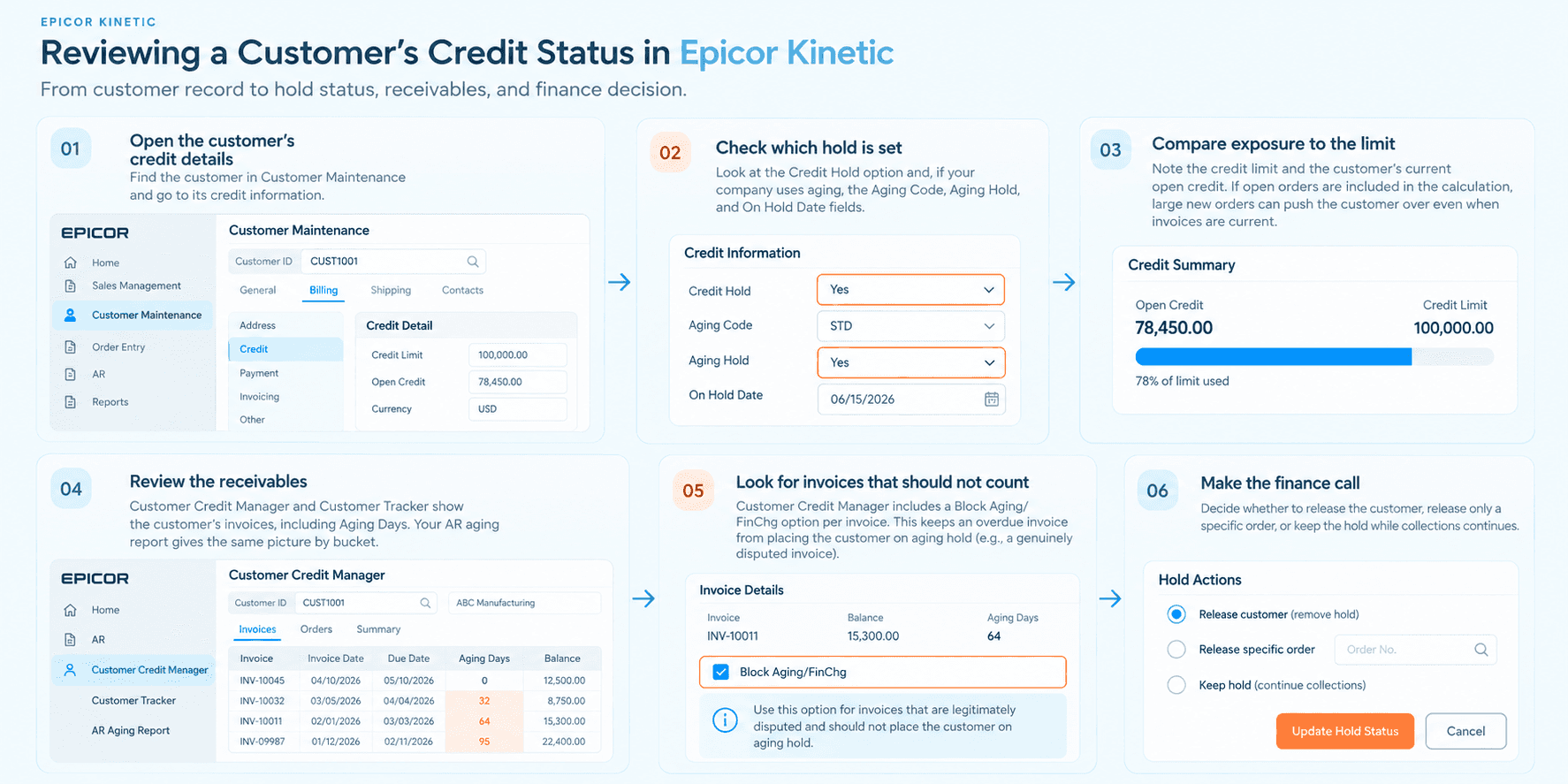
Open the customer's credit details. Find the customer in Customer Maintenance (the Customer record) and go to its credit information. In classic Epicor 10 layouts this was Billing > Credit > Credit Detail. The Kinetic browser groups the same fields differently, and placement can vary by release and customization.
Check which hold is set. Look at the Credit Hold option and, if your company uses aging, the Aging Code, Aging Hold, and On Hold Date fields. Credit hold and aging hold are separate flags, and either one can hold the customer's orders.
Compare exposure to the limit. Note the credit limit and the customer's current open credit. If open orders are included in the calculation, large new orders can push the customer over even when invoices are current.
Review the receivables. Customer Credit Manager and Customer Tracker both show the customer's invoices, including Aging Days (how many days an invoice is past due). Your AR aging report gives the same picture by bucket.
Look for invoices that should not count. Customer Credit Manager includes a Block Aging/FinChg option per invoice. Epicor describes it as keeping an overdue invoice from placing the customer on aging hold, which is useful for a genuinely disputed invoice.
Make the finance call. Decide whether to release the customer, release only a specific order, or keep the hold while collections continues.
Since Release 2026.1, Epicor Kinetic has replaced the Smart Client (classic forms) with its browser-based interface. If you're looking for a Customer Credit Manager or Customer Tracker, the exact navigation can vary by release, role, and configuration, so use the Kinetic menu/search interface available in your environment.
How to Take a Customer Off Credit Hold in Epicor Kinetic
Once the review supports a release, the change itself is short. Epicor documents two places where a customer can be taken off credit or aging hold manually: the Customer record and Customer Credit Manager. Your security setup decides who can do it.
Open the Customer's Credit Information
Open the customer in Customer Maintenance and go to its credit details, or open Customer Credit Manager and select the customer. Customer Credit Manager is usually the better starting point for finance, because it puts the customer's credit settings, orders on credit hold, and invoices in one place.
Review the Credit Hold Status
Confirm which hold is active. If Credit Hold is selected, the customer is on credit hold. If Aging Hold is selected, the customer is on aging hold, and the On Hold Date shows when it was applied. A customer can have both at once.
Check the cause one last time against the table above. If open credit is still over the limit, or overdue invoices still meet the aging code criteria, decide now whether you are releasing on an exception basis or waiting until the cause is resolved.
Remove the Credit Hold
Clear the Credit Hold option. If the customer is also on aging hold and your review supports releasing it, clear Aging Hold as well. Removing one does not remove the other.
Depending on your release and configuration, Kinetic may prompt you about the customer's open orders when you change the hold. Read any prompt carefully, because it affects whether existing orders are held or released.
If the customer should stay on hold but one order needs to ship, you do not have to release the whole account. Customer Credit Manager lists the customer's orders on credit hold, and releasing a specific order there marks that order with a credit override while the customer stays on hold. Epicor user-community guidance favors this for one-off exceptions.
Save the Change and Verify the Customer Status
Save the record. Then reopen the customer in Customer Tracker or Customer Credit Manager and confirm the hold fields show what you expect.
Next, check where the hold shows up for other teams. Epicor documents a Credit Hold indicator in Order Entry, Order Tracker, Customer Shipment Entry, and Opportunity/Quote Entry for customers on credit or aging hold. If that indicator still appears, one of the holds is still active.
Verify That the Order Can Proceed
Removing the customer's hold does not guarantee the order is free to move. Kinetic tracks credit status at the order level too, and other controls can hold an order for reasons unrelated to credit.
When you placed a customer on hold, their open orders were likely put on credit hold with them. Epicor documents that the Mass Credit Information Update takes open orders off credit hold when it takes the customer off. When you clear a hold manually, whether the orders follow can depend on your release and how you answered any prompts. So open the order and check it directly.
If "I removed the customer hold, so why isn't my order moving?" is your question, work through these checks:
What you see | Likely cause | Where to look |
Order still shows the Credit Hold indicator | Aging hold is still set, or the order-level credit hold was not released | Customer credit details; the Orders list in Customer Credit Manager |
Order cleared, then held again after a save | Open orders count toward credit, and the new total puts the customer over the limit | Credit limit vs. open credit in Customer Credit Manager |
Order shows no credit hold but still won't ship | A manual order hold (the On Hold option on the order header) or unfirm releases | Order Entry, order header and releases |
Shipment is blocked or warns | Credit / Aging Limit Actions for shipments, or an aging hold | Company Configuration; customer credit details |
Hold makes no sense for this customer | Shared credit through a national account, stale credit totals, or custom logic such as a BPM | Your Epicor administrator |
A few notes on that table. The On Hold option on the order header is a manual order hold, separate from credit hold, and users often use it for their own business reasons. Shipment behavior follows the Credit / Aging Limit Actions settings in Company Configuration, which can be set to warn or stop. And if the customer belongs to a national account, credit may be shared across related customers, so the parent's exposure matters too.
If your company requires a second approval for credit releases, make sure that step has happened before the order moves. Kinetic records the change, but your approval policy lives with your finance team.
What If the Credit Hold Comes Back?
Yes, Epicor Kinetic can put a customer back on credit hold automatically. It usually means the underlying condition was never resolved.
The main mechanism is the Mass Credit Information Update. Per Epicor's documentation, it recalculates each customer's credit status and can include credit hold, aging hold, or both. When it runs with credit hold included, it places customers back on hold if open credit is still above the limit. With aging hold included, it re-applies aging hold if any open invoice still meets the aging code criteria. Many companies schedule it to run overnight, which is why a hold cleared in the afternoon can reappear the next morning.
Other common causes:
New order activity. If open orders count toward credit, adding or changing an order can push the customer over the limit again.
Payments received but not applied. Epicor documents that aging hold comes off only when overdue invoices are paid or have credit memos applied. A check sitting as unapplied cash does not lower the overdue balance Kinetic sees.
Released orders re-held. Epicor users have reported the scheduled update putting manually released orders back on hold. A Company Configuration option under the sales order settings, described in the community as Retain Credit Override, is often suggested. Confirm its name and behavior in your release.
Custom logic. A BPM or other customization may place holds on its own schedule.
When a hold returns, work through it in this order:
Confirm which hold returned. Credit hold or aging hold point to different causes.
Recheck the underlying numbers. Compare open credit to the credit limit, and review invoices by aging days.
Resolve the cause. Collect overdue balances, apply payments that have arrived, issue valid credit memos, or have an approver adjust the limit.
Reassess and release per policy. Release the customer, or release only the order if the account should stay on hold.
If the credit totals themselves look wrong, for example after a data migration, Epicor administrators sometimes run a credit recalculation. That is an administrator task, and it is worth raising with your Epicor partner or support team.
How Credit Hold Management Becomes Difficult at Scale
Notice the pattern in the last two sections. The click that removes a hold is simple. What decides whether the release holds, and whether it was the right call, is the state of the customer's receivables.
Kinetic does its part well here. It stores the credit limit, calculates open credit, applies holds on schedule, and enforces the warn or stop rules you set. What it relies on is current data, and keeping that data current is ongoing finance work:
Monitoring AR aging and spotting customers drifting toward an aging threshold
Following up on overdue invoices before they trigger a hold
Tracking promises to pay, and noticing when one is broken
Separating genuine disputes from slow payment, so a pricing or quantity issue doesn't hold an account
Applying incoming payments quickly, so paid invoices stop counting as overdue
Answering sales when they ask why an order is blocked, and when it will clear
Reassessing the same customers every time the balance moves
For a handful of customers, a credit manager can keep this in their head. Across hundreds of accounts, several entities, and daily order volume, it becomes a queue. The hold itself is just where that queue becomes visible. Our look at finance gaps around Epicor workflows covers this pattern across AP and AR in more detail.
How Automation Can Help With Credit Hold Management
Automation does not need to touch the Credit Hold option to make a difference. It helps most with the receivables work that feeds the credit decision.
Useful areas to automate:
Receivables monitoring. Continuously watching aging and flagging customers who are about to cross a threshold, instead of finding out when an order stops.
Prioritization. Ranking which overdue accounts to work first, by amount, risk, and impact on open orders.
Follow-ups. Sending reminders and escalations on a schedule, and logging responses.
Promise-to-pay tracking. Recording commitments and flagging when a date passes without payment.
Dispute handling. Catching disputes early and routing them to the right owner.
Cash application. Matching incoming payments and remittances to invoices quickly, so the AR balance in Kinetic reflects what customers have actually paid.
Review alerts. Telling finance which held customers now look ready for review.
A note on controls. Releasing a credit hold is a credit decision, and it should stay with an authorized person under your approval policy. Good collections automation prepares that decision with current data and a clear record. It does not replace the approver.
Why Hyperbots Can Help
Hyperbots works on the receivables side of the credit hold: the collections and cash application work that determines whether a customer's exposure is shrinking. The credit decision and the hold itself stay in Kinetic, with your finance team.
Here is how the pieces connect. A customer has outstanding exposure, so finance needs visibility into receivables and payment behavior, and collections activity starts. That is where the Hyperbots Collections Co-Pilot fits. According to Hyperbots, its AI agents:
Prioritize collection work dynamically, based on payment behavior, invoice risk, dispute likelihood, and aging impact
Automate pre-due and post-due reminders and follow-ups by email and phone
Capture and track promise-to-pay commitments, with reminders and escalation when one is broken
Detect dispute signals, such as price, quantity, tax, or PO mismatches, and route them to the right owner
Signal delinquency risk to sales and credit teams through role-based alerts
Write collection actions, notes, dispute status, and promises to pay back to the ERP
When the customer pays, the Hyperbots Cash Application Co-Pilot takes over. It extracts remittance and bank statement data, matches payments to invoices even when remittance data is incomplete, routes short payments and deductions for review, and posts cash applications back to the ERP. That matters for credit holds specifically: Epicor removes aging hold only once overdue invoices are paid or credited, so cash that sits unapplied keeps a customer on hold.
With collections moving and payments applied, the AR position in Kinetic is current. Finance can reassess the customer and release the hold, or the order, with confidence.
Layer | Role in credit hold management |
Epicor Kinetic | System of record: credit limits, holds, orders, and AR transactions |
Hyperbots | Automation around collections and cash application, writing results back to Kinetic |
Finance team | Credit policy, approvals, judgment, and exceptions, with human-in-the-loop review where it counts |
Hyperbots already runs alongside Epicor Kinetic in multiple live production environments. The platform has been deployed with Epicor customers across finance workflows, demonstrating its ability to operate alongside Kinetic in production. For ERPs where Hyperbots has an existing API connector, including Epicor, integration typically takes 6 to 8 weeks.

Best Practices for Managing Credit Holds in Epicor Kinetic
These combine Epicor-specific checks with general finance controls. Adapt them to your own credit policy.
Review the Reason Before Releasing the Hold
Identify whether it is a manual, credit limit, or aging hold before you touch it. Each has a different fix, and releasing without knowing which one applies is how holds come back.
Check the Customer's AR Position
Look at open credit against the limit and at invoices by aging days. Check for payments received but not yet applied, since they can make a customer look worse than they are.
Follow Credit Approval Controls
Limit who can change Credit Hold, Aging Hold, and credit limits through Kinetic security, and set approval thresholds in your credit policy. This is general good practice rather than an Epicor requirement.
Verify the Affected Order
After any release, open the order itself. Confirm the credit hold indicator is gone and that no manual order hold or release setting is still blocking it.
Document the Decision
Record why the hold was released, who approved it, and any conditions, such as a promise to pay. Use a note on the customer or order, or your collections system, so the next reviewer has the context.
Address the Underlying Issue if the Hold Returns
A returning hold is information, not an annoyance. Treat it as a prompt to resolve the balance, the overdue invoices, or the unapplied cash, rather than clearing it again.
Removing an Epicor Kinetic Credit Hold Is Quick; Keeping AR Current Is the Real Work
Taking a customer off credit hold in Epicor Kinetic is straightforward once you know which hold applies and whether the cause is resolved. Clear it on the customer or in Customer Credit Manager, release a single order when the account should stay held, and verify the order before telling sales it is free.
The harder part is everything upstream: monitoring aging, following up on overdue invoices, tracking promises to pay, and applying cash quickly. When that work keeps pace, credit decisions get faster and holds stop bouncing back. That is the work Hyperbots automates alongside Kinetic.
FAQ
How do I take a customer off credit hold in Epicor Kinetic?
Open the customer in Customer Maintenance or Customer Credit Manager, go to its credit details, clear the Credit Hold option (and Aging Hold, if set), and save. Then check the customer's open orders, because they may carry their own credit hold. To release a single order while the customer stays on hold, use the orders list in Customer Credit Manager.
Why is my customer on credit hold in Epicor Kinetic?
Usually one of three reasons. Someone placed a manual hold; the customer's open credit exceeded their credit limit; or they have overdue invoices that meet the criteria of their aging code. Custom logic, such as a BPM, can also place holds in some environments.
How do I check a customer's credit status in Epicor Kinetic?
Open the customer's credit details in Customer Maintenance, or use Customer Credit Manager or Customer Tracker. Look at Credit Hold, credit limit, Aging Code, Aging Hold, and On Hold Date, then review the customer's invoices and their aging days.
Why is an order still on hold after removing the customer credit hold?
Common reasons include an aging hold that is still set, an order-level credit hold that was not released, or new order activity pushing the customer back over the limit. The order may also be held by something unrelated to credit, such as the manual On Hold option on the order header or shipment rules set in Company Configuration.
Can Epicor Kinetic automatically put a customer back on credit hold?
Yes. The Mass Credit Information Update process places customers on credit hold when open credit is above their limit, and on aging hold when invoices meet their aging code criteria. Companies often schedule it, so a hold cleared manually can return on the next run if the cause remains.
Can AR aging affect a customer's credit status in Epicor?
Yes, if your company uses aging codes. Aging codes set how many days past due, what minimum overdue balance, and what grace period trigger an aging hold. The hold comes off when the overdue invoices are paid or have credit memos applied.
Can finance teams automate credit-hold-related workflows?
Yes, mainly the work around the decision. Collections follow-ups, promise-to-pay tracking, dispute routing, and cash application can all be automated, which keeps the AR data behind Kinetic's credit checks current. The release decision itself should stay with an authorized approver.
See How Hyperbots Supports Faster, Better-Informed Credit Decisions
If your team spends more time chasing overdue balances and matching payments than making credit calls, the bottleneck is the receivables work behind the hold. See how Hyperbots automates collections and cash application alongside Epicor Kinetic, so your AR data stays current and credit reviews move faster.