Epicor Kinetic Order to Cash Automation: AR Guide (2026)
A Practical Guide to AR, Cash Application, Credit, and Collections in Epicor Kinetic
Epicor Kinetic Order to Cash Automation: AR Guide (2026)
Where Order to Cash Work Really Happens in Epicor Kinetic
For a manufacturer, order to cash (O2C) is where operational work becomes revenue. A customer places an order, the plant builds or picks it, the shipment goes out, an invoice is raised, and eventually cash lands in the bank and gets applied to the right invoice. Every step has an operational side and a financial side, and both have to agree.
Epicor Kinetic sits at the center of that process for many mid-market manufacturers. It records the sales order, the shipment, the AR invoice, the cash receipt and the resulting general ledger impact, so it provides the ERP foundation that O2C depends on. This guide is the receivables-side companion to our procure-to-pay guide for Epicor AP automation, and it follows the same logic: start with what Kinetic does, then look at the work that still sits around it.
That distinction matters for anyone evaluating Epicor Kinetic order to cash automation. Recording and managing O2C transactions is one job. Doing the operational work around those transactions is another: reading remittances, working out which invoices a payment covers, investigating short payments, reconciling bank activity, and deciding which overdue accounts need attention today.
This guide walks through AR, cash receipts, cash application, reconciliation, collections and exception handling in Kinetic, then looks at how Agentic AI can take on the repetitive parts of that work and how Hyperbots fits alongside Kinetic rather than replacing it. The short version: Epicor handles the core O2C process. The interesting question is what happens around those transactions, and how much of that work can be automated.
How Epicor Kinetic Handles Order to Cash on Its Own
The order-to-cash process is the business cycle that runs from a customer order through fulfillment, invoicing, receivables, payment, cash application and collections. The process itself is broadly consistent across ERP systems. What differs is how each ERP implements it: the screens, terminology, controls and modules it uses to carry a transaction from one stage to the next.
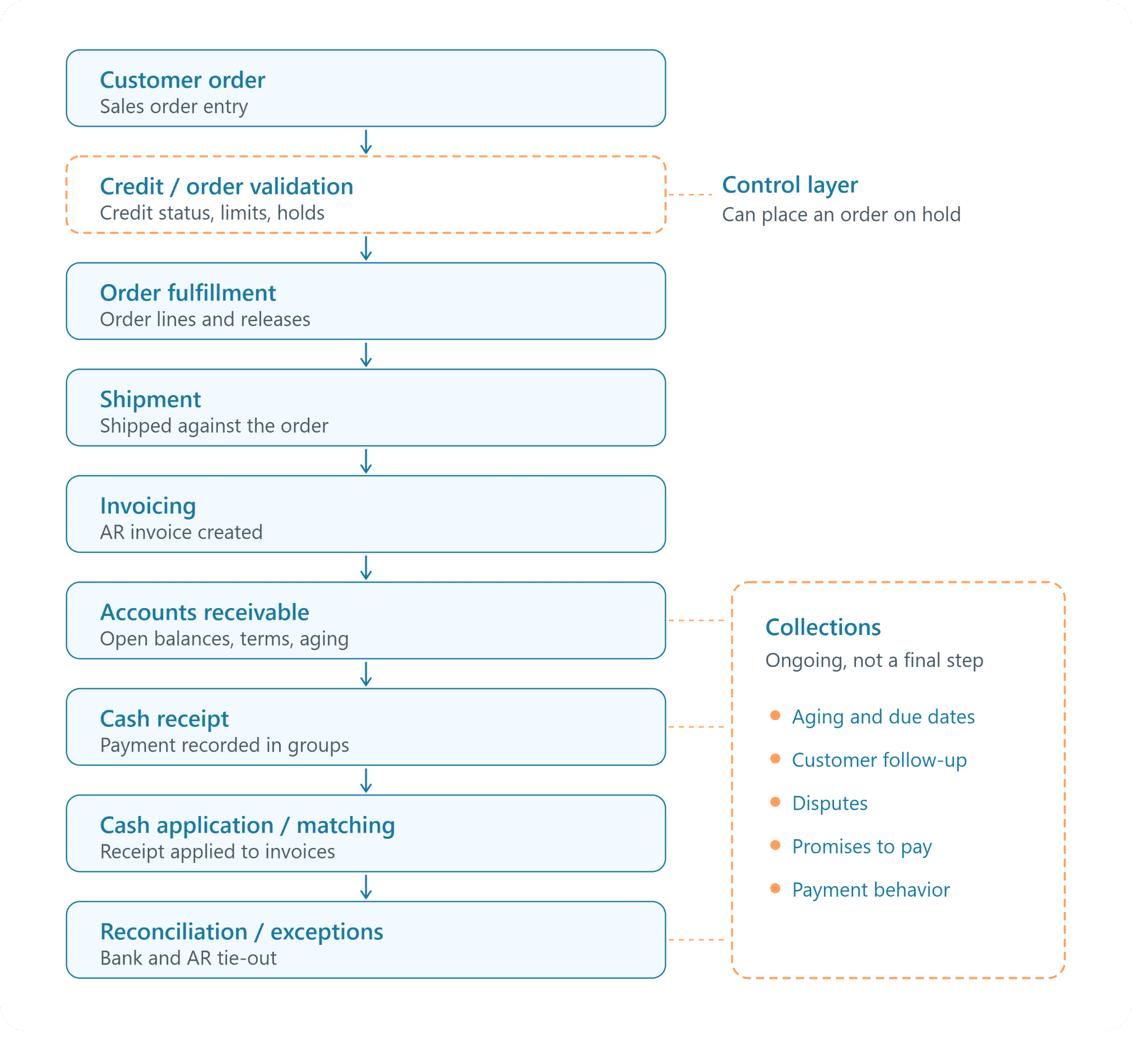
So O2C is not different in Epicor. What follows is how Kinetic implements it.Two details in that flow are worth calling out. Credit validation is a control that screens an order rather than a standalone stage every order must pass through in sequence. Collections runs alongside AR, cash receipts and reconciliation for as long as a balance is open, rather than starting after cash application.
Order Management in Epicor Kinetic
Everything in Kinetic's O2C flow starts with the sales order. Within Epicor Kinetic sales management, order management covers entering and maintaining customer orders, applying value- or quantity-based discounts, and using blanket orders that create multiple releases (firm or non-firm) per sales order line. Epicor positions the Sales Management suite as a way to streamline your order-to-cash cycle.
A few adjacent capabilities are presented as distinct features rather than core order entry. On Epicor's Kinetic Sales Management page, Sales Order Automation, Configure Price Quote, Epicor Commerce and EDI/Demand Management are each listed separately, so buyers should confirm which of these are in scope for their licence.
Once an order is saved, its lines and releases drive what happens next: planning and production for make-to-order items, picking for stocked items, and eventually shipment. The order record carries the customer, pricing, quantities and dates that later flow into shipping and invoicing.
Credit Management and Order Validation
Credit management in Kinetic works as a screening layer on top of the order. Epicor states that users can check customer credit status at any stage of order management. In the customer record, the credit detail is where teams define the credit limits you want to place on the current customer and place the customer on or off credit hold.
In practice, that means an order for a customer who is over limit or on hold can be stopped from moving forward until someone with the right authority reviews it and releases it. The order is still recorded; the control simply decides whether it proceeds.
Order Fulfillment and Shipment
Fulfillment in Kinetic is organized around order lines and releases. Because a single line can carry several releases, an order can be fulfilled across more than one shipment, and partial fulfillment of a release is recorded against the original order rather than as a new one.
The shipment is the transition point between operations and finance. Once goods are shipped and the shipment is confirmed, the transaction is ready to become a receivable. Kinetic also supports field-based workflows here: Epicor notes that teams can manage sales orders and shipments directly from your customers' sites through mobile applications that integrate with Kinetic.
Invoicing in Epicor Kinetic
Invoicing is where a fulfilled sale becomes a receivable. Customer invoices are created and managed in AR Invoice Entry, and Epicor's own training library covers tasks such as printing multiple invoices from AR Invoice Entry and printing an AR invoice in draft mode for review.
For shipment-based invoicing, Kinetic users typically pull shipped, not-yet-invoiced shipments into an invoice group from AR Invoice Entry (the "Get Shipments" action), so invoice lines inherit the quantities and prices from the order and shipment. Once the invoice group is posted, the invoice becomes an open receivable and the corresponding entries flow to the general ledger.
Accounts Receivable in Epicor Kinetic
Kinetic's financial management suite processes transactions for General Ledger (GL), Accounts Payable (AP), and Accounts Receivable (AR), so open invoices, customer balances and invoice status are maintained in the same system that recorded the order and shipment. For aging visibility, Epicor's training library includes printing the Aged Receivables Report.
A common practical question is how the Epicor Kinetic AR invoice due date is determined. The due date is driven by the payment terms on the invoice, which normally default from the customer record, so an invoice raised on net-30 terms carries a due date 30 days from the invoice date. Getting terms right at the customer level matters because due dates feed aging, and aging feeds collections priorities.
For multi-entity manufacturers, Epicor highlights that Kinetic can manage multiple books, sites, companies, and currencies, which keeps receivables for each entity within the same ERP environment.
Cash Receipts in Epicor Kinetic
When a customer pays, the payment is recorded in Cash Receipt Entry. Epicor's documentation describes the process as starting with entry groups: you begin the Cash Receipt Entry process by creating entry groups, which are also called batches. Within a group, the user enters the customer payment against one or more invoices and then posts the group's receipts.
Kinetic also treats corrections as their own transactions. Posted receipts can be changed through Adjust Cash Receipts, which lets users make changes to a receipt you've already posted, and Epicor's library also covers reversing a cash receipt.
Teams often ask how to print a cash receipts report in Epicor. Before posting, the usual review step is printing the group's edit list from the actions menu in Cash Receipt Entry, which shows each receipt and its allocations. For posted history, AR teams generally rely on Kinetic's AR reports or a Business Activity Query (BAQ)-driven dashboard filtered by receipt date, bank or customer. Report names and menu paths vary by Kinetic release, so check your version's application help for the exact option.
Cash Application and Matching
Cash application is the generic finance term for deciding which invoices a payment settles and recording that allocation. Conceptually, it looks like this: a payment is received, the customer is identified, the remittance information is interpreted, the relevant invoices are identified, the payment is applied, and anything that doesn't fit is handled as an exception.
In Kinetic, that allocation happens inside Cash Receipt Entry, where the user enters a customer payment against an invoice and selects the invoices the payment covers. You'll often hear "cash matching" used loosely for the same thing. It's worth being precise: in Kinetic, applying receipts to invoices happens in Cash Receipt Entry, while matching bank statement lines to transactions that have already been posted happens separately during bank statement processing. They are related steps, but they are not the same task.
Reconciliation
Reconciliation confirms that what the bank says happened matches what the ERP recorded. Epicor introduced Bank Statement Processing as a headline finance feature in Epicor ERP 10.2.400, alongside an AR Reconciliation Report and Tracker. Bank statement lines are compared with posted receipts and payments so cleared items can be identified and differences investigated.
Discrepancies arise for ordinary reasons: a deposit that combines several receipts, a bank fee deducted from a customer payment, a receipt posted to the wrong customer, or a payment that arrived before its remittance did. Kinetic provides the place to record and clear these; someone still has to work out what each difference actually is.
Collections
Collections is an ongoing AR activity, not a step that happens after cash application. It runs continuously against open balances based on aging, due dates, disputes, promises to pay and each customer's payment behavior.
Epicor's Kinetic financial management page lists workflow-based requisitions, cash collections, credit card payments among its finance automation capabilities. For more structured collections management, Epicor offers Epicor Cash Collect as a separate, cloud-based solution integrated with major Epicor ERP platforms such as Kinetic, Prophet 21, Eclipse. Its listed capabilities include AR sequencing, promise-to-pay tracking, dispute management and customer self-service. Buyers should treat Cash Collect as an add-on to Kinetic rather than part of core Kinetic AR.
What Epicor Kinetic Does Right for O2C
It's worth being clear about what the ERP contributes before looking at where extra work remains.
Kinetic as the System of Record
Kinetic holds the authoritative record for each O2C transaction: the sales order, the shipment, the AR invoice, the cash receipt and the resulting GL entries. When auditors, controllers or customers ask what happened to an order, the answer lives in Kinetic.
That record is what any downstream automation depends on. A payment can only be matched to an invoice if the invoice, customer and balance are accurate in the ERP.
Visibility Across the O2C Lifecycle
Because orders, shipments, invoices and receipts sit in one system, Kinetic can show order status, invoice status, customer balances and aging from a single source. Epicor also highlights built-in queries, live dashboards and reports that users can run instantly from within Kinetic, which is where most AR teams build their working views.
Integration Between Operations and Finance
This is the strongest argument for running O2C in a manufacturing ERP. Sales activity leads to fulfillment, fulfillment leads to shipment, shipment leads to invoicing, and invoicing leads to financial records, all in one data model. The invoice reflects what actually shipped, and the receivable reflects what was actually invoiced. Our look at how AI agents extend Epicor's finance and accounting capabilities covers why this operational-financial link is so valuable for manufacturers.
Native Workflow and Financial Controls
Kinetic brings structure to O2C transactions. Credit limits and holds screen orders. Cash receipts are entered and posted in groups, which gives teams a natural review point before posting. Posted receipts are corrected through dedicated adjustment and reversal functions rather than by overwriting history. And Kinetic's tools, including Business Process Management (BPM) and an open REST API, let companies add their own rules and connect other systems.
Those controls govern how transactions are recorded. They are different from automating the interpretation, matching, investigation, prioritization and exception handling that finance teams perform before and around those transactions.
Where Kinetic Fits in the O2C Technology Stack
A simple way to picture it: business activity flows into Epicor Kinetic, and Kinetic produces the financial record. Kinetic is the ERP, the system of record and the transaction foundation.
Which raises the practical question for finance leaders: if the ERP provides the transaction foundation, what work still sits around those transactions?
Where External Help May Still Be Needed in Epicor O2C
Even when O2C transactions are recorded and managed in the ERP, finance teams may still have to perform interpretation, matching, reconciliation, investigation, prioritization and follow-up. None of this reflects a failing in the ERP. It reflects the fact that the information finance teams receive from customers and banks is often incomplete, inconsistent or unstructured.
Cash Application Challenges
The ERP contains the open invoices and, once entered, the payment records. What it receives from the outside world is less tidy. A cash application analyst may be dealing with remittance advice in an email body, a PDF attachment, a customer portal download, a lockbox file and a bank statement, all describing the same payment differently.
Typical situations include:
Extracting payment data from documents: pulling customer names, invoice numbers, amounts and deduction codes out of remittances and statements that arrive in different formats.
One payment, many invoices: a single ACH or wire that covers dozens of invoices, sometimes with a remittance that references only some of them.
Partial and short payments: a customer pays less than the invoice total because of a pricing dispute, freight deduction or short shipment.
Overpayments and unexpected credits: amounts that don't correspond to any open balance.
Missing remittance: a payment arrives with no invoice references at all.
The core challenge is interpretive. Someone has to read the payment information, connect it to the right customer and invoices, and decide how the cash should be applied, including what to do with the difference when amounts don't line up.
Unapplied Cash and Exception Handling
When a payment can't be matched confidently, it often sits as unapplied cash until someone resolves it. Unidentified payments, unmatched amounts, missing remittances and discrepancies all land in the same queue.
The work here is investigative: pulling the customer's open items, searching email for remittance details, checking whether a deduction relates to a known dispute, and contacting the customer when all else fails. Just as important is prioritization. A large unapplied receipt from a major customer, or one that is making an account look overdue when it isn't, deserves attention before a small, low-risk variance.
Reconciliation Work
Reconciliation means comparing bank activity with what was posted in AR and the GL, finding mismatches, and correcting them. Deposits that combine several receipts, bank fees, timing differences and receipts posted to the wrong account all create differences that have to be explained.
Until those differences are resolved, AR balances and aging can be misleading. A customer can appear overdue simply because their payment hasn't been applied yet.
Collections Challenges
Collections is often described as "sending reminders," but the harder part is deciding what to do next. With hundreds of open invoices, a collector has to decide which accounts matter most today and why.
That decision depends on several signals at once:
Aging and due dates: how far past due each invoice is, and which balances are about to become overdue.
Payment behavior: whether this customer usually pays a few days late, or whether a normally reliable payer has suddenly slipped.
Disputes: whether an invoice is unpaid because of a pricing, quantity, tax or PO mismatch that no reminder will fix.
Account context: the size of the balance, the strategic importance of the customer, credit exposure and open orders.
Then comes the follow-up itself, tracking promises to pay, noting outcomes, and escalating when a promise is broken. When prioritization is based on a static aging list, collectors can spend time on accounts that will pay anyway while riskier balances wait.
Why This Work Becomes Harder at Scale
Every challenge above grows with volume. More customers mean more remittance formats. More entities and currencies mean more bank accounts and more reconciliations. Higher transaction counts mean more exceptions, even if the exception rate stays flat. Much of the work is repetitive: the same kinds of documents read, the same searches run, the same follow-ups sent.
Kinetic provides the ERP foundation, but finance teams can still spend a large share of their day on the grunt work around cash application, reconciliation, collections and exceptions.
How Agentic AI Can Help Fill These Gaps
Kinetic provides the ERP foundation, but finance teams may still spend time doing the operational work around cash application, reconciliation, collections and exceptions. That work is where Agentic AI is most useful.
From Rule-Based Automation to Agentic Finance
Traditional automation follows a fixed pattern: a trigger fires, a rule is evaluated, an action is taken. That works well when inputs are consistent, such as posting a lockbox file that always arrives in the same format.
Finance work rarely stays that consistent. It involves documents, incomplete information, several data sources, exceptions and decisions that depend on context. Agentic AI follows a different pattern: understand the input, investigate the context, decide on a course of action, act, verify the result, and escalate when it isn't confident. The agent handles the reasoning and action layer, while defined controls determine what it's allowed to do on its own.
The table below maps each challenge from the previous section to what an agentic approach changes.
Challenge in Kinetic O2C | What Agentic AI does |
Remittances in many formats | Extracts payment and invoice data from emails, PDFs, portals and statements |
Matching payments to invoices | Matches using invoice numbers, PO references, amounts, dates and history |
Short payments, deductions, unapplied cash | Detects the exception, classifies the likely cause and recommends an action |
Reconciliation differences | Compares bank and AR data and surfaces mismatches with context |
Collections prioritization | Ranks accounts using aging, payment behavior, disputes and account context |
Repetitive follow-up | Drafts and sends follow-ups where appropriate, tracks outcomes, escalates |
Agentic AI in Cash Application
In cash application, the agent's job runs from payment to posting. A payment is received. The agent extracts information from the remittance and bank data, identifies the customer, identifies the invoices the payment relates to, and attempts a match. It checks for exceptions such as short payments or deductions, recommends or performs the cash application, updates the ERP when the action is validated, and escalates when it can't reach a confident answer.
The value isn't just document extraction. It's connecting the extracted information with financial context from the ERP (open invoices, customer history, known disputes) and deciding what should happen next.
Agentic AI in Unapplied Cash and Exceptions
For unapplied cash and exceptions, the workflow looks like this: a payment or remittance arrives, data is extracted, matching is attempted, an exception is detected, a recommended action is prepared, cash is applied where the evidence supports it, the ERP is updated, and a person reviews anything that remains uncertain.
When a payment doesn't match, the agent can gather the surrounding context automatically: the customer's open invoices, recent remittance emails, prior deduction patterns and possible invoice combinations that add up to the payment amount. Instead of a bare "unmatched" status, the reviewer sees a likely explanation and a suggested resolution. Ambiguous cases are escalated rather than forced through.
Agentic AI in Collections
In collections, an agent can analyze each account, prioritize it dynamically, recommend the next action, send follow-ups where appropriate, handle disputes, update the ERP and escalate to a person when needed.
Dynamic prioritization is the heart of it. Rather than working a static aging list from top to bottom, the agent weighs aging, payment behavior, disputes and account context together, then answers the question every collector asks each morning: who should I focus on, why, and what should happen next? A dispute gets routed to the team that can fix it. A reliable customer who is two days late gets a light reminder. A high-risk balance gets a collector's attention first.
Human-in-the-Loop Finance Automation
Agentic AI does not need to replace people. Its purpose is to reduce the repetitive work so finance professionals can concentrate on judgment and exceptions. A practical way to structure that is by confidence:
Confidence level | What happens |
High confidence | The action is automated |
Medium confidence | The agent recommends an action and requests review |
Low confidence | The case is escalated to a person with context |
Approvals remain controlled, high-risk actions can always require sign-off, and every automated action should be traceable so reviewers and auditors can see what the agent did and why.
What Changes for Finance Teams?
Before automation, the day is spent reading documents, searching for invoices, matching payments, investigating exceptions, reviewing aging, deciding collection priorities and sending repetitive follow-ups.
After automation, AI handles the repetitive interpretation and processing, surfaces exceptions, and recommends actions. Finance teams spend their time on judgment calls, difficult exceptions and customer relationships.
The goal is not to replace finance professionals. The goal is to reduce redundant operational work so finance teams can spend more of their time on higher-value decisions.
Why Hyperbots Fits Epicor Kinetic
With the general approach established, here is how Hyperbots applies it in an Epicor Kinetic environment.
Hyperbots as the Finance Automation Layer Around Epicor Kinetic
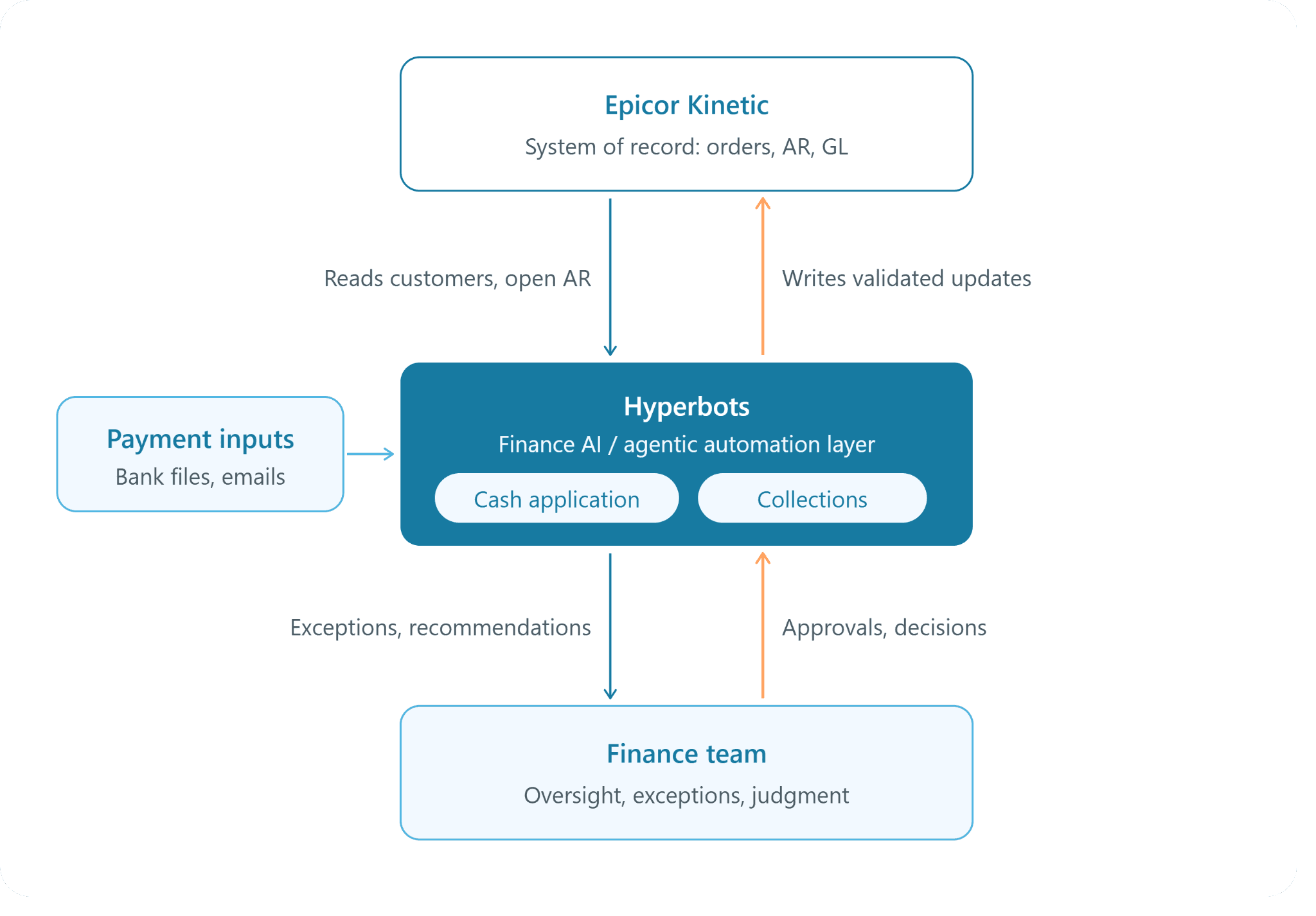
The architecture is straightforward: Kinetic stays the system of record, Hyperbots automates selected finance workflows around it, and the finance team keeps oversight.In practice, the co-pilot:
Ingests payments from multiple sources. It covers bank feeds, lockboxes, ACH, wires, checks, portals, and email remittances in a unified workflow.
Matches with more than one signal. Payments are matched to invoices and remittances using invoice numbers, PO references, amounts, dates, customer behavior, and historical patterns, including when remittance data is incomplete.
Identifies exceptions. It detects short-payments, overpayments, deductions, and unidentified cash, classifies the likely root cause and routes each exception for resolution.
Handles credits and deductions. It identifies valid credits, promotional deductions, chargebacks, and pricing differences and applies or routes them.
Posts back to the ERP. Validated cash applications, adjustments, write-offs and credits are posted back to the ERP with validation and controls.
On outcomes, Hyperbots reports that the co-pilot reduces unapplied cash to less than 10% and lowers reconciliation costs by up to 80%, and that it typically achieves 60%–90% straight-through processing. For an Epicor environment specifically, Hyperbots describes the co-pilot's role as processing remittance advice, matching payments to open invoices, handling short-pays and deductions, and posting matched transactions back into Epicor. Anything outside confidence thresholds goes to human review with the context already assembled.
Hyperbots Collections Co-Pilot
The Hyperbots Collections Co-Pilot is designed to turn collections from a static aging list into an action-oriented workflow. Its capabilities map closely to the collections challenges described earlier:
Dynamic prioritization. It continuously reprioritizes collection actions based on payment behavior, invoice risk, dispute likelihood, customer value, and aging impact on DSO.
Recommended next actions. Recommenders suggest next-best actions, scripts, escalation timing, and workload balancing for collectors.
Follow-up. Pre-due and post-due reminders are automated using customer behavior, risk and dispute context, with personalized email and portal follow-ups.
Disputes. The co-pilot identifies dispute signals before due date (price, quantity, tax, PO mismatch) and routes them to the right owner.
Promises to pay. It captures and tracks promise-to-pay commitments, with reminders and escalation when a promise is broken.
ERP updates. Collection actions, notes, dispute status, PTPs, and resolution outcomes are written back to the ERP.
Escalation stays with people. In Hyperbots' own before-and-after breakdown, escalation management remains a human task, while activities like calling, dispute resolution and forecasting are shared between AI and humans. Hyperbots reports up to 80% improvement in collections productivity, with more than 70% of collection tasks automated.
Finance-Specific AI, Not Generic AI or RPA
Hyperbots is positioned as finance-specific AI rather than a generic AI tool or an RPA layer. That matters in O2C because the hard part is not clicking through screens; it's understanding financial documents and the accounting context around them.
Hyperbots states that its platform specializes exclusively in finance and accounting intelligence and is pre-trained on financial documents such as invoices, statements and contracts. Its agents are designed to combine structured ERP data (customers, invoices, chart of accounts) with unstructured documents like remittances and bank statements, which is exactly the combination cash application and collections require. The co-pilots also use customer payment behavior, historical patterns, and invoice context to improve matching over time, and because the models arrive pre-trained and ready to deploy, there's no customer-side model training project.
Finance-specific context shows up in the details: knowing that a remittance line referencing a PO number may map to several invoices, that a small shortfall on a freight line is likely a deduction rather than an error, or that a customer's "late" payment is actually sitting in unapplied cash.
Auditability and Control
Epicor provides auditability for the ERP transaction. An automation layer needs its own traceability for the actions it performs before and around that transaction.
Hyperbots records a complete, time-stamped audit trail of every payment, match decision, exception, and AI action in cash application, and a comparable record of every action, communication, workflow step, decision, and AI recommendation in collections. Its human-in-the-loop design supports exception handling, approval workflows, and contextual insights, and the platform includes functional controls such as security, SSO, audit trails and permissions. Workflows for exceptions, approvals, escalations and write-offs are configurable, so each company decides which actions can be automated and which require sign-off.
Integration With Epicor Kinetic
Hyperbots maintains a pre-built connector for Epicor, listed on its ERP integrations page. Hyperbots describes the connector as supporting end-to-end data integration for invoices, purchase orders, vendor records, and general ledger transactions through secure APIs.
In a detailed conversation about Hyperbots' Epicor integration, Dave Sackett of Persimmon Technology explains that the connector uses Epicor's REST v2 endpoints or Service Connect for older builds and that Epicor remains the system of record. He also notes that user-defined fields are auto-discovered and supported and that the platform respects multi-site, multi-currency ledgers.
On timelines, Hyperbots integrations with ERPs where it already has an API connector, including Epicor, typically take six to eight weeks. Persimmon's rollout was faster than that norm, at between 3 and 5 weeks.
It's important to be precise about scope. Hyperbots' Epicor Kinetic customer story is a P2P deployment: a Boston-based semiconductor robotics manufacturer that processes 30K+ invoices annually and saw 50% human bandwidth optimization with invoice processing time falling from one week to one day. That case establishes Hyperbots' integration and deployment experience with Epicor Kinetic. It is not evidence of an O2C deployment for that customer, and O2C write-back scope for any specific Kinetic environment should be confirmed during implementation scoping.
Extending Automation Beyond O2C
Once Hyperbots is running as a finance automation layer next to Kinetic, the same connector and agent platform can extend to other workflows. Beyond cash application and collections, Hyperbots offers co-pilots for invoice processing, accruals and payments, among others. Many manufacturers start on one side of the ledger and expand to the other once the first workflow is stable. For a broader view of the receivables side, see Hyperbots' overview of AR automation software and its work in manufacturing finance.
Getting Started With Epicor Kinetic Order to Cash Automation
Epicor Kinetic gives manufacturers a strong O2C foundation: sales orders, credit controls, shipments, AR invoices, cash receipts and reconciliation, all tied to the same operational and financial record. What it doesn't remove is the interpretive work around those transactions: reading remittances, applying cash when the data is messy, resolving exceptions, reconciling bank activity, and deciding where collectors should spend their time.
That's where Epicor Kinetic order to cash automation delivers the most value. For most teams, cash application is the natural first workflow because it is high-volume, rule-resistant and easy to measure through unapplied cash and days to apply. Collections prioritization usually follows, since accurate cash application makes aging trustworthy enough to prioritize against. When evaluating options, look for finance-specific AI, clear confidence thresholds and human review, full audit trails, and a proven Epicor connector that keeps Kinetic as the system of record.
Frequently Asked Questions
What is order to cash in Epicor Kinetic?
Order to cash in Epicor Kinetic is the standard O2C cycle (customer order, fulfillment, shipment, invoicing, receivables, cash receipt, cash application, reconciliation and collections) implemented through Kinetic's sales management and financial management capabilities. The process is the same as in any ERP; Kinetic provides the specific screens, controls and records that carry each transaction from order to cash.
How does O2C work in Epicor Kinetic?
A sales order is entered and screened against the customer's credit status. The order is fulfilled through its lines and releases, then shipped. Shipped items are invoiced in AR Invoice Entry and become open receivables. When the customer pays, the payment is recorded in Cash Receipt Entry and applied to invoices, and bank activity is reconciled against posted transactions. Collections runs alongside AR for any balance that remains open.
What does Epicor Kinetic handle in accounts receivable?
Kinetic maintains customer balances, open AR invoices, invoice status, payment terms and due dates, and aging, with reporting such as the Aged Receivables Report. It also records cash receipts and supports adjusting or reversing posted receipts. Structured collections tooling like Epicor Cash Collect is a separate Epicor solution that integrates with Kinetic.
How does cash application work in Epicor Kinetic?
Users create a cash receipt group in Cash Receipt Entry, enter each customer payment, select the invoices it covers, allocate the amount, and post the group. The mechanics are straightforward; the effort lies in working out which invoices a payment covers when remittance information is missing, incomplete or inconsistent, and deciding how to treat short payments, deductions and overpayments.
What is cash matching in Epicor Kinetic?
"Cash matching" is often used informally to mean applying a customer payment to the right invoices, which in Kinetic happens in Cash Receipt Entry. A separate kind of matching happens in bank statement processing, where bank statement lines are matched to receipts and payments already posted. Both matter, but they answer different questions: "which invoices did this payment pay?" versus "did this posted transaction clear the bank?"
How can companies reduce unapplied cash?
Reducing unapplied cash comes down to capturing remittance information reliably, matching on more than just invoice numbers, and working exceptions quickly instead of letting them age. Practical steps include pulling remittances from every channel (email, portals, lockbox), matching on PO references, amounts and payment history, classifying deductions early, and prioritizing large or customer-impacting unapplied items. AI-driven cash application automates most of these steps and routes the remainder to reviewers with context.
How can AI automate cash application?
AI extracts payment and invoice details from remittances and bank data, identifies the customer and candidate invoices using ERP context, matches payments even when data is incomplete, and detects exceptions such as short payments and deductions. High-confidence matches can be applied and posted automatically; uncertain ones are routed to a person with a recommended resolution. Every action is logged for audit.
How can AI improve collections?
AI improves collections by prioritizing accounts dynamically instead of by aging alone, taking into account payment behavior, disputes, invoice risk and account context. It recommends the next action for each account, automates routine follow-ups where appropriate, detects and routes disputes to the right owner, tracks promises to pay, and writes outcomes back to the ERP. Collectors spend their time on the accounts and conversations that need a person.
Can Agentic AI work with Epicor Kinetic?
Yes. Kinetic exposes data through APIs, including REST, which allows an external agent layer to read customers, invoices and balances and write validated updates back. The key design principle is that Kinetic remains the system of record, while the agent layer performs extraction, matching, prioritization and exception handling under defined controls.
Can Hyperbots work alongside Epicor Kinetic?
Yes. Hyperbots maintains a pre-built Epicor connector that uses Epicor's APIs, supports user-defined fields and multi-site, multi-currency setups, and keeps Epicor as the system of record. Hyperbots has an Epicor Kinetic customer in production on P2P workflows, and integrations with ERPs where Hyperbots already has a connector typically take six to eight weeks. O2C write-back scope for a specific Kinetic environment is confirmed during scoping.
Does Hyperbots replace Epicor Kinetic?
No. Hyperbots is a finance automation layer that works alongside Kinetic. Kinetic continues to hold orders, shipments, invoices, receipts and the general ledger. Hyperbots automates selected workflows around those records, such as cash application and collections, and posts validated results back into the ERP.
What O2C processes should companies automate first?
Most finance teams start with cash application, because it's high-volume, exception-heavy and has clear metrics such as unapplied cash percentage and days to apply cash. Accurate cash application also makes aging reliable, which strengthens collections. Collections prioritization and follow-up are typically next. To size the opportunity before committing, the cash application ROI calculator is a useful starting point.
See How Hyperbots Can Automate O2C Workflows in Epicor Kinetic
Epicor Kinetic provides the ERP foundation. Hyperbots can automate the cash application, collections and exception work around it, with Kinetic remaining your system of record and your finance team in control of every decision that needs judgment.
Request a demo to see how Hyperbots applies, posts and prioritizes AR work in an Epicor Kinetic environment.