NetSuite Custom Fields and Records in API Integrations: A Developer Guide
NetSuite API Guide | Custom Fields | Custom Records | SuiteQL | SuiteScript | Integration Patterns | Developer Playbook 2026
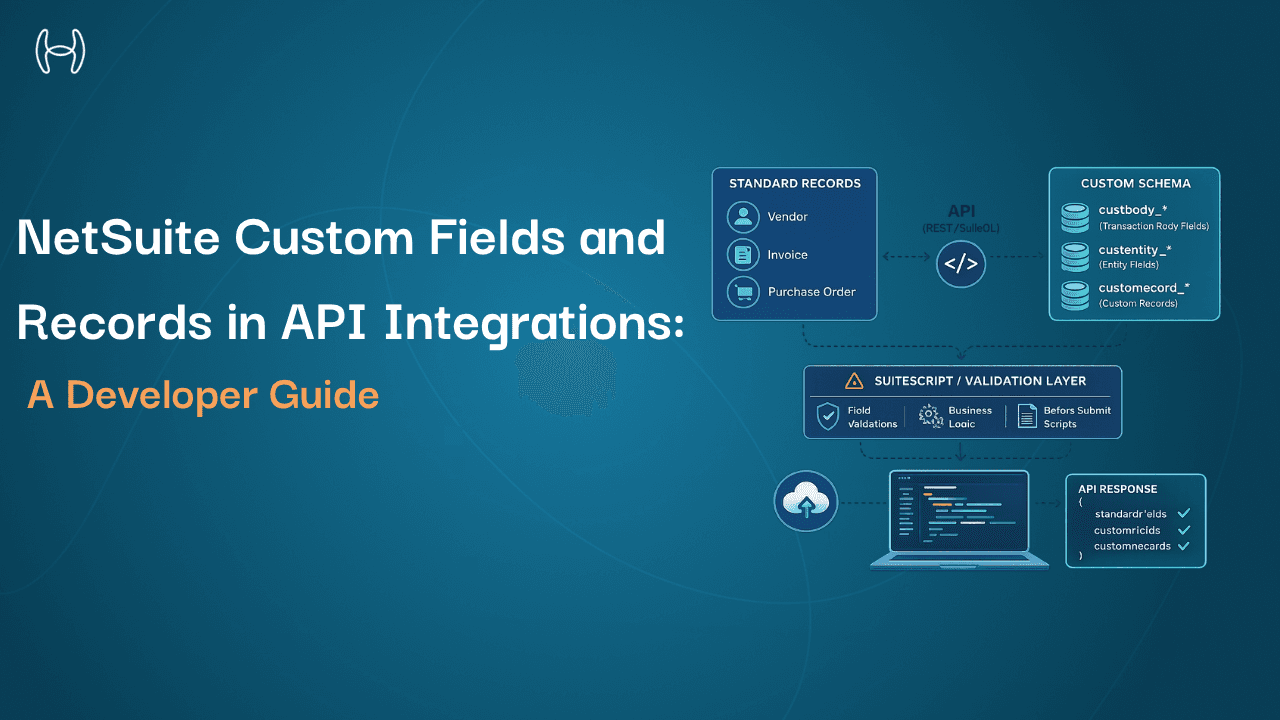
This guide is for integration engineers and developers building or maintaining integrations with NetSuite environments extended beyond the standard schema. If you work with a NetSuite account that has custom fields on vendor records, custom record types for compliance or project tracking, or SuiteScript logic that validates field values on save, this covers what you need to handle that customization layer correctly in your API calls.
NetSuite's API surfaces are well-documented at the standard record level. The REST Records API exposes a clean OpenAPI schema, SuiteQL handles complex queries, and authentication patterns are predictable once you understand OAuth 2.0 and TBA. What the documentation covers less thoroughly is the layer most production environments depend on: custom fields, custom records, and the SuiteScript logic that extends them. In practice, production NetSuite environments are rarely standard. Administrators and developers add custom fields, custom record types, SuiteScript validation logic, and custom segments that do not appear in the base schema.
What Are Custom Fields in NetSuite?
A custom field in NetSuite is a field added by an administrator or developer to an existing standard record type, outside of NetSuite's built-in field set.
NetSuite standard records ship with a defined set of fields. When a finance team needs to capture data that does not fit into those standard fields, administrators create custom fields. Common examples include a vendor compliance status field on the Vendor record, an internal project code field on purchase orders, a department-specific approval flag on vendor bills, or a contract reference number on purchase order lines.
Custom fields are typed: Free-Form Text, Integer, Currency, Date, Check Box, or List/Record (a foreign key to another record or list). The type determines validation on save and serialization in API responses.
Custom fields are identified by a custom field ID, which is the programmatic name assigned when the field is created. The format is always custbody_ for body-level fields on transactions, custcol_ for line-level fields on transaction sublists, custentity_ for entity record fields such as Vendor or Customer, custrecord_ for fields on custom record types, and custitem_ for item record fields. These prefixes are consistent, so integration code can distinguish standard from custom fields by prefix alone.
What Are Custom Records in NetSuite?
A custom record in NetSuite is an entirely new record type created by an administrator or developer, not a standard NetSuite record, used to store structured business data that does not fit into existing record types.
Where custom fields extend existing records, custom records create new ones. A professional services firm might create a custom record type for engagement milestones, linked to both the project and the vendor. A manufacturer might create a custom record for quality inspection results, linked to work orders. A compliance team might create a custom record for vendor certification tracking, linked to the vendor master.
Custom records behave like standard NetSuite records: they have internal IDs, support sublists, can be linked to standard records via List/Record fields, and appear in SuiteQL queries. Their API identifier follows the pattern customrecord_ plus the type ID assigned at creation.
For integration engineers, custom records are absent from the standard NetSuite API documentation and must be discovered through the account-specific schema.
How Custom Fields and Records Appear in the REST API
The REST Records API exposes custom fields automatically in the record payload, alongside standard fields, identified by their prefix.
GET /services/rest/record/v1/vendor/789
Response:
{
"id": "789",
"entityId": "ACME Corp",
"email": "ap@acme.com",
"custentity_vendor_compliance_status": "Approved",
"custentity_contract_ref": "CTR-2025-0047",
"custentity_preferred_payment_method": {
"id": "3",
"refName": "ACH"
}
}
Custom fields with List/Record types return as nested objects with id and refName, consistent with standard reference fields.
For transaction records, custbody_ fields appear at the record level and custcol_ fields within sublist items:
GET /services/rest/record/v1/vendorbill/1042
Abbreviated response:
{
"id": "1042",
"entity": { "id": "789", "refName": "ACME Corp" },
"custbody_po_approval_reference": "PO-2025-0188",
"custbody_department_code": "ENGR-04",
"item": {
"items": [
{
"item": { "id": "55", "refName": "Consulting Services" },
"quantity": 40,
"rate": 150,
"custcol_project_phase": "Phase 2",
"custcol_billable_flag": true
}
]
}
}
Discovering custom fields requires the REST API Browser (https://<accountId>.app.netsuite.com/app/recordscatalog/rcbrowser.nl) or the metadata endpoint. It reflects the account-specific schema rather than a generic one. Custom records are accessed at /services/rest/record/v1/customrecord_<typeId>/<recordId>.
How Custom Fields and Records Appear in SuiteQL
SuiteQL queries custom fields on standard records directly by their internal ID:
SELECT
v.id,
v.entityId,
v.custentity_vendor_compliance_status,
v.custentity_contract_ref
FROM
vendor v
WHERE
v.custentity_vendor_compliance_status = 'Approved'
ORDER BY
v.entityId
For custom records, the table name is the record type internal ID:
SELECT
cr.id,
cr.custrecord_engagement_milestone_name,
cr.custrecord_milestone_due_date,
cr.custrecord_linked_vendor
FROM
customrecord_engagement_milestones cr
WHERE
cr.custrecord_milestone_due_date < BUILTIN.RELATIVE_RANGES('TOMORROW', 'START')
SuiteQL joins custom records to standard records via standard SQL JOIN syntax on the foreign key field, for example, customrecord_vendor_certifications to vendor on custrecord_linked_vendor = vendor.id, returning related data in one query.
The Role of SuiteScript in Custom Field Behavior
SuiteScript is NetSuite's JavaScript-based scripting environment. For integration engineers, it is critical context because it changes how custom fields behave in ways that are not visible in the schema.
User Event Scripts run before and after record saves. A beforeSubmit user event script might validate that a custom field value meets a business rule, transform a custom field value before it is written to the database, or populate one custom field based on the value of another. An integration writing a vendor bill with a specific custbody_ field value may trigger a validation script that rejects the write if the value does not meet conditions defined in SuiteScript that do not appear anywhere in the API schema.
Client Scripts run in the UI only and do not affect API writes. Behavior seen in the UI but not reproduced via API is typically a Client Script.
Workflow Actions built on SuiteFlow run server-side logic on save and can overwrite custom field values after the initial API write.
When an API write to a record with custom fields behaves unexpectedly, the cause is usually a User Event Script or Workflow Action. The SuiteScript execution log (Setup > SuiteCloud > SuiteScript > Script Deployments), filtered by record type and date, surfaces scripts that fired on recent saves.
Schema Changes Over Time: The Core Integration Challenge
Standard NetSuite fields change only with Oracle releases, which are versioned and announced. Custom fields and records change whenever an administrator makes a configuration change, at any time, without notice to the integration team.
Common schema change scenarios that break integrations include: a new mandatory custom field added to a record type that the integration is not populating; a custom field deleted and recreated with a different internal ID, causing the integration to write to a field that no longer exists; a custom record type extended with new fields that the integration's fixed schema silently drops; and a User Event Script updated with new validation logic that rejects writes the integration previously made successfully.
In practice, this coordination is inconsistently maintained in most organizations, which means integration resilience against schema changes must be a design requirement, not an assumption.
Integration Design Patterns for Custom Schema Resilience
Query the metadata endpoint rather than hardcoding field lists. Call the metadata endpoint at startup or on a refresh interval. A new custom field becomes visible to the integration without a code deployment.
Use externalId for idempotent upserts. The externalId addressing pattern in the REST Records API allows the same write operation to create or update a record without a separate lookup. This matters when custom field validation may change the outcome of a write.
Log the complete API response, not just mapped fields. When a new custom field appears in a response, the data is captured in the log before the integration is updated to process it.
Design deserialization to tolerate unknown fields. Do not throw exceptions on keys the integration does not recognize. A new custbody_ field in a vendor bill response should not break reads of fields the integration already handles.
A lightweight change notification between the NetSuite administration team and the integration team, using a shared channel rather than a formal change management board, catches most breaking changes before deployment. Most schema changes that break integrations were known to the administrator and unknown to the integration team.
How Hyperbots Integrates With Customized NetSuite Environments
Every NetSuite environment Hyperbots connects to in production is customized. Finance teams have added custentity_ fields to vendor records, custbody_ fields to vendor bills for project codes and approval references, custcol_ fields to PO lines for department tracking, and in many cases entirely custom record types. A finance automation platform that requires a standard schema is not usable in these environments.
How the integration works technically: The Hyperbots integrations platform connects to NetSuite via standard SuiteTalk REST APIs using OAuth 2.0 authentication. No SuiteScript bundle is installed in the customer's NetSuite account and no SuiteCloud licensing is required. This is a meaningful distinction from integration platforms that deploy a SuiteScript package on the NetSuite side, creating a separate versioning and upgrade dependency. Hyperbots reads and writes through the standard REST API surface only, leaving the customer's SuiteScript environment untouched. During the initial connector setup, the platform calls the REST API Browser metadata endpoint for each record type in the configured workflows, including Vendor, VendorBill, PurchaseOrder, and any relevant custom record types, and reads the complete account-specific schema including all custom fields. This discovery runs once at setup and produces a versioned field map that governs all subsequent read and write operations.
What this means for custom field write-back: When the Invoice Processing Co-Pilot posts a processed invoice to NetSuite, the write-back payload includes the full set of custom fields the finance team has configured, including project codes, department references, approval flags, and contract references, populated from the invoice data and from the co-pilot's GL coding logic. Custom field write-back is complete and explicit: every configured field is populated, none skipped.
What happens when the schema changes: The Hyperbots connector uses a configuration-driven integration framework that reads and writes to custom fields through stored field mapping configurations. When a custom field is added, removed, or renamed in the ERP, the platform surfaces an exception report identifying the specific field ID and record type, using the same read-back checks and exception reporting applied across all ERP write operations. The field mapping is updated through connector configuration, not a code deployment.
What the performance looks like in customized environments: The NetSuite AI automation capabilities that Hyperbots delivers, including up to 80% straight-through processing, invoice processing in under one minute, PR creation in under 5 minutes, and 80% reduction in PO creation and dispatch time, are measured in production environments with extensive custom schema, not in clean standard-schema test accounts. These outcomes are documented in full in the guide to Hyperbots on NetSuite operations. Invoice extraction accuracy of 99.8%, achieved through models pre-trained on 35 million invoice fields, is maintained in customized environments because the extraction model operates on the source document while the configuration-driven custom field mapping governs the ERP write-back. These are separate concerns handled by separate components.
ERP-agnostic architecture: The same schema discovery and field mapping applies across all ERP integrations Hyperbots supports, including SAP S/4HANA, SAP ECC, SAP B1, Microsoft Business Central, and Sage Intacct. If the organization migrates its ERP, the automation layer is repointed through a new schema discovery pass rather than rebuilt from scratch.
Onboarding for customized NetSuite environments completes in two to four weeks. Full go-live is within one month. ROI is achieved within 6 months. See it in action with a demo or start a free trial.
Custom Fields and Records: Reference Table
Concept | NetSuite Term | API Prefix | REST Access Pattern | SuiteQL Access |
Custom body field on transaction | custbody | custbody_ | Included in record GET/POST | Direct column reference in query |
Custom line field on transaction | custcol | custcol_ | Included in sublist items | Direct column reference in sublist join |
Custom field on entity record | custentity | custentity_ | Included in entity record GET/POST | Direct column reference in query |
Custom field on item record | custitem | custitem_ | Included in item record GET/POST | Direct column reference in query |
Custom record type | customrecord | customrecord_ | /record/v1/customrecord_typeId/recordId | SELECT FROM customrecord_typeId |
Custom field on custom record | custrecord | custrecord_ | Included in custom record GET/POST | Direct column reference in query |
Custom list | customlist | N/A (values referenced by id) | Read via /record/v1/customlist/listId | JOIN on list table |
FAQs
What is the difference between a custom field and a custom record in NetSuite?
A custom field extends an existing record type by adding a new field, for example, a compliance status on the Vendor record. A custom record is an entirely new record type with its own fields and internal ID sequence, such as a vendor certification tracking record.
How do I discover what custom fields exist in a specific NetSuite account?
Use the REST API Browser in the account's developer tools. It reflects the account-specific schema. Alternatively, the REST Records metadata endpoint for a record type returns the full field list. SuiteQL can also query the customfield table programmatically.
Why do API writes to custom fields behave differently from the schema?
The most common cause is a User Event Script running a beforeSubmit or afterSubmit handler. Check the SuiteScript execution log, filtered by record type and recent execution date, to identify which scripts fired on recent saves.
How should integrations handle schema changes in NetSuite?
Tolerate unknown fields without failing, log complete API responses rather than only mapped fields, avoid hardcoding field lists, and query the metadata endpoint periodically to surface alerts when the live schema diverges from the stored mapping.
For the foundational API architecture covering the four NetSuite API surfaces, authentication patterns, SuiteQL query patterns, and integration matrix, see the NetSuite developer API playbook.
Hyperbots connects to customized NetSuite environments through schema discovery at setup, mapping custom fields and records without manual specification. Up to 80% straight-through processing. Invoice processing in under one minute. Live within one month. Request a demo at hyperbots.com.