Two-Way vs Three-Way Matching in NetSuite: How to Prevent Errors and Fraud
Every vendor invoice that passes through accounts payable carries a question: is this invoice legitimate, accurate, and authorized? The answer comes from a matching process. Get it right and you pay only what you owe, only to vendors who delivered, only on authorized invoices. Get it wrong and you overpay, duplicate-pay, or approve fraudulent invoices that should never have reached the payment queue.
NetSuite supports both matching types natively. Understanding which applies to which purchase type, where each breaks down, and how to close the gaps is what separates teams that catch errors from those that discover them at audit.
This guide is for finance leaders, controllers, and AP managers on NetSuite who want to understand their matching framework, where it is vulnerable, and how to close the gaps.
What Is Invoice Matching in NetSuite: PO, GRN, and Vendor Bill Explained
Invoice matching is the process of comparing a vendor invoice against one or more source documents to verify that the goods or services billed were ordered, received, and priced correctly before payment is authorized.
The three documents involved in matching are:
The Purchase Order (PO) is the buyer's formal commitment to purchase specific goods or services at an agreed price and quantity. It is created before the vendor delivers anything. In NetSuite, the PO is the anchor document against which all subsequent matching runs.
The Goods Receipt Note (GRN), also called an Item Receipt in NetSuite, is the record confirming that physical goods were received by the organization. It is created by the warehouse or receiving team when a delivery arrives and is counted against the PO.
The Vendor Invoice is the supplier's request for payment. It states what was delivered, at what price, and what the buyer owes. In NetSuite, vendor bills are the invoice record.
Matching connects these three to answer one question: does what the vendor is billing match what was ordered and received?
Two-Way Matching in NetSuite: When to Use It and What It Misses
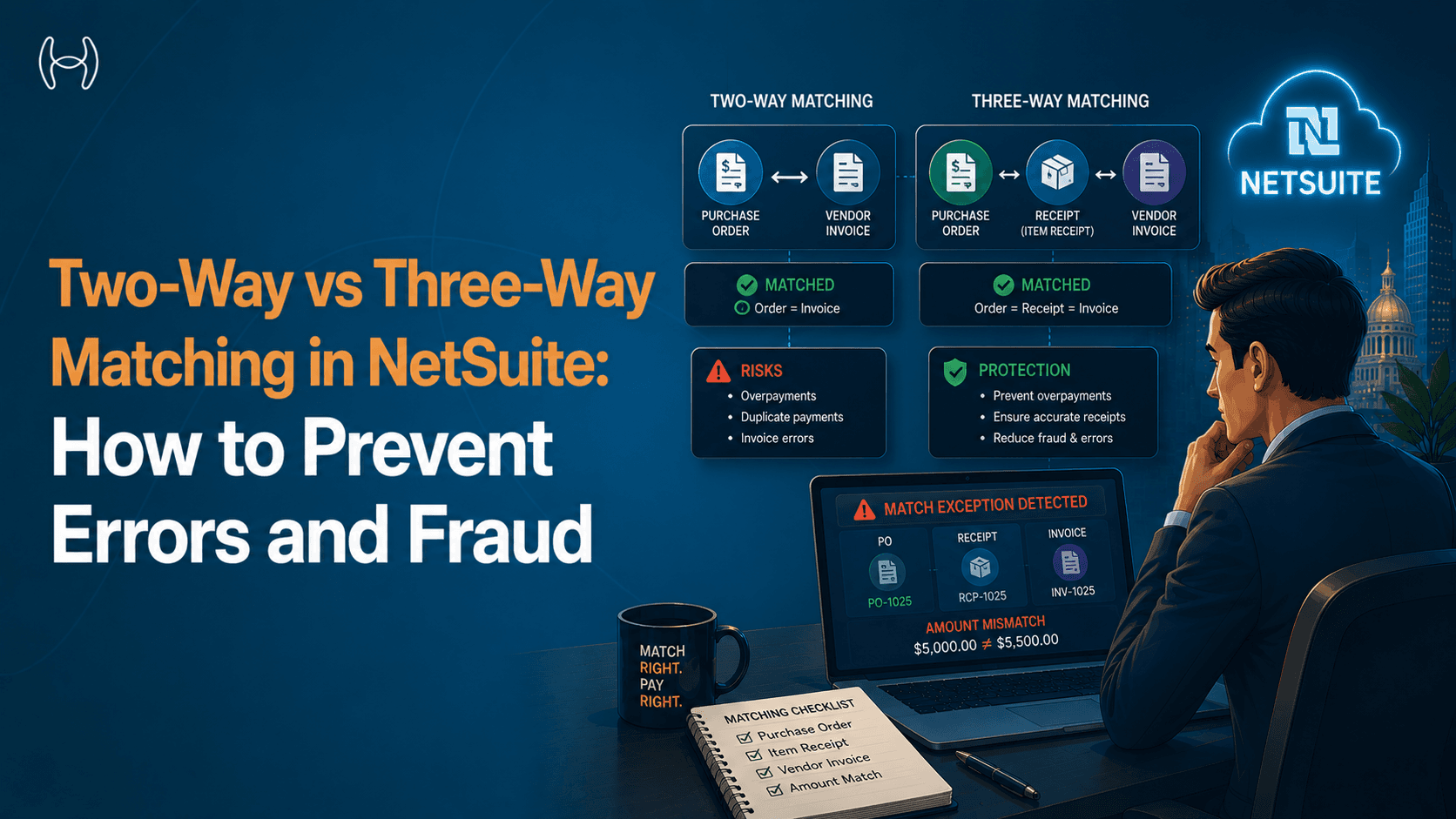
Two-way matching compares two documents: the purchase order and the vendor invoice. It verifies that the invoice price and quantity match what was agreed in the PO, without requiring confirmation that physical goods were received.
When two-way matching is appropriate:
Two-way matching is the right control for services, subscriptions, and any purchase where there is no physical delivery to confirm. A software subscription generates no goods receipt. A consulting invoice has no warehouse scan to compare against. Two-way matching confirms the invoice aligns with the PO terms and is authorized.
How it works in NetSuite:
In NetSuite, two-way matching runs automatically when a vendor bill is linked to a PO, comparing unit cost and quantity on the bill against the PO lines. If they fall within configured tolerance bands, the bill is matched and can proceed to approval. If they fall outside tolerance, a mismatch exception is raised for AP review.
Where two-way matching falls short:
Two-way matching cannot detect invoices for goods that were never received. If a vendor bills for 500 units but only 400 were delivered, two-way matching will not catch the discrepancy. For goods-based procurement, it is an insufficient control.
Three-Way Matching in NetSuite: How It Works and What You Need to Enable
Three-way matching compares three documents: the purchase order, the goods receipt note, and the vendor invoice. It verifies that what was ordered matches what was received and what is being billed.
When three-way matching is required:
Three-way matching is appropriate for any purchase where physical goods are delivered and a goods receipt can be generated: raw materials, inventory items, equipment, and medical supplies. For regulated industries, three-way matching is frequently a compliance requirement and the standard control that prevents payment for undelivered goods.
How it works in NetSuite:
Three-way matching in NetSuite requires the Advanced Receiving feature to be enabled under Setup > Company > Enable Features. Without it, Item Receipts cannot be created against POs, which means the third leg of the match does not exist. Once enabled, when a vendor bill is created and linked to both a PO and an Item Receipt in NetSuite, the system compares all three documents automatically. NetSuite flags any mismatch between the three documents as a bill variance requiring review before payment can proceed.
The NetSuite matching flowchart:
Vendor Invoice Received
|
v
Vendor Bill Created in NetSuite
|
v
Linked to Purchase Order?
|
|-- No --> Non-PO Invoice Workflow (manual review required)
|
v (Yes)
Item Receipt Exists?
|
|-- No --> Two-Way Match: PO vs Invoice
| (appropriate for services and subscriptions)
|
v (Yes)
Three-Way Match Executed:
PO quantity vs GRN quantity vs Invoice quantity
PO price vs Invoice price (within tolerance)
|
|-- Match --> Bill approved for payment workflow
|
|-- Mismatch --> Bill variance flagged
Exception routed to AP for investigation
|
v
Investigate: short delivery, price error,
duplicate invoice, or fraudulent submission
|
v
Resolved: credit note, resubmission,
or blocked and reported
Two-Way vs Three-Way Matching: Side-by-Side Comparison
Dimension | Two-Way Matching | Three-Way Matching |
Documents compared | PO and vendor invoice | PO, goods receipt, and vendor invoice |
Confirms authorized purchase | Yes | Yes |
Confirms goods were received | No | Yes |
Appropriate for services | Yes | Not applicable |
Appropriate for goods | Insufficient | Yes |
Fraud protection against fake invoices | Partial | Strong |
Fraud protection against over-delivery billing | No | Yes |
NetSuite implementation | Native, automatic when bill linked to PO | Native, automatic when bill linked to PO and Item Receipt |
Manual effort required | Low | Low when GRN process is followed consistently |
Audit trail strength | Moderate | Strong |
5 Reasons NetSuite Matching Fails in Practice
Knowing that NetSuite supports both matching types is not the same as knowing that your matching controls are working. In practice, five specific failure points cause matching to break down even in organizations that believe the control is operating.
Invoices submitted without a PO reference. When vendors submit invoices without referencing a PO, or when purchases are made outside the PO process entirely, there is no PO to match against. NetSuite cannot run a match without the anchor document. These non-PO invoices bypass the matching control entirely and must be reviewed manually, a process that is inconsistent and time-consuming at volume. Maverick spend is not just a procurement governance problem. It is a matching controls problem.
Item receipts not created consistently. Three-way matching requires an Item Receipt to exist in NetSuite before the vendor bill is matched. In organizations where the receiving team does not consistently create Item Receipts when deliveries arrive, whether due to workload, unclear process, or partial delivery ambiguity, three-way matching falls back to two-way matching by default. The quantity control disappears.
Tolerance bands set too wide. NetSuite's matching tolerances allow for minor variances in price and quantity without triggering an exception. This is necessary to handle legitimate rounding and unit-of-measure differences. But tolerance bands that are set too wide allow material overcharges to pass without review. A vendor who consistently bills 3% above the PO price may never trigger an exception if the tolerance is 5%. Over a year of invoices, this adds up.
Duplicate invoices with altered references. NetSuite's native duplicate detection checks invoice numbers and vendor IDs. A duplicate invoice submitted with a slightly altered invoice number, such as a changed digit or added suffix, may not be caught by the native check. This is one of the most common invoice fraud patterns and it exploits the gap between exact-match duplicate detection and the fuzzy matching that would catch near-duplicate submissions.
Vendor master data out of sync. Matching runs against the vendor record in NetSuite. When the vendor master has duplicate entries for the same supplier, or when vendor bank details have been updated by a fraudulent change request, matched and approved invoices route to incorrect payment accounts. The matching confirmed the invoice. The fraud happened in the vendor master.
How AI Catches What NetSuite Matching Misses
NetSuite's native matching is rule-based and runs on the documents it has been given. AI-powered matching is pattern-based and runs across the full history of documents to identify anomalies that rules miss.
The specific capabilities that matter are:
Fuzzy duplicate detection. Rather than checking only exact invoice number matches, AI compares new invoices against the full invoice history using similarity scoring across number, vendor, amount, date, and line items simultaneously. A fraudulent re-submission with an altered invoice number that matches a recently paid invoice on every other dimension is flagged for review before it reaches the approval queue. This is the control that catches the duplicate fraud pattern described above.
Anomaly detection on vendor behavior. AI identifies when a vendor's invoicing pattern changes in ways that warrant investigation: unusual frequencies, amounts clustering just below approval thresholds, line items not on the PO, or billing addresses differing from the vendor master. These signals surface invoices that deserve scrutiny before payment.
Automatic Item Receipt correlation. When a vendor invoice arrives and no Item Receipt exists in NetSuite for the corresponding PO line, AI flags the missing GRN immediately rather than defaulting silently to two-way matching. The AP team sees clearly that three-way matching could not be completed and knows to check whether the goods were received, partially received, or not yet delivered before approving payment.
How Hyperbots Automates Two-Way and Three-Way Matching on NetSuite
The Invoice Processing Co-Pilot from Hyperbots connects to NetSuite through a pre-built native connector and handles the matching layer that NetSuite's native AP module leaves to human reviewers.
When a vendor invoice arrives, the co-pilot extracts data with 99.8% accuracy, pre-trained on 35 million invoice fields, and cross-references it against the NetSuite PO and Item Receipt records in real time. Matching runs automatically across up to 140 fields at the line-item level, including quantities, unit prices, payment terms, and item descriptions. The industry average for invoice processing is 11 days. Hyperbots brings that to under one minute. Up to 80% of invoices match and process straight through without any human touchpoint, with invoice processing costs reduced by 80%.
One of the most directly relevant capabilities for a NetSuite environment is configurable matching strategy by vendor or expense category. Rather than applying a single matching rule across all invoices, Hyperbots allows matching rules to be set per vendor and per expense type: three-way matching for hardware and medical supplies, two-way matching for consulting and legal services, no matching for utilities. The system applies the correct matching type automatically on each invoice, without AP team intervention. This directly addresses which matching type applies to which purchase type. to knowing which matching type applies to which purchase type.
For invoices that do not match cleanly, the co-pilot surfaces the specific mismatch: the line that overbills, the quantity exceeding the Item Receipt, the invoice number resembling a previously paid submission, or banking details differing from the vendor master. When the issue is a missing Item Receipt, it flags the gap and automatically retries matching once the GRN is created in NetSuite.
The detecting and preventing fraud capability runs across every invoice processed, not just flagged ones. Behavioral anomalies in vendor invoicing patterns surface automatically. Fuzzy duplicate detection runs against the full invoice history on every new submission. Every matching decision, including match result, exception reason, and approval, is logged automatically in a timestamped audit trail that satisfies audit requirements without manual assembly.
The matching strategies that took AP teams hours now take seconds, and the three-way matching gap is closed. Hyperbots goes live within one month. ROI is achieved within 6 months.
See it in action with a demo or start a free trial.
NetSuite Invoice Matching FAQs
What is the difference between two-way and three-way matching in NetSuite?
Two-way matching in NetSuite compares the vendor invoice against the purchase order only. It confirms the invoice price and quantity match what was agreed but does not verify that goods were received. Three-way matching adds the Item Receipt as a third document, confirming that what is being billed was actually delivered. Three-way matching is the stronger control for goods-based procurement.
When should I use two-way matching instead of three-way matching?
Use two-way matching for services, subscriptions, and any purchase that does not involve a physical delivery. A software subscription, a consulting engagement, or a cleaning services contract will not generate an Item Receipt in NetSuite. Two-way matching is the appropriate and sufficient control for these purchase types.
Why does three-way matching sometimes fail in NetSuite?
The most common reason is that Item Receipts are not consistently created when deliveries arrive. Without one, NetSuite falls back to two-way matching by default.
Does NetSuite Catch Duplicate Invoices Automatically?
NetSuite's native duplicate detection checks invoice numbers and vendor IDs for exact matches only. It does not catch near-duplicate submissions where the invoice number has been slightly altered. AI adds fuzzy detection, comparing new invoices against full invoice history across multiple dimensions simultaneously.
What is a bill variance in NetSuite?
A bill variance is the exception raised when a vendor bill does not match the PO or Item Receipt within configured tolerance. It signals a price or quantity difference and requires AP review before the invoice can proceed to payment.
What Are the Limits of NetSuite's Native Matching Compared to AI?
NetSuite's native matching is rule-based, checking specific fields against configured tolerances. AI-powered matching is pattern-based, comparing new invoices against full invoice history to surface anomalies rules miss, including near-duplicate submissions and inconsistencies that fall within tolerance individually but signal a problem in aggregate.
For the full picture of how purchase orders are set up, approved, and tracked in NetSuite, including approval workflow configuration, blanket PO setup, and procurement tips, see the guide to the NetSuite purchase order process.