Vendor Portals for Invoice Tracking: How Supplier Self-Service Transforms AP Operations
How vendor portals give suppliers real-time invoice visibility and reduce AP workload and communication overhead
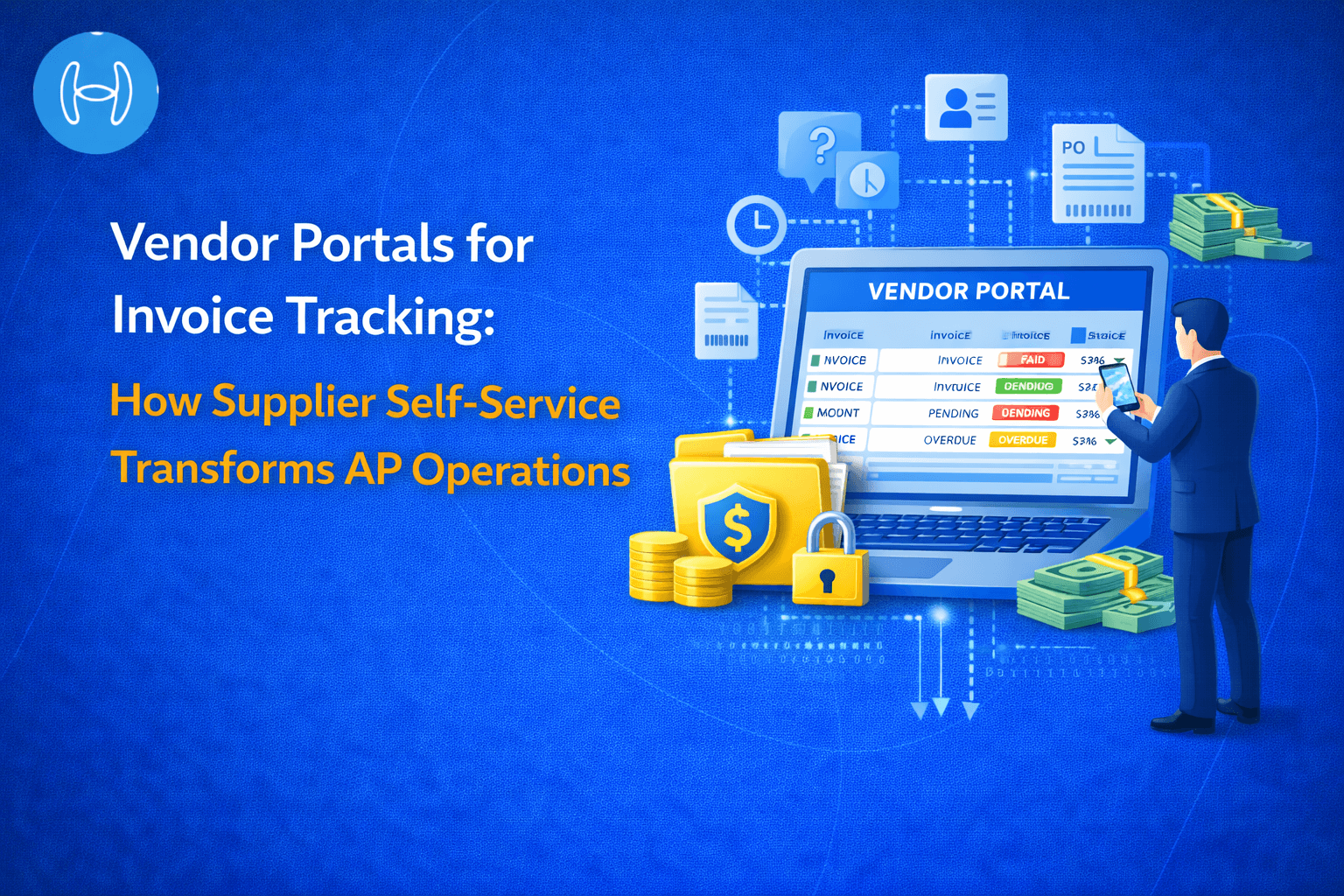
Every AP team knows the email. It arrives from a supplier asking where their invoice is. Sometimes it comes a week after submission. Sometimes from three different contacts at the same vendor in the same week because none of them can see what happened to the invoice they sent. The AP team stops what they are doing, searches the inbox, checks the ERP, reconstructs the status, and responds. Multiplied across hundreds of vendors and thousands of invoices, it is a significant and entirely avoidable drain on AP capacity.
The operational answer is a vendor portal for invoice tracking. Not a shared email inbox. Not a status spreadsheet sent weekly. A live, self-service interface through which suppliers can see exactly where their invoice is at any point in the processing workflow, without contacting the AP team.
This guide explains what a vendor portal is, what it must show suppliers, why supplier visibility directly benefits the buying organization, and how AI-powered portals eliminate the manual communication cycle entirely.
What Is a Vendor Portal?
A vendor portal is a secure, web-based interface that gives suppliers direct, real-time visibility into the status of their invoices, purchase orders, and payments without requiring them to contact the buyer's AP team.
It is not a file upload tool, though many portals include that capability. It is the visibility layer that sits between the supplier's invoicing activity and the buyer's internal AP process, giving both sides a shared, accurate, and current view of where every transaction stands.
A genuine vendor portal for invoice tracking has three defining characteristics. First, it shows real-time status, meaning the current state of the invoice in the processing workflow at this moment, not a batch update from last night. Second, it is self-service, meaning the supplier accesses it directly without relying on the AP team. Third, it is secure, meaning each supplier sees only their own documents, not those of other vendors.
Without all three, the portal does not eliminate the "where is my invoice" email. It just moves it from a daily occurrence to a weekly one.
Why the Problem Is Bigger Than It Looks
On the surface, a supplier emailing to ask about invoice status is a minor inconvenience. In practice, it is a symptom of a structural gap in how AP operations communicate with vendors.
For the AP team, every status inquiry is an interruption. The team member must stop their current task, locate the invoice in the ERP, establish its current status, and compose a response. In a team processing several hundred invoices per day, this consumes meaningful capacity on communication rather than processing.
For the supplier, uncertainty about invoice status creates cash flow anxiety. A supplier who cannot confirm receipt, validation, or payment timing cannot plan their cash position reliably. This drives follow-up behavior including emails, calls, and escalations, particularly as payment due dates approach.
For the buyer-supplier relationship, repeated payment uncertainty damages trust. Suppliers who consistently cannot get clear information may begin to view the buyer as a difficult trading partner, affecting pricing decisions and willingness to extend favorable terms.
The accounts payable workflow is designed to process invoices accurately and on time. Supplier communication running parallel to that workflow, through email threads and phone calls, introduces manual work the workflow was never designed to handle.
What a Vendor Portal Must Show Suppliers
A portal that genuinely reduces inquiries gives suppliers the information needed to answer their own questions across five categories.
Invoice receipt confirmation. A timestamp of receipt, the invoice number as recorded, and the channel through which it arrived. Suppliers who know their invoice has been received stop sending follow-up emails asking if it arrived.
Current processing status. Status in plain language, not system codes. "Received," "Matched to Purchase Order," "Pending Approval," and "Payment Scheduled" are labels suppliers can understand and act on, each showing when that stage was reached.
Exceptions and queries. When an invoice fails validation or has a matching discrepancy, the supplier sees the reason clearly and the action required from their side. A notification that says "Invoice INV-2025-0047 is on hold because the PO number referenced does not match our records" allows the supplier to act immediately without contacting AP.
Payment information. The scheduled payment date, payment method, and remittance details once approved. Payment confirmation with reference number once executed. This eliminates the post-payment "has it been paid?" inquiry that is nearly as common as the pre-payment inquiry.
Document and PO visibility. Seeing the purchase orders associated with their invoices allows suppliers to self-diagnose matching discrepancies before they escalate and to submit invoices that align precisely with PO terms.
How a Vendor Portal Fits Into the Invoice Processing Workflow
The vendor portal is not a separate system bolted on to AP operations. It is the external-facing layer of the same processing workflow the AP team uses internally. Understanding how it connects to each stage of supplier invoice processing explains why real-time integration is the defining requirement.
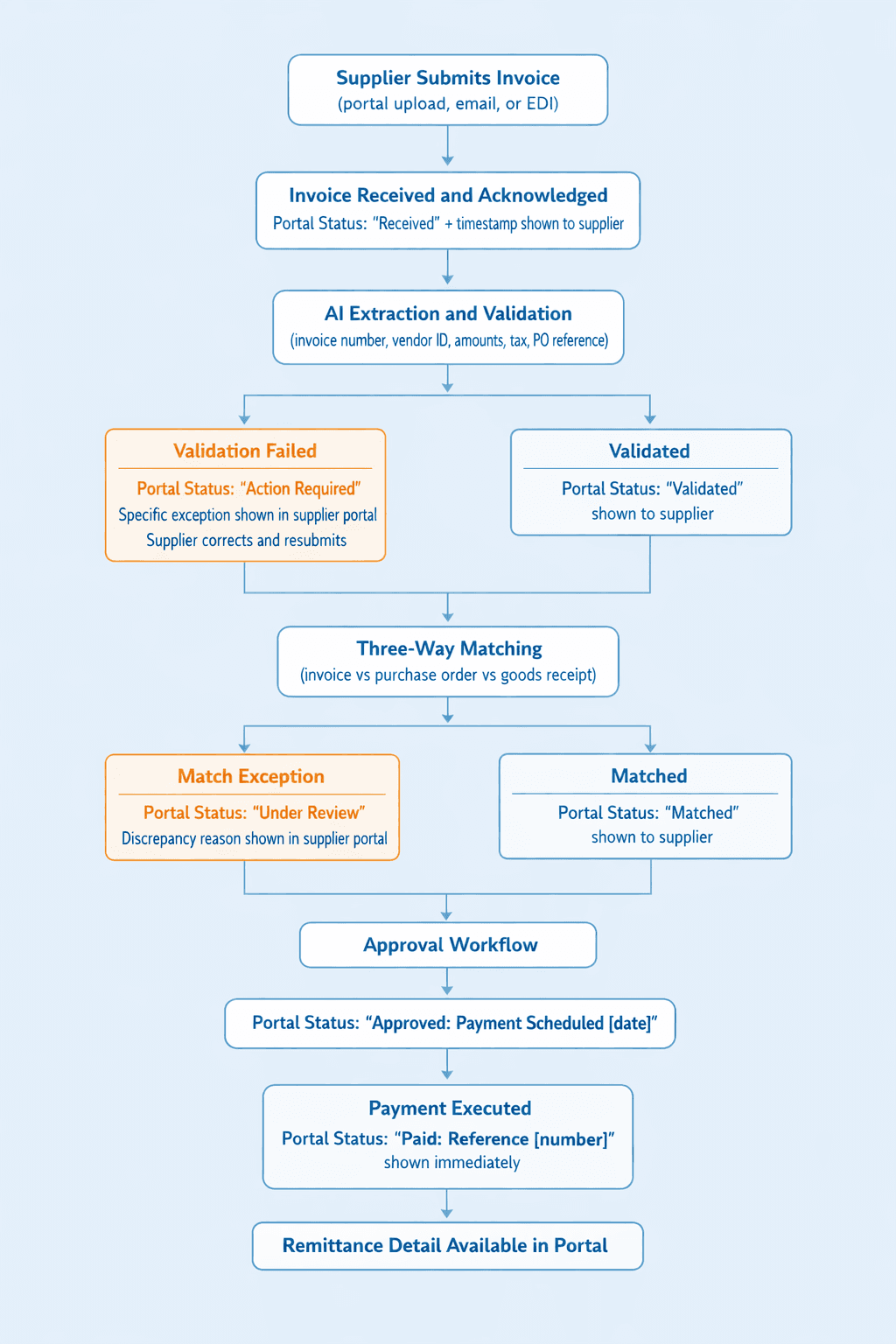
Every transition updates the portal in real time. The supplier sees the current state of their invoice at the same moment the AP team does, through a view filtered to their own documents.
What Vendor Portals Do for Early Payment Discount Capture
One underappreciated benefit of portal transparency is its effect on early payment discount capture. Early payment discounts are time-sensitive. A supplier offering 2% for payment within 10 days requires the buyer to know precisely when the 10-day window opened.
When invoice receipt is unclear and processing status is opaque, buyers miss early payment windows because the AP team does not realize the clock started. When the portal shows the supplier exactly when their invoice was received and logged, and the AP team sees the same timestamp in their internal dashboard, the discount window is unambiguous. Approval workflows can be configured to automatically prioritize early-payment-eligible invoices.
The Operational Impact on AP Teams
When suppliers can see invoice status themselves, they stop asking for it. Status inquiry responses are eliminated. Duplicate invoice follow-ups decline because suppliers can confirm receipt immediately. Exception resolution becomes faster because the supplier receives a specific, actionable notification and can address it without a back-and-forth exchange. Post-payment remittance inquiries stop because payment confirmation is visible in the portal the moment payment is executed.
What remains for the AP team are tasks that require genuine human judgment: approving high-value invoices, investigating discrepancies that require vendor conversation, and overseeing exceptions the AI cannot resolve automatically. The vendor management function shifts from reactive communication to proactive relationship management.
How Hyperbots Delivers Vendor Portal Functionality
The Vendor Management Co-Pilot from Hyperbots provides a self-service supplier portal connected directly to the live invoice processing workflow. Status updates in real time as each processing stage completes. The supplier always sees the current state of their invoice, not a cached or delayed version.
Suppliers access a secure, branded interface showing only their own documents: invoices, associated purchase orders, payment history, and current document status. Bank details and compliance documents including W-9 and W-8 forms are managed through the portal with AI validation applied before any change is written to the vendor master. This eliminates the manual document collection that accompanies vendor onboarding and annual compliance reviews.
When an invoice is submitted, the Invoice Processing Co-Pilot begins processing immediately. Extraction runs with 99.8% accuracy across any invoice format, whether PDF, email, EDI, or scanned document. Validation against vendor master, purchase order records, and chart of accounts runs automatically. The portal reflects each stage as it completes. Exceptions appear in plain-language descriptions specific to that invoice, so the supplier knows exactly what to correct and can resubmit without an email exchange.
The AP team's internal dashboard mirrors the supplier view with full processing detail: extraction result, matching comparison, approval chain, exception reason, and ERP posting reference. Both views draw from the same live data. There is no version discrepancy to resolve in conversation.
The operational outcomes: up to 80% of invoices processed straight through without human touchpoint, invoice processing time under one minute, invoice processing cost reduced by 80%, and DSO reduced by 40% as payment cycles become predictable and supplier cash flow anxiety is eliminated. Accruals variance falls to less than 5% between accrued and actual costs. Implementation goes live within one month. ROI is achieved within 6 months.
Before and After: AP Operations Without a Vendor Portal vs. With Hyperbots Vendor Portal
Dimension | Without a Vendor Portal | With Hyperbots Vendor Portal |
Invoice receipt confirmation | Supplier emails to check if invoice arrived | Hyperbots portal shows receipt timestamp immediately on submission |
Processing status visibility | AP team responds to status inquiries manually | Supplier sees live status in Hyperbots portal, no inquiry needed |
Exception communication | AP team emails supplier with exception detail | Hyperbots portal shows plain-language exception reason automatically |
Post-payment remittance | Supplier calls or emails to confirm payment | Hyperbots portal shows payment reference and confirmation in real time |
AP team time on status inquiries | Significant daily capacity consumed on communication | Eliminated for all standard status queries |
Duplicate invoice submissions | Common: supplier re-sends when receipt is unconfirmed | Eliminated: supplier sees receipt confirmed in Hyperbots portal immediately |
Early payment discount capture | Missed due to unclear invoice receipt timestamps | Window unambiguous: same receipt timestamp visible to both sides |
Onboarding document collection | Manual email requests, chasing signatures | Supplier uploads via Hyperbots portal, AI validation runs automatically |
Invoice processing accuracy | Extraction errors drive manual exception handling | 99.8% extraction accuracy, exceptions surface with specific resolution guidance |
Straight-through processing rate | Suppressed by supplier communication gaps and resubmissions | Up to 80% STP as portal eliminates resubmissions and accelerates exceptions |
Invoice processing cost | High: communication overhead adds to per-invoice cost | 80% reduction in invoice processing cost |
DSO | High: payment uncertainty delays cycles | 40% DSO reduction as payment timelines become visible and predictable |
FAQs
What is a vendor portal for invoice tracking?
A vendor portal for invoice tracking is a secure, self-service web interface giving suppliers real-time visibility into invoice, purchase order, and payment status. Suppliers see exactly where their invoice is in the buyer's processing workflow without contacting the AP team. An effective portal updates in real time as each processing stage completes.
How does a vendor portal reduce AP team workload?
By giving suppliers direct access to invoice status, a portal eliminates the need for AP teams to respond to status inquiries manually. When suppliers can see their invoice was received, cleared validation, and is pending approval, they do not email asking for updates. AP team capacity is freed for judgment-based work.
What is the difference between a basic and an effective vendor portal?
A basic portal shows static data from the last batch sync, may be hours or days old, and requires the supplier to log in and search. An effective portal shows real-time status from the live processing system, sends proactive notifications on status changes, explains exceptions in plain language, and matches exactly what the AP team sees internally. Basic portals reduce inquiry frequency. Effective portals eliminate the structural cause.
Does a vendor portal require changing the ERP?
No. The Hyperbots vendor portal connects to the ERP through a pre-built native connector, reading live data from the ERP and displaying it in the portal without requiring any changes to the ERP itself. For ERPs with pre-built connectors, integration is complete within two to four weeks.
Does a vendor portal replace the AP team?
No. A portal handles information retrieval that currently consumes AP capacity. It does not handle judgment tasks: approving high-value invoices, resolving complex discrepancies, managing vendor relationships, and overseeing exceptions requiring negotiation. A portal redirects AP effort from reactive communication to higher-value work.
For the broader view of how invoice numbers are tracked through every stage of the processing workflow, and how real-time visibility benefits both internal teams and suppliers, see the guide to invoice number tracking online.
The Hyperbots Vendor Management Co-Pilot provides a real-time self-service supplier portal connected to the live invoice processing workflow. Up to 80% straight-through processing. 80% reduction in invoice processing cost. 40% DSO reduction. Live within one month.
Request a demo at hyperbots.com.