Cloud-Based ERP SaaS Solution System For Modern Businesses
ERP SaaS solution systems can help in better decision-making when integrated with AI.
Summary
Cloud-based ERP SaaS has become the default infrastructure choice for organizations evaluating new ERP deployments. 79% of new ERP implementations today choose cloud deployment, making on-premise effectively a legacy path for greenfield builds. From total cost of ownership advantages to AI-powered finance automation, this article covers what a cloud-based ERP SaaS solution system actually looks like in practice, how growing enterprises benefit from ERP software as a service, and where tools like Hyperbots' AI Co-pilots fit into the picture.
Understanding the Shift to ERP SaaS
What is ERP SaaS?
ERP software as a service (SaaS) is a cloud-hosted Enterprise Resource Planning system delivered via subscription. It eliminates upfront infrastructure costs and provides access anytime, anywhere.
Why Organizations Are Moving to ERP SaaS
Lower total cost of ownership
No hardware maintenance
Scalability as the business grows
Real-time updates and security patches
Rise of Businesses: Cloud-Based ERP SaaS Solution Systems
The global cloud ERP market reached $65.89 billion in 2026 and is on track toward $207 billion by 2034, growing at a 13.4% CAGR. The driver is not just affordable. It is the speed of deployment, the elimination of upgrade cycles, and an architecture that is built to accommodate AI and automation layers that on-premise systems cannot easily support.
Core Benefits of a Cloud-Based ERP SaaS Solution System
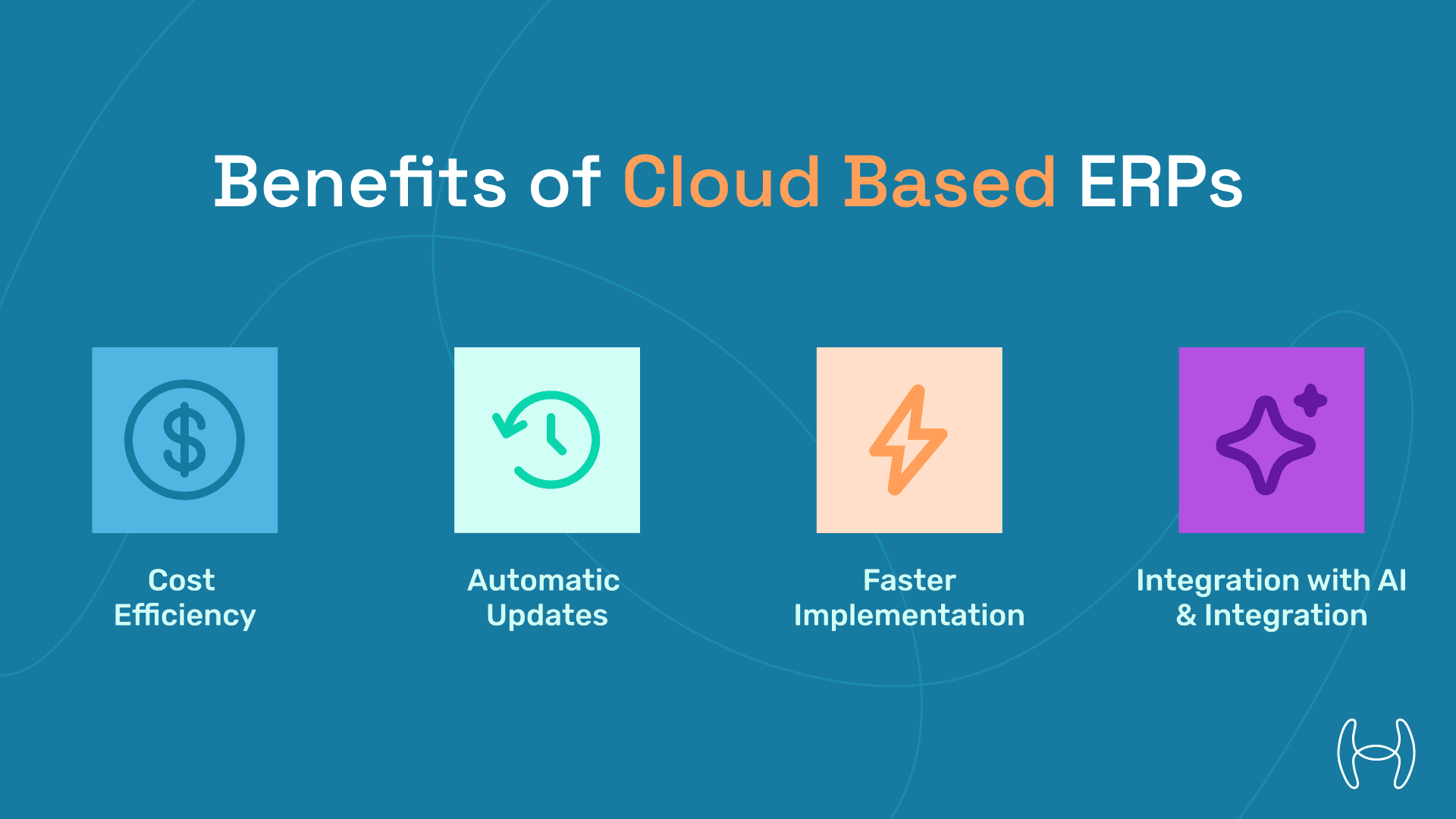
Accessibility and Collaboration
With a cloud-based ERP SaaS solution system, users can collaborate in real time across departments and geographies. Access is role-based and available from any device, without VPN dependencies or on-site server access requirements.
Cost-Efficiency
Reduces capital expenditures by converting software ownership to operational costs.
Automatic Updates
Cloud ERP ensures continuous innovation without manual upgrades.
Faster Implementation
Unlike on-premise ERP, SaaS models offer implementation in weeks, not months.
Integration With AI and Automation
Modern SaaS ERPs support integration with AI agents, like Hyperbots' Co-pilots, for finance workflow automation across invoice processing, procurement, payments, and accruals.
Total Cost of Ownership: Cloud ERP vs. On-Premise
Sticker price comparisons between cloud and on-premise ERP consistently understate the real gap. According to Forrester Research, cloud ERP reduces TCO by 30 to 50% over five years compared to on-premise deployments. Over ten years, that gap widens to 66 to 71%, driven primarily by eliminated infrastructure costs, reduced IT personnel requirements, and avoided upgrade projects.
The reason is straightforward. On-premise ERP carries costs that rarely appear in the initial vendor quote.
On-premise hidden costs include:
Infrastructure and hardware: Servers, storage, and networking equipment require significant upfront capital investment, plus hardware refresh cycles every three to five years that vendors do not advertise in the headline license price
IT staffing: A dedicated ERP administrator is not optional for on-premise deployments; this is an ongoing headcount cost that cloud eliminates or substantially reduces
Perpetual licenses: On-premise ERP perpetual licenses run $1,200 to $5,000+ per user, with annual maintenance fees of 15 to 25% of the original license cost recurring every year
Major version upgrades: Vendor-supported version upgrades occur every three to five years and typically cost a significant percentage of the original license price, plus internal project resource time
Security and disaster recovery: Ongoing investment in patching, monitoring, and redundancy that cloud vendors absorb as part of the subscription
Cloud ERP pricing, for comparison:
Cloud ERP operates on a per-user, per-month subscription model. Pricing across mid-market platforms generally starts at $40 to $200 per user per month, depending on vendor, modules, and user count. Implementation services typically run one to three times the software cost, covering configuration, data migration, integrations, and training, and represent a one-time expense rather than a recurring one.
One important caveat: organizations with complex customizations should factor in long-term subscription escalation clauses, as these can erode the savings advantage over a ten-year horizon. Build your own TCO model using actual vendor quotes rather than relying on a vendor's calculator, which will always favor their deployment model.
Migrating from On-Premise ERP to Cloud SaaS
Migration is the question that stalls most on-premise organizations from making a move they have already decided to make. The process is more structured than it appears from the outside, and the timeline has compressed significantly with modern tooling.
Typical Migration Phases
1. Assessment and goal definition Before any data moves, document what is working in the current system, where the pain points are, and what KPIs the new system needs to hit. This includes identifying which data to migrate, which integrations to rebuild, and which legacy customizations are worth carrying forward versus replacing with native SaaS functionality.
2. Vendor and partner selection Not all cloud ERP implementations are equivalent. The implementation partner often determines project outcomes more than the software itself. For NetSuite specifically, look for partners with proven experience in your industry and ask for references on projects of similar complexity.
3. Data migration and cleansing This is where many migrations succeed or fail. Financial records, vendor master data, open purchase orders, and historical transactions all need to be cleaned and structured before import. Running two mock migrations with full reconciliations before go-live is standard practice for mid-market and enterprise projects.
4. Configuration and integration Cloud ERP is largely configured rather than custom-coded. Aim for 70 to 85% configuration with targeted development only where native functionality genuinely cannot cover the requirement. Integrations with banking systems, CRM, and supply chain tools are typically handled via pre-built connectors or API-based setups.
5. Testing and UAT User acceptance testing by role, finance, operations, procurement, is essential before cutover. A full dress rehearsal that surfaces workflow gaps early is far less expensive than discovering them after go-live.
6. Go-live and post-implementation optimization Cutover near the end of a financial period reduces the complexity of reconciling open transactions. After go-live, track KPIs like invoice cycle time, AP cost per invoice, and straight-through processing rate. These metrics quantify ROI and surface areas where additional automation can add value.
Migration timeline: Cloud ERP implementations typically complete in two to twelve weeks for standard configurations, and three to nine months for complex multi-entity or highly integrated environments.
One strategic consideration worth flagging: organizations with heavily customized on-premise systems sometimes opt for a phased approach, moving core financials to cloud first and migrating peripheral modules in subsequent phases. This reduces cutover risk and allows teams to stabilize on the new platform before expanding scope.
Meet Hyperbots: AI Co-Pilots for NetSuite Cloud ERP
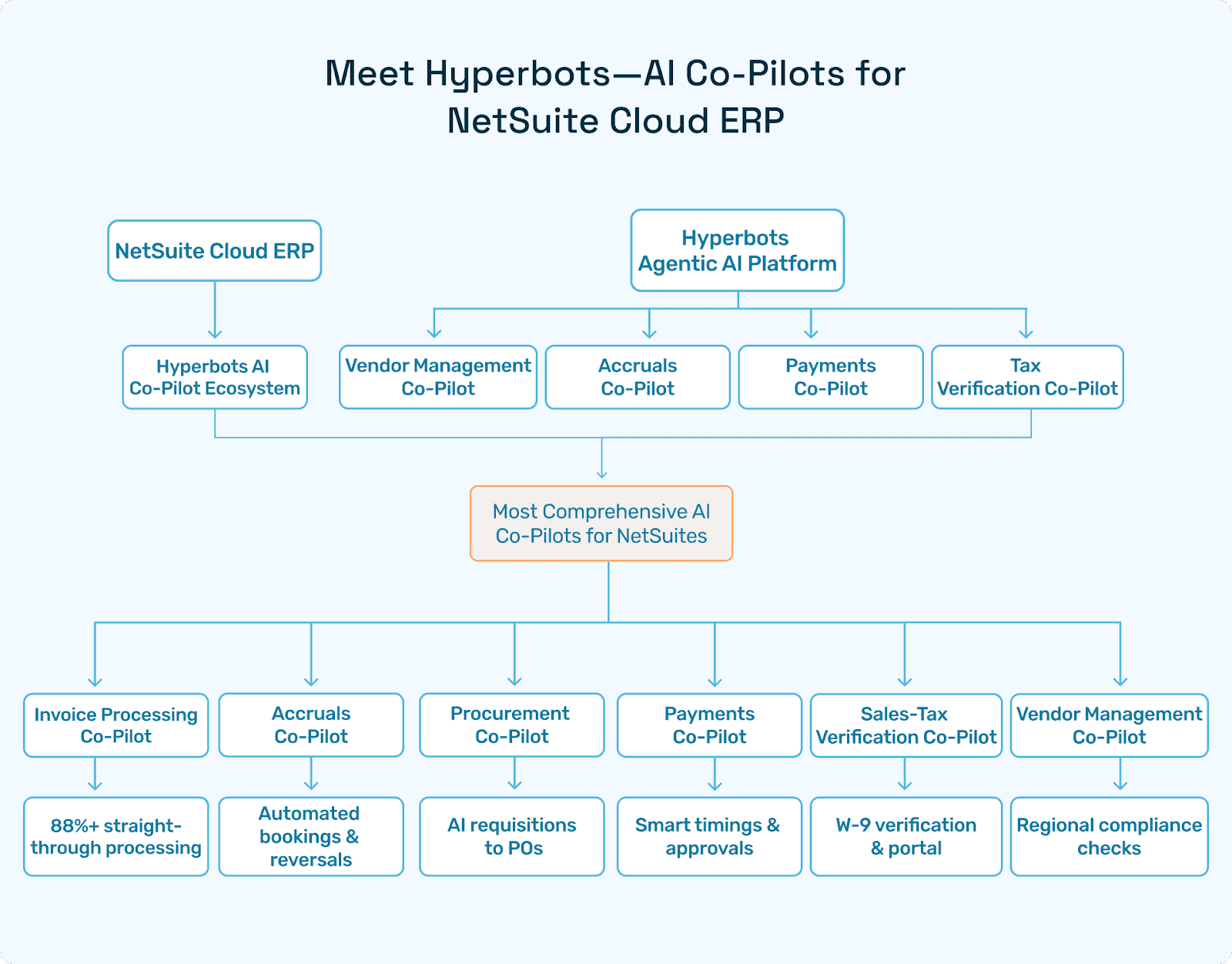
Hyperbots has built the most comprehensive AI co-pilot ecosystem for NetSuite users. These agents sit on top of the ERP layer and perform tasks autonomously across finance workflows.
Hyperbots AI Co-Pilots Include:
Invoice Processing Co-pilot: Enables 80%+ straight-through processing, powered by OCR, LLMs, and VLMs.
Accruals Co-pilot: Automates accrual identification, bookings, and reversals with high compliance.
Payments Co-pilot: Suggests timing, manages approvals, and supports ACH/checks/wire automation.
Procurement Co-pilot: Converts AI-suggested requisitions to purchase orders.
Vendor Management Co-pilot: Performs W-9 verification and gives vendors a real-time portal.
Sales Tax Verification Co-pilot: Checks regional compliance and minimizes audit risks.
Each agent uses Hyperbots' Agentic AI platform, built on:
Vision Language Models (VLMs)
Finance-trained LLMs
Mixture of Experts (MoE)
Strong reasoning and context
How ERP SaaS Empowers Growing Organizations
Industry Use Cases
Construction: Track job costing, materials, and subcontractor invoices.
Healthcare: Compliant vendor payments, HIPAA-ready document storage.
Manufacturing: Real-time inventory, production planning, and AP automation.
Real Client Example: A Mid-Sized Manufacturer
A U.S.-based manufacturer reduced invoice processing effort by 73% using Hyperbots' Invoice Processing Co-pilot, integrated seamlessly with NetSuite ERP SaaS.
Comparing ERP SaaS Vendors
Feature | NetSuite + Hyperbots | SAP Business One | Microsoft Dynamics 365 |
Cloud-Native | Yes | Partial | Yes |
AI Co-Pilot Support | Full Suite via Hyperbots | Limited | Limited |
Mid-Market Focus | Strong | Moderate | Strong |
Speed of Implementation | 2–4 Weeks | 8–12 Weeks | 6–10 Weeks |
Cost Efficiency | High | Medium | Medium |
For a deeper breakdown of how these platforms compare across pricing, modules, and AI readiness, see our ERP systems vendor scorecard and NetSuite alternatives guide.
ERP SaaS Implementation Checklist
✅ Define your goals (cost saving, speed, automation)
✅ Choose the right ERP vendor and implementation partner
✅ Ensure AI compatibility
✅ Integrate with banking, CRM, and supply chain tools
✅ Train staff and test for edge cases
Why Hyperbots is the Top AI Layer for ERP SaaS
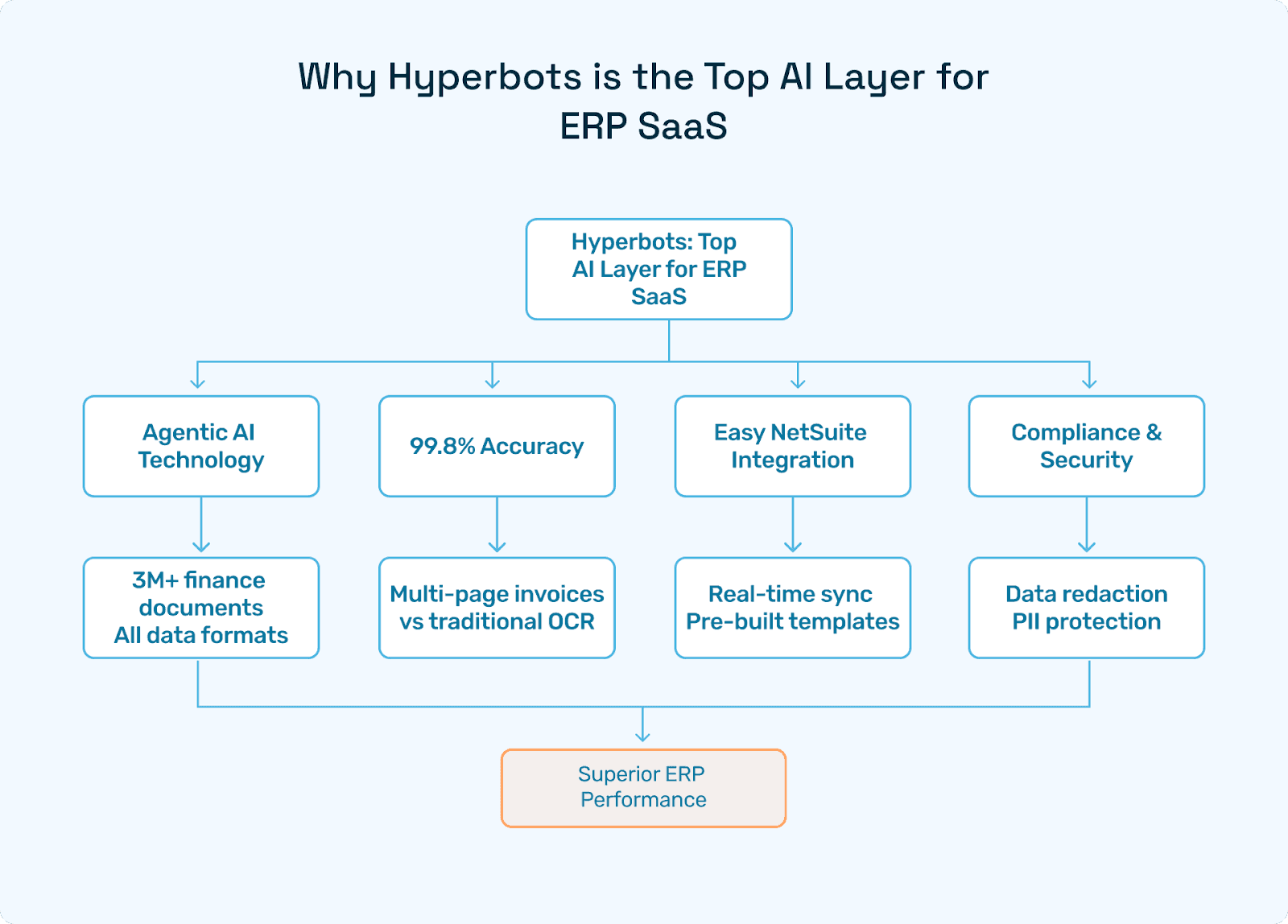
Agentic AI Technology
Trained on 3M+ finance documents
Handles unstructured, structured, and multimodal formats
99.8% Accuracy
Especially on multi-page, line-item invoices, where traditional OCR fails.
Easy Integration with NetSuite
Real-time data sync via Oracle NetSuite connector
Pre-built templates
Compliance and Redaction
Hyperbots supports secure data redaction, PII protection, and audit-trail creation.
Conclusion
Cloud ERP SaaS is not a trend you are deciding whether to join. For most organizations evaluating new or replacement ERP systems, it is the default. The TCO math favors it. The implementation timelines are faster. The upgrade burden disappears. And the architecture is built to accommodate AI in a way that on-premise systems simply are not.
What matters now is not whether to go cloud, but how to get the most out of it once you are there. That is where the AI layer becomes important. Standard cloud ERP handles the system of record. Hyperbots handles the workflows that run on top of it: invoices, accruals, payments, procurement, vendor management, and tax verification, all operating autonomously with audit trails built in.
If you are evaluating a cloud-based ERP SaaS solution system or planning an AI automation layer on top of an existing one, request a Hyperbots demo or explore the product page to see the co-pilots in detail.
Frequently Asked Questions
What is ERP SaaS and how does it differ from on-premise ERP?
ERP SaaS is an Enterprise Resource Planning system delivered as a cloud-hosted subscription. The vendor manages the infrastructure, handles updates automatically, and is responsible for uptime and security. On-premise ERP places all of that on the organization's own IT team. The practical difference for finance teams is faster implementation, no upgrade projects, and a lower total cost of ownership over a five-to-ten year horizon for most organizations.
Does Hyperbots work with both cloud and on-premise ERP systems?
Yes. Hyperbots co-pilots integrate natively with all cloud and on-premise ERP deployments. The platform supports pre-built connectors for NetSuite, SAP S/4HANA, SAP ECC, SAP B1, Oracle Cloud, Microsoft Dynamics 365 Business Central, Sage 300, Sage Intacct, Deltek Costpoint, Epicor, QuickBooks, and others. All connectors support real-time, bidirectional read and write access to financial data including invoices, purchase orders, vendor records, GL codes, and chart of accounts. See the full integrations page for the complete list.
What finance workflows do the Hyperbots co-pilots automate?
Hyperbots covers the full accounts payable and procure-to-pay cycle. The Invoice Processing Co-pilot handles invoice discovery, field extraction, matching, GL coding, and posting, achieving 80% straight-through processing and reducing average invoice processing time from 11 days to under one minute. The Procurement Co-pilot auto-generates purchase requisitions and converts them to purchase orders in around 5 minutes. The Payments Co-pilot handles timing recommendations, approvals, and ACH, check, and wire execution. The Accruals Co-pilot automates month-end accrual identification, booking, and reversal with less than 5% variance between accrued and actual costs. Collections and Cash Application co-pilots are also available, with 40% DSO reduction and 80% reconciliation cost reduction reported respectively.
How accurate is Hyperbots' AI for document processing?
The platform achieves 99.8% accuracy in converting unstructured financial documents to structured fields, using a multimodal Mixture of Experts model that integrates LLMs, VLMs, and layout models. With contextual validation, deployed agents reach 100% accuracy. This is especially relevant for multi-page, multi-line-item invoices where standard OCR fails. The model is pre-trained on millions of financial documents including invoices, bills, statements, and contracts.
What does cloud ERP actually cost?
Cloud ERP operates on per-user, per-month subscriptions. Mid-market platforms generally start at $40 to $200 per user per month, depending on vendor and module scope. Implementation services typically run one to three times the software cost as a one-time expense. Factor in integrations, training, and data migration work when building a realistic budget.
What hidden costs should we expect with on-premise ERP?
The most commonly underestimated costs are IT staffing for a dedicated administrator, perpetual licenses of $1,200 to $5,000+ per user plus annual maintenance fees of 15 to 25% of the original license cost, hardware refresh cycles every three to five years, and disaster recovery infrastructure. When all of these are factored in, on-premise TCO runs 66 to 71% higher than cloud over ten years.
Can Hyperbots adapt to company-specific ERP customizations?
Yes. The co-pilots use a configuration-driven integration framework that supports read and write access to custom fields in any connected ERP. The platform also employs inference-time learning through Auto ML pipelines, including reinforcement learning, to adapt to company-specific patterns over time, for tasks like GL recommendation and cash outflow forecasting. See the Oracle ERP vs. NetSuite comparison for an example of how this plays out across different ERP architectures.