Designing a User-Friendly PO Automation Workflow
Streamline purchase orders with user-friendly PO automation software that simplifies procurement, ensures compliance, and drives higher ROI.
Executive Summary
In today’s fast-paced and increasingly complex procurement landscape, finance and procurement teams face mounting pressure to operate with greater efficiency, transparency, and compliance. Traditional, manual purchase order processes are no longer sufficient—they create bottlenecks, introduce errors, and increase fraud risk. To overcome these challenges, organizations are turning to user-friendly PO automation software that simplifies workflows while ensuring accuracy and governance.
With Hyperbots’ industry-leading AI Co-pilot suite, companies can reduce process costs, accelerate purchase order cycle times, and enforce compliance at every step. The platform provides intuitive interfaces and intelligent workflow design, ensuring that even non-technical users can navigate procurement seamlessly.
This blog explores how intelligent PO automation workflows, supported by best practices in procurement UI/UX and AI-driven decision-making, generate strategic value across the enterprise—empowering teams to optimize spend, strengthen vendor relationships, and focus on initiatives that drive growth.
What is User-Friendly PO Automation Software?
User-friendly PO automation software digitizes and streamlines the entire purchase order (PO) lifecycle—from requisition requests and approvals to PO creation, dispatch, and invoice matching. By eliminating spreadsheets, email-based approvals, and manual data entry, it helps organizations reduce errors, remove bottlenecks, and achieve faster, more accurate procurement outcomes.
Unlike outdated, manual processes that often create silos, modern PO automation platforms centralize procurement activities in one secure hub. They not only improve efficiency but also enforce policy compliance and provide real-time visibility into spending, approvals, and vendor data. This transparency is essential for finance and procurement teams looking to control costs, reduce fraud risk, and strengthen vendor relationships.
Key Features of User-Friendly PO Automation Software
Automated Requisition Creation: Simplifies the request process, reducing time spent on manual data entry.
AI-Powered Validation: Detects errors, duplicates, and compliance issues before they move forward, reducing rework and fraud exposure.
Customizable Approval Workflows: Configures logic based on business rules, departments, or transaction size, ensuring proper oversight.
Seamless ERP & Finance System Integration: Syncs with existing systems for a smooth, connected workflow.
Mobile & Web Approvals: Empowers managers to approve requests on the go, keeping procurement cycles moving.
Automating repetitive tasks frees finance and procurement professionals from time-consuming, error-prone activities. Instead of chasing approvals or fixing mistakes, teams can focus on proactive spend management and strategic decision-making.
Why Intuitive Design Matters: Procurement UI/UX
An effective purchase order (PO) automation workflow is not only about digitization and AI—it’s equally about intuitive procurement UI/UX. Even the most advanced automation loses its impact if end users find the system cumbersome, confusing, or frustrating. Poorly designed interfaces can slow down supplier onboarding, discourage adoption, and paradoxically increase the risk of errors that automation is meant to prevent. This is why design thinking must be placed at the center of PO automation.
Core Principles of Effective Workflow Design
Embracing Personas:
Procurement automation platforms must account for the fact that different users have different needs. A CFO may want high-level dashboards and spend insights, while an AP clerk requires step-by-step invoice matching and validation. Procurement leads focus on compliance and approvals, and vendors need visibility into order status and payments. Designing with these personas in mind ensures that each stakeholder gets a tailored experience that supports their role effectively.Journey Mapping:
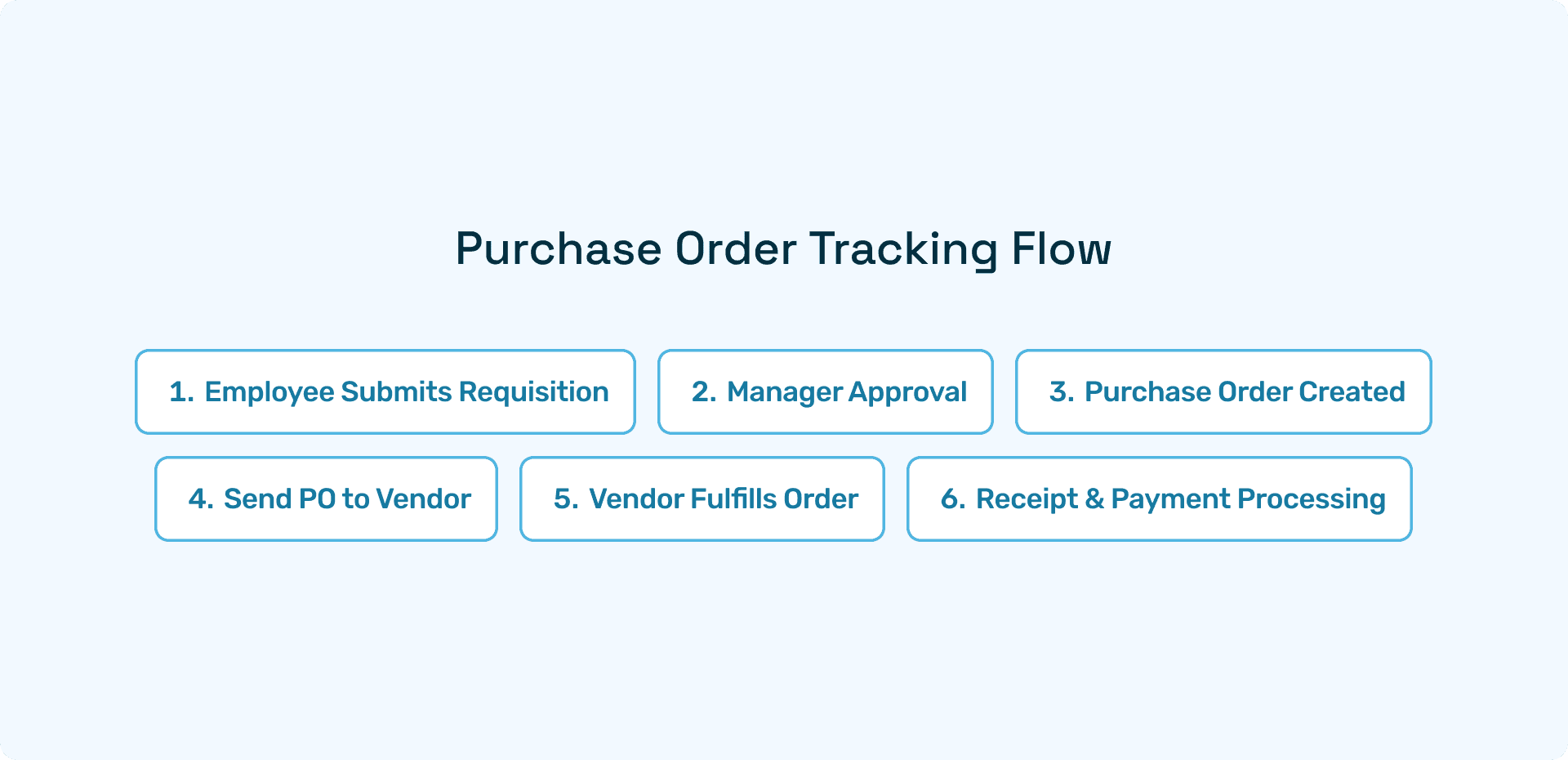
Visualizing the end-to-end workflow—from requisition to approval, purchase order creation, invoice submission, and final payment—helps identify friction points and inefficiencies. Journey mapping allows product teams to optimize touchpoints, reduce redundant clicks, and ensure smooth transitions between stages. Companies like Genpact emphasize journey-led transformations, showing how aligning workflows to actual user behavior leads to better adoption and efficiency.Supplier-Centricity:
Too often, automation platforms prioritize the buyer’s side while leaving vendors struggling with complex, unintuitive portals. A supplier-focused approach ensures portals are just as easy for vendors as they are for internal teams. This means seamless onboarding, simplified document uploads, order tracking, and payment visibility. Vendors benefit from reduced administrative overhead, while buyers gain from stronger, more collaborative relationships.
The Impact of Thoughtful Design
When procurement systems are designed with UI/UX at the forefront:
Adoption rates improve because the software is intuitive and accessible.
Errors decrease, as users are guided with smart prompts and validations.
Supplier relationships strengthen through transparent, user-friendly interactions.
Finance leaders gain real-time visibility without overwhelming complexity.
Ultimately, user-friendly PO automation software should empower all stakeholders, not just automate processes. By applying design thinking, organizations can unlock the full potential of automation, ensuring procurement is both efficient and collaborative.
A Phased Approach to PO Automation Workflow Design
Designing an effective purchase order (PO) automation workflow requires more than just implementing software—it demands a structured, phased approach. Organizations that jump straight to automation without understanding their current state often face poor adoption, recurring errors, or limited ROI. A step-by-step methodology ensures that automation is purposeful, user-friendly, and aligned with business objectives.
1. Assess and Map the Current State
The first step is to understand how your purchase order process works today. Document each stage, from requisition to invoice matching, noting every manual intervention and approval bottleneck. Common issues include duplicate data entry, unclear approval chains, and delays caused by paper-based or email-driven workflows. By visualizing the current state, procurement leaders create a baseline that highlights where automation will have the greatest impact.
2. Define Goals and Build the Business Case
Once the current workflow is mapped, establish measurable goals. Benchmark key metrics such as average cycle times, error rates, and cost per PO. Framing these objectives in financial and operational terms builds a strong business case, making it easier to secure executive buy-in and budget approval.
3. Design the Future-State Workflow
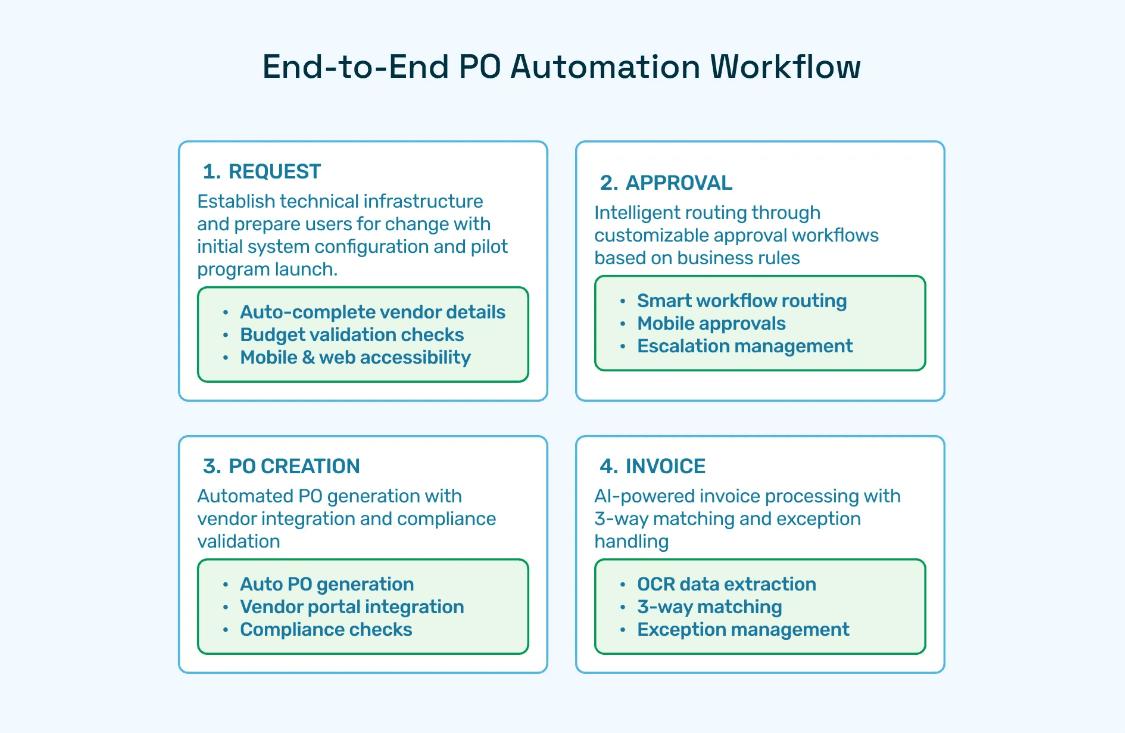
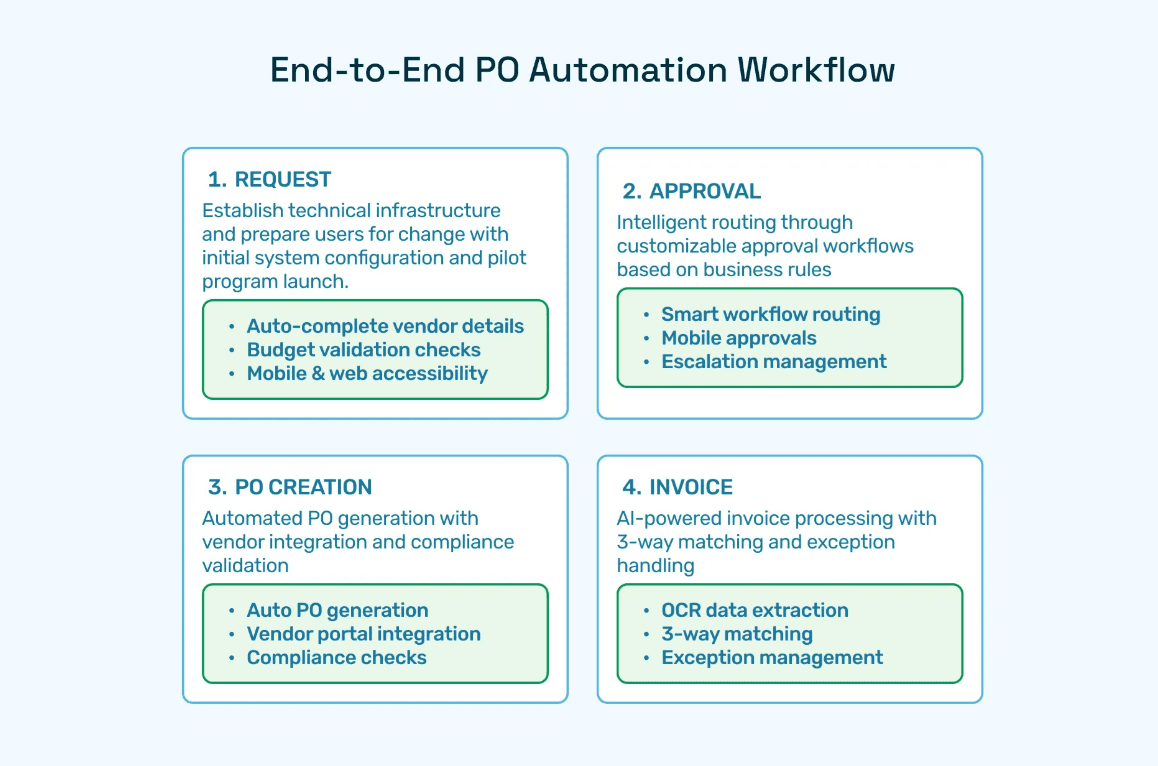
Next, reimagine how the purchase order process should work in an automated environment. Identify where manual steps can be eliminated or streamlined. Automated requisition creation, intelligent approval routing, real-time PO generation, and system-driven three-way matching (PO, invoice, goods receipt) should be built into the design. Closing the PO with automated updates ensures full visibility and audit readiness. A well-designed future state aligns with compliance requirements while improving user experience.
4. Select Software with a User-Friendly Interface
Technology selection is critical. Prioritize platforms that combine robust functionality with intuitive design. Features such as customizable workflows, role-specific dashboards, and simple, guided forms reduce complexity for end users. Solutions like Hyperbots Procurement Copilot emphasize both automation and usability, ensuring adoption across CFOs, procurement leads, AP clerks, and vendors. A user-friendly interface is not just a convenience—it’s essential for maximizing ROI.
5. Implement, Train, and Monitor
Successful implementation goes beyond configuration. Engage stakeholders early in the rollout by involving them in testing and training. Provide role-based training sessions that address the needs of different personas. After go-live, monitor adoption metrics, user feedback, and system analytics to spot friction points. Iterative improvements—based on real-world data—help refine the workflow and sustain long-term efficiency gains.
This phased approach helps organizations avoid common pitfalls of rushed automation and instead build a PO process that is efficient, scalable, and user-friendly.
PO Automation Workflow Design Best Practices
Implementing user-friendly purchase order (PO) automation software is not just about replacing manual tasks with digital tools—it’s about creating workflows that are intuitive, efficient, and built around the needs of every stakeholder. Poorly designed systems often frustrate users, delay approvals, and create friction with vendors. To unlock the full potential of automation, organizations must focus on workflow design that blends usability, transparency, and adaptability.
Procurement UI/UX Essentials
Simple Request Forms: A well-designed requisition form is the foundation of a smooth procurement process. Forms should include auto-suggest fields that pull data from vendor catalogs or past POs, reducing manual entry errors. Mandatory fields such as vendor name, item code, quantity, and cost center ensure that every requisition is complete before moving forward. This not only speeds up requests but also reduces costly back-and-forth clarifications.
Multi-Channel Approvals: Executives and managers are often on the move, and waiting for desktop logins slows down cycle times. A best-practice PO automation workflow supports multi-channel approvals, enabling decision-makers to respond via mobile apps, web interfaces, email, or even chat-based notifications. Flexible approvals reduce bottlenecks and keep the procurement engine moving without compromising compliance.
Real-Time Dashboards: Transparency is critical for finance and procurement teams. Real-time dashboards provide a single source of truth, displaying all open, pending, approved, and closed POs at a glance. With drill-down capabilities, users can track budgets, vendor performance, and policy compliance instantly. Dashboards also empower CFOs and controllers with data-driven insights for forecasting and spend governance.
Vendor Portals: A well-integrated vendor portal is just as important as internal workflows. Suppliers should be able to manage onboarding, upload compliance documents, track invoices and payments, and communicate with AP teams—all from one secure platform. This supplier-centric approach reduces emails and manual document handling while strengthening vendor relationships through faster resolutions and better visibility.
Bringing It All Together
When organizations combine simple request forms, multi-channel approvals, real-time dashboards, and supplier-friendly portals, they create a procurement ecosystem that is efficient, transparent, and user-centric. Software like Hyperbots Procurement Copilot brings these best practices to life, ensuring PO workflows are designed not just for automation—but for long-term adoption, compliance, and scalability.
PO Automation Workflow Design Principles
Designing an effective purchase order (PO) automation workflow requires more than simply digitizing approvals. The most impactful solutions incorporate controls, intelligence, and adaptability to reduce errors, enforce compliance, and ensure every transaction contributes to financial visibility. Below are four core principles that should guide any organization implementing PO automation.
1. Automate 3-Way Matching and Reconciliation
At the heart of strong PO automation lies 3-way matching—the systematic comparison of purchase orders, goods receipts, and supplier invoices. By automating this step, organizations can instantly detect discrepancies in quantities, prices, or payment terms, reducing duplicate payments and fraud risk. Automated reconciliation saves accounts payable teams hours of manual effort and creates an auditable trail that is critical during compliance checks.
2. Customize Approval Hierarchies
Not all purchases carry the same risk or importance. A best-practice PO workflow should include configurable approval hierarchies that adjust based on spend thresholds, vendor risk levels, or departmental policies. For instance, low-value purchases may route to a single approver, while high-value or sensitive vendor contracts may require multi-level sign-offs. This flexibility ensures efficiency without compromising oversight. Platforms like Hyperbots Procurement Co-pilot make it simple to configure and adapt hierarchies as business needs evolve.
3. Real-Time Notifications for Bottlenecks and Exceptions
Even the most well-designed workflows can encounter bottlenecks when approvals are delayed or anomalies arise. PO automation systems should push real-time notifications—via mobile, email, or dashboards—to keep stakeholders informed and ensure action is taken quickly. For exceptions such as over-budget requests or unverified vendor data, alerts allow teams to intervene proactively, avoiding process slowdowns and compliance breaches.
4. Integrate Analytics for Spend Control and Compliance
Modern procurement teams cannot rely on static reports. Embedding analytics directly into PO workflows empowers finance leaders with visibility into spend by department, vendor performance trends, and compliance adherence. Dashboards and drill-down reports highlight patterns such as recurring delays, pricing anomalies, or policy violations, enabling smarter decision-making and stronger vendor negotiations. With AI-driven insights, organizations move beyond processing transactions to actively managing spend and mitigating risk.
The Takeaway
Automating 3-way matching, tailoring approval hierarchies, enabling real-time alerts, and integrating analytics enables businesses to create PO workflows that are secure, efficient, and strategic. These principles transform procurement from a transactional back-office function into a value-driving capability, positioning organizations to scale confidently while maintaining control.
Industry Insights: Deloitte notes that some organizations “have seen promising early returns” in productivity and cost optimization when using AI in procurement workflows.
Industry Best Practices for Effective PO Automation
Implementing purchase order (PO) automation is not just about digitizing the process—it’s about doing it right. Leading organizations recognize that automation delivers maximum value when paired with standardized practices, robust validation rules, and intuitive workflows. By embedding best practices into the design, businesses can eliminate costly errors, reduce compliance risks, and create a seamless experience for all stakeholders.
1. Standardize Purchase Order Forms
One of the most effective ways to improve PO accuracy is to standardize forms across the organization. Instead of allowing each department or location to use its own format, leading teams establish a single, consistent template. This ensures uniformity in data entry and simplifies reporting. A standardized PO form typically includes:
Mandatory fields such as vendor name, item description, unit price, quantity, and cost center.
Dropdown menus for commonly used fields, reducing manual typing errors.
Pre-set approval workflows tied to spend thresholds or business units.
2. Implement Data Validation Rules
Even with automation in place, errors can creep in without proper validation. By embedding rules directly into the PO workflow, organizations ensure that every entry is accurate, complete, and compliant before it moves forward. Best practices include:
Validation of vendor master data to avoid duplicate or unauthorized vendors.
Enforcing standard units of measure (e.g., kg, pcs, hrs) for consistency across orders.
Error flags and alerts for incomplete or mismatched entries.
Budget and policy compliance checks to prevent overspending or unauthorized purchases.
3. Leverage Electronic Workflows
Paper-based approvals or email-driven processes slow down procurement and introduce unnecessary risks. Electronic workflows streamline PO creation, approval, and tracking, ensuring faster cycle times and greater transparency. Benefits include:
Real-time visibility into PO status for requesters, approvers, and vendors.
Mobile approvals so managers can approve POs on the go.
Automated reminders and escalations to prevent delays.
Complete audit trails for compliance and financial reporting.
4. Use Standardized Templates for Tracking and Auditing
Automation platforms like Hyperbots Procurement Copilot enable organizations to design configurable templates for POs, ensuring every order follows the same structure. This not only improves operational efficiency but also makes it easier to track orders, reconcile invoices, and conduct digital audits with confidence.
Continuous Improvement & Fraud Prevention in PO Automation
Modern purchase order (PO) automation goes beyond digitizing workflows—it enables continuous improvement and proactive fraud prevention through advanced technology. Leading platforms are embedding artificial intelligence (AI) and real-time analytics to ensure procurement remains both efficient and secure.
Key elements include:
AI-Powered Fraud Detection
Identifies duplicate orders, inflated invoices, or unusual vendor activity.
Learns from historical transactions, improving accuracy over time.
Reduces false positives while catching risks early.
Seamless ERP and Accounting Integration
Creates a single source of truth for procurement and finance teams.
Eliminates mismatched entries and redundant data entry.
Ensures automated reconciliation of POs, receipts, and invoices.
Real-Time Exception Flagging
Instantly alerts teams to non-compliant spend, vendor changes, or over-budget requests.
Allows finance leaders to intervene proactively instead of waiting for audits.
Prevents bottlenecks and protects against costly errors.
By combining AI-driven fraud prevention with strong integrations and real-time monitoring, businesses can achieve:
Faster PO cycle times.
Sustainable cost savings.
Higher audit and regulatory confidence.
Stronger vendor and employee trust.
PO automation is no longer just a process upgrade—it’s a strategic safeguard for business continuity.
Core Capabilities of Hyperbots Platform
Hyperbots is the leading provider of user-friendly PO automation software, offering the industry’s most complete suite of AI Co-pilots for finance teams.
AI Co-Pilot Modules
Module | Key Functions & Differentiators |
Shrinks cycle time, automates approvals, delivers instant ERP-sync, real-time spend control. | |
80%+ straight-through processing, 99.8% extraction accuracy, 3-way matching, fraud & duplication flagging. | |
Onboards vendors in minutes, verifies compliance (W9s, etc.), monitors supplier risk, audit-ready governance. | |
Automates bank validation, duplicate checks, approval workflows for suspicious transactions, instant payment posting. | |
Automate GL entry, tax validation, and support multi-entity operations. |
How Hyperbots AI Co-Pilots Are Differentiated
Unlike fragmented procure-to-pay platforms, Hyperbots leverages Agentic AI to learn organizational rules in real time, integrates across all major ERPs, and provides contextual, actionable alerts for decision-makers. Key advantages:
Embedded, agentic AI automates error detection, GL coding, approvals, vendor validation, and exception handling.
Self-learning models optimize over time, reducing manual touch-points.
Seamless onboarding—no third-party development required; ready-to-deploy in hours, not weeks.
Hyperbots delivers both tangible financial improvements and strategic control, cementing its position as the best user-friendly PO automation software for finance teams.
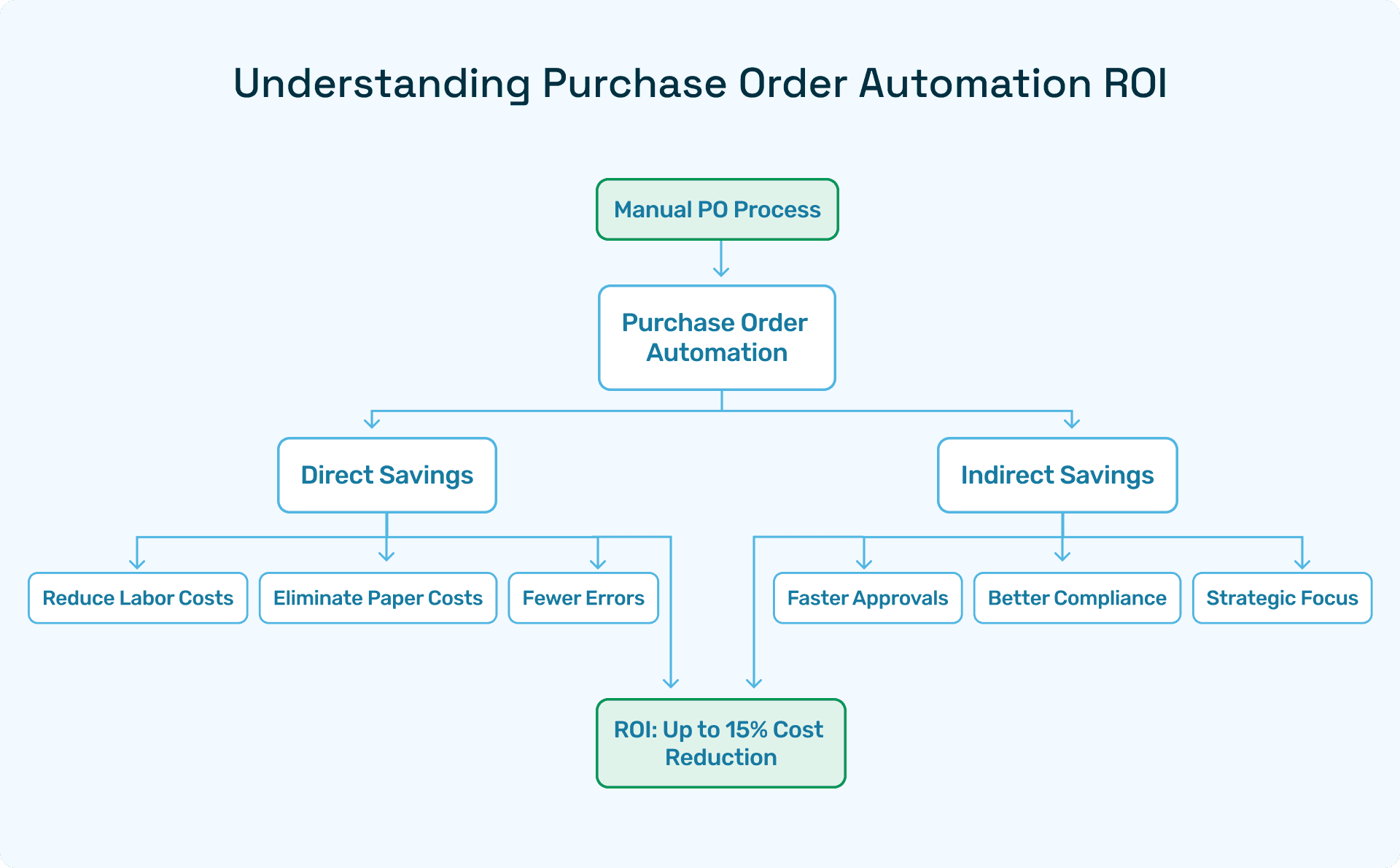
ROI You Can See and Feel with Hyperbots' PO Automation
Implementing Hyperbots' Procurement copilot deliver significant ROI and transforms procurement operations by providing:
Over 80% reduction in PO creation & dispatch time
5 minute PR creation time
At least a 10% reduction in cash outflows
Accurate and timely automatic communication with vendors
100% automation of forms and other information verification
Granular and customized workflow for each process
Improved vendor relationships due to predictable approval timelines.
Hyperbots’ integrated platform ensures that these benefits scale across departments, projects, and business units, turning procurement into a high-value function rather than a bottleneck.
Industry Insights: Gartner projects that GenAI is expected to deliver a 21 % increase in productivity and 12 % cost savings over the next 12–18 months.
Frequently Asked Questions
Q1: What exactly is user-friendly PO automation software?
A digital platform that automates purchase order creation, approval, and management through intuitive UIs and smart workflows.
Q2: How does PO automation minimize compliance risk?
By enforcing budget checks, capturing digital audit logs, and ensuring proper approvals at every step.
Q3: Is this relevant for mid-market organizations, or just enterprises?
PO automation benefits both. Hyperbots supports scalable, user-friendly workflows for companies of all sizes.
Q4: How does Hyperbots integrate with existing ERPs?
Via native connectors and pre-trained AI agents, providing near-instant setup with zero custom code.