Online PO System: Setup, User Roles, and Permissions
Set up online PO systems with defined user roles, permissions, and AI-powered compliance for streamlined procurement efficiency.
Executive Summary
Implementing an online purchase order software is crucial for modern enterprises aiming to streamline procurement, enhance compliance, and reduce operational costs. Central to this transformation are well-defined user roles, permissions, and robust audit trails. This guide delves into the setup process of an online PO system, the significance of user roles and permissions, and how Hyperbots' AI-driven Procurement Copilot elevates procurement operations.
What Is an Online PO System?
An online PO system is a digital solution that automates and manages the creation, approval, and tracking of purchase orders. It ensures a standardized process for requesting and acquiring goods or services, reducing manual errors and improving compliance.
Key Features Include:
Automated Approvals and Workflows: Streamlines the approval process, reducing delays and bottlenecks.
Real-Time Spend Visibility: Provides finance teams with up-to-date insights into expenditures. (source)
Integration with ERP Systems: Ensures seamless data flow between procurement and financial systems.
Supplier Collaboration Tools: Facilitates communication and coordination with vendors.
Setting Up an Online PO System
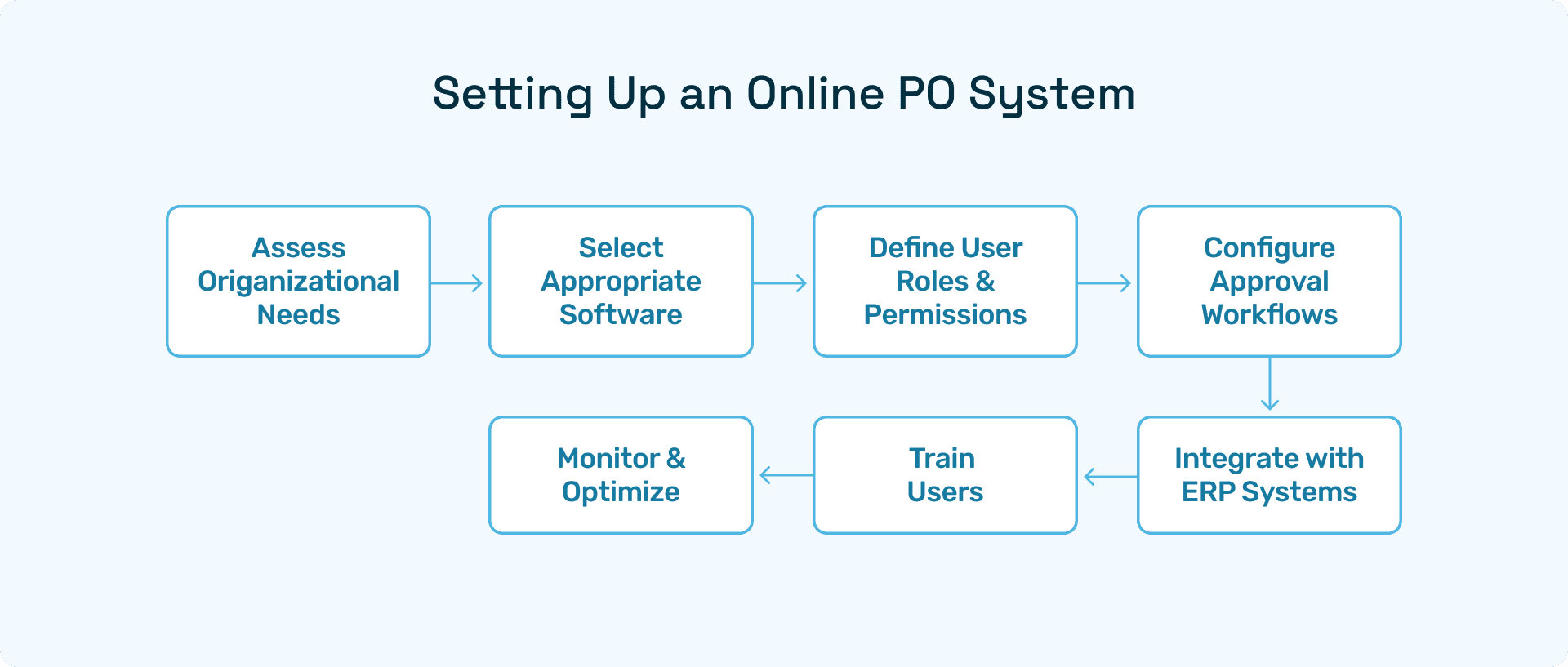
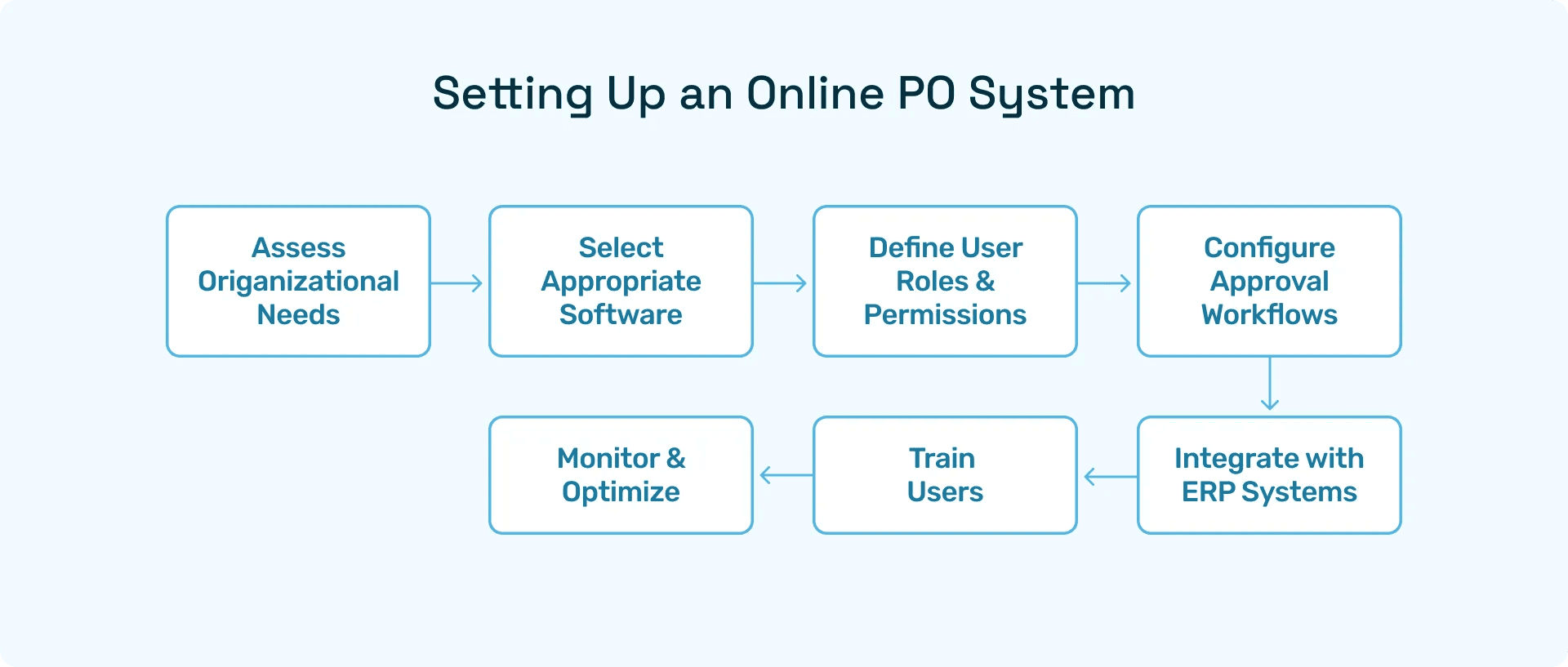
Implementing an online PO system involves several key steps:
Assess Organizational Needs: Identify specific requirements based on company size, industry, and procurement volume. (source).
Select Appropriate Software: Choose a solution that aligns with organizational needs and integrates well with existing systems.
Define User Roles and Permissions: Establish clear roles and access levels to ensure appropriate control and accountability.
Configure Approval Workflows: Set up automated workflows to streamline the approval process.
Integrate with ERP Systems: Ensure seamless data exchange between the PO system and financial systems.
Train Users: Provide training to ensure effective use of the system.
Monitor and Optimize: Regularly review system performance and make necessary adjustments.
Defining User Roles and Permissions
User roles and permissions are critical for maintaining control and ensuring compliance within an online purchase order software.
Common User Roles:
Requester: Initiates purchase requests.
Approver: Reviews and approves purchase requests.
Purchasing Agent: Creates and manages purchase orders.
Finance Officer: Oversees budget compliance and financial approvals.
Administrator: Manages system settings and user access.
Best Practices for Managing Permissions:
Implement Role-Based Access Control (RBAC): Assign permissions based on user roles to ensure appropriate access levels.
Regularly Review Access Rights: Conduct periodic audits to ensure that permissions align with current responsibilities.
Enforce the Principle of Least Privilege: Grant users the minimum level of access necessary to perform their duties.
Utilize Audit Trails: Maintain logs of user activities to monitor and review actions taken within the system.
Benefits of Defining Clear User Roles in Online PO Systems
Defining clear user roles in a purchase order system is crucial for efficiency, accountability, and compliance. Each role ensures that users have appropriate access and responsibilities, preventing errors and maintaining control over the procurement process.
Key Advantages:
Segregation of Duties: Dividing responsibilities between requesters, approvers, and finance officers reduces the risk of unauthorized spend or fraud.
Faster Approvals: With clearly defined approvers, requests move quickly through workflows, avoiding bottlenecks.
Improved Accountability: When actions are tied to specific roles, it’s easier to track decisions and assign responsibility.
Enhanced Compliance: Regulatory and internal policies are enforced automatically when roles align with approval authority.
Implementing structured user roles ensures that the system supports both operational efficiency and regulatory adherence, providing confidence in everyday procurement activities.
Best Practices for Managing Permissions in PO Systems
Permissions determine what users can see and do within an online purchase order system. Properly managed permissions protect sensitive financial data and ensure compliance.
Best Practices:
Role-Based Access Control (RBAC): Assign permissions based on job responsibilities rather than individuals to simplify administration.
Principle of Least Privilege: Give users only the access necessary to perform their duties, reducing potential misuse or accidental errors.
Periodic Access Reviews: Regularly audit user permissions to ensure they reflect current roles and responsibilities.
Audit Trail Integration: Combine permissions management with system logging to monitor actions and detect anomalies.
Following these practices ensures that procurement remains secure, compliant, and auditable while minimizing operational risk.
The Importance of Audit Trails in Purchase Order Systems
Audit trails provide a chronological record of all actions taken in the PO system, creating transparency and accountability. They are critical for both operational control and regulatory compliance.
Benefits of Audit Trails:
Enhanced Compliance: Demonstrates adherence to internal policies and external regulations.
Dispute Resolution: Provides historical records to quickly resolve conflicts with vendors or internal stakeholders.
Operational Insights: Analyzing audit data helps identify bottlenecks, recurring errors, and opportunities for process improvement.
Fraud Prevention: Continuous tracking of user activity makes it easier to detect irregular behavior or unauthorized changes.
Maintaining detailed audit trails ensures that organizations can confidently manage spend, respond to audits, and continuously improve procurement processes.
Hyperbots' AI-Driven Procurement Copilot
Hyperbots offers an advanced AI-driven Procurement Copilot that transforms procurement operations.
Key Features:
Instant ERP-Synced Approvals: Enables real-time purchase order approvals directly within ERP systems.
End-to-End Automation: Automates the entire procure-to-pay process, from requisition to payment.
AI-Driven Anomaly Detection: Identifies and flags potential issues, such as fraud or errors, using advanced AI algorithms.
Real-Time Spend Visibility: Provides up-to-date insights into expenditures, enhancing financial oversight.
Seamless Integration: Integrates effortlessly with existing ERP systems, ensuring smooth data flow.
ROI You Can See and Feel with Hyperbots
When finance leaders evaluate purchase order automation, the first question is simple: what’s the ROI? With Hyperbots, the answer is both measurable and transformative. The platform delivers savings you can quantify in hard dollars, along with intangible benefits that reshape how procurement and finance teams work.
Implementing Hyperbots' Procurement copilot deliver significant ROI and transforms procurement operations by providing:
Over 80% reduction in PO creation & dispatch time
5 minute PR creation time
At least a 10% reduction in cash outflows
Accurate and timely automatic communication with vendors
100% automation of forms and other information verification
Granular and customized workflow for each process
Improved vendor relationships due to predictable approval timelines.
By leveraging AI-driven PO tracking, companies not only achieve quantifiable cost savings but also strengthen operational resilience and supplier collaboration. Hyperbots’ integrated platform ensures that these benefits scale across departments, projects, and business units, turning procurement into a high-value function rather than a bottleneck.
Conclusion
An online PO system is a vital component of modern procurement strategies. By defining clear user roles, managing permissions effectively, and maintaining robust audit trails, organizations can enhance control, compliance, and efficiency. Hyperbots' AI-driven Procurement Copilot further elevates procurement operations, delivering significant ROI and transformational impact.
FAQs
Q1: How does Hyperbots' Procurement Copilot integrate with existing ERP systems?
Hyperbots' Procurement Copilot seamlessly integrates with various ERP systems, enabling real-time purchase order approvals and data synchronization.
Q2: What industries can benefit from Hyperbots' AI-driven procurement solutions?
Hyperbots' solutions are designed to benefit a wide range of industries, including manufacturing, retail, wholesale distribution, technology, and telecommunications.
Q3: How can I learn more about Hyperbots' Procurement Copilot? For more information, visit the Procurement Copilot page or explore the Hyperbots Blog for insights and updates.