Epicor AI Explained: Prism, Edge Agent & Automation Studio
Understand Epicor Prism, Edge Agent, and Automation Studio—and where finance-specific AI fits into your Kinetic environment.

Introduction: Understanding Epicor AI and Its Approach to ERP
Ask five ERP buyers what "AI in the ERP" means and you will hear five different things: a chat window that answers questions about open orders, an agent that drafts a purchase order, a connector that syncs customer records with a CRM, or a tool that reads supplier invoices. Each of these now has a place in the Epicor ecosystem. That is exactly why understanding Epicor AI starts with separating them.
Epicor describes its direction as "Cognitive ERP": intelligent agents, automation and human-guided decision support embedded directly into the workflows of the ERP itself (Epicor). In practice, that answers the question of what Epicor's approach to AI in ERP is. AI should run inside the system of record, work from the customer's own industry-specific ERP data, and inherit the security and governance rules the business already has. It should not sit in a separate analytics tool that someone has to remember to open.
For teams running Epicor Kinetic, three names come up most often in this conversation:
Epicor Prism, a network of vertical AI agents embedded in Kinetic and Prophet 21.
Epicor Edge Agent, a small utility that connects browser-based Kinetic to local printers and files. Despite the name, it is not an AI agent.
Epicor Automation Studio, an integration and workflow automation platform built into Kinetic.
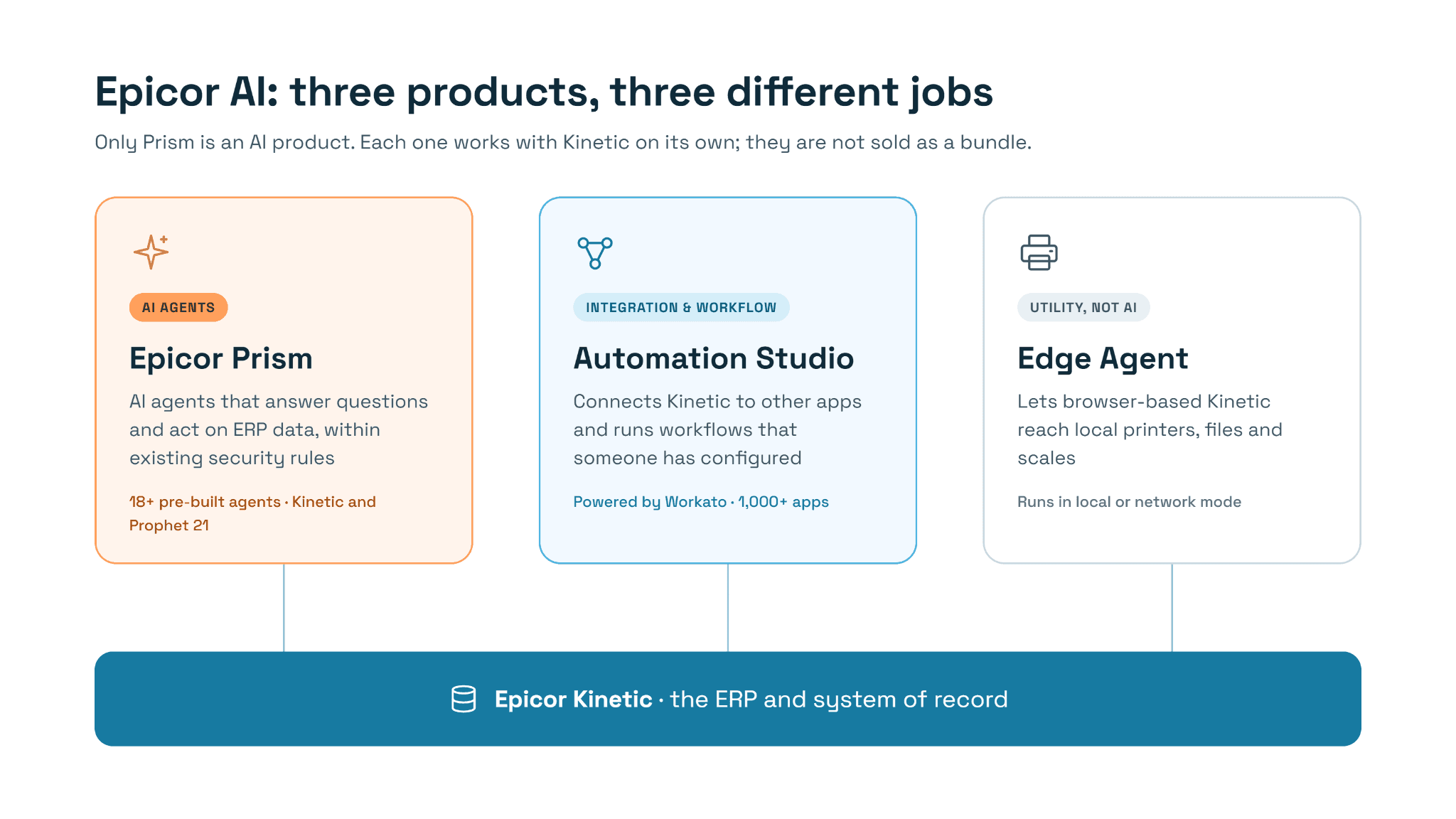
They solve different problems, they are sold and deployed separately, and they should not be treated as one bundled "AI layer." This guide explains what each one actually does, how they relate, and what they mean for finance teams already thinking about how AP and procure-to-pay work inside Kinetic. The question running through every section is a practical one: what does Epicor's native AI help a business accomplish, and where might specialized finance automation fit alongside it?
Epicor Prism: AI Agents Within the ERP Environment
Epicor Prism is the centre of Epicor's AI strategy. Epicor launched it in January 2025 as a network of vertical AI agents built for the supply chain industries, initially available with Kinetic (Epicor). It now runs inside both Kinetic and Prophet 21 and became generally available in Australia and New Zealand, the UK and selected European markets, and Latin America during 2026 (IT Brief, ERP Today).
What Prism does day to day
Prism is easiest to understand as a way of asking the ERP questions in plain language and getting answers grounded in the company's own data. A user works in their normal Epicor screens and types a question; behind the scenes, several specialized agents cooperate to find the answer or recommendation. Epicor stresses that Prism works with the customer's own ERP data while respecting existing governance settings and role-based security, so a user should only see what their role already allows.
That makes Prism more than a chatbot. Its agents are tied to specific workflows, and Epicor's 2026 direction is explicitly about moving "from answers to action," meaning agents that carry out supported tasks inside the ERP rather than only describing data.
Agents worth knowing about
Epicor says the current release includes more than 18 pre-built agents. At Epicor Insights 2026 it introduced a new wave, several of which illustrate the range (Epicor via Business Wire):
Reasoning Agent: synthesizes ERP data, documents and context to help users move from an answer to a next step.
MRP Log Agent: explains why MRP made the recommendations it did.
Freight Spend Agent: combines ERP and shipping data to spot carrier discrepancies and reconcile variances.
EDI Agent: lets Kinetic users ask plain-language questions about EDI document status and errors.
Smart Data Capture Agent: extracts and validates complex documents across AP and compliance workflows.
The Prism Knowledge Agent, which gives users in-context help with completing tasks, already handles more than 70,000 requests a month, according to Epicor. Customers also report concrete gains: one Epicor customer's CFO said Prism made shipment tracking roughly 85% faster by collapsing several system lookups into a single view.
For finance leaders, two details matter most. The Smart Data Capture Agent touches AP document handling directly. Epicor also says more than 30 further agents are in development, including financial planning, compliance and invoicing use cases.
Building and governing agents
Epicor is also giving customers ways to create their own agents. Epicor Lux is the design and governance framework every Prism agent follows, intended to show users the context, confidence and consequences of an agent's suggestion while keeping humans in the loop. Prism Agent Foundry is a guided workspace where customers and partners can build custom agents on their own data while inheriting Epicor's identity and access controls. A separate tool, Prism Developer for Application Studio, helps technical teams build and test ERP customizations faster.
What to confirm before planning around Prism
Prism is a growing portfolio, not a single switch. Regional availability has been rolled out in stages, several agents were announced as "new and forthcoming," and not every agent applies to every product or industry. Before building a business case, confirm with Epicor or your partner which agents are available for your Kinetic release, region and licence.
Epicor Edge Agent: What It Does and Where It Fits
The Epicor Edge Agent is not an AI agent. It is a small Epicor application installed on a user's computer, or on a server in the company's network, that lets the browser version of Kinetic do things a web browser cannot do on its own.
The problem it solves
As more Epicor customers move to the browser-based Kinetic experience, they run into a basic security limit of every modern browser: a web page cannot talk directly to the printers, files and devices on a person's machine. The Edge Agent acts as a trusted bridge. Epicor staff describe it as providing direct printing to local printers, access to local files for attachments, and connections to serial and USB scales for browser users, on both cloud and on-premises deployments (EpiUsers, Epicor staff post).
It runs in two modes. In local (client) mode, it sits on an individual user's computer so that clicking Print in Kinetic sends a report straight to that person's printer. In network printing mode, it runs as a service in the customer's network and gives Kinetic cloud customers server-style printing to shared printers.
What the customer gains
For a finance team, the benefit is unglamorous but real. Staff working in the browser can print reports and documents directly and attach supporting files from their own machines, without switching back to a desktop client. It removes friction from moving to browser-based Kinetic; it does not analyze, decide or automate anything.
Edge Agent vs. other things Epicor calls an "agent"
The word "agent" is doing a lot of work in the Epicor ecosystem, so it helps to keep three meanings apart:
Name | What it is | Is it AI? |
Epicor Prism agents | Vertical AI agents that answer questions and carry out supported ERP tasks | Yes |
Epicor Edge Agent | Local helper that connects browser-based Kinetic to printers, files and scales | No |
Automation Studio On-Prem Agent | Secure connector that lets cloud-based Automation Studio reach approved on-premises apps, databases and folders without opening firewall ports | No |
If a vendor, consultant or internal stakeholder mentions "the Edge Agent" in a conversation about AI, it is worth pausing to confirm which of these they actually mean.
Epicor Automation Studio: Connecting Systems and Automating Workflows
Epicor Automation Studio is Epicor's integration and workflow automation platform. Introduced in May 2022 and powered by Workato, it is an integration platform as a service (iPaaS) embedded in Kinetic and Prophet 21, designed so that business users, working with IT for governance, can connect Epicor to more than 1,000 other applications and databases and automate workflows between them (Epicor).
What it does
According to Epicor's product page, Automation Studio provides:
Connectors and recipes: Epicor-built connectors plus a large library of pre-built workflow templates ("recipes"), including Epicor industry templates for common integration needs.
Data synchronization: keeping records consistent across connected systems.
Scheduled and event-driven workflows: for example, a recipe that runs on a schedule and flags contract items about to expire, replacing a report someone used to run by hand.
Human-interactive workflows: automations that pause for a person's input or approval.
AI-assisted building: Workato's generative AI tools help users create automations and integrations faster.
Cloud operation with an On-Prem Agent: Automation Studio runs in the cloud, and its On-Prem Agent lets it reach customer-approved on-premises systems securely.
A simple business example
Epicor's own launch examples include HR automatically sending workforce data from Epicor to ADP. A finance equivalent might look like this: when a new customer is approved in the CRM, a recipe creates the customer record in Kinetic and notifies the credit team. Nobody re-keys data, and both systems stay in step. The trigger, the steps and the rules are all defined in advance by whoever builds the recipe.
Workflow automation is not the same as agent reasoning
This is the key distinction. A recipe follows the path someone configured: when X happens, do Y. That is powerful for repeatable, well-defined steps. An AI agent, by contrast, interprets information, such as an unfamiliar invoice layout or an ambiguous question, and decides what to do within guardrails. Automation Studio's AI features make recipes faster to build; they do not turn every recipe into an autonomous decision-maker, and many workflows do not need AI at all.
Automation Studio is licensed separately from Kinetic, and pricing depends on connections and options such as the On-Prem Agent, so scope it with Epicor or a partner before committing.
How Epicor Prism, Edge Agent, and Automation Studio Fit Together
Taken together, the three products cover three different layers of an Epicor environment: intelligence, connectivity at the desk, and integration between systems. Only one of them, Prism, is an AI product in the sense most buyers mean.
Capability | Primary role | Business value |
Epicor Prism | Vertical AI agents embedded in Kinetic and Prophet 21 that answer natural-language questions and carry out supported tasks on ERP data | Helps users find insights faster and act on them inside the ERP, within existing security and governance |
Epicor Edge Agent | Local helper application that connects browser-based Kinetic to printers, local files and scales | Removes a practical barrier to working in the browser, such as direct printing and attaching local documents |
Epicor Automation Studio | Embedded integration platform (iPaaS) for connecting Epicor to other applications and automating configured workflows | Cuts re-keying and manual hand-offs between systems through rule-based, repeatable automation |
The Kinetic AI features that matter most, therefore, sit in Prism, while Automation Studio supplies the plumbing that moves data between systems and Edge Agent smooths the day-to-day browser experience. These are complementary, but they are not a bundle. Each has its own deployment and licensing, and many Epicor customers use one without the others.
It also helps to keep the underlying concepts apart when evaluating Epicor Kinetic AI capabilities:
AI interaction is about understanding and reasoning: asking a question, interpreting a document, recommending a next step.
Business-process automation is about executing a defined sequence of steps reliably, with or without AI.
System integration is about moving trustworthy data between applications so that each one has what it needs.
A mature environment usually needs all three. With that map in place, the more useful question for a finance leader becomes what these layers mean for the work their team does every day.
What Epicor's Native AI Means for Finance Teams
For finance, Epicor's native tools help in three distinct ways: Prism makes ERP information easier to understand and act on, Automation Studio removes repetitive hand-offs between systems, and integration keeps financial data consistent across applications. Each answers a different question a controller or AP leader might ask.
How can AI help finance users understand ERP information?
A large share of finance time goes into looking things up: why a receipt does not match a PO, which shipments are still open, what changed in a supplier's terms. Prism's natural-language access shortens that work, and agents such as the Reasoning Agent are designed to help users move from an answer to the next action. Newer finance staff, who do not yet know where everything lives in Kinetic, are an obvious beneficiary.
How can automation reduce repetitive steps?
Automation Studio is well suited to steps that follow the same rules every time: syncing vendor or customer master data with another system, sending notifications when a status changes, or running a scheduled check. Each recipe removes a small, predictable chore.
How can integration connect financial information?
Finance data rarely lives in one place. Banks, expense tools, CRMs and procurement portals all hold part of the picture. Integration keeps that information flowing into and out of Kinetic so that reports and reconciliations start from consistent records.
What should a finance team assess when automating AP and AR?
This is where a feature-by-feature view of Epicor Kinetic AI is not enough. Most finance workflows are long chains with many exceptions, not single steps:
Invoice processing and coding: capturing invoices from email in many formats, extracting line detail and applying the correct GL coding.
PO and receipt matching: matching invoice lines to purchase orders and goods receipts, and handling partial deliveries and price variances.
Posting and validation: getting invoices through the ERP's own validation and posting rules, and confirming that they actually posted.
Accruals: identifying goods received but not yet invoiced at month-end, and reversing the entries when invoices arrive.
Cash application and payment matching: matching customer payments and remittances to open invoices.
Collections: prioritizing overdue accounts and following up consistently.
Reconciliation and exceptions: resolving mismatches, duplicates and rejections without losing the audit trail.
Epicor's documented tools touch parts of this list. Prism's Smart Data Capture Agent, for instance, extracts and validates documents in AP workflows, and Kinetic's own AP and AR modules handle the accounting itself. What a finance team needs to decide is how much of the chain it wants automated, and how exceptions will be handled when they arise. Teams mapping this out may find it useful to look at where automation typically fits across Kinetic's order-to-cash cycle as well as on the payables side.
That leads to the question worth asking before any AI purchase: beyond asking questions about ERP data or automating individual steps, how much of the end-to-end finance workflow does the business want to automate?
Epicor Native AI vs. Finance-Specific Agentic AI: What's the Difference?
The difference is mainly one of breadth versus depth. Epicor's native AI spans the whole ERP, from production and inventory to logistics and finance. A finance-specific platform such as Hyperbots goes deep into a narrower set of finance workflows, following each one from the incoming document to the posted, reconciled transaction.
Dimension | Epicor native AI | Hyperbots finance-specific AI |
Primary focus | AI capabilities across the Epicor ERP ecosystem, with a strong supply chain emphasis | Specialized finance and accounting workflows |
Context | ERP data, industry processes and the supported capabilities of each Prism agent | Finance documents, transactions, matching rules and exceptions within supported Hyperbots products |
Typical use cases | ERP-grounded insights, natural-language queries and supported workflow actions | AP automation, invoice processing, PO matching, accruals and related finance automation |
Integration role | Native intelligence and automation inside the Epicor environment | Finance automation that works alongside the ERP through its integration layer |
System of record | Epicor Kinetic, when used as the ERP | Epicor remains the system of record when integrated with Hyperbots |
The table is a framework, not a scorecard. The two approaches overlap in places: Prism's Smart Data Capture Agent handles AP documents, and Epicor has said invoicing agents are in development. A business could reasonably use Prism to answer operational questions across the ERP while relying on a specialized platform for the high-volume, exception-heavy work inside accounts payable.

When each approach tends to fit
Native Epicor AI is a natural first step when the main goal is faster access to ERP information, help for users across many departments, or custom agents built on Epicor's governance model.
Finance-specific agentic AI is worth evaluating when the goal is to automate a finance workflow end to end, including document intake in varied formats, GL coding, PO and receipt matching, posting and exception handling, with finance-level controls and an audit trail.
Many organizations will use both, because insight across the ERP and depth within finance are different needs.
What makes a finance-specific layer workable is not the AI alone. It is how reliably that layer works with the ERP, which is where the integration matters.
How Hyperbots Integrates With Epicor Kinetic
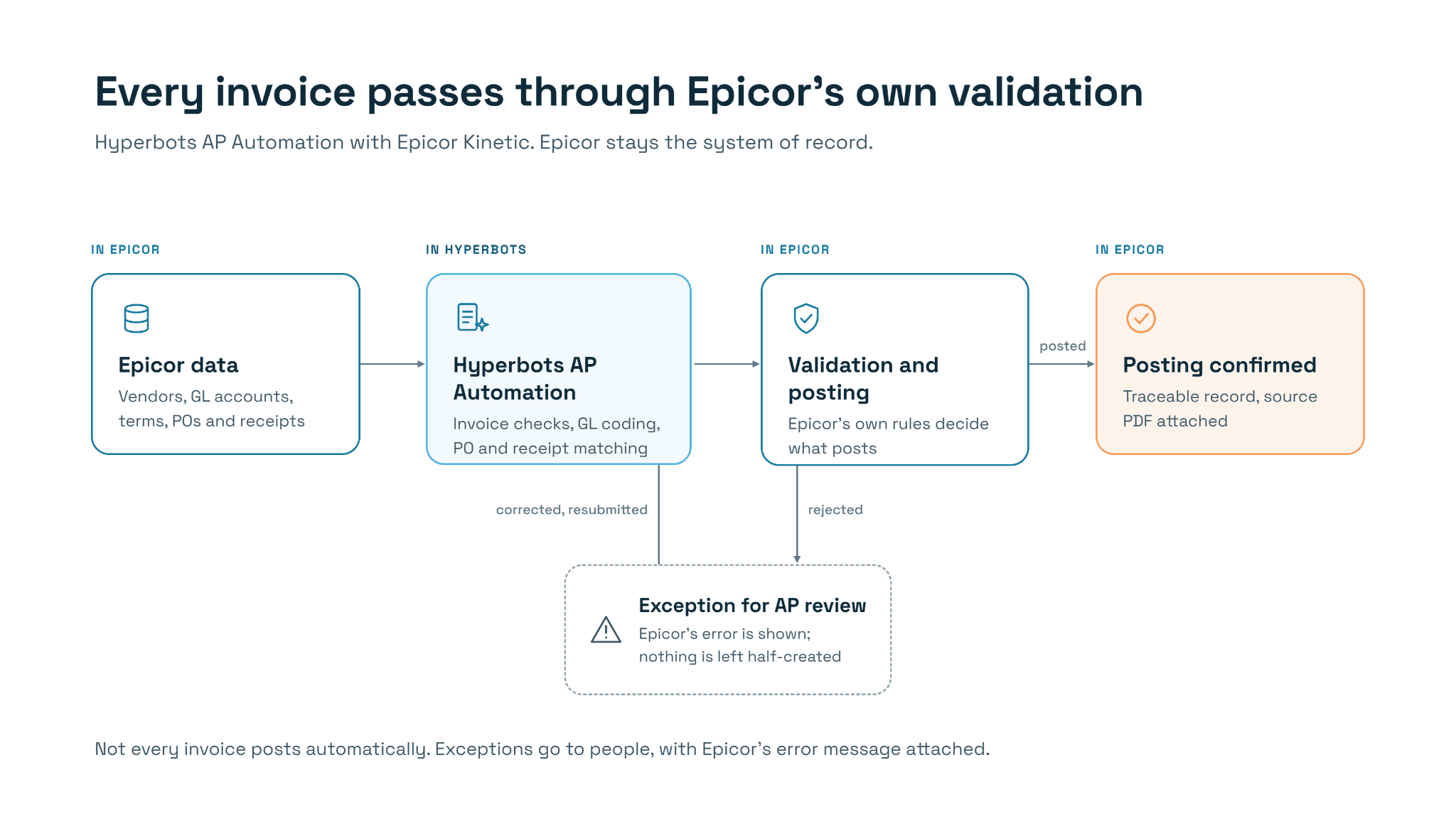
Hyperbots AP Automation connects to Epicor Kinetic through a production-grade connector that keeps Epicor as the authoritative ERP and sends every transaction through Epicor's own validation and posting process. The points below describe what that connector does for accounts payable, in terms of what changes for the finance team.
It works through Epicor's established integration mechanisms
Hyperbots is designed to work with Epicor through its established integration mechanisms, so automated transactions follow Epicor's own validation and posting processes rather than relying on a simple flat-file exchange. Business rules the company has configured in Epicor still apply to invoices that arrive through automation.
Epicor remains the source of truth
The connector reads the information AP automation depends on from Epicor: vendors, items, GL accounts, companies, payment terms, purchase orders and receipts. It writes AP invoices and their supporting information back into Epicor, where Epicor's process handles posting. Epicor remains the authoritative ERP, while Hyperbots uses the relevant ERP information to automate finance work and keeps references between the records in both systems.
Invoices are checked, coded and matched before they reach Epicor
The Hyperbots invoice processing agent prepares each invoice before it is created in Kinetic. The connector:
checks that the essential invoice information is present before attempting to create the record;
applies GL coding to non-PO invoice lines;
matches PO invoice lines against the relevant goods receipts;
handles PO and non-PO lines on the same invoice;
submits the invoice through Epicor's established posting process.
The outcome is that invoices arrive with the right accounting information, matched to purchase orders and receipts where applicable, and pass through Epicor's own validation. Invoices that fail a check or a match still go to people for review; automation narrows the pile rather than pretending exceptions do not exist.
Posting is confirmed, not assumed
Sending a transaction to an ERP is not the same as confirming it posted. The connector distinguishes between submitting an invoice for posting and receiving Epicor's confirmation that it has actually posted, and only reports success once that confirmation arrives. For a controller, that means the status shown in Hyperbots reflects what is really in the ledger.
Failures are cleaned up, not left half-finished
Creating an invoice in an ERP takes several steps. If one of them fails, the connector is designed to undo the records it created instead of leaving a partially created invoice for someone to find and delete. When an invoice is corrected, the correction workflow replaces the earlier entry rather than creating a duplicate.
Changes are synchronized incrementally
The connector tracks what has changed in Epicor and processes only those records, instead of re-reading everything each time. Reads are paged and paced so a live Epicor environment is not flooded with requests during the working day. The result is controlled, change-aware synchronization that keeps both systems aligned without straining the ERP.
Errors and records stay traceable
When Epicor rejects a transaction, the connector can surface Epicor's underlying error message rather than a generic failure. Alerts flag invoice write or posting failures, and record references let users trace any transaction between Hyperbots and Epicor. Where enabled, the original invoice PDF is attached to the matching invoice record in Epicor, so users and auditors can open the source document directly from Kinetic.
Customer-specific configurations are accommodated
No two Epicor environments are identical. The connector supports customer-specific field mappings and configuration for differences such as company codes and GL structures, so most variations are handled through configuration rather than custom code. Unusual customizations should still be reviewed during implementation.
Related purchasing and close workflows
The same connector also supports creating purchase orders from approved requisitions, validating GL accounts on requisition lines, and creating, posting and reversing accrual journals natively in Epicor. These extend the AP workflow into procurement and month-end accruals without leaving Epicor's controls.
In practice: Persimmon Technology
Persimmon Technology runs Epicor on-premises and uses Hyperbots HyperAGENTS across AP and related finance work. In a conversation with Hyperbots, Dave Sackett, VP of Finance, explained that invoices are read from the AP mailbox, matched against the PO and receipt, coded and posted in Epicor, with about 80% going straight through. Every write is read back and checked against Epicor, and failures land in an exceptions queue with an alert to finance so nothing fails silently.
Persimmon went live in three to five weeks, which was faster than usual. For ERPs where Hyperbots already has API connectors, including Epicor, implementation typically takes six to eight weeks.
Epicor AI and Finance-Specific AI: Choosing the Right Layer for Kinetic
Epicor’s AI and automation capabilities serve different purposes. Prism brings industry-specific AI agents into ERP workflows, helping users interpret operational data and take supported actions within systems such as Kinetic and Prophet 21. Automation Studio connects Epicor with external applications and automates configured workflows. Edge Agent, despite its name, is a local utility that helps browser-based Kinetic interact with printers, local files and supported devices; it is not an AI agent.
For finance teams, native ERP AI and finance-specific automation answer different questions. Prism helps people across the business understand and act on ERP data. A finance-specific platform such as Hyperbots takes on high-volume workflows like invoice processing, PO matching and accruals from start to finish, while Epicor stays the system of record and every transaction passes through Epicor's own validation and posting. The right mix depends on how much of each finance workflow the business wants automated, and how it wants exceptions handled.
Frequently Asked Questions
What is Epicor AI?
Epicor AI refers to the artificial intelligence capabilities Epicor builds into its ERP products. The main one today is Epicor Prism, a portfolio of vertical AI agents embedded in Kinetic and Prophet 21 that let users query ERP data in plain language and carry out supported tasks. Epicor frames this under its "Cognitive ERP" vision of embedding agents, automation and human-guided decision support into ERP workflows.
What is Epicor's approach to AI in ERP?
Epicor's approach is to embed AI directly inside the ERP rather than in a separate tool. Its agents are built for specific industries, work on the customer's own ERP data, and inherit existing role-based security and governance. Epicor's Lux framework sets design and governance standards for every agent, and Prism Agent Foundry lets customers build their own agents within those controls.
Is the Epicor Edge Agent an AI agent?
No. The Edge Agent is a small application installed on a user's computer or a network server. It lets browser-based Kinetic print directly to local or network printers, access local files for attachments, and connect to scales. It does not analyze data or make decisions.
What are the key Epicor Kinetic AI features?
The key Epicor Kinetic AI features come from Prism: natural-language access to ERP data, more than 18 pre-built agents for workflows such as MRP analysis, freight spend, EDI status and document capture, a Reasoning Agent that connects data, documents and context, and tools to build custom agents. Automation Studio adds AI-assisted building of integrations and workflows. Availability varies by release, region and licence.
Does Epicor Prism automate accounts payable?
Prism includes a Smart Data Capture Agent that extracts and validates documents across AP and compliance workflows, and Epicor has said invoicing agents are in development. How far that covers a given AP process, such as GL coding, PO and receipt matching, posting confirmation and exception handling, should be confirmed with Epicor for your release and licence.
Is Automation Studio the same as an AI agent?
No. Automation Studio is an integration platform that runs workflows ("recipes") a user has configured, such as syncing records between systems or running a scheduled check. It includes AI tools that help users build recipes faster, but a recipe follows defined rules rather than reasoning about each case the way an AI agent does.
Does Hyperbots replace Epicor AI or Kinetic?
No. Hyperbots works alongside Epicor Kinetic and does not replace Kinetic, Prism or Automation Studio. Its AP integration reads master data, purchase orders and receipts from Epicor and writes invoices back through Epicor's own validation and posting process, so Epicor remains the system of record.
How long does it take to implement Hyperbots with Epicor?
For ERPs where Hyperbots already has API connectors, including Epicor, implementation typically takes six to eight weeks. Persimmon Technology's Epicor rollout took three to five weeks, a faster-than-usual case. Timelines depend on the number of entities, customizations and workflows in scope.
See finance-specific AI working alongside Epicor Kinetic. Watch Hyperbots process, match and post AP invoices through Epicor's own validation and posting workflow, with every transaction traceable back to its source. Request a Hyperbots demo.