Epicor Procurement: A Requisition-to-PO Guide for Kinetic
Understand how Epicor Kinetic manages procurement from purchase requisition to purchase order, approval, receiving, and AP.
What does Epicor procurement actually look like from the moment someone requests a purchase to the point where the supplier is paid?
In Epicor Kinetic, procurement is not a single transaction. It is a connected workflow that can involve purchase requisitions, approvals, supplier and part data, purchase orders, releases, receiving, invoice matching and payment.
Kinetic Supply Chain Management brings together capabilities for Purchase Management, Supplier Relationship Management, Inventory Management, MRP, and Shipping & Receiving. Epicor Advanced Requisition Management (ARM) adds structured requisition workflows, real-time GL budget checking, preferred and one-time vendors, standing and blanket orders, and multi-level approvals.
That makes Epicor Kinetic procurement particularly relevant for manufacturers, where purchasing decisions are closely connected to material requirements, inventory availability, production schedules and supplier lead times.
This guide explains the Epicor procurement process from requisition to purchase order, how PO data flows into receiving and accounts payable, and where automation can reduce repetitive work without replacing Kinetic as the ERP and system of record.
What Is Epicor Procurement?
Epicor procurement is the process of managing how an organization identifies a purchasing need, creates and approves a requisition, places an order with a supplier, receives the goods or services, and processes the resulting invoice.
It is more accurate to think of Epicor procurement software as a group of connected Kinetic capabilities rather than one standalone procurement module.
Kinetic capability | Role in procurement |
Purchase Management | Supplier purchasing, PO creation and tracking |
Advanced Requisition Management | Requisition entry, budget checks and approvals |
Supplier Relationship Management | RFQs and supplier collaboration |
MRP and Inventory Management | Material requirements, replenishment and purchasing signals |
Shipping & Receiving | Recording inbound shipments and receipts |
Financial Management / AP | Invoice processing, matching and payment |
Epicor's current Kinetic SCM offering includes Purchase Management, Supplier Relationship Management, Inventory Management, MRP, Shipping & Receiving and Purchase Contracts. Purchase Management includes supplier cross-referencing, part-master price breaks, supplier trackers and PO tracking, while SRM supports RFQs and supplier responses.
ARM sits alongside these capabilities to control internal purchasing requests. Epicor describes real-time GL budget checking, preferred and one-time vendors, standing and blanket orders, and multi-level approvals as core ARM capabilities.
The result is a procurement process that looks simple at the transaction level but depends on several connected records and decisions.
The Epicor Procurement Process: From Need to Payment
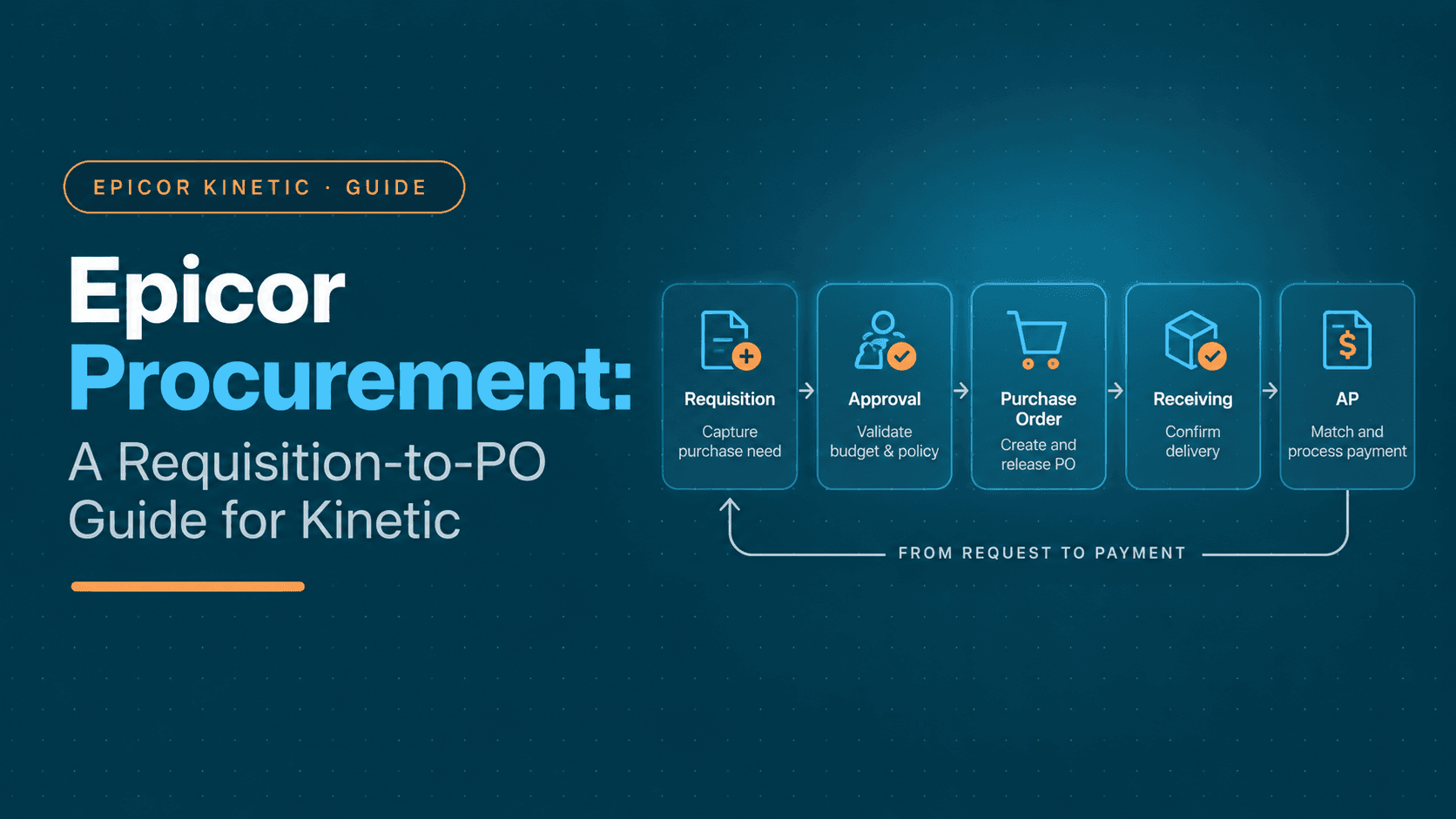
A useful way to understand Epicor purchasing is to follow a single transaction through the procure-to-pay workflow:
Need → Requisition → Approval → Purchase Order → Release → Receipt → Invoice → Match → Payment
Each stage creates information that the next stage depends on.
1. A purchase need is identified
The process starts when a department, planner, buyer or warehouse identifies a requirement that cannot be fulfilled from available inventory or existing commitments.
For a manufacturer, that might be:
A raw material
A production component
A replacement or MRO part
A subcontracted service
Packaging
Tooling or equipment
The requirement may also originate from planning. Epicor Kinetic connects purchasing with MRP, shortage monitoring, reorder analysis and inventory requirements, allowing procurement activity to reflect production and inventory needs rather than operating as an isolated finance process.
The quality of this initial requirement matters. "Need 50 units" is not enough if procurement still has to determine which part, supplier, site, UOM, delivery date or accounting treatment applies.
2. The requirement becomes a purchase requisition
A purchase requisition formalizes the internal request before the company makes a supplier commitment.
Depending on the organization's process, the requisition can contain:
Item or service
Quantity and UOM
Preferred supplier
Site or location
Required date
Department or cost center
GL or accounting information
Project or job reference
Supporting documents
Epicor ARM provides structured requisition workflows and budget checking before the purchasing commitment is made.
This is also the point where the difference between a requisition and a PO becomes important. A requisition is an internal request to buy. A PO is the supplier-facing purchasing commitment that follows the required controls and approvals.
For a deeper explanation of that handoff, see Purchase Requisition vs. Purchase Order.
3. Review, budget and approval
The requisition then moves through the organization's purchasing controls.
Epicor ARM supports real-time GL budget checking and multi-level approval workflows. The specific routing depends on how the customer has configured Kinetic, so a workflow deployed at one organization should not automatically be treated as native behavior for every Kinetic customer.
At this point, procurement and finance may need to determine:
Is the spend within budget?
Is the supplier acceptable?
Does the request require additional approval?
Is the purchase for inventory, a job or an expense?
Is there an existing contract, blanket order or preferred supplier?
Can the required delivery date be met?
This stage is also where delays often begin. A request can be valid from a business perspective but still need clarification around accounting, supplier information or purchasing policy.
4. Create the purchase order
Once the requirement is approved, the buyer creates or generates the purchase order.
Kinetic's Purchase Management capabilities support purchasing and PO tracking, while MRP and related purchasing workflows can generate purchasing requirements from inventory and planning activity.
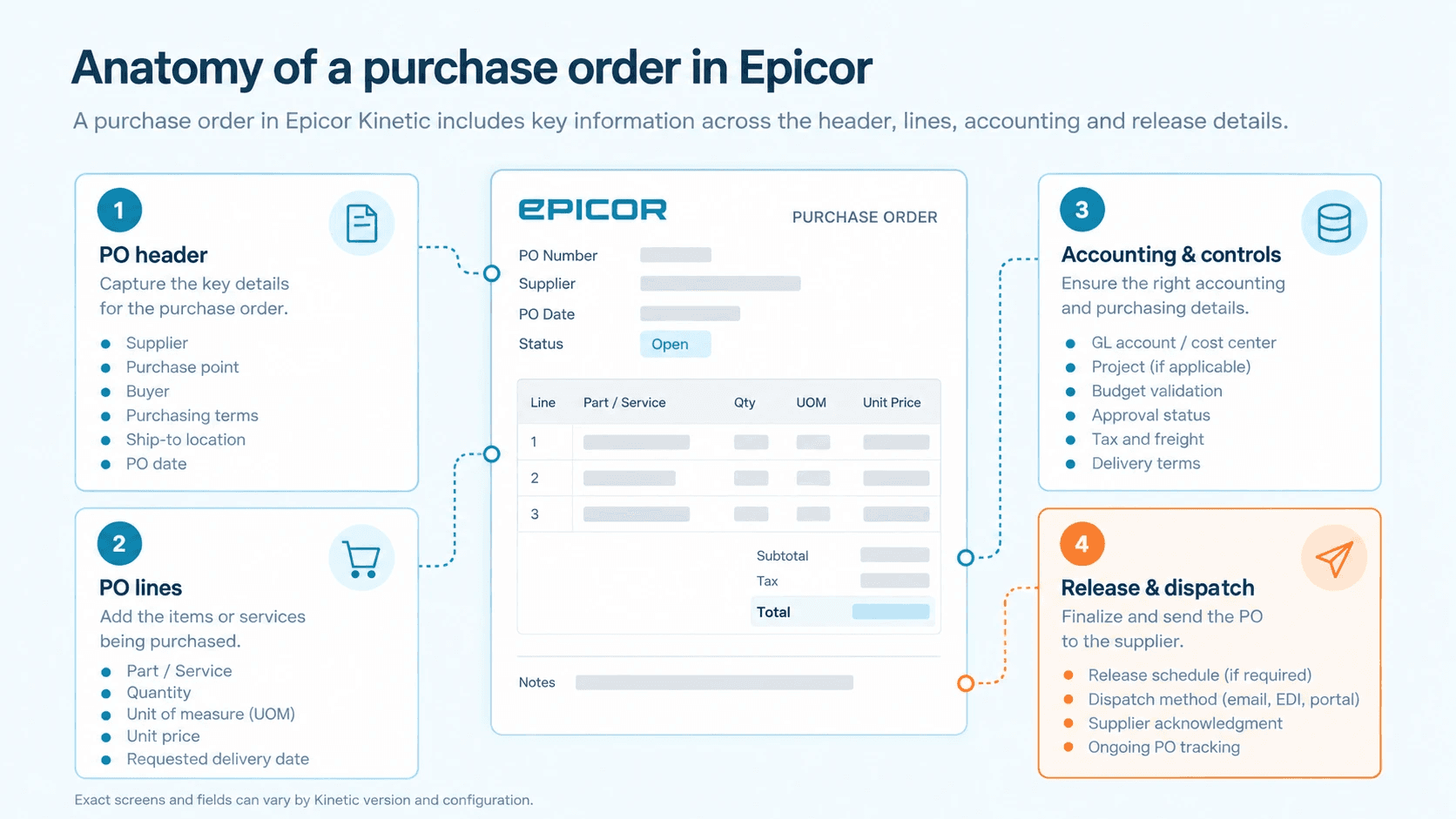
A Kinetic purchase order can be understood in three practical layers.
PO header
The header establishes the commercial context of the order, including information such as:
Supplier
Purchase point
Buyer
Terms
Ship-to location
PO date
PO lines
The lines define what is being purchased:
Part or service
Quantity
Unit of measure
Unit price
Required or due date
Relevant accounting or job information
Inventory, job and expense/service purchases can require different accounting treatment.
Releases
Releases become important when one commercial commitment has multiple deliveries.
For example, a manufacturer may order 1,000 components but receive 250 every month for four months. The releases allow those delivery requirements to be tracked against the same purchasing commitment.
Epicor also supports Purchase Contracts for recurring inventory purchasing and delivery schedules, while ARM supports standing and blanket orders.
For the broader PO creation workflow, including vendor and GL selection, approval and dispatch, see our guide to purchase order creation.
5. Release the PO and communicate it to the supplier
Once the PO has passed the required controls, it is released and communicated through the organization's configured supplier workflow.
The important point is that PO creation is not the end of procurement. Supplier acknowledgment, changes, delivery dates and release-level tracking can still affect whether the purchase reaches production on time.
Epicor's broader supply chain ecosystem includes supplier collaboration capabilities. For example, SourceDay extends Kinetic into the direct-spend supplier network and tracks the PO lifecycle from creation through receipt.
6. Receive what was ordered
The simplest way to understand receiving is:
PO = what the business ordered.
Receipt = what the business actually received.
That distinction becomes important when a supplier makes a partial delivery.
Kinetic provides receiving functionality for inbound purchase orders and supports processes such as serial and lot processing and multiple units of measure.
For example, if a PO is for 500 bearings and 300 arrive, the receipt needs to reflect the 300 units actually received rather than the original 500-unit commitment.
That receipt then becomes important when the supplier invoice arrives.
7. Invoice matching and accounts payable
The supplier invoice brings procurement into the AP workflow.
For a PO-based purchase, the relevant records are:
Purchase order → receipt → supplier invoice
A 2-way match compares an invoice against the PO. A 3-way match adds the receipt so that AP can validate both the commercial terms and the quantity actually received.
Epicor's own training material describes the receipt line as the basis for matching a purchase order, receipt and supplier invoice, with invoice variances preventing the transaction from being posted until they are resolved.
This makes upstream procurement data quality important to AP.
An incorrect quantity, price, UOM, supplier reference or missing receipt may not cause a visible problem when the PO is created. It may surface weeks later as an invoice exception.
For a deeper look at receipt matching in Epicor, see Automatic Receipt Matching in Epicor.
How to Enter a Purchase Order in Epicor
One of the most practical search questions around Epicor procurement is: how to enter a purchase order in Epicor?
Exact screens and menu labels can vary by Kinetic version, deployment and customization. Hyperbots' published Epicor research identifies Purchase Order Entry under the standard Purchase Management workflow and describes the core fields involved in creating the transaction.
Step 1: Create the PO header
Create the purchase order and establish the supplier and purchasing context.
Check:
Supplier
Purchase point
Buyer
Terms
Ship-to location
PO date
Required delivery information
Step 2: Add the PO lines
Add the part or service being purchased.
For inventory purchases, this commonly includes:
Part number
Quantity
UOM
Unit cost
Required date
Non-inventory, job or service purchases may also require relevant accounting or project information.
Step 3: Add releases where required
For split deliveries, add releases so the individual delivery requirements can be tracked against the PO.
Step 4: Validate the purchasing information
Before release, review the supplier, quantity, UOM, price, required date, accounting information and approval status.
This is also where discrepancies that could later become AP exceptions should be caught.
Step 5: Approve and release
After the required controls are satisfied, the PO can be approved and released to the supplier.
The key point is that entering a PO is not just typing in supplier and line-item information. The PO needs to carry enough accurate commercial and accounting information to support the downstream receiving and invoice workflow.
A Practical Epicor Procurement Example
Consider a manufacturer running Kinetic across two production sites.
The maintenance department at Site 2 needs 50 replacement valves for a production line.
The original request arrives as:
"Need 50 units of the replacement valve from the usual supplier for Site 2 by Friday."
That sentence contains the business need, but it does not necessarily contain everything procurement needs to create a clean ERP transaction.
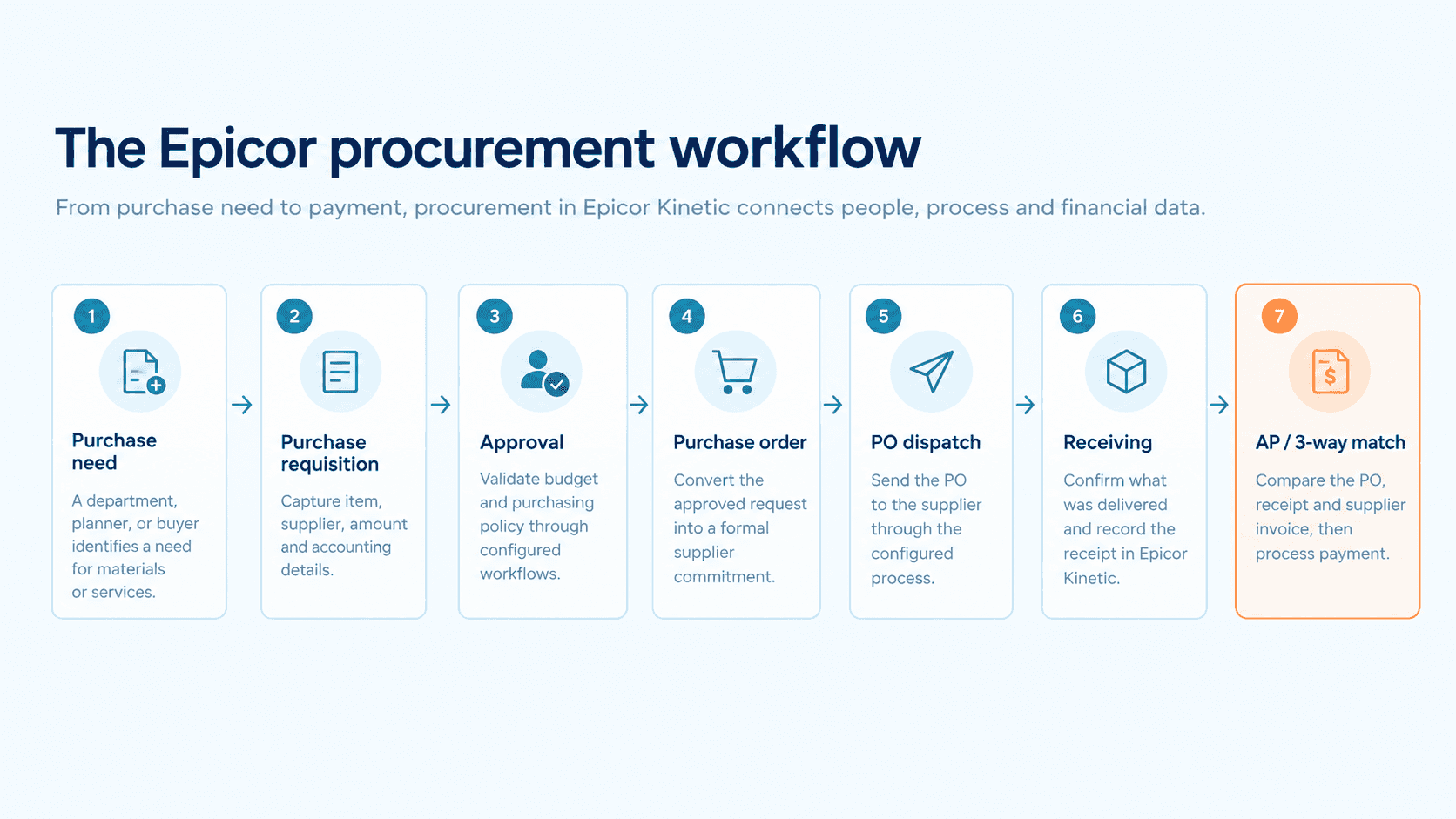
The important lesson is that each stage depends on the quality of the previous one. A missing UOM at the requisition stage can become a PO correction. A wrong PO quantity can become a receipt discrepancy. A missing receipt can become an AP exception.
That is why Epicor requisition-to-PO workflows are best understood as a connected chain rather than a series of unrelated screens.
Where Epicor Procurement Becomes Manual
Epicor already provides substantial native purchasing, requisition, approval, receiving and supplier-management capabilities. The more useful question is where people still have to perform repetitive work around those ERP records.
A common example is an unstructured request like:
"Need 50 units of the replacement valve from the usual supplier for Site 2 by Friday."
Someone still needs to determine:
Which exact part is intended
Which supplier should be used
Which site or warehouse receives it
Which UOM applies
Whether an existing PO or contract already covers it
Which GL or cost center applies
Whether the spend is within budget
Which approval path applies
What information belongs on the eventual PO
The manual chain can become:
Unstructured request → clarification → coding → approval → PO entry → supplier communication → receiving follow-up → invoice exception
The problem is not necessarily a missing ERP transaction.
It is the human work required to turn incomplete information into a clean transaction.
The strongest bottlenecks tend to be:
Unstructured requests
The requester knows what is needed, but procurement has to translate the request into the fields required by the ERP.
Coding uncertainty
The buyer knows the item but may not know the correct GL or cost-center treatment for an expense or service purchase.
Approval friction
Approvers receive requests with missing context or wait for corrections before they can act.
Manual PO completion
Information from contracts, emails or requisitions is re-entered into the final PO.
Receiving and invoice exceptions
A partial receipt, incorrect quantity, UOM difference or price variance creates work for AP after the purchasing decision has already been made.
These are the areas where an automation layer can complement the ERP rather than duplicate it.
Epicor Procurement vs. Automation: Where Each Fits
The distinction between native ERP functionality and an external automation layer matters.
Activity | Epicor Kinetic | Hyperbots |
Requisition | Native ARM workflows | Structured intake and automated PR creation |
Coding | ERP/accounting controls | AI-assisted GL recommendation |
Budget | Native budget checking | AI-assisted validation |
Approval | Configurable workflows | Automated routing and notifications |
PO creation | PO Entry and purchasing workflows | Automated PO generation |
Receiving | Native receiving | Downstream automation around matching |
Invoice matching | AP workflows | AI-assisted matching and exception handling |
Epicor remains responsible for the underlying ERP records and operational processes. Hyperbots' role is to automate data movement, classification, routing and execution around those records.
That distinction is particularly important for Epicor procurement automation. The value is not in replacing Purchase Management or ARM. It is in reducing the manual effort between the transactions those systems already manage.
How Hyperbots Automates Epicor Procurement
Hyperbots' Procurement Co-pilot is designed around the PR-to-PO workflow, including requisition creation, validation, coding, budget checks, approvals, PO generation and dispatch. Hyperbots also documents audit trails, configurable workflows and human-review points within the procurement process.
Before the PO
The first opportunity is turning an incomplete procurement request into a usable requisition.
Hyperbots can extract information from supported source documents such as contracts and statements of work, populate configurable PR fields and validate the information before the request progresses. Its Procurement Co-pilot also supports duplicate checking and configurable exception workflows.
GL coding
Hyperbots can recommend GL codes at the PR line level based on item information, predefined rules and historical data. Users can override the recommendation when a different allocation is required.
This is useful because accounting classification can happen before the PO reaches AP rather than being corrected after the invoice arrives.
Budget control
The Procurement Co-pilot can retrieve budget information during PR creation and apply configurable policies when the request approaches or exceeds a threshold. Depending on the configured rules, an out-of-budget request can be flagged, blocked or routed for additional approval.
Approval routing
Once the request has been structured and validated, approval workflows can route the transaction based on configured rules such as value, category or business unit.
The important part is that Hyperbots is not replacing the organization's approval policy. It is automating how that policy is applied to the transaction.
From PR to PO
Once the PR is approved, Hyperbots can generate the PO using predefined or custom templates.
The Co-pilot can populate PO data from the approved PR or relevant contract, including supplier information, items and payment terms. It can then dispatch the PO to the supplier according to the configured workflow, while allowing an optional human review before dispatch for sensitive or high-value orders.
This changes the execution path from:
Approved PR → buyer manually recreates PO → checks fields → sends PO
to:
Approved PR → PO generated → validation/review → dispatch
Hyperbots currently states that its Procurement Co-pilot can reduce PO creation and dispatch time by 80% and reduce PR creation effort to five minutes. These are Hyperbots' published product metrics and should not be treated as universal benchmarks for every Epicor customer.
For a deeper look at the PR-to-PO workflow, see from intake to PO automated processing.
How Hyperbots Integrates With Epicor
The integration architecture is the key distinction between an automation layer and another procurement system.
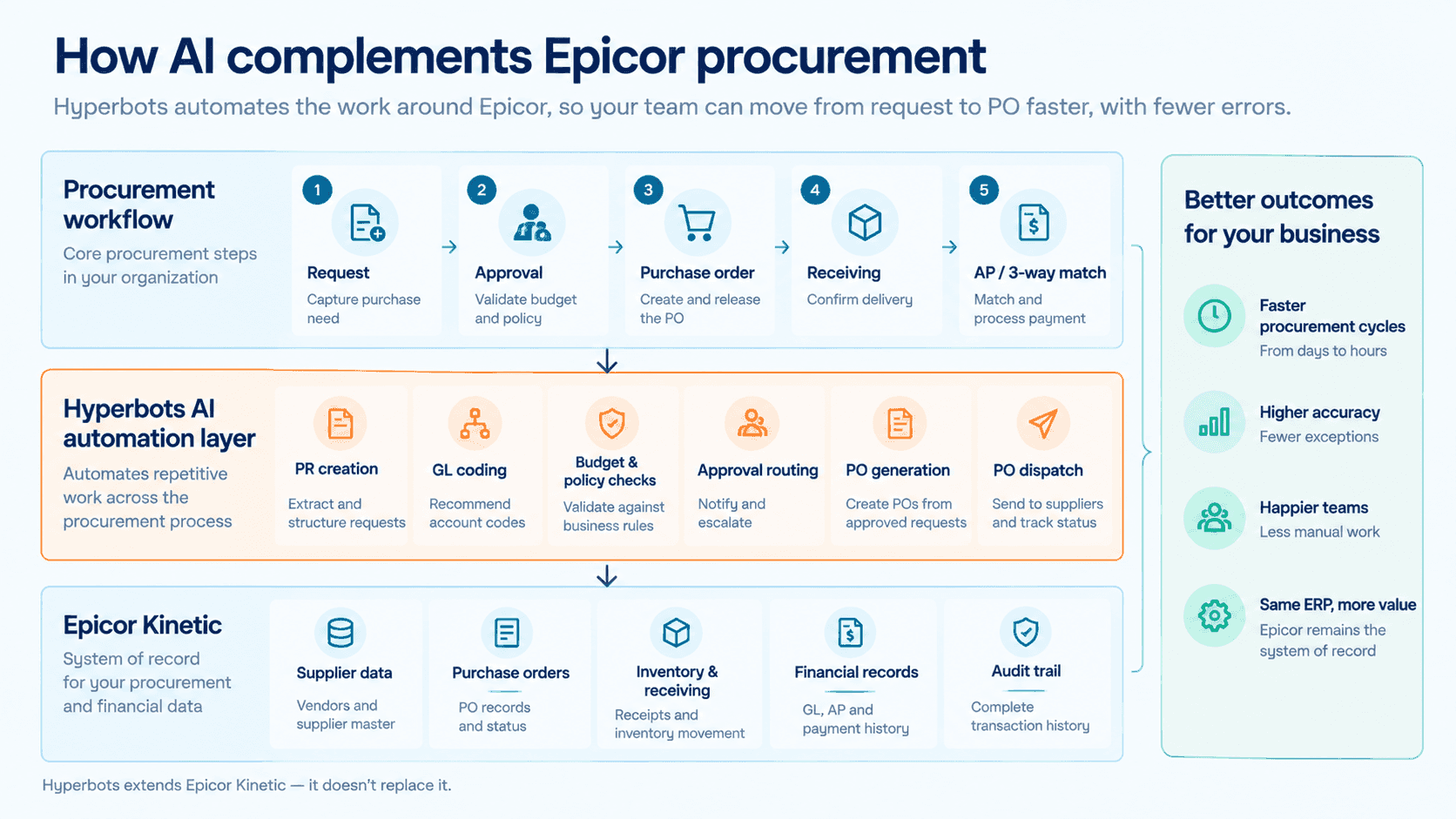
Hyperbots' published Epicor integration material describes bidirectional read/write connectivity, with Epicor remaining the system of record. The integration can work with Epicor REST v2 and, for older environments, Service Connect. Hyperbots also describes read-back verification after writes and exception handling when a transaction cannot be posted successfully.
That architecture means the automation layer does not create a second ERP.
The goal is to let Hyperbots handle repetitive execution while keeping the official supplier, PO, receipt and financial records in Epicor.
For a more detailed look at the architecture and Epicor deployment model, see Integration of Hyperbots AI Copilots with Epicor ERP.
What an Epicor + Hyperbots Workflow Looks Like
Step | Traditional workflow around Epicor | With Hyperbots |
Request intake | Requester or buyer gathers information manually | AI structures supported source information |
PR creation | User enters and checks fields | AI-assisted PR creation and autofill |
Coding | User selects or researches the GL | AI recommends line-level GL codes |
Budget | User validates budget | Real-time budget validation and configured alerts |
Approval | Configured Epicor/customer workflow | Automated routing and notifications |
PO creation | Buyer creates or completes the PO | Approved PR/contract populates the PO |
PO validation | Buyer checks fields manually | AI validation and policy checks |
Dispatch | Buyer sends the PO | Configured automated dispatch with optional human review |
Receiving | Epicor records the receipt | Epicor remains the receipt system; downstream automation uses the data |
Invoice matching | AP reviews PO, receipt and invoice | AI-assisted matching and exception handling |
The distinction is important: Hyperbots does not eliminate human oversight. The product supports configurable human review and exception handling, so routine transactions can move automatically while transactions that fall outside policy remain with the appropriate team.
Evidence From Epicor Environments
Hyperbots has publicly documented Epicor deployments that illustrate how this model works in practice.
Persimmon Technology → Epicor on-premise → procurement and AP automation
Persimmon Technology runs Epicor on-premise. In a published interview, its VP of Finance describes Hyperbots providing read/write access to Epicor data and supporting procurement workflows that include creating POs from contracts, budget and rule checks, approval routing and requisition-to-PO conversion.
The same customer story reports an 80% reduction in AP data entry and approximately 80% straight-through processing for invoice processing. Those are reported outcomes for the broader AP workflow, not procurement-cycle benchmarks, so they should not be interpreted as an 80% procurement improvement.
Boston-based semiconductor robotics manufacturer → Epicor Kinetic → broader P2P automation
Hyperbots' current integrations and Procurement Co-pilot pages identify a Boston-based semiconductor robotic manufacturing company running Epicor Kinetic and processing more than 30,000 invoices annually across vendors, PO matching, procurement workflows and finance approval chains. Hyperbots reports 50% human-bandwidth optimization and a reduction in invoice processing time from one week to one day.
Those metrics describe the broader finance and invoice-processing deployment. The procurement relevance is that Procurement is explicitly listed among the deployed Hyperbots agents alongside extraction, matching, fraud detection and finance workflows. They should not be read as standalone procurement benchmarks.
The customer evidence supports a more precise conclusion: Hyperbots has publicly documented experience operating procurement and finance automation around Epicor environments, while the specific measured outcomes vary by workflow and deployment.
Epicor Procurement for Manufacturers vs. Distributors
The underlying procurement workflow is similar, but the buying problem differs.
Manufacturers
Manufacturers commonly procure:
Raw materials
Production components
MRO parts
Subcontracted services
Packaging
Tooling
Procurement is closely connected to MRP, production schedules, inventory availability and supplier lead times. Kinetic's SCM capabilities are explicitly built around those relationships.
Distributors
Distributors often procure:
Finished goods for resale
Products across large supplier catalogs
Inventory for multiple warehouses
Items with supplier-specific part numbers
The emphasis is more heavily weighted toward availability, replenishment, supplier pricing, inventory positioning and warehouse requirements.
The workflow is still fundamentally the same, but the data and purchasing decisions surrounding each PO can be very different.
Epicor Procurement Checklist
Before redesigning or automating an Epicor procurement process, ask:
Where do requisitions originate?
How much request data is entered manually?
How are GL and cost-center codes assigned?
How are approvals routed?
How much PO information is manually re-entered?
How are POs dispatched and tracked?
How are receipts and supplier invoices matched?
How are exceptions escalated and audited?
The answers will show whether the primary problem is an ERP capability, a configuration issue, or the repetitive work surrounding a process that already exists in Kinetic.
Frequently Asked Questions
What is Epicor procurement?
Epicor procurement refers to the purchasing and requisition workflows used to request, approve, purchase and receive goods or services in an Epicor environment. In Kinetic, relevant capabilities span Supply Chain Management, Purchase Management and Advanced Requisition Management.
Does Epicor Kinetic have procurement capabilities?
Yes. Kinetic includes Purchase Management, supplier relationship capabilities, inventory and MRP, receiving and purchase contracts. Advanced Requisition Management adds structured requisitions, budget checks and approval workflows.
How do you enter a purchase order in Epicor?
A typical Kinetic PO workflow involves opening Purchase Order Entry, selecting the supplier and purchasing context, adding PO lines, creating releases when required, validating accounting and purchasing information, completing approvals and releasing the PO. Exact screens and menu names can vary by release and customization.
What is the difference between an Epicor purchase requisition and purchase order?
A purchase requisition is an internal request to purchase. A purchase order is the formal supplier-facing commitment created after the required purchasing controls and approvals are satisfied.
Does Epicor Kinetic support 3-way matching?
Epicor's invoice workflow supports matching an invoice against receipt information, establishing the three-way relationship between the purchase order, receipt and supplier invoice. Variances need to be resolved before the invoice can be posted.
Can Hyperbots automate Epicor procurement?
Hyperbots publicly documents a Procurement Co-pilot that supports requisition creation, validation, GL recommendations, budget checks, approval routing, PO generation and PO dispatch. Its Epicor integration model is designed to read from and write back to Epicor while keeping Epicor as the system of record.
The practical view of Epicor procurement
Epicor Kinetic provides the ERP foundation for procurement, connecting purchasing with supplier data, MRP, inventory, receiving and finance. The opportunity for automation is not necessarily to replace those capabilities.
It is to reduce the repetitive work between them: structuring purchase requests, applying coding and budget rules, routing approvals, generating POs, dispatching routine orders and handling downstream matching exceptions.
That is the role Hyperbots can play alongside Kinetic. Epicor remains the system of record; Hyperbots adds an intelligence and automation layer around the workflow. The result is a procurement process where routine execution can move faster while people remain responsible for exceptions, policy decisions and high-value approvals.
For the broader picture of how this connects procurement and AP inside Kinetic, see Epicor AP Automation: Closing Kinetic's P2P Gaps With AI.