Finance Automation in NetSuite vs Other ERP Systems: What Buyers Should Compare
A clear breakdown of how finance automation actually works across ERP platforms, where native capabilities fall short, and what fills the gap
Choosing an ERP is one of the most consequential decisions a finance team makes. The platform you select will sit at the centre of every purchase order, every vendor invoice, every budget cycle, and every financial close for the next several years. Getting it right matters.
But here is what most ERP evaluations get wrong: they compare features on paper rather than comparing what automation actually looks like in practice. Every major ERP vendor claims strong finance automation capabilities. The meaningful question is not whether those capabilities exist, but how deep they go, where they stop, and what that means for the finance team operating the system day to day.
This blog explains how finance automation differs across the main ERP platforms buyers are comparing in 2025, where each platform's native automation runs out, and what the gap means for procurement, accounts payable, accruals, and vendor management. For buyers evaluating NetSuite against the field, the guide to NetSuite alternatives in 2025 covers the competitive landscape in full.
What ERP Finance Automation Actually Means
Before comparing platforms, it helps to be clear about what finance automation means in an ERP context, because the term covers a wide range of capabilities with very different practical implications.
At the basic level, ERP finance automation means rule-based workflow: if an invoice arrives, route it to this approver; if a PO exceeds this threshold, require a second signature; if a GL code matches this pattern, post it here. This kind of automation is present in every major ERP platform. It is valuable, but it is not intelligence. It handles the expected case well and produces exceptions for everything else.
At the advanced level, finance automation means something different: the system understands context, not just rules. It reads an invoice and identifies whether it matches the contracted price, not just the PO quantity. It detects that a vendor has submitted the same invoice twice with a slightly different reference number. It estimates what the business owes for services received but not yet invoiced, based on open purchase orders and vendor billing patterns. It flags when an approval pattern is anomalous, not just when it is missing.
This second level of automation is where most ERP platforms have a meaningful gap, and where buyers frequently discover the distance between what was demonstrated and what is delivered.
How the Main ERP Platforms Handle Finance Automation
Oracle NetSuite
NetSuite is the most widely adopted cloud ERP in the mid-market and brings genuinely strong native finance capabilities. Its SuiteFlow workflow engine handles approval routing, automated reminders, and conditional logic without custom code. Its SuiteAnalytics layer provides real-time financial reporting across entities and dimensions. Multi-currency, multi-entity consolidation, and intercompany accounting are handled natively, which is a significant advantage for organisations with complex structures.
Where NetSuite's native automation runs out is in the intelligence layer. Invoice processing in NetSuite requires invoices to be entered into the system, either manually or through a connected tool. Three-way matching is supported but does not natively handle format diversity, partial deliveries, or contract-level price validation without configuration. Anomaly detection, duplicate invoice identification across slightly varying formats, and vendor communication automation are not native capabilities.
NetSuite's open API and pre-built SuiteApp ecosystem make it a strong platform for layering AI automation on top, which is a reason many organisations choose it and then extend it with specialised tools. The guide on advancing Oracle NetSuite operations with Hyperbots covers what this integration layer looks like in practice.
SAP S/4HANA
SAP S/4HANA is the enterprise-grade choice for large, complex organisations. Its finance automation is deep where it is configured: intelligent purchase order matching, real-time goods receipt reconciliation, and advanced accrual management are all supported at a sophisticated level. The platform's native AI capabilities, delivered through SAP Business AI, include some invoice processing intelligence, but these are module-dependent and often require significant implementation effort to activate.
The practical limitation for mid-market buyers is implementation cost and complexity. The automation capabilities that distinguish S/4HANA from simpler platforms require investment in configuration, training, and ongoing maintenance that mid-market teams often cannot sustain. The gap between what S/4HANA can do and what a typical mid-market deployment actually uses is frequently large.
Microsoft Dynamics 365 Business Central
Business Central is a capable platform for smaller and mid-market organisations, particularly those already operating in the Microsoft ecosystem. Its native finance automation covers approval workflows, basic purchase order processing, and standard invoice matching. Integration with Power Automate extends these workflows meaningfully.
The limitations become visible at scale and complexity. Business Central's native invoice processing is manual-entry dependent. Its matching logic is straightforward and does not handle the kind of vendor diversity or format complexity that generates high exception volumes. AI-driven capabilities are available through Copilot features in Microsoft 365, but these are general-purpose rather than finance-specific, and their applicability to AP processing, accruals, or vendor management is limited in practice.
Sage Intacct
Sage Intacct is particularly strong for multi-entity not-for-profit and professional services organisations. Its dimensional accounting model is excellent for fund accounting, grant tracking, and reporting across complex entity structures. Native workflow automation covers approval routing, expense management, and financial close processes.
Finance automation at the invoice and procurement level is more limited. Invoice processing is largely manual or dependent on third-party integrations. Accruals automation requires configuration and does not natively estimate unbilled liabilities from operational data. Anomaly detection and vendor communication capabilities are not built into the core product.
What No ERP Platform Does Natively
Across all four platforms, the same gap appears consistently. Every platform handles the expected case: a clean invoice against an open PO, a straightforward approval, a standard payment run. What none of them do natively, at a level that meaningfully reduces manual work for a high-volume finance team, is the following.
Understanding invoice content at the line-item level across formats. Finance teams receive invoices as PDFs, as EDI files, as email attachments, and through vendor portals. Each has a different structure. Native ERP tools require invoices to be entered into a standard format before processing can begin. Reading an invoice directly from any format, extracting every line item accurately, and validating it against the contracted price without human intervention is not something any major ERP does at a production-ready level.
Detecting anomalies that rules miss. A duplicate invoice with a slightly different reference number. A vendor submitting invoices at a rate inconsistent with the contracted delivery schedule. A purchase order pattern that incrementally approaches an approval threshold without crossing it. These are signals that require pattern recognition across the full dataset, not rules applied to individual transactions.
Automating vendor communication. When an invoice is queried, or a payment is scheduled, or a PO changes status, the vendor needs to know. In most ERP environments, this communication is manual: someone in finance or procurement sends an email or makes a call. Automating vendor-facing communication at the transaction level is not a native ERP capability.
Estimating accruals from operational signals. Month-end accruals require finance to estimate what has been received but not yet invoiced. In native ERP environments, this is a manual process requiring someone to review open POs and make judgment calls. Continuous accrual estimation from live purchase orders, partial receipts, and vendor billing patterns is not standard ERP functionality.
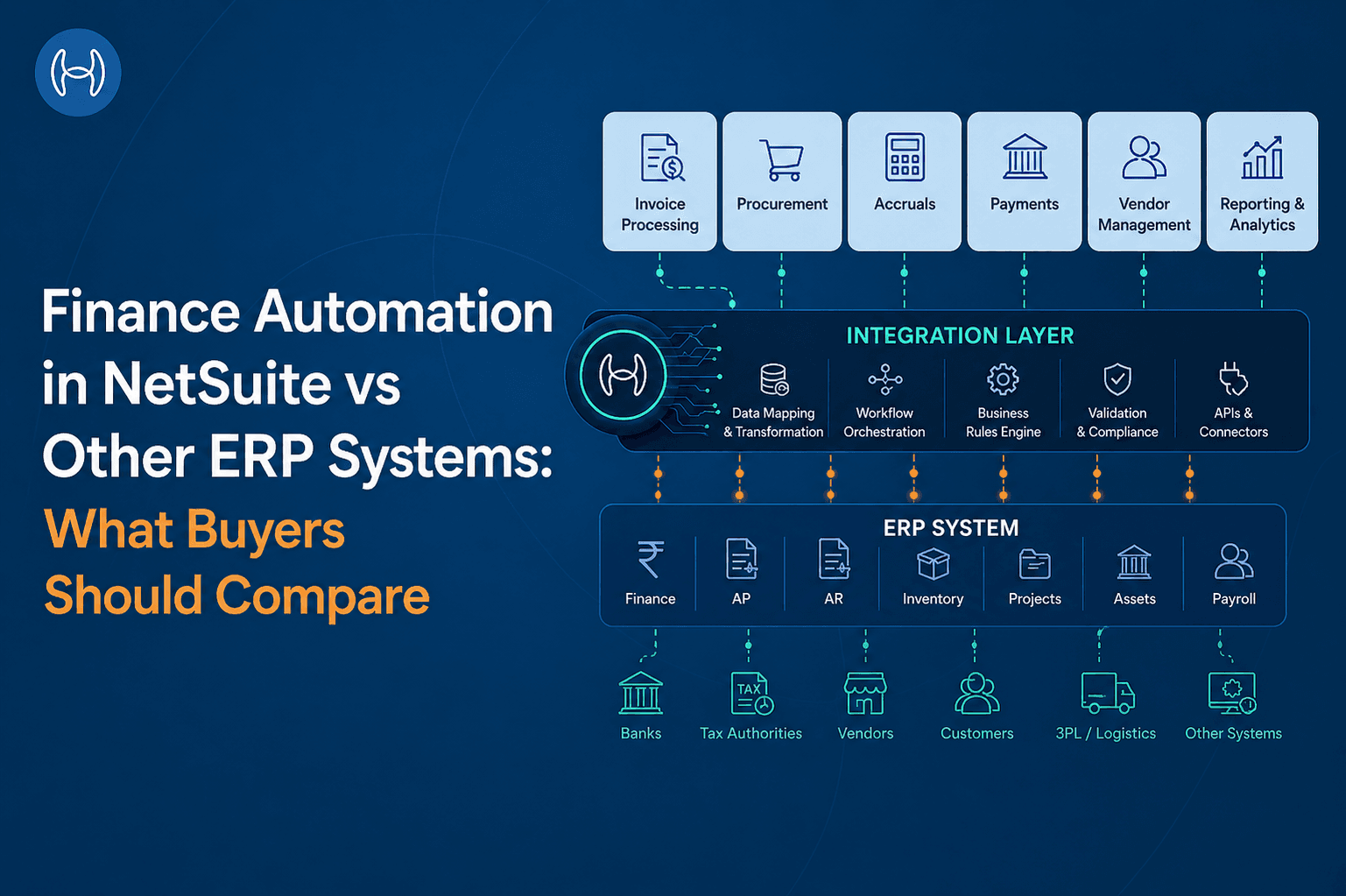
The guide on how AI complements ERP systems explains the structural reason for this gap: ERPs are built to record and report transactions, not to reason about them. The intelligence layer that makes advanced finance automation possible sits above the ERP, not inside it.
The Finance Automation Comparison Buyers Should Run
When evaluating ERP platforms on finance automation, these are the dimensions that separate surface-level claims from operational reality. Understanding what genuine AI-native invoice processing looks like is essential context before sitting through any demo. The guide to AI invoice processing software explains what to look for and where most platforms fall short.
Capability | What to Ask | Why It Matters |
Invoice processing | Does the system read invoices from any format, or does it require structured input? | Format diversity is the primary source of manual effort in AP |
Three-way matching | Does matching validate contracted prices, not just PO quantities? | Price variance detection prevents overpayment |
Anomaly detection | Can the system flag near-duplicate invoices and threshold-splitting patterns? | Rule-based checks miss the most costly exceptions |
Accruals automation | Does the system estimate unbilled liabilities from live operational data? | Manual accruals are the leading cause of month-end close variance |
Vendor communication | Is outbound vendor communication automated at the transaction level? | Manual communication is a hidden drain on finance team capacity |
Straight-through processing | What percentage of invoices clear without human intervention? | STP rate is the clearest indicator of automation effectiveness |
AI layer integration | Does the ERP support pre-built connections to specialised AI platforms? | Native automation gaps need to be filled without custom development |
The honest answer for most ERP platforms on most of these questions is: partially, or with significant configuration, or through a third-party integration. That is not a criticism. It is the nature of what ERP systems are built to do. The question for buyers is not whether the ERP handles all of this natively, but whether the ERP can support the specialised platform that will.
How Hyperbots Extends Finance Automation Across Any ERP
Hyperbots is built specifically for the gap described above. It is not an ERP alternative. It is the AI automation layer that sits on top of whichever ERP a finance team is running and handles the processing work that ERP native modules leave to humans.
The Invoice Processing Co-Pilot reads invoices from any format and channel, extracts line-item data with 99.8% accuracy, validates against contracted prices and purchase orders, and processes up to 80% of invoices straight through without human intervention. Invoice processing costs are reduced by 80%. Anomaly detection identifies near-duplicate submissions, threshold-splitting patterns, and vendor billing irregularities before they reach the approval queue.
The Vendor Management Co-Pilot automates vendor-facing communication at the transaction level: PO status updates, payment notifications, invoice acceptance and rejection, and onboarding workflows. The volume of inbound vendor queries drops because the information is already available to them through a connected vendor portal.
Hyperbots connects to all major ERP platforms through pre-built native connectors, including Oracle NetSuite, SAP S/4HANA, SAP ECC, SAP B1, Microsoft Business Central, Sage Intacct, and Sage 300. It is ERP-agnostic by design: the same automation capabilities are available regardless of which platform the organisation runs. For organisations on NetSuite specifically, the connection is immediate and does not require custom development.
Go-live is within one month. ROI is typically reached within six months, driven by eliminated manual processing hours, recovered early payment discounts, error correction savings, and reduced compliance exposure.
What This Means for Buyers
ERP selection and finance automation capability are increasingly being evaluated together rather than sequentially, because the ERP choice determines what automation is possible on top of it. A platform with a well-documented, stable API and an active integration ecosystem supports a richer automation layer than one that requires custom development for every external connection.
For buyers comparing NetSuite against the field, the automation question is not which ERP has the best native invoice processing. None of them have it at the level a high-volume finance team needs. The question is which ERP provides the best foundation for the AI automation layer that will sit on top of it, how quickly that layer can be deployed, and what it will cost to maintain.
The answer to that question varies by organisation size, entity complexity, and industry. But the pattern is consistent: the ERP handles the system of record, and specialised AI platforms handle the intelligence layer above it.
Conclusion
Finance automation in 2026 is not a single capability. It is a stack: the ERP at the foundation, handling transaction recording and workflow; and an AI layer above it, handling the intelligence that transforms high-volume finance operations from manual to autonomous. No ERP platform delivers both layers at the depth a growing finance team needs. The ones that acknowledge this and support strong external integration are the ones that age well.
For buyers in the middle of an ERP evaluation, the most useful question is not "which ERP automates the most?" It is "which ERP gives us the best foundation to automate everything above it?"