Free Purchase Order Sample PDF: Template, Guide & Best Uses
Get a free purchase order sample PDF to edit, customize, and streamline procurement with efficient, automated PO processes.
Executive Summary
Every organization conducting procurement—whether a startup, SMB, or enterprise—needs a reliable way to issue, track, and validate purchase orders. Accessing a professionally structured purchase order sample PDF not only accelerates internal purchasing but also reduces compliance risk, errors, and supplier disagreements. This blog provides a thorough overview of purchase order sample PDFs, demonstrates how to use and customize them, and illustrates their value alongside emerging automation strategies utilized by finance leaders. Download a free PO sample for your records—plus, discover how best-in-class automation tools like Hyperbots are transforming purchase management into a competitive advantage.
What Is a Purchase Order?
If you’ve ever ordered takeout, you know the relief of getting exactly what you asked for—no missing fries, no surprise toppings. In business, a purchase order (PO) does something very similar, but on a much bigger (and slightly less greasy) scale.
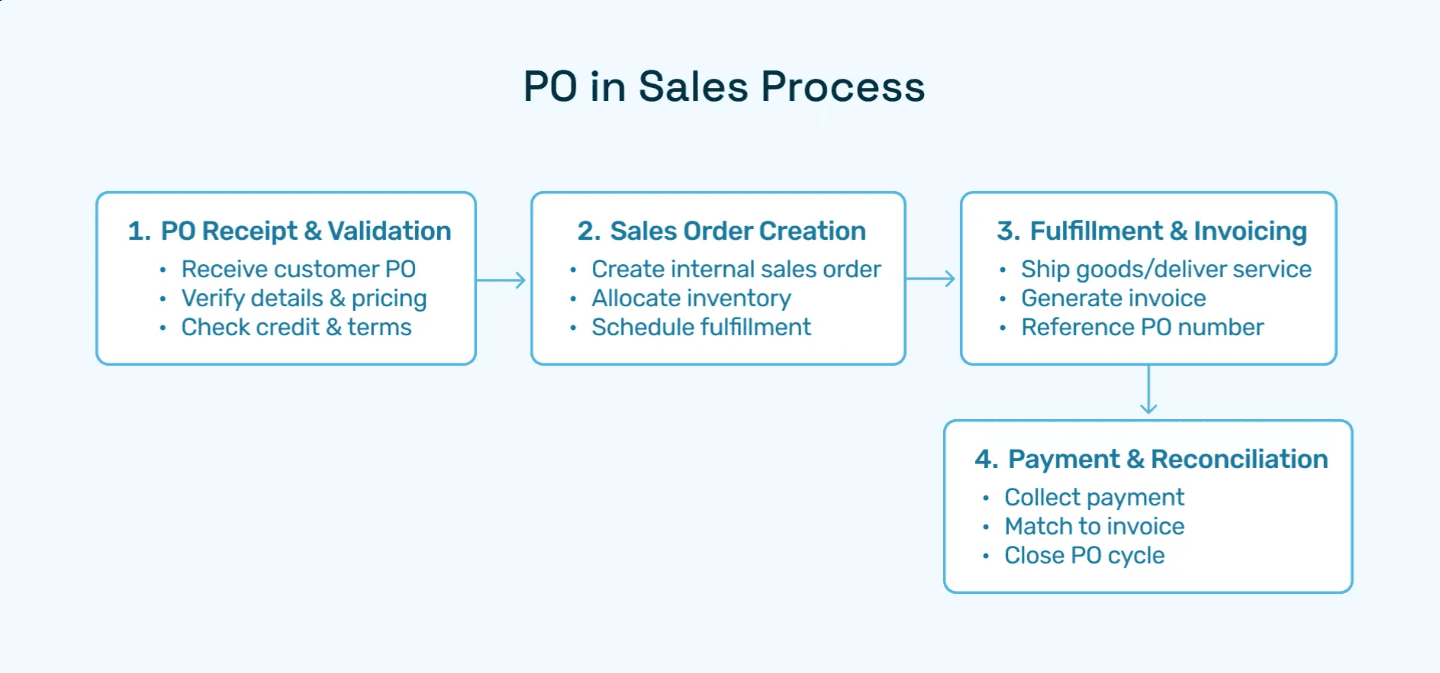
A purchase order is simply a formal, legally binding document that a buyer sends to a vendor. It spells out what’s being bought, how much it costs, when it’s supposed to arrive, and how payment will work. Think of it as the written promise that keeps both sides on the same page.
Without POs, businesses would be stuck in endless “he said, she said” arguments about who ordered what, when, and at what price. With POs, everything is documented—making life easier for buyers, vendors, and even accountants who need to keep things audit-ready.
Why Purchase Orders Matter
Clarity: Both sides know exactly what’s being purchased.
Legal protection: If there’s a dispute, the PO acts as proof of agreement.
Budget control: Businesses can track commitments and avoid overspending.
Audit readiness: Finance teams love POs because they provide a paper (or digital) trail.
Core Elements of a Purchase Order
A typical PO isn’t just a casual note—it’s a structured document. Here are the essentials:
PO number and order date – Think of this as the ID card for the order.
Buyer’s details – Name, company, and address so the vendor knows who’s asking.
Vendor information – Supplier’s name, address, and contact details to avoid confusion.
Itemized products/services – The fun part: what you’re actually buying, with quantities and agreed-upon prices.
Shipping instructions – Where it should go and by when.
Taxes, discounts, and totals – Because no order is complete without the math.
Signatures or digital acceptance – A stamp of approval that seals the deal.
Bringing It All Together
Whether you’re a startup ordering new laptops or a global enterprise securing raw materials, purchase orders act like the glue holding procurement together. They prevent misunderstandings, speed up processes, and create a reliable structure for transactions.
In short, a PO is more than paperwork—it’s the business world’s version of saying, “Here’s what I need, here’s what I’ll pay, let’s make it official.”
Why Use a Purchase Order Sample PDF?
Purchase orders aren’t exactly the most exciting part of running a business. They don’t sparkle like a product launch or feel as fun as closing a big deal. But here’s the thing: a simple purchase order (PO) can save you from a lot of headaches down the line. That’s where a purchase order sample PDF comes in handy—it’s like a ready-made cheat sheet for doing things the right way.
So, why should you care about PO sample PDFs? Let’s break it down:
Standardize your documents.
No more “Did I include the right fields?” or “Wait, what’s missing here?” A sample PDF sets the template for all POs, ensuring consistency across your team. Everyone is on the same page—literally.Stay compliant (without sweating it).
Finance teams juggle internal controls and external regulations all the time. A standard template means you’ve got all the must-have fields (like approval signatures or vendor details) built right in. Less chance of a mistake, and fewer late-night calls from your auditor.Speed up purchasing.
Nobody likes back-and-forth emails asking, “Can you resend with the right info?” With a sample PDF, your team knows exactly what to fill in, so the process moves faster—and vendors get what they need without confusion.Make audits and reporting less painful.
Organized records equal smoother reconciliations. If every PO follows the same format, pulling together audit trails or monthly reports is way less of a chore.Improve communication with vendors.
Suppliers love clarity. A clean PO template makes it easy for them to understand what you’re ordering, when you need it, and how to get it right the first time.
Here’s the fun part: many finance teams start with free sample PO PDFs they find online. They’re great for onboarding new staff, teaching best practices, or simply getting a “starter kit” in place before moving up to something more powerful—like a full-blown automated purchase order system.
Think of a purchase order sample PDF as the training wheels of procurement. It’s simple, reliable, and keeps you from falling over while you get the hang of things. Eventually, you’ll want to graduate to an automated system that can handle approvals, integrations, and real-time tracking—but until then, a sample PDF is a surprisingly effective way to keep things rolling smoothly.
Key Fields in a Standard Sample Purchase Order
A best-in-class sample purchase order will always include these sections:
Section | Description |
Header | PO number, company name/address, PO date |
Supplier Info | Vendor name, address, contact |
Ship-to | Destination address, expected delivery date |
Order Details | Itemized goods/services, SKU, quantity, unit price |
Pricing | Subtotals, discounts, taxes, grand total |
Terms & Conditions | Delivery, payment, cancellation, warranty, etc. |
Approval/Signature | Authorized signatories; digital/electronic approval |
These elements, embedded in your free po sample, protect against disputes and automate critical downstream finance processes like three-way matching.
How to Customize and Use a Purchase Order Sample PDF
Let’s be real—purchase orders (POs) might not sound as thrilling as unboxing the latest gadget or scoring front-row tickets to a concert, but when it comes to running a business, they’re the unsung heroes. A simple PDF template can keep your purchasing process professional, organized, and audit-ready—all without reinventing the wheel. The best part? It’s easier than you think.
Step-by-step way to take a PO sample PDF and make it your own:
Download a free PO sample template
Start by grabbing a free template from a reliable source online. Think of it as your blank canvas—simple, structured, and ready to be filled in.Add your brand personality
Upload your company logo, adjust the colors to match your brand palette, and include your official company information. Not only does this make your PO look professional, but it also helps vendors recognize who they’re dealing with at first glance.Fill in vendor details
Add the supplier’s name, address, and contact info. Double-check spelling here—because nothing slows down a process like having to resend corrected paperwork.Enter the itemized order data
This is where the real action happens. List product IDs, item descriptions, quantities, and agreed prices. The clearer you are here, the fewer misunderstandings later. (Think of it as your shopping list, but with much higher stakes!)Define shipment and payment terms
Make sure to spell out delivery dates, shipping addresses, payment deadlines, and any tax details. When both parties know the expectations upfront, you avoid unnecessary “where’s my order?” emails down the road.Assign a unique PO number
This tiny little number is the superhero of tracking. It’s what helps you (and your vendor) find, reference, and audit the order in seconds.Review, approve, and send
Before hitting “send,” give it one last look to ensure everything is correct. Then, save as PDF and share it with your supplier. Voilà—your polished, professional PO is ready to roll.
By following these steps, you’ll transform a simple sample PDF into a functional, branded purchase order that keeps your processes streamlined and your suppliers impressed. Who knew paperwork could feel this smooth?
Best Practices for Storing and Sharing
Creating a purchase order (PO) is only half the job—the real magic lies in how you store and share it. A beautifully designed PO template doesn’t do much good if it gets lost in your inbox jungle or buried in a random “Downloads (12)” folder. Luckily, a few simple best practices can keep your POs neat, traceable, and future-proof.
Keep digital records organized
Save every PO PDF you send or receive in a secure digital folder (or better yet, your accounting or ERP system). Think of it as your “PO library,” where every document is easy to find when you need it.Use consistent naming conventions
A file name like “PO-2025-0001-ABC-Widgets.pdf” might not look exciting, but it’s gold when you’re searching through hundreds of documents. Consistency makes audits and tracking much smoother.Share in the format vendors prefer
Some vendors love emails with attached PDFs, others may prefer a direct download link, and a few still want printed copies. Being flexible keeps relationships running smoothly.Review templates regularly
Once a year, give your PO templates a quick checkup. Regulations and internal policies change, and keeping your formats up-to-date avoids compliance headaches later.
Staying organized here means fewer errors, faster retrieval, and peace of mind when audits come knocking.
Common Mistakes to Avoid When Using a Free PO Sample
Free purchase order (PO) templates are a lifesaver—but only if you use them the right way. Here are some common slip-ups to watch out for (and how to dodge them):
Skipping the small stuff
It’s tempting to rush through, but leaving out key details like payment terms or the delivery address can slow things down. Vendors can’t read your mind!Recycling PO numbers
Think of PO numbers like fingerprints—each one needs to be unique. Duplicates create confusion and make it harder to track orders later.Forgetting the “official stamp”
Without a signature or approval, your PO may not hold up if challenged. Always get the green light before sending it out.Using an outdated template
Old templates can sneak in wrong company info, outdated policies, or old vendor details. Give your template a quick refresh now and then to avoid headaches.
💡 Pro tip: Your PO template will do its best work when kept sharp and up to date!
Why Standardizing with PDF POs Improves Procurement
Procurement can get messy fast. One team sends orders over email, another still faxes (yes, really), and someone else is juggling five Excel templates at once. The result? Duplicate requests, missed invoices, and a whole lot of frustration for finance and procurement teams alike.
That’s why more organizations are making the simple switch to standardized purchase order PDFs—and the benefits go way beyond “looking neat.”
No more human slip-ups. With one consistent format, you cut down on manual entry errors and those awkward duplicate orders that make vendors raise an eyebrow.
Faster problem-solving. When every PO looks the same, reconciling invoices and resolving supplier disputes becomes less of a detective game and more of a quick check.
Audit-ready anytime. Standardized POs make compliance teams very happy. Everything is structured, consistent, and easy to track, which means less scrambling before audits.
Smooth integration. PDF POs slide right into ERP systems, accounting platforms, or automation tools. That’s the magic of standardization—it plays nicely with tech.
And here’s the kicker: it’s not just us saying this. Deloitte’s 2023 CPO Survey and IBM’s work on PO automation both highlight standardization as a critical step in controlling spend and reducing procurement risks. In other words, the big players already know this is the future.
So, if you’re tired of messy processes and the “Excel vs. email vs. paper” chaos, standardizing with PDF purchase orders is an easy win. It’s a small shift that brings big results—cleaner workflows, happier suppliers, and a finance team that doesn’t need three cups of coffee just to get through PO reconciliation.
Purchase Order Automation: Taking Your Sample PO Digital
If you’re still creating purchase orders in PDFs, you’re not alone. PDFs are neat, easy to share, and way better than stacks of paper forms. They save time compared to writing things out by hand—but let’s be honest, they’re still a halfway step. The real magic happens when you take your sample PO and make it fully digital with automation.
Think about it: why should your team spend hours typing in the same vendor details, re-checking quantities, or chasing down approvals when software can handle it in seconds? Modern PO automation tools are designed to feel intuitive, user-friendly, and—most importantly—help you get work off your plate.
Here’s what the smarter, automated route looks like:
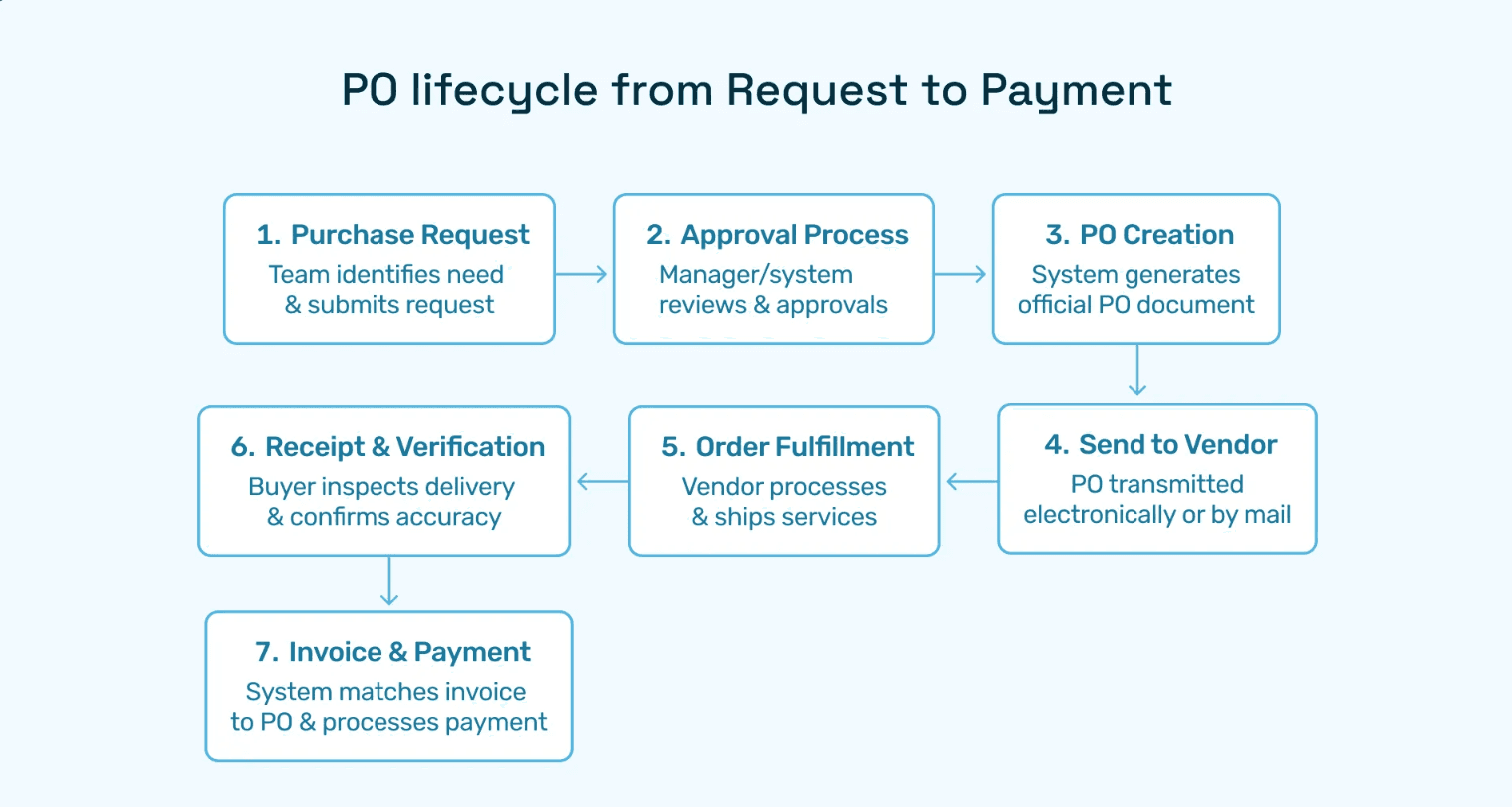
Instant PO Generation: Approved requests automatically turn into purchase orders, no copy-pasting required.
Machine Learning Smarts: Systems can auto-fill order details, check prices and quantities, and even stop duplicate orders before they happen.
Seamless Integrations: Connect directly with your ERP or finance software so the whole order-to-pay cycle flows smoothly.
Actionable Dashboards: Real-time insights into spend, compliance, and approvals, all in one place.
The best part? You don’t have to leap into automation overnight. Start small—maybe with a sample purchase order template in PDF form to get comfortable. Then gradually roll into automation to unlock speed, accuracy, and audit-friendly records that make finance teams (and auditors) smile.
By taking that first digital step, you’re setting the stage for a future where purchase orders don’t slow you down—they actually help your business move faster.
Hyperbots in Procurement Automation: Unlocking Next-Level Efficiency
Procurement is evolving fast. Teams can no longer afford manual errors, long approval chains, or endless paper trails. Hyperbots’ intelligent purchase order automation changes the game by bringing AI, seamless integrations, and user-friendly workflows together in one powerful platform.
Hyperbots ROI to Procurement Automation
When finance leaders evaluate purchase order automation, the first question is simple: what’s the ROI? With Hyperbots, the answer is both measurable and transformative. The platform delivers savings you can quantify in hard dollars, along with intangible benefits that reshape how procurement and finance teams work.
Implementing Hyperbots' Procurement copilot deliver significant ROI and transforms procurement operations by providing:
Over 80% reduction in PO creation & dispatch time
5 minute PR creation time
At least a 10% reduction in cash outflows
Accurate and timely automatic communication with vendors
100% automation of forms and other information verification
Granular and customized workflow for each process
Improved vendor relationships due to predictable approval timelines.
Beyond purchase orders, Hyperbots integrates with invoice matching, vendor management, and payment reconciliation, giving procurement leaders true end-to-end digital transformation.
Hyperbots Capabilities: More Than Just Purchase Orders
Hyperbots is an AI-first automation platform designed to modernize procurement and finance operations. Its Co-Pilots don’t just automate—they learn, validate, and optimize continuously.
Core Capabilities:.
ERP & Finance System Integration → Compatible with SAP, Oracle, Microsoft Dynamics, and more.
Smart Data Extraction → Pulls clean data from contracts, PDFs, and emails.
Compliance by Design → Automated approvals, policy enforcement, and audit trails.
Analytics & Insights → Dashboards for spend, supplier performance, and compliance metrics.
Hyperbots’ modular design lets organizations start small and scale fast. Teams often begin with PO automation, then expand into invoice processing and vendor management—without disruption.
Beyond Procurement: Hyperbots’ Supporting Co-Pilots Driving Full Automation
When people think about purchase order automation, they often picture just speeding up requisitions and approvals. But in reality, procurement doesn’t operate in isolation—it’s tied to invoices, vendors, and payments. That’s where Hyperbots’ P2P Co-Pilots come in. Together, they deliver a 360° automation experience for finance and procurement leaders.
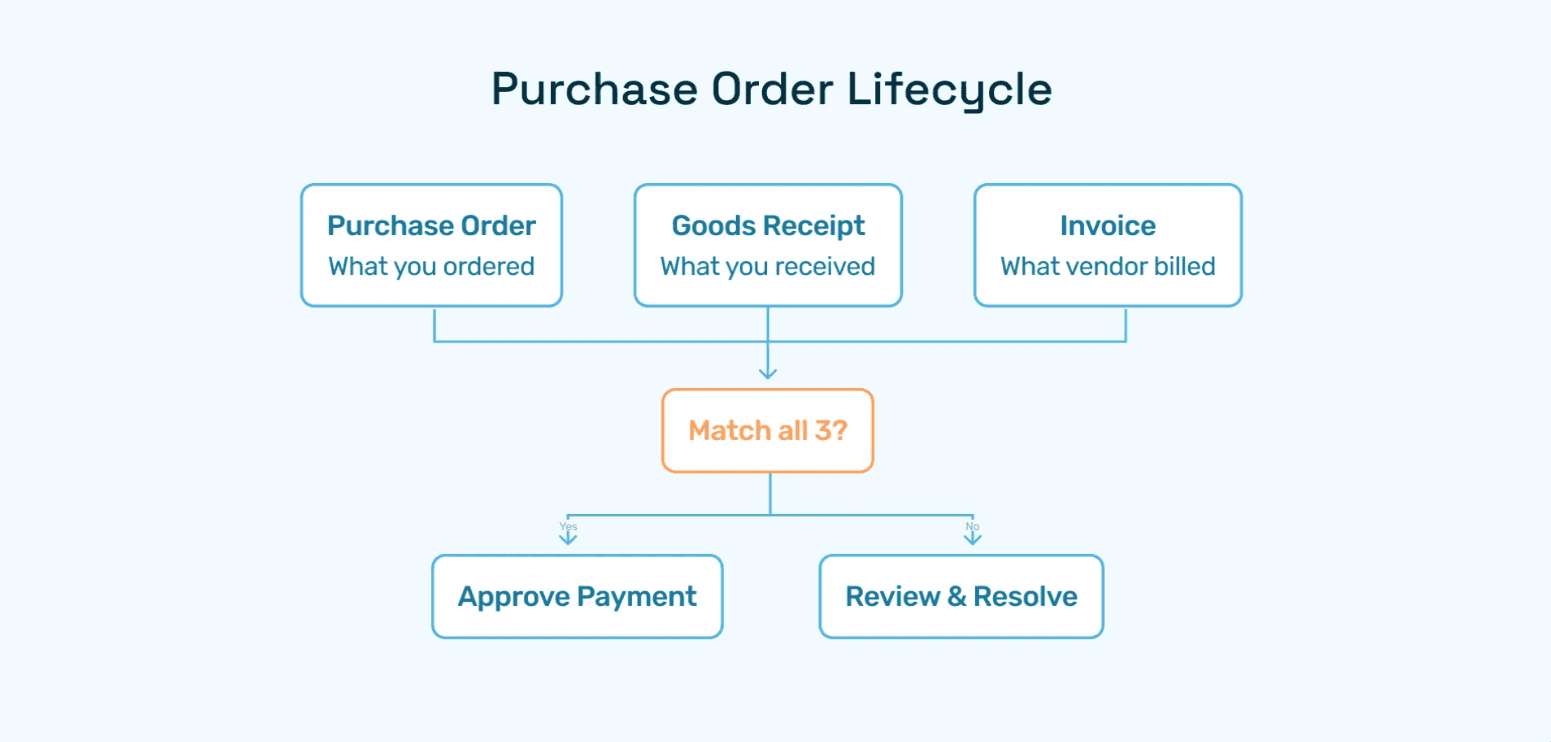
Automates 3-way matching between POs, goods receipts, and invoices.
Uses AI-driven validation to flag duplicates, mismatches, or overpayments.
Reduces reliance on manual AP checks, saving countless staff hours.
Simplifies onboarding with digital forms, compliance checks, and risk scoring.
Continuously monitors vendors for financial, regulatory, or performance risks.
Ensures only vetted, authorized suppliers transact with your company.
Improves supplier relationships through transparent communication and faster resolution of queries.
Automates fraud checks by validating vendor bank details before any transfer.
Flags duplicate or suspicious transactions for additional approval.
Supports various methods of transaction such as wire, credit cards, and digital wallets
Automates expense accruals and journal entries for month-end closing.
Matches invoices, POs, and receipts to accurately recognize liabilities.
Reduces manual reconciliation, ensures accounting compliance, and improves financial reporting speed.
With all of these copilots working in concert, Hyperbots isn’t just automating partial tasks—it’s reinventing procurement and finance operations for the digital era.
FAQs—Using Purchase Order Sample PDFs
Q1: Is a purchase order sample PDF legally valid?
Yes, if fully completed, uniquely numbered, and signed by authorized personnel, it serves as a binding offer between buyer and seller.
Q2: Can I edit my free PO sample template?
Absolutely. Downloadable PDF templates can be filled out in Adobe or any editor, or converted to Word/Excel for further customization.
Q3: How do automated systems enhance PO sample usage?
PO automation overlays your template—auto-filling, validating, routing for approvals, and syncing with accounting, all with audit logs and compliance checks.
Q4: What are the main benefits of standardizing POs as PDFs?
Consistency, clarity, improved record-keeping, and reduced disputes with vendors.
Q5: Can automation work with PDF PO templates?
Yes! Modern procure-to-pay platforms like Hyperbots extract data from PDFs into structured workflows, enabling digital approval and processing.