What Is Epicor CMS? How It Differs From Epicor ECM and DocStar
Epicor CMS, ECM, and DocStar Explained for Finance Teams
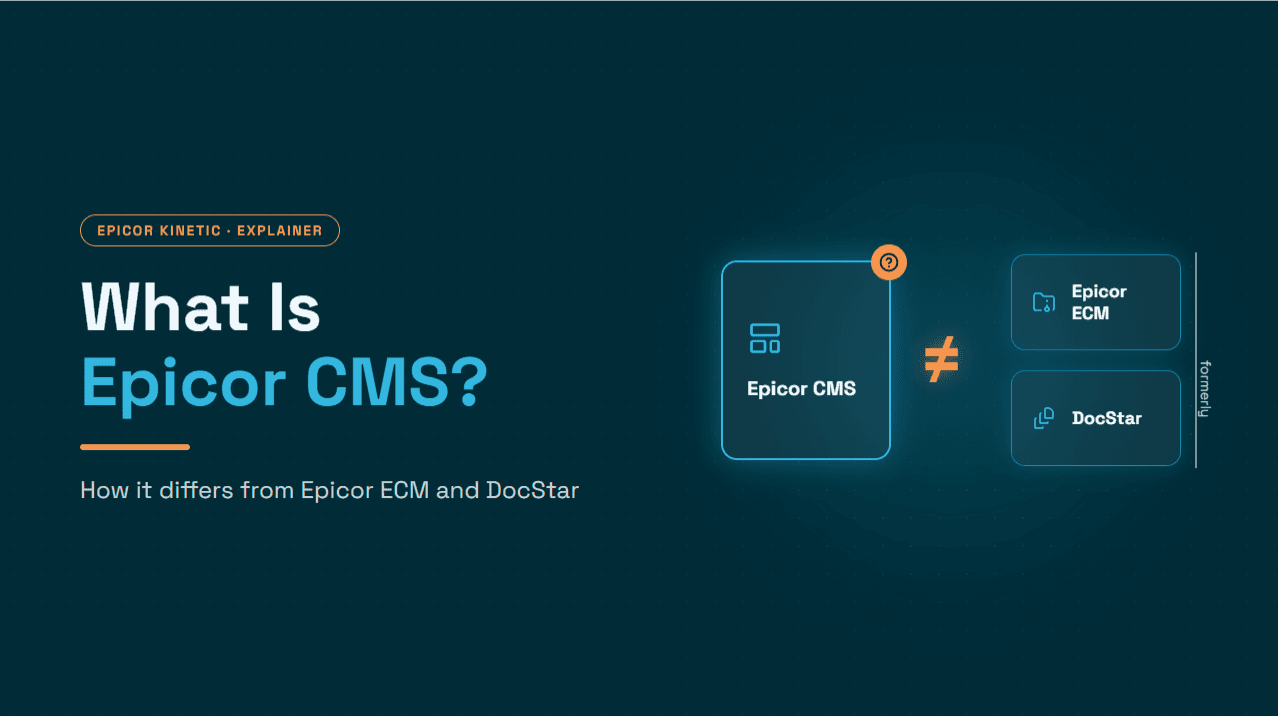
If you searched for "Epicor CMS," you are probably looking for one of two very different things.
Epicor CMS is an ERP system built for automotive parts manufacturers. It is not a content management system.
If you want Epicor's document management and workflow platform, you want Epicor ECM, the enterprise content management product formerly sold as DocStar.
This guide covers:
what each product is,
where the naming confusion comes from,
how each fits into finance operations, and
where document automation ends and transaction-level finance automation begins.
What is Epicor CMS?
Epicor CMS is an industry-specific ERP for automotive suppliers. It covers order management, planning and scheduling, inventory, shop floor, quality, EDI, and financials in a single system.
It is designed around the operating realities of Tier 1 and Tier 2 suppliers. These include:
tight OEM delivery windows,
customer-mandated labels,
release-based (scheduled) demand, and
supplier scorecards that penalize late or incorrect shipments.
Epicor CMS is a separate product from Epicor Kinetic, Epicor's broader manufacturing ERP (formerly Epicor ERP / E10). Both come from Epicor and both serve manufacturers. They are, however, distinct systems with different histories and different customer bases.
Who uses Epicor CMS
Epicor CMS is used mainly by automotive parts manufacturers. That includes suppliers doing metal stamping and forming, plastics and rubber molding, fasteners, and electronic assemblies. Such companies ship to OEMs and higher-tier suppliers under long-running supply agreements.
If your plant runs make-to-order work alongside repetitive, schedule-driven production for automotive customers, CMS is the Epicor product aimed at you.
Core capabilities
Area | What Epicor CMS focuses on |
Automotive EDI | Built-in support for OEM and supplier EDI transactions, including release and ship schedules |
Serialized traceability | Tracking serials, lots, coils, and heat numbers; embedded labeling for customer label compliance |
Quality | Control plans, online inspections, quality alerts, and built-in APQP, PPAP, and FMEA tools |
Planning and scheduling | Visibility into production so shipments go out on time and premium freight is avoided |
Sequencing | The In-Line Vehicle Sequencing (ILVS) module builds and ships parts in the OEM's vehicle build sequence, using broadcast or EDI sequence documents |
Financials | Integrated accounting, including payables and receivables, tied to production and shipping activity |
The financial row matters later in this guide. Epicor CMS has its own accounting, so an automotive supplier on CMS keeps its ledger, payables, and receivables in CMS rather than in Kinetic.
What does Epicor CMS stand for?
Epicor does not publish an official expansion of "CMS" in its product materials. The name is best understood as a product name with a history rather than an acronym with a fixed meaning.
The product traces back to CMS Manufacturing Systems, a Toronto company that developed the CMS/400 package. The package was popular with midsized manufacturers in the Great Lakes automotive supply chain. The lineage continued as follows:
In 2007, CMS Manufacturing Systems was merged with UK-based XKO Software to form Solarsoft.
Solarsoft sold the product as iVP.
Epicor acquired Solarsoft in 2012 and renamed the product Epicor CMS.
So when someone asks what Epicor CMS stands for, the most accurate answer is this: "CMS" comes from the original developer, CMS Manufacturing Systems. It does not mean content management system.
Why "Epicor CMS" gets confused with content management
"CMS Epicor" searches often land in the wrong place for several reasons.
"CMS" usually means content management system. Most business users associate CMS with content or document management, so they assume Epicor CMS is Epicor's document product.
Epicor really does sell content management. It just calls it ECM (enterprise content management). One letter apart, it is easy to mix up.
Directories mislabel it. At least one software review site describes Epicor CMS as a maintenance management system (CMMS), which it is not.
Epicor has automotive content management too. In 2024 Epicor acquired Solenium Group, a provider of product content management for the automotive aftermarket, such as catalog and application data. That serves parts sellers and distributors, not the manufacturing ERP use case.
If you came here looking for document capture, storage, or approval workflows, ECM is the product you want.
What is Epicor ECM (and why people still say DocStar)?
Epicor ECM is Epicor's enterprise content management and business process automation platform.
Epicor acquired docSTAR, a Schenectady, New York document management company, in January 2017. The product was sold as DocStar ECM for several years and is now branded Epicor ECM. Many consultants, partners, and long-time users still call it DocStar, so you will see all three names used for the same product.
ECM handles the document side of business processes:
Capture. Scanned paper, email attachments, and imported files come in from multiple sources.
Intelligent Data Capture (IDC). Key fields are extracted and documents are classified automatically.
Storage and retrieval. Documents are indexed, searchable, access-controlled, and backed by an audit trail.
Workflow. Documents are routed, reviewed, and approved.
Retention and compliance. Document retention and disposition policies are enforced.
Cross-department automation. Epicor positions ECM for workflows across AP, AR, HR, and sales. It also offers packaged solutions such as AP Automation and Sales Order Automation.
ECM is available as SaaS or on-premises. Epicor says ECM can work with virtually any ERP or accounting system, and that it is optimized for Kinetic and BisTrack.

Epicor CMS vs Epicor ECM vs DocStar at a glance
Epicor CMS | Epicor ECM | DocStar | |
What it is | Industry-specific ERP | Enterprise content management and process automation | Former name of Epicor ECM |
Primary users | Automotive parts manufacturers | Finance, operations, HR, and sales teams in many industries | Same as Epicor ECM |
Core job | Run production, EDI, inventory, quality, and financials | Capture, store, route, and approve documents | Same as Epicor ECM |
System of record for financial transactions? | Yes, for CMS customers | No. It manages documents and workflow around the ERP | No |
Origin | CMS Manufacturing Systems → Solarsoft (iVP) → Epicor (2012) | docSTAR → Epicor (2017) | docSTAR, acquired by Epicor in 2017 |
Relationship to Kinetic | Separate ERP | Integrates with Kinetic (and other ERPs) | Same as Epicor ECM |
The short version: CMS is an ERP, while ECM and DocStar are the same document platform under two names.
How CMS, ECM, and Kinetic fit into finance operations
The simplest way to separate these products is to ask where the financial transaction lives.
The ERP is the system of record. For automotive suppliers on Epicor CMS, that means CMS. For most other Epicor manufacturers, it means Kinetic. Supplier and customer records, invoices, receipts, payments, and GL postings all live in the ERP.
ECM is the document and workflow layer. It captures the paperwork around those transactions, routes it for review, and keeps it retrievable and compliant.

In Kinetic, a common example is accounts payable. A team using Epicor ECM AP Automation captures supplier invoices in ECM. ECM extracts the data, matches it against Kinetic purchase orders and receipts, and routes it for approval. The approved invoice is then posted in Kinetic, while ECM keeps the invoice image linked to the transaction.
Kinetic records the payable, and ECM helps get the invoice ready to be recorded.
Epicor CMS users follow the same principle, with CMS as the ledger. Before scoping document capture or automation in front of CMS, confirm with Epicor or your implementation partner which integration options your CMS version supports.
Document automation vs transaction-level finance automation: AP and AR
Much of the "CMS vs ECM" confusion comes from finance teams trying to answer a more practical question: what will actually reduce manual work?
The answer depends on a distinction that product names blur.
Document and content automation captures, classifies, stores, routes, and approves documents. This is ECM's core strength.
Transaction-level finance automation makes and executes the accounting decisions tied to those documents. Examples include which GL account an expense belongs to, which overdue customer to contact first, or which open invoices a payment should clear.
Both matter, but they solve different problems. The gap between them looks different in payables than in receivables.
Accounts payable: documents start the workflow, decisions finish it
In AP, the process starts with a document: the supplier invoice. That is why AP is the most common use case for document automation platforms like ECM. Capturing, extracting, matching, and routing the invoice removes a large share of the manual effort.
What typically remains is judgment-heavy work on the invoice itself:
coding non-PO spend,
resolving partial or tolerance-breaking matches,
allocating freight and surcharges,
catching duplicate or suspicious invoices, and
handling exceptions that don't fit a standard route.
AP work also extends beyond the invoice, both before and after it arrives:
Upstream, requisitions and purchase orders determine whether an invoice can match cleanly at all. Supplier onboarding determines whether the supplier record, tax details, and bank information behind it are correct.
Downstream, finance still has to verify that sales tax was charged correctly, decide when and how to pay, and accrue for goods or services received but not yet invoiced before period close.
These are transaction and master-data decisions rather than document-handling steps.
Accounts receivable: the hard part is the transaction, not the document
AR works differently. The company issues its own invoices, so the difficulty usually isn't capturing them. The hard work happens after the invoice goes out, in two areas.
Collections is the larger of the two for most finance teams. Deciding which accounts to chase, when, and how depends on transaction data: aging, payment history, disputes, and promises to pay. The work is continuous follow-up and prioritization rather than a single document moving through approval. When it slips, DSO rises, disputes stay unresolved longer, and cash-flow forecasts lose accuracy.
Cash application is the second. Customer payments often arrive separately from their remittance details, which may come as an email, a PDF, a bank file, or a portal download. A single payment may cover dozens of invoices. It may also be short-paid, include deductions or chargebacks, or reference invoice numbers inconsistently.

Applying that cash correctly means reconciling bank data, remittance data, and open AR in the ERP. That is a matching and decision problem more than a document problem. When it lags, unapplied cash builds up and AR aging becomes unreliable, which in turn weakens collections, since teams end up chasing invoices that have already been paid.
This is especially relevant for automotive suppliers. OEM and Tier 1 customers often pay in large, multi-invoice remittances that can include deductions.
Epicor ECM can support AR-related workflows, such as capturing remittances or other customer documents and routing them for review. The deeper AR work sits at the transaction level: prioritizing collections, tracking disputes, matching payments to invoices, handling deductions, and updating the ledger. That is where the ERP and any decisioning layer on top of it do the heavy lifting.
Document/content automation (e.g., Epicor ECM) | Transaction-level finance automation | |
Primary unit of work | A document | A financial transaction or decision |
AP examples | Invoice capture, data extraction, 2-/3-way matching, approval routing, retention | GL coding, exception resolution, duplicate/fraud checks, freight allocation, PR-to-PO conversion, supplier verification, sales tax validation, payment timing, accruals |
AR examples | Capturing and routing remittances and customer documents, storage and retrieval | Collections prioritization, dunning and follow-ups, dispute and promise-to-pay tracking, matching payments to open invoices, handling short pays and deductions |
Where value concentrates | Paper elimination, visibility, compliance, workflow control | Lower DSO, more predictable collections, faster cash application, fewer AP exceptions, cleaner close |
Many finance teams end up needing both: a document layer for control and compliance, and a transaction layer for the decisions that still consume staff time.
Where a finance automation layer fits alongside Epicor
If your remaining workload sits in that transaction-level column, the next question is how to automate it without disturbing the ERP or the document platform you already run.
Finance automation layers are built for this. Hyperbots, for example, provides AI co-pilots that work alongside the ERP as a complementary layer. They do not replace CMS, ECM, or Kinetic.
On the receivables side, the Collections Co-Pilot handles collections end to end: prioritizing accounts, running dunning and follow-ups by email and phone, detecting disputes, tracking promises to pay, and updating the ERP. The Cash Application Co-Pilot complements it. It extracts data from remittances and bank statements, matches payments to open invoices, handles exceptions, and posts the results to the ERP, which keeps AR aging accurate for the collections team.
On the payables side, the Invoice Processing Co-Pilot is the core of the workflow. It covers invoice discovery, extraction, validation, GL coding, 2- and 3-way matching, duplicate and fraud checks, and ERP posting. The surrounding co-pilots address the work before and after the invoice:
Procurement Co-Pilot: generates purchase requisitions, converts approved requisitions into purchase orders, and dispatches them to suppliers, so invoices have clean POs to match against.
Vendor Management Co-Pilot: automates supplier onboarding and identity verification (for example, from W-9s), gives vendors a portal to check PO, invoice, and payment status, and flags duplicate or high-cost suppliers.
Sales Tax Verification Co-Pilot: validates the sales tax on each invoice and line item before posting.
Payments Co-Pilot: recommends payment timing based on terms, discounts, and penalties, and runs approval workflows across ACH, check, and wire.
Accruals Co-Pilot: identifies, books, and reverses accruals to support month-end close.
For Epicor customers, Hyperbots has published a connector for Epicor Kinetic. It reads and writes ERP data through Kinetic's REST endpoints, or through Service Connect for older on-premises builds, and Kinetic remains the system of record.
Teams already using ECM can keep it for document storage, retention, and cross-department workflows. Before layering transaction-level automation on top, decide which system owns capture and approvals, so the handoffs into Kinetic stay clean.
Quick guide: which product were you looking for?
You run an automotive parts plant and need EDI, sequencing, traceability, and PPAP in your ERP. You want Epicor CMS.
You want to scan, store, search, and route documents across AP, AR, HR, or sales. You want Epicor ECM.
A consultant mentioned DocStar. That is Epicor ECM under its former name.
Your bottleneck is posting-level work, such as applying customer payments, managing collections, or coding and matching invoices. You are looking at transaction-level finance automation that works alongside your Epicor ERP.
Conclusion
Epicor CMS, Epicor ECM, and DocStar are easy to confuse, but they do different jobs.
Epicor CMS is an automotive manufacturing ERP whose name comes from CMS Manufacturing Systems, not "content management." Epicor ECM is Epicor's document and workflow platform, and DocStar is simply its former name.
For finance teams, the more useful distinction is between managing documents and automating the transactions behind them. ECM brings control, visibility, and compliance to invoices, remittances, and other records. The ERP remains the system of record. Transaction-level work such as collections, cash application, invoice coding, and matching is where a finance automation layer alongside Epicor can take on the remaining manual effort.
If your focus is payables in Kinetic, our complete procure-to-pay guide to Epicor AP automation walks through the full workflow, from requisitions and purchase orders to invoice processing, payments, and close.
See how Hyperbots can help automate the finance workflows that sit around your Epicor environment.
Book a Demo
FAQ
What is Epicor CMS?
Epicor CMS is an ERP system built for automotive parts manufacturers. It covers EDI, planning, serialized traceability, quality tools such as APQP and PPAP, vehicle sequencing, and financials.What does Epicor CMS stand for?
Epicor does not publish an official expansion. The name comes from CMS Manufacturing Systems, the Toronto company that created the original CMS/400 package. It does not mean content management system.Is Epicor CMS a content management system?
No. Epicor's content management product is Epicor ECM, formerly DocStar.Is DocStar the same as Epicor ECM?
Yes. Epicor acquired docSTAR in 2017, and the product is now branded Epicor ECM.Is Epicor CMS the same as Epicor Kinetic?
No. Both are Epicor manufacturing ERPs, but CMS is a separate, automotive-focused product with its own history.Can Epicor ECM be used for accounts receivable?
Epicor positions ECM for AR workflows as well as AP, such as capturing and routing customer-related documents. Deeper AR work, like matching payments to open invoices, handling deductions, and prioritizing collections, is transaction-level and depends on the ERP and any finance automation layered on top of it.Does Epicor ECM replace Kinetic's AP or AR functionality?
No. ECM manages documents and workflow, while Kinetic remains where invoices, receipts, and payments are recorded.