Automatic Receipt Matching in Epicor: Setup & 3-Way Match
How to receive supplier items, configure 2-way and 3-way matching in Epicor Kinetic, and fix received POs that won't show up in AP
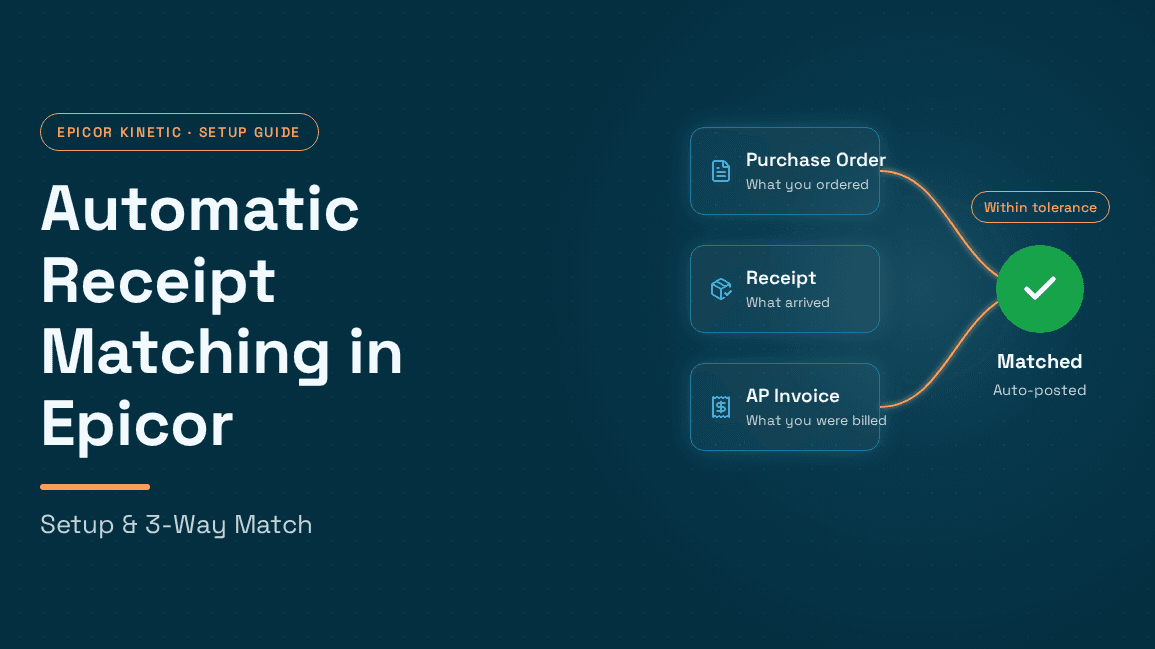
Epicor Kinetic already holds everything a 3-way match needs: the purchase order, the receipt, and the supplier invoice all live in the same ERP. What it doesn't do on its own is bring them together without an AP clerk comparing screens line by line. Learning how to implement automatic receipt matching in Epicor systems comes down to three things: clean receiving habits, deliberate configuration, and a clear plan for the exceptions that rules can't resolve.
Matching is the control point that holds the rest of Epicor AP automation across the procure-to-pay cycle together. If receipts and invoices don't reconcile, approvals stall, accruals drift, and payments go out late or wrong. This guide explains how receipt matching works in Kinetic, how to receive supplier items so they're available to match, how to configure 2-way and 3-way matching and tolerances, why Epicor sometimes won't show received POs in AP Invoice Entry, and where AI-based matching outperforms native rules.
What "automatic receipt matching" means in Epicor Kinetic

Receipt matching is the control that confirms you only pay for what you ordered and what you actually received. In Epicor terms, three records have to agree:
The purchase order (PO), created in Purchase Order Entry, which sets the expected quantity, unit price, and supplier.
The receipt, created in Receipt Entry, which records what physically arrived and posts it to inventory or expense.
The supplier invoice, entered in AP Invoice Entry, which is what you're being asked to pay.
A 2-way match compares invoice to PO (price and quantity ordered). A 3-way match adds the receipt, so you're checking invoice against PO against quantity actually received. A 4-way match adds an inspection or acceptance record, which matters for regulated and quality-controlled parts.
The accounting logic behind this is what makes matching so important in Epicor. When a receipt posts, the value lands in an AP clearing (Received Not Invoiced) position. When the invoice is matched to that receipt line and posted, the clearing entry is relieved and the liability moves to Accounts Payable. Epicor practitioners describe AP Clearing as the account that bridges the gap between receiving goods and processing the vendor invoice, and they flag receipts never matched to an invoice and invoices stuck in unposted groups as frequent causes of reconciliation discrepancies. Put simply, unmatched receipts don't just slow AP down; they distort your balance sheet at month-end.
How to receive supplier items into Epicor (so they're matchable)
Matching can only be as good as receiving. Most "Epicor won't match" complaints trace back to how goods were received, not to AP. Here's the receiving workflow in Kinetic, with the settings that affect matching downstream. Screen labels can vary slightly between Kinetic releases, so treat this as the standard flow.
Step 1: Make sure the PO is approved and correctly flagged. Receipt Entry works against approved POs. If a part requires inspection, set the inspection flag on the PO line. When inspection is required on the PO, Receipt Entry carries that flag through and routes the item to the inspection warehouse and bin defined in site configuration.
Step 2: Create the receipt header in Receipt Entry. Enter the supplier, the packing slip number, and the receipt date. The packing slip number is worth enforcing because it becomes the easiest cross-reference when AP needs to trace an invoice back to a delivery.
Step 3: Add receipt lines from the PO. Pull the PO and select the lines and releases being received. Enter the actual quantity received, not the ordered quantity. Short shipments should be received short so the difference stays visible.
Step 4: Mark the lines Received, not just Arrived. This is the single most important habit for matching. In Kinetic, Arrived means the material is on your dock, while Received means it has been put into inventory with a bin location and costs posted to the relevant ledger accounts. An Epicor community contributor explains that Arrived only signals the goods are in the building, whereas Received makes them available to inspection and to invoicing. An arrived-but-not-received line will not appear when AP tries to match.
Step 5: Complete inspection where required. Items that go to inspection should be dispositioned promptly so receiving, quality, and AP stay in step.
When receiving is timely, purchase order tracking from creation to receipt becomes a reliable signal rather than a guess, and AP stops chasing warehouses for confirmation.
How to implement automatic receipt matching in Epicor systems
With receiving in order, here's how to set up matching in Kinetic. Think of it in three layers: configuration, daily workflow, and exception control.
Layer 1: Company Configuration settings that shape matching
Allow Multiple Invoicing of Receipts:
Suppliers often bill a single receipt across several invoices, or bill partial quantities. Epicor introduced AP partial invoicing controls in Company Configuration, including an Allow Multiple Invoicing of Receipts check box and Manual GRNI Clearing tolerance fields, so that non-invoiced quantities remain selectable on future invoices and show correctly on the AP Received Not Invoiced report. If you get split invoices, enable this.
Manual GRNI clearing tolerances:
For old receipts that will never be invoiced (a supplier who never bills small amounts, for example), AP Invoice Entry offers a Get Not Invoiced Receipts action that selects not-invoiced receipts meeting the tolerance criteria set in Company Configuration and creates clearing documents for them, which cannot share a group with standard invoices.
AP rounding tolerance:
For penny differences between invoice and PO, Epicor users point to the Accounts Payable settings under Company Configuration's Finance modules, where you can accept rounding at invoice entry and define a tolerance amount.
Supplier price defaults:
When asked whether Epicor has built-in purchase price variance tolerances, community members pointed to the Supplier Price Defaults fields under Company Configuration's Shipping/Receiving materials settings. This is worth being clear-eyed about: native Kinetic does not offer the kind of granular, percentage-based match tolerance matrix (by supplier, by part, by supplier-part combination) that some other ERPs expose out of the box. Teams that need that granularity typically build it with BPMs (Business Process Management directives) or an external matching layer.
Layer 2: The daily matching workflow in AP Invoice Entry
Create an invoice group with the apply date and fiscal period.
Enter the invoice header with supplier, invoice number, date, and the PO reference.
Pull in receipt lines for that PO. Kinetic shows receipts that are received and not yet fully invoiced for that supplier. Select the lines the invoice covers.
Compare quantities and unit prices against the invoice. Where the supplier's price differs from the PO, Epicor lets AP adjust the PO price at invoice entry so the correct amount is paid, and one controller describes running a monthly BAQ of those price changes and requiring buyer sign-off when the invoice price doesn't match the PO.
Add freight, misc. charges, and tax as header or line charges.
Review the Edit List and post. The AP Invoice Entry Edit List shows the purchase price variance amounts generated during invoice processing, which are informational until posting.
On the accounting side, when invoice and PO prices differ, an ADJ-PUR transaction should be generated automatically, and PPV shows up as an ADJ-CST transaction in Part History and in the TranGLC table. Knowing where variances land is what lets you audit matching later.
Layer 3: Tolerances and exception control
Because native tolerance controls are limited, most well-run Epicor AP teams formalize tolerance policy outside the screen and enforce it with BPMs, BAQs, and dashboards. The table below gives sensible starting points our team sees mid-market manufacturers use. Tune them to your risk appetite, supplier mix, and audit requirements.
Match check | Common starting tolerance | Typical owner when exceeded |
Unit price vs PO | ±1–2% or a fixed dollar cap per line, whichever is lower | Buyer / procurement |
Quantity invoiced vs received | 0% over received; short invoices allowed | Receiving / AP |
Freight vs PO or quoted freight | Fixed cap (e.g., $25–$50) or % of invoice | Procurement / logistics |
Sales tax vs expected rate | Near-zero; any mismatch reviewed | Tax / AP |
Invoice total vs matched lines | Rounding tolerance only | AP |
Setting tolerances is really a policy decision, not a technical one.
A useful control pattern: compare the APInvDtl table against PODtl in a dashboard to surface purchase price discrepancies where the supplier changed price after PO confirmation. Pair that with a weekly review of the Received Not Invoiced report and you'll catch most matching drift before month-end.
Why won't Epicor show received POs in AP Invoice Entry?
This is one of the most common Epicor questions, and it almost always traces back to one of six causes. Work through them in order.
Symptom | Likely cause | Fix |
|---|---|---|
PO shows goods delivered, but no receipt lines to select | The line is Arrived, not Received. Arrived only means the goods are on your dock; Received puts them into inventory and makes them available to AP | Mark the receipt line Received in Receipt Entry |
No receipts at all for that PO | Wrong supplier or purchase point on the invoice header, PO not yet received, or the receipt was entered in a different company or site | Verify the invoice header supplier, the receipt status, and which company context you're in |
Receipt was partially invoiced and the remainder is missing | Multiple invoicing of receipts isn't enabled, so the uninvoiced balance isn't offered on the next invoice | Enable Allow Multiple Invoicing of Receipts in Company Configuration |
Receipt lines are stuck and the RNI report won't clear | The invoice was entered as an unreceived line and the match step was never completed. One Epicor user found around 200 POs sitting in this state, and experienced controllers generally advise against invoicing unreceived lines for exactly this reason | Complete Invoice/Receipt Match, then stop invoicing unreceived lines |
Receipt split into several lot lines won't pair with an earlier unreceived-line invoice | A known matching limitation with an open enhancement request | Adjust the invoice manually, or request a data fix |
Receipt appears on the Received Not Invoiced report but not in AP Invoice Entry | A header data issue. In one documented case the POType value on the POHeader and RcvHead records was blank instead of STD | Raise it with Epicor support, referencing KB0045337 |
Exception handling: where 3-way matching really gets decided
Clean matches are easy. The real cost of AP lives in the exceptions. The most common ones in Epicor environments:
Price variances, from outdated PO prices, surcharges, or contract changes not reflected in Epicor.
Quantity variances, from short shipments, over-shipments, backorders, and partial deliveries across multiple receipts.
Unit-of-measure mismatches, where the supplier bills in cases and the PO was raised in each.
Freight and misc. charges that were never on the PO, or were quoted differently.
Tax discrepancies, from wrong ship-from/ship-to jurisdictions or misclassified line items, which is why validating tax at the line-item level rather than the invoice total matters, and why an undercharge can leave you owing use tax on the shortfall.
Blanket POs and services, where there's no clean receipt quantity to match against, so blanket purchase orders need cumulative matching strategies that track invoiced value against the standing PO over time, and open-ended services like time and material have to be matched against agreed rates and approved hours rather than received units.
Duplicates and anomalies, which is where AI-based matching for detecting anomalies and fraud earns its keep.
The problem with rules is that the same symptom has different causes. A quantity mismatch could be a short delivery, a second shipment still in transit, a UOM difference, or overbilling, and each needs a different resolution. A rule can say "mismatch." It can't say why. That gap is the reason straight-through processing of invoices still faces real constraints even in well-configured ERPs.
The stakes aren't trivial. McKinsey describes a company whose AI system surfaced contract leakage of roughly 4 percent of total spend, a level the firm notes is not unusual, which on $1 billion of spend would equal about $40 million in recurring margin.
When AI matching beats native Epicor rules
Native Epicor matching is deterministic: select receipt lines, compare, post, record variance. It works well for simple, single-receipt, single-price invoices. It struggles where judgment is needed.
AI-based matching approaches the problem differently. Instead of checking whether two fields are equal, it reasons across quantity, price, freight, and tax together, using the PO, all related receipts, supplier history, and your policy.
Here's a realistic example. A supplier sends one invoice covering two receipts for the same PO line, bills 110 units against 100 received, adds a $180 freight line not on the PO, and charges 7.25% tax on a part that ships from out of state.
Native Epicor: AP pulls both receipt lines, sees the 10-unit overage, keys freight as a misc. charge, and has to separately figure out whether the tax is right. Each check is a manual judgment.
AI matching: The system recognizes the invoice spans two receipts, matches 100 units, flags the 10-unit overage as unreceived (and checks whether a third receipt is in transit), tests the freight against the supplier's historical freight pattern and your freight tolerance, and validates tax against the ship-from and ship-to jurisdictions and the part's tax category. AP sees one exception with the reason already stated.
That's the Hyperbots approach. The Hyperbots Invoice Processing AI Agent's 3-way matching reasons across quantity, price, freight, and tax together, with 2-way matching for non-receipt lines, configurable matching strategies for tolerance rules, and field-level matching configurability for Epicor custom fields. Tax checks run through automated sales tax verification before the invoice posts. Hyperbots' extraction layer combines expert systems with vision-language and large language models, uses chain-of-thought reasoning, and is pre-trained on 35 million invoice fields to reach 99.8% accuracy.
Capability | Native Epicor Kinetic | Hyperbots AI matching on Epicor |
2-way / 3-way match | Manual receipt-line selection in AP Invoice Entry | Automatic, line-level, across multiple receipts |
Tolerances | Rounding, GRNI clearing, supplier price defaults; granular rules via BPMs | Configurable by supplier, part, category, and amount |
Freight & misc. charges | Keyed manually | Validated and allocated against policy and history |
Sales tax | Manual review | Ship-from/ship-to and tax category verified pre-posting |
Exception reason | Variance amount only | Root cause stated (short ship, UOM, price change, etc.) |
Audit evidence | PPV transactions, BAQs | Full decision log via audit trails |
It's also worth noting what AI matching should not do: act unchecked on critical decisions. Deloitte's Finance Trends 2027 report found that 95% of finance leaders are comfortable with agentic workflows in at least some finance activities, but only 14% support full autonomy for critical decisions. That's why Hyperbots routes true exceptions through human-in-the-loop review rather than forcing them through.
Value, not activity, is the bar. Gartner data from a June 2025 survey of 183 CFOs showed that 84% of finance organizations have implemented or plan to implement AI, yet only 7% report high or very high impact. Receipt matching is one of the few AP use cases where impact is directly measurable: touchless rate, exception rate, and RNI balance.
Case study: Persimmon Technology automates 3-way matching on Epicor
Persimmon Technology, a semiconductor robotics manufacturer, runs Epicor on-premise and uses Hyperbots for AP. In a conversation on integrating Hyperbots AI agents with Epicor ERP, VP of Finance Dave Sackett walked through both how the integration was built and what changed afterwards.
Hyperbots Integration With Persimmon' Epicor ERP
Hyperbots ships a plug-and-play connector for Epicor Kinetic in the cloud, and for on-premise builds like Persimmon's it uses Epicor's REST v2 endpoints, or Service Connect on older versions, to give the co-pilots secure read-write access to companies, sites, suppliers, parts, receipts, AP invoices, payments, and user-defined fields, with Epicor remaining the system of record. On-premise deployment doesn't require opening the network: a lightweight agent sits on the Epicor app server and opens a secure outbound HTTPS tunnel, so no inbound firewall changes are needed and data stays inside the network under IT control. Epicor customizations survive the move, because onboarding pulls Epicor metadata so custom fields and logic become mapping targets, the AI learns from historical postings how to populate them, and the connector triggers existing business process workflows the same way a user would.
Why the plumbing matters for matching
An invoice can only match a receipt the system can actually see, so sync cadence is a matching control, not an IT detail. At Persimmon, chart of accounts and company-site structures sync weekly, suppliers, parts and GL codes daily, PO receipts and supplier invoices hourly, while writes such as invoices, POs, journal entries and accruals happen in real time. Every posting is then proved: after each write the connector re-reads the Epicor record and compares amount, currency, company and posting date, and only an exact match passes. Failures don't disappear quietly either, since errors like a closed fiscal period or a duplicate document number trigger three automatic retries before the item lands in an Integration Exceptions queue with a Teams alert to finance. The platform is SOC 2 Type II compliant and ISO 27001 certified, with data encrypted in transit and at rest and access keys inheriting Epicor's own security groups on a least-privilege basis.
Results Achieved by Persimmon post Hyperbots Implementation
The Invoice Processing Copilot now reads invoice PDFs from Persimmon's Outlook mailbox, runs the three-way match against the PO and receipt, generates GL coding and tax, and posts the AP invoice into Epicor, with roughly 80% going straight through. The gains extend past AP data entry into month-end and tax: the Accruals Copilot finds PO receipts without invoices, books the month-end journal entries and reverses them automatically once the invoice arrives, which is precisely the accruals discovery for goods received that keeps AP clearing reconciled, while the Sales Tax Verification Copilot checks ship-to and ship-from tax groups and part tax categories before the invoice posts, eliminating tax mischarges.
Sackett's comparison with the tools Persimmon used before is the sharpest measure of the difference. Having worked with invoice OCR previously, he described those as far simpler, and noted that finance-trained models can reach 99.8% accuracy and deliver 80% productivity gains, against perhaps 30% from traditional RPA and OCR tools, with an immutable audit trail behind every action. In a separate discussion on the Invoice Processing Co-Pilot, he added that anything that doesn't pass its checks moves into a "waiting to be reviewed" queue rather than posting, and that the existing link between Hyperbots and Epicor makes extending AI to other teams working with that data straightforward
From Receiving to Reconciliation: Making Automatic Receipt Matching Work in Epicor
Automatic receipt matching in Epicor comes down to three disciplines. First, receive properly: mark lines Received, not just Arrived, and receive actual quantities. Second, configure Kinetic deliberately: enable multiple invoicing of receipts, set rounding and GRNI clearing tolerances, avoid unreceived-line invoicing, and use BAQs and BPMs to enforce price and quantity policy. Third, treat exceptions as the real work, because that's where cost, leakage, and audit risk live.
Native Epicor gets you a controlled 3-way match. It doesn't get you a match that understands why an invoice disagrees with a PO and receipt. That's the gap AI matching fills: reasoning across quantity, price, freight, and tax together, posting clean invoices straight through, and handing your team only the exceptions that need judgment, with the cause already identified.
If your team is still pulling receipt lines by hand or clearing the Received Not Invoiced report at month-end, it's worth seeing how this runs on your own data. Request a Hyperbots demo to watch 3-way matching run against your Epicor POs and receipts, or estimate your savings with the invoice processing ROI calculator.
Frequently asked questions (FAQs)
1. Does Epicor Kinetic support 3-way matching natively?
Yes. Kinetic ties AP invoice lines to PO receipt lines, which gives you a PO-receipt-invoice match with purchase price variances recorded at posting. What it doesn't do natively is automate the selection and judgment. AP still pulls receipt lines, reviews variances, and decides what's acceptable. Granular percentage tolerances by supplier or part generally require BPMs or an external matching layer.
2. How do I receive supplier items into Epicor so AP can match them?
Use Receipt Entry against an approved PO: create the receipt header with supplier and packing slip, add the PO lines, enter the quantity actually received, and mark the lines Received. Lines left in Arrived status aren't in inventory and won't appear for invoice matching. Complete inspection promptly for parts flagged for it.
3. Why won't Epicor show my received PO in AP Invoice Entry?
The most common reasons are that the line was marked Arrived rather than Received, the receipt was already fully invoiced (or partial invoicing isn't enabled), the invoice header has a different supplier or company than the receipt, or the invoice was previously entered as an unreceived line and is waiting in Invoice/Receipt Match. If all of those check out, a header data issue (such as a blank PO type) may need an Epicor data fix.
4. What's the difference between 2-way and 3-way matching in Epicor?
A 2-way match compares the invoice to the PO on price and quantity ordered. A 3-way match adds the receipt, so you only pay for quantities actually received. Use 3-way for inventory and physical goods; 2-way is typically used for services, subscriptions, and items where no receipt is recorded.
5. What tolerance should I set for price variances?
Many mid-market manufacturers start around ±1–2% or a small fixed dollar cap per line, whichever is lower, with zero tolerance for invoicing more than was received. The right number depends on your supplier mix, margin sensitivity, and audit requirements. Revisit it quarterly using your PPV data.
6. Should AP enter invoices as unreceived lines when goods haven't arrived?
It's generally best avoided. Unreceived-line invoices must later be matched through Invoice/Receipt Match, and if that step is missed, receipts stay on the Received Not Invoiced report and AP clearing drifts. Holding the invoice until receipt, or using accruals, is usually cleaner.
7. How does AI matching handle freight and tax on Epicor invoices?
Instead of treating freight and tax as manual add-ons, AI matching validates them. Freight is checked against the PO, quotes, supplier history, and your tolerance policy; tax is verified against ship-from and ship-to jurisdictions and the part's tax category before posting. Anything outside policy becomes an exception with the reason stated.
8. How long does it take to add AI matching to an existing Epicor system?
For Hyperbots on Epicor, rollout can take up six to eight weeks, depending on the coverage of connection, field mapping, testing with historical transactions, UAT, and cutover, without custom code. It works with both Epicor Kinetic cloud and on-premise deployments, and Epicor remains the system of record.