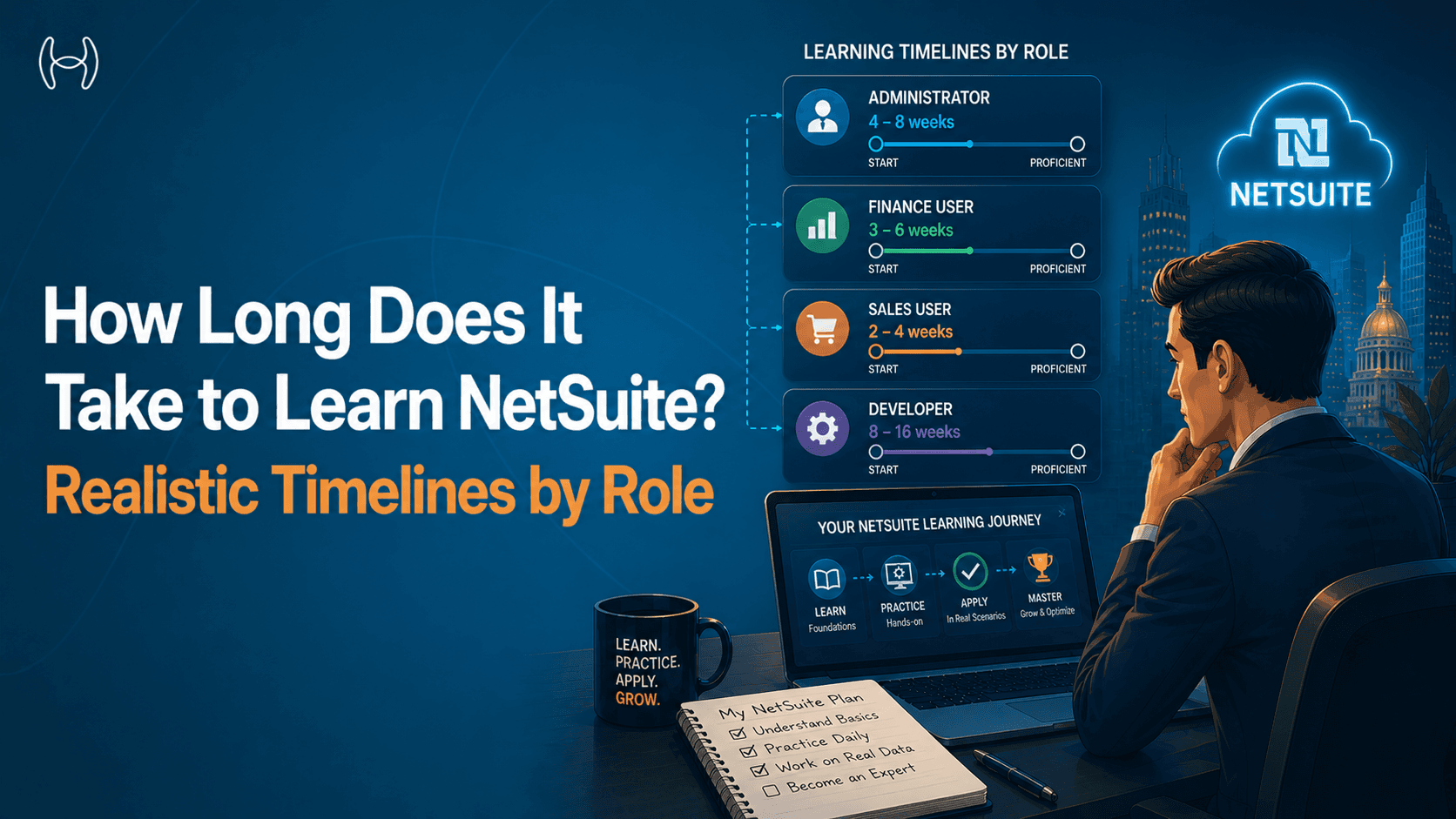
How Long Does It Take to Learn NetSuite? Realistic Timelines by Role
When a business implements NetSuite, one of the first questions finance and operations teams ask is a practical one: how long will it take us to actually get comfortable using this?
It is a fair question, and one that implementation projects often gloss over. Training plans tend to be optimistic. Go-live dates are set before anyone fully understands how steep the learning curve will be for specific roles. And the gap between completing training and genuinely being productive in the system is something most organisations discover only after the project closes.
This guide gives realistic timelines for learning NetSuite by role, the factors that affect how quickly teams reach productivity, the challenges that slow people down, and how automation changes the learning equation in ways most buyers do not consider upfront.
It is written for HR leaders managing onboarding, finance directors setting expectations for their team, IT managers planning training programmes, and operations managers who need to know when their teams will actually be self-sufficient. If you want a structured training path that goes from navigation basics through to module mastery, the guide on NetSuite training for all user levels covers the full curriculum.
What Learning NetSuite Actually Involves
Before getting to timelines, it helps to be clear about what learning NetSuite means at different levels.
At the basic level, a user can navigate the system, find records, enter data, and complete the tasks relevant to their role. This is functional competence: the system does not feel unfamiliar, and the user can complete their daily work without constant assistance.
At the intermediate level, a user understands why the system works the way it does, can handle exceptions without escalating everything, and can configure basic elements of their own workspace. They have developed enough context to recognise when something is wrong, not just when something looks unfamiliar.
At the power user or administrator level, a user can configure workflows, build reports, manage roles and permissions, troubleshoot integration issues, and train others. This level of expertise takes considerably longer and is typically the goal for a small number of team members rather than the whole organisation.
The timeline question is different for each of these levels, and the answer also depends heavily on which role is doing the learning.
Realistic Timelines by Role
The timelines below reflect a simple truth: an AP clerk and a system administrator work in the same platform but need fundamentally different depth of understanding before they can operate confidently. The right expectation depends on the role.
AP Clerk: 4 to 8 Weeks to Functional Competence
For an AP clerk, most of the day-to-day work in NetSuite is repetitive and role-contained: entering invoices, processing payments, managing vendor records, and running basic reports. The screens are consistent. The workflow follows a pattern. That repetition is actually an advantage: functional competence comes from doing the same tasks correctly many times, and AP clerks get that volume quickly.
Four to six weeks is realistic for daily tasks to feel routine. The timeline stretches to eight weeks when invoice complexity is high, exceptions are frequent, or the initial training did not closely match the organisation's actual NetSuite configuration. The gap between generic NetSuite training and the specific setup a clerk will actually use every day is one of the most consistent reasons AP teams take longer to feel confident than expected.
Procurement and Purchasing Team: 6 to 10 Weeks to Functional Competence
Procurement is more variable than AP, which is what makes it harder to learn quickly. An AP clerk does roughly the same thing every day. A procurement user might raise a standard PO one day, handle a blanket PO release the next, manage a vendor dispute the day after, and deal with a multi-entity approval the following week. Each scenario involves different screens, different rules, and different stakeholders.
Six weeks gets most procurement users comfortable with the standard PO workflow. The timeline extends to ten weeks for users managing more complex purchasing scenarios: blanket POs, multi-entity transactions, contract-linked orders, or category-specific approval structures. The subtler challenge is organisational, not technical. A procurement user needs to know which approval thresholds apply to which spend categories, which cost centres map to which departments, and which vendor records are current. That knowledge comes from being embedded in the business, and it takes time regardless of training quality.
Finance Controllers and FP&A Analysts: 3 to 6 Months to Intermediate Competence
Controllers and analysts are working in the parts of NetSuite where the real financial logic lives: month-end close, journal entries, multi-entity consolidation, intercompany eliminations, budget versus actual reporting, variance analysis. These processes depend on a deep understanding of how the chart of accounts is structured, how reporting dimensions are configured, and how data flows between modules.
Three months gets a competent finance professional to a functional level for core tasks. Six months is where genuine confidence develops, typically after a full close cycle, seeing where numbers do not reconcile as expected, and learning to investigate the cause. The learning for this group is not linear. It is experiential.
NetSuite Administrators: 6 to 12 Months to Full Capability
Administrators carry the broadest scope of any NetSuite user. They are responsible for role configuration and access management, workflow maintenance, custom record management, integration oversight, user support, and keeping the system aligned with the business as it changes. They need to understand every module well enough to support users in each of them, and they need to understand how changes in one area affect behaviour in others.
Six months builds solid working knowledge across the core administrative functions. Twelve months is where most administrators feel confident across the full scope, including unusual requests and edge cases that routine work does not prepare them for. Administrators who also manage SuiteScript, which is NetSuite's built-in scripting language for custom automation, need additional time beyond system knowledge. Script maintenance requires both technical ability and a thorough understanding of the business logic the scripts are meant to serve.
The guide to NetSuite features for 2025 is useful context for administrators learning which capabilities are native, which need configuration, and which require custom development. That distinction shapes most decisions they make.
A Summary of Realistic Timelines
Role | Functional Competence | Intermediate Competence | Power User / Full Capability |
AP Clerk | 4 to 8 weeks | 3 to 4 months | 6 months+ |
Procurement and Purchasing | 6 to 10 weeks | 4 to 6 months | 9 months+ |
Finance Controller or FP&A | 3 to 4 months | 6 months | 12 months+ |
NetSuite Administrator | 3 to 6 months | 9 months | 12 to 18 months |
The Learning Journey at a Glance
Go-Live
|
v
Week 1 to 4: Navigation and Role-Specific Basics
(Finding records, completing daily tasks, understanding screens)
|
v
Week 4 to 10: Functional Competence
(Routine tasks feel comfortable, fewer escalations, fewer errors)
|
v
Month 3 to 6: Intermediate Competence
(Handling exceptions independently, understanding module connections)
|
v
Month 6 to 12+: Advanced and Power User Level
(Configuring workflows, building reports, supporting others)
|
v
WITH AUTOMATION LAYER:
Each stage compresses. Users review system outputs
rather than making every judgment call from scratch
Factors That Affect How Quickly Teams Learn
Timelines are starting points, not guarantees. These are the factors that move them in either direction.
Prior ERP experience. Users coming from another ERP system have the conceptual foundation but need to unlearn specific habits. Users with no prior ERP experience face a steeper initial curve but develop without the mental overhead of comparing everything to a previous system. Neither is straightforwardly faster. It depends on how similar or different the previous system was.
Quality of the initial training. Generic NetSuite training covers standard features and navigation. Training tailored to the organisation's specific configuration, workflows, and data structures is significantly more effective. The gap between the two is often the difference between a team that feels confident at eight weeks and one that is still struggling at four months.
Proximity to the actual system. Hands-on practice in a sandbox environment, on data that resembles real production data, accelerates learning more than any amount of classroom instruction. Users who spend time in the system, making mistakes and understanding why, develop practical competence much faster than users who watch demonstrations and read documentation.
How much the system asks of them. This is the factor most training plans do not account for. The learning curve is not just about the system. It is about the total workload the system and the manual processes around it place on each user. An AP clerk learning NetSuite who also has to manage a growing invoice backlog manually is learning under pressure. That pressure slows the learning and increases errors.
Frequency of use. A user who touches NetSuite every day reaches competence faster than one who uses it weekly. Infrequent users retain less between sessions, accumulate questions without answers, and tend to develop workarounds rather than working through the system correctly.
The specific challenges that arise when teams are trying to build adoption alongside volume pressures are covered well in the guide on driving user adoption of purchase order automation, which includes strategies for managing the adoption curve without letting it derail operational performance.
The Learning Curve Challenges Nobody Warns You About
Most implementation plans underestimate three specific challenges.
The gap between training and real data. Training environments use clean, simple datasets. Production environments contain years of legacy data, duplicate vendor records, incomplete historical transactions, and edge cases nobody planned for. The moment a new user encounters a situation that does not match their training scenario, confidence drops and escalation increases. This is not a training failure. It is a data quality and complexity issue that shows up at go-live.
The exception volume problem. NetSuite handles the expected case well. It surfaces exceptions for everything else. New users who are not yet confident enough to resolve exceptions independently create a queue that backs up quickly. The exception volume in the early weeks after go-live is consistently higher than steady-state, and teams that are still learning are less equipped to handle it. This combination is where the most go-live stress comes from.
Module interdependency. NetSuite's modules are interconnected. A change in a vendor record affects AP. A change in the chart of accounts affects reporting. A new entity requires configuration across multiple modules. Users who learn their module in isolation without understanding how it connects to others make well-intentioned changes that have unexpected effects elsewhere. Understanding module interdependency is part of reaching intermediate competence, and it takes time.
How Automation Changes the Learning Equation
This is where automation becomes genuinely relevant to the learning question, not just as a productivity tool but as something that directly changes how steep the curve feels.
The harder parts of learning NetSuite for most users are not the navigation or the data entry. They are the judgment calls: which GL code applies, whether this invoice matches the PO closely enough to approve, how to handle a partial receipt, whether a vendor record is accurate. These are the decisions that slow new users down, generate the most errors, and require the most support from senior team members.
When an AI automation layer handles these decisions, or at least surfaces them with the relevant context already assembled, the learning curve for the user changes. They are not learning to make complex judgments under pressure on day one. They are reviewing decisions the system has already made, learning from the exceptions the system has flagged, and developing their own judgment in a more structured way. The guide on ERP automation modules and playbooks covers what this automation layer looks like across different ERP functions and how it changes what users need to master.
How Hyperbots Reduces the Learning Burden on NetSuite Users
Hyperbots is an AI-native finance automation platform designed by CFOs for CFOs. It connects to NetSuite through pre-built native connectors and handles the processing work that requires the most judgment and the most training for users to get right.
The key point for finance teams going live on NetSuite is this: when the system handles the judgment calls, users learn faster. They are not trying to master every step under the pressure of a live queue. They are reviewing structured outputs, handling clearly flagged exceptions, and building their instincts in a more controlled environment.
For AP clerks, the Invoice Processing Co-Pilot discovers invoices from emails, drives, and vendor portals automatically, extracts data with 99.8% accuracy, runs three-way matching, and recommends GL codes based on historical data and human corrections. An AP clerk on Hyperbots is not learning to key invoices, manually match POs, and code GL accounts from scratch on day one. They are reviewing the system's output, handling the exceptions it has flagged with context already attached, and approving what is correct. The scope of what they need to master in NetSuite narrows significantly, and time to productivity compresses.
For procurement teams, the Procurement Co-Pilot auto-fills purchase requisitions from contracts and vendor records, runs budget checks automatically against live NetSuite data, and routes approvals through configured workflows. A new procurement user does not need to memorise every vendor record, contract term, and approval threshold from day one. The system surfaces the right information at the right step, which means the learning happens in context rather than in isolation.
The broader Hyperbots platform is pre-trained on millions of financial documents and ready to deploy from day one without custom configuration. Go-live is within one month of NetSuite being in place. ROI is typically reached within six months, partly because teams reach productive efficiency faster when the system absorbs the complexity rather than placing it on users still finding their feet.
See it in action with a demo or start your free trial today.
Conclusion
There is no single answer to how long it takes to learn NetSuite, because the timeline depends on the role, the quality of training, the hands-on time available, and critically, how much manual complexity the system places on the user from day one. AP clerks can reach functional competence in four to eight weeks. Administrators may take twelve months or more to reach full capability.
What every organisation can do is narrow the gap between training completion and genuine productivity, by building hands-on practice into the training plan, tailoring scenarios to real configuration rather than generic data, and putting automation in place that handles the hardest decisions until users are ready to own them confidently. The teams that get there fastest are not the ones with the most training hours. They are the ones where the system and the automation around it make the right action the easiest one to take.