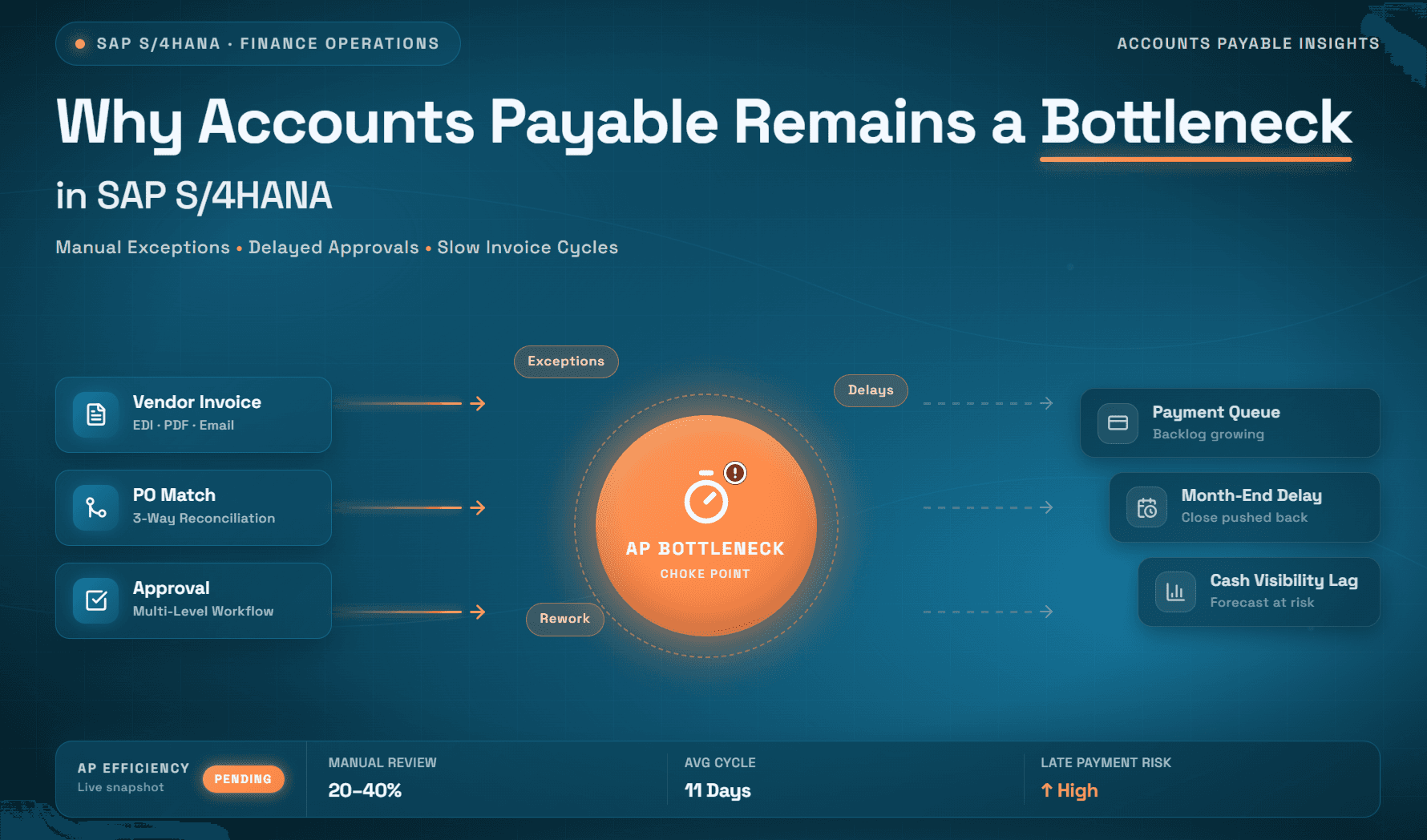
Why Accounts Payable Remains a Bottleneck in SAP S/4HANA
SAP S/4HANA streamlines core ERP transactions, yet real-world AP workflows often remain slow and fragmented. Learn where the bottlenecks persist and how automation helps finance teams move faster.
You Upgraded the System But the Bottlenecks Upgraded With You
Something strange happens when organizations migrate to SAP S/4HANA. Finance leaders expected accounts payable to finally run smoothly. The system is modern. It's cloud-native or on-premise robust. It has AI capabilities built in. It's supposed to handle invoicing and payments automatically.
But invoices still take days to process. Approvals still create bottlenecks. Vendor relationships still suffer from late payments. Manual work didn't disappear. It just got more complex.
The problem isn't SAP S/4HANA. SAP S/4HANA uses AI and machine learning to validate and match invoices to purchase orders or receipts, minimizing manual intervention. It provides advanced payment management by tracking cash flow and outstanding payables with real-time data.
The system does exactly what it was designed to do. But what it was designed to do isn't what your AP team actually needs.
What SAP S/4HANA Actually Does (and Doesn't Do) for AP
Let's be clear about SAP's capabilities first. The SAP Accounts Payable module allows businesses to manage invoicing and payments efficiently. It provides an automated system for tracking and monitoring invoices, improving accuracy, and reducing administrative costs.
When a purchase order gets created in Materials Management and goods get received, SAP automatically creates a payables document. When an invoice arrives that matches that purchase order and goods receipt, SAP can match it automatically through GR/IR (Goods Receipt/Invoice Receipt) clearing. When it's time to pay, SAP calculates the amount due, considers payment terms, and can initiate payment automatically.
The three-way match (PO, goods receipt, invoice) happens inside SAP with minimal manual work. That's genuinely powerful.
But here's where the gap appears. SAP has an organizational structure that can lead to information silos. Structuring menus and workflows and controlling access by role makes sense from a high-level perspective, but it can restrict efficient accounts payable processing. Role-based permissions can cut off AP teams from the people and information required to process invoices and expense reports.
SAP controls what you can see and do based on your role. This is good for security. It's bad for efficiency when you need information that your role doesn't have access to.
The Real AP Bottlenecks That S/4HANA Doesn't Address
Bottleneck 1: Invoices Arrive in a Thousand Different Formats
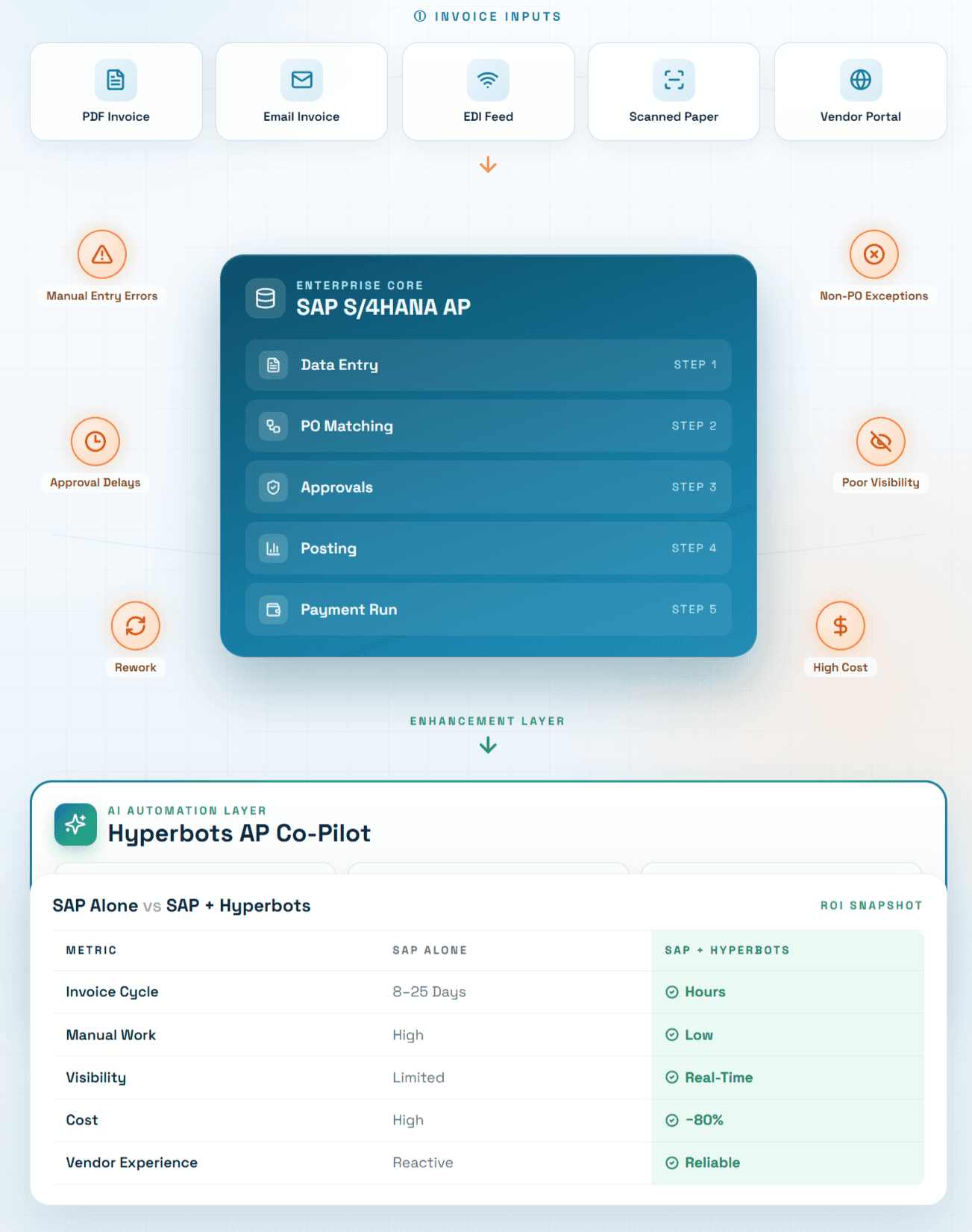
Here's a reality that SAP implementation teams don't always emphasize: Invoices arrive from various sources and in inconsistent formats including PDFs, scanned images, and free text emails. Each invoice requires time-consuming retrieval, validation, data entry, reconciliation, and routing.
Your vendors send invoices as email attachments. Some send them through EDI. Some send paper that gets scanned. Some send links to their own portals. One vendor puts all the critical information in the body of the email instead of a formal invoice.
SAP S/4HANA expects structured data. It has fields for invoice number, vendor, amount, invoice date, due date, and line items. When an invoice arrives in a format that matches SAP's expectations, great. But when it doesn't, someone has to manually pull that information out of the varied formats and enter it into SAP.
Manual data entry is highly susceptible to human error, with a common error rate of 3-5%. It affects the invoice approval processing and reconciliation process.
Bottleneck 2: Complex Invoice Scenarios That Don't Fit the Standard Workflow
SAP S/4HANA handles purchase-order-backed invoices beautifully. The invoice comes in, gets matched to the PO, gets matched to the goods receipt, and flows through to posting automatically.
But not all invoices have purchase orders. Some are for services where you estimate the cost upfront but the actual invoice comes in for a different amount. Some are for freight charges that didn't exist when the PO was created. Some are from vendors providing goods for multiple purchase orders on a single invoice that needs to be split across multiple GL accounts.
Price, quantity, or tax discrepancies block entire invoices, requiring complex screen navigation to resolve. PO-based invoices use one workflow, non-PO invoices another, forcing AP teams to learn separate processes. Error details hide in multiple screens, often requiring IT or SAP super-users to diagnose issues.
When these exceptions occur, the invoice gets blocked. Someone needs to investigate, figure out what doesn't match, make a decision about how to handle it, and manually resolve it. The invoice sits waiting while the AP team figures out the complexity.
Bottleneck 3: Approval Routing Becomes a Quagmire
Approvals are the single biggest source of processing delays in accounts payable. Approval delays remain one of the biggest challenges in accounts payable. As departments grow and invoice volumes increase, routing chains often become more complex. Without structured workflows, invoices may pass through multiple reviewers via email or shared drives, slowing review cycles and increasing the risk of stalled payments.
SAP has workflow capabilities. You can define approval routing rules. But these rules live inside SAP and are managed through SAP configuration. Changing an approval chain means IT work. Changing approvers requires IT change requests that can take days or weeks to implement.
So your approval workflows stay rigid even when your business needs change. A new manager joins and should have approval authority, but that requires IT changes. A key approver goes on leave and you need a backup, but you can't change it without IT involvement. An invoice type changes and needs different approval routing, but you're stuck with the old workflow.
Many organizations report that approvals account for more than 60% of the total invoice processing time.
Meanwhile, complex, multi-step approval chains create bottlenecks as departments grow. Unclear backup approvers, inconsistent escalation paths, and limited visibility into approval status all create delays.
Bottleneck 4: Visibility Into Invoice Status is Scattered
You want to know where an invoice is in the approval process. SAP can theoretically show you this, but the information is spread across multiple screens and requires navigation through SAP's complex menu structure.
When invoices sit in queues, organizations lose early payment discounts and risk late penalties. Without consistent validation and documentation, finance teams struggle to maintain clean audit trails.
A vendor calls asking about an invoice. You need to find it, check its status, see who has it for approval, understand if there's an issue, and give the vendor an answer. This requires digging through SAP screens that weren't designed for quick status checks.
One of the most frustrating aspects of manual invoice processing is the lack of real-time visibility into the status of invoices. Manually tracking down where an invoice is in the approval process or identifying what payments are due can be burdensome.
Bottleneck 5: Data Entry Errors Persist Even With Automation
Manual data entry is highly susceptible to human error, with a common error rate of 3-5%. When someone manually keys invoice data into SAP (because the invoice didn't arrive in a standardized format), errors happen.
Wrong amounts. Wrong vendor codes. Wrong GL accounts. Wrong cost centers. These errors get caught sometimes during the three-way match, but often they're discovered later when someone is reconciling accounts or when a vendor calls about a payment discrepancy.
Each error requires investigation and correction. That's more manual work.
Bottleneck 6: The Cost Per Invoice Keeps Growing
Here's the financial reality that rarely gets talked about openly: According to Goldman Sachs research, manually processing a single invoice costs businesses an average of $22. For a mid-sized company handling just 500 invoices monthly, that's $132,000 annually spent on pushing paper.
SAP S/4HANA didn't change this. The approximate labor cost of manual invoice processing is $7.75 per invoice. If that same company automates their invoice processing, their estimated annual cost drops to $2.02, a savings of approximately 74%.
The gap exists because SAP processes the transaction, but people still do the work that gets the transaction into SAP.
Why S/4HANA Can't Solve These Bottlenecks Alone
SAP S/4HANA is an ERP system. It manages transactions, maintains data integrity, enforces controls, and provides visibility into what's in the system.
But accounts payable isn't just a transaction. It's a workflow. It's people making decisions about exceptions. It's coordinating information from multiple sources. It's managing deadlines and escalations. It's handling the 10-25% of invoices that don't fit the standard three-way match pattern.
Although powerful ERPs like SAP can automate and streamline financial workflows, they are also complex. They can be cumbersome for AP teams if they're not specifically designed to optimize accounts payable processes or lack automation features. Many companies use manual accounts payable processes for data entry, invoice processing, expense reporting, verifying and approving expenditures, and making payments. Although most companies use digital systems to automate workflows, these systems are still considered manual if they don't facilitate easy and fast invoice and expense processing.
That's the gap. SAP handles the ERP part. But you need a complementary solution that handles the AP workflow part. Learn how AI tools complement ERP systems rather than replacing them.
The Bridge: Hyperbots for AP Operations
Hyperbots is an intelligent automation platform that complements SAP S/4HANA by handling what the ERP system doesn't do natively.
Intelligent Document Processing: Unlike traditional OCR tools, Intelligent Document Processing (IDP) enables organizations to extract semi-structured invoice data even when formats vary significantly. By using AI to recognize invoice fields and interpret formatting differences, IDP dramatically reduces the time spent manually extracting and verifying invoice details.
Instead of someone manually keying invoice data into SAP, Hyperbots captures the data from invoices in any format, validates it, and pushes clean data to SAP. This eliminates the data entry bottleneck.
Dynamic Workflow Orchestration: Purpose-built AP interfaces with dynamic workflows adapt to real-world scenarios. Code complex SAP invoices in seconds with AI-driven automation and built-in field validation. Handle all SAP PO types with live receiving data and many-to-many matching capabilities.
Instead of rigid SAP workflows that require IT changes, Hyperbots routes invoices based on business logic that's easy to modify. An invoice with a missing PO goes through exception workflow. A service invoice goes through a different approval chain. An amount exceeding a threshold goes to a higher-level approver. All configured without IT involvement.
Intelligent Exception Handling: By catching discrepancies early and routing them intelligently, automation reduces delays and minimizes rework. The result: faster approvals, fewer bottlenecks, and smoother AP operations.
Hyperbots knows which exceptions can be resolved automatically (missing PO numbers can be looked up, duplicate invoices can be flagged, line amounts can be validated against historical norms) and which require human decision-making. People focus on decisions, not detective work.
Real-Time Visibility: Automation provides real-time dashboards and reporting capabilities, allowing finance teams to instantly see the status of every invoice. Purchasers are notified of invoices awaiting their review and notified when invoices that haven't been reviewed are approaching their due date.
Instead of navigating SAP screens to find an invoice's status, Hyperbots provides simple dashboards that show you exactly where every invoice is, who has it, and what action it's waiting for.
Scalability Without Headcount: Automation reduces workload, and in turn, creates capacity for small teams to focus on higher-value activities. For companies manually processing 12,000 invoices per year, the estimated annual cost is $93,000. If that same company automates, their estimated annual cost drops to $24,240, a savings of $68,760 per year.
As invoice volume grows, Hyperbots scales without requiring you to hire more AP staff.
The Reality of S/4HANA Plus Hyperbots
Organizations that combine SAP S/4HANA with Hyperbots are achieving results that S/4HANA alone doesn't deliver.
The Institute of Finance and Management reports that manual invoice processing takes an average of 8.3 days, with less efficient operations requiring up to 25 days per invoice. Organizations using invoice automation software solutions reduce processing costs by 80% and cut cycle times from weeks to days or even hours.
That's not just efficiency. That's the difference between meeting payment terms and missing them. That's the difference between capturing early payment discounts and paying late fees. That's the difference between satisfied vendors and vendors who are unhappy with your company's reliability.
What This Means for Your Organization
If you're running SAP S/4HANA and wondering why accounts payable still feels manual and slow, the answer isn't a new ERP system. The answer is adding Hyperbots as your workflow automation layer that transforms AP from an operational bottleneck into a high-performance function.
SAP S/4HANA is the foundation. It manages the transaction. But Hyperbots is what makes the transaction happen efficiently.
The companies winning in accounts payable today aren't the ones running fancy ERP software. They're the ones running ERP software plus Hyperbots working together seamlessly. See how Extreme Reach achieved 80% straight-through processing and 99.8% accuracy.
If your AP team is still manually keying invoices, chasing email approvals, or spending hours investigating discrepancies, you're not just being inefficient. You're leaving money on the table through missed early payment discounts, late fees, and wasted labor. You're also straining vendor relationships through slow and inconsistent payments.
The solution isn't complex. It's adding Hyperbots to handle the workflow, visibility, and exception management that SAP S/4HANA wasn't designed to do on its own. Explore the ROI framework for AI-led automation in finance.
Ready to eliminate AP bottlenecks and transform invoice processing in your S/4HANA environment?
Start Your Free Trial of Hyperbots or Schedule a Demo to see how Hyperbots bridges the gap between SAP S/4HANA and the efficient AP operations you need.
Frequently Asked Questions (FAQs)
Q1: Doesn't SAP S/4HANA already automate accounts payable?
SAP S/4HANA automates core ERP transactions such as invoice posting, three-way matching, payment scheduling, and financial controls. However, many AP bottlenecks happen before or around those transactions, including invoice capture, approvals, exception resolution, vendor communication, and workflow visibility. That is why many finance teams still experience manual work even after upgrading.
Q2: Why do invoices still take days to process in SAP S/4HANA?
Processing delays usually come from approvals, missing purchase order references, pricing discrepancies, non-PO invoices, incomplete data, and manual routing. SAP can process structured transactions efficiently, but complex real-world invoice scenarios often require additional workflow automation.
Q3: What types of invoices create the biggest AP bottlenecks?
The most common problem areas include:
Non-PO invoices
Service invoices with variable amounts
Multi-PO invoices
Freight or surcharge invoices
Duplicate submissions
Tax mismatches
Invoices missing vendor or PO details
These exceptions typically require manual intervention and slow down cycle times.
Q4: How does Hyperbots improve AP operations in an SAP S/4HANA environment?
Hyperbots works as an intelligent automation layer on top of SAP S/4HANA. It helps finance teams by:
Capturing invoice data from any format
Automating approvals and routing
Resolving common exceptions automatically
Providing real-time invoice visibility
Reducing manual data entry
Accelerating invoice cycle times
Improving straight-through processing rates
Q5: Will Hyperbots replace SAP S/4HANA?
No. Hyperbots is designed to complement SAP S/4HANA, not replace it. SAP remains the system of record for transactions, controls, ledgers, and payments, while Hyperbots handles the workflow automation, AI reasoning, and operational execution around AP processes.
Q6: How does Hyperbots handle invoice approvals better than standard ERP workflows?
Traditional ERP workflows are often rigid and dependent on IT changes. Hyperbots enables dynamic approval routing based on amount thresholds, invoice type, department, urgency, vendor risk, or business rules. This makes approvals faster and easier to adapt when teams or structures change.
Q7: Can Hyperbots reduce invoice processing costs?
Yes. By reducing manual data entry, approval delays, rework, and exception handling effort, automation can significantly lower the cost per invoice. Many organizations also save money through early payment discount capture, fewer late fees, and improved team productivity.
Q8: How does Hyperbots help vendor relationships?
Slow or inconsistent payments often damage supplier trust. Hyperbots improves vendor relationships through faster invoice processing, better payment predictability, transparent status tracking, and fewer payment disputes.
Q9: Is Hyperbots suitable for high-volume AP teams?
Yes. Hyperbots is built to scale with growing invoice volumes. Instead of increasing AP headcount as volumes rise, organizations can automate repetitive tasks and allow staff to focus on exceptions, analytics, and vendor management.
Q10: How quickly can Hyperbots be deployed with SAP S/4HANA?
Deployment timelines depend on process complexity and integration scope, but automation platforms like Hyperbots are generally much faster to implement than ERP programs. Many organizations begin seeing efficiency gains in weeks rather than months.
Q11: What KPIs should finance teams track after implementing AP automation?
Key metrics include:
Invoice cycle time
Cost per invoice
Straight-through processing rate
Approval turnaround time
Exception rate
Early payment discounts captured
Late payment penalties avoided
Vendor satisfaction levels
Q12: What is the best AP strategy for SAP S/4HANA users?
The strongest model is usually:
SAP S/4HANA as the ERP foundation for controls and transactions
Hyperbots as the automation layer for workflow efficiency, AI-led processing, and operational speed
Together, they create a more scalable and modern AP function.