Company Purchase Orders: Best Practices & Templates for Modern Finance
Discover proven strategies, ready-to-use templates, and automation tips to streamline your company’s purchase order process.
Executive Summary
Company purchase orders (POs) are the foundation of corporate procurement and financial control. They represent more than administrative paperwork—they are legally binding commitments that protect organizations from unauthorized spending, vendor disputes, and compliance violations. For CFOs, controllers, and procurement leaders, establishing robust PO processes with standardized templates and best practices is essential to maintaining fiscal discipline while enabling business agility.
This comprehensive guide explores everything finance leaders need to know about company purchase orders: from understanding core components and standardized formats to implementing best practices and leveraging modern templates. We'll examine common pitfalls that drain resources and erode controls, and demonstrate how AI-driven automation platforms like Hyperbots are transforming PO management from a manual bottleneck into a strategic advantage.
With thousands of POs processed annually, these costs compound quickly. By implementing standardized templates, enforcing best practices, and adopting intelligent automation, finance teams can reduce processing costs significantly while strengthening compliance and improving supplier relationships. Whether you're a growing mid-market company or an established enterprise, this guide provides actionable insights to transform your company PO processes.
Understanding Company Purchase Orders
A company purchase order is a formal, legally binding document issued by a buyer to a supplier that authorizes a purchase transaction under specific terms and conditions. In corporate environments, POs serve as the primary control mechanism for procurement spending, creating a documented trail from requisition through payment that supports financial planning, compliance, and audit readiness.
Unlike informal purchase requests or verbal agreements, company POs establish clear expectations for both parties. They specify exactly what is being purchased, at what price, under what terms, and by what deadline. This clarity protects organizations from disputes, price discrepancies, and unauthorized commitments while providing suppliers with confidence to fulfill orders.
The importance of company POs in financial control cannot be overstated. They represent the moment when a request becomes a commitment, transforming a budgetary plan into an actual liability. For CFOs and controllers, POs provide visibility into outstanding commitments before cash leaves the organization, enabling more accurate cash flow forecasting and working capital management.
From a compliance perspective, company POs are critical evidence of internal controls. Under frameworks like Sarbanes-Oxley (SOX), publicly traded companies must demonstrate proper authorization and approval of expenditures. POs document that purchases were approved by authorized personnel, stayed within budget, and followed established procurement policies. Similarly, IFRS standards require accurate recording of purchase commitments, and POs provide the source documentation for these obligations.
Key Components of a Company PO
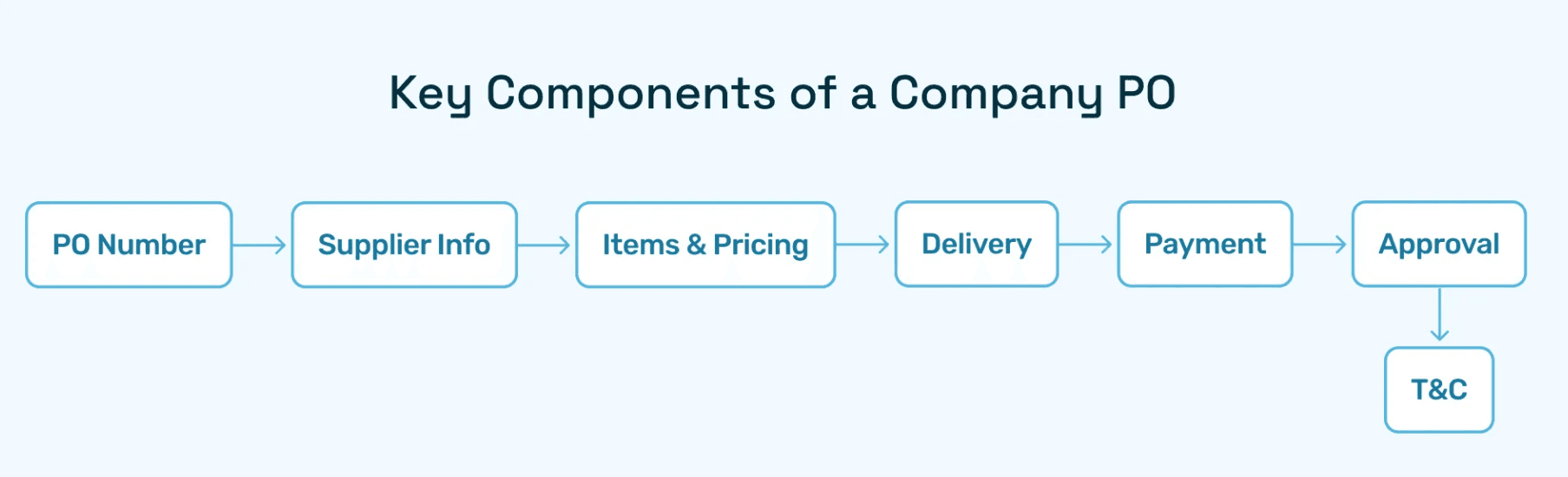
Every effective company purchase order template should include these essential elements:
PO Number: A unique identifier that enables tracking throughout the procurement lifecycle. Sequential numbering helps identify gaps or potential fraud, while alphanumeric schemes can encode information like department, fiscal year, or purchase type.
Supplier Details: Complete vendor information including legal entity name, address, contact information, payment details, and tax identification numbers. Accurate supplier data prevents payment errors and supports vendor management.
Itemized List & Pricing: Detailed description of goods or services including item codes, specifications, quantities, unit prices, and extended totals. This line-item detail enables precise three-way matching against receipts and invoices.
Delivery Timelines: Expected delivery dates or service performance periods. Clear timelines support inventory planning, project management, and vendor performance evaluation.
Payment Terms: Net payment period (e.g., Net 30, Net 60), early payment discounts, and any special conditions. Standardizing payment terms across POs improves cash flow planning and strengthens supplier negotiations.
Approval Signatures: Documentation of who authorized the purchase and when. Digital approval workflows create tamper-proof audit trails while accelerating processing.
Terms and Conditions: Legal provisions including warranty terms, return policies, liability limitations, and dispute resolution procedures. Standard terms protect the organization while providing legal clarity.
Modern PO automation platforms like Hyperbots ensure every company PO contains all mandatory fields through intelligent validation rules. The system flags incomplete POs before they can be transmitted to suppliers, preventing downstream errors and disputes that consume AP team time.
Why Standardized Company PO Formats Matter
Inconsistent purchase order formats create significant operational and financial risks for corporations. When different departments or locations use varying PO structures, the organization faces increased error rates, compliance gaps, and inefficiencies that compound across thousands of transactions.
The risks of unstandardized company POs include:
Processing Errors: When POs lack consistent field placement or data formats, both internal teams and suppliers struggle to extract information accurately. This leads to mis-keyed data, incorrect pricing, and wrong quantities—errors that trigger invoice disputes and payment delays.
Compliance Violations: Regulatory frameworks and internal policies require specific information on purchase commitments. Inconsistent PO formats make it difficult to verify compliance across the organization, increasing audit risk and potential penalties.
Supplier Friction: Vendors working with multiple company locations or divisions face confusion when each issues POs differently. This damages relationships, may result in fulfillment errors, and can cost negotiating leverage during contract renewals.
Reporting Challenges: Finance teams analyzing procurement spend need consistent data structures. When PO formats vary, data must be manually normalized before analysis, consuming time and introducing additional error opportunities.
Scale Limitations: As organizations grow through acquisition or expansion, inconsistent PO processes become increasingly unmanageable. What works for a single location with 100 monthly POs breaks down at enterprise scale with thousands of POs across multiple entities.
The benefits of implementing standardized company PO formats are substantial:
Operational Efficiency: Consistent templates enable faster processing as both employees and suppliers know exactly where to find needed information. Training time decreases, and new hires become productive more quickly.
Transparency and Control: Standard formats ensure critical control fields like approval signatures and budget codes are never omitted. This strengthens financial controls and reduces unauthorized spending risk.
Vendor Trust: Professional, consistent POs signal operational maturity to suppliers. This builds confidence that orders will be fulfilled correctly and payments made on time, potentially yielding better pricing and terms.
System Integration: Standardized formats integrate more easily with ERP systems, procurement platforms, and analytics tools. Data flows seamlessly without manual reformatting or field mapping.
Audit Readiness: When auditors review procurement controls, standardized POs demonstrate strong process discipline and make evidence gathering straightforward.
Best practices for company PO formatting include:
Digital-First Design: Structure POs for electronic transmission and processing rather than paper-based workflows
Clear Visual Hierarchy: Organize information logically with headers, sections, and white space that guide the eye
Machine-Readable Fields: Use consistent field names and data formats that support automated data extraction
Digital Signatures: Implement electronic approval workflows with cryptographic signatures that provide legal validity and audit trails
Version Control: Date and version stamp templates to track changes and ensure everyone uses current formats
Accessibility: Ensure PO formats are accessible to users with disabilities, meeting WCAG standards
Company Purchase Order Templates: What to Include
An effective company purchase order template balances comprehensiveness with usability. It must capture all information needed for financial control, legal protection, and operational execution without becoming so complex that users circumvent it or make errors.
Essential Template Elements
Header Section: The PO header establishes the basic transaction framework. It should include the PO number, issue date, buyer entity information (including division or cost center), and supplier details. Many organizations also include a "ship to" address distinct from the buyer's main location, and a "bill to" address for invoice submission.
Line Item Detail: The core of any company PO template is the line item section where specific goods or services are enumerated. Each line should capture:
Item or service description (sufficiently detailed for supplier to fulfill accurately)
Manufacturer part number or service code
Quantity and unit of measure
Unit price and extended price
Expected delivery date for each line item
Account code or cost center for financial allocation
Tax treatment if applicable
Financial Summary: After line items, the template should provide a clear financial rollup showing:
Subtotal of all line items
Applicable taxes (sales tax, VAT, GST depending on jurisdiction)
Shipping and handling charges
Any discounts applied
Grand total representing the maximum financial commitment
Terms and Delivery Information: This section specifies the operational parameters:
Delivery address and special delivery instructions
Requested delivery date
Payment terms (Net 30, Net 60, 2/10 Net 30, etc.)
Shipping method and carrier preferences
Acceptance criteria or inspection requirements
Approval Documentation: The template must capture approval workflows showing:
Requestor name and department
Budget owner approval
Procurement approval if required
CFO or controller approval for amounts exceeding thresholds
Dates and methods of approval (electronic signature, email approval, etc.)
Legal and Compliance Provisions: Standard terms should be incorporated or referenced:
Warranty requirements
Return and cancellation policies
Liability limitations
Force majeure provisions
Dispute resolution procedures
Compliance certifications (minority-owned supplier, sustainability attestations, etc.)
Types of PO Templates
Different procurement scenarios require different template variations:
Standard Purchase Order Template: Used for one-time purchases of goods or services. This is the most common template type and includes all elements described above. Standard POs work well for capital equipment, project-specific services, or irregular supply needs.
Blanket Purchase Order Template: Designed for recurring purchases over a defined period. Blanket POs establish pricing, terms, and maximum commitment amounts but don't specify exact quantities or delivery dates. Individual "releases" against the blanket PO occur as needs arise. This template requires fields for:
Effective date range
Maximum total commitment
Release authorization process
Per-release limits if applicable
Blanket POs are ideal for office supplies, maintenance materials, or other regular purchases from preferred suppliers.
Contract Purchase Order Template: Supports long-term supply agreements where pricing, terms, and specifications are established but specific orders occur periodically. Contract POs reference master agreements and focus on release schedules. Key fields include:
Master contract reference number
Contract effective dates
Pricing schedule or pricing formula
Volume commitments or minimums
Contract-specific terms that override standard provisions
Planned Purchase Order Template: Used in manufacturing and production environments where material requirements planning (MRP) systems generate anticipated needs. Planned POs communicate forecasted requirements to suppliers, enabling them to reserve capacity or materials. Unlike blanket POs, planned POs may not represent firm commitments until confirmed. Template requirements include:
Firm vs. forecast designation by line or period
Rolling horizon dates
Quantity flexibility parameters
Commitment fence dates (when forecasts become firm orders)
Customizing Templates for Industry Needs
While core elements remain consistent, effective company PO templates adapt to industry-specific requirements:
Manufacturing Companies: Manufacturing POs emphasize technical specifications, quality standards, and delivery timing critical to production schedules. Templates often include:
Engineering drawing references
Quality inspection requirements (incoming inspection, certifications needed)
Just-in-time delivery windows
Packaging specifications for production environment
Supplier capacity allocation for critical components
SaaS and Technology Companies: Technology sector POs focus on licensing, service levels, and data handling:
License types and user counts
Service level agreement (SLA) references
Data security and privacy requirements
Integration specifications
Support terms and escalation procedures
Subscription renewal terms
For recurring SaaS subscriptions, blanket POs are particularly effective. Hyperbots' Procurement Copilot automatically generates renewal POs from recurring vendor spend patterns, ensuring subscriptions never lapse while maintaining proper authorization.
Retail and Distribution: Retail POs emphasize inventory management and logistics:
SKU numbers and UPC codes
Assortment planning details (sizes, colors, configurations)
Drop-ship vs. warehouse delivery
Packaging and labeling requirements for retail environment
Return and markdown policies
Seasonal delivery date criticality
Professional Services: Service-focused POs specify scope, deliverables, and performance metrics:
Statement of work (SOW) reference
Deliverable descriptions and acceptance criteria
Milestone payment schedules
Resource qualifications or key personnel designations
Intellectual property ownership
Change order procedures
Template Management Best Practices
Effective template management ensures consistency while allowing necessary flexibility:
Centralized Template Repository: Maintain approved templates in a single accessible location (intranet, procurement system, or shared drive) so users always access current versions
Version Control: Date and version stamp templates, maintain change logs, and archive superseded versions for historical POs
Access Controls: Limit template editing to procurement or finance teams while providing view/use access to requestors
Regular Reviews: Evaluate templates quarterly or annually to incorporate regulatory changes, system updates, or process improvements
Training and Documentation: Provide clear guidance on when to use each template type and how to complete required fields
Digital Native Design: Create templates that work seamlessly in procurement systems rather than designing for paper then digitizing
Organizations implementing well-designed company PO templates report 40–50% fewer incomplete or incorrect POs, directly reducing processing time and vendor inquiries.
Best Practices for Managing Corporate POs
Effective company purchase order management extends beyond good templates to encompass processes, technology, and organizational practices that maximize value while minimizing risk.
Centralized PO Repository
All company POs should be stored in a centralized, searchable repository accessible to stakeholders with appropriate permissions. Benefits include:
Single Source of Truth: Eliminates confusion about PO status when multiple versions circulate via email. Everyone references the same authoritative document.
Historical Access: Prior POs inform pricing negotiations, support contract renewals, and provide precedent for handling similar purchases.
Analytics Foundation: Centralized PO data enables spend analysis, supplier performance measurement, and procurement optimization.
Audit Support: During audits, centralized repositories enable rapid retrieval of supporting documentation.
Modern cloud-based systems provide this centralization while enabling distributed access. Team members can view relevant POs from any location without manually requesting files from colleagues.
Digitization and Cloud-Based Tracking
Paper-based PO processes create bottlenecks, increase error rates, and limit visibility. Digital PO management delivers substantial advantages:
Real-Time Status Visibility: Stakeholders can check PO status instantly - whether in draft, pending approval, transmitted to supplier, acknowledged, or fulfilled, without sending status inquiry emails.
Faster Approvals: Digital workflows route POs to approvers automatically, send reminders for pending approvals, and enable mobile approval for executives traveling or working remotely.
Automatic Matching: Digital POs integrate with receiving systems and AP platforms, enabling automated three-way matching that catches discrepancies instantly.
Remote Accessibility: Cloud-based systems support distributed teams, multi-location operations, and remote work models without losing control or visibility.
Disaster Recovery: Cloud platforms provide redundancy and backup that paper or locally-hosted systems cannot match.
Leading finance organizations have moved beyond simply digitizing paper processes. They've redesigned workflows to leverage digital capabilities, achieving faster cycle times while strengthening controls.
Segregation of Duties for Fraud Prevention
Purchase orders play a critical role in fraud prevention through proper segregation of duties. Best practices include:
Separate Requisition and Approval: The person requesting a purchase should not also approve their own PO. This prevents employees from self-authorizing unauthorized purchases.
Separate PO Creation and Transmission: For high-risk environments, separate the person who creates the PO from the person who transmits it to the supplier. This prevents unauthorized commitments.
Separate Receiving and PO Creation: Receiving personnel should be independent from those creating POs. This prevents employees from ordering items for personal use then confirming false receipts.
Separate AP Processing and PO Creation: Accounts payable should operate independently from procurement to prevent employees from creating fake POs to support fraudulent invoices.
Dollar-Based Approval Escalation: Establish approval thresholds requiring higher-level authorization as purchase amounts increase. For example:
Under $5,000: Department manager approval
$5,000–$25,000: Director approval
$25,000–$100,000: VP approval
Over $100,000: CFO approval
Vendor Master Controls: Separate the ability to create new vendors from the ability to create POs. This prevents employees from adding fictitious vendors then issuing POs to them.
These segregation controls should be embedded in PO systems through role-based permissions rather than relying on policy compliance alone. Systems should prevent transactions that violate segregation rules rather than detecting violations after the fact.
Real-Time Budget vs. PO Tracking
One of the most powerful applications of modern PO management is real-time budget tracking. Traditional budgeting tracks actual expenses - money already spent. But POs represent commitments not yet reflected in the general ledger.
Effective budget management requires tracking:
Budget Allocated: Original budget for each cost center or project
POs Outstanding: Commitments made via open POs
Actuals Spent: Invoices paid
Available Budget: Allocated minus POs outstanding minus actuals
This "encumbrance accounting" approach prevents budget overruns by flagging POs that would exceed available budget before they're approved. Budget owners see their true remaining capacity, not just what they've spent to date.
Best practices for budget-PO integration:
Pre-Approval Budget Checks: Systems should verify budget availability automatically when POs are created, preventing the creation of POs that exceed budget without override authorization
Dashboard Visibility: Provide budget owners with real-time dashboards showing commitments, spending, and available balance by category
Period-End Accruals: Use open POs to estimate accruals for period-end closes, improving financial statement accuracy
Variance Alerts: Notify budget owners when PO+actual spend approaches budget limits (e.g., at 85% and 95% thresholds)
Cross-Period Tracking: For POs spanning fiscal periods, allocate commitments to appropriate periods based on delivery schedules
CFOs implementing real-time budget-PO tracking report fewer budget overruns and significantly faster month-end closing processes.
Compliance & Audit Readiness
Every company PO should maintain a complete audit trail documenting:
Creation History: Who initiated the requisition, when it was created, from what system or process
Approval Chain: Complete record of who approved at each level, when approvals occurred, and any comments or conditions
Transmission Record: Documentation of when the PO was sent to the supplier and confirmation of receipt
Amendments: Any changes to PO terms with change authorization and date
Fulfillment Evidence: Goods receipt documentation or service completion confirmation linked to the PO
Invoice Matching: Record of invoice matching against PO and any exceptions or disputes
Payment Record: Payment details and dates linked back to the PO
Modern PO systems create these audit trails automatically, time-stamping every action and maintaining immutable records. This transforms audit preparation from a time-consuming evidence-gathering exercise to a report generation task.
Integration with ERP systems ensures PO data flows seamlessly into financial reporting. Key integration points include:
Chart of Accounts Mapping: PO line items map to general ledger accounts, supporting accurate financial categorization
Project Tracking: POs link to projects or jobs for project accounting and profitability analysis
Fixed Asset Tracking: POs for capital equipment trigger fixed asset creation in the general ledger
Accrual Automation: Open POs at period-end automatically generate accrual entries
Cash Flow Forecasting: PO payment terms and amounts feed cash flow projections
Organizations with strong PO-ERP integration complete financial closes 2–3 days faster than those with manual bridging processes.
Common Mistakes Companies Make with POs
Even with good templates and intentions, many organizations fall into common traps that undermine PO effectiveness:
Over-Reliance on Manual Processes
Manual PO creation using Word documents or Excel spreadsheets remains surprisingly common, particularly in mid-market companies. This approach creates multiple problems:
Data Re-Entry: Information is manually typed multiple times, from requisition to PO to accounting system—introducing errors at each step
Lost Documents: Email-based PO routing results in lost requests, missing approvals, and confusion about status
Inconsistent Application: Manual processes depend on individual discipline. Some users follow procedures carefully while others skip steps, creating inconsistent controls
Limited Scalability: Manual processes collapse as volume increases. What worked with 50 monthly POs becomes unmanageable at 500
No Analytics: Manual POs create data trapped in documents rather than structured databases. Spend analysis requires manual compilation
The cost impact is substantial. APQC research shows manual PO processing costs $506–$527 per PO compared to $120–$150 for automated processing. For organizations processing thousands of POs annually, this represents millions in preventable costs.
Missing Approval Hierarchies
Purchase orders without proper approval workflows invite unauthorized spending and create compliance violations. Common approval gaps include:
Inconsistent Thresholds: Approval requirements vary by department or change over time, creating confusion about who should approve what
Self-Approval: Without system controls, employees may approve their own purchases or fail to obtain required approvals
Incomplete Chains: POs routed for approval but transmitted to suppliers before all approvals are complete
Ghost Approvals: Email approvals that aren't documented in PO systems, leaving no audit trail
Emergency Bypass: Pressure to expedite urgent purchases leads to skipping approvals "just this once," establishing bad precedent
These gaps create both fraud risk and compliance exposure. During audits, missing approvals require extensive remediation and may indicate material weaknesses in internal controls.
Robust approval workflows should be embedded in PO systems with:
Configurable approval chains based on amount, category, and department
Automatic routing to appropriate approvers
Reminder notifications for pending approvals
Inability to transmit POs without complete approvals
Complete audit log of approval chain
Lack of Integration with ERP/Finance Systems
POs that exist independently from ERP and accounting systems create significant problems:
Reconciliation Burden: AP teams manually match invoices against POs stored separately from the accounting system
Budget Blindness: Finance cannot see outstanding commitments not yet recorded in the general ledger
Duplicate Data Entry: PO information must be re-keyed into the accounting system when invoices arrive
Version Control Issues: Updates to POs in one system aren't reflected in the other, causing confusion
Reporting Gaps: Financial reports don't reflect total liabilities including open PO commitments
Integration should enable:
PO creation directly within or tightly linked to ERP systems
Real-time commitment recording in the general ledger
Automated invoice matching against PO data
Seamless flow from PO to goods receipt to invoice to payment
Unified reporting across requisitions, POs, receipts, and payments
Modern platforms offer pre-built integrations with major ERP systems, eliminating the need for custom development. Hyperbots, for example, integrates natively with QuickBooks, NetSuite, SAP, and Microsoft Dynamics, with bidirectional data sync that maintains consistency across systems.
Poor Template Standardization
Organizations often accumulate multiple PO templates over time as different departments create their own versions. This template sprawl creates:
Inconsistent Data: Different templates capture different information, making consolidated reporting difficult
Training Complexity: Employees must learn multiple formats rather than mastering one
Supplier Confusion: Vendors receiving different PO formats from the same company struggle to process orders accurately
System Incompatibility: Templates designed for manual processing don't work well when the organization adopts procurement software
Compliance Gaps: Some templates may lack fields required for regulatory compliance or internal controls
Template standardization initiatives should:
Consolidate to minimum necessary template variations
Ensure all templates capture core required data
Design templates for system use rather than paper
Establish governance preventing unauthorized template creation
Phase out legacy templates with defined sunset dates
Inadequate Vendor Data Management
Poor vendor data management undermines even well-designed PO processes:
Duplicate Vendors: Same supplier listed multiple times with slight name variations, preventing spend consolidation analysis
Outdated Information: Incorrect addresses, closed bank accounts, or old contacts causing payment and delivery failures
Missing Tax Information: Incomplete W-9 forms or tax IDs creating year-end 1099 reporting problems
No Performance Tracking: Inability to evaluate vendor reliability, quality, or pricing trends
Unvalidated New Vendors: Adding suppliers without verification, increasing fraud and compliance risk
Best practices for vendor master data include:
Centralized vendor master maintained by procurement or AP
Required data elements before vendors can be activated
Periodic vendor data cleansing and deduplication
Vendor validation process for new suppliers
Vendor performance scorecards linked to PO/invoice history
Hyperbots enhances vendor data management through AI-driven validation that automatically enriches vendor information and flags potential duplicates or data quality issues before POs are created.
How Hyperbots Reinvents Company PO Management
While improving templates and processes helps, the transformational leap comes from intelligent automation. Hyperbots AI Procurement Copilot reimagines company PO management from the ground up, eliminating manual bottlenecks while strengthening controls and delivering unprecedented visibility.
Procurement Copilot Capabilities
AI-Driven PO Creation & Validation: Rather than starting with blank templates, Hyperbots generates draft POs automatically from multiple triggers:
Purchase requisitions submitted through any channel
Recurring orders based on historical patterns
Contract renewals approaching expiration
Inventory reorder points triggered by stock levels
Service renewals for SaaS subscriptions
The AI populates all fields using data from vendor masters, prior POs, existing contracts, and requisition details. Intelligent validation checks ensure completeness:
Verifies all mandatory fields are populated
Confirms vendor information is current and complete
Validates pricing against contract terms
Checks budget availability before proceeding
Flags unusual patterns (significant price increases, new vendors, first-time large orders)
This automation eliminates manual data entry time while dramatically improving accuracy.
Seamless ERP Integration: Hyperbots integrates natively with leading ERP and accounting platforms:
QuickBooks (all versions)
SAP (S/4HANA and ECC)
Oracle ERP Cloud
Sage Intacct
Integration is bidirectional and real-time:
POs created in Hyperbots automatically sync to the ERP
Vendor data maintained in the ERP flows to Hyperbots
Budget availability checked in real-time against ERP balances
Goods receipts in the ERP trigger PO status updates
Invoice matching occurs across systems seamlessly
Unlike legacy integration approaches requiring extensive custom coding, Hyperbots leverages pre-built connectors that deploy in days rather than months. The platform supports dual-write mode during transitions between accounting systems, ensuring no data loss when organizations switch ERPs.
Auto-Population from Multiple Sources: Hyperbots ingests data from various sources to minimize manual input: Extracts terms and pricing from contract PDFs using natural language processing Pulls pricing and product information from vendor portals and catalogs Learns from prior invoices to predict costs for repeat purchases Imports requisition data from email, Slack requests, or other systems Copies data from similar historical POs with one-click cloning For recurring purchases, the system learns patterns and proactively suggests POs before inventory runs low or contracts expire. This predictive capability ensures business continuity while maintaining proper controls.
Intelligent Approval Routing: Hyperbots automatically routes POs through appropriate approval chains based on: Purchase amount and approval thresholds Department and cost center Vendor type or risk classification Budget status (approved vs. over-budget) Purchase category (capital vs. operating expenses) The system sends notifications via email, Slack, or Microsoft Teams, and enables one-click approval for authorized approvers. Approval workflows include: Parallel approvals when multiple sign-offs are required Sequential approvals for escalating authorization Conditional routing based on PO characteristics Automatic escalation when approvals are delayed Substitute approvers when primary approvers are unavailable Mobile-optimized interfaces enable executives to review and approve POs from anywhere, eliminating delays caused by travel or remote work.
Differentiation from Competitors
The procurement software market includes numerous solutions, but Hyperbots stands apart through several key differentiators:
Full AI-Driven Automation, Not Just Templates: Many procurement tools offer digital templates - essentially electronic versions of paper forms. Hyperbots goes far beyond this by: Using machine learning to predict PO needs before users request them Automatically extracting and validating data from unstructured sources Learning from each transaction to improve future automation Handling exceptions intelligently rather than simply flagging them for manual review The result is a system that requires minimal user input while maintaining accuracy and control.
Strong Compliance Engine: Hyperbots embeds compliance throughout the PO lifecycle: Enforces segregation of duties through role-based access controls Creates immutable audit trails for all PO activities Validates POs against contract terms preventing maverick spending Ensures budget availability before commitment Generates compliance reports for SOX, IFRS, and industry-specific requirements This compliance-first architecture gives CFOs confidence that controls operate as designed, even as procurement scales.
Faster Deployment: Traditional procurement systems require 6–12 months to implement, with extensive configuration, data migration, and user training. Hyperbots deploys in weeks: Pre-configured workflows based on best practices Automated data migration from existing systems Intuitive interfaces requiring minimal training Phased rollout capability (pilot then expand) Expert implementation support included Organizations can achieve ROI in the first quarter rather than waiting years for payback.
Ecosystem Integration: Rather than operating as a standalone point solution, Hyperbots functions as part of an integrated finance automation ecosystem. The Procurement Copilot works seamlessly with:
Invoice Processing Copilot: Automatically matches incoming invoices against POs, handles discrepancies, and routes exceptions
Payments Copilot: Schedules and executes payments based on PO terms, optimizing for early payment discounts
Sales Tax Copilot: Ensures proper tax treatment across jurisdictions, handles exemption certificates, and supports tax reporting This ecosystem approach eliminates the gaps and manual handoffs that plague multi-vendor technology stacks. Data flows seamlessly across the source-to-pay process without re-keying or reconciliation.
Continuous Intelligence: Hyperbots continuously analyzes PO data to surface insights and recommendations: Identifies consolidation opportunities where multiple POs could combine for volume discounts Flags suppliers with declining performance or increasing prices Recommends optimal reorder points based on usage patterns Highlights compliance risks before they become violations Benchmarks spending against industry standards These insights transform procurement from a transactional function to a strategic capability that actively drives value.
Exception Handling: When anomalies occur, pricing mismatches, budget overruns, missing approvals. Hyperbots doesn't simply halt and request human intervention. Instead: AI agents analyze the exception to determine appropriate resolution Low-risk issues are resolved autonomously within defined parameters Higher-risk exceptions are routed to appropriate personnel with full context Resolution patterns are learned to handle similar future cases automatically All exception handling is fully logged for audit purposes This intelligent exception handling maintains process velocity while preserving control.
Enterprise-Grade Security: Hyperbots maintains SOC 2 Type 2 and ISO 27001 certification, ensuring: Encryption of data in transit and at rest Role-based access controls with multi-factor authentication Regular security audits and penetration testing Comprehensive business continuity and disaster recovery Compliance with GDPR, CCPA, and other privacy regulations For enterprises with stringent security requirements, Hyperbots offers private cloud or on-premises deployment options.
ROI and Transformation Impact
The financial and operational case for automating company PO management is compelling across multiple dimensions.
Direct Cost Reduction
Manual purchase order processing is expensive. Industry research consistently shows manual PO costs ranging from $506 to $527 per purchase order when accounting for labor, overhead, error correction, and cycle time. This includes: Time spent creating POs and gathering required information Approval routing and follow-up Supplier communication and order confirmation Error correction when POs contain mistakes Reconciliation challenges during invoice matching
Organizations processing 10,000 POs annually face $5+ million in processing costs with manual approaches.
Beyond direct processing costs, automation delivers: Reduced Headcount Requirements: Finance teams scale without proportional headcount increases Lower Error Costs: Fewer duplicate payments, pricing disputes, and late fees Discount Capture: Faster cycle times enable companies to capture early payment discounts worth 1–2% of spend Avoided Penalties: Meeting supplier deadlines avoids expedite fees and rush charges
Cycle Time Acceleration
Manual PO processes typically require days from requisition to PO transmission to suppliers. This includes time gathering information, obtaining approvals, and handling back-and-forth corrections. Hyperbots compresses PO cycle time to minutes: Standard POs: Approved and transmitted within minutes.
Complex POs: Processed same-day even with multiple approval levels Recurring POs: Generated automatically without any manual intervention
Faster cycle times deliver multiple benefits: Improved Supplier Relationships: Vendors appreciate predictable, fast PO processing. This can translate to better pricing, priority allocation during shortages, and more favorable terms. Enhanced Business Agility: Organizations can respond quickly to opportunities or changing conditions rather than being constrained by procurement bottlenecks. Better Cash Flow Management: Faster PO processing enables more accurate short-term cash flow forecasting since commitments are documented immediately rather than languishing in approval queues. Reduced Expedite Costs: When POs are delayed, organizations often pay premium shipping or rush fees to meet deadlines. Faster PO processing eliminates these unnecessary costs.
Compliance and Risk Mitigation
The risk reduction value of automated POs is harder to quantify but potentially more significant than direct cost savings:
Audit Cost Reduction: Organizations with strong PO controls spend 40–50% less time on audit preparation and respond to auditor requests in hours rather than days.
Fraud Prevention: Automated segregation of duties and approval enforcement prevents the majority of procurement fraud schemes. The median procurement fraud loss of $200,000+ makes prevention invaluable. Regulatory Compliance: Automated audit trails and controls reduce the risk of compliance violations and associated penalties. Contract Compliance: Automated validation against contract terms prevents maverick spending and ensures negotiated pricing is actually realized.
Strategic Benefits
Beyond tactical efficiency, automated PO management enables strategic capabilities:
Spend Visibility: Real-time dashboards show spending by category, supplier, department, and project, enabling data-driven procurement strategies.
Supplier Performance Management: Automated tracking of delivery times, quality issues, and pricing trends supports objective supplier evaluation and optimization.
Budget Management: Real-time visibility into commitments vs. budget enables proactive management rather than reactive crisis response.
Scalability: Automated processes support business growth without proportional increases in procurement headcount.
Working Capital Optimization: Better visibility and control over commitments enables more strategic working capital management.
FAQs on Company POs
1. What's the difference between a company PO and an invoice?
A purchase order is a document issued by the buyer to the supplier confirming the intent to purchase goods or services under specified terms. It represents a commitment made before goods are delivered or services performed. An invoice, by contrast, is issued by the supplier to the buyer after delivery, requesting payment for goods or services already provided. The PO authorizes the purchase; the invoice requests payment. In proper procurement processes, invoices are matched against POs to verify that what's being billed was actually ordered and received.
2. Can small companies use corporate POs?
Absolutely. While POs are essential for large enterprises, small and mid-sized companies benefit significantly from implementing structured PO processes. Even basic PO systems help small companies control spending, avoid disputes with suppliers, maintain professional relationships, and prepare for growth. Small businesses can start with simple templates and basic approval workflows, then scale sophistication as they grow. Modern platforms like Hyperbots offer pricing and functionality appropriate for companies of all sizes, from startups to Fortune 500 enterprises.
3. How do you create a compliant company purchase order template?
Creating a compliant PO template requires understanding applicable regulations and internal control requirements. Start with these steps: Identify regulatory frameworks relevant to your industry (SOX, IFRS, FAR for government contractors, etc.) Review internal control policies and approval hierarchies Include all mandatory fields: PO number, dates, buyer/supplier details, itemized descriptions, pricing, terms, and approvals Incorporate standard terms and conditions addressing legal protections Design approval workflows that enforce segregation of duties Ensure templates integrate with ERP and accounting systems Build in validation rules that prevent incomplete POs Maintain version control and audit trails Test templates with internal audit or compliance teams before deployment
4. What's the best company PO format for audit readiness?
The best audit-ready PO format is one that creates complete, immutable audit trails while capturing all required information. Key characteristics include: Unique, sequential PO numbering with no gaps Complete date/time stamps for creation, approval, transmission, and modifications Digital signatures or electronic approvals with identity verification Full approval chain documentation showing who approved at each level Links to supporting documentation (requisitions, contracts, quotes) Change history showing any amendments with authorization Connection to downstream documents (receipts, invoices, payments) Structured data fields rather than free-form text (enables automated reporting) Integration with financial systems for seamless reconciliation Digital PO systems inherently provide better audit trails than paper or spreadsheet-based approaches because they automatically capture metadata and prevent after-the-fact alterations.
5. How does AI change the way we create purchase orders?
AI transforms PO creation from a manual, data-entry intensive task to an automated, intelligent process. Specific AI applications include: Predictive PO Generation: AI analyzes usage patterns, inventory levels, and seasonal trends to predict needs and generate draft POs proactively Intelligent Data Extraction: Natural language processing extracts relevant information from contracts, emails, requisitions, and vendor communications, auto-populating PO fields Automatic Validation: Machine learning models detect anomalies, flag unusual patterns, and validate data against historical norms Smart Routing: AI determines optimal approval paths based on purchase characteristics and organizational policies Exception Handling: AI agents autonomously resolve routine discrepancies and escalate complex issues with full context Continuous Learning: Systems improve over time by learning from user corrections and feedback The result is dramatically faster PO processing with higher accuracy and stronger controls.
6. Are POs mandatory in all industries?
POs are not legally mandatory in most industries, but they're considered best practice across virtually all sectors. Specific situations where POs become required or highly advisable include: Government Contracting: Federal, state, and local government work typically requires formal POs meeting specific regulatory standards Public Companies: SOX compliance effectively requires PO systems to demonstrate expenditure authorization controls Healthcare: Hospital and healthcare procurement often requires POs for regulatory compliance and reimbursement documentation Construction: Large projects typically mandate POs for subcontractor work and materials to support lien releases and project accounting Manufacturing: Complex supply chains depend on POs for material planning, quality control, and just-in-time delivery Even in industries without formal requirements, POs protect organizations from disputes, unauthorized spending, and compliance issues. The question isn't whether to use POs, but rather how sophisticated the PO system needs to be for your organization's size, complexity, and risk profile.
7. What's the ROI timeline for PO automation?
Most organizations achieve positive ROI from PO automation within 4–8 months, though the timeline varies based on: PO Volume: Higher volume organizations achieve faster payback Current Process Maturity: Organizations with highly manual processes see more dramatic improvement Implementation Approach: Phased rollouts take longer but reduce implementation risk Integration Complexity: Organizations with standard ERP platforms deploy faster than those with heavily customized systems
The most successful implementations focus on quick wins in early months (high-volume, standardized POs) then expand to more complex scenarios. This approach demonstrates value quickly, building organizational support for broader adoption.
Taking the Next Step
For CFOs and controllers ready to transform company PO management:
Assess Current State: Document existing PO processes, volumes, costs, and pain points. Quantify the time spent on PO creation, approval routing, error correction, and supplier communication.
Define Requirements: Identify must-have capabilities based on your organization's size, complexity, and industry. Consider integration needs, approval workflows, reporting requirements, and compliance mandates.
Evaluate Options: Compare solutions based on automation capabilities, not just digitization. Look for AI-driven intelligence, seamless integration, fast deployment, and proven ROI.
Pilot Strategically: Start with high-volume, standardized POs to demonstrate quick wins. Prove ROI before expanding to more complex scenarios.
Scale Systematically: Roll out across departments, locations, and PO types in phases. Capture lessons learned and refine workflows as you expand.
Measure Continuously: Track metrics including cycle time, cost per PO, error rates, budget compliance, and user satisfaction. Use data to drive continuous improvement.
Hyperbots simplifies this journey with proven implementation methodologies, expert support, and technology that delivers results in weeks rather than months. The Procurement Copilot handles the complexity while you realize the benefits.
👉 Discover how Hyperbots can transform your procurement workflows. Request a demo today and see how the world's most efficient finance teams manage company purchase orders.