The Ultimate Guide to the Purchase Order Process
Your Step-by-Step Roadmap to Creating, Tracking, and Managing Purchase Orders for Optimal Spend Control and Efficiency.
The Ultimate Guide to the Purchase Order Process
Introduction
The purchase order (PO) process is the operational backbone of procurement and finance in modern organizations. It represents the formal workflow through which businesses request, approve, document, and track their spending on goods and services from external vendors. At its core, a well-structured purchase order process bridges the gap between internal purchasing needs and external supplier fulfillment, creating a transparent, auditable, and controlled mechanism for organizational spending.
Yet despite its critical importance, the PO process remains one of the most challenging operational areas for finance and procurement teams. Manual PO processes are plagued by inefficiencies that cascade throughout the organization: procurement teams spend countless hours chasing approvals through email chains and spreadsheets; finance controllers struggle with limited visibility into spending commitments; and vendors face payment delays due to invoice mismatches and approval bottlenecks. The problems compound as organizations scale—what works for 50 employees quickly becomes unmanageable at 500.
The consequences of poorly managed purchase order workflows extend far beyond operational frustration. Organizations face significant financial and compliance risks including maverick spending that bypasses proper controls, duplicate payments resulting from poor documentation, late payment penalties that erode vendor relationships, audit findings due to incomplete purchase trails, regulatory compliance failures in industries with strict procurement requirements, and budget overruns from unauthorized commitments. These challenges create a compelling case for modernizing the PO process.
This comprehensive pillar guide serves as your complete resource for understanding, optimizing, and automating purchase order processes across your organization. Whether you're a CFO evaluating purchase order automation software, a procurement manager designing approval workflows, a controller implementing three-way matching, or a finance professional navigating ERP-specific procedures, this guide provides the frameworks, best practices, and actionable insights you need.
Throughout this guide, we'll explore the complete purchase order lifecycle from requisition through payment, examine automation tools and templates that deliver measurable ROI, walk through software-specific implementations for platforms like NetSuite, SAP, Dynamics, and QuickBooks, address industry-specific requirements and compliance considerations, and provide detailed guidance on roles, responsibilities, and organizational design. By the end, you'll have a clear roadmap for transforming your purchase order process from a bottleneck into a strategic advantage.
What is the Purchase Order Process?
Definition and Purpose
The purchase order process is a structured, sequential workflow that organizations use to formally request, authorize, document, and fulfill purchases of goods and services from external suppliers. At its most fundamental level, a purchase order (PO) is a legally binding commercial document issued by a buyer to a seller that specifies the types, quantities, and agreed prices for products or services. Once accepted by the seller, the PO becomes a contract between the two parties.
The purpose of the purchase order process extends far beyond simple documentation. It serves multiple critical functions within the organization. First, it creates spending authorization and control by establishing formal approval gates that ensure purchases align with budgets, policies, and business needs. Second, it provides legal protection by creating a paper trail that protects both buyer and seller in case of disputes about pricing, quantities, specifications, or delivery terms. Third, it enables financial planning and visibility by allowing finance teams to track commitments and accruals before invoices arrive. Fourth, it facilitates vendor relationship management by providing clear communication of expectations regarding delivery dates, quality standards, and payment terms. Finally, it supports audit and compliance requirements by maintaining a complete, traceable record of purchasing decisions and approvals.
The PO process typically begins when an employee or department identifies a need for goods or services. This need triggers a purchase requisition, which is routed through appropriate approval channels based on factors like amount, category, and department. Once approved, the requisition is converted into a formal purchase order, which is transmitted to the vendor. The vendor fulfills the order by delivering goods or performing services, and the organization records receipt. Finally, the vendor submits an invoice, which is matched against the PO and receipt before payment is authorized.
Understanding this basic framework is essential because it reveals how purchase orders function as control points in the broader procure-to-pay process. Every purchase order represents a commitment of company funds—even before the invoice arrives or payment is made. This makes the PO process central to cash flow forecasting, budget management, and financial reporting accuracy.
Key Business Outcomes
When implemented effectively, a robust purchase order process delivers measurable business outcomes across multiple dimensions. These outcomes provide the business case for investing in process optimization and automation.
Cost Control and Budget Compliance: Perhaps the most immediate benefit is enhanced spending control. By requiring approval before purchases are made rather than after, organizations can prevent unauthorized spending and ensure all purchases align with approved budgets. The approval workflow enforces spending limits, requiring higher-level authorization for larger amounts. For example, purchases under $1,000 might be approved by a department manager, while purchases over $10,000 require CFO approval. This tiered structure prevents budget overruns while maintaining operational efficiency for routine purchases. Organizations with mature PO processes report 15-25% reductions in maverick spending and significantly improved budget adherence.
Process Efficiency and Cycle Time Reduction: While poorly designed PO processes create bottlenecks, optimized workflows—especially those leveraging purchase order automation—dramatically reduce cycle times. Leading organizations report reducing average PO cycle time from 5-7 days to 1-2 days through automation. This acceleration frees procurement teams to focus on strategic activities like supplier negotiation and category management rather than administrative processing. The efficiency gains compound throughout the organization as stakeholders spend less time chasing approvals and vendors experience faster order processing.
Compliance and Risk Management: From a compliance perspective, the PO process creates the documentation trail required for both internal and external audits. Whether facing SOX compliance requirements, industry-specific regulations, or internal control assessments, a well-documented PO process provides the evidence auditors need. The process should enforce segregation of duties (ensuring the person who requests a purchase isn't the same person who approves it), maintain complete audit trails showing who approved what and when, require documentation of vendor selection and pricing rationale, and support contract compliance by ensuring purchases align with negotiated terms. Organizations with robust PO control processes experience fewer audit findings and can respond to audit requests in hours rather than days.
Audit Readiness and Financial Reporting Accuracy: The PO process directly impacts financial reporting accuracy, particularly around period-end accruals. Purchase orders represent commitments that should be reflected in financial statements even before goods are received or invoices processed. Organizations with mature PO processes can automatically generate accurate accruals based on open POs with goods received but not yet invoiced. This capability is critical for timely month-end close processes and accurate financial reporting. AI-powered accrual automation takes this further by predicting likely accrual amounts based on historical patterns and PO data.
Vendor Relationship Management: From the vendor's perspective, a professional PO process builds trust and strengthens relationships. Clear purchase orders with complete specifications reduce order errors and disputes. Consistent processes make it easier for vendors to do business with you, potentially leading to better pricing and priority service. Organizations that optimize their PO-to-pay cycles also improve their reputation as reliable business partners, which can translate into competitive advantages during supply shortages or when negotiating terms.
Data-Driven Decision Making: Finally, a structured PO process generates valuable data for strategic decision-making. Procurement analytics derived from PO data can reveal spending patterns by category, department, vendor, and time period; identify opportunities for spend consolidation and volume discounts; highlight vendors with recurring quality or delivery issues; and support make-versus-buy decisions with actual cost data. These insights enable continuous improvement in procurement strategy and vendor management.
The business case for optimizing your purchase order process is compelling: reduced costs, faster cycles, better compliance, stronger vendor relationships, and data-driven decision making. Organizations that view the PO process as a strategic capability rather than an administrative burden consistently outperform their peers in procurement efficiency and spend management.
Steps in the Purchase Order Process
From Requisition to Purchase Order
The journey from requisition to purchase order represents the critical front-end of the procurement workflow. Understanding this transition is essential because it sets the foundation for everything that follows—proper requisition management prevents problems downstream while poor practices create cascading inefficiencies.
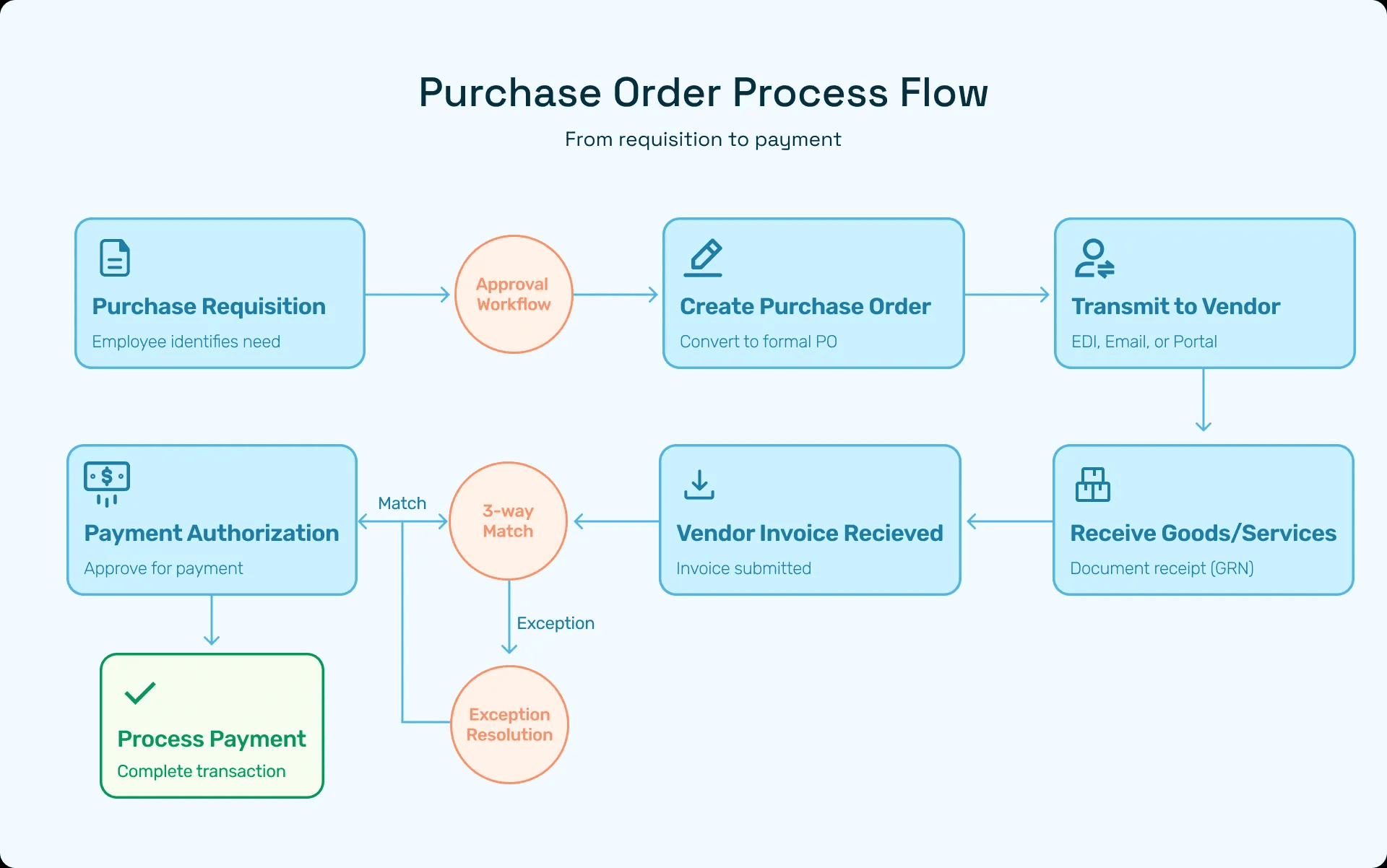
The Purchase Requisition Trigger: The process begins when someone in the organization identifies a need. This might be a warehouse manager noticing inventory levels dropping below reorder points, an IT director planning a software upgrade, or a facilities team needing maintenance services. The requisitioner creates a purchase requisition (PR) that documents the business need, specifications, estimated cost, preferred vendor, budget code, and delivery timeline. Modern purchase requisition software guides users through this process with intelligent forms that prompt for required information and validate data entry.
Information Gathering and Vendor Selection: Before submitting the requisition, the requestor should gather supporting documentation. For goods, this includes detailed specifications, quantities, and delivery requirements. For services, it should include scope of work, deliverables, and timeline. If the purchase requires competitive bidding, the requisitioner may need to obtain multiple quotes. Many organizations maintain approved vendor lists that streamline this process—requestors simply select from pre-qualified suppliers rather than sourcing new vendors for every purchase. This balance between standardization and flexibility is critical: too rigid, and the process becomes a bottleneck; too loose, and the organization loses purchasing power and risk management benefits.
The Requisition-to-PO Handoff: Once the requisition is submitted and approved (a process we'll detail in the next section), it moves to the procurement team for conversion to a purchase order. This handoff is where many organizations experience friction. In manual processes, approved requisitions might sit in email inboxes or shared folders waiting for procurement attention. In automated systems, approved requisitions appear immediately in the procurement queue with all relevant information and attachments readily accessible. Best practice organizations establish service level agreements (SLAs) for this conversion—for example, standard requisitions converted to POs within one business day, urgent requests within four hours.
Purchase Order Creation: The procurement specialist reviews the approved requisition and enriches it with additional procurement data. This includes verifying vendor information and confirming it matches the approved vendor list, validating pricing against contracts or catalogs, assigning proper GL codes and cost centers for accounting, determining appropriate payment terms based on vendor agreements, and generating a unique PO number for tracking purposes. In sophisticated systems, much of this enrichment happens automatically through integrations with vendor management databases, contract management systems, and the ERP's master data.
Key Roles and Responsibilities: Throughout this requisition-to-PO journey, several roles play distinct parts. The Requisitioner initiates the request and provides business justification and specifications. The Department Manager or Budget Owner provides first-level approval, confirming the purchase is necessary and budgeted. The Procurement Specialist converts approved requisitions to POs, ensuring compliance with purchasing policies and contracts. The Finance Controller may provide additional approval for high-value purchases or those requiring budget transfers. The AP Team later processes invoices against the PO, completing the cycle. Clear role definition prevents confusion and ensures accountability at each stage.
Organizations should document these roles in a RACI matrix (Responsible, Accountable, Consulted, Informed) that specifies who does what at each process step. This clarity is especially important in hybrid procurement models where some purchases follow a traditional PR-to-PO flow while others skip the requisition step entirely for efficiency.
Detailed Creation and Approval
The purchase order creation process involves careful attention to data accuracy, documentation, and workflow routing. Getting these elements right prevents downstream matching problems and payment delays.
Essential PO Data Elements: A complete purchase order includes both header-level and line-level information. At the header level, you need the PO number (unique identifier), vendor information including name, address, and remit-to details, bill-to and ship-to addresses, PO date and expected delivery date, payment terms, shipping method and costs, and buyer contact information. At the line level, each item or service requires item description or service specification, quantity ordered, unit of measure, unit price and extended price, GL code/cost center for accounting, requested delivery date, and any item-specific notes or requirements.
The quality and completeness of this data directly impacts downstream efficiency. Incomplete PO data leads to vendor clarification calls, incorrect shipments, invoice mismatches, and payment delays. Organizations with high straight-through processing rates for invoices invariably have exceptional PO data quality.
Supporting Documentation: Beyond the core data, purchase orders should be supported by appropriate documentation. For goods purchases, this might include product specifications or SKU information, pricing quotes or catalog references, and delivery instructions. For services, attach statements of work (SOWs) or service agreements, milestone definitions and acceptance criteria, and rate cards or pricing schedules. For capital purchases, include capital approval forms, project codes, and asset tag assignments. Modern purchase order systems allow these documents to be attached directly to the PO record, creating a complete package that travels with the PO through its lifecycle.
PO Review and Validation: Before issuance, purchase orders should undergo quality checks. In manual processes, this might be a procurement supervisor reviewing POs before release. In automated systems, intelligent validation rules check for common issues like missing required fields, prices that deviate significantly from historical averages, duplicate POs for the same vendor and amount within a short timeframe, GL codes that don't match the item category, and delivery addresses not on the approved location list. These automated checks prevent errors that would otherwise require PO changes or cause invoice processing problems later.
PO Issuance and Communication: Once validated, the PO is issued to the vendor. The issuance method varies by vendor sophistication and organizational capability. Options include EDI transmission for vendors with EDI capability, allowing real-time integration; email with PDF attachment as the most common method; portal access where vendors log into your system to view POs; and API integration for tight system-to-system connections. Best practice organizations maintain preferred communication methods in their vendor master data, allowing the system to automatically route POs through the appropriate channel. Some organizations also maintain backup communication methods—for example, sending both EDI and email to ensure receipt.
Post-Issuance Management: The PO's journey isn't over once issued. Organizations need processes for tracking PO status, managing changes and amendments, handling vendor acknowledgments, and monitoring delivery timelines. Purchase order tracking systems provide visibility into open POs, allowing procurement and requesting departments to proactively manage delivery issues rather than reactively responding to delays. The goal is active PO management throughout the fulfillment cycle.
PO Approval Process
The purchase order approval process is where organizational spending policies are enforced. A well-designed approval workflow balances control with efficiency, ensuring proper oversight without creating operational bottlenecks.
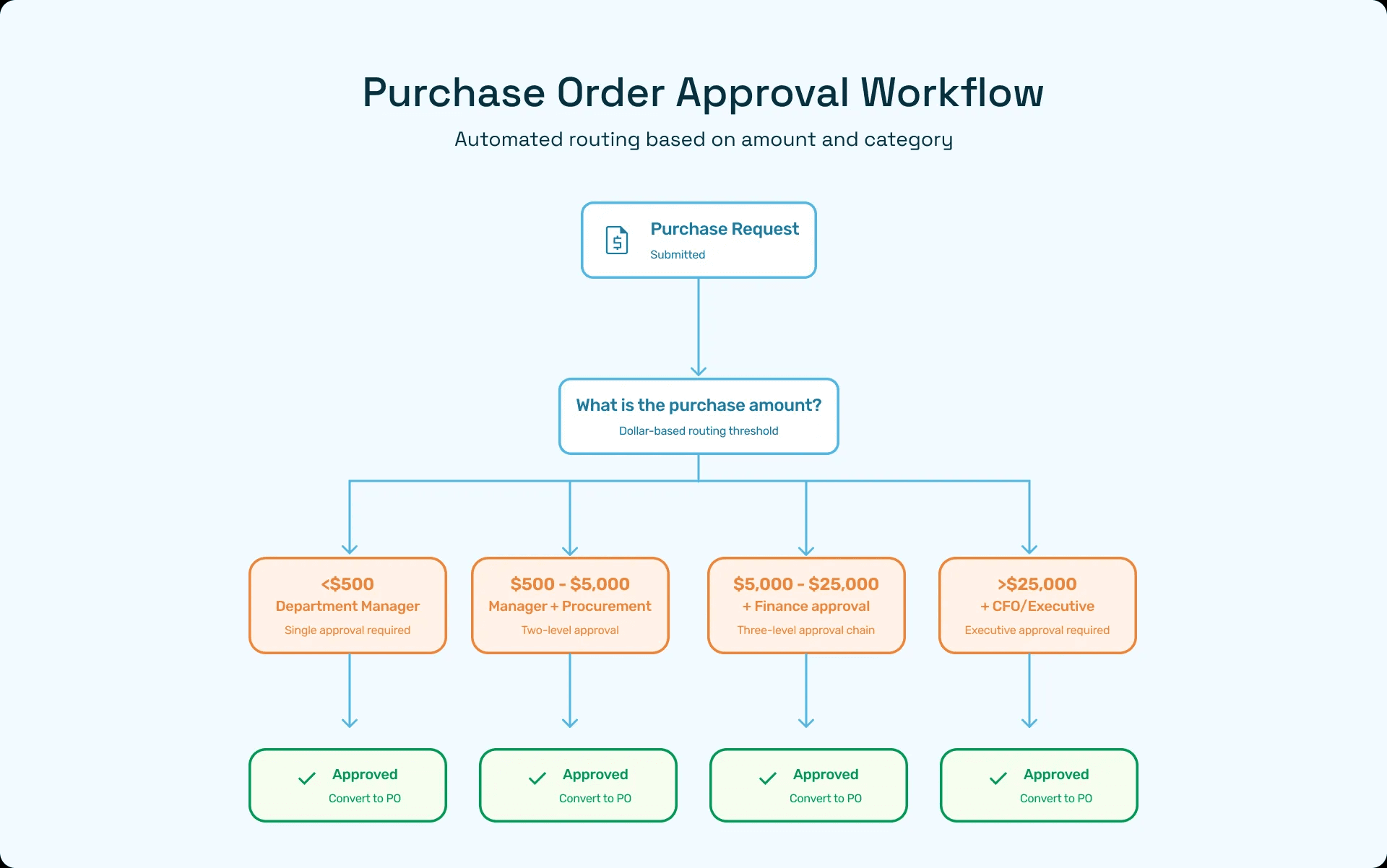
Approval Policy Framework: Approval policies typically start with dollar-based thresholds that determine routing. A common framework might include purchases under $500 requiring only department manager approval, $500-$5,000 requiring department manager and procurement approval, $5,000-$25,000 requiring additional finance approval, and over $25,000 requiring CFO or executive approval. However, dollar thresholds are just the starting point. Sophisticated approval policies also consider other factors including purchase category (IT purchases might require CTO approval regardless of amount; professional services might always need legal review), vendor status (purchases from new vendors might require additional scrutiny versus established suppliers), budget status (if the department is over budget, normally routine approvals might require finance oversight), and contract compliance (purchases that should be covered by existing contracts might route for contract review).
Approval Workflow Design: Organizations should map their approval workflows using decision trees or flowcharts that clearly show routing logic. The purchase order process flow should be visualized and documented so all stakeholders understand how purchases route. Modern workflow tools support parallel approvals (multiple approvers review simultaneously to speed processing), sequential approvals (each approver must act before the next receives the request), conditional routing (workflow adapts based on data in the PO or requisition), and escalation rules (automatic escalation if approvers don't act within defined timeframes).
Delegation and Substitution: Approval workflows must account for approver absence. When the CFO is on vacation or the procurement director is at a conference, purchases shouldn't grind to a halt. Organizations need clear delegation policies that specify who can approve on behalf of whom, time-limited delegation (automatically expires after a date), and audit trails showing when delegated authority was used. Some organizations also implement "skip-level" rules where requests automatically escalate to the next management level if the primary approver is unavailable for more than a defined period.
Reducing Approval Bottlenecks: Even well-designed approval policies can create bottlenecks if not actively managed. Best practices for maintaining approval flow include mobile approval capabilities so approvers aren't tied to their desks, bulk approval options for reviewing multiple similar requests efficiently, approval reminders and notifications to prompt timely action, approval metrics and reporting to identify chronic delays, and periodic policy review to eliminate unnecessary approval steps. Organizations implementing automated PO approval workflows report 60-80% reductions in approval cycle time, not by lowering standards but by eliminating the friction in manual routing and follow-up.
Exception Handling and Escalation: Not all purchases fit neatly into standard approval workflows. The process needs provisions for handling exceptions like urgent purchases requiring expedited review, emergency purchases that bypass normal workflows (with post-purchase documentation), budget overrides when strategic needs justify exceeding department budgets, and policy waivers for unique situations. These exceptions should be explicitly defined in policy, require specific justification, and create audit trails for review. The goal is to provide flexibility without undermining control.
Approval Metrics and Continuous Improvement: Leading organizations treat approval workflow performance as a key process metric. They track average time in each approval stage, approval queue backlogs, approval rejection rates and reasons, and percentage of purchases requiring exception handling. This data drives continuous improvement—identifying workflow bottlenecks, training needs, policy refinement opportunities, and automation possibilities. When procurement leaders can show that 40% of approval delays come from a single bottleneck in the workflow, they can make targeted improvements that benefit the entire organization.
Goods Receipt, Matching, and Invoice Processing
The back-end of the purchase order process—from goods receipt through invoice payment—is where financial accuracy and vendor relationships are won or lost. This phase validates that what was ordered matches what was received and invoiced, creating the foundation for payment authorization.
Receiving Goods and Services
Proper goods receipt documentation is critical for three-way matching and financial accuracy. When goods arrive, the receiving process should include physical inspection to verify quantity, quality, and condition; documentation capture including packing slips, delivery receipts, and photos of damage; system recording by creating a goods receipt record (GRN) in the ERP system; and exception handling by documenting and reporting discrepancies immediately.
For goods purchases, receiving documentation should capture the date received, quantity received by line item, condition notes and any damage observed, receiver name and signature, and location received or inventory storage location. This information is captured in a Goods Receipt Note (GRN) that becomes part of the PO record. Modern warehouse management systems can automate much of this capture through barcode scanning and mobile receiving apps.
Service receipts are more nuanced than physical goods. For services, "receipt" means confirming that services were delivered according to the statement of work. This might involve reviewing deliverables against milestones, obtaining user acceptance sign-offs, and confirming hours worked for time-and-materials services. Service receipts are often documented through service entry sheets, timesheets, or milestone completion records rather than traditional GRNs. The key is creating objective, auditable evidence that the service was performed as agreed.
Organizations should establish clear receiving protocols including who is authorized to receive goods or accept services, inspection criteria and quality standards, timeframes for recording receipts in the system, and processes for handling partial receipts or returns. Many organizations separate physical receiving (warehouse personnel) from system recording (procurement or AP) to maintain segregation of duties and prevent fraud.
3-Way Match
The three-way match is the gold standard for invoice validation, comparing the purchase order, goods receipt, and vendor invoice to ensure alignment before authorizing payment. This matching process catches errors and prevents overpayment.
The Matching Components: A three-way match validates that the purchase order establishes what was authorized to be purchased at what price, the goods receipt confirms what was actually received and when, and the vendor invoice shows what the vendor is charging for the goods or services. The payment should be authorized only when these three documents align within acceptable tolerances. Some organizations also implement a four-way match that adds inspection records as an additional validation step, particularly for quality-critical purchases.
Matching Logic and Tolerances: Perfect matches are rare in practice. Small variances in quantities, pricing, or freight charges are common due to partial shipments, volume-based price breaks, shipping cost estimates, tax calculations, and unit of measure conversions. Organizations establish matching tolerances that define acceptable variances. A typical tolerance framework might include quantity tolerance of ±5%, price tolerance of ±2% or $50 (whichever is less), and freight tolerance of ±$25 or actual bill of lading. Invoices within tolerance match automatically and route for payment; those outside tolerance flag as exceptions requiring investigation.
Handling Matching Exceptions: When invoices don't match within tolerance, they enter an exception queue for resolution. Common matching exceptions include price variances when the invoiced price differs from the PO price, quantity variances when the invoiced quantity doesn't match the received quantity, missing receipts when invoices arrive before goods are received, and PO discrepancies including invoices with no matching PO. Each exception type requires different resolution steps. Price variances might require vendor negotiation or PO updates. Quantity variances might need receiving team review. Missing receipts might simply need receiving documentation entry.
Modern AI-powered invoice processing systems dramatically reduce matching exceptions through intelligent validation that identifies root causes, suggests resolution actions, and automates resolution for common exception types. These systems learn from historical resolution patterns to handle increasingly complex exceptions automatically.
Best Practices for Effective Matching: Organizations achieving high match rates and low exception volumes follow several best practices. They ensure timely goods receipt recording by requiring receiving documentation within 24 hours of delivery, maintain PO data quality through validation at creation time, establish clear matching tolerances based on organizational risk tolerance, provide training to all stakeholders on matching requirements and exception resolution, and implement automated matching tools that handle routine validations and flag genuine issues.
The investment in robust three-way matching pays off through reduced payment errors, fewer vendor disputes, stronger audit trails, and prevention of fraud. Organizations report that automated three-way matching reduces invoice processing costs by 50-70% while improving accuracy and compliance.
Invoice Processing and Payment
Once the three-way match validates the invoice, it enters the payment authorization workflow. Modern invoice processing combines automation, controls, and analytics to optimize the invoice-to-payment cycle.
Invoice Receipt and Data Capture: Invoices arrive through multiple channels including email, paper mail, EDI, and vendor portals. Regardless of the receipt method, invoice data must be captured into the ERP or accounts payable system. Optical Character Recognition (OCR) technology extracts data from PDF or scanned paper invoices, while EDI invoices arrive as structured data. Advanced AI invoice processing goes beyond simple OCR to understand invoice context, handle complex formats, and validate data against POs and business rules.
Invoice Validation and Approval: Beyond three-way matching, invoices undergo additional validations including GL code verification to ensure proper accounting treatment, duplicate detection to prevent paying the same invoice twice, payment term validation to confirm discounts and due dates, and tax validation to verify appropriate sales tax calculations. Some invoices—particularly those without POs or with matching exceptions—may require additional approval. The approval routing should be efficient, typically requiring only the resolution of specific issues rather than complete re-review of the entire invoice.
Payment Authorization and Execution: Validated invoices are scheduled for payment according to payment terms and organizational cash management strategy. Payment optimization considers factors like early payment discounts, payment terms negotiation, cash flow management, and vendor relationship priorities. Leading organizations analyze these factors to determine optimal payment timing—sometimes paying early to capture discounts, other times extending to terms for cash management. The payment execution itself may use multiple methods including ACH transfers, checks, wire transfers, and virtual cards, selected based on vendor capabilities and cost optimization.
Payment Analytics and Continuous Improvement: The invoice-to-payment cycle generates valuable analytics for continuous improvement. Organizations should track metrics including invoice processing cost per invoice, days payable outstanding (DPO), early payment discount capture rate, percentage of invoices that match automatically, and average exception resolution time. These metrics identify improvement opportunities and justify continued investment in automation and process optimization. Accounts payable automation platforms that deliver comprehensive analytics enable data-driven decision making and continuous process improvement.
Automating the Purchase Order Process
Purchase order automation represents one of the highest-ROI opportunities in finance and procurement operations. Organizations implementing comprehensive PO automation report dramatic improvements in cycle time, accuracy, compliance, and cost-efficiency.
Benefits of PO Automation
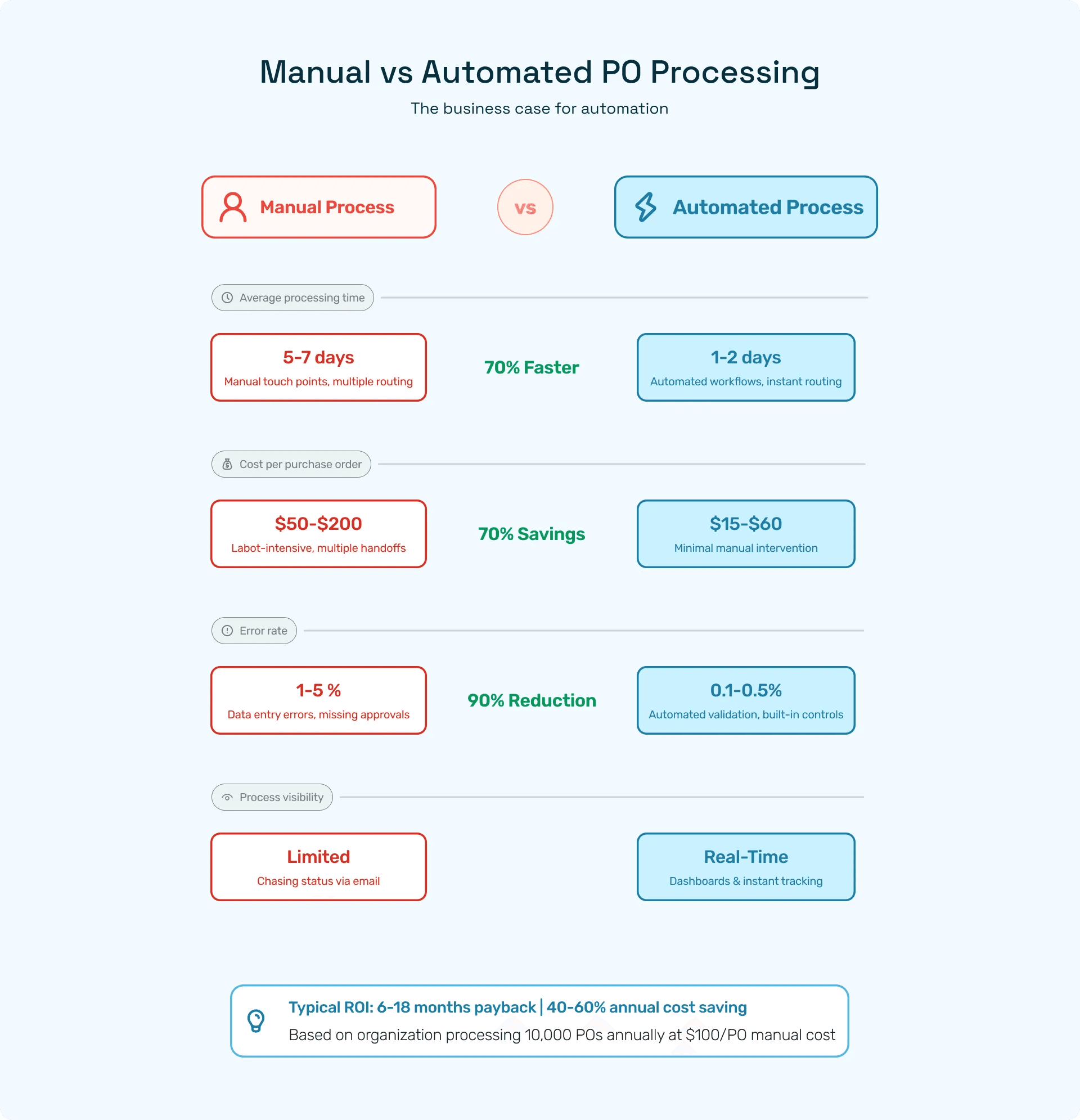
Faster Cycle Times: Manual PO processing typically requires 5-7 days from requisition submission to PO issuance. Automated systems reduce this to 1-2 days or even same-day processing. This acceleration comes from eliminating manual data entry, automatic routing to available approvers, parallel rather than sequential processing, and automatic notification and escalation. Faster PO cycle times improve operational agility—your organization can respond more quickly to changing business needs and market opportunities.
Reduced Errors and Improved Accuracy: Manual data entry, transcription between systems, and paper-based approvals introduce errors at every step. Automation eliminates these error sources through direct data capture from requisitions, automated vendor and item data lookup, built-in validation rules preventing incomplete or incorrect data, and integration between systems eliminating transcription. Organizations report 80-95% reductions in PO errors after implementing automation, directly reducing downstream matching exceptions and payment delays.
Enhanced Compliance and Controls: Automated systems enforce approval policies consistently, creating complete audit trails and strengthening segregation of duties. Every action is logged with user ID, timestamp, and system details. Approval policies are enforced by the system rather than relying on individual judgment. Required fields and attachments are validated before submission. Integration with contract management ensures purchases comply with negotiated terms. These automated controls reduce compliance risk and simplify audits significantly.
Greater Visibility and Reporting: Real-time dashboards replace periodic status update meetings. Procurement teams can see exactly how many requisitions are awaiting approval, which approvers have the longest backlogs, what POs are open versus closed, and where spending is occurring by category, vendor, or department. This visibility enables proactive management—addressing bottlenecks before they become critical, managing vendor relationships based on performance data, and optimizing spending based on actual patterns rather than assumptions.
Cost Savings and ROI: The business case for PO automation is compelling. Most organizations calculate ROI based on reduced processing costs through labor hour savings, fewer errors requiring manual correction, and less time spent on status inquiries; improved procurement leverage through spend visibility enabling consolidation, contract compliance ensuring negotiated pricing is honored, and early payment discount capture; and risk mitigation from reduced fraud exposure, fewer audit findings, and better compliance with regulations. Organizations typically see full payback in 6-18 months with ongoing annual savings of 40-60% of previous processing costs.
Tools and Templates
The landscape of purchase order automation tools ranges from ERP-native capabilities to specialized procurement platforms to AI-powered intelligent automation.
ERP-Native Capabilities: Most modern ERP systems include basic PO management functionality including requisition and PO creation forms, approval workflow engines, integration with vendor management and GL, and basic reporting and analytics. For organizations with straightforward requirements and no complex procurement processes, these native capabilities may suffice. However, ERP-native tools often lack advanced features like intelligent routing, predictive analytics, natural language processing, and seamless integration across multiple ERPs in complex enterprise environments.
Specialized Procurement Platforms: Dedicated procurement platforms like Coupa, SAP Ariba, and Ivalua provide more sophisticated capabilities including guided buying experiences with punchout catalogs, advanced analytics and spend intelligence, supplier relationship management, and contract lifecycle management. These platforms excel in complex procurement environments but may be over-engineered and expensive for mid-market organizations with simpler needs.
AI-Powered Intelligent Automation: The latest generation of purchase order automation leverages artificial intelligence to provide capabilities that traditional tools cannot match. AI-powered platforms offer natural language requisition capture allowing users to describe needs conversationally, intelligent routing that learns optimal approval paths based on historical patterns, predictive analytics that flag potential issues before they occur, and automated exception resolution that handles routine problems without human intervention. Hyperbots' procurement co-pilot exemplifies this new category, providing enterprise-grade automation accessible to organizations of all sizes.
Implementation Approaches: Organizations can pursue different automation implementation strategies including full replacement by implementing a comprehensive new procurement platform, gradual enhancement by adding automation capabilities to existing ERP systems, and best-of-breed integration by selecting specialized tools for specific process areas. The optimal approach depends on factors like current system capabilities, budget and resources, organizational complexity, and strategic procurement priorities. Many organizations find success with a hybrid approach—leveraging ERP capabilities where strong, supplementing with specialized tools where gaps exist.
Templates and Accelerators: Rather than building workflows from scratch, organizations should leverage proven templates and accelerators. Many platforms provide industry-specific workflow templates, approval policy frameworks, integration patterns for common ERP systems, and reporting and dashboard templates. These pre-built components reduce implementation time and risk while incorporating best practices from thousands of implementations. Organizations should customize these templates to their specific needs rather than treating them as one-size-fits-all solutions.
ROI and Cost Savings
Understanding the cost to process a purchase order helps build the business case for automation investment. Industry benchmarks provide useful comparison points for evaluating your current performance and potential improvement.
Baseline Cost Analysis: The fully loaded cost of processing a single purchase order in a manual environment typically ranges from $50 to $200, depending on complexity. This cost includes direct labor for requisition creation, approval routing, PO generation, and vendor communication; indirect labor for exception handling, status inquiries, and reporting; system costs for ERP licensing and maintenance; and error costs including incorrect shipments, payment errors, and compliance issues. Organizations often underestimate this cost because it's distributed across many departments and individuals.
Automation Impact on Costs: Well-implemented automation reduces per-PO processing costs by 50-70%. For an organization processing 10,000 POs annually at $100 per PO baseline cost, reducing to $40 per PO through automation saves $600,000 annually. Beyond direct cost savings, automation delivers value through improved cash management from better discount capture, reduced carrying costs from faster cycle times, and enhanced productivity as staff focus on strategic activities rather than administrative processing.
Calculating Your ROI: Organizations should build business cases using these components: quantify current costs by measuring time spent on PO-related activities, volume of POs and requisitions processed, error rates and correction costs, and manual report generation effort; estimate automation benefits including labor hour reduction, error rate improvement, discount capture improvement, and approval cycle time reduction; calculate implementation costs including software licensing, implementation services, integration development, training and change management, and ongoing maintenance; project ongoing savings across multiple years accounting for process volume growth and continuous improvement.
Most organizations achieve positive ROI within 6-18 months. Cloud-based solutions with subscription pricing reduce upfront investment and accelerate payback compared to on-premise implementations requiring large capital outlays.
Software-Specific Purchase Order Processes
While the conceptual PO process remains consistent, implementation details vary significantly across ERP platforms. Understanding these platform-specific nuances is essential for successful automation.
NetSuite PO Process
Organizations running NetSuite benefit from its cloud-native, integrated procurement capabilities, but optimal NetSuite purchase order processing requires careful setup and configuration.
NetSuite PO Setup and Configuration: The foundation of effective NetSuite PO processing begins with proper system configuration. Organizations should establish vendor records with complete information including subsidiary assignments, payment terms, preferred currency, and tax settings; item master data with purchasing units of measure, standard costs, and preferred vendors; approval routing rules using NetSuite's workflow engine; and purchasing preferences for default values, numbering sequences, and required fields. NetSuite's subsidiary management is particularly important for multi-entity organizations—each purchase order must be assigned to the correct subsidiary for proper accounting treatment.
Creating Purchase Orders in NetSuite: NetSuite supports multiple PO creation paths. Users can create POs directly from the user interface, convert approved purchase requisitions to POs with a single click, generate POs automatically from reorder points or drop-ship sales orders, or receive POs via EDI or API integration from external systems. The system automatically populates vendor terms, calculates taxes, and assigns GL accounts based on item setup. Advanced features include blanket purchase orders for recurring purchases, drop-ship POs linked directly to sales orders, and inter-company POs for purchases between subsidiaries.
NetSuite Approval Workflows: NetSuite's approval routing is highly configurable through SuiteFlow workflows. Organizations can build sophisticated routing logic based on amount thresholds, account codes, department or location, vendor attributes, and custom fields. The workflow engine supports email notifications, approval delegation, automatic escalation for late approvals, and mobile approval through the NetSuite mobile app. However, NetSuite's native workflow can become complex for organizations with very intricate approval requirements—in these cases, organizations may layer additional workflow tools or leverage AI-powered approval automation that sits alongside NetSuite.
Receipt and Matching in NetSuite: NetSuite uses Item Receipts to document goods received against purchase orders. The receipt process creates a debit to inventory or expense accounts and a credit to an accrued purchases account—tracking the liability before the invoice arrives. When the vendor invoice is entered (called a "Bill" in NetSuite), the system matches it against the PO and item receipt. NetSuite's matching can be automated through saved searches and workflows that identify matched invoices for automatic approval. Organizations should configure matching tolerances in preferences to define acceptable variances.
Integration Considerations: NetSuite integrates with procurement and AP automation tools through multiple mechanisms including native SuiteScript APIs for custom integrations, pre-built connectors from platforms like Celigo or Boomi, REST and SOAP web services for modern integrations, and CSV import/export for batch data transfer. When evaluating NetSuite implementation partners, prioritize those with deep procurement and AP automation experience—generic NetSuite expertise alone isn't sufficient.
NetSuite Best Practices: Organizations succeeding with NetSuite PO management follow these practices: they establish item master data governance to ensure consistent purchasing information; they use saved searches and dashboards for real-time PO visibility; they configure appropriate approval workflows balancing control with efficiency; they leverage vendor portals for PO acknowledgment and ASN integration; and they implement regular data quality reviews to identify and correct issues. The NetSuite features guide provides comprehensive coverage of procurement-related capabilities.
SAP and Ariba
SAP environments present unique considerations due to the platform's complexity and the distinction between on-premise SAP ERP/S/4HANA and cloud-based SAP Ariba.
SAP ERP/S/4HANA Purchase Order Processing: The SAP purchase order process begins with Purchase Requisitions (PR) created through transaction ME51N or automatically generated by MRP. PRs route for approval through customizable release strategies based on criteria like value, account assignment, and purchasing group. Once released, purchasing agents convert PRs to Purchase Orders (PO) using transaction ME21N. The PO captures detailed information including material/service descriptions, delivery dates and locations, pricing conditions and discounts, account assignments (cost centers, WBS elements, GL accounts), and tax codes and jurisdictions.
SAP's release strategy for POs is highly flexible, supporting multiple approval levels and complex conditions. However, this flexibility comes with configuration complexity. Organizations need skilled SAP consultants to properly configure release strategies, especially for nuanced requirements. The goods receipt is recorded through transaction MIGO, creating a material document and updating inventory or consumption accounts. SAP's three-way match occurs during invoice verification (transaction MIRO), where the system automatically compares PO, GR, and invoice data. Tolerances for matching are configured in Customizing settings.
SAP Ariba Procurement: SAP Ariba provides cloud-based procurement capabilities that integrate with backend SAP systems or operate standalone. Ariba supports guided buying experiences with catalog punchouts, collaborative supplier onboarding and management, contract compliance and spend analytics, and automated approval workflows. Purchase requisitions created in Ariba can automatically convert to POs in the backend SAP system through integration middleware. Many organizations use Ariba for the user-facing requisition and approval experience while maintaining SAP ERP/S/4HANA as the system of record for POs and financial transactions.
Integration Architecture: The SAP ecosystem requires careful integration architecture design. Common patterns include direct integration between Ariba and S/4HANA using CIG (Cloud Integration Gateway), middleware platforms like SAP BTP (Business Technology Platform) or third-party iPaaS, and batch interfaces for less time-sensitive data synchronization. Organizations should also consider how AP automation platforms integrate with SAP—whether interfacing at the IDOC level, using BAPI function modules, or leveraging SAP's OData services.
SAP Best Practices for PO Processing: Successful SAP organizations establish clear master data governance for vendors, materials, and conditions; they design release strategies that enforce control without excessive approval layers; they leverage SAP's output determination to automatically send POs to vendors; they implement exception monitoring using standard SAP reporting; and they train users thoroughly on SAP's intricate transaction codes and navigation.
Microsoft Dynamics (GP/D365)
Microsoft Dynamics environments—whether Dynamics GP (Great Plains), Dynamics 365 Finance & Operations, or Dynamics 365 Business Central—each have distinct purchase order processing approaches.
Dynamics GP Purchase Orders: Dynamics GP provides straightforward PO functionality through the Purchase Order Processing module. Users create POs directly or convert them from requisitions. The system supports standard purchase orders, drop-ship POs linked to sales orders, and blanket purchase orders. GP's approval workflow, historically a weak point, has improved in recent versions through Workflow functionality that provides basic routing and approval capabilities. However, organizations with complex approval needs often supplement GP with external workflow tools.
Receipt entry in GP creates a receivings transaction that updates inventory and posts to an accrued purchases account. When vendor invoices are entered in Payables Management, users manually match them to PO receipts—GP doesn't automate three-way matching as robustly as SAP or NetSuite. This manual matching increases processing time and error risk, making it a prime candidate for automation enhancement.
Dynamics 365 Finance & Operations: D365 F&O provides more sophisticated procurement capabilities. Purchase requisitions flow through configurable workflows, supporting complex approval routing and automatic sourcing rules. The system can automatically generate POs from approved requisitions based on vendor selection rules. Product receipts document goods received, and vendor invoices are matched through automated three-way matching with configurable tolerances. D365 F&O also provides advanced features like vendor collaboration portals where suppliers can view POs and submit confirmations, invoice capture through AI Builder for automated invoice data extraction, and purchase order change management tracking modifications to issued POs.
Dynamics 365 Business Central: Business Central, Microsoft's SMB-focused ERP, provides streamlined procurement functionality. Purchase requisitions are handled through "Purchase Quotes" that convert to purchase orders. The approval workflow is configuration-based, supporting dollar thresholds and hierarchical routing. Receipt and invoicing follow a straightforward process with automatic matching. Business Central's simplicity is both a strength (easier to implement and use) and limitation (less flexibility for complex requirements).
Microsoft Dynamics Integration: Dynamics environments integrate with Microsoft Power Platform for extended automation. Power Automate can enhance approval workflows, Power BI provides advanced analytics, and Power Apps enables custom mobile experiences. Organizations can also leverage AI co-pilots that integrate natively with Dynamics through APIs and connectors, adding intelligent automation without custom development.
Dynamics Best Practices: Organizations should leverage workflow capabilities fully, even if supplementing with external tools; they should maintain clean vendor and item master data with complete information; they should establish clear processes for receipt entry and invoice matching; they should utilize reporting tools (GP Report Writer, D365 Power BI integration) for visibility; and they should consider Power Platform extensions for automation beyond native capabilities.
QuickBooks and Xero
Mid-sized businesses often run on more accessible platforms like QuickBooks or Xero. While these systems lack the complexity of enterprise ERPs, they still require thoughtful purchase order process design.
QuickBooks Purchase Orders: QuickBooks Online and QuickBooks Desktop both support purchase order functionality, though with less sophistication than enterprise platforms. Users create POs from the vendor menu, selecting items or services from the item list. The system tracks PO status (open, partially received, closed) and allows receiving against POs to update inventory. Bills (vendor invoices) can be linked to POs, though QuickBooks doesn't enforce three-way matching—users must manually verify that bill quantities and prices match the PO and receipt.
QuickBooks lacks native approval workflow—POs route through external approval processes (email, manual sign-off) before entry in the system. This workflow gap makes QuickBooks environments prime candidates for workflow automation tools that layer approval routing on top of the accounting system. The approval occurs before the PO is created in QuickBooks, with the approved requisition data then entered to generate the formal PO.
Xero Purchase Orders: Xero provides similar functionality to QuickBooks with some interface differences. Purchase orders are created in the Business menu, including line items, delivery details, and reference numbers. Xero tracks PO status and allows receiving inventory against POs. The invoice approval workflow in Xero is also basic—bills can be marked for approval, but sophisticated routing requires external tools. Xero's API is generally regarded as more modern and accessible than QuickBooks, making integration with workflow and automation tools relatively straightforward.
Automation for Mid-Market Systems: Organizations running QuickBooks or Xero should consider these automation approaches. They can implement intake forms (Google Forms, Microsoft Forms, or dedicated tools) for purchase requests that feed into approval workflows; use workflow platforms (Zapier, Make, Power Automate) to route approvals via email or collaboration tools; employ purchase order management systems that integrate with QuickBooks/Xero via API; and leverage AI-powered procurement tools that add intelligent automation while syncing to QuickBooks/Xero as the system of record.
Mid-Market Best Practices: Organizations should establish clear policies for when POs are required and what approvals are needed; they should maintain item and vendor lists diligently for consistent data; they should implement external workflow tools for approvals rather than relying on manual processes; they should use reporting features to monitor open POs and receiving status; and they should plan for ERP evolution—as organizations grow, QuickBooks/Xero limitations may necessitate migration to more robust platforms.
Industry-Specific Purchase Order Processes
While the fundamental PO process framework applies across industries, specific sectors face unique requirements, regulations, and best practices that shape their purchase order workflows.
Construction, Government, and Retail
Construction Industry PO Processes: Construction procurement involves unique complexity due to project-based accounting, progress billing, change orders, and subcontractor management. Construction POs typically include job numbers or work breakdown structure elements for cost tracking, retention percentages withheld pending completion, progress milestone definitions for staged deliveries, and lien waiver requirements before payment. Many construction firms use specialized ERP systems that integrate procurement with project management, allowing POs to draw from project budgets and track actual costs against estimates. Change order management is particularly critical—field conditions frequently require modifications to original orders, creating documentation and approval challenges. Construction organizations benefit from mobile PO and receipt capabilities that allow field personnel to create requests and document deliveries on-site.
Government Procurement Requirements: Government entities face rigorous procurement regulations designed to ensure fair competition, prevent fraud, and maintain accountability. Government PO processes must accommodate competitive bidding thresholds requiring formal RFPs above certain dollar amounts, minority and small business set-aside programs, prevailing wage requirements for services and construction, complex approval chains reflecting governmental authority structures, and detailed audit trails for every procurement decision. Government procurement systems must also track requisite certifications (minority-owned business status, SAM registration, debarment clearance) and generate compliance reports for oversight bodies. The procurement cycle is typically longer due to these requirements—what takes days in commercial environments may take weeks or months in government contexts.
Retail Industry Procurement: Retail procurement focuses on inventory management, seasonal planning, and supplier relationships. Retail POs are characterized by high volumes and frequent orders as inventory turns rapidly, seasonal variations with advance planning for peak periods, drop-ship arrangements where vendors ship directly to stores or customers, and rapid onboarding of new vendors for fashion and trend-driven categories. Large retailers often operate sophisticated demand planning systems that automatically generate POs based on sales forecasts, current inventory, and lead times. The ecommerce ERP integration between online and physical channels creates additional complexity—POs must support omnichannel fulfillment where inventory purchased for stores may ship from distribution centers to fulfill online orders.
EDI and Digital Purchase Orders
Electronic Data Interchange (EDI) represents the highest level of purchase order automation, enabling direct system-to-system communication between buyer and supplier.
EDI Standards and Formats: EDI purchase orders follow standardized formats including ANSI X12 850 Purchase Order, EDIFACT ORDERS message, and XML-based formats like cXML. These standards define exactly how purchase order data should be structured and transmitted. When a buyer's system generates a PO, it's automatically converted to the EDI format and transmitted to the vendor's system, where it's automatically imported and processed. This eliminates manual data entry on both sides, dramatically reducing errors and processing time.
EDI Implementation Considerations: Implementing EDI requires both buyer and supplier to have compatible systems or use EDI translation services (VANs - Value Added Networks) that convert between formats. Organizations must map their internal PO data fields to EDI standard segments, establish communication protocols (AS2, SFTP, VAN), implement error handling for transmission failures or invalid data, and maintain trading partner agreements defining technical specifications. EDI implementation typically requires 2-6 months for setup and testing with each trading partner. However, the investment pays off through processing efficiency—EDI POs are transmitted instantly, processed automatically, and confirmed electronically.
EDI Beyond Purchase Orders: Mature EDI implementations extend beyond POs to include Functional Acknowledgments (997) confirming PO receipt, PO Changes (860) for modifications, PO Acknowledgments (855) where vendors confirm details, Advance Ship Notices (856) providing shipment information, and Invoices (810) for electronic billing. This complete EDI integration creates a largely automated procure-to-pay process requiring minimal human intervention for routine transactions.
EDI Alternatives for Mid-Market: Full EDI implementation may be impractical for smaller organizations or less frequent trading relationships. Alternatives include API-based integration using modern REST or GraphQL APIs, portal-based PO access where vendors log into your system to view orders, email-based structured data where POs are sent as XML attachments, and vendor-managed inventory (VMI) where suppliers manage stock levels automatically. Organizations should evaluate trading partner volumes and technical capabilities when deciding between full EDI, lighter integration approaches, or traditional methods.
Manual vs. Automated Purchase Order Processes
The contrast between manual and automated purchase order processes illuminates why automation has become a strategic imperative rather than a nice-to-have enhancement.
Risks of Manual Processes
Operational Inefficiencies: Manual PO processes are inherently slow and resource-intensive. Consider a typical manual workflow: A department manager writes a purchase request in email or completes a paper form, the request routes through multiple people's email inboxes or physical mail, approvers might take days to review and sign due to competing priorities, procurement manually transcribes request details into the ERP system, the generated PO is printed, signed, and mailed or faxed to the vendor, and receiving documentation arrives on paper and must be manually filed. This process easily consumes 5-10 business days and touches 5-8 people. The labor hours accumulate quickly—if each PO requires two total hours of effort across all participants and your organization processes 1,000 POs monthly, that's 2,000 hours (one full-time equivalent) spent just moving paper and data.
Error Rates and Data Quality: Manual processes introduce errors at multiple points. Transcription errors occur when data is re-entered between systems, approval errors happen when approvers can't easily access relevant information, receiving errors occur when paper documentation is lost or incorrect, and matching errors occur when invoices are manually compared to POs and receipts. Industry studies suggest manual PO processes have error rates of 1-5%, meaning 10-50 of every 1,000 POs contain mistakes. These errors cause invoice disputes, payment delays, strained vendor relationships, and financial reporting inaccuracies.
Limited Visibility: Manual processes create information black holes. Without real-time dashboards, procurement and finance leaders struggle to answer basic questions like how many POs are awaiting approval and with whom, what is the total value of open purchase commitments, which departments are over budget on purchases, or how long POs typically take from request to issuance. This lack of visibility prevents proactive management—problems are discovered reactively when they become crises rather than prevented through early intervention.
Compliance and Audit Risks: Paper-based approval trails are difficult to audit and easy to manipulate. Auditors seeking to verify that proper approvals were obtained must hunt through file cabinets or email folders. Reconstructing the approval chain for a PO issued six months ago becomes a time-consuming exercise. Missing documentation creates audit findings and potentially compliance violations. Organizations in regulated industries—healthcare, finance, government contracting—face particular risk from weak PO documentation and controls.
Scalability Limitations: Manual processes don't scale efficiently. Doubling your business doesn't just double PO volume—it increases complexity exponentially as you add departments, locations, and vendors. Organizations experiencing rapid growth often find their manual PO processes breaking under the strain, forcing reactive scrambles to implement systems rather than strategic automation initiatives.
Gains from Automation
Efficiency and Speed: Automated PO processes reduce cycle time by 60-80%. Requisitions are submitted through intuitive digital forms, approvals route automatically to the right people based on rules, parallel approvals allow multiple approvers to review simultaneously, automatic notifications and reminders keep the process moving, and electronic PO transmission reaches vendors instantly. The two-week manual process becomes a same-day or next-day automated process. This speed translates to competitive advantage—your organization can respond more quickly to opportunities and customer needs.
Accuracy and Data Quality: Automation dramatically reduces errors through validation rules that prevent incomplete or incorrect data entry, automated lookups that populate vendor and item information consistently, automatic calculations that eliminate math errors, and integrated systems that eliminate transcription between applications. Organizations report 80-95% reductions in PO errors after automation, directly reducing downstream problems and improving stakeholder satisfaction.
Visibility and Analytics: Real-time dashboards transform PO management from reactive to proactive. Leaders can see approval bottlenecks as they develop, spending trends as they emerge, vendor performance issues as they occur, and budget variances before they become serious. Purchase order tracking systems provide complete visibility from requisition through payment, enabling data-driven management decisions.
Control and Compliance: Automated controls enforce policies consistently. The system prevents purchases that violate rules—no exceptions unless explicitly authorized. Complete digital audit trails document every action with user IDs, timestamps, and supporting data. When auditors request PO documentation, it's available immediately through electronic archives. Organizations report that automation reduces audit preparation time by 70-80% while improving audit outcomes.
Scalability and Growth Support: Automated systems scale efficiently. Adding new departments, locations, or entities requires configuration rather than proportional staff increases. Cloud-based platforms scale virtually infinitely—whether you process 100 or 100,000 POs monthly, the system performs consistently. This scalability supports growth without administrative bottlenecks.
Stakeholder Satisfaction: Beyond measurable metrics, automation improves the user experience for all stakeholders. Requesters can easily submit needs and track status, approvers can review requests anywhere via mobile devices, procurement teams focus on strategic sourcing rather than administrative processing, finance teams have accurate, timely data for reporting and planning, and vendors receive POs promptly with clear, complete information.
Controls, Matching, and Exception Handling
Effective purchase order controls balance the need for oversight with operational efficiency. The control framework should prevent fraud and errors without creating unnecessary bureaucracy.
Preventive Controls: These controls stop problems before they occur. Examples include segregation of duties ensuring requesters don't approve their own purchases, approval hierarchies requiring appropriate authority levels for purchase amounts, vendor master controls preventing creation of fraudulent vendors, budget checks blocking purchases that exceed available budget, and contract compliance validations flagging purchases that should be covered by existing contracts. Modern systems can enforce these controls automatically, rejecting transactions that violate policies before they're submitted.
Detective Controls: These controls identify problems after they occur so they can be corrected. Examples include exception reporting highlighting unusual transactions for review, spending analytics revealing anomalous patterns, duplicate payment detection identifying potential duplicate POs or invoices, and audit trail reviews examining user activities for suspicious behavior. AI and machine learning enhance detective controls by learning normal patterns and flagging anomalies automatically.
Matching Strategies: Three-way matching remains the gold standard, but organizations should tailor matching strategies to transaction types. For high-value purchases, they should enforce strict three-way matching with tight tolerances; for low-value purchases, they might allow two-way matching (PO to invoice) to reduce processing cost; for blanket POs and recurring services, they should implement specialized matching logic; and for non-PO invoices, they should require appropriate alternate approval. Matching strategies should be configured based on risk assessment—stricter controls for higher-risk transactions, streamlined processing for routine, low-risk items.
Exception Management: Despite best efforts, exceptions occur. Effective exception handling includes clear exception categories defining common types and ownership, automated exception queuing routing issues to appropriate resolvers, resolution workflows guiding users through corrective steps, and exception analytics tracking frequency, root causes, and resolution time. The goal is continuous improvement—analyzing exceptions to identify systemic issues that can be prevented through better processes, training, or controls.
Roles, Responsibilities, and Tasks in PO Processing
Successful purchase order management requires clear role definition and accountability across the organization. Ambiguity about who does what creates bottlenecks, errors, and frustration.
Key Job Descriptions
Requisitioner/Requestor: Typically department managers or authorized employees who identify purchasing needs. Their responsibilities include defining purchase requirements clearly and completely, obtaining necessary quotes or cost estimates, identifying budget sources and GL codes, attaching supporting documentation, and selecting appropriate vendors from approved lists. Organizations should provide requisitioners with clear guidance on what information is required and train them on procurement policies and tools.
Department Manager/Budget Owner: First-level approver who confirms that purchases are necessary, appropriate, and affordable within the department budget. Their responsibilities include reviewing requisitions for business justification, verifying budget availability, confirming vendor appropriateness, and either approving, rejecting, or requesting more information within defined timeframes. Department managers should be held accountable for their approval decisions through periodic reviews of spending patterns and outcomes.
Procurement Specialist/Buyer: Responsible for converting approved requisitions to purchase orders and managing vendor relationships. Their responsibilities include enriching requisitions with procurement data, verifying compliance with contracts and policies, negotiating pricing and terms when appropriate, generating and issuing purchase orders, and tracking order status and managing vendor issues. Procurement specialists should have training in negotiation, category management, and the organization's ERP system.
Finance Controller/Finance Approver: Provides additional approval for high-value or out-of-budget purchases. Their responsibilities include ensuring purchases align with financial plans, verifying appropriate GL coding and cost allocation, assessing cash flow impact for large commitments, and approving budget transfers or overrides when justified. Finance approvers bring a cross-organizational perspective that individual department managers may lack.
Receiving Clerk/Warehouse Personnel: Documents receipt of goods and performs quality inspection. Their responsibilities include verifying quantities and condition of delivered goods, recording receipts in the system promptly, flagging discrepancies or damage, properly storing received items, and communicating delivery issues to procurement and requesters. Receiving personnel should be trained on inspection standards and system procedures to ensure accurate, timely documentation.
Accounts Payable Specialist: Processes vendor invoices and manages payment. Their responsibilities include receiving and processing invoices, performing three-way matching, resolving matching exceptions, obtaining necessary approvals, and processing payments according to terms. AP specialists should understand the complete procure-to-pay process and have access to tools for efficient invoice processing and exception resolution.
How to Process Purchase Orders Effectively
Effective purchase order processing requires both clear procedures and appropriate technology enablement.
Standard Operating Procedures: Organizations should document step-by-step procedures for each process phase including requisition submission requirements, approval routing and timeframe expectations, PO creation and issuance steps, receiving and inspection procedures, and invoice matching and payment processes. These procedures should be readily accessible—published on the intranet, included in new employee onboarding, and referenced in training sessions. Procedures should be reviewed and updated annually to reflect process improvements and system changes.
Training and Enablement: Comprehensive training ensures stakeholders understand their roles and tools. Training programs should cover process fundamentals explaining why PO processes exist and their importance, role-specific procedures detailing exactly what each role should do, system mechanics showing how to use requisition and approval tools, policy and compliance requirements explaining rules and consequences, and exception handling guidance for common problems and their resolution. Training should be delivered through multiple modalities—instructor-led sessions for complex topics, video tutorials for system procedures, and quick reference guides for daily use.
Performance Metrics and Accountability: Clear metrics drive performance improvement. Organizations should track PO cycle time from requisition to issuance, approval turnaround time for each approver and level, PO error rates and types, budget compliance and variance analysis, and vendor delivery performance. These metrics should be reviewed regularly with process owners, identifying bottlenecks, recognizing high performers, and driving continuous improvement initiatives.
Technology Enablement: Appropriate technology makes effective processing possible. At minimum, organizations need intuitive requisition interfaces that guide users through data entry, mobile approval capabilities allowing approvers to act anywhere, real-time status visibility so stakeholders can track progress, automated notifications and reminders keeping the process moving, and reporting and analytics for process monitoring. Organizations should continually evaluate whether their current tools support efficient processing or create friction that impedes performance.
Continuous Improvement: Purchase order processing shouldn't be "set it and forget it." Leading organizations implement continuous improvement programs including regular process reviews to identify improvement opportunities, stakeholder feedback collection to understand pain points, benchmarking against industry standards to identify performance gaps, technology evaluation to assess new tools and capabilities, and pilot programs to test improvements before full rollout. The goal is incremental, ongoing enhancement that compounds over time into significant performance gains.
Conclusion
The purchase order process stands at the intersection of operational efficiency, financial control, and strategic procurement management. As we've explored throughout this comprehensive guide, a well-designed PO process delivers far-reaching benefits: cost control and budget compliance, operational efficiency and speed, compliance and audit readiness, vendor relationship strength, and data-driven decision making capabilities.
Yet many organizations continue to struggle with manual, inefficient PO processes that create bottlenecks, errors, and compliance risks. The path forward requires a combination of clear process design, appropriate technology investment, role clarity and training, and commitment to continuous improvement. The business case for modernizing the purchase order process is compelling—organizations implementing comprehensive automation report ROI within 6-18 months and ongoing annual savings of 40-60% of previous processing costs.
Key Takeaways and Best Practices:
Start with Process Design: Technology can't fix broken processes. Before investing in automation, map your current state, identify pain points, and design an optimized future state process that balances control with efficiency.
Invest in Automation Strategically: Evaluate automation options based on your organization's size, complexity, and requirements. AI-powered procurement platforms offer capabilities that traditional tools cannot match, particularly for complex approval routing and intelligent exception handling.
Focus on Integration: Purchase order processing doesn't exist in isolation. Ensure your PO system integrates seamlessly with requisitioning, vendor management, receiving, invoice processing, and payment systems. Breaking down data silos enables end-to-end visibility and efficiency.
Tailor to Your Software Platform: Whether you're running NetSuite, SAP, Dynamics, QuickBooks, or another ERP, understand platform-specific capabilities and limitations. Leverage native functionality where strong, supplement with specialized tools where gaps exist.
Address Industry-Specific Requirements: Construction, government, retail, and other industries have unique procurement requirements. Ensure your PO process accommodates industry-specific regulations, workflows, and documentation needs.
Emphasize Data Quality: Complete, accurate PO data is the foundation of efficient processing. Invest in master data management for vendors, items, and GL codes. Implement validation rules that prevent errors at the point of entry.
Balance Control with Efficiency: Excessive controls create bottlenecks; insufficient controls create risks. Design approval workflows that enforce necessary oversight while maintaining operational speed. Use risk-based approaches—stricter controls for high-risk transactions, streamlined processing for routine purchases.
Enable Mobile and Remote Work: Modern workforces expect mobile capabilities. Implement tools that allow approvers to review and act on POs from smartphones, enabling faster cycle times and better user experience.
Measure and Improve Continuously: Track key metrics including cycle time, error rates, budget compliance, and user satisfaction. Use this data to drive continuous improvement initiatives. Benchmark against industry standards to identify performance gaps.
Think Beyond Purchase Orders: The PO process is one component of the broader procure-to-pay cycle. Consider how PO optimization connects to requisition management, contract compliance, invoice processing, and payment optimization. A holistic approach delivers greater benefits than point solutions.
Next Steps and Further Exploration:
This pillar guide has provided a comprehensive foundation for understanding and optimizing purchase order processes. To deepen your knowledge in specific areas, explore the linked cluster blogs throughout this guide. Key resources include:
What is the Purchase Order Process? for foundational understanding
Purchase Order Process Automation for implementation guidance
Platform-specific guides for NetSuite, SAP, Dynamics, and QuickBooks/Xero
Cost benchmarking tools for building your business case
Control frameworks for ensuring compliance
Additionally, explore Hyperbots' suite of AI-powered co-pilots designed to transform finance and procurement operations:
Procurement Co-Pilot for intelligent requisition and PO automation
Invoice Processing Co-Pilot for automated three-way matching and invoice validation
Vendor Management Co-Pilot for supplier onboarding and relationship optimization
Payments Co-Pilot for cash flow optimization and payment strategy
Accruals Co-Pilot for accurate period-end financial reporting
Sales Tax Verification Co-Pilot for compliance and tax accuracy
The purchase order process represents both a challenge and an opportunity for modern finance and procurement organizations. Those who view it as merely an administrative burden miss its strategic potential. Those who invest in process optimization, technology enablement, and continuous improvement discover that an excellent PO process becomes a competitive advantage—enabling faster operations, better financial control, stronger vendor relationships, and data-driven decision making.
Whether you're at the beginning of your automation journey or looking to enhance an already-mature process, the frameworks, best practices, and resources in this guide provide a roadmap for success. The investment in purchase order process excellence pays dividends across your organization for years to come, supporting growth, improving profitability, and reducing risk.
As procurement and finance leaders navigate an increasingly complex business environment—with supply chain disruptions, regulatory pressures, and demands for greater efficiency—the purchase order process becomes even more critical. Organizations that master this fundamental process position themselves for sustainable success, regardless of external challenges.
Take action today to assess your current purchase order process, identify improvement opportunities, and chart a path toward automation and optimization. The resources linked throughout this guide provide detailed guidance for every step of the journey. Your future self—and your organization—will thank you for the investment in purchase order excellence.